Managed Security Services in Dallas With a 24/7 SOC
Managed security services in Dallas give you a staffed security operations center that watches your endpoints, sign-ins, email, and logs around the clock, so a threat at 2 AM reaches a person instead of a voicemail. Uprite’s MSSP Security Focus starts at $40 per user per month.
Overnight, weekend, and holiday monitoring for Plano, Irving, Richardson, and Frisco companies that already own the tools. It’s the round-the-clock layer of our cybersecurity services in Dallas, backed by a 120-day guarantee.
Get Your Free Security AssessmentNo obligation. We’ll show you what your current tools are missing.In Texas Since 1999 | MSP 501 Winner 7 Years Running | SOC 2 Type 1 (2023) | 120-Day Guarantee
Get Your Free Security Assessment
Recognized Across Texas for Managed IT and Cybersecurity















The Coverage Gap
Attackers Don’t Keep Dallas Business Hours
Ask a Dallas IT company whether security is covered and you’ll usually hear yes. It sounds fine. The endpoint agent is deployed. The firewall is licensed. A monthly report goes out, and nobody opens it.
Then something moves at 2:40 on a Saturday morning.
An account in Plano signs in from a country you’ve never sold to. A new mailbox rule starts forwarding invoices to an outside address. Someone browses the backup repository before a single file gets encrypted. Nobody notices. By the time the office opens on Monday, the intruder has had 2 nights and a full day to work.
If your managed IT services in Dallas provider only watches from 8 to 5, you don’t have a tooling problem.
You have a coverage problem.
Sophos looked at 661 incident response and managed detection cases from November 1, 2024, through October 31, 2025, for its 2026 Active Adversary Report, and 88% of the ransomware payloads in them were deployed outside business hours. 9 in 10. Data theft kept the same clock, with 79% of exfiltration happening off-hours. Identity sat at the root of 67% of the incidents.
Who looked at your security alerts last Sunday night? What happens to a high-severity detection at 3 AM, specifically? If an account were compromised tonight, how long before someone with the authority to disable it found out?
That third question is the one most Dallas owners can’t answer. It isn’t negligence. It’s arithmetic. You can’t staff a 168-hour week with 3 people.
The Texas Record
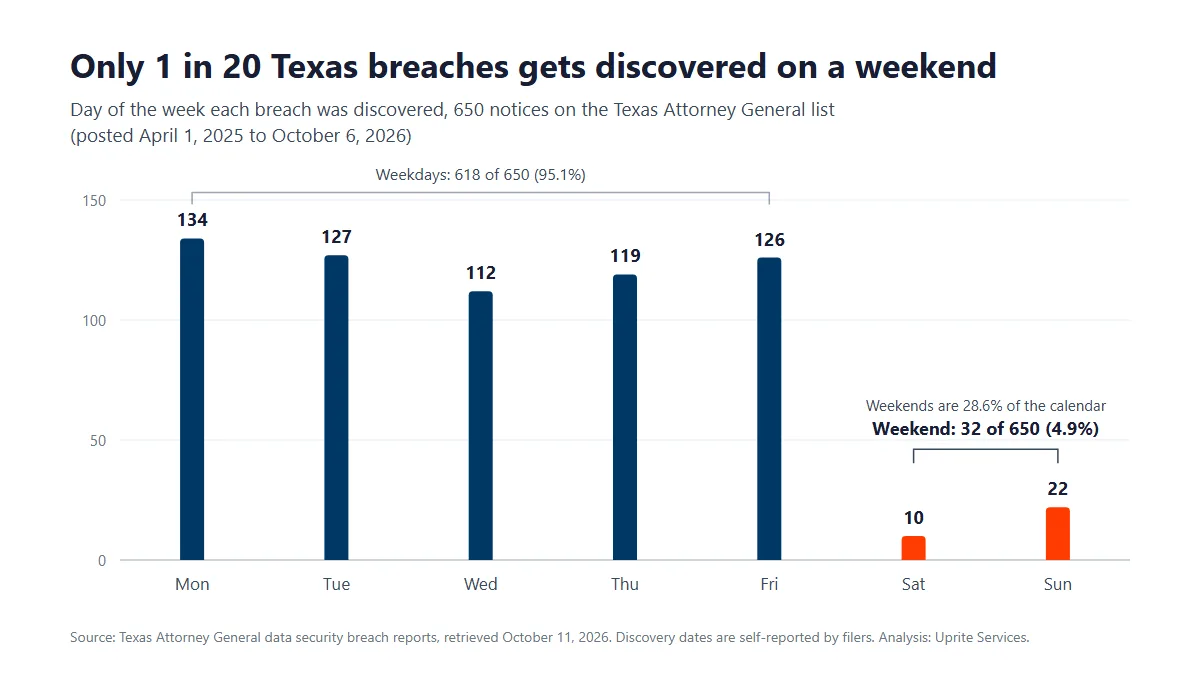
650 Texas Breach Notices, and Only 1 in 20 Found on a Weekend
Texas requires any business whose breach involves at least 250 Texans to notify the Attorney General within 30 days of determining it happened, under Business and Commerce Code 521.053, and the AG keeps a public list of those notices. On October 11, 2026, we pulled the full Texas Attorney General data breach list, 650 notices posted between April 1, 2025, and October 6, 2026, and sorted them by the discovery date each filer reported. Then we counted.
Weekends are 2 days out of every 7. They produced 32 of the 650 discoveries. That’s 4.9%.
4.9%
of the 650 notices put the discovery on a Saturday or Sunday, in a calendar where weekends are 28.6% of all days.
10
breaches discovered on a Saturday. Mondays logged 134, the busiest day on the list.
95 days
median time to discovery when the incident started on a weekend. Weekday starts took 65 days, across the 544 notices that gave both dates.
5 of 87
notices from organizations based in DFW-area cities that logged a weekend discovery.
One caveat. Discovery dates are self-reported, and some companies log the day an investigator confirmed which records were involved, which leans toward weekdays, while 106 filers left the start date blank, so only 544 notices can show a gap. Read the result as a direction rather than a precise measurement.
Attacks run all weekend. On most networks, the only thing that stops is the looking.
That’s the window a 24/7 SOC exists to close, and it’s why a weekend detection on our side starts a response instead of a Monday ticket.
Managed IT vs Managed Security
Why an MSSP Isn’t Your IT Provider With More Tools
Your IT provider and your security provider work on the same network. They get graded on different things.
IT is measured on uptime and closed tickets. Security is measured on how fast something hostile gets found and stopped. Those goals collide on ordinary Tuesdays, because the patch that closes a vulnerability is the same patch that reboots the billing server, and the person whose bonus depends on uptime shouldn’t be the one making that call. It happens monthly.

Sophos found no MFA at all in 59% of its 2026 cases, and median attacker dwell time was down to 3 days. That isn’t much runway. It’s still plenty of time for a tool with nobody behind it to record an intrusion accurately and stop none of it.
A log isn’t a detection.
If you’re still choosing a provider, our ranking of the best managed IT services in Dallas scores local firms on terms you can check, and our breakdown of the difference between an MSP and an MSSP covers where the jobs overlap.
One thing turns up on almost every Dallas assessment we run. The tools are mostly fine. Defender is licensed, the firewall is current, and there’s an endpoint agent on most machines. Nobody has ever tuned an alert or answered one at night, so the console can hold thousands of unread detections and a team that’s learned to ignore red. We see it constantly. Our EDR vs MDR vs XDR comparison explains why the monitoring behind a tool matters more than the tool itself.
That’s the gap.
What the SOC Does
What Our 24/7 SOC Watches, and What Happens at 2 AM
In Dallas, the push to buy this rarely comes from a regulator. It comes from a renewal questionnaire.
Cyber insurers underwrite on controls now, and an application that overstates MFA coverage can sink the claim you file later. Enterprise customers send security reviews with 2-week deadlines. DFW added 2 more Fortune 500 headquarters in 2026, for 24 in all, and the suppliers that sell to them inherit those reviews. None is a regulator. One desk gets it all.
Here’s what our security operations center watches, what an analyst does when something fires, and the framework line each item answers to. The #StopRansomware Guide from CISA, the NSA, the FBI, and MS-ISAC sets the bar plainly, telling organizations to make sure their tools “escalate warnings and indicators to notify security personnel.” Simple test. A tool that alerts an empty room doesn’t pass it.
| What the SOC watches | What an analyst does when it fires | Framework line |
|---|---|---|
| Sign-ins to Microsoft 365, Entra ID, and VPN | Checks impossible travel, new MFA devices, and risky sign-ins against the user, then disables the account when it isn’t them | NIST CSF 2.0 DE.CM-03, CIS 6.4 and 6.5 |
| Endpoint detections on servers, laptops, and virtual desktops | Triages the detection and isolates the host when you’ve authorized that in advance | DE.CM-09, RS.MI-01 |
| Firewall, VPN, and network logs | Correlates network events with identity and endpoint data, so one alert carries the whole story | DE.CM-01, DE.AE-03, CIS 13.1 |
| Mailbox rules, forwarding, and reported phishing | A person reviews new forwarding rules and every reported message, instead of a shared inbox nobody owns | DE.CM-03, DE.AE-02 |
| Audit logs in the SIEM | Keeps them centralized and searchable, so an investigation can answer what happened and when | PR.PS-04, CIS 8.2, 8.10, and 8.11 |
| Vulnerability scans | Ranks findings by exploitability and tracks each fix, with a written exception list for systems a vendor won’t let you patch | ID.RA-01 |
| Declared incidents | Escalates to your named contact, runs the response plan, and keeps a dated record of each action | DE.AE-08, RS.MA-01 to RS.MA-04, RS.AN-06, CIS 17.1 |
Framework lines refer to the NIST Cybersecurity Framework 2.0 (February 26, 2024) and the published text of the CIS Controls v8 safeguards.
Texas added its own reason to document all of this. Senate Bill 2610, in effect since September 1, 2025, bars exemplary damages in a breach lawsuit against a Texas business with fewer than 250 employees that holds sensitive personal information, as long as it was running a documented program that conforms to a recognized framework when the breach happened. It’s a real incentive. For a company with 20 to 99 employees, that means meeting at least CIS Controls Implementation Group 1, and our SB 2610 compliance guide walks through every tier.
Implementation Group 1 asks you to collect audit logs, which is Safeguard 8.2. Collecting isn’t reviewing. The 90-day retention floor and the weekly log review sit in Implementation Group 2, as Safeguards 8.10 and 8.11, and that’s where a monitored program earns its keep.
Licensed isn’t monitored.
Pricing
What Managed Security Costs in Dallas, Plan by Plan
So what does it cost to have somebody accountable for the overnight?
MSSP Security Focus starts at $40 per user per month on our published price sheet. It’s built for companies that already have an internal IT person or team, and the price sheet lists advanced firewall, SIEM, and SOC monitoring, threat intelligence and vulnerability scanning, incident response and compliance automation, and quarterly security reviews at that rate. At the starting rate, a 60-person company begins at $2,400 a month. That’s the floor. The assessment sets the real number. It’s the Dallas delivery of our statewide managed security services program.
After-hours coverage isn’t the same on every Uprite plan. The differences are published, so here they are side by side.
Which Uprite Plans Respond After Hours
| Plan | Starting price | After hours, per our price sheet | Built for |
|---|---|---|---|
| MSSP Security Focus | $40 per user per month | SIEM and SOC monitoring with incident response, plus 24/7 support availability | Companies with an internal IT team that needs security added |
| Fully Managed IT | $138 per user per month | Full visibility with after-hours response | Companies replacing the whole IT department, on-site work included |
| IT Pro (remote only) | $110 per user per month | 24/7 alerting with immediate response | Teams of 12 or more outside the Houston and San Antonio areas |
| Co-Managed IT | $100 per user per month | 24/7 support availability, coordinated with your team | Internal IT teams that want support, coverage, and strategy |
| IT Essentials (remote only) | $91 per user per month | Basic alerting only, no response | Teams under 12 with basic, Microsoft-native needs |
Plan details as published on our pricing page.
Read that last row twice. IT Essentials alerts, but nobody responds after hours, which suits a small office with nothing sensitive and fails anyone with an overnight exposure. Every rate is per user per month, and Microsoft licensing is billed separately. For the rest of a security budget, our breakdown of cybersecurity cost in Dallas prices the pieces around the SOC.
Tell us what you already have.
We’ll show you what it’s missing before we quote anything.
Get Your Free Security AssessmentGetting Started
How Security Onboarding Works at Uprite
Bringing in an MSSP sounds disruptive. New agents. New consoles. An outside team in production.
Dallas IT managers usually hesitate somewhere between knowing the overnight is uncovered and picturing a rollout that breaks a line-of-business app during quarter close. In our experience, the objection is almost never the technology. It’s the calendar, and who gets blamed if the project stalls. Fair enough.
So we built the sequence around that.
Step 1. Security Assessment
We inventory what’s already in place, from identity settings and MFA coverage to endpoint agents, mail flow rules, firewall posture, backup isolation, and log retention. It’s read-only. Nothing changes during discovery, and you keep the document whether or not you hire us.
Step 2. Prioritized Roadmap
You get a remediation plan ranked by exploitability, not by what’s easiest to sell. It marks which items are configuration changes, which need a maintenance window, and which one we’d fix first if it were our company.
Step 3. Staged Rollout
Agents and log sources go in wave by wave and get tuned as they land, so nobody inherits a console full of noise. No big-bang cutover. Monitoring starts with the first wave, well before the rollout ends.
Step 4. Ongoing Operations
Round-the-clock monitoring, monthly patch and vulnerability reporting, and quarterly reviews with leadership, not just IT. The response plan gets tested instead of filed, and the evidence stays current instead of being rebuilt under a renewal deadline.

Honest Fit Check
Who MSSP Security Focus Fits
| This is built for |
|---|
| Dallas, Plano, Irving, Richardson, Garland, Carrollton, and Addison companies with no overnight security coverage |
| Companies with an internal IT person or team that owns the environment but can’t staff a night watch |
| Firms whose cyber insurance renewal or biggest customer now asks for controls they can’t yet prove |
| Medical and dental practices, financial firms, law firms, and manufacturers across DFW with framework or contract security requirements |
| Companies that bought the tools and have never had an alert triaged by a person |
Could we take work outside that list? Sure. Would it go well for either side? Probably not.
Medical practices have a federal reason to want this, too. The HIPAA Security Rule requires procedures to regularly review records of information system activity, such as audit logs and access reports, under 45 CFR 164.308(a)(1)(ii)(D), and a monitored SIEM is the practical way to keep that review from slipping.
Before You Switch
What’s Actually Stopping You from Buying
If you’ve read this far, you probably know the overnight is uncovered. The hesitation is somewhere else, and these 4 objections come up most.
“We already pay our IT provider for security.”
You probably pay them for security tools. Ask a narrower question. Who looked at a detection at 2 AM last month, and what were they allowed to do about it? If the honest answer is nobody and nothing, you’re paying for licenses, not monitoring.
“This will bury us in alerts.”
It should do the opposite. The first 30 days are mostly tuning, and the whole point of a staffed SOC is that you never see the thousands of raw detections, only the handful that survive triage. A provider that forwards raw alerts has handed the hard part back to you.
“Our internal team can handle it.”
For an 8-hour day, probably. Nights and weekends add another 128 hours, and an on-call rotation that limps through one quarter burns out in the next. MSSP Security Focus is built to sit alongside an internal team rather than replace it. Our co-managed IT services in Dallas page shows who owns what.
“Nothing has happened to us yet.”
Maybe. Median dwell time in the Sophos cases was 3 days, and across the 544 notices on the Texas list that gave both dates, the median gap between an incident starting and someone finding it was 70 days. No known incident isn’t the same as no incident. Our guide to cybersecurity services in Dallas walks through how local companies actually get compromised.
In Writing
Response Times and Coverage, in Plain Numbers
Fast response is the first thing any Dallas MSSP will promise. Here’s ours. The definitions are attached, because a number without its definition can’t be compared to anyone else’s.
| What you’re buying | Our published figure | What it means |
|---|---|---|
| Security operations coverage | 24 hours a day, 7 days a week, holidays included | A staffed shift watching detections, not an inbox someone checks in the morning |
| First response | 5-minute average | Averaged across every priority level from our own ticket data. It’s an average, not a per-alert contract term |
| Triage | Target of under 10 minutes | A target we publish on our Dallas managed IT page, not a guarantee |
| Emergency support | Always available | Stated on our price sheet |
| Security reviews | Quarterly | Part of MSSP Security Focus |
| Satisfaction terms | 120 days | Not satisfied in the first 120 days? You can exit the contract |
| Rate lock | First 12 months | Your rate can’t rise during year one |
These 3 terms belong in your contract rather than on a web page. Get all of them in writing from any provider, us included.
Containment Targets by Severity
Response means someone looked. Containment means the threat stopped spreading. Those are different clocks. Ask for a written target for each severity level, and for the list of actions the analyst can take without calling you first.
Log Retention, in Days
CIS Controls v8 Safeguard 8.10 sets a 90-day minimum for audit logs. 30 days isn’t enough. Investigations stall when the logs that mattered rolled off before anyone looked, so get the retention period written down as a number, along with where the logs live and who can search them.
A Named Person at 3 AM
CIS Safeguard 17.1 asks you to designate one key person, and at least one backup, to manage incident handling. Your contract should name who that is on the provider’s side, and who on yours can approve isolating a server at night, because an analyst who has to wait for a callback at 3 AM is only watching.
What Clients Say
Trusted by Texas Businesses That Can’t Afford a Quiet Breach
Hector and Kareem are super helpful! They are always willing to take on my computer problems even if its small. I had my mouse disappear off my screen, it was an user issue but Hector didn't make me feel small or "dumb" for this error. We love uprite!
Gerardo Sanchez was very helpful & professional. Uprite Services has great customer service and outstanding technicians. We have used them for several years and will continue our business with them.
I had been having trouble with an IT matter that I didn't think would be fixed but Arvin Ebueng from Upright took his time with me and worked with me until we were able to resolve the issue. The issue was an internal issue with the way the program was written, but Arvin came up with a great work around so that I am now able to do what I need to do at my job. Long story short, he got me access to both things that I need access to simultaneously and daily. Thanks 😊 Arvin, you are much appreciated 👏 💐 🥳.
I’ve been extremely satisfied with Uprite Services and would recommend them without hesitation. They consistently deliver reliable, high-quality work and truly feel like a true partner rather than just another vendor. A special thank you goes to Arvin Ebueng, he is always quick to respond to our needs and incredibly easy to communicate with. No matter how busy things get, Arvin makes sure we’re taken care of promptly and with a smile. His responsiveness and clear communication have made every interaction smooth and stress-free. Thank you, Arvin and the entire Uprite team, Peerless Equipment is a customer for life!
I'm am not a "tech" person, however the team at Uprite gets me through the technological side of computers and software so that I can function on a daily basis... but the most enduring quality is that they care. Special shoot out to Mary, Sergio, Eufemio, Hector, and Jeff just to name a few... I appreciate each of you and the help you give me.
Great service by Juan and Jacob. Always helping us out at Alamo City Trailer Sales. We have been using this company for over 10 years and always happy with the work they do.
FAQ
What Dallas Businesses Ask First
$40 per user per month is the starting rate for MSSP Security Focus in Dallas, and it includes SIEM and SOC monitoring, firewall management, threat intelligence, vulnerability scanning, incident response, and quarterly security reviews. Fully Managed IT, with security built in, starts at $138 per user. The assessment turns the starting rate into a firm quote, and our guide to managed IT pricing in Texas explains what moves it.
It watches sign-ins, endpoints, email, network traffic, and logs, and when something fires, an analyst decides whether it’s real and contains it. At night, that can mean isolating a laptop or disabling an account before anyone in your office is awake. You see the handful of incidents that survived triage, each with a dated record of what was done.
No, our 5-minute figure is an average first response across every priority level, measured on our own ticket data, not a contractual SLA. We also publish a triage target of under 10 minutes. Containment targets by severity belong in your contract, so ask for them in writing, from us or from anyone else.
An MSP keeps your technology running, while an MSSP watches for anyone trying to turn it against you. One is graded on uptime and closed tickets. The other is graded on how fast it detects and contains threats, which is why it staffs nights and weekends. Plenty of Dallas companies need both, and our MSP vs MSSP guide covers the overlap.
Yes, our security operations center is staffed 24/7, holidays included, and that coverage is the whole point of the service. In Sophos’s 2026 data, 88% of ransomware payloads were deployed outside business hours. Texas’s own breach list shows the other side of it, with just 32 of 650 discoveries logged on a Saturday or Sunday.
Usually, because renewal applications now ask about MFA coverage, EDR, backup isolation, log retention, and whether your response plan has been tested. We keep that evidence current, so the form gets answered from records instead of memory. We won’t promise a better premium. What we can do is make sure every answer on the form is accurate and backed by a record.
Working alongside an internal team is the most common setup we run in Dallas. Your people keep ownership of the environment and the daily priorities, and we add overnight monitoring, identity hardening, escalation depth, and the evidence work most in-house teams never get to. The split is laid out on our co-managed IT services in Dallas page.
SB 2610 protects Texas businesses under 250 employees that hold sensitive personal information from exemplary damages after a breach, as long as a documented, framework-based program was running at the time. At 20 to 99 employees, that means at least CIS Controls Implementation Group 1. It doesn’t stop the lawsuit itself or Attorney General enforcement, and our SB 2610 compliance guide covers each tier.
Our Dallas office is at 5757 Alpha Road, Suite 530, and we support companies across Dallas, Plano, Frisco, Richardson, Irving, Garland, Grand Prairie, Arlington, Carrollton, and Lewisville. Fort Worth companies have their own page for managed security services in Fort Worth. Our teams also cover Houston and San Antonio, which helps multi-site companies consolidating providers.
Within the first 120 days, you can exit the contract if you’re not satisfied, and your rate stays locked for the first 12 months. No hidden fees, either.
Start Here
The Overnight Is Either Covered or It Isn’t
Each month without staffed monitoring, your Dallas business is betting nothing hostile happens between 6 PM and 8 AM.
In the Sophos cases, 88% of ransomware payloads fired outside business hours. The work that prevents it, from MFA everywhere and tuned endpoint detection to isolated backups and real log retention, is mostly configuration that never interrupts anybody’s day. The rest is a person on the other end at 3 AM. That part is ours.
The question isn’t whether your Dallas business needs security monitoring.
It’s whether you find the intrusion first, or your customers do.
Or call our Dallas office directly at (469) 699-8766.



