Backup and Disaster Recovery in Dallas, TX
Monitored backups, a locked offsite copy in a different Texas risk zone, and restore tests on a calendar, run from our Dallas office on Alpha Road.
CRN Pioneer 250•MSP 501•Houston Fast 100•Clutch Top Performer•The Manifest Most Reviewed•ForzaDash MSP 555
Backup and disaster recovery in Dallas is a managed service that copies your servers, endpoints, and Microsoft 365 to a local appliance and an immutable offsite copy, then proves each critical system can be restored inside a written recovery time. Uprite runs it from our office at 5757 Alpha Road as part of our disaster recovery across Texas, so the offsite copy sits in a different Texas risk zone from your building.
Why Dallas Backup Plans Fail on the Day They’re Needed
Hardly any Dallas company loses data because nobody paid for backup. It loses data because nobody restored from the backup until the morning it mattered, with the office dark, the phones forwarding to somebody’s cell, and a client already on hold. Expensive way to learn.
That morning shows up in a handful of ways. Your drive array dies. A phished admin account lets ransomware walk straight to the backup share. An ice storm keeps everyone home for 3 days while the file server sits in a locked closet off LBJ Freeway. Somebody empties a SharePoint library that held the only signed copy of a contract. Ordinary stuff, all of it.
Which one hurts most? How long could you run without that system? How much work would you redo, if you had to? Those 3 questions decide the whole design. Plenty of the companies we meet have never answered them in writing.
We’ve done recovery work for Texas businesses since 1999, and the ones that come back fast share a boring habit. They schedule the restore. Not the backup, the restore, with a stopwatch running and somebody writing down how long it took.
Recovery is part of our managed IT services in Dallas, so the engineers who patch your servers are the same people who bring them back.
Watch the 3:28 breakdown: the difference between running backups and actually recovering, and what a tested Dallas recovery plan includes.
What Backup and Disaster Recovery in Dallas Has to Include
Backup and disaster recovery get sold as a single product. They’re 2 jobs.
Backup is the copy. Disaster recovery is the tested ability to bring a system back from that copy inside an agreed time, and it takes monitored backups, an immutable offsite copy, a written recovery time and recovery point for each system, failover for the systems that can’t wait, and a plan for people while the work happens.
A lot of providers stop at the copy. That’s half the job. They’ll show you a dashboard of successful jobs and call it disaster recovery. Ask how long a full restore of your accounting server takes, and you’ll usually get a pause, then an estimate nobody has ever timed. Ask anyway.
Regulators and insurers care about the second half. Proof, mostly. A dental group under HIPAA, a tax practice under the FTC Safeguards Rule, and a manufacturer with a customer’s security questionnaire on the desk each need different targets, written down, with proof they’ve been met. How recovery targets and continuity planning fit together is laid out in business continuity vs disaster recovery.
For Dallas companies without an internal IT team, it works best inside full-service Dallas IT support, where the same people see the alerts, own the backups, and run the restore drills.
What Uprite’s Managed Backup in Dallas Covers
Servers, Endpoints, Microsoft 365
Image-based backups of Windows servers and laptops, plus Exchange, OneDrive, SharePoint, and Teams data kept outside Microsoft’s own retention.
A Locked Copy Elsewhere
An immutable offsite copy in a different Texas risk zone, out of reach even for a stolen domain admin password.
Written Recovery Targets
A recovery time and an acceptable data loss window for every system, signed off by leadership before anything breaks.
Timed Restore Tests
Real restores on a schedule, timed against the target, with a written result you can hand to an auditor or insurer.
Dallas Outages on Record and the Copy That Survives Each One
Ask a Dallas owner to picture a disaster and you’ll usually hear the word tornado. Fair enough. By December 30, 2015, the National Weather Service office in Fort Worth had confirmed 76 tornadoes across its North and Central Texas warning area that year, the most since it began keeping detailed records in 1950.
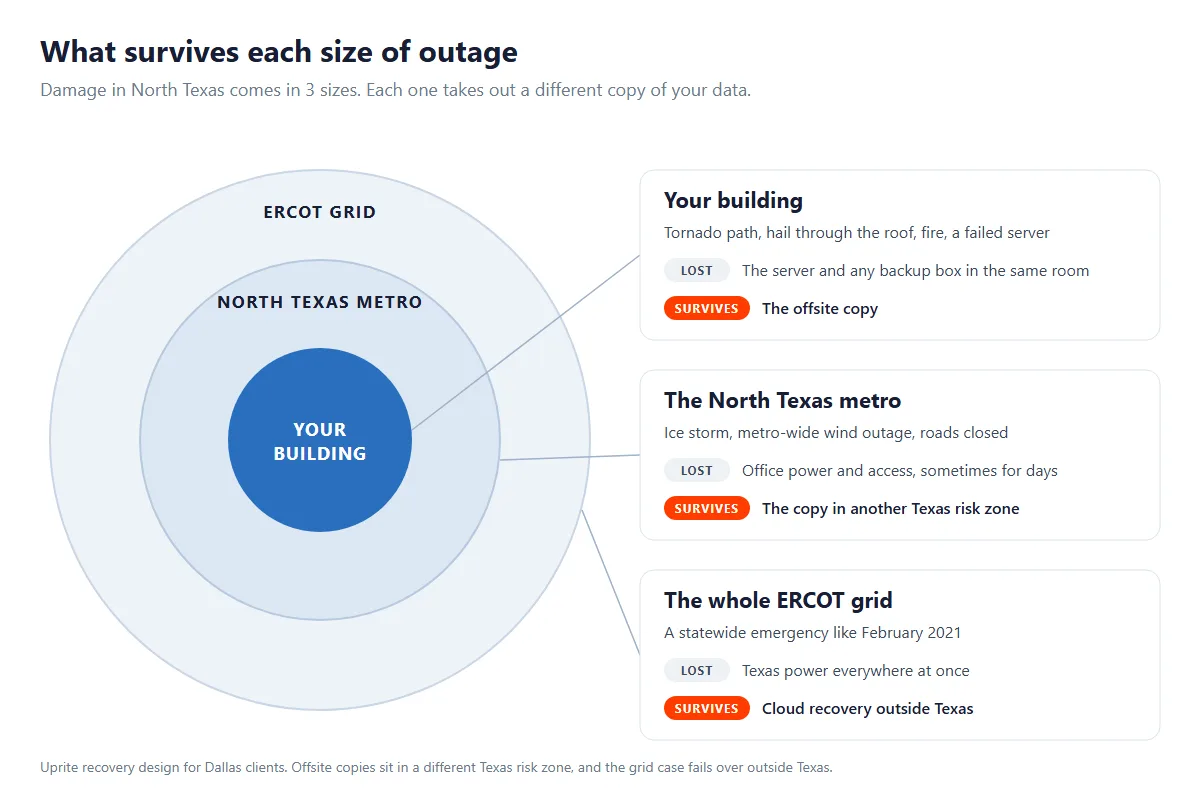
For recovery planning, though, the cause matters less than the reach. Damage comes in 3 sizes. Your building. Your whole metro. The state grid. Each size takes out a different copy of your data, which is the reason the copies live in different places.
| Dallas record | What the primary record shows | The copy still standing | How the plan answers it |
|---|---|---|---|
| Las Colinas to Richardson tornado, October 20, 2019 | EF3, 15.76 miles long and up to 1,300 yards wide, on the ground from 8:58 to 9:30 p.m. Office low-rises near US 75 took significant roof damage, and windows blew out of office buildings along the path (NWS Fort Worth survey). | Anything held offsite. An appliance in the same server room goes down with the server. | Restore from the offsite copy to replacement hardware or a cloud host while the building gets repaired. |
| Garland and Rowlett tornado, December 26, 2015 | EF-4 with peak winds estimated at 170 to 180 mph, on a 13-mile path from Sunnyvale to Lake Ray Hubbard between 6:45 and 7:02 p.m. (NWS Fort Worth survey). | Only what was already off the property. Nobody grabs a drive in 17 minutes. | Replicate offsite every day, not every Friday, and plan for a storm season that runs past spring. |
| Winter Storm Uri, February 2021 | For more than 2 straight days, ERCOT averaged 34,000 MW of generation outages, nearly half its 69,871 MW all-time winter peak. FERC counts the event’s 23,418 MW of firm load shed as the largest in U.S. history (FERC staff summary). | A copy that doesn’t need Texas power. A second office elsewhere in the state is on the same grid. | Fail Tier 1 systems over to cloud recovery outside Texas, the fallback our statewide plan names for an ERCOT emergency. |
| Ransomware, any month of the year | CISA’s baseline is near-real-time backup for critical systems, copies stored offsite and offline, and a recovery test at least once a year (CISA CPG 2.0). | The immutable copy. Anything reachable with your admin password gets targeted first. | Contain the intrusion, confirm the restore point is clean, then restore, so the attacker doesn’t come back with the data. |
Look at what the 3 weather records share. None of them gave anyone time to grab a drive, and the Garland tornado covered 13 miles in 17 minutes. Think about that. If the copy isn’t already somewhere else, it isn’t a copy.
Ransomware is the outage with no weather report. Dallas has its own recent example in the 2023 attack on City Hall, which our guide to ransomware protection for Dallas businesses walks through. Backups are the target. CISA’s Cybersecurity Performance Goals 2.0 name that exact risk, warning that adversaries “can delete data and disable recovery services, preventing system recovery.”
Tarrant County clients get the same design, built around Fort Worth’s own outage history, on our page about disaster recovery in Fort Worth. For the hours before a storm hits, our North Texas severe weather IT plan covers what to shut down and when.
RTO and RPO Tiers for Dallas Backup and Disaster Recovery
Every system you run gets 2 numbers before we build anything. Per system, not per company.
Both definitions come from the federal contingency planning guide, NIST SP 800-34 Rev. 1. Recovery time objective means the longest a system can stay down before the impact on the rest of the business becomes unacceptable. Recovery point objective means the moment your data can be restored back to, which in practice means how much recent work gets typed in twice.
NIST adds a third number that sales decks skip. Maximum tolerable downtime is the longest outage the business itself can absorb, and every RTO has to fit inside it. But RPO sits outside that math, the guide notes, because it measures lost data rather than lost time. Our guide to setting recovery targets per system walks through how to pick both.
Here’s where we usually start for Dallas systems.
| Tier | Typical Dallas systems | Recovery time (RTO) | Data you could lose (RPO) | What it takes |
|---|---|---|---|---|
| Tier 1, critical | EHR at a Plano clinic, the warehouse system near DFW Airport, ERP on a Garland shop floor | Under 4 hours | An hour or less | Continuous replication or a warm standby, the highest-cost tier |
| Tier 2, important | Email, file shares, accounting, the CRM your sales team lives in | Within 1 business day | 1 to 4 hours | Frequent image backups that can boot in the cloud or on the appliance |
| Tier 3, standard | Archives, closed matters and projects, reporting | Several days | 24 hours | Nightly backup, restored on request |
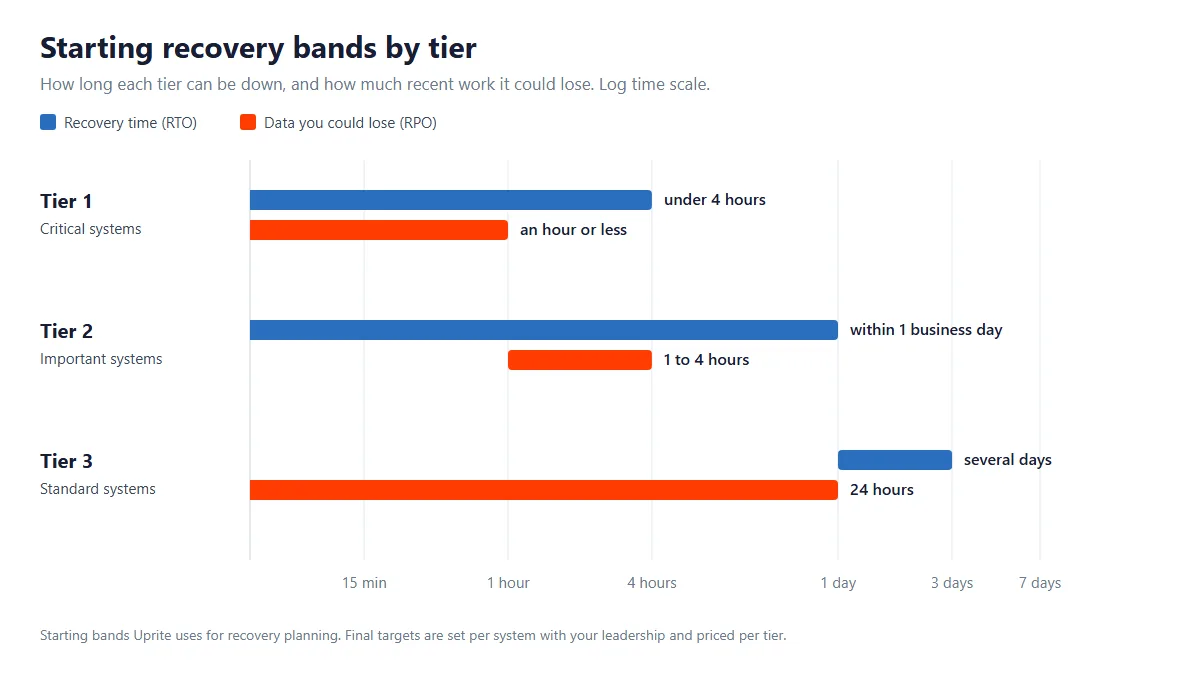
Those bands are a start. Leadership sets the final numbers system by system and we price each tier, so the business decides where the expensive line falls instead of leaving it to IT.
Take a 40-person tax and accounting firm in Addison in March. Its tax software and client portal are Tier 1, because a day without them is a day of returns not filed. Email, file shares, and the billing system sit in Tier 2. Closed returns from prior years go to Tier 3, and nobody needs those back by lunch. That’s 2 systems on the expensive tier instead of 20. Big difference.
Ranking everything as Tier 1 is the fastest way to make recovery unaffordable. It also hides the real risk, because the 2 or 3 systems that actually stop revenue end up sharing a budget, and a backup schedule, with an archive nobody has opened since 2019. Pick the 3 that matter. Per-workload math matters too, and our list of questions to ask an MSP about backup shows how a 4-hour target multiplies across a dozen servers. It adds up fast.
How We Run Backup and Disaster Recovery for Dallas Clients
3 Copies, 1 of Them Locked
Every Dallas plan starts from the 3-2-1 rule. That’s 3 copies of your data, on 2 kinds of media, with 1 kept offsite. A copy on a local appliance handles the everyday restore, the deleted folder or the dead drive, without waiting on a download from somewhere else.
That offsite copy is immutable for its retention window, which means a stolen domain admin password can’t erase it, and it lives in a different Texas risk zone from your office. Our data backup services build and retain the copies themselves, and this page covers what happens on the day you need them.
Microsoft 365 Gets Its Own Backup
Microsoft keeps your tenant running. It doesn’t promise to keep every deleted file forever. Deleted mail, OneDrive files, and SharePoint content sit in recycle bins and retention windows for a limited time before they’re gone, so we back up Exchange, OneDrive, SharePoint, and Teams on their own schedule, with retention you choose.
Restore Tests on a Calendar
Untested backups are rumors. Fully Managed IT clients get a timed restore test every quarter, and the result gets written down next to the target it was supposed to hit.
CISA’s performance goals put the floor at once a year. Once. They also add a step people skip, checking a backup’s integrity before restoring from it, which is how you avoid bringing back last week’s malware along with last week’s files. Our quarterly cadence runs at 4 times that minimum.
Ransomware Recovery From a Clean Point
Ransomware crews hunt for backups before they encrypt anything else. A backup share mapped as a drive letter is just more data to lock. Easy target.
We keep at least 1 copy immutable and off the production network, then pair it with the monitoring in our Dallas cybersecurity services so an intruder gets noticed before the clean restore points age out. Companies that want a security operations team watching overnight can add managed security services in Dallas on top.
Failover When the Office Is Dark
Some systems can’t wait for a building to reopen. For those, the plan includes a standby copy that boots in the cloud, so your team works from home on the failover while the primary hardware gets repaired, replaced, or dried out. If the outage is an ERCOT-wide emergency, the fallback is cloud recovery outside Texas, the same rule our statewide plan uses.
We did a version of this for a nonprofit with about 40 staff when its on-site server failed with more than 3 TB of records at risk. A temporary environment got people working again while the full restore ran in parallel, and our data recovery case study for a nonprofit walks through it.
Companies already running Azure or Microsoft 365 get there faster, and our managed cloud services in Dallas handle that side. When the tenant itself needs cleanup first, Microsoft 365 services in Dallas come before the backup design.
Continuity for People, Not Just Servers
Technology restores data. People restore the business. A continuity plan answers who declares the incident, who calls clients, which system comes back first, and where staff work while the rest catches up, and we update it whenever your systems or your people change.
Recovery That Holds Up Under HIPAA and the FTC Safeguards Rule
HIPAA is blunt about this. Its contingency plan standard at 45 CFR 164.308(a)(7) requires a data backup plan, a disaster recovery plan, and an emergency mode operation plan, and it lists testing and an applications and data criticality analysis as addressable specifications. Practices that need the wider picture can start with healthcare IT services in Dallas.
Financial firms answer to the FTC’s version. Its Safeguards Rule at 16 CFR 314.4 requires a written incident response plan designed to “promptly respond to, and recover from, any security event,” and a notification event involving 500 or more consumers has to reach the FTC within 30 days of discovery. That rule counts tax preparers and mortgage brokers as financial institutions, and our page on financial services IT in Dallas covers the rest.
What Backup and Disaster Recovery Costs in Dallas
Basic backup and recovery isn’t sold as an add-on. It sits inside each of our 3 managed IT plans, and what changes between plans is how often we prove it works.
| Plan | Published starting price | Backup and recovery in the plan | Built for |
|---|---|---|---|
| Fully Managed IT | $138 per user per month | Full monitoring and a restore test every quarter | Dallas companies that want on-site and cloud infrastructure managed, with 24/7 support |
| IT Pro, remote only | $110 per user per month | Monitored backups and a restore test twice a year | Teams of 12 or more outside the Houston and San Antonio areas, which includes Dallas |
| IT Essentials, remote only | $91 per user per month | Basic monitoring and a restore test once a year | Teams under 12 on Microsoft-native tools, with alerting only and no response |
Those are the starting rates on our published pricing, with licensing on top. A 25-person Dallas office on Fully Managed IT starts at $3,450 a month, and that already buys 4 timed restore tests a year.
Warm standby for Tier 1 systems is the piece we quote separately. Pricing depends on how many systems need a spare and how big each one is, and it gets priced tier by tier after the free assessment, so you’re not paying standby rates to protect an archive. Archives can wait.
How does that compare with the rest of North Texas? Our page on managed IT pricing in Dallas puts these plans next to the wider DFW market.
We sell the bigger plans, so an honest threshold belongs here. A 7-person office that lives entirely in Microsoft 365, with no server in a closet, may be fine on IT Essentials and its yearly restore test. That math changes the day a server, a line-of-business database, or a compliance obligation shows up.
The Numbers Behind the Service
1999
Serving Texas Since
Recovery work for Texas companies from offices in Dallas, Houston, and San Antonio.
5 min
Average First Response
An average from our own ticket data, not a contract promise.
4
Restore Tests a Year
On Fully Managed IT. CISA’s floor is 1.
120 days
Satisfaction Promise
Not satisfied inside 120 days? You may get out of your contract.
How Uprite Builds Your Dallas Recovery Plan
Recovery Readiness Assessment
We inventory every server, cloud tenant, and line-of-business app, check when each one was last restored, and mark the single points of failure. The assessment is free.
Tier Every System
Leadership ranks the systems, and we attach a recovery time, a data-loss window, and a price to each tier, in writing.
Build the Copies
We deploy the local and immutable offsite backups, set retention to match what your insurer and regulators expect, and stand up failover for Tier 1.
Time the First Restore
Before go-live we restore a real system and time it, so the target you signed off on gets checked against a stopwatch on day one. No guessing.
Test on Your Plan’s Calendar
Restores repeat on schedule, quarterly on Fully Managed IT, and the plan gets revised whenever a system is added, moved, or retired.
Who It Fits
Which Dallas Businesses This Recovery Service Fits
Clinics and practices where a down EHR means no patients seen, with a HIPAA contingency plan to keep current.
Tax, legal, and financial firms answering to the FTC Safeguards Rule or a client’s security questionnaire.
Manufacturers and distributors along I-35E and around DFW Airport that lose shipments for every hour the ERP is down.
Companies whose cyber insurer asks for documented, tested restores at renewal.
Offices that already lived through a dead server or a ransomware scare and want proof before the next one.
Teams of 10 to 300 people across Dallas, Collin, and Denton counties.
Already have an IT person or a small internal team? Co-managed IT services in Dallas let us run the backups and the restore tests while your team keeps the day-to-day.
What About the Backup You Already Have?
Fair question. These are the 5 objections we hear most, with straight answers.
“We already have backups.” Good. When did someone last restore one end to end and time it? A job that reports success every night can still fail at restore time because of corruption, an expired credential, or an encryption key nobody saved. We’ll test what you have before we suggest replacing any of it.
“Our IT provider handles that.” Maybe they do. Ask for 3 things this week. The written RTO and RPO for each system, the date and length of the last restore test, and whether any copy is immutable. Quick, specific answers mean you’re in decent shape. Vague ones don’t.
“It’s too expensive.” Compared with what? Tiering keeps the expensive standby on the 2 or 3 systems that actually stop revenue, and everything else rides on the backup already inside your plan. Your rate is also locked for the first year.
“Everything’s in the cloud already.” Some of it is. Cloud apps keep running when your office loses power, which is a real advantage. They don’t promise to undo a mass deletion, a synced ransomware encryption, or an admin account that got phished, so the cloud data still needs its own backup and its own restore test.
“It won’t happen to us.” Maybe not a tornado. A drive will fail eventually, someone will delete the wrong folder, and phishing emails don’t check your industry first. Companies that recover fast weren’t luckier. They’d rehearsed.
Questions Dallas Owners Ask About Backup and Disaster Recovery
Plan on $138 per user per month to start, on Fully Managed IT, with backup and a quarterly restore test already included. IT Pro starts at $110 for remote-only teams of 12 or more, with tests twice a year. Warm standby for Tier 1 systems is quoted separately after the free assessment.
Short answer, a backup is a copy and disaster recovery is the tested process for turning that copy back into a working system inside an agreed time. One tells you the data exists. The other tells you how long you’ll be down and how much work you’ll redo.
Under 4 hours is the usual starting target for Tier 1 systems, and within 1 business day for Tier 2. Real numbers get set per system with your leadership, timed during onboarding, and checked again at every scheduled restore test. Measured, not promised.
Only the copies an attacker can’t reach or change. Ransomware crews look for backup shares first, so at least 1 copy stays immutable and off the production network. Before any restore, we check that the restore point is clean, a step CISA’s performance goals also call for.
In a different Texas risk zone from your office, far enough that a single North Texas storm can’t reach both copies. For a statewide grid emergency like February 2021, the fallback is cloud recovery outside Texas.
HIPAA does, explicitly. Its contingency plan standard requires a data backup plan, a disaster recovery plan, and an emergency mode operation plan. And the FTC Safeguards Rule requires a written incident response plan built to respond to and recover from security events, and it covers firms like tax preparers and mortgage brokers.
Plano, Frisco, Irving, Richardson, Addison, and Las Colinas get the same service, and most recovery work happens remotely anyway. On-site visits run from our office at 5757 Alpha Road, Suite 530, in North Dallas.
Faster than most owners expect, usually 2 to 3 weeks for an initial plan. That covers the assessment, the backup and replication setup, failover for critical systems, and the first timed restore. Bigger environments take longer, and you’ll get a date after the assessment.
What Uprite Clients Say on Google
Hector and Kareem are super helpful! They are always willing to take on my computer problems even if its small. I had my mouse disappear off my screen, it was an user issue but Hector didn't make me feel small or "dumb" for this error. We love uprite!
Gerardo Sanchez was very helpful & professional. Uprite Services has great customer service and outstanding technicians. We have used them for several years and will continue our business with them.
I had been having trouble with an IT matter that I didn't think would be fixed but Arvin Ebueng from Upright took his time with me and worked with me until we were able to resolve the issue. The issue was an internal issue with the way the program was written, but Arvin came up with a great work around so that I am now able to do what I need to do at my job. Long story short, he got me access to both things that I need access to simultaneously and daily. Thanks 😊 Arvin, you are much appreciated 👏 💐 🥳.
I’ve been extremely satisfied with Uprite Services and would recommend them without hesitation. They consistently deliver reliable, high-quality work and truly feel like a true partner rather than just another vendor. A special thank you goes to Arvin Ebueng, he is always quick to respond to our needs and incredibly easy to communicate with. No matter how busy things get, Arvin makes sure we’re taken care of promptly and with a smile. His responsiveness and clear communication have made every interaction smooth and stress-free. Thank you, Arvin and the entire Uprite team, Peerless Equipment is a customer for life!
I'm am not a "tech" person, however the team at Uprite gets me through the technological side of computers and software so that I can function on a daily basis... but the most enduring quality is that they care. Special shoot out to Mary, Sergio, Eufemio, Hector, and Jeff just to name a few... I appreciate each of you and the help you give me.
Great service by Juan and Jacob. Always helping us out at Alamo City Trailer Sales. We have been using this company for over 10 years and always happy with the work they do.
Awards & Industry Recognition















Start With a Free Recovery Readiness Assessment
Find out on a quiet weekday instead of the morning after a storm. You’ll see what you have, what’s exposed, and how long a real restore would take today. No sales deck required. If your setup already holds up, we’ll tell you that and leave it alone.
Recovery works best inside a complete IT plan, from 24/7 IT support in Dallas to the backups themselves.
Or call our Dallas office at (469) 699-8765.
Related pages Managed IT Services Dallas | Cybersecurity Services Dallas | Managed Cloud Services Dallas | Data Backup Services | Disaster Recovery Texas | Disaster Recovery Fort Worth | Healthcare IT Services Dallas | Financial Services IT Dallas



