24/7 security monitoring means trained analysts watch the alerts from your computers, servers, firewall and Microsoft 365 sign-ins every night and weekend, and are cleared to contain a real attack before your Dallas office opens. Software that saves an alert for Monday doesn’t count.
A lot of Dallas companies already pay for good security tools and assume someone is watching them overnight. Often nobody is, because a license buys the software and not the people who read its alerts. This post covers what a night shift actually does, how one real alert plays out, what staffing it yourself would cost in Dallas-Fort Worth, and which questions separate real coverage from an inbox. For how monitoring fits into a full security program, see our page on managed detection and response in Dallas.
Coverage is real only when a person reads the alert and is allowed to act on it. Before you sign with anyone, ask who is on shift at 2 a.m. on a Saturday, what they can do without calling you, who they call and in what order, and what you get in writing afterward. Renting a night shift costs a small fraction of hiring one, since a single analyst on a 40-hour week leaves 128 of the week’s hours uncovered.
What does 24/7 security monitoring mean for a Dallas business?
24/7 security monitoring is round-the-clock review of the signals your systems produce, from laptops and servers to the firewall, email and cloud sign-ins, by people who can investigate and respond at any hour. The software spots unusual activity. The people decide whether it matters and what to do about it, and that second part is what you’re paying for.
NIST has a name for the idea. Its SP 800-137 guidance, written in 2011 for federal systems, describes continuous monitoring as “maintaining ongoing awareness of information security, vulnerabilities, and threats to support organizational risk management decisions.” The words that matter for a 40-person company in Frisco are ongoing awareness. A tool that writes to a log nobody opens until Monday gives you a record of the problem, which isn’t the same thing as knowing about it.
The NIST Cybersecurity Framework 2.0 places continuous monitoring under its Detect function, right next to the analysis that decides whether an event is actually an attack. In a typical Dallas office, these are the sources an overnight team watches.
- Microsoft 365 and Entra ID sign-ins, including new MFA devices and logins from places your staff have never been
- Laptops and servers running endpoint detection software such as Microsoft Defender for Business
- Firewall and VPN logs, which show who is connecting from outside the building
- Email, where new forwarding rules and clicked phishing links tend to show up first
- Backup jobs, because attackers often go after your backups before they encrypt anything
What does a night shift do when nothing is wrong?
On an ordinary night, a monitoring team spends most of its time ruling things out. A sales rep signs in from a hotel near DFW Airport after a late flight. A server in Irving restarts at 1 a.m. because a patch was scheduled. A backup job fails because a drive filled up. Each of these raises an alert, and each one needs a person to look at it, match it to something expected, and close it with a note.
That triage is the unglamorous part of the job, and it’s where the value sits. If a provider can’t tell your traveling sales rep from a stolen password, it will either wake you up for nothing or let the one alert that mattered sit in a queue. Good analysts learn your normal pattern, such as who travels, which servers reboot on which night, and which vendor connects remotely on Sundays, so the unusual activity stands out.
You should see the results of that work the next morning as a short summary and once a month as a review of what was closed and why. If your provider sends a long list of raw alerts every day instead, the sorting has quietly been handed back to your own staff.
What happens when an overnight alert turns out to be real?
Here’s how a well-run response to one common kind of attack tends to unfold. It’s an illustration of the pattern rather than a record of a client incident, and the times are examples.
- Shortly before 2 a.m. on the Saturday of a holiday weekend, the endpoint software on a file server in a Richardson office reports a new local administrator account, created during a remote session nobody scheduled.
- A few minutes later the same session tries to stop the backup service and delete the server’s saved restore points, which ransomware operators often do before they encrypt files.
- The analyst on shift checks that no maintenance was planned, cuts the server off from the network with the endpoint tool, and disables the new account. Both actions were approved in advance, so nobody had to be woken up first.
- Next the analyst calls your first named contact, and the backup contact if the first doesn’t answer within the agreed time, to explain what was contained and what still needs a decision.
- When your team gets in on Monday, there’s a written timeline waiting, along with the changes the analyst made and the next steps, such as resetting the remote access credentials that were used.
The step that decides the outcome is the third one. An analyst who has to reach you before isolating a server loses the time that monitoring was supposed to buy. CISA’s #StopRansomware Guide, updated in 2023 with the FBI, NSA and MS-ISAC, opens its response checklist with finding the affected systems and isolating them right away. An overnight team can only follow that advice if your contract lets them.
Why do holiday weekends need the most coverage?
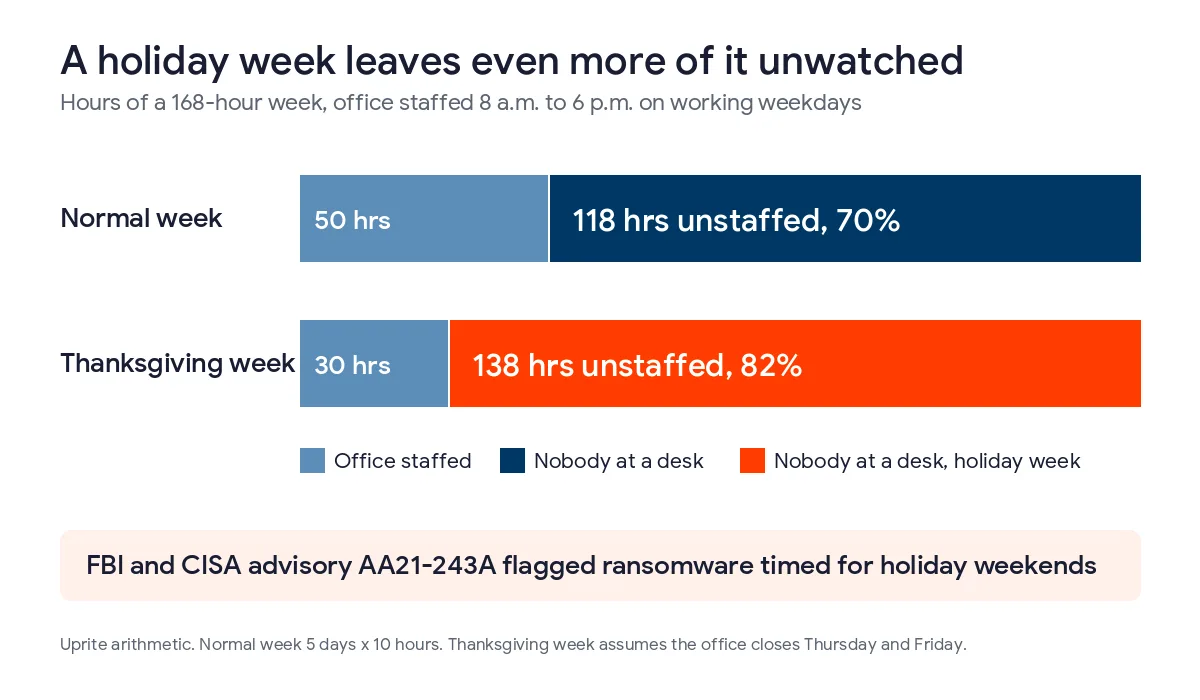
Attackers pick the hours when defenders are scarce. In 2021 the FBI and CISA issued a joint advisory, AA21-243A, after seeing an increase in highly impactful ransomware attacks on holidays and weekends, including attacks over Memorial Day weekend and the Fourth of July holiday that year. CISA has since moved the advisory to its archive, but its advice to keep monitoring through holidays and to have security staff on call still applies.
Now put a holiday week on the calendar. An office staffed 8 a.m. to 6 p.m. on weekdays is open 50 of the week’s 168 hours. In a Thanksgiving week, when many offices close Thursday and Friday, staffed time drops to 30 hours, and 138 hours, about 82% of the week, go by with nobody at a desk. Christmas and New Year’s weeks look much the same.
If you don’t have overnight coverage yet, the days before a long holiday weekend are a sensible time to at least agree who gets called and which systems someone may switch off. The advisory recommended exactly that kind of preparation in the run-up to holidays.
Should a Dallas company staff its own overnight monitoring?
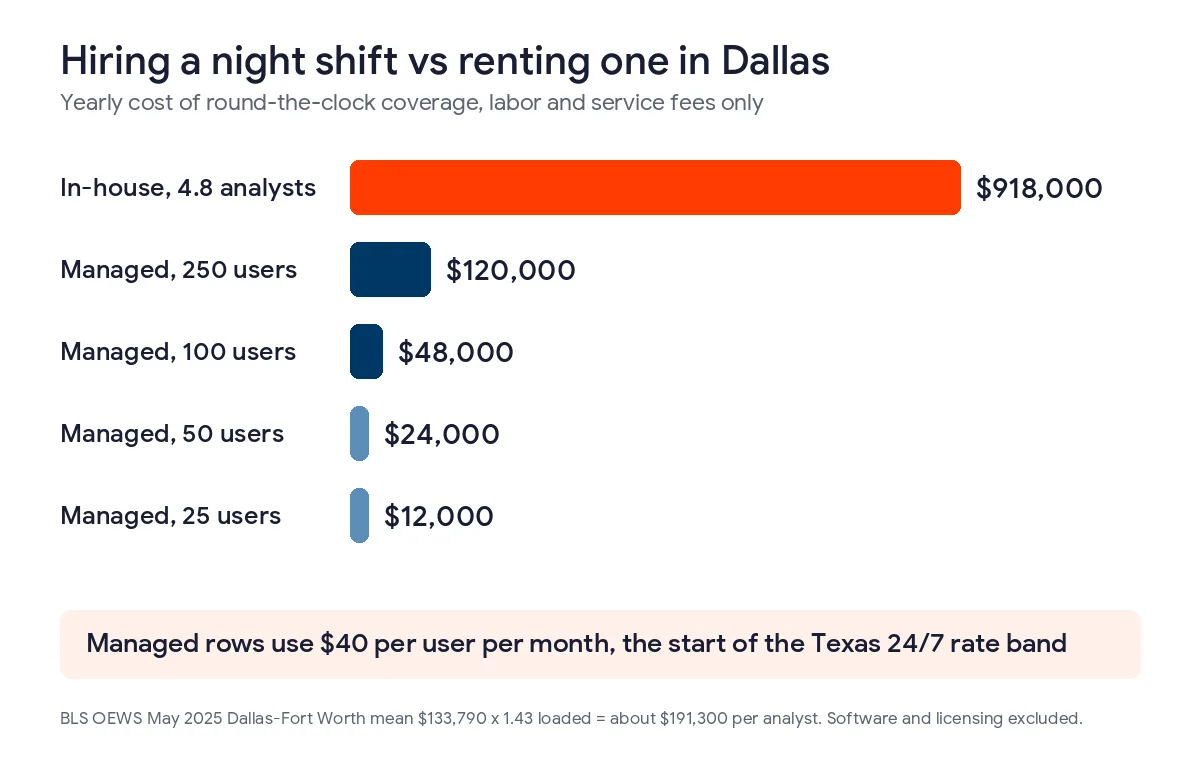
For most companies the numbers don’t work. Dallas-Fort Worth employed 7,080 information security analysts in May 2025 at a mean wage of $133,790, according to the BLS metro area wage estimates. Add benefits and payroll taxes at the ratio our cost guides use, about 1.43 times salary, and each analyst costs roughly $191,000 a year.
One analyst covers a 40-hour shift. Covering all 168 hours takes 4.2 full-time seats before anyone takes leave, and about 4.8 people once vacations, sick days and training are counted. At Dallas-Fort Worth pay, that’s a little over $900,000 a year in salaries and benefits alone, before the monitoring software, the log storage, or the manager who builds the schedule.
Hiring does make sense in a few cases, such as a company large enough to need a security team during the day anyway. Even then, the usual setup is to keep the in-house team on days and pay a provider for nights, weekends and holidays, so your people work on projects while the provider takes the 2 a.m. calls. Our cybersecurity cost breakdown for Dallas prices the rest of the security budget around that choice.
What should you ask a Dallas provider before you sign?
Sales calls tend to dwell on tools and dashboards. These 6 questions cover what actually happens overnight, and the answers tell you whether you’re buying coverage or a mailbox.
| Question to ask | An answer that means real coverage | An answer that should worry you |
|---|---|---|
| Who reads our alerts at 2 a.m. on a Saturday? | Analysts on shift in a staffed security operations center | A ticket queue that someone reviews in the morning |
| What can your analyst do without calling us? | A written list, such as isolating a device, disabling an account and blocking an address | Nothing until they reach you |
| Which of our systems are off limits? | They ask, and record things like a payroll server or a lab instrument as hands-off | The question never comes up |
| How fast do you act on a high-severity alert? | A number of minutes, written into the contract | A promise to act as soon as possible |
| Who gets called, and in what order? | 2 named contacts with 2 numbers each, plus a rule for what is worth a call | Whoever is listed on the account |
| What do we receive afterward? | A morning summary and a monthly review of every closed alert | A raw export of alerts |
The second and third questions are the ones people put off, because deciding what an outside analyst may shut down feels risky. If nobody settles those 2 things ahead of time, the analyst on shift ends up waiting on a phone call while the attack keeps running. If you’d like the difference between detection tools and monitoring services explained first, our guide to EDR vs MDR vs XDR walks through it.
How does overnight monitoring tie into Texas law and cyber insurance?
Speed changes what you end up reporting. When a breach affects 250 or more Texans, the Texas Attorney General requires a report as soon as practicable and no later than 30 days after you discover it, and the office posts those reports publicly. A server isolated at 2 a.m. on a Saturday usually leaves far less to report than one found on Tuesday when the files won’t open.
Texas Senate Bill 2610 adds a second reason. For breach lawsuits that arise on or after September 1, 2025, a Texas business with fewer than 250 employees can’t be ordered to pay exemplary damages if it was running a cybersecurity program that conforms to a recognized framework, such as the NIST Cybersecurity Framework, when the breach happened. Monitoring alone doesn’t make a program, but the framework’s Detect function expects it. Our Texas SB 2610 guide explains the tiers by company size.
Insurers ask about it too. Cyber insurance applications often ask whether someone watches alerts around the clock and who responds, and our breakdown of cyber insurance requirements in Dallas shows what each control on that list costs.
What does 24/7 monitoring cost in Dallas?
Texas providers generally charge $40 to $90 per user per month for security with a staffed operations center, or $125 to $200 when it comes bundled into fully managed IT, based on the rate card in our Texas cybersecurity cost guide. Uprite’s MSSP Security Focus plan starts at $40 per user per month and includes security operations center monitoring and incident response. For 50 users that’s $2,000 a month, or $24,000 a year.
One honest note about our own price sheet. Our IT Essentials plan, built for remote teams under 12 people, sends alerts but doesn’t include an after-hours response. That suits a very small office with little sensitive data, and it doesn’t suit anyone who needs a person acting at night. If you’re on an alert-only plan with any provider, it’s worth checking which kind you actually bought. Current rates for every plan are on our pricing page.
Questions Dallas business owners ask about 24/7 monitoring
Is antivirus the same as 24/7 security monitoring?
No. Antivirus and endpoint detection software block what they recognize and log the rest. Monitoring adds people who read those logs at night, connect them to sign-in and email activity, and act on the ones that matter.
Do small Dallas companies really need overnight monitoring?
If you have 20 or more people, hold customer financial or health records, or carry cyber insurance, it’s usually worth it. A 6-person office with nothing sensitive can often get by with good backups, multifactor sign-in and an owner who answers the phone at night.
Will the analysts shut down our systems without asking?
They should only touch what you’ve cleared in writing. A typical agreement pre-approves isolating a laptop, disabling an account and blocking an address, and lists anything that has to stay up, like a payroll server, as hands-off unless someone senior agrees.
How quickly should an overnight analyst respond?
Get a written number of minutes from alert to first action on high-severity alerts. Acknowledging an email isn’t the same thing. Lower-severity items can wait for the morning summary, and the contract should say which is which.
Is MDR the same thing as 24/7 monitoring?
MDR, or managed detection and response, is one way to buy it, usually built around endpoint software plus analysts who investigate and contain. A broader security operations center also watches firewalls, sign-ins and cloud apps, so ask which signals are included.
Does 24/7 monitoring help with cyber insurance?
In most cases it does. Carriers commonly ask whether someone watches alerts around the clock and who responds, and a yes backed by a signed contract is easier to defend at claim time than a yes based on a license you own.
What does Uprite’s overnight monitoring cost?
Our MSSP Security Focus plan starts at $40 per user per month with security operations center monitoring and incident response included. A 25-person company would pay about $1,000 a month, with Microsoft licensing billed separately.
Tell us how your alerts are handled today and we’ll show you, in writing, who would see a 2 a.m. alert at your company right now, what it would take to close the gap, and what that would cost. Our average first response is 5 minutes.
Talk to a Security ExpertPrefer to email or call? Reach the team through our contact page.