Co-Managed IT in Dallas That Makes Your Team Stronger
Co-managed IT in Dallas pairs your internal IT staff with an MSP like Uprite to share cybersecurity, monitoring, help desk overflow, and strategic planning under a written split. Texas engagements run $60 to $130 per user per month, and our plan starts at $100. Your IT lead keeps the keys. We cover the hours and security depth one person can’t.
Built for Dallas-Fort Worth companies that already employ IT people and can’t outbid the corporate headquarters next door for more of them.
See What Co-Managed IT Would Cover for YouNo obligation. Bring your IT person. We’d rather talk to them first.MSP 501, 7 Consecutive Years | Dallas Office at 5757 Alpha Rd | 120-Day Satisfaction Guarantee
Get a Free Co-Managed IT Assessment
Awards & Industry Recognition















The Dallas Staffing Squeeze
Your IT Person Is Doing 4 Jobs on One Salary
Help desk queue. Security alerts. Vendor calls. A 3-year plan nobody has time to write. Ask your IT person how much of last week went to each of those, and you’ll hear the problem in the answer. One title, one paycheck, 4 jobs.
Dallas-Fort Worth companies with 20 to 150 users tend to land here the same way. You hired a capable generalist when the company was smaller. Then came the second office, the Microsoft 365 move, the cyber insurance questionnaire, and a customer asking for security evidence. Now that one person owns endpoint security, backups, the firewall, every vendor, every after-hours call, and the roadmap, usually with nobody to call when 2 of those catch fire on the same afternoon. It’s common enough that we wrote a separate page on co-managed IT for a one-person IT department.
Burnout isn’t a soft problem here. Security work never really ends, and your IT lead squeezes it in between password resets, vendor calls, and whatever broke this morning. People in that seat rarely fail for lack of skill. They run out of hours.
Co-managed IT puts a team behind that person. In a metro packed with corporate IT departments, a good IT lead has options, and real backup is often what keeps them from taking the next recruiter call seriously, especially after a weekend spent alone on an outage.
If you’re comparing managed IT services in Dallas, co-managed is the version built for companies that already have internal IT but need more depth, more hours, and more security coverage than their own team can carry.
Your IT person should be on the first call.
We’ll ask what’s slipping, what worries them most, and what they’d hand off first. No pitch deck.
Schedule a Co-Managed IT AssessmentScope of Work
What Does Co-Managed IT Cover for a Dallas Team?
Most owners ask 2 questions on the first call. What would we hand off? And what stays with our own people?
Every company splits it differently, but here’s how co-managed IT services in Dallas typically split for a company with 40 to 100 users and one internal IT person who’s been carrying all of it.
Your in-house person keeps the work that depends on knowing your business. The people. The line-of-business apps. Which report the CFO needs by Monday, and why the warehouse scanners sit on their own network. That knowledge took years to build and doesn’t move to an outside firm without loss.
Uprite takes the work that needs a team and a 24-hour clock. Typical handoffs are SOC monitoring and threat response, endpoint protection, patching and vulnerability fixes, backup checks and restore tests, nights and weekends, and vCIO planning done alongside your internal team.
Here’s a pattern we run into a lot. A company expects co-managed to mean help desk overflow, and it can. But the bigger win is usually security and monitoring, the work your IT person knows matters but never gets to because the ticket queue gets there first, every morning, before the coffee is done.
That gap shows up in small ways first. A patch that waited a month. An alert nobody read until Monday. A restore that was never tested. For a solo IT lead, the skills are usually there. The hours aren’t. One person, one queue, no backup.
Why Dallas Is Different
Why Are Dallas Businesses Moving to Co-Managed IT?
The solo IT model is hard to sustain in Dallas-Fort Worth, and the reason is who else is hiring.
Corporate relocations into Plano, Frisco, Richardson, and Irving brought big IT departments with them, and the mid-market companies around them run far leaner. Healthcare and dental groups still need HIPAA documentation that goes past “we have antivirus.” Wealth managers and lenders along the Telecom Corridor answer audit requests every year. Manufacturers, distributors, and builders run ERP, CAD, and connected equipment that most generalist hires were never trained for, let alone given time to learn on the job while the plant keeps running.
And the hiring math doesn’t help. In the Dallas-Fort Worth metro, the Bureau of Labor Statistics puts the median pay for network and computer systems administrators at $103,260 as of May 2025, about 2% above the $101,240 Texas median for the same job. Benefits sit on top of every dollar of that. The BLS Employer Costs for Employee Compensation survey shows private employers nationwide paying $46.89 in total compensation for each $32.82 in wages as of June 2026, once health insurance, retirement, paid leave, and payroll taxes are counted. Load a DFW sysadmin at that 1.43 ratio and one more hire costs about $147,500 a year. That’s one person. With vacation. With sick days. With a resignation letter that could land on your desk any Tuesday.
Security talent is the tighter squeeze. The metro employs 7,080 information security analysts, 44% of all the analysts BLS counts in Texas, at a median of $133,610 in the same BLS survey. Loaded the same way, one analyst runs about $190,900 a year. And the headquarters that relocated into Plano, Frisco, Irving, and Richardson hire from that same pool.
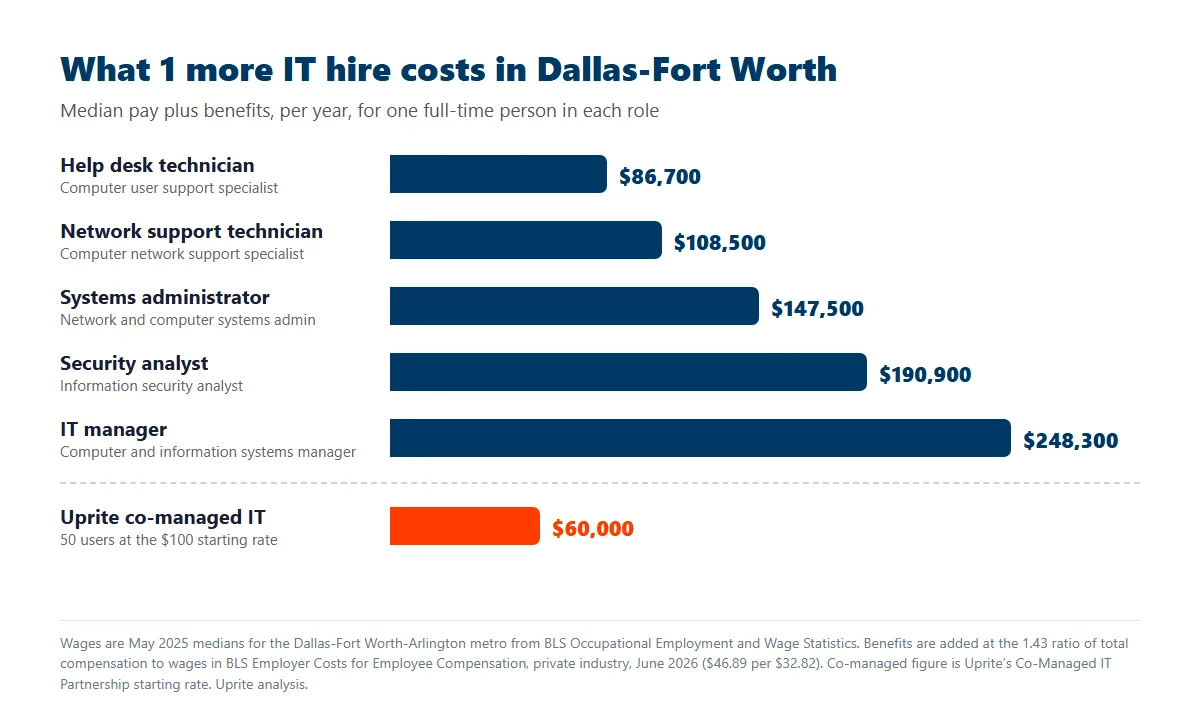
Co-managed IT gives you a bench of specialists for a fraction of one of those hires. At our $100 starting rate, a 50-person company pays $60,000 a year, about 41% of one loaded sysadmin and less than a third of one security analyst, before you count the after-hours coverage neither hire would give you.
Then there’s the awkward middle. Between about 20 and 150 users, one IT person isn’t enough, but 2 more full-time hires blow the budget. Add the DFW mix of regulated work in finance, healthcare, legal, and logistics, and the cybersecurity requirements land well past what a solo practitioner can cover between help desk tickets.
The breach record points the same way. As of October 8, 2026, the Texas Attorney General’s breach list holds 274 notices from Texas-based organizations, published April 1, 2025 through October 6, 2026. Organizations listing a Dallas-Fort Worth city filed 87 of them, more than the 77 from Houston-area organizations, and those 87 notices covered 1.81 million Texans. Of those 87, 66 involved Social Security numbers. Texas law requires notice to the Attorney General as soon as practicable and no later than 30 days after discovering a breach that touches 250 or more Texans, and it applies to private companies of every size. That clock doesn’t pause because your only IT person is on vacation.
Most Dallas companies we talk to get here through a trigger. Something broke, or an auditor or insurer flagged a gap, and now leadership needs coverage without doubling headcount. Sound familiar?
Who Owns What
Your IT Lead Keeps the Final Say
The first worry we hear, usually from the IT lead, is simple. “Is this step one of replacing me?”
Fair question. Some MSPs do use co-managed as a foot in the door, sidelining the internal person and then pitching a full takeover. We don’t, and the model only works when nobody does.
So every Uprite co-managed engagement starts with a written responsibility matrix. Your IT lead, your leadership, and our team sign off on it before we connect a single tool. Help desk tiers, security monitoring, patching, vendors, and planning each get one owner’s name.
That isn’t just our habit. A joint advisory from CISA, the NSA, the FBI, and the cyber agencies of the UK, Australia, Canada, and New Zealand says the same thing (advisory AA22-131A, May 2022). MSP customers should get a contract that says whether the provider or the customer owns hardening, detection, and incident response, and how and when the provider reports an incident to you. It also says to switch off provider accounts once they stop managing anything. Here’s a typical starting split. Your IT person edits it before anything gets signed.
| Function | Your IT lead | Uprite |
|---|---|---|
| Help desk, tier 1 | Owns it. Knows the people, the apps, and the history. | Overflow, after-hours tickets, and PTO cover |
| Escalations, tier 2 and 3 | Sets the priority and stays the point of contact | Server, network, and Microsoft 365 engineering on request |
| Security monitoring and threat response | Gets the summary and signs off on anything that touches business systems | 24/7 SOC monitoring, EDR, triage, and containment |
| Patching and vulnerability fixes | Sets maintenance windows and app exceptions | Runs the patch cycle and reports what failed |
| Backups and recovery | Decides what has to come back first | Watches backup jobs and tests restores |
| Firewall and user access | Keeps admin control | Reviews rules and flags risky changes |
| Vendors and business apps | Owns the relationships | Joins the call when infrastructure is involved |
| Incident response | Brings in leadership and legal for notice decisions | Runs the technical investigation and the evidence timeline |
| Roadmap and budget | Owns the plan | vCIO input at quarterly reviews |
| Documentation | Reviews and approves it | Keeps it current |
Inside their lanes, your IT lead makes the calls. We don’t go around them to leadership, and we don’t copy executives on tickets to apply pressure. Think of a general contractor and a specialty sub. The GC runs the job. The sub owns its trade and answers to the GC.
Day to day, it looks like this. Your internal team keeps the user relationships, the app knowledge, and the history. Our team carries the security stack, the monitoring, the 3 a.m. alert nobody wants, and a quarterly planning session where 2 senior people pressure-test the roadmap together before it goes to leadership.
By the Numbers
The Numbers Behind Uprite
Check every one of these before you sign anything.
25+ yrs
Serving Texas businesses across Dallas-Fort Worth, Houston, and San Antonio.
MSP 501 7x
7 consecutive years on the Channel Futures MSP 501, No. 264 on the 2026 list.
120 days
In writing, in every contract. If we don’t meet your expectations, you leave without penalties.
SOC 2
Type 1 audit completed in 2023, plus the HIPAA Seal of Compliance for healthcare clients.
On-site
Dallas office at 5757 Alpha Rd, with technicians dispatched locally across DFW.
Year 1
Rate lock. Your first-year price stays put.
Getting Started
How Does Co-Managed IT Start at Uprite?
Step 1. Scoping Call
Your IT person walks us through what they handle now and where it hurts. We listen more than we talk.
Step 2. Environment Assessment
We inventory your systems, tools, and security posture, and we write down the gaps. That document becomes the baseline for everything after it.
Step 3. Responsibility Matrix
We draft the responsibility matrix with your IT lead, line by line. If a task has 2 owners or none, we fix it before go-live.
Step 4. Onboarding and Tool Integration
We connect monitoring, security, and ticketing into your environment without disrupting what’s already working. Your team keeps admin access to your own systems.
Step 5. Ongoing Partnership
Regular check-ins with your internal team. Quarterly business reviews. A clear escalation path for the bad days. And the matrix gets revisited every quarter as the company changes.
Most onboarding wraps up in 2 to 3 weeks. Your internal IT person is part of every step, because nobody knows your environment better.
Honest Fit Check
Is Co-Managed IT Right for Your Dallas Team?
| Right fit |
|---|
| A Dallas-Fort Worth company with 20 to 150 users and at least one internal IT person who’s stretched thin |
| You need SOC monitoring, endpoint protection, and threat response that your own team can’t staff around the clock |
| Your IT lead wants backup, not a boss |
| You’re in healthcare, manufacturing, financial services, legal, construction, or engineering, and the compliance asks keep growing |
| You want nights and weekends covered without putting your IT person on permanent call |
Still not sure? Book a scoping call. That’s exactly what it sorts out, and it costs nothing.
Model Comparison
Co-Managed vs. Fully Managed vs. In-House Only
| Co-Managed IT (Uprite) | Fully Managed IT | In-House IT Only | |
|---|---|---|---|
| Best for | Dallas companies with 20 to 150 users and some IT staff already | Companies with no IT staff, or owners who want all of it handed off | Companies that can fund a full internal department |
| Day-to-day support | Your IT lead plus Uprite, split by the responsibility matrix | Uprite handles all of it | Your team handles all of it |
| Security depth | SOC, EDR, and threat response from Uprite, while your team keeps firewall and user-level access | Uprite runs the full security stack | Whatever your team has time to cover |
| After hours | Uprite covers nights, weekends, and holidays | Uprite covers 24/7 | Your IT person’s cell phone |
| Cost | $60 to $130 per user per month for the MSP layer, plus the salary you already pay. Uprite’s plan starts at $100 (see co-managed IT cost in Texas). | From $138 per user per month on Uprite’s Fully Managed plan | About $147,500 a year for one DFW systems administrator at the median, fully loaded |
| Control | Your IT lead keeps operational control | Uprite drives strategy and operations | Fully internal |
| Scaling | Add Uprite scope as headcount grows | Scales with headcount automatically | Every step up is a new hire |
| If a key person leaves | Uprite keeps things running while you backfill | No single point of failure | Operations stall until you rehire |
Is Co-Managed IT the Same as IT Staff Augmentation?
Not quite, and the difference decides who carries the risk. IT staff augmentation in Dallas usually means an agency places a contract engineer on your team and bills for their hours. Your IT lead manages that person like any other employee. You get hands. You keep every process, every tool decision, and the after-hours risk.
Co-managed IT is a managed service. Uprite brings its own security stack, ticketing, and on-call rotation. The split lives in the responsibility matrix, and coverage doesn’t stop when someone takes PTO or quits in the middle of a project. So which one do you need? Augmentation fits a project with an end date. Co-managed fits work that never ends, like monitoring, patching, and incident response.
| Co-Managed IT (Uprite) | IT Staff Augmentation | |
|---|---|---|
| How you pay | Per user per month, starting at $100 per user | Per hour or per placement, for each contractor |
| Who directs the work | Your IT lead sets priorities, and Uprite runs its lanes under the matrix | Your IT lead supervises the contractor day to day |
| Tools and security stack | Uprite supplies SOC monitoring, EDR, and ticketing | Usually your existing tools and licenses |
| After-hours coverage | Nights, weekends, and holidays included | Only if you hire and pay for a second shift |
| When someone leaves | The team and the documentation stay | What they knew leaves with them unless it was written down |
| Best fit | Ongoing security, monitoring, and coverage gaps | A migration, rollout, or backfill with an end date |
Need both? That works too. A contractor can run an ERP migration while co-managed coverage keeps security and monitoring running underneath it. And if security is your only gap, our MSSP Security Focus plan covers SOC monitoring for internal IT teams starting at $40 per user per month, listed on our pricing page.
Before You Sign
What Dallas Owners Worry About Before Signing
“We can’t afford another IT expense.”
Run the real comparison. One more systems administrator in Dallas-Fort Worth costs about $147,500 a year at the median once benefits are loaded, and that’s one person with one skill set and 2 weeks of PTO. Co-managed IT in Texas runs $60 to $130 per user per month. For a 50-person company that’s $3,000 to $6,500 a month, or $36,000 to $78,000 a year. That’s roughly a quarter to just over half the cost of a single extra hire, and with Uprite you get 24/7 coverage, a security team, and strategic planning. We ran the full second-hire arithmetic for a 75-person Texas company if you want every line.
“Our IT person will feel replaced.”
Usually the opposite happens. Once it’s running, internal IT leads often tell us it’s the first real backup they’ve had in years. The overdue security monitoring finally gets done. So does the documentation. And the after-hours calls stop ringing their personal cell.
“Our last MSP burned us.”
That’s why the 120-day satisfaction guarantee sits in the contract. If you’re not satisfied within the first 120 days, you can get out of your contract. Uprite has served Texas since 1999 and made the MSP 501 list 7 years running. The guarantee is in writing, so you don’t have to take our word for it.
“Will you push us to fully managed later?”
No. The matrix is a signed document, not a handshake, and your IT lead’s scope is set before onboarding starts. Plenty of our co-managed clients have stayed co-managed for years because it fits them. If a company later decides fully managed makes more sense, that’s their call to make, never ours.
What Clients Say
Hector and Kareem are super helpful! They are always willing to take on my computer problems even if its small. I had my mouse disappear off my screen, it was an user issue but Hector didn't make me feel small or "dumb" for this error. We love uprite!
Gerardo Sanchez was very helpful & professional. Uprite Services has great customer service and outstanding technicians. We have used them for several years and will continue our business with them.
I had been having trouble with an IT matter that I didn't think would be fixed but Arvin Ebueng from Upright took his time with me and worked with me until we were able to resolve the issue. The issue was an internal issue with the way the program was written, but Arvin came up with a great work around so that I am now able to do what I need to do at my job. Long story short, he got me access to both things that I need access to simultaneously and daily. Thanks 😊 Arvin, you are much appreciated 👏 💐 🥳.
I’ve been extremely satisfied with Uprite Services and would recommend them without hesitation. They consistently deliver reliable, high-quality work and truly feel like a true partner rather than just another vendor. A special thank you goes to Arvin Ebueng, he is always quick to respond to our needs and incredibly easy to communicate with. No matter how busy things get, Arvin makes sure we’re taken care of promptly and with a smile. His responsiveness and clear communication have made every interaction smooth and stress-free. Thank you, Arvin and the entire Uprite team, Peerless Equipment is a customer for life!
I'm am not a "tech" person, however the team at Uprite gets me through the technological side of computers and software so that I can function on a daily basis... but the most enduring quality is that they care. Special shoot out to Mary, Sergio, Eufemio, Hector, and Jeff just to name a few... I appreciate each of you and the help you give me.
Great service by Juan and Jacob. Always helping us out at Alamo City Trailer Sales. We have been using this company for over 10 years and always happy with the work they do.
FAQ
What Dallas Businesses Ask Before Choosing Co-Managed
In Dallas, Uprite’s Co-Managed IT Partnership plan starts at $100 per user per month, inside the $60 to $130 range co-managed IT runs across Texas. That doesn’t include your internal IT salary, which you’re already paying. Scope, security depth, and compliance requirements move the number. Uprite gives you a specific quote after the scoping call because a flat co-managed price can’t reflect how differently every company splits the work.
No. Co-managed IT adds capacity around your IT person, and their role, scope, and authority stay where they are. If a provider pitches co-managed as a stepping stone to fully managed, what they’re selling is a slow takeover, and an internal IT lead who senses that will fight the whole engagement.
Operational control. With co-managed IT, your in-house IT staff runs day-to-day operations and Uprite covers security, monitoring, after-hours coverage, and planning. With fully managed IT, Uprite owns all of it. If you already have a capable IT person who needs depth and coverage, co-managed usually fits better, and it costs far less than adding a second IT hire.
With a responsibility matrix your internal IT person helps write before onboarding starts. Every function, from help desk tiers and patching to security monitoring, vendor calls, and planning, gets one named owner, either your team or Uprite, with the other side’s supporting role written next to it. We review it every quarter and update it when your scope changes.
Yes, if your company decides it wants that. Sometimes the IT lead moves on and leadership decides not to backfill. Sometimes growth outruns what one person can own, even with support. Either way, the switch is easier because Uprite already has your environment documented. It works in reverse too, when a fully managed client hires its own IT lead.
Uprite keeps monitoring, security, and after-hours support running while you hire, because your environment is already documented. Without an MSP relationship, a resignation often leaves you with thin documentation and no coverage. That’s the strongest case for having co-managed in place before anyone gives notice.
Not quite. Staff augmentation places a contractor on your team, billed by the hour, and you manage that person. Co-managed IT is a managed service with its own tools, a written responsibility matrix, and after-hours coverage, priced per user per month.
Every bit of it. Your internal team keeps admin access to your own systems, including firewall and user-level control. CISA’s guidance for MSP customers adds 2 checks worth writing into any provider contract, ours included. Provider accounts should only reach the systems that provider manages, and they should be switched off as soon as the provider stops managing those systems.
Your company does, and the clock is short. Texas requires notice to the Attorney General as soon as practicable and no later than 30 days after discovering a breach that affects 250 or more Texans. In a co-managed setup, the matrix names who runs the technical investigation and who owns the notice, so nobody at your company learns about the deadline on day 25 of 30.
Our Dallas office is at 5757 Alpha Rd, Suite 530, and technicians dispatch from there across DFW when a problem needs hands on hardware. Monitoring, patching, and most fixes happen remotely, which is how round-the-clock coverage stays affordable.
Start Here
Your IT Lead Deserves Backup. Not a Replacement.
Every week spent firefighting tickets is a week your IT person isn’t building what the business needs next. Security gaps widen. Audit deadlines slip. Projects sit.
The daily grind isn’t the real risk, though. The single point of failure is. One resignation. One breach with no response plan. One insurance renewal or customer audit that nobody prepped for because your IT lead was stuck fixing Outlook.
In our experience, Dallas companies that fix this early keep their IT people longer, and their leadership sleeps better for it.
Our Dallas office is at 5757 Alpha Rd, Suite 530, and every co-managed engagement comes with a 120-day satisfaction guarantee.
Or call our Dallas office directly at (469) 699-8766.



