Managed IT Services for Manufacturing
Plant-floor networks, OT/IT segmentation, ERP support, and CMMC paperwork for Texas plants in Houston, Dallas-Fort Worth, and San Antonio. Fully managed IT starts at $138 per user per month.
Managed IT services for manufacturing are a flat monthly service that runs a plant’s office IT, ERP and MES systems, plant-floor network, and cybersecurity, with OT kept apart from IT and changes timed around production. Uprite Services delivers it to Texas plants from offices in Houston, Dallas, and San Antonio.
Timing is the part an office never thinks about. An office can reboot a server at 2 PM on a Tuesday. A press line can’t. Neither can the Epicor or SAP server that releases its work orders, so our plant scope sits on top of the same managed IT services every Uprite client gets and bends to your production calendar.
42
People on the Uprite team
Spread across our Houston, Dallas, and San Antonio offices.
2,227
Users we support
Plus 444 servers under management.
5 min
Average first response
Measured across every ticket priority.
$138
Per user per month
Starting rate for Fully Managed IT.
Watch the 3:39 breakdown: how managed IT keeps production running, from ERP and MES to shop floor networks and security.
What Managed IT Services for Manufacturing Include
The agreement covers 8 service lines. The table lists what we run on each one and where a plant changes the job compared with an office.
| Service line | What Uprite runs | Where a plant changes the job |
|---|---|---|
| Help desk | Remote and on-site support for office, engineering, and floor users | Shared terminals and shift change bring requests outside office hours |
| Networks and Wi-Fi | Firewalls, switching, and wired and wireless coverage across production, warehouse, and yard | Racking, steel, and scanner density defeat a wireless design drawn for an office |
| OT/IT segmentation | A separate production network, monitored crossings to the office side, and brokered remote access for machine builders | On a flat network, a single phished mailbox can reach the HMIs |
| ERP, MES, and CAD | SAP, Epicor, NetSuite, Sage 500, Fishbowl Inventory, and Autodesk support, down to the server and the license service | When the ERP stalls, work orders and shipping paperwork stall with it |
| Security and 24/7 SOC | Managed detection and response, MFA, endpoint protection, patching, and email filtering, watched around the clock | Night-shift logins are normal, so alerting has to know the schedule |
| Backup and recovery | Monitored backups with scheduled restore tests | Quality records and engineering files need a proven restore, not just a backup job |
| Compliance evidence | NIST SP 800-171, DFARS, and CMMC documentation, ITAR data separation, and answers for customer questionnaires | The requirement usually arrives in a customer contract with a due date |
| vCIO planning | Strategy sessions and a written IT roadmap | IT spending competes with machine purchases for the same capital |
OT, short for operational technology, is the equipment that runs production itself, such as PLCs, HMIs, SCADA servers, and machine controllers. IT is everything else, from email and laptops to the ERP. Each side breaks differently. Running plant IT well comes down to managing the line between them, and keeping a current inventory of every device on each side of it.
Support That Follows the Shift Schedule
A week has 168 hours. An 8-to-5 weekday help desk covers 45 of them. That’s about 27%.
Run 2 shifts of 8 hours, 5 days a week, and the plant is producing for 80 hours. A third shift makes 120. A plant that runs around the clock uses all 168, and the night crew’s problems don’t wait for morning.
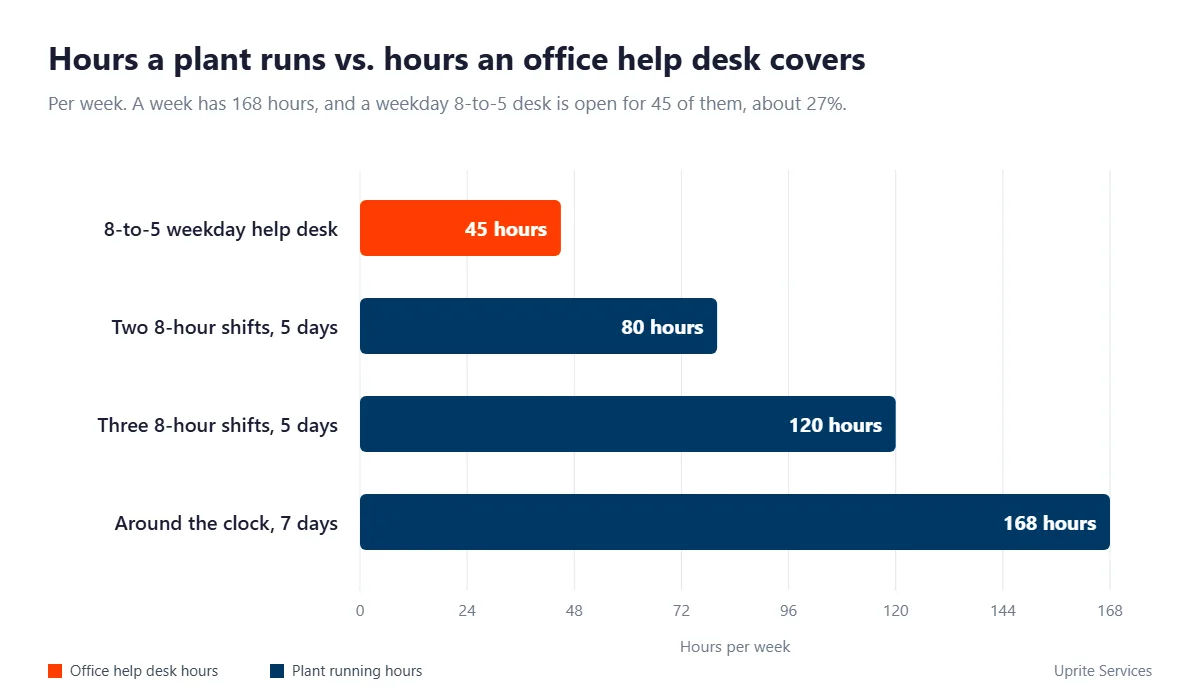
That arithmetic picks the plan. Fully Managed IT includes 24/7 support availability and after-hours response to monitoring alerts, while IT Essentials, our $91 tier, is limited business-hours support capped at 8 hours per user per month, which suits day-shift office users and not a night crew.
Changes follow the plant calendar too. Office systems take patches on a normal cycle. Anything on the production side waits for a window your plant manager signs off on, and when a controller is involved, so is the machine builder.
Monitoring has to know the schedule as well. A 2 AM login from a second-shift supervisor is routine on a plant network. Our 24/7 SOC, part of our cybersecurity services, is tuned to that pattern instead of an office day, so a login that really is out of place still stands out.
OT/IT Segmentation Without Stopping the Line
Manufacturing has been the most-targeted industry in IBM’s X-Force reports for 5 years running. In the 2026 X-Force Threat Intelligence Index, it accounted for 27.7% of the incidents X-Force observed.
So what does a plant actually do about it? In May 2025, CISA published 5 primary mitigations for operational technology. Each one maps to a line in a plant IT agreement.
- Remove OT connections to the public internet. Our OT asset inventory shows which controllers and HMIs can be reached from outside, and those paths get closed or moved behind the firewall.
- Change default passwords. The same inventory flags devices still on factory credentials. Some of them belong to the integrator, so the change gets scheduled with whoever supports the machine.
- Secure remote access. Machine builders connect through brokered, logged sessions with MFA rather than an always-on remote tool sitting on the HMI.
- Segment IT and OT networks. Production traffic gets its own network. Every crossing to the office side is controlled and monitored.
- Practice manual operations. The plant owns that procedure. Our part is proving, with scheduled restore tests, that the systems you need to restart production actually come back.
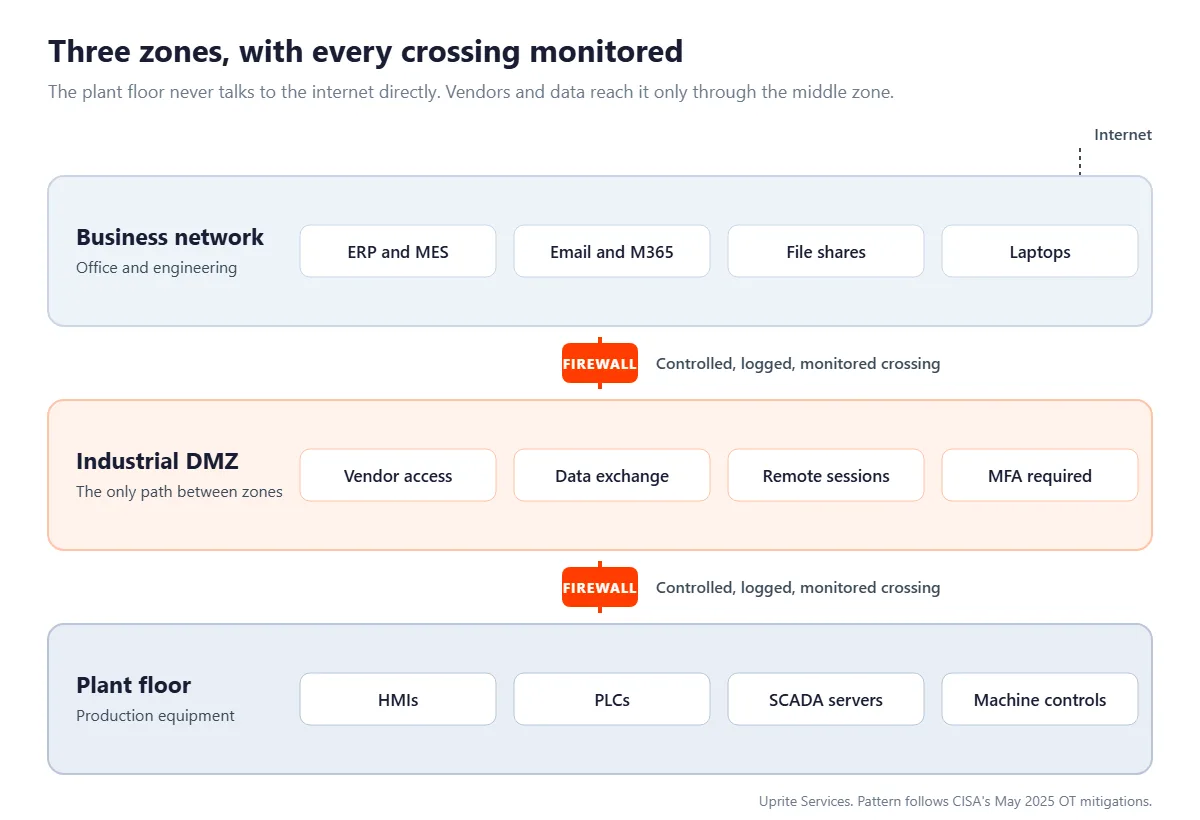
The deeper reading sits in 3 companion guides. Manufacturing cybersecurity in Texas walks through the common breach paths and a 90-day hardening plan. What Texas manufacturers get wrong about OT/IT security covers the 7 assumptions we keep finding on plant floors. And the guide to the OT cybersecurity audit for Texas manufacturers explains what reviewers check first.
ERP, MES, and CAD Support Below the Application
We support SAP, Epicor, NetSuite, Sage 500, and Fishbowl Inventory on the ERP side, plus Autodesk AutoCAD, Inventor, and Vault for engineering.
Support covers the stack under each application. Server and database health, the license server, backups, user access, patch timing, and the network path between the ERP and the floor terminals that read from it all sit with us. When the fault is in the software itself, we open the vendor ticket and stay on it until it closes.
CAD is the quiet risk. Vault and Inventor files are big, locked while someone has them open, and shared across the shop network, so a slow link shows up as an engineer staring at a progress bar while a job waits on a drawing. It adds up.
Weighing a move to a cloud ERP? Read ERP cloud migration for Texas manufacturers before you sign the vendor’s proposal. It starts from the modules a company actually uses.
CMMC, ITAR, and Customer Security Requirements
For most plants, the security requirement shows up through a customer, not a regulator. A prime adds a DFARS clause. An automotive buyer sends a questionnaire. The cyber insurer asks for proof of MFA before it renews.
Where CMMC stands in October 2026
On July 13, 2026, the Department of War suspended CMMC Phase II, the step that would have required third-party assessments. Its CMMC program page says all Phase I self-assessment requirements remain firmly in place.
The contract clause underneath didn’t move either. DFARS 252.204-7012 still applies the NIST SP 800-171 controls to any contractor system that handles covered defense information, and it still requires cyber incidents to be reported within 72 hours of discovery.
That paperwork is what MFG Secure covers for defense suppliers, along with keeping ITAR and EAR technical data off the general engineering shares. For the full readiness process, see our CMMC compliance services in Texas.
ITAR registration doesn’t wait for an export
Export rules catch more plants than people expect. Under 22 CFR 122.1, a manufacturer of defense articles has to register with the State Department even if it never exports anything, and from that point, who on your IT provider’s team can reach the technical data becomes a compliance question.
Texas SB 2610 rewards a documented program
Texas added an incentive of its own. Senate Bill 2610, in effect since September 1, 2025, blocks exemplary damages in a breach lawsuit against a Texas business with fewer than 250 employees that holds sensitive personal information, as long as it was running a qualifying cybersecurity program when the breach happened.
The bar rises with headcount. Under 20 employees, the law asks for simplified controls like password policies and staff training. From 20 to 99, it points to CIS Controls Implementation Group 1. From 100 to 249, the program has to conform to a recognized framework such as the NIST Cybersecurity Framework or NIST SP 800-171, the same control set a defense supplier already owes its prime.
Customer questionnaires usually ask about the IT provider too. Our SOC 2 Type 1 report (2023) answers that section for buyers who accept a Type 1. It was issued in May 2023 and hasn’t been renewed, and we say so up front.
Downtime, Response Times, and What Goes in the Agreement
Response numbers come in 2 kinds. Guarantees and averages.
Ours is an average. Across every ticket priority, our first response averages 5 minutes, and we publish it as a measured average rather than a promise written into the contract. Know which kind you’re buying before anyone signs.
The agreement still has to say what happens when a line goes down. These are the lines we write in.
| Agreement line | Uprite’s published standard | Set for each plant |
|---|---|---|
| First response | A 5-minute average across all priorities, measured rather than guaranteed | Priority levels tied to line impact, so a stopped line outranks a slow laptop |
| Support hours | 24/7 availability on Fully Managed IT and IT Pro | Which users and shifts sit on which plan |
| After-hours alerts | After-hours response on Fully Managed IT, and 24/7 alerting with immediate response on IT Pro | Which plant servers and network devices get monitored |
| Restore testing | Quarterly on Fully Managed IT, twice a year on IT Pro, and once a year on IT Essentials | The restore order for ERP, file, and quality systems |
| Change windows | Production-side changes only inside windows you approve | Your planned stoppage calendar |
| Emergencies | Emergency support, always available | Who on your side can declare one |
Recovery targets get set system by system. Our page on disaster recovery in Texas explains how each system gets its own recovery time and data-loss target, priced by tier and agreed in writing before anything breaks.
What Managed IT for Manufacturing Costs at Uprite
Our rates are published on the Uprite pricing page. Every plan below is billed per user per month.
| Plan | Starting rate | Who it suits in a plant | Support |
|---|---|---|---|
| Fully Managed IT | $138 per user per month | Plants that want the whole IT function run for them, with on-site infrastructure management included | 24/7 availability |
| Co-Managed IT Partnership | $100 per user per month | Plants with internal IT that need coverage, strategy, and compliance consulting | Enhanced support, coordinated with your IT staff |
| IT Pro, remote only | $110 per user per month | Teams of 12 or more outside the Houston and San Antonio areas | 24/7 availability |
| IT Essentials, remote only | $91 per user per month | Teams under 12 with basic needs on Microsoft tools | Business hours, 8 hours per user per month |
| MSSP Security Focus | $40 per user per month | Internal IT teams adding firewall, SIEM, and SOC monitoring | SOC monitoring and incident response |
Plans can be mixed across a team. The pricing page’s own example puts an executive team on Fully Managed IT while operations staff sit on IT Essentials. Plants do the same with floor users. Watch the hours, though. Essentials won’t cover a night shift.
Licensing sits on top. Microsoft 365 and other software subscriptions are billed beyond the plan rate, and our breakdown of manufacturing IT cost in Texas prices those lines, plus OT and compliance scope, for real plant sizes.
Every plan carries a first-year rate guarantee and a 120-day satisfaction promise. If you’re not satisfied within 120 days, you can get out of the contract. No hidden fees, either.
The Uprite MFG Suite
Uprite MFG℠ is our manufacturing program. It comes in 4 forms, so a 40-person machine shop with no IT staff and a manufacturer with a 3-person IT department can both use it.
| Option | Focus | Best for |
|---|---|---|
| Uprite MFG Complete℠ | Fully managed IT covering help desk, systems management, cybersecurity, monitoring, and vendor coordination | Manufacturers that want a complete, turnkey IT partnership |
| Uprite MFG rComplete℠ | Remote IT services, including monitoring, patching, and cloud management | Companies with dispersed teams or limited physical infrastructure |
| Uprite MFG Impact℠ | Co-managed IT where Uprite supports internal IT staff with shared responsibilities | Plants that want extra horsepower without adding headcount |
| Uprite MFG Secure℠ | Compliance, vCISO services, and protection for regulated or contract-driven environments | Manufacturers under customer, vendor, or supply-chain security requirements |
Each option includes regular risk reviews, incident response planning, and documentation built for audits and customer compliance demands. Still comparing providers? Work through the managed IT factors for Texas manufacturers first, or see how 19 providers scored in our ranking of the best MSPs for manufacturing.
Already have an IT person? MFG Impact℠ is the co-managed version. Your IT lead keeps ownership of the plant’s priorities, and we add the SOC, patching, after-hours cover, and the compliance paperwork.
Manufacturing IT Where Your Plants Are
Every Uprite office is in Texas, and Texas plants are the only ones we support. Each metro has its own page with local detail. Pick yours below.
Houston
Our 2 Houston offices sit at 5718 Westheimer Road and 16441 Space Center Boulevard, close to the Bay Area and Ship Channel plants. Fabricators, oilfield equipment makers, and process plants.
Dallas-Fort Worth
Our Dallas office at 5757 Alpha Road, Suite 530, covers plants from Dallas to Fort Worth, Arlington, and Grand Prairie, aerospace and defense suppliers included.
San Antonio
11831 Radium Street, serving plants and suppliers across Bexar County and up the I-35 corridor.
What This Looks Like at a Growing Manufacturer
A growing manufacturer came to us with email outages from a failing on-site Exchange server, hardware near end of life, slow support from its previous provider, and cyber insurance requirements it was struggling to meet.
We replaced break-fix with managed IT and 24/7 support, moved email to Office 365, upgraded the servers and workstations, added VoIP and backup, and closed the security gaps behind the insurance requirements. The work was sequenced so production kept running.
The result was fewer outages, faster response, and an environment ready for the next stage of growth. The full write-up is our manufacturing IT modernization case study.
“We built our Uprite MFG suite because production cannot afford surprises. If a line goes down or systems fail, the entire operation feels it. Technology must work as reliably as the equipment on your floor.”
Stephen Sweeney, CEO, Uprite Services
Who It Fits
Plants Uprite MFG Is Built For
Plants running a second or third shift that need IT help after the office empties
Defense suppliers fielding DFARS 252.204-7012, NIST SP 800-171, and CMMC questions from their primes
Shops on Epicor, SAP, NetSuite, Sage 500, or Fishbowl Inventory, where an ERP outage stops shipping
Manufacturers with sites in several Texas metros that want a single provider and a single standard
Companies with 1 or 2 internal IT people who need a bench behind them
Plants whose customers or insurers have started sending security questionnaires
Do 2 or more of those sound like your plant? The free assessment shows what the scope would look like.
Questions Plant Leaders Ask About Managed IT
Both, with a boundary. Office IT, the ERP, and the plant network sit under a single agreement, while controllers and HMIs stay with production and change only in windows you approve, with the machine builder involved. That split is deliberate. The people who answer for a stopped line keep the final say on the equipment that runs it, and we keep the systems around that equipment patched, monitored, backed up, and documented.
$138 per user per month is where our Fully Managed IT plan starts, with 24/7 support and on-site infrastructure management included. Co-managed IT starts at $100, MSSP security coverage at $40, and software licensing is billed on top of the plan rate.
Yes, on the right plan. Put night-shift users on Fully Managed IT, which includes 24/7 support availability.
Only with your approval and the machine builder in the loop. Controllers belong to production, so plant-side changes wait for a maintenance window you sign off on, and we coordinate with the integrator or OEM that supports the equipment.
Partly. The Department of War suspended CMMC Phase II on July 13, 2026, but its CMMC page says all Phase I self-assessment requirements remain in place. DFARS 252.204-7012 still requires NIST SP 800-171 controls and 72-hour incident reporting.
Not to replace them. Uprite MFG Impact is our co-managed option, and it gives the person you already trust a SOC, a patching pipeline, after-hours coverage, and compliance help. Our co-managed plans start at $100 per user per month.
SAP, Epicor, NetSuite, Sage 500, and Fishbowl Inventory on the ERP side, plus Autodesk AutoCAD, Inventor, and Vault. We look after the servers, databases, license services, backups, user access, and network paths behind them, and we work the vendor ticket when the fault is in the software.
Texas plants, yes. Our offices are in Houston, Dallas, and San Antonio, we cover Fort Worth from Dallas, and IT Pro is a remote-only plan for teams of 12 or more outside the Houston and San Antonio areas. We don’t support plants outside Texas.
It shouldn’t. Office systems move first and can move live, and anything on the plant side waits for a window you approve. Our 120-day satisfaction promise covers the transition, so you can leave the contract if onboarding goes badly. Ask for the cutover plan in writing before the first change, and check that it names which systems move on which date.
Our SOC 2 Type 1 report (2023) was issued in May 2023 and hasn’t been renewed. It won’t satisfy a questionnaire that requires a current Type II.
The Next Outage Won’t Wait for a Maintenance Window
Unplanned downtime picks its own hour, usually the one with an order due. A free manufacturing IT assessment shows where your plant’s IT stands before that happens.
Rather talk first? Book a time with our team in the scheduler at the bottom of this page.
Uprite Services Is Recognized For Creating Positive Impact For Businesses Throughout Texas
Awards & Industry Recognition















The Uprite Way
Secure. Responsive. Proactive.
Client Testimonials
Hector and Kareem are super helpful! They are always willing to take on my computer problems even if its small. I had my mouse disappear off my screen, it was an user issue but Hector didn't make me feel small or "dumb" for this error. We love uprite!
Gerardo Sanchez was very helpful & professional. Uprite Services has great customer service and outstanding technicians. We have used them for several years and will continue our business with them.
I had been having trouble with an IT matter that I didn't think would be fixed but Arvin Ebueng from Upright took his time with me and worked with me until we were able to resolve the issue. The issue was an internal issue with the way the program was written, but Arvin came up with a great work around so that I am now able to do what I need to do at my job. Long story short, he got me access to both things that I need access to simultaneously and daily. Thanks 😊 Arvin, you are much appreciated 👏 💐 🥳.
I’ve been extremely satisfied with Uprite Services and would recommend them without hesitation. They consistently deliver reliable, high-quality work and truly feel like a true partner rather than just another vendor. A special thank you goes to Arvin Ebueng, he is always quick to respond to our needs and incredibly easy to communicate with. No matter how busy things get, Arvin makes sure we’re taken care of promptly and with a smile. His responsiveness and clear communication have made every interaction smooth and stress-free. Thank you, Arvin and the entire Uprite team, Peerless Equipment is a customer for life!
I'm am not a "tech" person, however the team at Uprite gets me through the technological side of computers and software so that I can function on a daily basis... but the most enduring quality is that they care. Special shoot out to Mary, Sergio, Eufemio, Hector, and Jeff just to name a few... I appreciate each of you and the help you give me.
Great service by Juan and Jacob. Always helping us out at Alamo City Trailer Sales. We have been using this company for over 10 years and always happy with the work they do.
We Understand Your Technology Challenges
Our experts have your technology needs covered so you can stay secure, be more efficient, grow your business, and succeed in the marketplace. Schedule time with us today to explore how Uprite can help you reach your objectives.
Uprite News

What It Costs to Meet Cyber Insurance Requirements in Dallas: MFA, EDR and Backup Pricing (2026)
Last updated: October 29, 2026. Written by Pete Rullman, CTO at Uprite Services. TL;DR Meeting
Learn More
Best IT Companies in Dallas-Fort Worth for Cyber Insurance Readiness (2026)
Uprite Services, which publishes this page, scores highest among Dallas-Fort Worth IT firms on cyber
Learn More
Cyber Insurance Renewal Checklist for DFW Businesses: MFA, EDR, Backups and the Questionnaire
A cyber insurance renewal checklist for a DFW business comes down to 4 proofs, MFA
Learn More
Best Incident Response Companies in Houston (2026)
DYOPATH ranks first among Houston incident response companies in 2026 with a Response-Ready Score of
Learn More


