In-house IT vs outsourced IT in San Antonio comes down to user count. One in-house generalist costs about $139,100 a year with benefits and payroll taxes, the same as Fully Managed IT for 84 users at our published $138 rate. A two-person team matches 136 users. Below that, outsourcing wins on cost and coverage. Past roughly 190 users with steady projects, in-house can pay off. Plans and on-site details sit on our IT support in San Antonio page.
For most San Antonio companies under about 85 users, outsourced IT costs less than an in-house hire and covers more of the job. One loaded systems administrator here runs about $139,100 a year. Before a single tool.
I’m Uprite’s Lead vCIO, a virtual CIO for client companies, so this question lands in a lot of the planning meetings I run. Hire an IT person, or pay for outsourced IT support? The salary comes up first. Wrong place to start.
Three numbers decide it here. What a department costs, not a person. Who you can actually hire in this metro, and at what pay. And how many of your people sit at a computer all day, which can be a far smaller figure than your headcount once you count desks instead of name badges.
Each one gets a price below, built from federal data for the San Antonio-New Braunfels metro that I pulled in October 2026 and set beside the rates we publish for every plan we sell. Some of it favors hiring. I’ll flag it.
What counts as in-house, outsourced, or hybrid IT?
In-house IT means you employ the people who run your technology. Outsourced IT means a provider’s team runs it under a monthly agreement, usually priced per user. Hybrid IT, also called co-managed IT, keeps one or more of your own IT staff and adds a provider for the work they can’t cover alone.
Break-fix gets mentioned in the same breath. Not a staffing model, though. It’s a repair bill. We compare it on its own in break-fix vs managed IT in San Antonio.
So this guide sticks to three models. Each one gets tested on money, on skills, and on the moment that usually forces the call.
What does an in-house IT department cost in San Antonio?
A one-person IT department in San Antonio costs about $139,100 a year in loaded labor. Two people cost about $225,600. Four cost about $643,400. Those totals use the San Antonio-New Braunfels wages in BLS Occupational Employment and Wage Statistics for May 2025, the most recent survey, loaded for benefits and payroll taxes with the June 2026 employer cost data.
| Department | Who you’d hire | Loaded labor per year | Same as Fully Managed IT for |
|---|---|---|---|
| 1 person | A systems administrator who also works the help desk | About $139,100 | 84 users |
| 2 people | Add a help desk technician | About $225,600 | 136 users |
| 3 people | Add an information security analyst | About $405,400 | 245 users |
| 4 people | Add an IT manager | About $643,400 | 389 users |
Each row adds one hire. The wages are the San Antonio-New Braunfels means, $97,370 for a systems administrator, $60,520 for a help desk technician, $125,830 for a security analyst, and $166,630 for an IT manager, and the last column divides each loaded total by our Fully Managed IT starting rate of $138 per user per month.
Why 1.4287? Wages are only 70.0% of what a private employer spends for each hour worked. Benefits and payroll costs make up the other 30.0%, according to the BLS employer cost release for June 2026, which puts private-industry total compensation at $46.89 an hour worked against $32.82 in wages and salaries. So $97,370 becomes $139,100. Every year.
Could you hire a help desk technician alone? Sure. About $86,500 loaded, or Fully Managed IT for 52 users. But a help desk hire rarely rebuilds a firewall, untangles a Microsoft 365 tenant, and proves last month’s backups actually restore. You’d be paying someone to answer the phone. And hoping.
None of these figures buys a tool, either. An in-house team still needs a ticketing system, remote management software, endpoint protection, email security, and a backup service. A provider spreads those costs across every client. Your department carries them alone.
For the wider market, including why 4 San Antonio companies of the same size can get 4 very different quotes and how to line them up, our guide to what IT services cost in San Antonio walks through it.

Who can you actually hire for IT in San Antonio?
San Antonio has a deep bench of help desk and systems administrator talent and a thin one for network specialists. The metro counts 600 computer network support specialists. That’s all. Their share of local jobs sits 44% below the national share.
| Role | Jobs in the metro | Location quotient | Middle half of pay |
|---|---|---|---|
| Computer user support (help desk) | 4,710 | 0.91 | $46,900 to $71,540 |
| Network and computer systems administrator | 2,340 | 1.03 | $77,190 to $118,700 |
| Information security analyst | 1,350 | 0.98 | $99,490 to $149,220 |
| Computer network support specialist | 600 | 0.56 | $56,700 to $92,240 |
| Computer and information systems manager | 4,090 | 0.84 | $129,040 to $201,450 |
That third column is the BLS location quotient. A reading of 1.00 means the job makes up the same share of employment here as it does nationwide. Systems administrators sit at 1.03. Network support specialists sit at 0.56. Just over half.
What does that look like in a hiring week? You’ll find a generalist. Probably a good one. The specialist your generalist calls when a switch stack or a site-to-site VPN goes sideways is far scarcer here, and that’s precisely the person a provider keeps on its bench for every client at once.
Now the pay spread. The middle half of San Antonio systems administrators earn between $77,190 and $118,700, a $41,510 gap. The admin who can run your network, your Microsoft 365 tenant, and your security tools without anyone to call is rarely the one at the bottom of that band, and you’ll pay for the difference. Load the 75th percentile. About $169,600 a year. That’s Fully Managed IT for 102 users.
Plan for the goodbye, too. Workers in computer and mathematical jobs had been with their current employer a median of 4.6 years in January 2026, according to the BLS employee tenure survey, a little longer than the 4.1-year median for all workers. That’s a national figure. It still says a one-person department should be built around a departure, not surprised by one.
Which IT jobs does each option actually cover?
One in-house hire covers one person’s skills during one person’s working hours. Fully Managed IT adds 24/7 support availability, an after-hours monitoring response, a security stack, quarterly restore tests, and vCIO planning on top of the help desk, all for one per-user rate that doesn’t change when someone is on vacation.
| IT job | One in-house generalist | Two-person in-house team | Fully Managed IT | Your IT person plus co-managed |
|---|---|---|---|---|
| Help desk tickets | While they’re at work | The help desk technician | 24/7 support availability | Shared, with overflow to the provider |
| Network, firewall, and Wi-Fi | If it’s their strength | The systems administrator | Included, on-site and cloud | Shared, with escalation |
| Microsoft 365 and user accounts | Yes | Yes | Included | Shared |
| Security monitoring after hours | Nobody, unless you buy it in | Nobody, unless you buy it in | Monitoring with after-hours response | The provider |
| Backup restore tests | When there’s time | When there’s time | Quarterly | Agreed in the written split |
| Vacation and sick weeks | Uncovered | Partly covered | Covered by the team | Covered by the provider |
| Budget and roadmap planning | Falls to the owner | Falls to the owner | vCIO planning sessions | Roadmap planning with your IT person |
Leave is the line owners forget. Private-industry workers who get paid leave average 16 vacation days after 5 years of service and 7 sick days after 1 year, according to BLS benefits data for March 2026, and your IT person will want every one of those days. That’s more than 4 working weeks with your department of one out of the building, before a single holiday. Who answers the phone that week? Usually the owner.
Round-the-clock staffing is a bigger number again. We worked it out chair by chair in our guide to what managed IT services in San Antonio include. In-house plans skip it.
Who in San Antonio is facing this decision?
About 8,000 San Antonio-area workplaces have 20 to 249 employees, the size where the IT outsourcing question stops being theoretical. Restaurants, bars, and hotels make up the biggest group with 20 to 99 employees, ahead of health care and retail.
The Census Bureau’s County Business Patterns for 2023 counts 52,088 employer establishments across the San Antonio-New Braunfels metro. 70.1% have fewer than 10 employees. 7,011 have 20 to 99, and another 1,032 have 100 to 249. Who fills that band?
- Restaurants, bars, and hotels lead with 1,797 workplaces, about a quarter of the band.
- Health care and social assistance, 958.
- Retail stores at 892.
- Construction has 493, and 448 professional, scientific, and technical firms sit just behind it.
- Another 427 are in other services, the repair shops, salons, and member groups.
Headcount misleads here.
Management, business and financial, office, and computer roles add up to just 4.7% of US restaurant employment in the BLS national industry staffing estimates for May 2025, which count more than 12 million people working in US restaurants and bars. In hotels they’re 26.1%. So a 60-person restaurant group may have about 3 people at a desk, while a 60-person hotel has closer to 16. Neither justifies a $139,000 hire. Their IT lives in point-of-sale terminals, guest Wi-Fi, door locks, kitchen screens, and cameras, which don’t map neatly onto a per-user price, so ask any provider exactly how they’d count them.
Clinics run the other way. Nearly everyone in a medical office touches the patient record system all day. The HIPAA Security Rule also requires a covered practice to assess its risks and regularly review its system activity records, and neither job stops when the front desk closes at 5.
Under about 50 people? Our page on small business IT support in San Antonio works through the smaller end of the market.

At what size does in-house IT start to pay off?
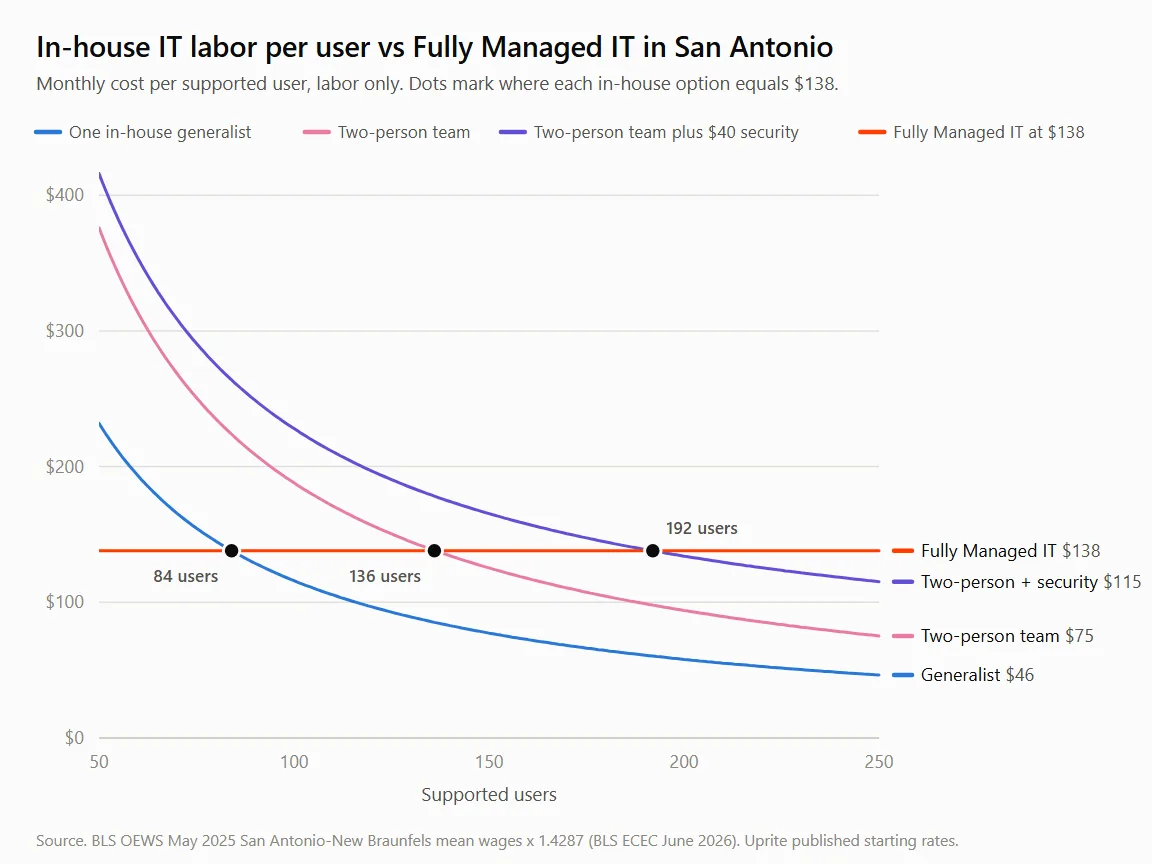
On labor alone, one in-house generalist matches Fully Managed IT at about 84 users, and a two-person team matches it at about 136. Add a bought-in security layer and those break-even points move out to about 118 and 192 users.
| Option, per user per month | 25 users | 50 users | 100 users | 150 users | 200 users |
|---|---|---|---|---|---|
| One in-house generalist | $464 | $232 | $116 | $77 | $58 |
| Generalist plus MSSP security at $40 | $504 | $272 | $156 | $117 | $98 |
| Two-person team | $752 | $376 | $188 | $125 | $94 |
| Two-person team plus MSSP security | $792 | $416 | $228 | $165 | $134 |
| Generalist plus co-managed at $100 | $564 | $332 | $216 | $177 | $158 |
| Fully Managed IT | $138 | $138 | $138 | $138 | $138 |
Every in-house row uses the same BLS wages and the 1.4287 load. Ours are published starting rates. Microsoft 365 licensing sits on top of every row, so it drops out of the comparison.
I’ll be straight about what that table says. Past about 84 users, one in-house generalist costs less per seat than our Fully Managed rate. Past about 136, so does a two-person team. That’s real.
It’s also only labor. The in-house rows carry no security operations center, no monitoring platform, no backup service, no ticketing system, and no cover for the weeks your people are out sick or on vacation. The $40 rows add our MSSP Security Focus plan, which brings advanced firewall coverage, SIEM log analysis, and monitoring from a security operations center, work two people can’t staff around the clock, and adding it pushes the honest break-even for a small in-house team out to about 192 users.
Seat load drives the provider side of this math too, since one engineer carrying 75 seats costs a provider more per seat than one carrying 100, and our breakdown of how much managed IT costs in San Antonio shows why. Want every line item, statewide? Our in-house IT vs MSP cost comparison has them.
When should you switch, and which way?
Move to outsourced IT services when your only IT person resigns, when an insurer or customer asks for security evidence you can’t produce, or when you’re under about 84 users. Bring IT back in-house when steady project work meets roughly 190 users.
Outsourcing signals arrive in pairs.
- Your IT person just gave notice. Two weeks is a short runway for any hire.
- Nobody else has the global admin password for Microsoft 365, or the firewall, or the backup console.
- You’re under about 84 users and paying one person more per seat than a full team would cost.
- A cyber insurance renewal, a customer security questionnaire, or a HIPAA risk analysis asks for after-hours monitoring and restore-test records, and nobody in the building can produce them by the deadline.
- A second location opened across the metro, say in New Braunfels or Boerne, and one person can’t be in two places.
- Your IT person hasn’t taken a full week off in a year.
When bringing IT in-house makes sense
Some companies should hire. If you’re near 190 users or more, the project list never empties, and a line-of-business system needs someone who knows it every day, a two-person team plus bought-in security can beat the per-user math. A plant floor running its own production software is the classic case. Our guide to in-house IT vs an MSP for San Antonio plants covers that case job by job.
Even then, keep a partner for nights and security. That gap stays open.
What does a hybrid IT setup look like in San Antonio?
In a hybrid setup your IT person keeps projects and the knowledge of how the place runs, while a provider takes after-hours coverage, monitoring, patching, and security. Uprite prices co-managed IT from $100 per user per month.
Be clear-eyed about the money. Check the size table. The generalist-plus-co-managed row is never the cheapest line in that table, and it stays above Fully Managed IT until about 300 users.
So why do it? Insurance, mostly. If your person leaves, the documentation, admin access, and monitoring already sit with the provider, so the search for a replacement doesn’t open a gap in coverage that an attacker or a dead server can find first. And your person finally sleeps through the night.
The written split matters more than the price. Our page on co-managed IT in San Antonio shows how it gets put on paper, who owns which system, and who picks up at 2 a.m.
Strong team, no security operations? The lighter step is MSSP Security Focus at $40 per user. It wraps SIEM and SOC monitoring around the people you already have.
Where Uprite fits for San Antonio companies
Uprite is a Texas managed IT and cybersecurity provider with 42 people and an office on Radium Street in north San Antonio, and our technicians work across the metro. We support 2,227 users, and our average response time runs about 5 minutes. Fully Managed IT starts at $138 per user per month and includes on-site and cloud infrastructure management, 24/7 support availability, a security stack, monitoring with after-hours response, vCIO planning sessions, and quarterly backup testing.
Co-Managed IT starts at $100, MSSP Security Focus at $40, and teams under 12 people can start on IT Essentials at $91, which is remote-only with limited business-hours support. Every rate is on our published pricing page, with a first-year rate guarantee and a 120-day satisfaction promise. Prefer a conversation first? You can reach our San Antonio team directly.
What San Antonio owners ask about in-house and outsourced IT
Is outsourced IT cheaper than hiring in-house in San Antonio?
Below about 84 users, outsourcing wins on cost, and the gap widens the smaller you are. One loaded systems administrator in the San Antonio-New Braunfels metro runs about $139,100 a year, the same as Fully Managed IT for 84 users at the published $138 rate, and the hire comes with no tools, no after-hours monitoring, and no cover for vacation weeks. Above 84 users, compare coverage too.
How much does one IT employee cost in San Antonio?
$86,500 to $139,100 a year, loaded. That range runs from a help desk technician at the metro mean wage of $60,520 to a systems administrator at $97,370, using BLS May 2025 data multiplied by 1.4287 for benefits and payroll costs. Recruiting, training, and tools come on top.
What does a small IT department cost per user?
Divide the department by the people it supports. A two-person team costs about $225,600 a year in labor, or $376 per user per month at 50 users and $125 at 150 users. The curve is steep. Fully Managed IT starts at $138 per user per month with the security stack, monitoring, and quarterly restore tests included.
At what size should a San Antonio company build its own IT team?
Somewhere between 140 and 190 users, if the project work is steady. A two-person team matches the Fully Managed rate at about 136 users on labor alone, and at about 192 once security monitoring is bought in at $40 per user. Even at that size, a partner for nights and security usually earns its place.
What happens to our current IT person if we outsource?
Nothing has to happen to them. They stay. In a co-managed setup the internal person keeps projects, vendors, and the knowledge of how the business runs, while the provider takes after-hours coverage, monitoring, patching, and security. Uprite co-managed IT starts at $100 per user per month.
What should we do first if our only IT person resigns?
Before the last day, collect the admin credentials and the documentation. That means Microsoft 365 global admin, firewall and network logins, the backup console, domain registrar access, and every vendor contract with a renewal date. Then choose between a replacement hire and a provider while the notice period is still running, because two weeks is a short runway for any search.
Does per-user pricing work for a restaurant or hotel?
It works if you count users, not employees. Management, business, office, and computer roles are only 4.7% of US restaurant employment in BLS May 2025 data, so a 60-person restaurant group may have about 3 people at a desk. The rest of the IT load sits in point-of-sale terminals, guest Wi-Fi, and cameras, so ask how a provider counts those.
Send us your headcount, how many people actually use a computer, and what your IT person spends the week on. We’ll set your in-house option beside our published plans using the same San Antonio wage data, coverage gaps included, and the model is yours to keep whichever way you decide.
Get My In-House vs Outsourced Cost Model