
Within 24 hours of your IT person quitting, take back every admin login, write down what only they knew, and get outside coverage started in week 1, before you interview anyone. The rest of the month is paperwork and one staffing decision.
That’s the plan we’d hand a San Antonio owner with 40 to 100 users and one IT person who just gave notice, or didn’t. For how shared coverage works once the exit is handled, see our page on co-managed IT in San Antonio.
Treat day 1 as an access problem and week 1 as a coverage problem. Take back every admin login, change the shared passwords, and confirm last night’s backup finished. Then get a second set of hands on monitoring while you write down what the person knew. Hiring, or deciding not to, comes in weeks 3 and 4.
What should you do in the first 24 hours after your IT person quits?
Day 1 is about control, not cleanup. Every account that can change, delete, or read company data needs a name next to it. Any password the leaver knew has to change, since nobody can say for sure who else has it. Here’s the order we’d work in.
- Write down every admin account you can find, starting with Microsoft 365 global admins, the firewall, the backup console, and the domain registrar.
- Make sure 2 people at your company, not 1, can sign in as an administrator to each of those.
- Disable the departing person’s own accounts and end their active sessions, unless they’re still working a notice period.
- Change the shared passwords, service account passwords, Wi-Fi keys, and vendor portal logins they knew.
- Turn on multifactor sign-in for every admin account, or confirm it’s already on.
- Check that the last backup finished and that someone besides the leaver can open the backup console.
- Collect laptops, phones, security keys, and badges.
None of this is theoretical. In a 2024 advisory, CISA and MS-ISAC described a state government breach that began with a former employee’s administrator account, one that wasn’t disabled right after the person left. The attacker likely got the password from a separate data breach, and neither admin account they used had multifactor sign-in turned on. Nobody had to target that agency. A dormant admin login just had to be sitting there.
Disabling an account isn’t the same as ending its sessions. Microsoft’s default is that Entra ID access tokens live for 1 hour. Apps that run their own session cookies can keep a person signed in even longer. Its guidance on revoking user access is to disable the account, revoke the sign-in sessions, and in a hybrid setup reset the on-premises password twice. Do all three. Then check the apps that don’t use Microsoft sign-in at all.
Should you lock them out today if they gave 2 weeks’ notice?
Usually not. If the departure is friendly, you need their head for 2 more weeks, and walking them out on day 1 means paying for a handover you don’t get.
Cut access the same hour if the exit is hostile, or they’re headed to a competitor, or something about the last month felt off. You’ll know.
Either way, put the notice period to work. Add yourself or someone you trust as a second admin on everything. Ask for a written list of every system, and who else can get into it. Then pick a cut-off time, an actual hour and not just a date. NIST’s termination control in SP 800-53 Rev. 5 says to disable access within a period the organization defines, collect credentials, and hold an exit interview. How long that period runs, NIST leaves to you. For an IT admin we’d make it the hour they stop being the person who’s supposed to have the keys.
Honest take. Walking a friendly 6-year employee out with a cardboard box is mostly about the owner’s nerves. A firm cut-off hour protects you just as well, and you keep the handover.
Where does the access hide when one person ran everything?
Places the owner has never opened, usually. Below are the spots we check first, and what should be true by day 3.
| System | Where the access usually hides | Confirm by day 3 |
|---|---|---|
| Microsoft 365 and Entra ID | Global admin role held by 1 personal-looking account | 2 company-owned admins, plus 1 emergency account kept sealed |
| Domain name and DNS | Registrar login tied to the leaver’s email | Contact moved to a shared mailbox, auto-renew on |
| Firewall and VPN | Local admin password nobody else has | Credential recovered and changed, configuration backed up |
| Backups | Console owned by a single login, alerts sent to 1 inbox | Last success date checked, failure alerts go to 2 people |
| Phones, Wi-Fi, cameras | Vendor default or personal admin accounts | Admin logins listed and changed |
| Software vendors and carriers | Support contact and portal in the leaver’s name | Contacts and billing emails updated |
| Password manager or spreadsheet | A personal vault, or a file on their desktop | Everything moved into a company-owned vault |

The alert email is the one that gets people. When the leaver’s mailbox is closed, backup failure notices and renewal reminders vanish with it. Nobody notices until a restore fails or a domain lapses.
How long will it take to replace them, and what will it cost?
Longer than you’d like, and we’d distrust any vendor page that quotes a confident time-to-fill for San Antonio. We couldn’t find one we’d stand behind. What we can give you is pay and tenure from the Bureau of Labor Statistics. If you keep a part-time IT person afterward, see our ranking of the best co-managed IT providers in San Antonio.
BLS’s May 2025 wage data for the San Antonio-New Braunfels metro lists 2,340 network and computer systems administrators at a $96,770 median. Help desk runs cheaper, with 4,710 computer user support specialists at $57,400. Both are wages only. No benefits, payroll taxes, or tools, so a fully loaded second hire costs more, and our one-person IT department page puts a Texas figure at $120,000 to $135,000 a year.
Leaving isn’t a failure of anyone’s. In BLS’s employee tenure table, workers in computer and mathematical occupations had a median of 4.6 years with their current employer in January 2026, against 4.1 years for all workers. So somebody walking after 5 years? Ordinary. Overload is a common reason people leave, and we cover it in preventing IT burnout in a small San Antonio IT team.
And an empty seat doesn’t save you money. At 75 users our co-managed layer runs about $7,500 a month, starting at $100 per user before software licensing. That buys 24/7 security monitoring, patching, backup restore tests, and after-hours tickets while you recruit.

What does the 30-day timeline look like?
We’d split the month into 4 windows. Each one has a finish line you can check without being technical.
| Window | Goal | What gets done | Done when |
|---|---|---|---|
| Days 1 to 2 | Control | Admin inventory, disable and rotate, multifactor sign-in, backup check | 2 company-owned admins on every critical system |
| Days 3 to 7 | Coverage | Pick interim support, start onboarding, update vendor and alert contacts | Someone besides you is watching the alerts |
| Days 8 to 14 | Knowledge | Network map, licenses, renewal dates, backup schedule, vendor list, a 1-page runbook | A stranger could find the firewall and the last backup |
| Days 15 to 30 | Decision | Choose backfill, co-managed, or fully managed, then write the scope | A signed plan instead of an open requisition |
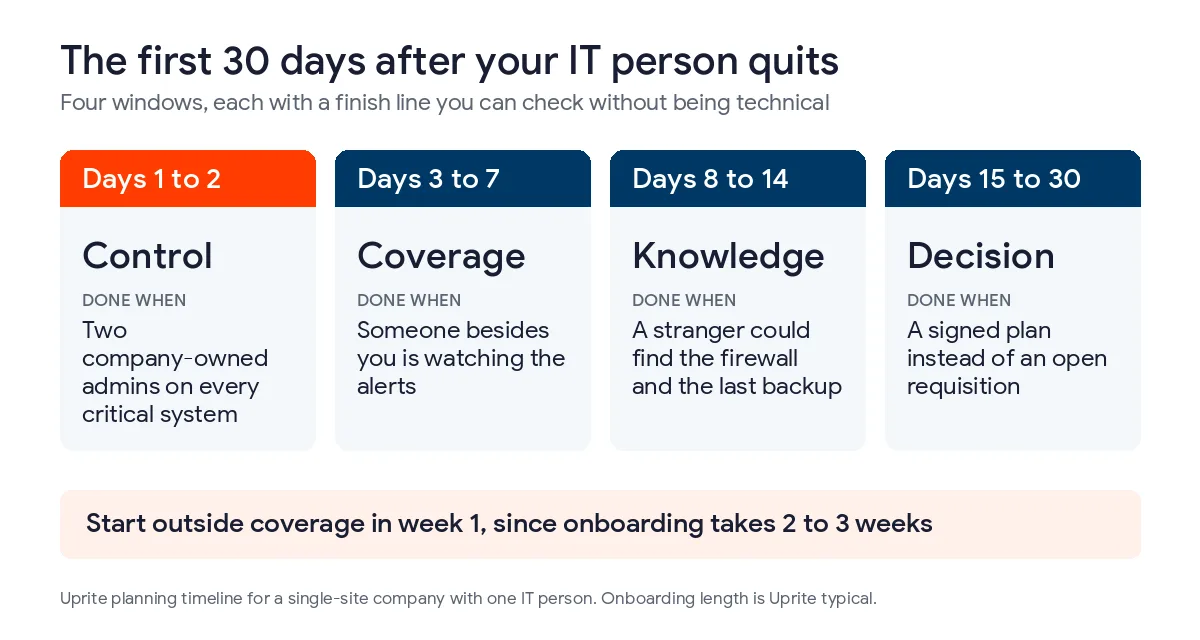
Our own onboarding usually takes 2 to 3 weeks for a single-site company, and we sign a written responsibility matrix before any tools get connected. Start the call in week 1 and coverage is fully in place around the end of week 3 or 4. Wait until week 3 and you’re running unmonitored for the whole month.
Should you hire a replacement, go fully managed, or add co-managed IT?
We sell co-managed IT, so weigh this accordingly. If you already have 4 or more people on an internal IT team and decent documentation, you probably don’t need us for this.
Backfill alone can work. The new hire needs clean documentation, and you have to be okay with another single point of failure. That’s the whole one-person IT department problem, and we priced it out in our comparison of co-managed IT versus a second hire.
Fully managed fits when you’d rather not run IT in house at all. It usually costs more per user, since we carry the whole help desk. The co-managed versus fully managed breakdown shows where the line sits, and the co-managed IT cost guide has the Texas price bands.
Co-managed keeps your people in charge. In our model the IT lead keeps the users, the line-of-business apps, the roadmap and budget, and final approval on anything that stops business systems. We take monitoring, patching, backup testing, and after-hours coverage. If the IT lead is gone, those approvals sit with you until the seat is filled. For a wider look at the trade, read our piece on in-house versus outsourced IT in San Antonio.
How do you keep this from happening to you again?
Build the exit plan while everyone’s still happy. Keep 2 admins on every critical system, 1 sealed emergency account, a password vault the company owns, and a one-page runbook for the firewall, backups, and domain. Review who holds admin rights once a quarter, since that’s cheaper than a week of scrambling. The earlier warning signs are in when to add co-managed IT in San Antonio.
There’s a legal angle too. Section 521.052 of the Texas Business and Commerce Code requires a business to maintain reasonable procedures to protect the sensitive personal information it holds. Whether a former admin’s live login meets that standard is a question for your attorney, and this isn’t legal advice. It’s hard to call it reasonable.
Questions owners ask in the first week
Can my former IT person still get into our systems?
Yes, until you disable their accounts and end their sessions. Disabling alone isn’t enough, since Microsoft access tokens last 1 hour by default and some apps keep their own sessions. Revoke sign-ins, reset passwords, and change every shared login they knew.
Should I lock them out today if they gave 2 weeks’ notice?
Usually not. A friendly leaver can finish the handover with access, as long as a second admin is added everywhere and a firm cut-off time is set. If the exit is hostile, cut access the same hour.
What if nobody knows the admin passwords?
Start with the systems that can reset the others, which are Microsoft 365, your domain registrar, and the firewall vendor. Each has an ownership-proof recovery process, and none is instant, so file the requests on day 1.
How much does it cost to cover IT while we hire?
Our co-managed layer starts at $100 per user per month before software licensing, so a 75-person company pays about $7,500 a month. The per-user rate doesn’t rise in the first year, and there’s a 120-day satisfaction guarantee.
Is it normal for an IT person to leave after a few years?
Yes. BLS puts median tenure for computer and mathematical occupations at 4.6 years in January 2026, against 4.1 years for all workers. Plan for turnover the way you plan for a power outage, before it’s a surprise.
What if our domain or a vendor account is in their name?
Move it to a shared company mailbox first, because renewal and alert emails go to whoever is listed. If the leaver is cooperative, ask them to change the contact before the last day. If not, talk to your attorney before you try a workaround.
Can Uprite step in if our IT person leaves tomorrow?
Usually, but onboarding takes 2 to 3 weeks for a single-site company, so call before day 7 if you can. In the meantime we’d start with an admin review, monitoring, and a backup check.
If you’d like a second opinion on who still holds your keys, contact our San Antonio team and we’ll walk through the inventory with you.
Not sure who still holds your admin keys? We’ll walk through the inventory with you and tell you what we’d cover first.
Book a Free Coverage Assessment