Managed IT cost in San Antonio, by Uprite’s estimate, runs $125 to $200 per user per month in 2026 for fully managed support, and most businesses pay $125 to $175. Uprite’s managed IT plans start at $91 per user, remote only.
A 20-person company should budget about $2,500 to $3,500 a month before licensing, and we estimate co-managed IT at $60 to $130 per user. These are estimates, not quotes, drawn from the proposals Uprite Services writes and reviews for managed IT services in San Antonio. Our published managed IT plans run $91 to $138 per user. Scope matters more than the headline rate. Our line-by-line guide to what managed IT services in San Antonio include shows which plan carries each line and what proof to ask for. Cheap agreements leave out cybersecurity, after-hours support, and compliance work. Read the exclusions first.
What Does Managed IT Pricing Look Like in San Antonio?
Managed IT services are a monthly subscription model where a provider handles your company’s technology infrastructure, cybersecurity, helpdesk support, and strategic planning for a predictable per-user fee, billed monthly against a documented scope rather than against whatever hours anyone happened to work. It replaces the unpredictable costs of break-fix IT with a flat monthly rate. Budgeting gets easier. For a full line-item view of what is included in managed IT services, see our complete breakdown.

If you’re evaluating providers, the first thing you need is a realistic number. Not a national average. Not a range so wide it’s useless. An actual San Antonio number.
By our estimate, most San Antonio MSPs price standard fully managed IT between $125 and $175 per user per month. Add compliance work, advanced cybersecurity, or 24/7 coverage and the range stretches to $200 or higher. Scope drives the number. Co-managed support runs lower, at roughly $60 to $130 per user. Those are Uprite’s estimates, not quotes, and they match the San Antonio row of the Texas MSP Pricing Index, our benchmark across all 3 Texas markets. Quote-based providers make the market harder to check, which is the core of our Uprite vs Rx Technology comparison.
San Antonio Managed IT Rates Per User, by Service Level (2026)
Most figures below are Uprite estimates of monthly fees, not quoted prices. Use them as a checklist. Each row shows its own unit and where the number comes from, including the hourly IT support costs for break-fix and project work. Licensing sits on top. If a proposal can’t be mapped onto one of these rows, ask why.
| Service | San Antonio range, 2026 | Basis |
|---|---|---|
| Fully managed IT, most San Antonio businesses | $125 to $175 per user per month | Uprite estimate, San Antonio row of the Texas MSP Pricing Index |
| Fully managed IT, standard plan | $125 to $150 per user per month | Uprite estimate |
| Fully managed IT, premium security (EDR, MDR, training, vCIO) | $175 to $225+ per user per month | Uprite estimate |
| Fully managed IT, regulated (HIPAA, CMMC, PCI DSS) | About $150 to $210 per user per month | Uprite estimate, standard rate plus 20 to 40% |
| Co-managed IT (your IT lead plus an MSP) | $60 to $130 per user per month | Uprite estimate (our own plan starts at $100) |
| Break-fix IT support | $125 to $185 an hour mid-level, $175 to $295 senior | Uprite estimate, Texas market |
| Project work (migrations, office moves) | $175 to $350 an hour | Uprite estimate, Texas market |
| Onboarding | $3,000 to $25,000, one-time | Uprite onboarding history |
| Microsoft 365 licensing | $7 (Business Basic) to $32 (Business Premium with Copilot) per user per month | Microsoft list price, annual plan |
| Tier-1 help desk labor, 1 San Antonio technician | About $7,205 a month fully loaded, or $72 per user if 1 technician carries 100 users | BLS OEWS May 2025 and ECEC June 2026 (the 100-user ratio is illustrative) |
The last row of the rate table is the floor under every quote. The wage section below shows how it’s built. Here’s the short version. If 1 San Antonio technician carries 100 users, tier-1 labor alone costs about $72 per user every month before the provider pays for its tools, escalation engineers, security analysts, account management, or margin. So a fully managed quote with on-site support that comes in far under $100 needs explaining. Ask for it. Engineering firms carry Autodesk and Bluebeam lines on top of the rate, and our guide to what IT costs for an engineering firm in San Antonio prices each seat.
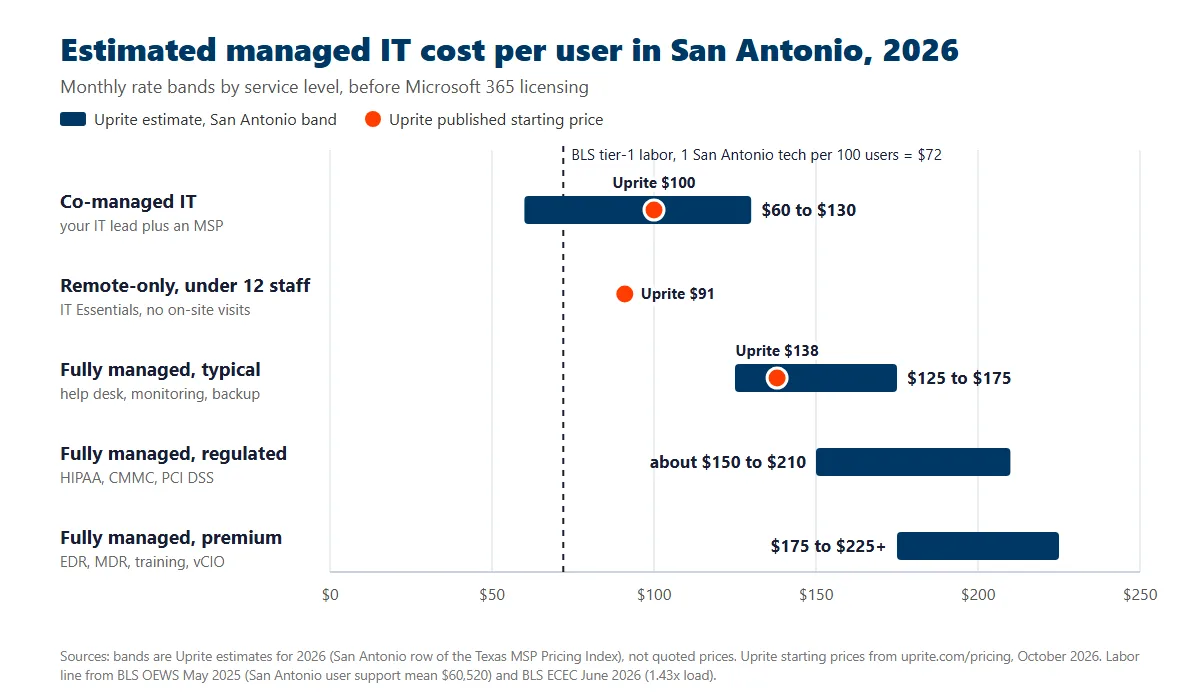
Uprite publishes its own starting rates, so you can test them against the bands above. These come straight from our pricing page as of October 2026. Hold us to them.
| Uprite plan | Starting price | Built for |
|---|---|---|
| Fully Managed IT | $138 per user per month | Complete IT department replacement, with on-site and cloud infrastructure management and 24/7 support availability |
| Co-Managed IT Partnership | $100 per user per month | Internal IT teams that need support, coverage, and executive strategy |
| IT Essentials (remote only) | $91 per user per month | Teams under 12 people with basic needs and Microsoft-native tools |
| MSSP Security Focus | $40 per user per month | Businesses with internal IT that need firewall, SIEM, and SOC monitoring |
| IT Pro (remote only) | $110 per user per month | Teams of 12 or more outside the Houston and San Antonio areas |
Those are our published starting prices, and 4 of the 5 apply to a San Antonio office. IT Pro is built for remote teams of 12 or more outside the Houston and San Antonio areas, so a local company that size usually lands on Fully Managed or Co-Managed instead. Our $138 Fully Managed rate sits in the lower half of the estimated San Antonio band. IT Essentials costs less because it does less. Less scope, lower price. It covers business-hours support up to 8 hours per user a month, the Microsoft Defender security stack, quarterly planning, and basic monitoring that alerts but doesn’t respond. Every plan is listed on our pricing page.
Multiply the estimated band by headcount and most small and mid-sized companies here land between roughly $1,250 and $10,000 a month, depending on scope. Here’s what that looks like by company size. The math is simple. Our statewide guide to managed IT cost at 25, 50 and 100 employees covers why headcount and billable user count are rarely the same number.
| Company Size | Low ($125/user) | Mid ($150/user) | High ($200/user) |
|---|---|---|---|
| 10 users | $1,250/mo | $1,500/mo | $2,000/mo |
| 20 users | $2,500/mo | $3,000/mo | $4,000/mo |
| 30 users | $3,750/mo | $4,500/mo | $6,000/mo |
| 50 users | $6,250/mo | $7,500/mo | $10,000/mo |
These ranges don’t include software licensing. That line sits separately. Microsoft lists Microsoft 365 Business Basic at $7 per user per month and Business Premium with Copilot at $32 on an annual subscription (Microsoft, 2026). Once you layer in cloud backup, email security, and a password manager, most of the San Antonio SMBs we support land somewhere between $30 and $50 per user per month in total licensing on top of the managed IT fee.
San Antonio does run cheaper than the other Texas metros. Not by much, though. Federal wage data puts the gap at 3.5% against Houston and 4.0% against Dallas-Fort Worth for the support roles that handle most of your tickets, which is why our Houston managed IT pricing guide and our Houston pricing breakdown land within a few dollars of these numbers. Managed IT costs in Dallas start a notch higher, at $135 per user by our estimate. The top of the range is similar. The next section shows the wage data behind all of it.
Price alone still doesn’t tell you much. Scope tells you everything. A $125 per user contract that excludes cybersecurity and charges $250 an hour for after-hours emergencies will cost you more than a $150 per user contract that bundles everything, over any 12-month period you care to measure it across. The next section breaks down what “included” should actually mean.
What San Antonio Wage Data Says a Managed IT Seat Really Costs
Every managed IT quote in San Antonio is built on one input above all others. Labor. The Bureau of Labor Statistics publishes what that labor costs in this metro, occupation by occupation, which means you can test a provider’s rate card against the region’s own numbers instead of taking the pitch at face value. Here’s the May 2025 picture for the San Antonio-New Braunfels metro, set beside Houston and Dallas-Fort Worth. The gaps are narrow.
| Role | San Antonio | Houston | Dallas-Fort Worth | San Antonio vs Houston |
|---|---|---|---|---|
| Computer user support specialists | $60,520 (4,710 employed) | $62,700 | $63,030 | 3.5% lower |
| Computer network support specialists | $76,790 (600 employed) | $76,560 | $80,300 | 0.3% higher |
| Network and computer systems administrators | $97,370 (2,340 employed) | $108,200 | $108,020 | 10.0% lower |
| Information security analysts | $125,830 (1,350 employed) | $126,880 | $133,790 | 0.8% lower |
| Computer and information systems managers | $166,630 (4,090 employed) | $182,200 | $185,720 | 8.5% lower |
Annual mean wage by metropolitan area, BLS Occupational Employment and Wage Statistics, May 2025. Employment counts are San Antonio-New Braunfels only.
The San Antonio discount is real. It’s also smaller than you think.
Ask a buyer why a San Antonio quote should come in under a Houston one and you tend to get the same answer. Cheaper market. Cheaper labor. The wage data only partly agrees, and on 2 of those 5 roles it doesn’t agree at all. Look at the table.
A computer user support specialist, the role that absorbs the bulk of your tickets, earns $60,520 here against $62,700 in Houston. That’s 3.5% less. A computer network support specialist earns $76,790 here against $76,560 in Houston, which is actually 0.3% more, and an information security analyst sits 0.8% under the Houston average, which is close enough to call it the same market rate. The frontline is at parity.
The gap opens further up the stack. Network and computer systems administrators run 10.0% below Houston. IT managers run 8.5% below. San Antonio is meaningfully cheaper for the people who design and lead, and level for the people who answer the phone.
That matters. You’re mostly buying the second group.
What a supported seat actually costs to staff
A salary isn’t what an employer pays. BLS Employer Costs for Employee Compensation for June 2026 puts private industry compensation at $46.89 per hour worked, of which wages and salaries are $32.82 and benefits make up the other 30.0% across payroll taxes, insurance, paid leave and retirement contributions. Divide one into the other and you get a load factor of 1.43. Use it every time.
Run the San Antonio tier-1 wage through it. $60,520 loaded at 1.43 comes to $86,465 a year. That’s $7,205 a month, or roughly $47 an hour across 1,840 productive hours. Now divide the monthly figure by the number of supported seats one technician carries. That ratio is everything.
| Seats per tier-1 technician | Tier-1 labor cost per user per month |
|---|---|
| 75 seats | $96 |
| 100 seats | $72 |
| 125 seats | $58 |
| 150 seats | $48 |
Nothing else is in that column. No software. No security stack. No vCIO hours, no escalation engineer, no account manager, no service desk lead, and no margin.
So a $125 per user proposal from a provider running 100 seats per technician has about $53 per user left to fund every other cost the business carries, from the tooling stack to leadership time. At 75 seats it has $29. Not much room left. That’s the arithmetic sitting underneath a cheap quote, and it’s why the lowest proposal on your desk is usually carrying the thinnest stack rather than the leanest overhead.
Geography isn’t the lever. Seat load is.
Run the same calculation on the other 2 metros and the picture gets blunt. Houston tier-1 labor loads to $7,465 a month. The spread is thin. Dallas-Fort Worth loads to $7,504. At 100 seats per technician, San Antonio’s labor advantage over Houston works out to $2.60 per user per month, and its advantage over Dallas-Fort Worth to $2.99, which is less than the cost of a single support ticket.
Two dollars and sixty cents. That’s the whole metro discount at the frontline.
Now change the staffing instead. Moving one technician from 100 seats down to 75 adds $24 per user per month in labor alone, which is roughly 9 times the size of the geographic gap you were just told explained the whole difference. The city on the invoice barely moves your price. The ratio behind it moves your price a lot.
Which leaves you one question worth more than any other on a pricing call. Ask how many supported seats one of their engineers carries. Write the answer down. A provider who knows the number and says it out loud is running a measured service desk. A provider who can’t answer is quoting from a spreadsheet. Published prices help too. When we checked the 7 firms in our scored comparison of San Antonio managed IT providers in September 2026, Uprite was the only one publishing a per-user rate anywhere on its site.
How many IT providers San Antonio actually has
Supply is measurable too. The BLS Quarterly Census of Employment and Wages counts every private establishment in computer systems design and related services, industry code 5415. Bexar County had 1,230 of them in 2025, employing 9,912 people. That’s an average of 8 people per firm. Small shops, mostly. Dallas County, by contrast, had 3,870 establishments employing 64,208 people, an average of 17.
The local pool is shrinking, too. Bexar County lost 63 of those firms and 407 of those jobs between 2024 and 2025, declines of 4.9% and 3.9%, while total private employment across the county grew from 777,264 to 780,620, so the contraction is specific to this industry rather than general. Providers are getting scarcer in an economy that’s getting bigger. Supply is tightening. That puts a floor under local rates rather than a ceiling.
One figure in that data set is easy to misread. Average annual pay across Bexar County’s 5415 sector was $107,579 in 2025, against $140,059 in Harris County and $138,207 in Dallas County. A 23% gap. It reads like proof that San Antonio IT labor costs a quarter less, and the occupation table above says it isn’t, because the same job titles differ by only 0.3% to 10.0%. The sector average is a mix effect. Not a rate effect. San Antonio firms do proportionally more support work and less high-end engineering, which moves the sector number without changing what a help desk technician actually costs to employ in Bexar County, where the occupation data barely moves.
Establishment, employment and average pay figures from the BLS Quarterly Census of Employment and Wages, 2025 and 2024 annual averages, private ownership, NAICS 5415.
Every rate behind this section feeds the Texas MSP Pricing Index, the benchmark we publish across all 3 markets. The metro companions are our Houston managed IT pricing guide and our Dallas managed IT pricing guide.
What’s Included in a Managed IT Contract (and What’s Not)?

Not all managed IT contracts cover the same ground. Not even close. The gap between what a standard package includes and what you actually need is where most San Antonio businesses get surprised. Statewide benchmarks sit on our managed IT pricing in Texas page.
A standard plan should cover the fundamentals your business relies on daily. Nothing exotic. That means 24/7 system monitoring, remote helpdesk support, patch management across all devices, data backup and disaster recovery, basic protections like endpoint security and email filtering, and network management for your firewalls, switches, and access points.
Premium tiers go further. They typically add endpoint detection and response, managed detection and response, security awareness training, compliance management for frameworks like HIPAA or CMMC, virtual CIO or virtual CISO advisory work, and cloud infrastructure management beyond basic Microsoft 365 administration. If you’re not sure which tier your business needs, a vCIO engagement is usually the cheapest way to find out. Start there.
Then there’s the work that almost always falls outside the monthly fee, regardless of provider. Major infrastructure projects like office moves or full cloud migrations, which we price separately in our San Antonio cloud migration cost guide. New hardware purchases. On-site installation. Formal compliance consulting and audit preparation. Specialized third-party application support.
| Feature | Standard Plan ($125 to $150/user) | Premium Plan ($175 to $225+/user) |
|---|---|---|
| 24/7 monitoring and alerting | Yes | Yes |
| Remote helpdesk | Yes | Yes |
| Patch management | Yes | Yes |
| Backup and disaster recovery | Yes | Yes |
| Basic endpoint protection | Yes | Yes |
| EDR and MDR threat detection | Sometimes an add-on | Included |
| Security awareness training | Usually an add-on | Included |
| vCIO strategic planning | No | Included |
| Compliance management (HIPAA, CMMC) | No | Included |
| On-site support | Limited or extra fee | Included or scheduled |
Before signing anything, ask your prospective MSP for a written scope document that lists every service covered by the monthly fee. Get it in writing. Then ask what’s explicitly excluded. The gap between those 2 lists is where unexpected invoices come from. Close that gap.
Which Pricing Models Do San Antonio MSPs Use?
Per-user pricing dominates this market. It’s the structure behind the large majority of managed service contracts we see signed in San Antonio, and it’s the one you should expect on most proposals you receive from a provider working anywhere in this metro. But it isn’t the only option, and understanding the alternatives helps you compare quotes that aren’t structured the same way. Know all 4. Our San Antonio IT buyers guide walks through normalizing 3 proposals onto a single all-in figure. We’ve broken the tradeoffs down further in our guide to MSP pricing models and red flags.
Per-User Pricing
One flat monthly rate for each employee, covering all their devices. Most of the employees we support use 2 or 3 devices, so this keeps billing simple and scales cleanly with your team. Simple beats clever. It’s the easiest model to budget and the most transparent when comparing providers side by side. Cost is only one factor, so pair this with our guide on choosing a San Antonio IT provider.
Per-Device Pricing
A separate rate for each computer, server, or mobile device under management. In the proposals we see, workstations run about $100 a month and servers about $200. Devices add up fast. This can work well for manufacturing floors, labs, or warehouses where the device-to-user ratio is high. For most office environments, it ends up costing more than per-user. Do the comparison.
Tiered Packages
Services bundled into levels with names like Bronze, Silver, and Gold. Higher tiers add faster response times, deeper security, and strategic planning. The jumps are real. See our San Antonio IT support response time benchmarks for what those response numbers should look like at each level. The catch is that you almost always seem to need one thing from the tier above whatever you budgeted for.
Flat-Rate or All-Inclusive
One monthly fee for a defined scope of work. No per-ticket charges, no usage limits. This appeals to leadership teams that want total budget predictability. Finance teams like it. It works well when the scope is documented carefully. It falls apart when the contract is vague about what “all-inclusive” actually covers. Vague is expensive.
No single model is best for every business. Per-user is the default for a reason. Whatever model your prospective MSP uses, the thing that matters is that you can calculate your total 12-month cost before you sign.
What Hidden Costs Inflate an MSP Bill?

The per-user price on an MSP proposal is rarely the total cost. Several line items routinely surprise San Antonio business owners after the first invoice arrives. Ask about each one.
Onboarding and transition fees cover the initial discovery audit, monitoring deployment, documentation, and tool rollout. Across the environments we’ve onboarded, these have run anywhere from $3,000 for a clean single-site office to $25,000 for a multi-location company with legacy servers. Some providers fold this into the monthly rate. Others bill it once, up front. Both are defensible. Ask which before you sign.
After-hours surcharges apply when you need help outside business hours. Plenty of the contracts we review advertise “comprehensive” coverage and still bill 1.5x to 2x the normal rate for evening, weekend, or holiday support. If your team works outside of 8 to 5, this adds up fast. Check your coverage window.
Software license markups are the quiet one. Nobody volunteers it. In the proposals we review, MSPs often add 10 to 20% on top of Microsoft 365 licenses, security tools, and backup platforms. That isn’t inherently unreasonable, since they manage the licensing lifecycle for you. But you should know it’s happening and factor it into your total cost comparison. Ask for the markup.
Project-based hourly billing kicks in for work the MSP classifies as outside the managed contract. Cloud migrations, office relocations, ERP deployments, and major network overhauls typically carry hourly rates of $175 to $350 in the Texas market, by our estimate. The question worth asking is exactly where your MSP draws the line between “managed” and “project.” Onboarding a new employee or setting up a standard workstation should be included in your flat rate. If it isn’t, that’s a scope problem, not a project. Push back on it.
There’s one question that cuts through all of this. Ask a prospective provider how their company makes more money. If they profit when your technology breaks or when emergencies trigger out-of-scope clauses, the incentives are pointed the wrong way. In a properly structured managed IT relationship, the provider profits from your stability. Incentives should align. Every emergency costs them money, so they’re motivated to prevent problems rather than bill for them.
Is Managed IT Cheaper Than an In-House IT Hire in San Antonio?

The most common comparison San Antonio business owners make is MSP cost against the salary of a full-time IT hire. That comparison almost always underestimates what an in-house employee actually costs. Usually by a lot.
The Bureau of Labor Statistics puts the average wage for network and computer systems administrators in the San Antonio metro at $97,370 as of May 2025, measured across the 2,340 people who hold that job across the metro today. That’s the role you would hire to solo-manage a 20 to 50 person company. You don’t have to guess at the number.
Salary isn’t the cost. BLS Employer Costs for Employee Compensation for June 2026 puts wages and salaries at 70.0% of what a private employer actually spends, with payroll taxes, insurance and retirement making up the other 30.0%. Apply that 1.43 multiplier and $97,370 becomes $139,112 before the person has a laptop.
Then add the tools. An in-house IT person still needs remote monitoring software, a ticketing system, backup infrastructure, security tooling, and training to stay current. We’d budget $15,000 to $30,000 a year for that stack. Total cost for one generalist IT employee in San Antonio realistically sits at $154,000 to $169,000 annually.
Now compare that to a managed IT contract. A 25-person company at $150 per user pays $45,000 a year and gets a team of specialists rather than one generalist. Helpdesk technicians, network engineers, security analysts, and a virtual CIO. One hire can’t cover that. The team doesn’t take PTO all at once, doesn’t resign with 2 weeks’ notice, and doesn’t leave you with a single point of failure at 2 AM on the night your file server stops responding.
| Cost Factor | In-House (1 person) | Managed IT (25 users at $150) |
|---|---|---|
| Annual base cost | $154,000 to $169,000 | $45,000 |
| Specialist depth | 1 generalist | Full team |
| Coverage hours | Business hours | 24/7 |
| Cybersecurity expertise | Limited | Dedicated analysts |
| PTO and sick coverage | None | Built in |
| Turnover risk | High | The provider’s problem |
The math shifts once you pass roughly 50 employees. At that size a hybrid model starts making sense. Keep both. Keep 1 in-house IT manager for day-to-day operations and institutional context, then layer co-managed IT on top for security, monitoring, after-hours coverage, and the specialized projects one person can’t reasonably staff alone across a full year.
Is Break-Fix IT Support Cheaper Than Managed IT in San Antonio?

Break-fix is the other comparison that matters. You call a technician when something breaks, they fix it, you pay for the visit. No monthly fee, no contract, no proactive monitoring. No safety net either. If you’re weighing the move itself rather than the price, our look at why San Antonio businesses are switching from break-fix to managed IT covers the insurance and contract pressures behind it.
On the surface it looks cheaper. By our estimate, Texas break-fix rates run roughly $175 to $295 an hour for senior engineers and $125 to $185 for mid-level techs. If nothing breaks, you pay nothing. Things break.
The problem is that things break. And when they do, the cost isn’t the repair bill. It’s the downtime. ITIC’s 2024 Hourly Cost of Downtime survey found that a single hour of downtime now costs more than $300,000 for over 90% of mid-size and large enterprises, which remains the most recent edition of that survey. Small businesses obviously don’t absorb losses at that scale, but the mechanics are identical. The clock still runs. When 20 people can’t work and customers can’t reach you, an outage that lasts a morning costs real money. Count the idle hours, not the invoice.
The threats aren’t theoretical either. Hiscox surveyed 1,000 US small businesses and found that 56% took at least one cyberattack in the past 12 months, at an average of 2.38 attempts each, in fieldwork run across companies with fewer than 250 employees (Hiscox Cyber Readiness Report, 2026). 1 in 4 said the attack materially threatened the solvency of the company. Paying didn’t reliably fix it. Only 50% of the businesses that paid a ransom recovered all of their data, and victims paid an average of 2.24 times. And Texas isn’t a quiet corner of the map. Texans filed 97,912 complaints and reported $1,825,636,181 in losses to the FBI’s Internet Crime Complaint Center in 2025, second nationally on both counts (FBI IC3 Annual Report, 2025). Break-fix gives you zero continuous monitoring and zero prevention against any of it. Zero is the word.
Closer to home, the public record is easy to check. The Texas Attorney General’s data breach list shows 24 notices filed in the 12 months to October 6, 2026 by organizations that list a San Antonio-area city. Most weren’t mega-breaches. The median notice covered about 3,200 Texans, 15 of the 24 covered fewer than 5,000, and 15 involved Social Security numbers. Medical providers filed 8 of them. Retailers and merchants filed 6. Under Texas breach-reporting rules, any breach touching 250 or more Texans has to be reported to the Attorney General within 30 days, and the Attorney General’s office then posts each notice on a public list. Anyone can search it.
Break-fix looks cheaper month to month. It stops looking cheaper the first time a serious outage or a breach notice lands, because the repair bill is the smallest part of the cost. That’s the trade.
Here’s the honest version, though, and it cuts against my own interests. Break-fix genuinely can work for a very small company with fewer than 10 users, minimal technology dependence, and someone on staff who can handle basic troubleshooting without turning every password reset into a billable call. Anyone who tells you every business needs a managed contract is selling. That includes us. For everyone else, it’s a bet against the odds that gets riskier the longer you hold it. We laid out the full three-way comparison in managed IT vs. break-fix vs. in-house for Texas SMBs.
What Drives Managed IT Costs Up (or Down) in San Antonio?
Your MSP quote isn’t arbitrary. It reflects a handful of specific variables about your business and your environment. Six of them, mostly. Understanding them puts you in a stronger position to negotiate and to budget.
User count is the most direct factor. More users means a higher total bill, but in the proposals we see, volume discounts kick in around 25, 50, and 100+ users. A 15-person company might pay $175 per user while a 100-person company pays $130 per user for the same tier, because onboarding, tooling, and account management costs spread across more seats. Volume moves the rate.
Compliance requirements push costs up measurably. Businesses bound by HIPAA, CMMC, SOC 2, or PCI DSS need documentation, audit trails, and specialized controls that standard plans don’t include. In our experience, regulated clients land 20 to 40% above standard market rates once the compliance program is properly staffed. Compliance isn’t free. Law firms follow the same pattern, and our guide to San Antonio law firm IT pricing shows it by firm size.
Cybersecurity depth matters more than most buyers realize. Basic endpoint protection is standard. Adding EDR, MDR, dark web monitoring, and security awareness training moves you from the $125 tier into the $175 and up tier. Given the attack data above, this isn’t optional for most San Antonio companies. It’s table stakes. It’s a question of how much protection you’re buying, not whether you need it. Our San Antonio cybersecurity cost guide prices that layer on its own.
Support hours create a 15 to 25% price difference, by our estimate. Business-hours-only coverage costs meaningfully less than a 24/7 helpdesk. Decide what you need. If your team works nights, weekends, or spans time zones, that upgrade usually pays for itself the first time something breaks at 11 PM.
Infrastructure complexity raises costs when your environment includes multiple offices, legacy hardware, hybrid cloud, or specialized industry software. A single-location office with standardized hardware is the cheapest environment an MSP can manage. Complexity costs money.
SLA response guarantees carry a price. A contract promising a 15-minute response for critical issues costs more than one guaranteeing 4 hours. Every time the SLA tightens, the provider has to staff more capacity to meet it. You pay for that.
How Do You Compare MSP Quotes Without Getting Burned?
The biggest mistake San Antonio business owners make is comparing quotes on monthly price alone. Two proposals at $150 per user can deliver wildly different value depending on scope, exclusions, and contract terms. Same price, different product. It isn’t the only one, and our list of contract mistakes San Antonio owners make covers the other 6.
Start by normalizing the scope. Build a list of everything you need, then ask every provider to quote against that same list. Otherwise you’re comparing a sedan to an SUV because they’re both vehicles. Normalize first. Before your second meeting with any provider, ask these questions.
- What are your published SLA response targets for critical, high, and normal priority issues?
- Do you offer a satisfaction guarantee written into the contract?
- What exactly is excluded from the monthly fee, in writing?
- What are your after-hours, on-site, and project hourly rates?
- How are onboarding and transition fees structured?
- Can you share 2 or 3 client references in our size range and industry?
- What’s the total 12-month cost including onboarding, licensing, and projected project work?
- How does your company make more money off of my contract?
Compare total 12-month cost across at least 3 providers using that same scope. Twelve months, not one. A quote that’s $25 per user cheaper but charges $5,000 for onboarding and $250 an hour for after-hours work can easily cost more over a year than the provider with the higher headline fee and fewer exclusions. If you want a shortlist to start from, we ranked the field in our guide to the best IT support providers in San Antonio, scored against published criteria rather than opinion.
Watch for red flags. Contracts with vague “reasonable use” language. Providers who dodge direct pricing questions. Proposals that don’t list exclusions. Introductory rates with no clarity on renewal pricing. Any provider that can’t hand you client references in your size range.
How Much Should a San Antonio Business Budget for IT in 2026?
If you want a practical number to put in your 2026 operating budget, use this formula. Per-user rate multiplied by employee count, plus licensing, plus estimated project work, equals your annual IT budget.
For a 25-person San Antonio company at the mid-market tier, that math works out like this.
- Managed IT at $150 per user across 25 users for 12 months comes to $45,000.
- Total licensing (Microsoft 365 plus backup, email security, and a password manager) at $40 per user across 25 users for 12 months adds $12,000.
- One mid-size project during the year adds $5,000 to $15,000.
- Total annual IT budget lands between $62,000 and $72,000. That’s the number.
That’s well under half the cost of one fully loaded in-house IT employee, and it buys you a team of specialists instead of a single generalist who has to be good at everything at once.
As a benchmark, Deloitte’s 2023 Global Technology Leadership Study put average technology budgets at 5.49% of revenue, up from 4.25% in 2020. Deloitte hasn’t refreshed that metric since, so treat it as a midpoint rather than a target. Spending varies widely by sector. A San Antonio company generating $2 million in annual revenue lands near $110,000 at that average, and a practical 4 to 6% band puts the range at $80,000 to $120,000 across managed services, hardware, software, and projects. Regulated industries and security-heavy environments land on the higher end. Plan for that. Our published pricing page and San Antonio IT support overview show where our own tiers fall inside that range.
If you’re currently spending under 3% and living with recurring issues, slow support, or cybersecurity gaps, you’re probably underspending in ways that create invisible costs through downtime, lost productivity, and unmanaged risk. That’s the bill you can’t see until it arrives all at once. Usually at the worst time.
Want a number for your own business instead of a range? Tell us your headcount, your locations, and what you pay for IT today. We’ll build a custom Business Technology Roadmap that lines your technology up against your budget, and we’ll show you the per-user rate it produces before you commit to anything. No obligation. No pressure. Uprite has served Texas businesses since 1999 and works today from offices in San Antonio, Houston, and Dallas. Start with the button below, or get a free IT assessment from Uprite through our contact page.
Get a Free IT AssessmentCommon Questions San Antonio Business Owners Ask About IT Costs
What does Uprite charge for managed IT in San Antonio?
Uprite’s Fully Managed IT plan starts at $138 per user per month, and the Co-Managed IT Partnership starts at $100. Offices under 12 people can use the remote-only IT Essentials plan from $91. Companies with their own IT staff can add the MSSP Security Focus layer from $40 per user. Those are starting prices. Scope sets the rest.
Is $100 per user per month enough for real managed IT?
For fully managed IT with on-site support, usually not. At that price most providers leave out cybersecurity tooling, backup management, compliance support, or after-hours coverage, so ask what’s missing. There’s one honest exception. Remote-only plans for very small teams can sit under $100 because they do less, and our own IT Essentials plan starts at $91 per user for offices under 12 people, with business-hours support capped at 8 hours per user a month.
Why do MSP prices in San Antonio vary so much?
Because “managed IT” can mean wildly different things depending on who is selling it. A $125 per user plan that includes 24/7 support, EDR, backup, and compliance management is a completely different product than a $125 per user plan covering business-hours helpdesk and basic monitoring. The variation isn’t in markup. It’s in scope. Always compare total scope and total 12-month cost, never the per-user headline.
Can I mix managed and co-managed plans for different teams?
Yes, if your provider allows it, and not all of them do. Your executive team might need fully managed IT with advanced security while your warehouse staff needs basic support. Mixing tiers lets you put budget where the risk and productivity impact are highest. Ask any MSP you’re evaluating whether they allow per-department or per-role tier assignments before you sign.
What happens if I outgrow my current MSP contract?
Good contracts include scalability provisions. Adding users should be straightforward, with the new per-user rate applied at the next billing cycle. Removing users may be subject to semi-annual or annual true-ups depending on the contract language. Before signing, confirm how quickly you can scale up or down without renegotiating the entire agreement. Providers that lock you into rigid headcount terms are a red flag for a growing business.
How do I know if my MSP contract has hidden fees?
Request a sample invoice from your prospective provider. If they can’t, or won’t, show you one, that tells you something on its own. Look for line items labeled “out of scope,” “project work,” “after-hours premium,” or “overage charges.” Then cross-reference those against the contract language. The best MSPs publish their pricing and will walk you through every potential charge before you sign anything.
Is managed IT worth it for a company with fewer than 10 employees?
It depends on how critical technology is to your operations. A 7-person law firm handling sensitive client data has very different IT needs than a 7-person landscaping company. If your team depends on email, shared files, accounting software, or a CRM to get through the day, managed IT is usually worth it. Remote-only plans built for small offices cost less. Our IT Essentials plan starts at $91 per user for teams under 12, with business-hours support and the Microsoft Defender security stack. That covers the basics without paying for on-site visits you may not need. It’s a sensible place to start.
How many supported seats should one MSP engineer carry?
We aren’t aware of a published industry standard, but we treat 100 to 150 supported seats per tier-1 engineer as the healthy range. Below 100 the provider is either running a premium model or carrying overhead it hasn’t priced. Above 150, response times usually start to slip. In San Antonio, where loaded tier-1 labor runs about $7,205 per month, that ratio moves your per-user price roughly 9 times more than the metro you’re buying in.
Is managed IT actually cheaper in San Antonio than in Houston or Dallas?
Only slightly, and by less than most buyers expect. BLS wage data for May 2025 puts San Antonio computer user support specialists at $60,520 against $62,700 in Houston and $63,030 in Dallas-Fort Worth. Loaded and spread across 100 supported seats, that’s a difference of about $2.60 per user per month. Senior roles run 8 to 10% below the other 2 metros, so the real savings show up in architecture and leadership time rather than in day to day support.
What would a 200-person San Antonio company pay for managed IT?
Roughly $25,000 to $35,000 a month before licensing, if you multiply our estimated $125 to $175 band by 200 users. Expect to negotiate below the middle of that range, because volume pricing is normal at this size in the proposals we see. Ask for it. Many companies this large also keep an internal IT lead on staff and buy co-managed support for security, after-hours cover, and projects instead, which we estimate at $60 to $130 per user.