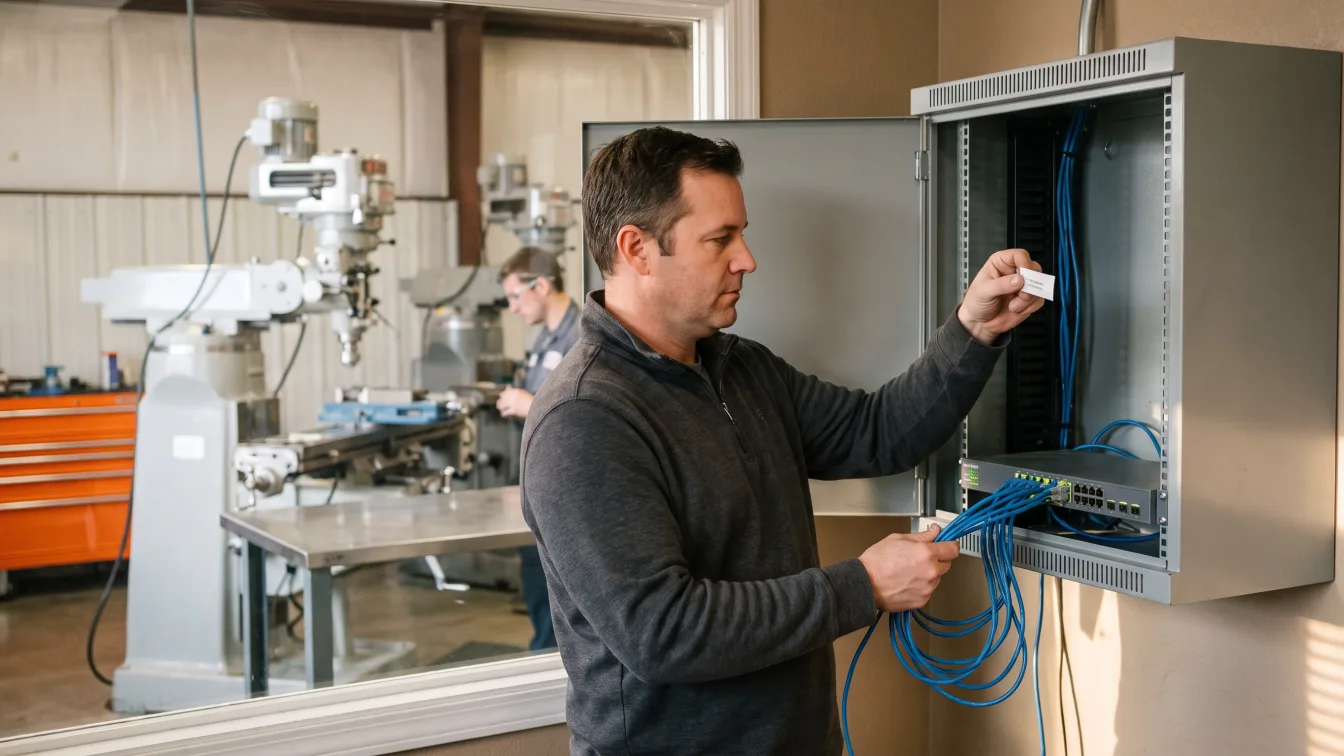
A small San Antonio IT team avoids burnout by capping after-hours work, naming one owner for every recurring job, and handing the alert queue and patch cycle to a partner before the lead starts missing things. Order matters. Fix hours first, ownership second, and coverage third.
I run operations at Uprite. We sell co-managed IT in San Antonio, so I benefit when a team says yes. This page also tells you when to say no, because some small teams are fine.
Burnout in a 1 to 3 person IT team is a workload problem before it’s a morale problem. CISA added 313 known exploited vulnerabilities to its catalog in the last 12 calendar months, 24% more than the year before. San Antonio has about 2,340 systems administrator jobs to hire into when someone quits. Cap the hours, write down who owns what, and hand off alerts, patching, and nights first.
What does IT burnout actually look like in a small team?
In its ICD-11 classification, the World Health Organization defines burn-out as a syndrome that comes from chronic workplace stress that hasn’t been successfully managed. It has 3 parts. Exhaustion, growing cynicism about the job, and a drop in effectiveness. WHO applies the term only to work, not to life outside it.
Nobody in IT announces it. You see it in the numbers first. These are the 5 I’d count before I’d trust anyone’s gut.
- How many nights the phone rang in the last 30 days.
- Days since anyone tested a backup restore.
- Vacation days left unused last year, and whether the laptop went along on the days that were used.
- Critical patches that are more than 30 days old.
- Tickets older than a week with no note on them.
Any 2 of those rising is a bigger warning than a bad mood. Mood tends to show up last.
Survey data points the same way. ISACA’s 2025 State of Cybersecurity report says 47% of respondents name high stress as the top reason for attrition. Another 66% say their role is more stressful than it was 5 years ago. That survey covers security staff, not every IT generalist. In a 40-person San Antonio office the generalist does both jobs, so I read it as a floor. Our list of the signs your internal IT team needs support covers the softer signals.
Hours matter too. A WHO and International Labour Organization study of 2000 to 2016 data estimated that people who worked 55 or more hours a week had a 35% higher risk of stroke and a 17% higher risk of dying from ischemic heart disease than people who worked 35 to 40. It covers all workers, not just IT. But a lead who covers Saturday patching and Tuesday nights can reach 55 without ever calling it a bad week.
Why are small San Antonio IT teams so thin to begin with?
Locally, the pool is small. The Bureau of Labor Statistics counts 2,340 network and computer systems administrator jobs in the San Antonio-New Braunfels metro as of May 2025. Median pay is $96,770. Census County Business Patterns counts 8,043 employer locations with 20 to 249 employees in the same metro for 2023. That’s about 3.4 mid-size locations for every administrator job, and the jobs aren’t all at mid-size companies. Large San Antonio employers such as USAA and Rackspace need the same skills.
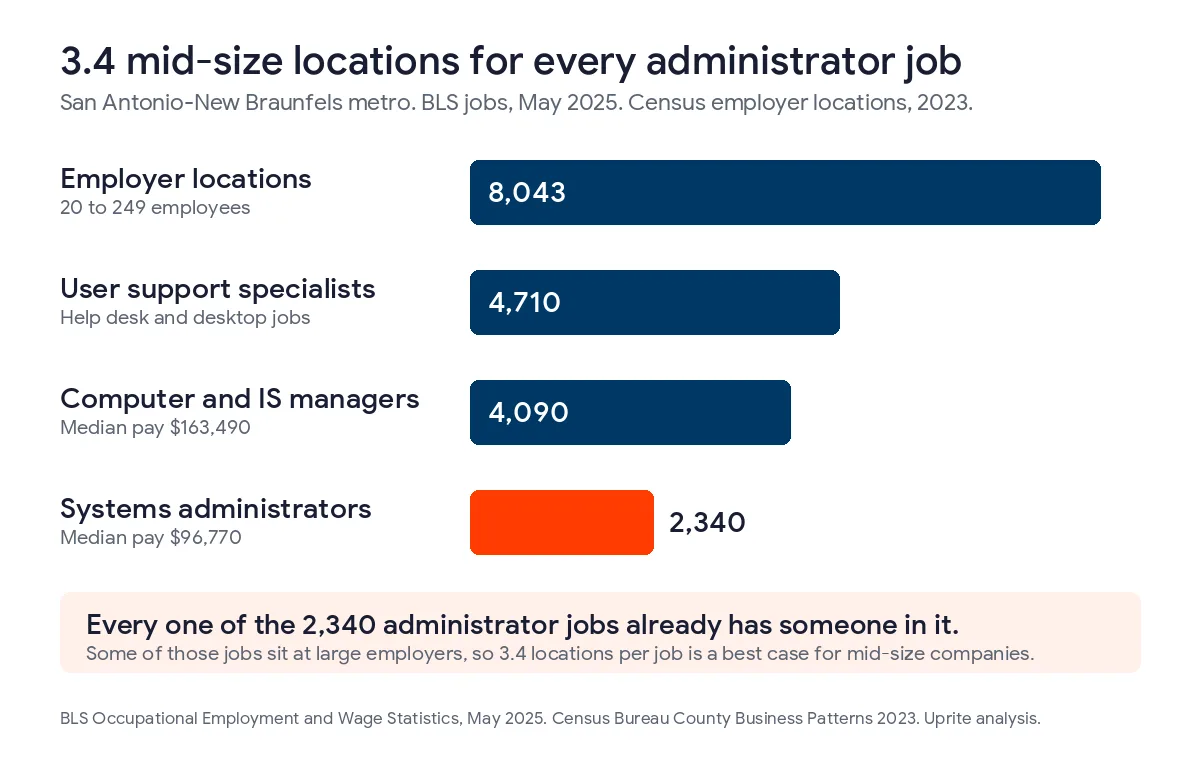
If a 60-person company loses its administrator, it’s hiring into a pool of 2,340 jobs. Every one of those jobs already has someone in it. That same data shows 4,710 user support specialists at a median of $57,400 and 4,090 computer and information systems managers at a median of $163,490. Help desk staff are easier to find than the person who owns the firewall and the backups. That’s why the one person who does own them gets called at night.
How much patching lands on a small team in a year?
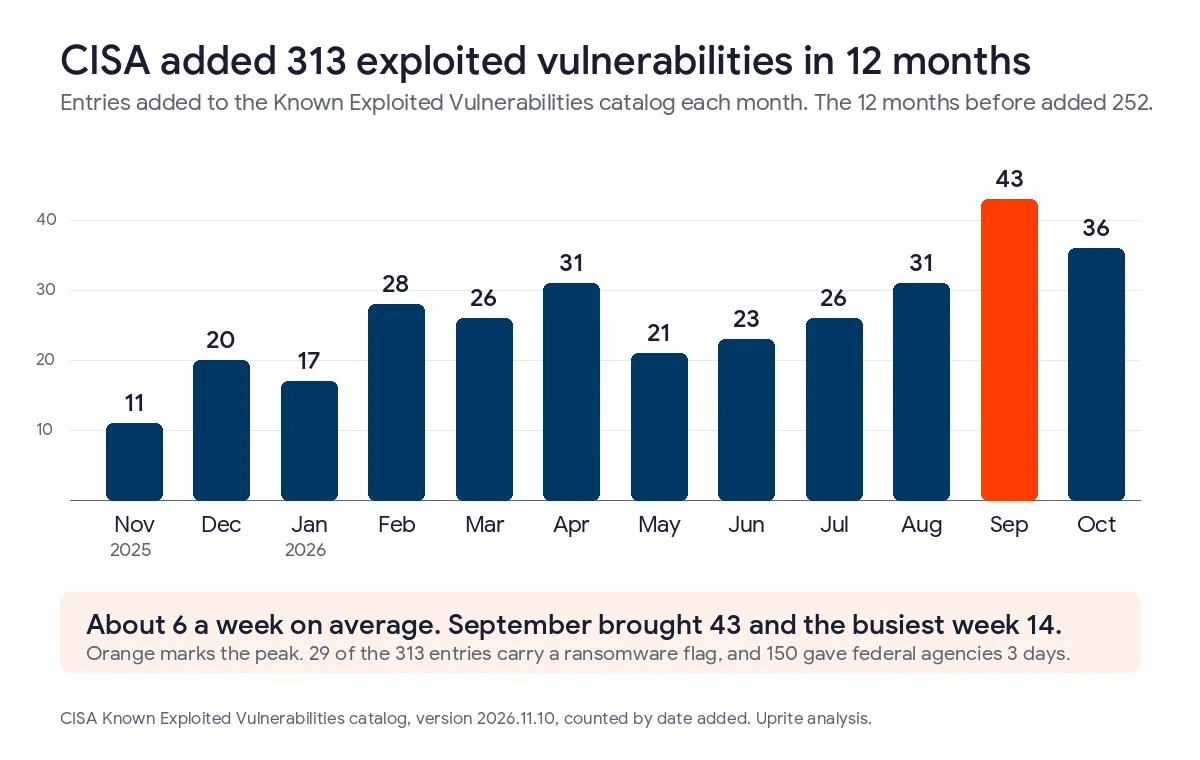
CISA keeps a public Known Exploited Vulnerabilities catalog. It lists flaws that attackers are using right now. I counted the entries by the date CISA added them. From November 2025 through October 2026 it added 313. In the 12 months before that it added 252. That’s 24% more.
313 a year is about 6 a week, but it doesn’t arrive evenly. September 2026 alone added 43. Ten separate weeks brought 10 or more entries, and the busiest week brought 14.
Not every entry touches you. A 50-person office doesn’t run every product on the list. Vendors a small office does run are another story. In the same 12 months Microsoft had 42 entries, Cisco 21, Fortinet 12, Google 11, Apple 10, and Adobe 7.
| Vendor | KEV entries added, Nov 2025 to Oct 2026 | Flagged for use in ransomware campaigns |
|---|---|---|
| Microsoft | 42 | 4 |
| Cisco | 21 | 2 |
| Fortinet | 12 | 0 |
| 11 | 0 | |
| Apple | 10 | 0 |
| Adobe | 7 | 0 |
| All 6 vendors | 103 | 6 |
That’s about 2 a week for 6 vendors. Someone has to read each one, decide whether you run the product, patch it, and check that the patch took. Across the whole catalog, 29 of the 313 entries carry a ransomware flag.
Federal agencies work to the due dates CISA lists under BOD 26-04. Of the 313 entries, 150 gave them 3 days. Those rules don’t bind a private company. They do show how fast CISA expects the worst ones to move.
NIST SP 800-40 Rev. 4 frames patching as preventive maintenance, a recurring job you plan for. A lot of small teams still treat it as an interrupt. My correction to the usual advice is that patching faster isn’t the fix. A fixed window and a second person to check the result are.
What should a small team hand off first?
Handing off everything at once is how co-managed projects stall. Start with the work that wakes people up.
Owners usually want to begin with the help desk because it’s the visible pile. I’d begin somewhere else. The alert queue and the after-hours phone cause the burnout. Password resets just cause the annoyance.
| Job | What it does to the person | Hand off | What the lead keeps |
|---|---|---|---|
| Security alert queue and 24/7 monitoring | Alerts ignore business hours, so the phone does too. | First | Approval of any change to production |
| After-hours and weekend tickets | Every night becomes possible work. | First | The definition of an emergency |
| Patch cycles and verification | Planned work turns into weekend work when a flaw gets hot. | Second | The maintenance window |
| Backup checks and restore tests | It’s quiet work, so it slips first and the failure stays hidden. | Second | Which systems matter most |
| Help desk overflow | It’s steady and visible, and it rarely wakes anyone up. | Third | Sensitive and executive requests |
| Vendor escalations | Hours on hold with an ISP, a copier vendor, or a line-of-business app. | When load demands it | The relationship and the contract |
| Business apps, access decisions, budget | They need someone who knows the company. | Keep in house | All of it |
Alert monitoring is security work, and our cybersecurity services in San Antonio cover it with continuous monitoring. Your lead stays in charge of the admin keys.
Here’s what the money looks like. Texas co-managed pricing runs $60 to $130 per user per month, and companies with 1 internal IT lead cluster between $85 and $110. Our plan starts at $100 per user. For a 60-person company that’s $6,000 a month, or $72,000 a year. Across the $60 to $130 band, the same 60 people cost $43,200 to $93,600. Our co-managed IT cost guide for Texas shows what sits inside the number.
We’re a 42-person team with an average response time of 5 minutes. Our pricing page lists 24/7 support availability on every plan except IT Essentials, and the co-managed plan is one of the plans that has it. If you’re comparing firms, see the best co-managed IT providers in San Antonio.
What should an IT lead and an owner agree on this month?
None of this needs a vendor. You can do the first 4 steps with a spreadsheet and one honest conversation.
- Log every after-hours page for 30 days, with the time and the cause.
- Put one name next to every recurring job, such as backups, patching, offboarding, license renewals, and the firewall. If 2 names share a job, nobody owns it.
- Pick a weekly ceiling. WHO’s 55-hour line is where harm shows up, so I’d set the ceiling at 50 to leave room. When the lead crosses it 2 weeks running, something comes off the list.
- Write the vacation plan before the vacation. Name who answers, what counts as an emergency, and who they call. The laptop stays home.
- Test one restore every quarter and put the result in writing.
- Check the CISA list once a month against the products you run, and give each match a ticket with an owner.
When does a small IT team not need outside help?
Plenty of them don’t. If all 4 of these are true, keep the team you’ve got.
- Your IT lead works 45 hours a week or less.
- Nobody has taken an after-hours page in the last 30 days.
- Your lead used every vacation day last year and wasn’t on the laptop for them.
- A backup restore test passed in the last 90 days and someone wrote it down.
That’s a healthy team. Check again when you add 15 people or take on a customer who sends a security questionnaire. My rule of thumb is that a team meeting only 2 of the 4 should hand off alerts and nights.
Companies with a department of one have their own version of this problem, and we wrote it up in co-managed IT for a one-person IT department. If you’re weighing a second hire, co-managed IT or a second sysadmin has the math. When you want to see the handoff on your own team, start with our managed IT services in San Antonio and ask for the co-managed plan.
Bring your IT lead and last month’s after-hours count. We’ll map who owns what and where the nights land.
Book a Co-Managed Scoping CallQuestions owners ask before they call
Is my IT person burned out or just busy?
Busy ends when the project ships, and burnout keeps going through the quiet weeks. If the after-hours pages, the skipped restore tests, and the unused vacation days all stay high after a launch, treat it as burnout and change the workload instead of giving a pep talk.
Will co-managed IT make my IT lead feel replaced?
Not if the scope says what the lead keeps. Your lead holds the admin keys, the business apps, and the final call, and we take the alerts, patch cycles, and nights. Ask your lead to draft the split first and put it in writing.
What does co-managed IT cost for a 60-person San Antonio company?
At $100 per user per month, 60 people cost $6,000 a month, or $72,000 a year. Across the Texas band of $60 to $130, the same headcount costs $43,200 to $93,600. That sits on top of your IT lead’s salary. It isn’t a replacement for it.
What happens when the IT lead goes on vacation?
An outside team answers the alerts and tickets you assign, so the lead can be unreachable. You decide in advance what counts as an emergency and who gets the call. Our average response time is 5 minutes, and that holds whether or not your lead is in town.
Should we just hire a second person instead?
Sometimes, yes. A second administrator adds 1 skill set for about 40 hours a week. An outside team adds a bench that runs around the clock. On cost alone the hire wins only at larger headcounts, and our post on the second sysadmin math walks through where that line sits.
Which jobs should we never hand to an outside team?
Keep access decisions, business apps, and vendor relationships in house. They depend on knowing the people and the history. We take the work that needs a bench, such as monitoring, patching, restore tests, and the nights.