
In-house IT vs an MSP is the wrong fight for most San Antonio plants. Of the metro’s 1,333 manufacturing sites, 984 have fewer than 20 people, and factory payrolls carry very few IT staff. The better question is who owns each plant-floor job, from ERP at shift change to controller backups. Keep the person who knows your machines, hand nights and security to a provider, and write the split down. That split is how we run manufacturing IT services in San Antonio.
San Antonio plants with one in-house IT person get the best coverage by keeping that person on the floor and adding a managed service provider for nights, security, and backups. Plants with no IT staff should outsource all of it.
I run operations at Uprite, so I spend my days looking at where support requests come from and when they arrive. Plants keep odd hours. Picture a label printer that quits at 11 at night while a truck sits at the dock. Who picks up? Too often, nobody does.
This guide answers that. If you want the general salary comparison for any business, our guide to in-house vs outsourced IT in San Antonio already prices it out, using federal wage data for the metro and the rates we publish for every plan. I’ll skip it here. This one is about the plant floor, the second shift, the controller backups, and the machine builder who needs a way in.
What does covering the plant floor mean for IT?
Covering the plant floor means owning the technology that keeps production moving, not just the office. That includes the ERP and MES screens operators use, the network between the office and the machines, vendor remote access, controller and HMI backups, and support for every shift the plant runs. Office IT is only part of it.
Here are the 8 plant-floor jobs I’d want a name next to.
- ERP and MES uptime at shift change, when every operator logs in at once
- Shared terminals and kiosk logins used by 2 or 3 shifts
- The firewall and switching that separate the office network from production
- Remote access for machine builders and integrators
- Backups of PLC logic, HMI projects, and controller settings
- Patching Windows HMIs and engineering workstations inside approved outage windows
- After-hours and weekend response while the line is running
- Security questionnaires and audit evidence for your customers
One job is left off. That’s deliberate. Changing PLC logic belongs to your controls engineer or the machine builder, not to an IT generalist and not to an MSP. If a provider offers to edit ladder logic without them in the room, I’d walk away.
NIST says changes to OT systems need control engineers working alongside security and IT staff. NIST SP 800-82 Revision 3, the federal guide to operational technology security, says an OT security team should include IT staff, a control engineer, a control system operator, a security specialist, and someone from enterprise risk management. It adds any cybersecurity service providers to that team. Nobody pictured one person.

Who runs IT in a typical San Antonio plant?
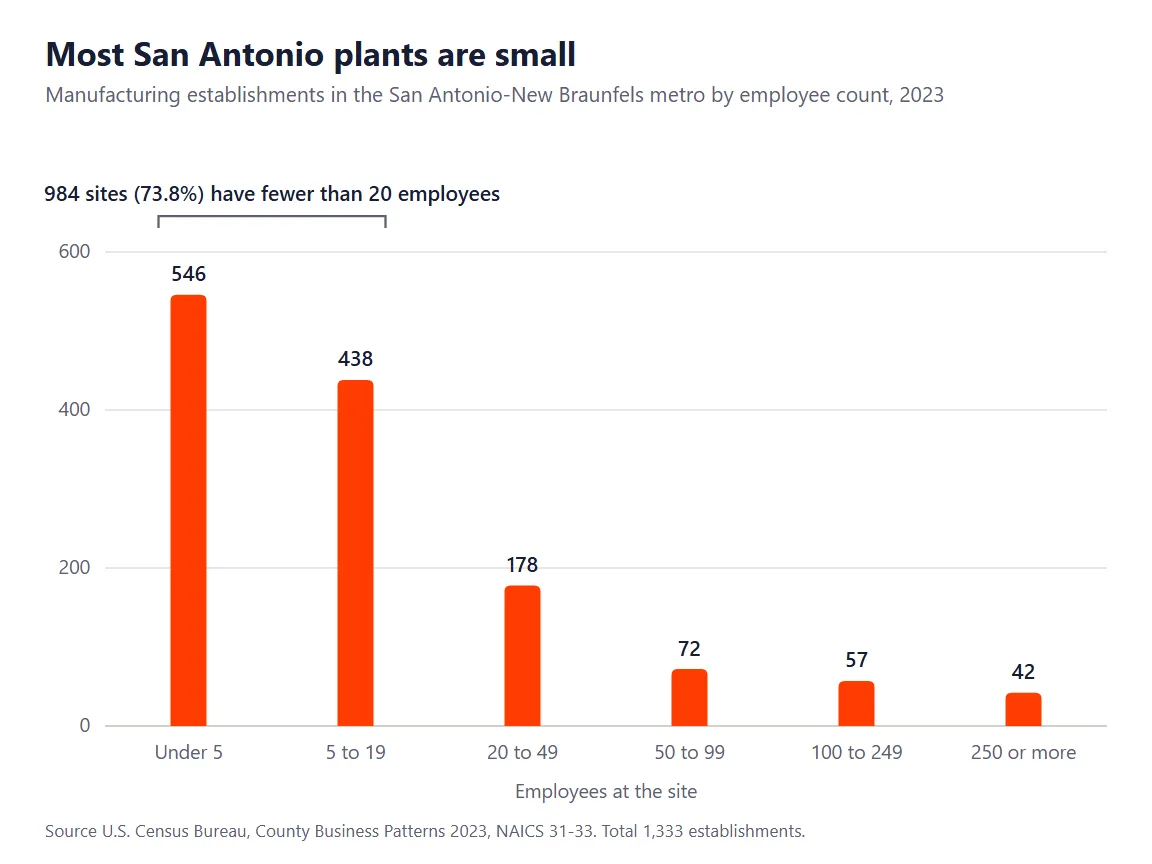
Usually nobody with that title. Most sites are small. The Census Bureau’s County Business Patterns for 2023 counts 1,333 manufacturing establishments in the San Antonio-New Braunfels metro. Here’s the breakdown.
| Employees at the site | Manufacturing sites | Share of metro total |
|---|---|---|
| Under 5 | 546 | 41.0% |
| 5 to 19 | 438 | 32.9% |
| 20 to 49 | 178 | 13.4% |
| 50 to 99 | 72 | 5.4% |
| 100 to 249 | 57 | 4.3% |
| 250 or more | 42 | 3.2% |
So 984 sites, or 73.8%, have fewer than 20 people. That’s 3 in 4. Another 307 sit between 20 and 249. Only 42 reach 250 or more, and those are the plants most likely to run a real IT department with more than one person in it, a help desk, and somebody whose whole job is the network.
Bigger plants aren’t much better. The BLS industry staffing estimates for May 2025 count the help desk, network support, and systems administrator jobs inside each kind of manufacturing nationwide. Fabricated metal has 1 of those jobs for every 314 workers. Plastics and rubber runs 1 per 262, and transportation equipment 1 per 263. Food manufacturing runs 1 per 574. Machinery is the outlier at 1 per 144.
Apply the fabricated metal ratio to a 150-person shop on the South Side and you get half a person, which in practice means nobody whose whole job is IT and somebody who handles it between other duties. Sometimes it’s the controls tech. Sometimes it’s whoever in accounting is best with Excel.
San Antonio has a twist. Metro data from BLS wage and employment statistics for May 2025 compares how concentrated each job is here against the national average, where 1.00 means the same share of local jobs.
| Role in the San Antonio metro | Jobs | Concentration vs US average |
|---|---|---|
| Electrical and electronics repairers, commercial and industrial equipment | 830 | 1.77 |
| Network and computer systems administrators | 2,340 | 1.03 |
| Industrial machinery mechanics | 2,950 | 0.93 |
| Industrial engineers | 1,670 | 0.63 |
| Computer network support specialists | 600 | 0.56 |
The people who repair industrial controls are 1.77 times as common here as nationally. That’s a real strength. Network support specialists run at about half the national rate, roughly 600 across the whole metro. Plants here can usually find someone who understands the machines. Hands-on network support is the thinner pool, even though systems administrators sit right at the national average, and it’s the skill that ties the ERP, the HMIs, and the vendor connections together on a plant floor.
Size varies by county, too. BLS county employment figures for 2025 put 1,124 private manufacturing workplaces in Bexar County, averaging 37.7 jobs each. Guadalupe County, which takes in Seguin and most of Schertz, has 150 averaging 63.9. Comal County’s 200 average just 22.7. A typical Guadalupe plant reaches the size where an IT hire makes sense well before a typical Comal shop does. Bexar sits in between.
Where does one in-house IT person run out of road?
Start with what a good in-house person does better than any outside provider. They know which machine has the flaky network drop. They know the second shift lead by name. They can walk to the cell in 2 minutes, and they hear about a problem before anyone files a ticket. Don’t trade that away. We don’t tell plants to replace a capable IT person.
But one person has limits. They show up in 4 places.
The second and third shift
One person works one shift. Most plants that run 2 shifts put their IT person on days, which leaves the evening crew calling a cell phone and hoping. That works for a while. One night the phone is off, or dead, or charging in another room while a press waits. If your line runs after 5 in the evening, someone other than your IT person has to answer that call, or the honest answer to every evening problem is wait until morning.

Vacation, sick days, and turnover
There’s no bench. When that person takes a week off, so does your IT. When they leave for good, the firewall rules, the admin passwords, and the vendor contacts often leave with them, along with the only clear memory of why the plant network was set up the way it was. The fix isn’t headcount. It’s documentation that someone else keeps current.
Round-the-clock security monitoring
Manufacturing has topped the list of attacked industries for 5 straight years. IBM’s X-Force Threat Intelligence Index 2026 put it at 27.7% of the incidents its responders handled in 2025. Watching alerts at 3 in the morning takes a security operations center, which means trained analysts on every shift, tools that connect what they see, and someone with the authority to cut a machine off the network. That’s beyond one person. They shouldn’t try.
OT patch windows
It takes planning. NIST notes that OT owners often have to plan outages days or weeks ahead, and that updates should be tested by both the vendor and the plant before they go in. Somebody has to build that calendar with production, try the patch on a spare HMI first, and come in on Saturday to apply it. A generalist can do that. They just can’t do everything else that week as well.
Where does an MSP fall short on the plant floor?
Here’s the part providers don’t put in their brochures. Plenty of MSPs treat a plant like an office with louder equipment. It isn’t one. They push patches on a Tuesday afternoon, spot an old Windows build on an HMI, and want to upgrade it. That HMI may run a machine whose builder certified exactly one operating system and nothing newer. Upgrade it, and you might void the support contract on a very expensive machine. That’s a costly patch.
Distance is the other limit. Uprite’s average first response is 5 minutes across all priority levels, but a remote engineer still can’t reseat a loose cable inside a control cabinet or swap a failed switch out on the floor. Our San Antonio office is at 11831 Radium Street, and on-site infrastructure management is built into Fully Managed IT. Even so, the person already standing next to the machine wins on anything physical.
And some systems belong to someone else. Your ERP vendor owns the software. The machine builder owns the controller warranty. A good provider coordinates with both. It doesn’t replace them, and you should be wary of any proposal that says it will.
Who should own each plant-floor job?
Who owns what? This is the table I’d want every San Antonio plant to fill in before signing anything. It shows where each job tends to land under the 3 models, based on how the work actually gets done. Fill it in honestly.
| Plant-floor job | In-house IT alone | MSP alone | Co-managed |
|---|---|---|---|
| ERP and MES at shift change | Strong on day shift, thin after hours | Covered remotely, slower to learn your workflow | In-house owns users and the app, MSP covers servers and nights |
| Shared shift terminals | Strong, knows who uses what | Workable if priced by position | In-house sets the rules, MSP enforces them in the identity tools |
| Office-to-plant firewall | Often put off for lack of time | Strong if the provider knows OT | MSP builds and monitors it, in-house approves changes |
| Machine builder remote access | Often an always-on tunnel | Brokered and logged | MSP runs the gateway, in-house approves each session |
| PLC and HMI backups | Done when someone remembers | Possible, needs controls staff input | Controls tech exports, MSP stores offsite and tests restores |
| HMI and workstation patching | Fits production, but slow | Fast, but risks the wrong window | MSP tests and schedules, production signs off |
| Second and third shift calls | A cell phone | A 24/7 desk | A 24/7 desk with in-house as escalation |
| Customer security questionnaires | Late nights and guesswork | Strong on evidence | MSP drafts, in-house confirms floor facts |
| PLC logic changes | Controls engineer or machine builder | Controls engineer or machine builder | Controls engineer or machine builder |
Look hard at vendor access. Machine builders and integrators need to get in to diagnose faults, and a connection that’s always open is one of the easier ways for an attacker to reach a plant network. In January 2026, CISA, the UK’s National Cyber Security Centre, and international partners published Secure Connectivity Principles for Operational Technology, 8 principles for designing and managing every connection into an OT network. A plant with one IT person rarely has the hours to work through them. A provider running a brokered, logged gateway usually can. Ask to see it.
Check the backup row first. NIST tells plants to keep copies of PLC logic and configuration files at a separate location, so the same incident can’t destroy both, and to test restores on a schedule. If the only copy of a program lives on one laptop in the maintenance office, that’s your gap. Ask where yours is tonight.
Which model fits your plant?
The answer depends mostly on headcount, shifts, and whether you already have someone good. Here’s my sort.
- No IT staff and under 20 people. Go fully managed, and get controller backups and vendor access written into the scope. Roughly 3 in 4 San Antonio plants are this small.
- One IT generalist and 20 to 249 people. Keep that person and add co-managed support for nights, monitoring, security, and offsite backups.
- Two or three shifts at any size. Never rely on one person. You need a 24/7 desk behind whoever you have.
- 250 or more people with a real IT team. In-house leads, and you add security monitoring plus extra hands for big projects.
- A defense or aerospace supplier. Pick any of the above, then add compliance help for CMMC and NIST SP 800-171 evidence.
Plenty of the 307 mid-size plants land in the second group. We walk through how that split works, and what it costs, on our co-managed IT in San Antonio page.
What does each option cost a plant?
I’ll keep this short, because the salary math is the same for a plant as for an office and it’s already been done. Plants differ on line items. Our breakdown of manufacturing IT cost in Texas separates ERP licensing, plant-floor OT work, and compliance into their own lines, and that’s usually where plant budgets surprise people.
Here are our numbers. Our published starting rates are $138 per user per month for Fully Managed IT, $100 for Co-Managed IT, and $40 for MSSP Security Focus, the security-only plan for teams that already have IT staff. Every plan except IT Essentials includes 24/7 support. One plant detail matters more. Twelve operators across 3 shifts sharing 4 terminals aren’t 12 users’ worth of IT work. We price manufacturing by position rather than by named person, so a seasonal hiring push doesn’t double the bill. The full rate card is on our published pricing page.
What happened when a San Antonio manufacturer brought in Uprite?
We published one local plant’s story in how we helped a San Antonio manufacturer upgrade its security. The company had about 50 employees, outdated equipment, and frequent crashes. It also had to meet its cyber insurance standards while some staff reached company data from overseas. Sound familiar?
The work started with a Business Technology Assessment run with the company’s executives, and server shutdowns and backups were then scheduled around operations to keep downtime and disruption to a minimum. Even so, unexpected server shutdowns hit in the middle of the project, and our team had to respond fast to keep the disruption small. That’s normal in a plant. The plan holds until the equipment disagrees.
One honest note. That write-up doesn’t publish before-and-after numbers, so I won’t make any up here. What it does show is the order of operations that works on a plant floor. Assess first, schedule around production, and expect the hardware to surprise you.
How can a plant decide in the next 30 days?
Skip the consultant. You need a week of honest answers.
- List every plant-floor job from the table above and write one owner’s name next to each.
- Call your own IT line at 9 at night and time how long it takes to reach a person.
- Ask your controls lead where the newest copy of each PLC program lives, and when it was last restored.
- Pull a list of every vendor who can connect to the plant network, and how they get in.
- Have any provider you’re considering put the split in writing before you sign.
If step 3 or 4 turns up surprises, read our guide to OT and IT security for Texas manufacturers next. It covers the beliefs that leave plants exposed and the checks that disprove them.
Plant-floor IT questions San Antonio manufacturers ask
Can one IT person support a manufacturing plant in San Antonio?
Yes, for a one-shift plant with modest systems, as long as someone else covers nights, security monitoring, and that person’s time off. Past one shift, or once customers start sending security questionnaires, a single person needs a provider behind them.
Should an MSP manage our PLCs and machine controllers?
Not the logic. Programming changes belong to your controls engineer or the machine builder. A provider can protect the network around those controllers, broker vendor access, and keep offsite copies of the programs your controls team exports, in line with NIST’s guidance on separate backup locations.
What does co-managed IT look like in a plant?
Your IT person keeps the floor, the users, and the ERP relationships, while the provider takes after-hours calls, monitoring, security tools, backups, and project depth. The important part is a written responsibility list, so nothing falls between you and the provider. Uprite’s Co-Managed IT starts at $100 per user per month.
Will an MSP answer calls from our second and third shift?
A good one will. Every Uprite plan except IT Essentials includes 24/7 support, and our average first response is 5 minutes across all priority levels. Ask any provider you’re considering to show you the after-hours path in writing, then test it yourself at 9 at night.
How do MSPs price plants where shifts share terminals?
Most price per named user, which overcounts a plant badly. We don’t. Uprite prices manufacturing by position, so operators who share a terminal across shifts don’t each become a paid seat, and seasonal hiring doesn’t double the invoice.
If we hire an MSP, do we have to let our IT person go?
No. In most plants with a capable IT person, the best result comes from keeping them. They know the machines, the people, and the history, and that knowledge takes years to rebuild. Co-managed support exists so that person stops carrying the phone every night and gets time back for the projects only they can do.
What should we ask an MSP before signing?
Ask who owns each plant-floor job, by name, and get it in the contract. Then ask how they handle machine builder access, where PLC backups will live, how they schedule patches around production, and what happens when your line goes down at 2 in the morning on a Sunday.
Want a second opinion on who covers your floor? We’ll walk the plant with you, fill in the ownership table together, and leave you the written assessment whether you hire us or not. Every engagement comes with a 120-day satisfaction promise and a first-year rate lock.
Book a Plant-Floor IT Assessment