Add co-managed IT when one IT employee can no longer cover nights, patch deadlines, security alerts, or a week off. In San Antonio, the tipping point usually shows up as 3 failed tests out of the 6 below.
Nobody schedules the day a one-person IT team outgrows its job. Picture a Friday afternoon with a missed Windows update, an insurer’s security questionnaire in the inbox, and the only person who knows the firewall login boarding a flight to Cancun. The 6 tests below put numbers on that feeling, and a company that trips 3 of them usually pays less each month for co-managed IT in San Antonio than for a second hire.
One employee covers about 24% of the hours in a week, and closer to 22% once holidays and time off come out. CISA added 323 actively exploited vulnerabilities to its catalog in the past year, about 6 a week. Three or more failed tests point to a co-managed team at roughly $85 to $110 per user a month. A second systems administrator at the San Antonio median costs $11,532 a month with benefits.
When does a one-person IT team need co-managed IT?
Co-managed IT is an arrangement where your IT employee and an outside provider split the work under a written scope. Your person keeps the users, the business apps, and the admin keys. The provider takes the security stack, monitoring, patch cycles, backup checks, and the after-hours queue. It fits companies that already pay at least one IT salary.
Hours come first. Of the 168 in a week, a salaried employee works 40, or 23.8%. BLS reports that private-industry workers average 8 paid holidays, and that 32% of them get 10 to 14 days of paid vacation after one year. Take 8 holidays, 10 vacation days, and 5 sick days (BLS publishes no average for sick days, so that one is an assumption), and 237 of the year’s 260 weekdays are worked. That’s 1,896 staffed hours out of 8,760, or 21.6%.
The other 6,864 hours belong to whatever happens by itself. A failed backup job, a firewall alert, and a locked-out executive all wait for someone to get back to a desk. What those hours do to a small team is covered in preventing IT burnout in a small San Antonio IT team.

Which 6 signs say a one-person IT team has hit its ceiling?
These come up in roughly this order on first calls with San Antonio owners, and they bleed into each other. A company that trips one often trips a second before the quarter ends. When the answer is yes, our ranking of the best co-managed IT providers in San Antonio compares eight firms.

Time off still means a phone call
Say the IT person is at Canyon Lake with one bar of signal, and on a Thursday during month-end close the Microsoft 365 account for the controller locks itself out. Nobody else holds an admin login. A single week of vacation removes 40 of the 1,896 staffed hours, which is 2.1% of the year, yet it leaves the business with no IT at all for 5 straight days. Ask your own IT person how many full days they’ve been unreachable since last November. A count under 5 means loyalty is doing a job that a second person should do.
Patches follow the calendar instead of the threat
On November 10, 2026 alone, CISA added 6 entries to its Known Exploited Vulnerabilities catalog. They included a Microsoft Office flaw, a Cisco BroadWorks flaw, a Chromium flaw, and 2 Barracuda email gateway flaws that carry a federal deadline of November 13, only 3 days out.
Between November 12, 2025 and that date the catalog gained 323 entries, which is 0.89 a day or 6.2 a week. Federal agencies were given 3 days to fix 157 of them, 14 days for 91, and 21 days for 65, so 258 of the 323 (80%) came with 14 days or less. Another 29 (9%) are tied to known ransomware campaigns, 4 of them in Microsoft products. By vendor, Microsoft has 43 entries, Cisco 22, Fortinet 12, Ivanti 8, SonicWall 6, and Citrix 6.
Most of the catalog never touches a 60-person office, so the useful count is the vendors your laptops and firewall actually run. Verizon’s 2026 Data Breach Investigations Report found that exploited vulnerabilities start 31% of breaches, now the top way in. A firewall or Windows patch cycle that trails the vendor’s release by more than 14 days is slower than 4 out of every 5 of those federal deadlines.
Security alerts sit until Monday
A weekday schedule of 8 to 5 covers 45 of the week’s 168 hours. That leaves 123 hours, or 73%, when the only person who could read an alert is off the clock. It’s Saturday at 2 in the morning, the endpoint tool flags a Windows host talking to a known command server, and the response plan is a text message to someone who’s asleep.
Nobody at the front desk ever asks about alert triage, so it sinks beneath the CEO’s laptop, the copier lease, and the printer that jams every other Tuesday. Restore tests and documentation sink with it. Uprite’s 24/7 security monitoring in San Antonio averages 5 minutes to respond on support tickets, and 24/7 availability is part of the co-managed plan.
A rule names a role and it’s your IT person
Tax preparers fall under the FTC Safeguards Rule, and 16 CFR 314.4 asks for a designated Qualified Individual, vulnerability assessments at least every 6 months, and an annual penetration test unless the company runs continuous monitoring. That’s 3 recurring technical deliverables a year, on top of the written risk assessment. HIPAA’s administrative safeguards add a named security official and a risk analysis.
Go through the last cyber insurance renewal, the biggest customer contract, and any audit letter, and underline every duty that has your IT person’s name next to it. One underline with no named backup is a gap. The FTC rule lets a service provider hold the Qualified Individual seat, as long as the company keeps responsibility and names a senior person to oversee the provider. The paperwork stays yours, and the weekly legwork can go elsewhere.
Projects are older than 2 quarters
BLS counts 2,340 network and computer systems administrators in the San Antonio-New Braunfels metro at a median of $96,770, and 4,710 computer user support specialists at $57,400. That’s 2 support specialists for every administrator across the metro. A one-person team does both jobs plus the vendor calls and the budget. The two median wages add up to $154,170, and at BLS’s 1.43 benefits ratio that comes to $220,463 a year.
Write down every IT project that’s been open for more than 6 months. Three or more stalled items says ticket work is crowding out planning. The page on co-managed IT for a one-person IT department shows how the overflow gets split.
Only one person knows where things are
Imagine the domain registrar account is tied to a Gmail address that belonged to a contractor who left in 2022. Imagine too that the backup console password lives in one person’s head, along with the reason VLAN 40 exists. If that person quit tomorrow, could a stranger reach the firewall, the Microsoft 365 admin console, the backup console, and the registrar from written notes? And has anyone pulled one real file back from backup in the last 90 days, only to watch the restore work? If that person has already left, start with what to do when your IT person quits in San Antonio.
Co-managed onboarding starts with this one. Uprite’s engineers write down the systems, tools, security posture, and gaps first, and that record becomes the baseline for everything after it.
How do you score the 6 tests?
| Test | What to count | Fail line | What an outside team takes |
|---|---|---|---|
| Time off | Days fully offline in 12 months | Under 5 | The after-hours queue and a second set of hands |
| Patching | Days from vendor release to your install | Over 14 | Patch cycles for Windows, firewalls, and third-party apps |
| Alerts | Time until a person acts on a 2 in the morning alert | Next business day | 24/7 monitoring and response |
| Compliance | Rules or contracts naming your IT person | Any, with no backup | Risk assessment evidence, scans, and vCIO planning |
| Projects | IT projects stalled for 6 months or more | At least 3 | Overflow tickets, so your lead gets time back |
| Documentation | Days since the last tested restore | Over 90 | Backup checks, restore tests, and written runbooks |
Companies at 0 to 2 failures usually aren’t ready for an outside team. Closing those gaps in-house and retesting in 90 days costs nothing, and a plan that sits unused helps nobody. An IT lead who already has a watched security tool, restores tested this quarter, and a named backup may need only security monitoring from $40 per user per month, or nothing at all.
At 3 or more failures, co-managed IT starts paying for itself. A company that trips only the alerts test can begin with monitoring and widen the scope later, while one that trips 4 tests is usually better off with the full arrangement than with a single-purpose tool.
What should an outside team take over first?
Hand work over in the order the gaps hurt.
- Nights and weekends on the alert queue, before anything else.
- Patch cycles, with your lead picking the maintenance windows.
- Backup checks plus one restore test every quarter.
- Written records of systems, accounts, and vendors.
- Overflow help desk tickets, once the queue starts backing up.
Before any tool is installed, the IT lead gets a written responsibility matrix and marks it up with a red pen. The lead keeps authority over their own lanes, and nothing moves to the provider that the lead didn’t hand over. Any provider that wants the only copy of the admin keys can be crossed off the list right there.
Does co-managed IT cost less than a second hire in San Antonio?
BLS puts the median San Antonio systems administrator at $96,770 a year. Its June 2026 compensation data shows employers paying $46.89 an hour in total compensation against $32.82 in wages, a ratio of 1.43. That makes a second administrator $138,381 a year, or $11,532 a month, for 40 more hours a week.
Co-managed IT is priced per user instead. Texas plans run $60 to $130 per user per month, and companies with a single IT lead usually land between $85 and $110, as the Texas co-managed IT pricing guide shows. Uprite’s plan is $100. The full breakdown is in what co-managed IT costs in San Antonio.
| Option for a 50-user company | Monthly cost | What it adds |
|---|---|---|
| Second systems administrator, median pay with benefits | $11,532 | 40 more hours a week, and one more person who can quit |
| Second help desk hire, median pay with benefits | $6,840 | 40 more hours a week of ticket work |
| Co-managed IT, full Texas band at $60 to $130 | $3,000 to $6,500 | A team and its tooling, with scope set in writing |
| Co-managed IT, usual band at $85 to $110 | $4,250 to $5,500 | The same, for a single-IT-lead company |
| Uprite co-managed plan at $100 | $5,000 | 24/7 support availability, and a vCIO beside your lead |
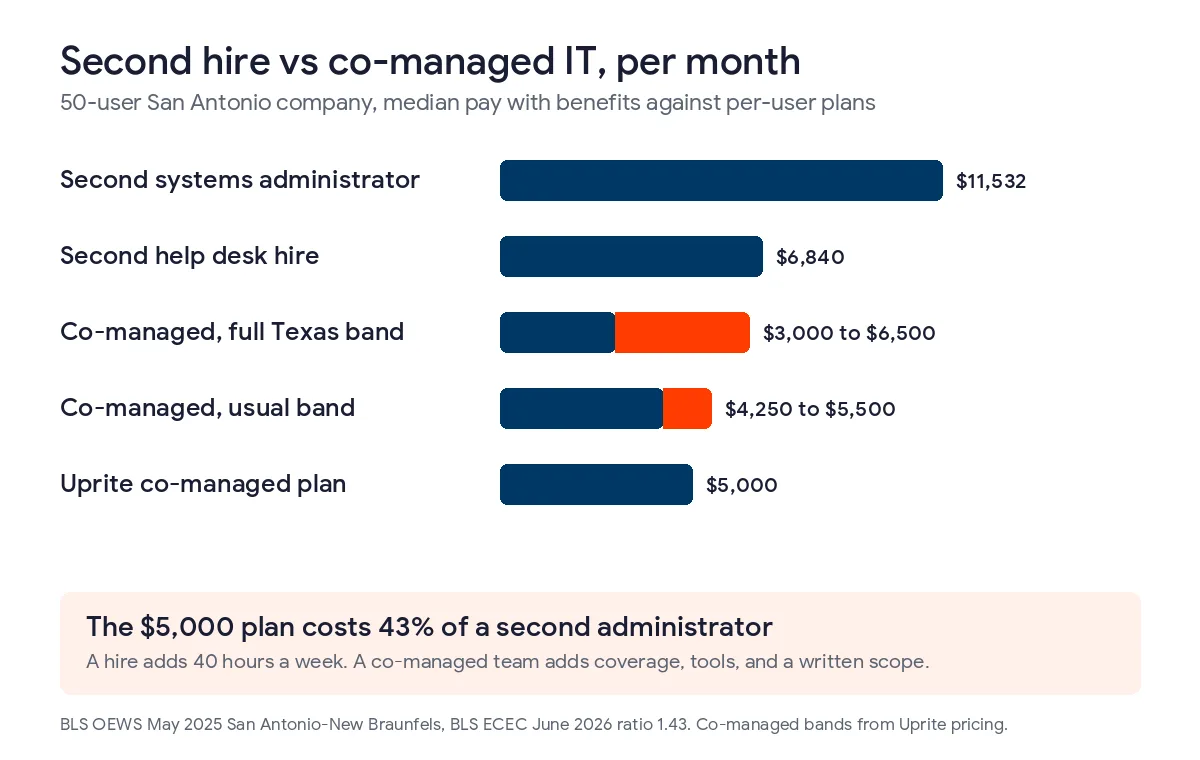
A second hire wins when the real trouble is ticket volume, say 150 users and a help desk queue that never reaches zero. Coverage, security, and compliance run on a different clock, because a new hire works the same 40 hours and walks into the same gaps. The comparison of co-managed IT and a second hire goes deeper, and the in-house versus outsourced IT guide for San Antonio covers the case where nobody is on payroll yet.
What San Antonio owners ask before they add co-managed IT
How big should a San Antonio company be before it adds co-managed IT?
Headcount isn’t the trigger, coverage is. A typical Uprite co-managed engagement in San Antonio covers 40 to 100 users and 1 internal IT person, though a 25-person firm with HIPAA duties can fail 3 of the 6 tests as well.
Will my IT person feel replaced?
Not if the contract is written well. The IT lead signs a responsibility matrix before any tool is connected, keeps the admin keys, and decides for their own lanes. A provider that sidelines the internal person is one to avoid.
Can we start with security monitoring only?
Yes, and a lot of companies do. Managed security from $40 per user per month covers a failed alerts test by itself, and the company can move up to co-managed after a quarter of watching how the handoffs work.
Does co-managed IT cover nights and weekends?
Yes. Uprite’s pricing page lists 24/7 support availability on every plan except IT Essentials, and the Co-Managed IT Partnership is one of them. The IT lead still decides which after-hours actions need approval first.
We’re regulated, so can an outside team really act as our Qualified Individual?
Under 16 CFR 314.4(a) it can, if the company keeps responsibility for compliance and names a senior person to oversee the provider. HIPAA separately asks a covered entity to identify its security official, so ask counsel how an outside partner fits. Uprite isn’t a law firm.
What if we fail only 1 or 2 of the tests?
Fix those gaps first, because 2 failures don’t justify a new monthly line item. Write down the dates, give each gap to the person best placed to close it, and rerun the tests in 90 days.
Bring your IT lead and your answers to the 6 tests. We’ll map what to hand off in one call, and we’ll say so if you don’t need us.
Book a Co-Managed Scoping Call