
Co-managed IT in San Antonio costs $60 to $130 per user per month, and Uprite’s plan starts at $100, so a 50-person company pays about $5,000 a month while its own IT lead keeps their job.
That’s the price of the outside half. The other half is your IT lead’s salary, and that isn’t going anywhere. We priced both sides here, using the plan on our co-managed IT services in San Antonio page plus Bureau of Labor Statistics wages for the metro. Rates exclude software licensing.
Plan on $5,000 a month for 50 users at Uprite’s $100 starting rate. That’s $60,000 a year, sitting on top of the IT lead you already pay. It costs less than a second systems administrator until about 116 users, and it covers nights and weekends, which one hire can’t. Already have monitored security and tested restores? Then skip it.
What does the split look like in a San Antonio company?
A co-managed IT split is a written agreement that gives each line of IT work one owner, either your internal IT lead or the outside provider. The price covers the provider’s lines only. Your lead’s salary, their tools, and the lines they keep stay on your payroll.
Uprite writes this split into a responsibility matrix before connecting a single tool. Your lead edits it before anyone signs. To see how the other local firms price and split the work, read our ranking of the best co-managed IT providers in San Antonio. Below is our usual starting point in San Antonio. The last column is what that skill earns locally, so you can see what you’d be hiring otherwise.
| Line of work | Usual owner | What the other side does | Local pay for that skill |
|---|---|---|---|
| Tier 1 tickets | Your IT lead | Uprite takes overflow, nights, and weekends | User support specialist, $29.09 an hour |
| Security alerts and response | Uprite | Your lead approves any step that would stop a business system | Information security analyst, $60.49 an hour |
| Patching and endpoint protection | Uprite | Your lead sets maintenance windows | Systems administrator, $46.81 an hour |
| Backups and restore tests | Uprite | Your lead decides what comes back first | Systems administrator, $46.81 an hour |
| Firewall and network changes | Shared | Uprite builds the change and your lead signs off | Network support specialist, $36.92 an hour |
| User accounts and admin access | Your IT lead | Uprite works through named accounts your lead controls | Stays on your payroll |
| Line-of-business software | Your IT lead | Uprite supports the servers and devices it runs on | Stays on your payroll |
| Roadmap and IT budget | Your lead and leadership | Uprite brings ticket trends and security findings to each quarterly review | Stays on your payroll |
Notice the lopsidedness. Alerts, patches, restore tests. Quiet, constant, and easy to skip when the queue is full. Your lead keeps the work that needs a memory of how the place runs. That’s the whole idea.
How much does co-managed IT cost for 25 to 100 users?
Uprite’s co-managed plan starts at $100 per user per month, and the rate holds for the first year. Our estimate for the Texas market is $60 to $130. Companies with one IT lead land between $85 and $110, per our write-up of co-managed IT cost in Texas.
| Users | Uprite at $100, per month | Uprite at $100, per year | Texas band, per month |
|---|---|---|---|
| 25 | $2,500 | $30,000 | $1,500 to $3,250 |
| 50 | $5,000 | $60,000 | $3,000 to $6,500 |
| 75 | $7,500 | $90,000 | $4,500 to $9,750 |
| 100 | $10,000 | $120,000 | $6,000 to $13,000 |
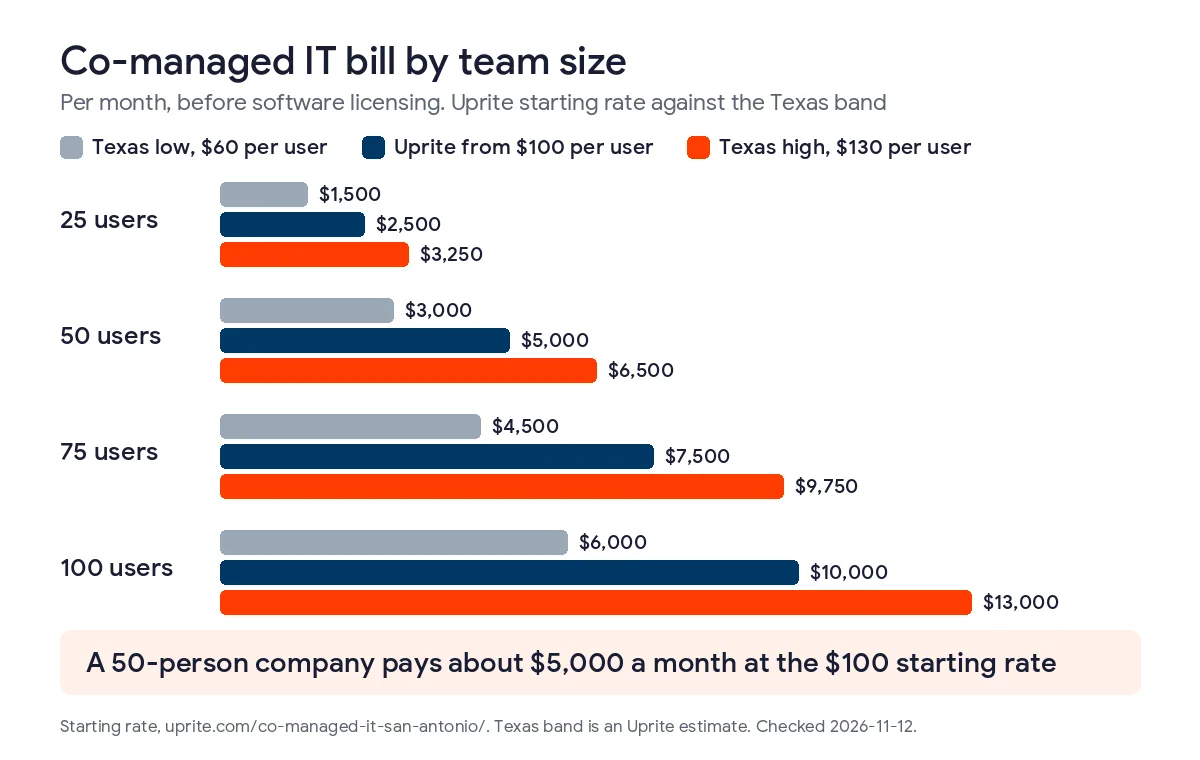
Treat these as starting rates. A real quote comes after a scoping call, because we scope each business on its own. And that Texas band? It’s our estimate from proposals we write and review. It isn’t a published index.
What would the same work cost on your own payroll?
Here’s what BLS counted in the San Antonio-New Braunfels metro in its May 2025 wage data. 4,710 user support specialists. 2,340 systems administrators. 1,350 security analysts. 600 network support specialists. Benefits add about 43 cents on every wage dollar, going by BLS’s June 2026 figures of $46.89 in total compensation against $32.82 in wages. That’s a ratio of 1.43.
| Role in the San Antonio metro | Jobs | Mean hourly wage | Mean annual wage | Loaded per year | Loaded per month |
|---|---|---|---|---|---|
| Computer user support specialist | 4,710 | $29.09 | $60,520 | $86,544 | $7,212 |
| Network support specialist | 600 | $36.92 | $76,790 | $109,810 | $9,151 |
| Network and computer systems administrator | 2,340 | $46.81 | $97,370 | $139,239 | $11,603 |
| Information security analyst | 1,350 | $60.49 | $125,830 | $179,937 | $14,995 |
Those are averages. Hire in a hot market and you’ll likely pay more. The loaded numbers also leave out recruiting fees, software, training, and the weeks a chair sits empty.
One number stopped us cold. A second systems administrator runs about $139,239 loaded. At $100 a user, the plan hits that figure at 116 people. So under 116 users, the plan is cheaper than the hire. Over 116, the hire wins on price. It still can’t be awake at 3 in the morning.
Why do nights and weekends cost so much to staff yourself?
Count the hours. A week is 168 of them, and one employee works about 40. Keeping a person on watch every hour of the year takes 8,760 staffed hours, and each full-time hire supplies roughly 2,080. That’s 4.2 people, before vacations and sick days. This is our arithmetic, since BLS doesn’t publish it.
Now price that. At the user support rate, 4.2 people cost about $363,485 a year loaded. At the security analyst rate, about $755,735. Nobody with 50 employees pays that. So you pick between a person who’s asleep on Saturday and a shared bench that isn’t. Pushing nights onto one person has a human cost too, covered in preventing IT burnout in a small San Antonio IT team.
Does the timing matter? CISA and the FBI say yes. Their advisory on holidays and weekends reports a rise in damaging ransomware attacks on those days and recommends continuous monitoring plus named responders. NIST’s Cybersecurity Framework 2.0 lists Detect and Respond as separate functions. Somebody has to watch. Somebody has to act.
How does the full bill compare with the other ways to staff IT?
Take a 50-person company and run 4 setups for a year. The first 3 keep a systems administrator at the metro average. The fourth drops the internal lead entirely.
| Setup for 50 users | Cost per year | What you get |
|---|---|---|
| IT lead alone | $139,239 | One person, business hours |
| IT lead plus co-managed at $100 | $199,239 | Your lead plus a bench, with 24/7 support availability on the plan |
| IT lead plus a second systems administrator | $278,478 | Two people, business hours, a gap overnight |
| Fully managed at $138, no internal lead | $82,800 | Uprite runs everything, on-site support included |
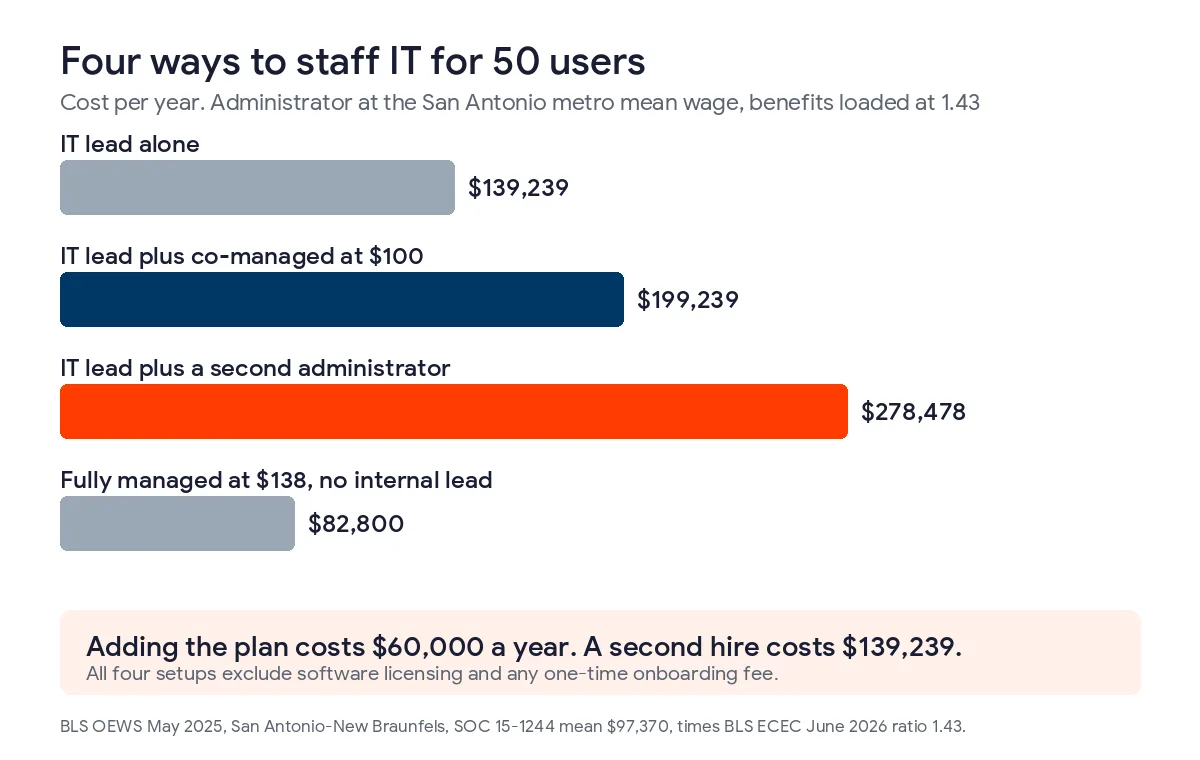
Row 4 is the cheapest, and no, that isn’t a trick. If your lead spends most days on password resets, fully managed may suit you better, and we’ll say that on the first call. Co-managed pays off when your lead carries things a provider can’t copy. The line-of-business software. The vendor relationships. The reason the network is wired that odd way. For the longer version, read our piece on co-managed versus fully managed IT in Texas, or co-managed IT versus a second hire if staffing is the real question.
All 4 rows leave out software licensing and any one-time onboarding fee.
When is co-managed IT not worth the money?
Skip it if your lead already has most of this covered. Backups restored on a schedule, a security tool somebody actually watches, an owner for the after-hours phone. In that case our MSSP Security Focus plan, at $40 per user, may be enough. For 50 people it’s $24,000 a year. Or you may need nothing from us.
Four signs it’s worth paying for.
- Your IT lead is the only one who reads the security alerts.
- An insurer, auditor, or client wants proof that monitoring and restore tests really run.
- The IT lead takes every after-hours call, and everyone knows it.
- Headcount is rising, and the next hire would just be a second person on business hours.

A typical Uprite engagement in San Antonio covers 40 to 100 users and 1 internal IT person. Only one person on staff? Our page on co-managed IT for a one-person IT department fits better. If your IT person already left, start with what San Antonio businesses do in the first 30 days. If the load is still climbing, 6 signs it’s time to add co-managed IT will help you decide.
What should a San Antonio co-managed quote spell out?
Before you compare prices, get 5 things in writing.
- A responsibility matrix your IT lead can edit before signing.
- What after-hours coverage means in practice, and whose phone rings at 3 a.m.
- Whether licensing (Microsoft 365, endpoint tools) sits inside the per-user rate or outside it.
- How long the rate holds. Ours is locked for the first year, and a 120-day satisfaction guarantee lets you leave if it isn’t working.
- The one-time onboarding fee. Our onboarding across managed plans has run $3,000 to $25,000, and our managed IT pricing for San Antonio breaks that down.
Our rates are on the Uprite pricing page. Hold us to them.
Questions San Antonio owners ask before they split IT work
How much does co-managed IT cost per user in San Antonio?
Co-managed IT in San Antonio runs $60 to $130 per user per month by Uprite’s estimate, and Uprite’s plan starts at $100 before software licensing. A 50-person company pays about $5,000 a month, or $60,000 a year, with the rate locked for the first year.
Is co-managed IT cheaper than hiring a second IT person?
Yes, up to about 116 users at Uprite’s starting rate. A second systems administrator in San Antonio runs about $139,239 loaded, which is what the plan costs at 116 users. And the plan covers nights and weekends. A second hire doesn’t.
What does my IT lead keep?
Your lead keeps user accounts, admin access, the line-of-business software, and the roadmap and budget. Uprite usually takes security monitoring, patching, backups, and after-hours tickets. The matrix settles every line, and your lead edits it first.
Does the price change if my lead hands off more work?
Not as a published per-line price. The quote is per user and scoped one business at a time, so the split gets settled before the number does. Ask for the matrix and the quote together.
What isn’t in the per-user price?
Software licensing isn’t in the starting rate, and your lead’s salary stays on your payroll. Ask whether Microsoft 365 and endpoint tools sit inside or outside the quote, and whether onboarding is a separate one-time line.
When is co-managed IT a waste of money?
It’s a waste when your lead already has monitored security, tested restores, and an after-hours plan. Then our MSSP Security Focus plan at $40 per user may be plenty, or you may need nothing from us.
Bring your IT lead to a free scoping call. We’ll map who owns what and give you a number you can check against this page.
Book a Co-Managed Scoping Call