
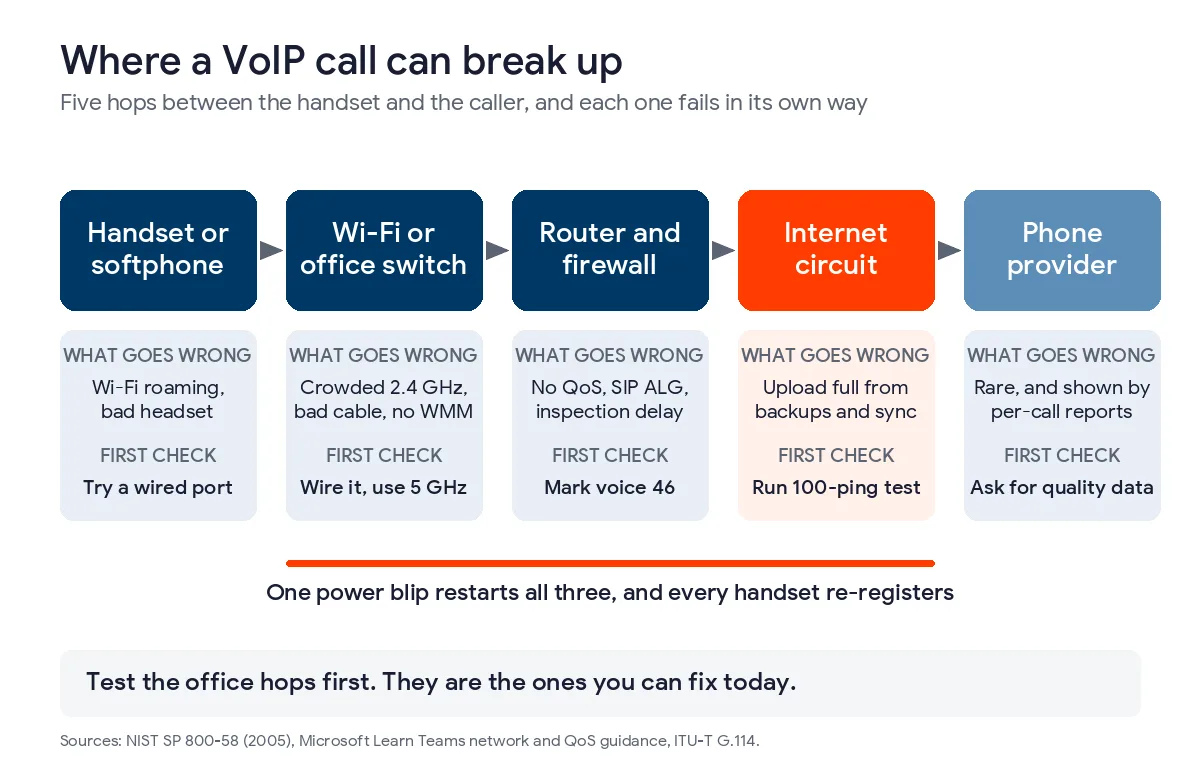
VoIP calls break up when voice packets arrive late, out of order, or not at all, and the cause is often the office network rather than the phones or the provider. Check Wi-Fi, router priority settings, and uploads first.
Take a hypothetical 25-person office near the Medical Center. The phones worked well in the spring, and by autumn patients say the line cuts out every afternoon. Staff have rebooted the handsets and called the carrier, and the carrier reports no faults. A business phone system in San Antonio runs across the office network, so that is where we would look first. The order below comes from four primary sources, which are the ITU, NIST, Microsoft, and CPS Energy.
Choppy VoIP calls often come from delay, jitter, or packet loss on the office network, not from the phone service. The usual fixes are putting voice on wired or 5 GHz connections, marking voice traffic as high priority on the router, moving large uploads out of business hours, and adding a small battery backup to the modem, router, and switch. A 100-ping test, described below, shows where to start before any money goes to bandwidth or new phones.
What makes a VoIP call break up?
A VoIP call breaks up when the audio packets from a phone arrive late, out of order, or not at all. NIST describes jitter as non-uniform packet delay and notes that voice runs over RTP and UDP, so a lost packet is not sent again. The listener hears a gap where the missing audio should be.
The ITU’s G.114 recommendation uses 150 milliseconds one way as the guide for a comfortable conversation. NIST’s guidance on VoIP security reviews earlier research in which G.711 audio fell below ordinary landline quality at 5% packet loss, even with delay under 150 ms. That document dates to 2005 and phones handle small losses better today, but voice still has no time for a retry.
| What you hear | Likely cause | First thing to try |
|---|---|---|
| Robotic or metallic voice | Jitter or packet loss, often on Wi-Fi | Plug that phone or laptop into a wired port and call again |
| Words missing every few seconds | Packet loss from a crowded connection | Check what is uploading, such as cloud backup or file sync |
| Long pauses and talking over each other | High delay, often a VPN or a distant route | Turn the VPN off for one call and compare |
| One-way audio | A firewall or NAT setting blocking the return stream | Ask the provider about SIP ALG and required ports |
| Trouble at the same hour every day | A scheduled job using up the connection | Match the time against backups and updates |
| Every phone reboots together | A power blip on the modem, router, or switch | Look for a battery backup on all three |
Our explainer on managed VoIP services shows what a provider is responsible for in this setup. Our comparison of VoIP and traditional phone systems explains why going back to copper lines does not solve the problem. For the San Antonio view of power and cutover planning, read VoIP vs landline for San Antonio offices.
How much internet does an office need for VoIP?
Microsoft’s Teams network guidance recommends 58 kbps in each direction for one audio call. NIST puts the common G.711 codec at 64 kbps before packet headers, so we budget 100 kbps per call. At that rate, 25 simultaneous calls need 2.5 Mbps up and 2.5 Mbps down, which is small next to most business internet plans.
| Calls at the same time | Upload needed | Download needed |
|---|---|---|
| 10 | 1 Mbps | 1 Mbps |
| 25 | 2.5 Mbps | 2.5 Mbps |
| 50 | 5 Mbps | 5 Mbps |
| 100 | 10 Mbps | 10 Mbps |
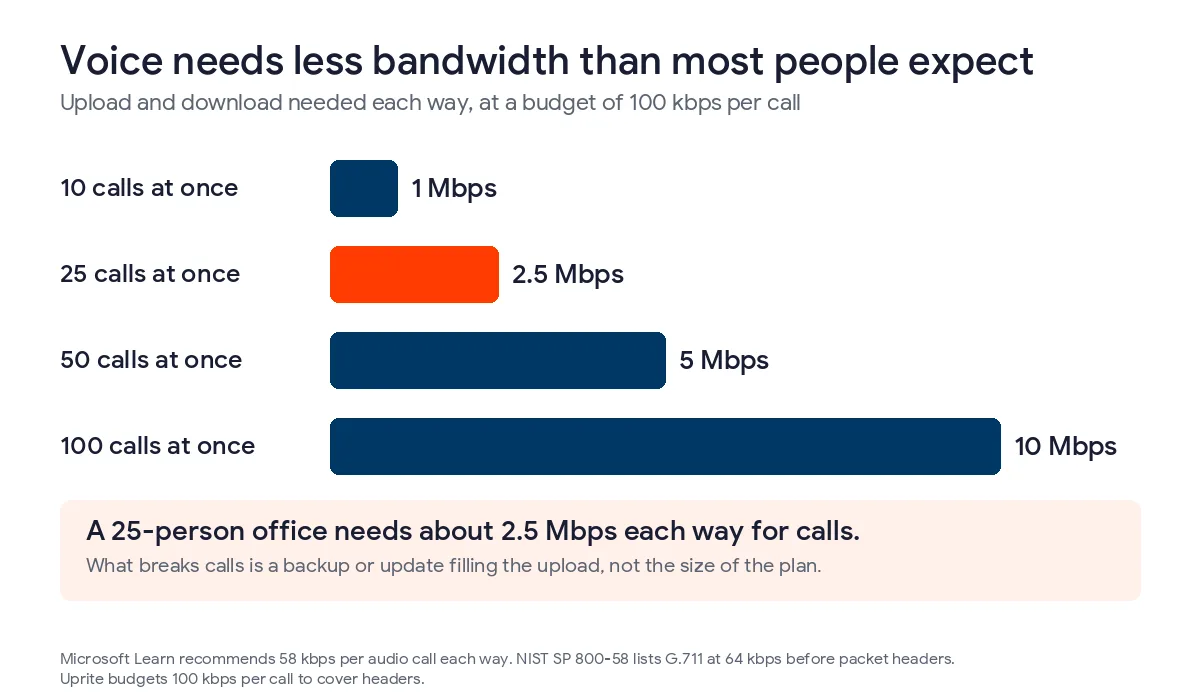
Calls can still break up on a 300 Mbps plan because voice shares the connection with everything else. A backup job, a software update, or a 4 GB video folder syncing to the cloud can fill the upload, and the voice packets then wait in the same line. Cable plans are often built around download speed, so the upload figure on the bill is the number to read. Microsoft’s QoS guidance says to use QoS first and add bandwidth only where necessary. A bigger plan is rarely the right first purchase.
Is your Wi-Fi causing the choppy audio?
Wi-Fi is the first thing we would rule out. Microsoft’s network guidance says Wi-Fi is not designed or configured for real-time media by default. The 2.4 GHz band is shared with microwaves, Bluetooth devices, and neighboring routers. The 5 GHz band is better for voice, but it needs more access points to cover a floor. Desk phones should be on wired PoE switch ports. Laptop softphones should use the Ethernet jack on the docking station, and a lot of people forget the dock has one.
For the Wi-Fi that remains, we would check three settings. WMM tells the access point to put voice ahead of web browsing, band steering moves dual-band devices onto 5 GHz, and neighboring access points should sit on channels that do not overlap. Multi-story buildings and suites with heavy interior walls need the most attention. A phone behind a break room wall can hold a good signal for browsing and still drop audio, because browsing tolerates a late packet and voice does not.
Which router and firewall settings cut calls?
The router comes next. Without QoS, a router puts all traffic in one line, first in and first out, so a voice packet can wait behind a file upload. Microsoft marks audio with DSCP 46, which is called Expedited Forwarding, and tells the router to send it through a faster queue. The exact steps depend on the router model, so we would use the manual or the phone provider’s setup guide.
NIST noted in 2005 that firewalls can delay or block call setup and that encryption adds latency and jitter. If calls got worse right after a new firewall went in, we would check the inspection settings first, because inspection adds processing time to every packet.
Three other settings cause similar trouble. SIP ALG on a consumer-grade router can rewrite call setup messages and produce one-way audio, and hosted phone providers commonly ask customers to turn it off. Microsoft says the firewall should not change the NAT address or port mapping for UDP. Microsoft also recommends keeping real-time calls out of a VPN tunnel, which is done with split tunneling. Our guide to security and privacy in managed phone services covers the other side of that tradeoff.
Why does every phone drop at once after a power blip?
CPS Energy’s fiscal 2025 fact sheet reports a system average of 61.80 minutes of outage and 1.08 outages per customer for the calendar year, across 976,622 customers. Those averages hide the customers who were hit more than once. They probably miss short flickers too, and a flicker of one second can still force a modem, router, and PoE switch to restart for a couple of minutes. Every handset then has to register again.
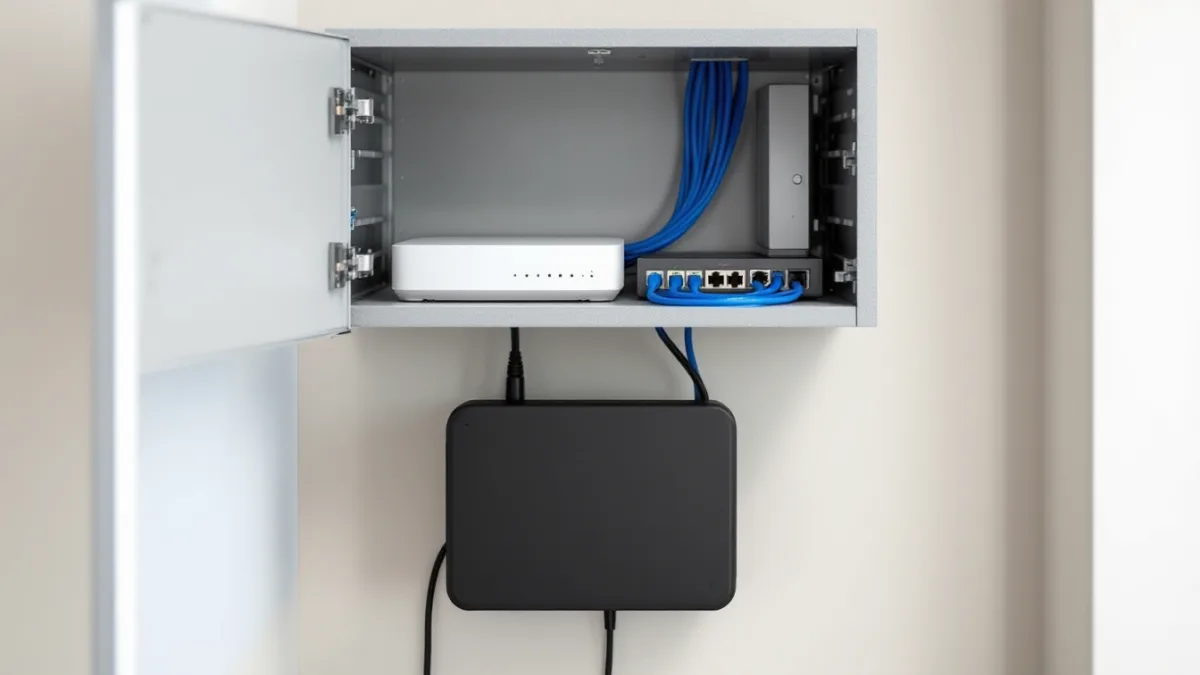
The fix is a small battery backup on the modem or fiber box, the router, and the switch. We would also ask the phone provider to set a failover rule that rings staff cell phones when the office lines go offline, so an outage does not stop calls from reaching people.
How do you run a 100-ping test before calling anyone?
The test takes about 10 minutes and shows whether the problem is inside the office or out on the internet connection. It should run during the hour the calls go bad, from a computer connected by cable.
- Open Command Prompt on a wired computer at the front desk.
- Type ping -n 100 followed by the router’s address, often 192.168.1.1, and press Enter.
- Run it again against a public address such as 1.1.1.1.
- Read the lost percentage and the minimum, maximum, and average times at the bottom.
| What you see | What it means | Next move |
|---|---|---|
| Any loss to the router | The problem is inside the office, in cabling, a switch, or Wi-Fi | Repeat with a different cable and port, then check the switch |
| Router is clean, internet shows loss or big spikes | The internet circuit or modem | Open a ticket with the internet provider and attach the output |
| Fine at 10 a.m., bad at 2 p.m. | Something inside the office is filling the connection | Move backups and updates to nights |
| Zero loss and steady times everywhere | The network is probably fine | Ask the phone provider for per-call quality reports |
A ping tests one path with one kind of traffic, and voice uses UDP, so a clean result does not clear the network completely. A ping that normally reads 20 ms and jumps to 150 ms in bursts still matches the pattern voice handles badly, and any loss at all deserves a second look.
When should you fix it yourself and when should you call for help?
An office with one location and 10 or fewer phones can do most of this in an afternoon. That means wiring the phones, updating the router, running the ping test, and buying a UPS. Outside help makes sense with several locations, with calls that only break on certain routes, or when QoS has to line up across switches, firewalls, and a SIP trunk. It also makes sense when the internet provider and the phone provider each say the other one owns the problem, because someone has to test across both. If you do decide to move, our guide to switching business phone systems in San Antonio covers the cutover. Our managed IT services in San Antonio cover the network side, and Uprite’s managed phone plans start at $22.99 per user per month at 50 or more users. Anyone who wants a second opinion first can send us the ping output.
Common questions about VoIP call quality
Why does my VoIP call cut out every few seconds?
Repeating dropouts of a second or less usually mean packet loss on the office network, most often from Wi-Fi or a crowded upload. Move one phone to a wired port and run the 100-ping test during a bad hour. If the gaps disappear on the wired phone, the wireless side is the problem.
Is 25 Mbps enough for 20 people on VoIP?
Yes for the calls alone. Twenty simultaneous calls at 100 kbps each need about 2 Mbps in each direction. What matters is how much of that stays free during the busy part of the afternoon, which depends on backups, updates, and file sync.
Do I need a separate internet line just for phones?
Usually no. Microsoft recommends QoS first and extra bandwidth only where needed. A second line makes sense as failover or for an office with heavy uploads, though that decision is about resilience more than call quality.
Will switching VoIP providers fix choppy calls?
Not if the problem sits inside the office, because a new provider’s calls still cross the same router, Wi-Fi, and internet line. Switch after the ping test comes back clean and the new provider can show per-call quality reports that beat the current one.
How do I tell whether it is my internet provider or my office network?
Run the ping test twice, once against the router and once against a public address. Loss to the router points inside the office. A clean router with loss to the public address points to the internet circuit, and that output can go to the provider.
Send us your ping results and the hours when calls break up. We will tell you whether the cause is your network, your internet circuit, or the phone service.
Talk to a phone expert