VoIP sends your office calls over the internet while a landline sends them over copper wire, so the switch changes how you handle power outages, 911 addresses, fax, alarm lines and phone bills. The phones are the easy part.
Most of what goes wrong during a move off landlines has nothing to do with the handsets. It’s the devices and habits nobody remembered were tied to the old line. If you’re already leaning toward a cloud system, our overview of business phone service in San Antonio covers plans and what’s included, and this guide covers what to check before you commit.
For most San Antonio offices, VoIP costs about the same or less per seat and does a lot more, but it swaps a line that lives on the phone company’s network for a service that depends on your power and your internet. Plan for 5 things before cutover, which are battery backup, a second internet path, a 911 location for every desk, a count of every device on copper, and a number port date.
What actually changes when a San Antonio office moves from a landline to VoIP?
A landline carries each call as an analog signal over copper wire that the phone company owns, while VoIP, short for voice over internet protocol, turns the call into data and sends it across your internet connection to a cloud phone system. That one difference explains nearly every tradeoff in the table below, from outages to how 911 finds you.
| What you’re comparing | Landline | VoIP | What to do about it |
|---|---|---|---|
| How the call travels | Copper pair from the phone company | Your internet connection to a cloud phone system | Test your upload speed and call quality before cutover |
| Power outage | Plain desk phones often keep working, cordless and system phones don’t, and poles can come down | Needs power at your router, switch and handsets | Put the network gear on a battery |
| Internet outage | Phones aren’t affected | Calls fail unless failover is set up | Add a cellular backup and a forward-on-failure rule |
| Adding or moving a seat | New jack, wiring, sometimes a visit | Assign an extension and plug in a phone or sign in on the app | Update the 911 location whenever a desk moves |
| Fax, alarm, elevator and door phones | Work on analog lines | Need an adapter or a different connection | Inventory every one before you port numbers |
| Remote and hybrid staff | Calls get forwarded to a cell phone | Same extension on a laptop or mobile app | Decide which staff get the app and which get a handset |
| Billing | Per line plus usage and fees | Per user per month | Compare against your actual bill, line by line |
A statewide comparison of the 2 technologies is in our VoIP vs traditional phone systems guide. This one stays on the San Antonio details, such as storm outages, the 911 center that answers your calls, and the copper lines your office may still be paying for.
What breaks when the copper line goes away?
Usually it’s something small that has been quietly riding on an analog line for years. When the line goes, these devices don’t throw an error. They just stop working, and you find out the day you need them.
- Fax machines, which need either a fax-over-IP service or an analog adapter, and which are far less forgiving of a shaky connection than a voice call.
- Alarm panels and fire alarm communicators that dial out to a monitoring company.
- Elevator emergency phones in multi-story buildings.
- Door entry and gate phones that ring a desk or a cell phone.
- Older credit card terminals and postage meters that still dial out.
- DSL internet that shares the same copper pair, which can take your VoIP down with the old phone line.
For the alarm and elevator items, ask the company that monitors them and your building owner what they accept before anyone cancels a line, because those requirements belong to them and to your local fire marshal, not to your phone provider. We’d rather you hear that from us now than from an alarm company in the middle of a cutover.
The clock on this matters more than it used to. In March 2026 the FCC adopted Report and Order 26-19, which removed the Commission’s own filing steps for network changes and copper retirements. A carrier that wants to discontinue a service still needs FCC authority and has to notify affected customers, but the practical effect is that the carrier’s schedule is the one that counts. Waiting for a letter isn’t a plan.
Will your phones keep working when CPS Energy loses power?
They will if the router, switch and handsets stay powered and at least one internet path stays up. The FCC says as much in the same order, noting that interconnected VoIP keeps working during a power outage when internet service is operational and the customer maintains backup power.
San Antonio gives you plenty of reasons to plan for it. Storms in late August 2026 left more than 67,000 CPS Energy customers without power on a Saturday morning, according to a local Fox station report, and in June KSAT reported at least 17,000 customers out after overnight storms. A company with a landline didn’t automatically ride those out either.
Here’s the honest part, which cuts against what a lot of VoIP sales pitches say and what a lot of landline loyalists believe. The FCC order rejects the argument that copper phone service always works in a power outage, pointing out that utility poles carrying copper come down in severe weather and cut off service along with power. Neither technology is safe by default. What matters is whether somebody planned for the failure. Our VoIP call quality guide for San Antonio covers the power blips that restart a modem, router, and switch.
A workable outage plan has 4 layers, and each one is cheap next to a day of missed calls.
- A battery backup on the modem or fiber terminal, the router, and the network switch that powers your handsets. Ask for the runtime in hours, then pull the plug once to confirm it.
- A second internet path, usually cellular, that takes over when the main connection drops.
- A forward-on-failure rule that sends calls to staff cell phones the moment the office goes offline.
- The mobile app on staff phones, so a person can still answer the main number from anywhere.
How does 911 work on a VoIP system in a San Antonio office?
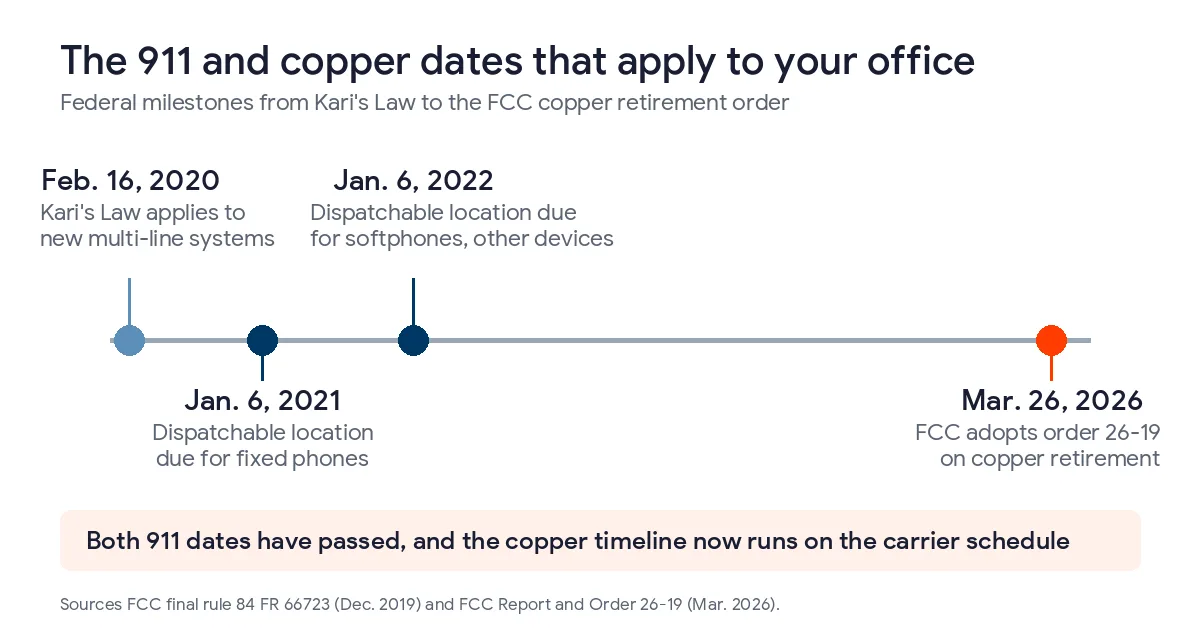
Federal rules put the responsibility on whoever installs, manages or operates the system. Kari’s Law, as the FCC implemented it in a December 2019 order, applies to multi-line systems manufactured, sold, leased or installed after Feb. 16, 2020. It requires that anyone can dial 911 directly without a prefix like 9, and that someone on site is notified when a call goes out.
The companion requirement is dispatchable location, which means a validated street address plus the detail needed to find the caller inside the building, such as a suite or floor. The FCC set that to take effect one year after the rules for fixed devices like desk phones and two years after for softphones and other devices, so both dates have passed. The direct-dial duty sits in 47 CFR 9.16.
On a landline, the 911 address follows the line. On VoIP, it follows a record that somebody has to keep current, and it’s the thing most likely to go stale. Three checks keep it honest.
- Confirm that every phone, including each softphone, reaches 911 without dialing 9 first. Ask your provider how to test this safely, since a live test call ties up a dispatcher.
- Decide who gets the on-site notification and make sure that person can actually open a door for responders.
- Record the suite, floor or room for each station, and update it whenever a desk moves. Ask how staff answering from home or a client site are handled, because their location has to follow them.
How do you cut over without dropping calls?
Keep the old lines alive until the new system has proven itself, and treat the number port as the last step instead of the first. Our guide to switching business phone systems without missing calls covers the same ground in more detail. A sensible order looks like this.
- Pull the last 3 phone bills and list every line, then walk the building and match each line to a device or a person.
- Check your internet for speed, stability and the type of connection, since DSL behaves differently from cable or fiber.
- Build the call flow, including the main greeting, ring groups, after-hours routing and voicemail to email.
- Set up battery backup, the second internet path, and the forward-on-failure rule.
- Test inbound, outbound, 911 dialing, fax and every alarm or door device on the new setup before the numbers move.
- Schedule the port for a quiet window, keep the old lines until it completes, and have someone watching calls that day.
Security belongs on that list too. NIST’s guide to VoIP security, SP 800-58, dates from January 2005 and opens by noting that a plethora of security issues come with the technology. It’s old enough that we’d treat it as a list of topics and not a current standard, and the practical takeaway is to ask your provider how they handle sign-in protection and toll fraud. If you’d like the network side checked first, our network assessment is no charge, and our IT support in San Antonio team can run the cutover alongside the rest of your environment.
What does VoIP cost compared with the landline bill you have now?
Uprite prices managed phone plans per user per month, and the price drops as the team grows. The CORE plan runs $29.99 per user for 1 to 5 users and $22.99 at 50 or more, PRO runs $29.99 to $36.99, and COMPLETE runs $35.99 to $42.99. Number porting is included, and handsets are optional.
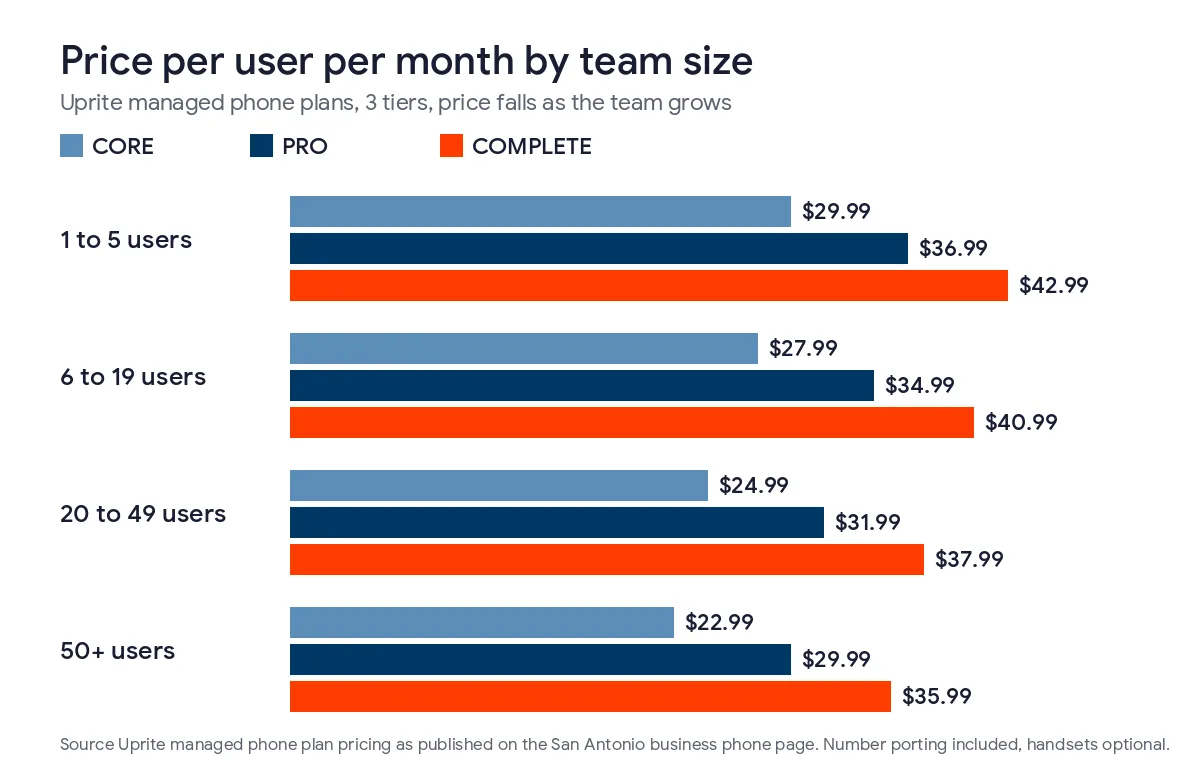
As a worked example, a 20-person office on CORE pays $24.99 per user, which is $499.80 a month, and the same office on COMPLETE pays $37.99 per user, or $759.80. Your own bill is the number that matters, so put the landline total next to those figures with the fax line, the alarm line, taxes and long-distance charges included. Current rates are on our pricing page.
VoIP isn’t always the cheaper line on a spreadsheet. A single basic landline for a one-person office can cost less than a plan plus a backup internet connection. It tends to win once you count more than a handful of seats, remote staff, and the cost of rewiring every time somebody moves.
What San Antonio owners ask about VoIP and landlines
Is VoIP better than a landline for a small business in San Antonio?
For most offices with more than a few people, yes, because it costs less per seat and adds mobile apps, call routing and voicemail to email. It needs backup power and a second internet path, which a plain landline didn’t.
Do VoIP phones work when the power goes out?
They do if your router, switch and handsets are on battery backup and the internet stays up. The FCC notes that VoIP keeps working during an outage under those conditions, and a cellular backup covers the case where the main line drops.
Can I keep my current phone number when I switch to VoIP?
Yes, in most cases the number moves to the new provider through a port. Keep the old lines active until the port completes, and expect your published numbers to stay the same. Uprite includes number porting in its plans.
Will my fax machine and alarm panel still work on VoIP?
Not automatically. Both were built for analog lines, so they need an adapter, a fax-over-IP service or a different connection. Ask your alarm company what it accepts before you cancel any line, and test every device before the numbers move.
Does VoIP support 911 in a San Antonio office?
Yes, and federal rules require it. Anyone must be able to dial 911 without a prefix, an on-site person must be notified, and each phone needs a location a dispatcher can use. That location record has to be kept current as desks move.
Is the copper phone network really being shut off?
Carriers are retiring it, and the FCC’s March 2026 order made the process faster by dropping its own filing steps. A carrier still needs FCC authority to discontinue a service and must notify affected customers, so check your own lines now instead of waiting.
How much does a VoIP phone system cost in San Antonio?
Uprite’s plans run from $22.99 to $42.99 per user per month depending on the plan and team size. A 20-person office pays $24.99 per user on CORE, which is $499.80 a month. Number porting is included and handsets are optional.
Send us a copy of your last phone bill and we’ll show you, line by line, which lines can move, which devices still ride on copper, and what a cloud phone system would cost for your headcount. We usually reply within 5 minutes.
Get a Phone Bill ReviewPrefer email or a phone call? Reach the team through our contact page.