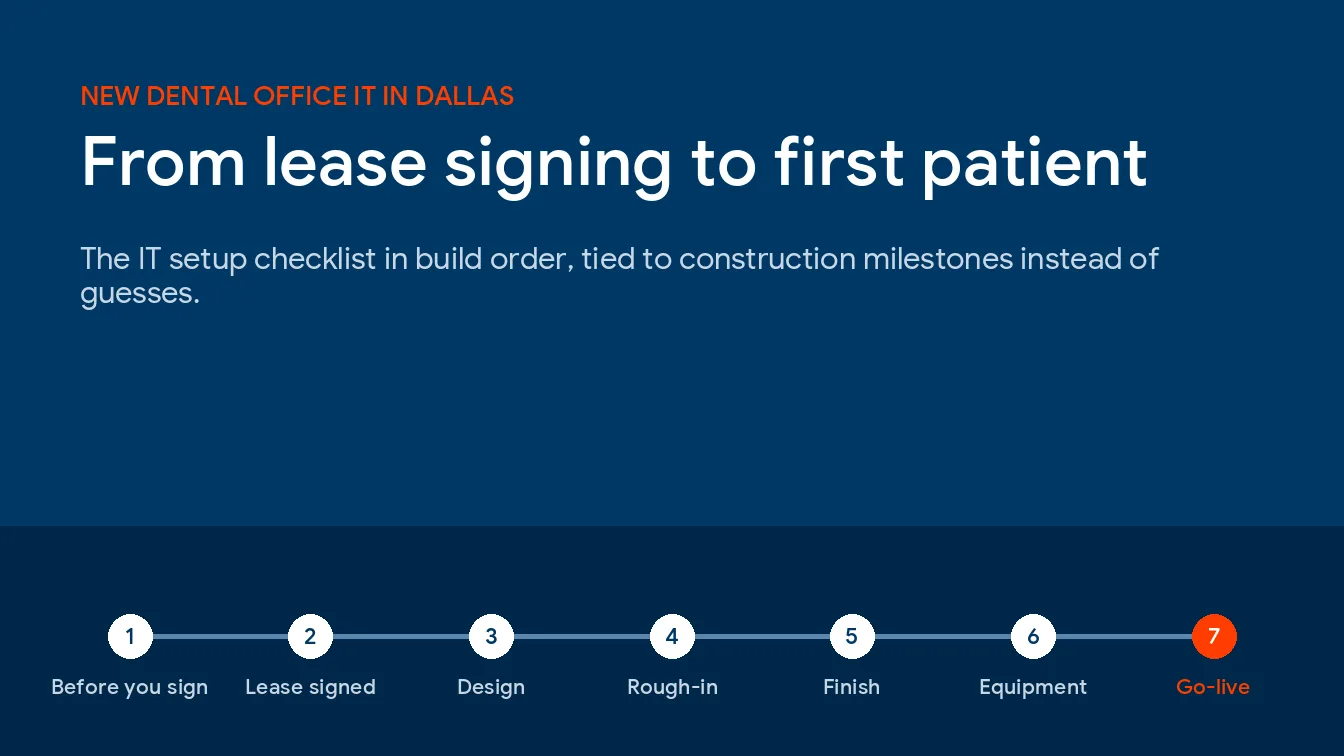
New dental office IT setup in Dallas means picking software and ordering internet at lease signing, cabling while walls are open, finishing e-prescribing and a HIPAA risk analysis before opening, and filing x-ray registration within 30 days of first use. The contractor sets the dates. The order doesn’t change.
This is the build-order version for a single-location practice, the setup project that comes before ongoing IT support for dental practices in Dallas. Everything here has lead time. Half of it starts before anyone hangs drywall. Miss a window and you’re paying a crew to fish cable through finished walls, or opening with a phone number that hasn’t moved yet.
Pick the practice management and imaging software first, because they set the server, workstation, and cabling spec. Order internet and lock in phone numbers the week the lease is signed. Cable while the studs are exposed, starting at 3 drops per operatory. Then clear the Texas prescribing and x-ray items, an EPCS credential for every prescriber, a PMP account for each prescriber and delegate, and DSHS x-ray registration within 30 days of first use. Finish the HIPAA risk analysis during go-live week.
What Does IT Setup for a New Dental Office Include?
IT setup for a new dental office is the work of designing, installing, and proving every system a practice needs before it sees patients. That runs from the cable inside the walls to practice software, imaging, phones, internet, e-prescribing credentials, backups, and the HIPAA paperwork covering all of it.
It’s a project. It has a start date. It has a finish date. And it ends with a punch list.
Ongoing support starts after. We keep the 2 separate on purpose, because a startup budget gets wrecked when setup labor hides inside a monthly contract nobody can read, or when monthly support gets quoted before anyone knows how many workstations the office will actually have.
Where Are New Dental Offices Opening Around Dallas?
North. Almost entirely north.
We pulled federal establishment counts for private dental offices in Dallas, Collin, Denton, Tarrant, and Rockwall counties. Between 2019 and 2025 the 5 together gained 46 offices. Collin and Denton gained 177. Dallas County lost 99. It’s shrunk every year after 2022.
| County | Dental offices 2019 | Dental offices 2025 | Net change | People per office 2025 |
|---|---|---|---|---|
| Collin | 692 | 813 | +121 | 6.8 |
| Denton | 350 | 406 | +56 | 6.8 |
| Rockwall | 77 | 74 | -3 | 7.1 |
| Tarrant | 972 | 943 | -29 | 7.3 |
| Dallas | 1,643 | 1,544 | -99 | 7.1 |
| All 5 counties | 3,734 | 3,780 | +46 | 7.1 |
Source is the BLS Quarterly Census of Employment and Wages, NAICS 621210, private ownership, annual averages, pulled October 2026. These are net counts. Openings minus closures, not ribbon cuttings.
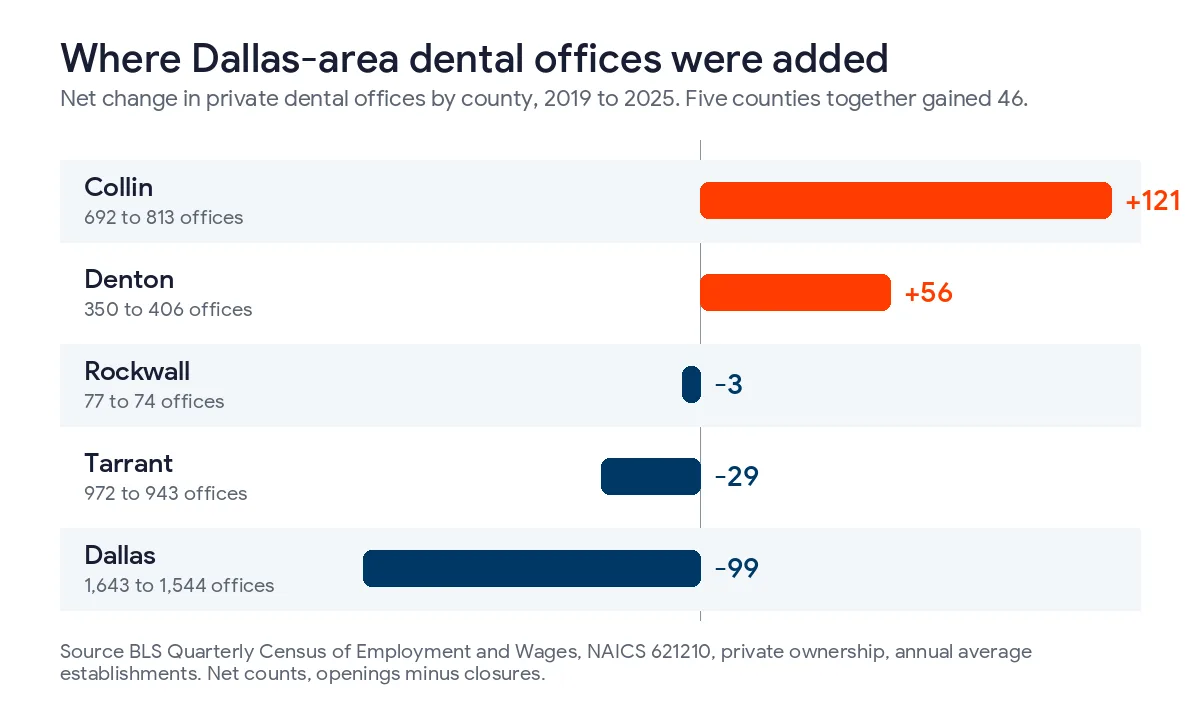
Collin added offices in every single year of that series. They stayed small, too. Collin averaged 6.8 people per dental office in 2019 and 6.8 in 2025, while Dallas County offices grew from 6.3 people to 7.1 as the count fell.
So what does that mean if you’re signing in Frisco, McKinney, Prosper, or Little Elm? If you’re leasing in a newer retail or medical-office development, a suite that’s never had a tenant may not have any carrier facilities in it yet. Ask the landlord which providers already serve the building. Ask before you sign. The average office in these counties runs about 7 people, which is a fair number to plan support around. Cable for year 3, though. Not for opening day. Our pages for managed IT services in Frisco and McKinney cover those two markets specifically.
The Build-Order Timeline, From Lease Signing to First Patient
Each row hangs off a construction milestone. That’s what actually moves.
| Step | Construction milestone | IT work that has to happen | Who owns it |
|---|---|---|---|
| 1. Before you sign | Letter of intent, lease negotiation | Confirm which carriers serve the building, where the telecom room is, whether there’s ceiling space for cable runs, and whether low-voltage work comes out of the tenant improvement allowance | Owner, broker, IT provider |
| 2. Lease signed | Architect starts drawings | Choose practice management and imaging software, decide on a local server or cloud, order internet, secure phone numbers | Owner, IT provider, software vendors |
| 3. Design | Construction drawings | Drop schedule for every room, closet location with power and cooling, dedicated circuits, Wi-Fi access points marked on the ceiling plan | IT provider, architect, electrician |
| 4. Rough-in | Walls framed and open | Pull and label every cable, set boxes and sleeves, run conduit to the pano or CBCT location | Low-voltage contractor |
| 5. Finish | Drywall, ceilings, cabinetry | Terminate and test every drop, mount the rack, install the firewall, switches, and access points | IT provider, cabling crew |
| 6. Equipment install | Chairs, delivery units, x-ray | Workstations, sensors, intraoral cameras, the imaging bridge into the practice software, printers and scanners | IT provider, equipment dealer, software vendor |
| 7. Go-live week | Certificate of occupancy | Port or activate numbers, test every operatory end to end, test a restore, confirm e-prescribing sign-in, sign the risk analysis | IT provider, office manager, dentist |
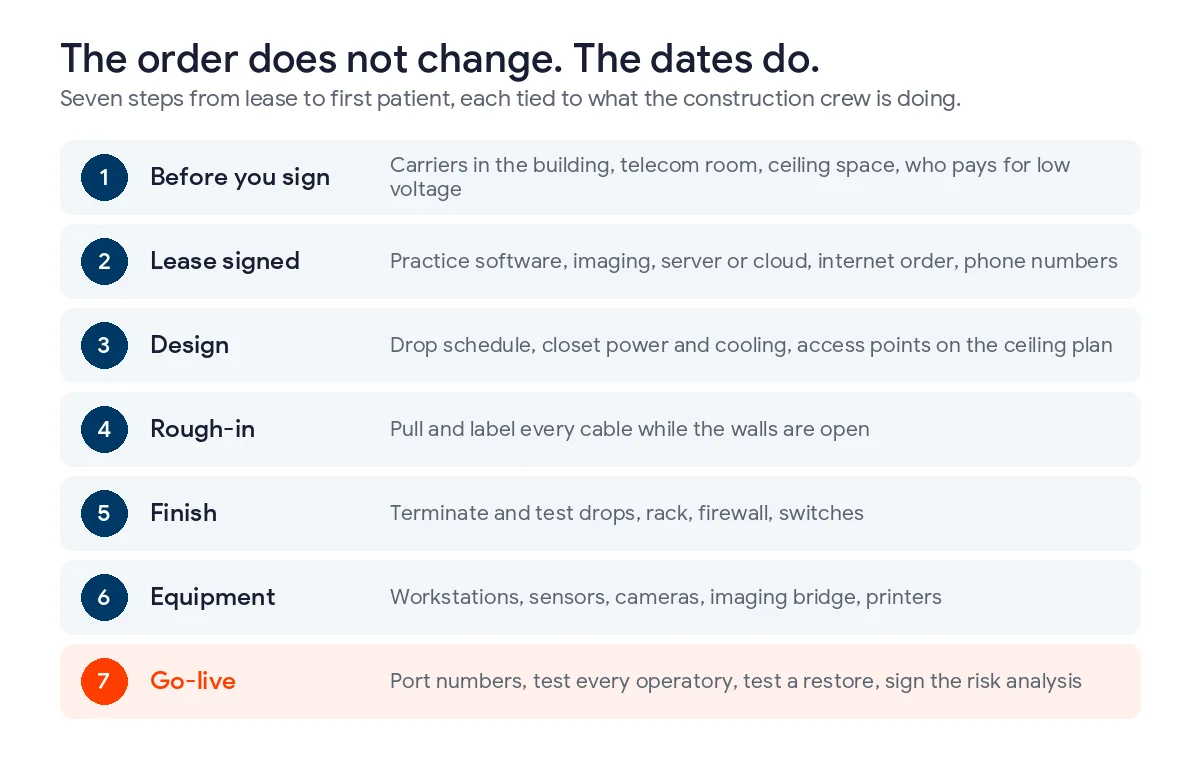
We don’t put week counts on that table. A shell space in a brand-new Frisco development and a second-generation suite off Preston Road run on completely different clocks, and a number printed in a blog post would be wrong for one of them. Sequence is what holds. If you’re at step 4 and step 2 isn’t settled, the cabling crew is guessing where the imaging room goes.
Guessing gets expensive fast.
Which Decisions Have to Be Made the Week You Sign the Lease?
Software comes first. It isn’t close. Whatever practice management system you pick decides whether you need a server at all, what that server has to look like, and how much of your day depends on the internet connection.
Patterson’s Eaglesoft hardware requirements, revision 035, call for a wired server, gigabit networking, and Cat 5e cabling or better. Open Dental publishes a very different list on its computer requirements page. Our breakdown of server requirements for Dentrix, Eaglesoft, and Open Dental lines the three up side by side. Read it before anyone buys hardware.
Going cloud? That moves the risk instead of removing it. With the chart in a browser, a dead internet connection stops the front desk cold, so a cloud practice needs a second connection from a different carrier, not a faster version of the first one.
Imaging is the second decision. Your sensor or camera vendor sets the workstation spec in every operatory, and a pano or cone beam unit usually brings its own acquisition computer and a site-planning document from the dealer. Get that document early. It shows the architect where data and power land.
Then come the 2 orders that hurt most when they’re late.
- Internet. Order it the week you sign, ask the carrier for an install date in writing, and order the backup connection from a different provider at the same time.
- Phone numbers. A brand-new practice should claim its main number now so it can go on the website, the Google Business Profile, and every enrollment form from day one.
Moving an existing number? Federal rules under 47 CFR 52.35 require the losing carrier to finish a simple port within 1 business day and a non-simple port within 4 business days, and a complete simple-port request has to arrive between 8 a.m. and 1 p.m. local time to be counted that day. Carriers holding an FCC waiver get 4 business days even for simple ports. An account with several lines usually isn’t a simple port. Plan on the longer clock. Never port on opening morning. Our managed VoIP and phone systems team handles the port and the call flows as part of the build.
How Many Network Drops Does a Dental Operatory Need?
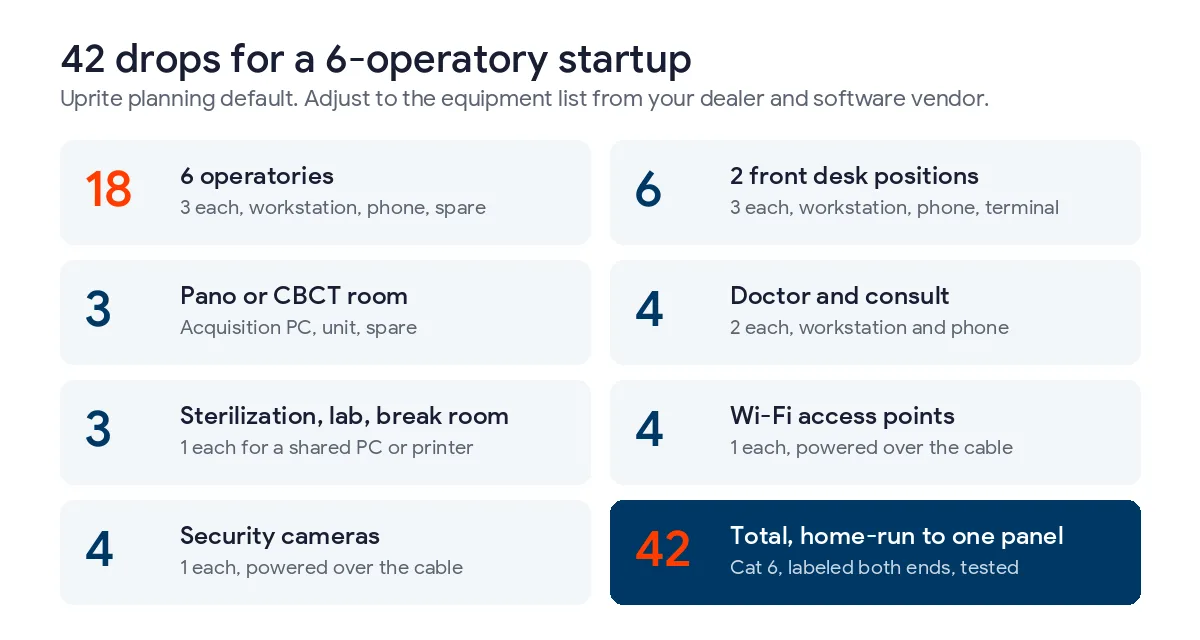
Start at 3 data drops per operatory. That’s our planning default, and it’s deliberately a little more than an operatory needs on opening day.
One feeds the chairside workstation. One feeds the phone. The third is the spare. It’s the cheapest item on this whole list while the walls are open, and one of the most annoying to add later. Intraoral sensors and cameras usually plug into the workstation by USB, so they don’t need their own drop, but a second monitor PC, a scanner cart, or a patient-facing display eventually will.
| Location | Data drops | What uses them |
|---|---|---|
| Each operatory | 3 | Chairside workstation, phone, one spare |
| Each front desk position | 3 | Workstation, phone, card terminal or label printer |
| Pano or CBCT room | 3 | Acquisition workstation, the unit if its site plan calls for one, a spare |
| Doctor’s office | 2 | Workstation, phone |
| Consult room | 2 | Treatment-plan display, phone |
| Sterilization | 1 | Shared workstation for digital logs |
| Lab and break room | 1 each | Shared workstation or printer |
| Ceiling, each Wi-Fi access point | 1 | Powered over the same cable |
| Each security camera | 1 | Powered over the same cable |
Run the numbers for a 6-operatory startup with 2 front desk positions, 4 access points, and 4 cameras and you land at 42 drops, all home-run to one patch panel in the closet. That closet needs a dedicated circuit, a battery backup sized for the firewall and switches, and somewhere for the heat to go. A broom closet with no vent? It’ll struggle by August.
Who’s allowed to pull the cable surprises people. Texas exempts communications circuits and optical fiber from state electrician licensing, per the Texas Department of Licensing and Regulation. So a low-voltage crew doesn’t need a state electrician license. Your closet circuit does. Security cameras are the exception. Texas Occupations Code section 1702.002 counts a business camera system that records images as an alarm system, so the company installing the cameras generally needs a Texas alarm systems license under chapter 1702. TDLR also notes that municipal rules can override the exemption, so check with your city’s building department before the crew mobilizes. We run these jobs through our structured and low-voltage cabling team, Cat 6, labeled at both ends, with a test report for every drop.
Keep the server and imaging workstations wired. Wi-Fi is for phones, tablets, and guests. Guests get their own segment. It can’t see the practice software at all.
What Texas Rules Turn Into IT Work Before Opening?
There are 3. None shows up on a generic office-setup checklist.
Electronic prescribing for controlled substances
Since January 1, 2021, Texas has required controlled substance prescriptions to go out electronically, and Texas Health and Safety Code section 481.0755 lists the exceptions, including a waiver held by the dentist. A dental board rule, 22 TAC 111.5, counts writing fewer than 25 prescriptions a year as an exceptional circumstance that supports a waiver. It isn’t automatic. The dentist has to request it from the board, and it lasts 1 year before it has to be renewed.
Setup is where startups stall. Federal EPCS rules require each prescriber to get a two-factor credential from an approved identity-proofing provider, and the provider has to deliver it over 2 separate channels, such as email and a phone call, under 21 CFR 1311.105. Then 21 CFR 1311.125 requires at least 2 designated people at each location to manage who can sign. One person enters a permission. A second approves it with their own two-factor credential, and that second person has to be a DEA registrant.
Think about a one-dentist startup. That means the office manager and the dentist both get set up, and the dentist’s own credential has to exist before anyone else’s permissions can be approved. Someone also has to confirm each prescriber’s DEA registration and Texas authorization are current. At a brand-new address, that’s a real check.
Prescription Monitoring Program accounts
Before prescribing opioids, benzodiazepines, barbiturates, or carisoprodol, a Texas prescriber has to check the patient’s history in the PMP under section 481.0764. Under 22 TAC 111.3, an employee can run the query at the dentist’s direction. Give every delegate their own account. Shared logins break the audit trail. They also get forgotten at offboarding.
Dental x-ray registration
A Department of State Health Services rule, 25 TAC 289.232, requires a practice to apply for registration within 30 days after it starts using a dental x-ray machine. The DSHS dental x-ray page lists the forms, RC 226-2, RC 226-1, and RC 42-R for the radiation safety officer, with a $370 application fee.
Strictly speaking, that’s not IT. It’s here anyway. Imaging install is the critical path in step 6, and the registration clock starts the day the first image is taken. Add a cone beam unit later and the same rule wants a written notice within 30 days, since adding computed tomography changes the category of machine on the certificate.
What Has to Be in Place Before the First Chart Is Created?
A risk analysis, a stack of signed business associate agreements, and a network that was built secure instead of patched secure later.
Risk analysis is a required implementation specification under the HIPAA Security Rule at 45 CFR 164.308(a)(1)(ii)(A), an accurate and thorough assessment of the potential risks and vulnerabilities to electronic protected health information. Timing is tricky. You can’t analyze systems that aren’t installed, and a risk analysis written off construction drawings is mostly a guess. So we draft it from the design in step 3, then finish and sign it in go-live week against what’s actually on the wall, before the first real chart exists or any patient data gets imported.
A free federal Security Risk Assessment Tool works fine for a small office. Our guide to the dental HIPAA risk assessment in Texas walks through running one.
Business associate agreements come next. Every vendor that stores or touches patient data signs one before data flows, which usually means the practice software company, the imaging cloud if you use one, the backup provider, the email platform, and the IT provider. We sign ours before onboarding starts.
Texas adds its own floor. Business and Commerce Code section 521.052 requires a business to use reasonable procedures to protect sensitive personal information. A dental chart is full of it. The statute doesn’t name specific controls. For a dental office, we treat reasonable as multifactor sign-in on email and on any remote access to the practice software, endpoint protection on every workstation, a firewall with the guest network walled off, and backups somebody has actually restored. Our page on dental practice IT security in Texas covers the full control set, and network security services covers the firewall side.
Go-Live Week, Tested in This Order
Don’t sign off on the build until a person has done every one of these. Assumed doesn’t count.
- Call the main number from outside and walk every call flow, including after-hours routing to the answering service.
- Sign in at each operatory as the person who’ll actually work there, then open a test patient’s chart and schedule.
- Take a test image in each operatory and confirm it lands in the right patient record inside the practice software.
- At the front desk, print a route slip, scan an insurance card, and run a card payment.
- Have every prescriber sign in to the e-prescribing module with their two-factor credential.
- Unplug the primary internet connection and watch the backup connection take over.
- Restore last night’s backup to a test location and open it in the practice software, the way our data backup services team runs restore tests.
- Walk the risk analysis against the installed equipment, then sign and date it.
- Hand the office manager the network diagram, the vendor contact sheet, and the admin credentials in a password vault.
Item 7 is the easiest one to skip. It’s also the one that matters on the worst morning of your first year. What that morning costs a Dallas practice is in our breakdown of dental office IT downtime in Dallas.
What Does New Practice IT Cost in Dallas?
You’ve got 2 budgets. Don’t blend them.
A one-time project covers cabling, network gear, workstations, the server if your software needs one, and the labor to build and test it all. It swings with the drop count and with what the equipment dealer is already supplying, so we quote it from the drop schedule, never from square footage.
Monthly is predictable. Our fully managed plan, on-site support included, runs $138 per user per month. For a startup sized like the Collin County average of about 7 people, that’s roughly $966 a month before licensing and hardware. Our remote-only IT Essentials plan is $91 per user per month for teams under 12. It’s a hard sell for an office where a sensor quits 10 minutes before the first patient sits down.
Want the per-chair view? Our breakdown of dental IT cost per operatory in Texas converts every common pricing model into a monthly number per operatory. Dallas numbers specifically are in our breakdown of dental practice IT cost in Dallas.
What New Practice Owners Ask Before Opening
How early should a new dental office bring in an IT provider?
Bring in an IT provider before you sign the lease, if you can. The building’s carrier access, ceiling space, and telecom room location are cheap to check at the letter-of-intent stage and expensive to fix once you’ve committed to a suite that has none of them.
Can a new dental practice run entirely in the cloud?
A new dental practice can run its practice management software in the cloud, but imaging still needs a local workstation in each room. The sensor or camera connects to that computer. A cloud practice also needs 2 internet connections from different carriers, since a single outage stops the schedule, the chart, and checkout at once.
Do I need a server in a new dental office?
Whether a new dental office needs a server depends on the practice management software it picks. Dentrix, Eaglesoft, and a locally hosted Open Dental install all need a properly built server, while a cloud practice management system doesn’t, though your imaging software may still want local storage for large scans.
Who should run the low-voltage cabling in a dental build-out?
A low-voltage contractor working from your IT provider’s drop schedule should run the data cabling in a dental build-out. The general contractor’s electrician handles power, including the dedicated circuit for the network closet, but data cabling is specialist work, and the person who’ll support the network should be the one who decides where every drop lands and how it’s labeled and tested.
Why does e-prescribing for controlled substances take longer than the software install?
Identity proofing comes first, and it runs on the identity provider’s schedule, not yours. Each prescriber has to be proofed, receive a two-factor credential over 2 channels, and then be approved by a second designated person who is a DEA registrant, so start it the moment the e-prescribing software is chosen.
Is a HIPAA risk analysis required before a startup practice opens?
HIPAA requires a risk analysis but sets no opening-day deadline, so the practical cutoff is the first electronic patient record. Risk analysis is a required implementation specification under 45 CFR 164.308, so draft it from the design, finish it against the installed equipment in go-live week, and revisit it whenever you add a system like a cone beam unit.
Signing a lease in Dallas, Frisco, or McKinney? We’ll draw the drop schedule with your architect, run the build as its own project, and move the practice onto managed support the day you open, with a business associate agreement signed before we touch a single system.
Plan My New Office ITAlready open and moving to a bigger space instead? Our IT checklist for moving into a new office covers relocations, and the ongoing plan options for DFW practices are on our page for managed IT services in Dallas.