A full day of IT downtime costs a typical Dallas dental office about $2,139 to $2,370 per chair once you add lost production to paid but idle staff. The damage depends on which box failed. A down imaging server stops exams and emergencies while hygiene keeps going, and a practice-software outage stops the whole front desk. If you want the full support model first, start with our page on IT support for dental practices in Dallas.
Dental office IT downtime in Dallas costs about $2,139 to $2,370 per chair for each full clinic day, based on median 2026 production per operatory and May 2025 Dallas-Fort Worth dental wages loaded for benefits. A 4-chair office loses $8,555 to $9,478 a day. Partial outages cost less, though an imaging outage takes the most expensive visits first.
The cost question usually gets asked the week after an outage. Wrong week. By then the schedule has been rebuilt, the front desk has called 20 patients, and nobody wrote down what actually broke.
As Uprite’s Lead vCIO, I build technology budgets for the businesses we support, and downtime is the line that almost never gets a number until after it happens. So I priced it for a dental office. Every cost figure below comes from a public source I link to, or from arithmetic you can check yourself with your own numbers. Check my math.
One caution before the math. A chair-day isn’t a revenue number. It’s what you lose when a chair that was booked can’t be used, and the size of that loss depends on whether your schedule has room to absorb the patients you send home.
What counts as dental office IT downtime?
Dental office IT downtime is any stretch when a booked chair can’t be used normally because a system it depends on has failed. That includes a practice management server that won’t start, an imaging server that can’t open or save radiographs, a network switch that drops every operatory, a dead internet circuit, or a cloud vendor’s outage.
Staff rarely use that term. They say the server is down, Dentrix won’t open, the x-rays aren’t loading, or the network is out. Same event. Different box.
And the box matters more than the duration. A 2-hour imaging outage on a heavy restorative morning can cost more than a 4-hour internet outage on a hygiene day, which is why I price downtime per chair and per failure, not per hour of total silence.
What does one down chair-day cost a Dallas dental office?
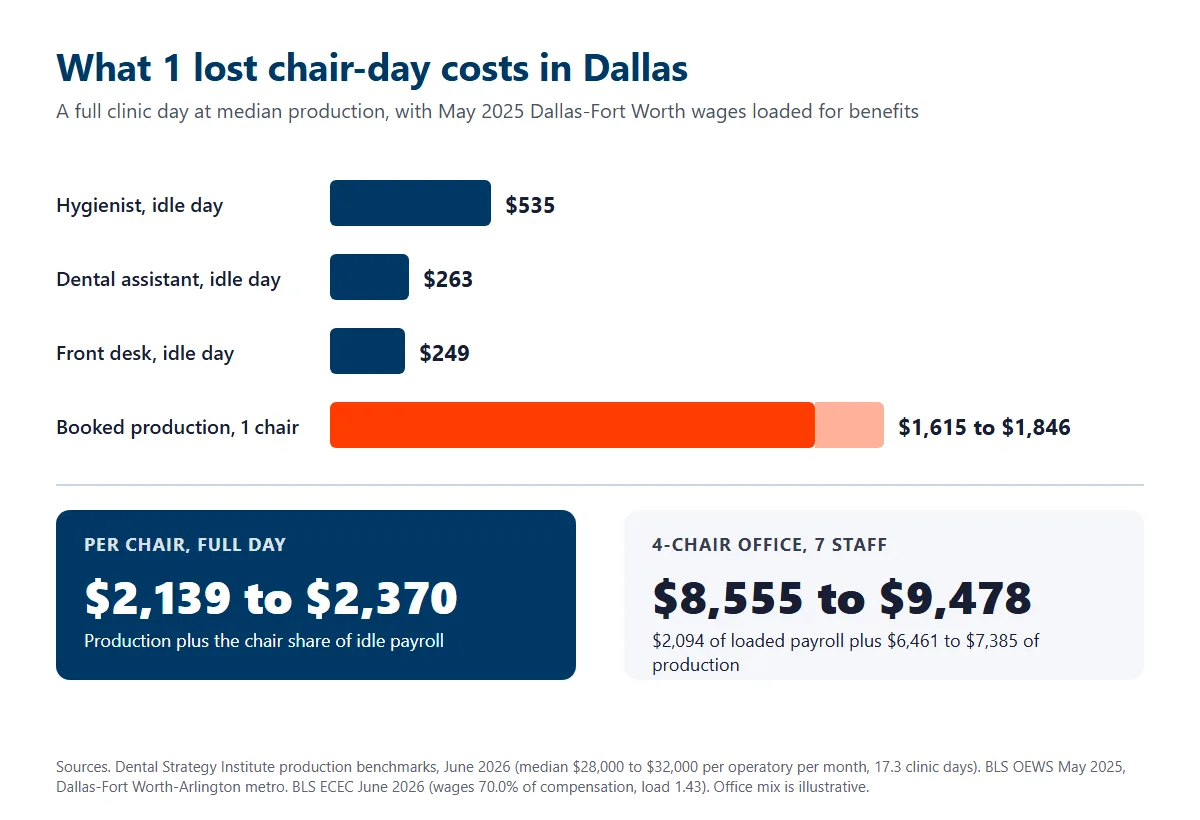
About $2,139 to $2,370 per chair at the median, for a full clinic day. Two numbers drive it, the production a chair would have produced and the payroll you pay while nobody can work.
Production comes first. The Dental Strategy Institute’s June 2026 benchmarks put median production at $28,000 to $32,000 per operatory per month. An office open 4 days a week runs about 17.3 clinic days a month, so each chair-day carries $1,615 to $1,846 of scheduled production.
Payroll comes second. I used the BLS Occupational Employment and Wage Statistics for May 2025 in the Dallas-Fort Worth-Arlington metro and loaded each wage by 1.43, because wages are 70.0% of private employer compensation costs in the June 2026 Employer Costs for Employee Compensation release.
| Line item | Dallas-Fort Worth input | Per 8-hour clinic day |
|---|---|---|
| Scheduled production per chair | $28,000 to $32,000 per operatory per month, 17.3 clinic days | $1,615 to $1,846 |
| Dental hygienist, idle | $46.74 mean hourly wage, 7,050 employed in the metro | $535 loaded |
| Dental assistant, idle | $22.97 mean hourly wage, 9,010 employed | $263 loaded |
| Front desk or office staff, idle | $21.79 mean hourly wage for medical secretaries | $249 loaded |
| Associate dentist, idle | $97.12 mean hourly wage for general dentists, 2,890 employed | $1,111 loaded |
Now build an office. Dallas County’s private dental offices averaged 7.1 people in 2025, a figure our Dallas dental IT support page works through from federal payroll data. Picture 4 operatories, 1 owner dentist, 2 hygienists, 2 assistants, and 2 people at the front desk.
That office pays $2,094 in loaded wages to its 6 staff for a day nobody can work. The owner’s income comes out of production, so it isn’t counted twice, and an office that also pays an associate adds $1,111. It also loses $6,461 to $7,385 of booked production. Total exposure runs $8,555 to $9,478, or $2,139 to $2,370 per chair. That’s one day. Your accountant may point out that you’d pay that payroll on a normal day too. Fair point. Count production alone and the floor is still $1,615 to $1,846 per chair.
A top-quartile office does worse. Busier chairs lose more. The same benchmarks put the 75th percentile at $42,000 to $55,000 per operatory per month, which works out to $2,423 to $3,173 of production per chair-day before a single dollar of payroll.
Is all of that production gone forever? Not always. If your hygiene schedule has openings next week, some patients slide into them. But a schedule booked 4 weeks out doesn’t have openings, so a lost day pushes every appointment behind it and some patients simply don’t rebook. I’d rather you plan on the full figure and get pleasantly surprised.
Which IT failure stops which chairs?
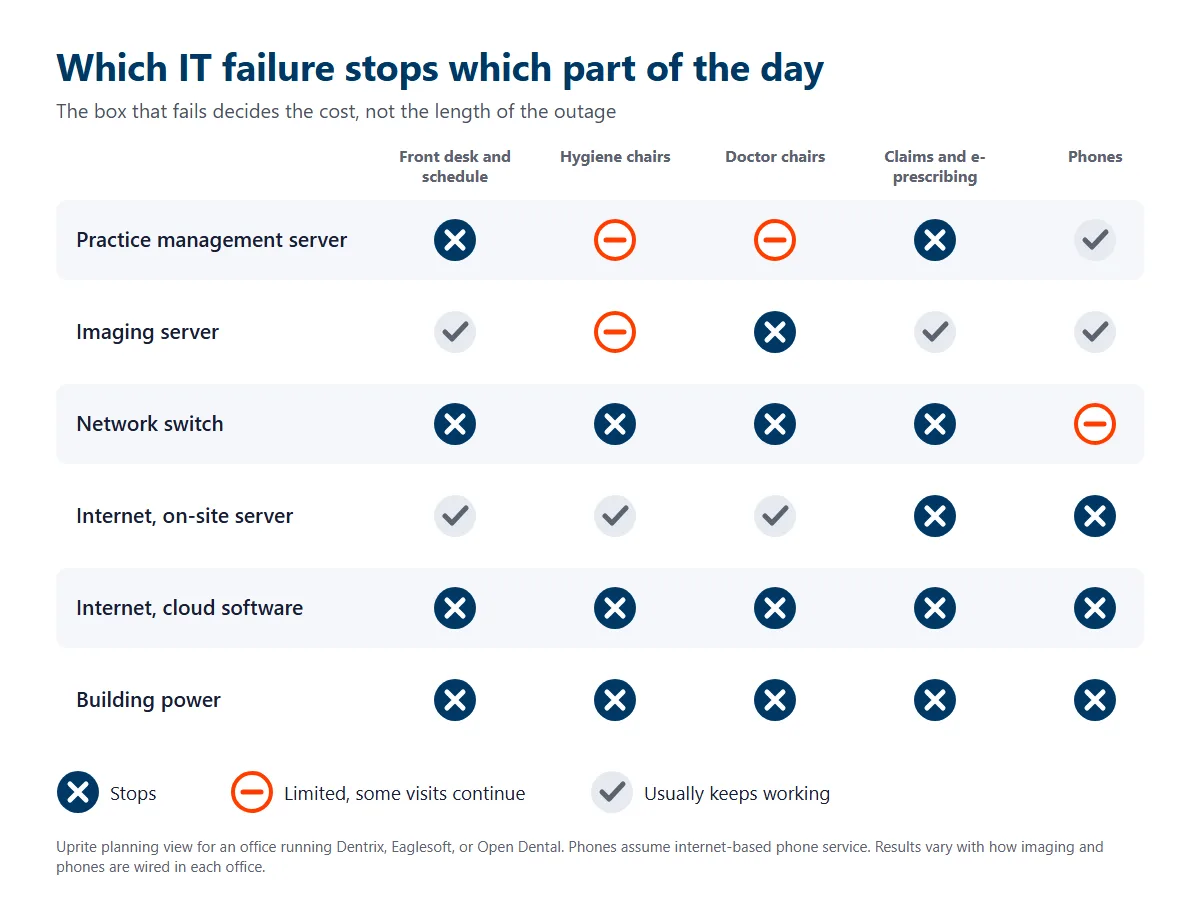
Not every outage is equal. Each failure shuts down a different part of the day. Use this table to decide what you protect first.
| What failed | What stops | What usually keeps working | First move |
|---|---|---|---|
| Practice management server | Schedule, charting, medical alerts, ledger, check-in, and any imaging launched from the patient chart | Phones, email, card terminals, and sometimes standalone imaging | Pull the printed schedule and call IT before anyone restarts the server |
| Imaging server or imaging database | New radiographs, prior images, pano and cone beam review, and treatment that depends on them | Scheduling, charting, billing, and hygiene visits that need no new images | Move image-dependent visits later in the day and keep hygiene running |
| Network switch or cabling | Everything on site that talks to the server, often both systems at once | Cell phones and any cloud tool reached over a hotspot | Check the switch lights and power before blaming the server |
| Internet circuit, with an on-site server | Eligibility checks, claims, e-prescribing, patient texting, and internet phones | The chairs, the chart, and imaging on the local network | Switch phones to a backup line and keep treating patients |
| Internet circuit, with cloud practice software | The whole schedule and chart | Almost nothing clinical | Fail over to a second circuit or a cellular backup |
| Building power | Everything, including compressors and suction | Battery backup on the server and switch, if you bought it | Shut the server down cleanly before the battery runs out |
| Ransomware | Every system it reaches, for days or weeks | Paper and cell phones | Disconnect, call IT, and preserve evidence before restoring anything |
Look at the internet rows. Same failure, opposite outcomes. An office running Dentrix, Eaglesoft, or Open Dental on a server in the closet barely notices a dead circuit until claims go out, while an office on cloud software loses the whole day. Still building out? That’s why our new dental office IT setup guide for Dallas orders the backup internet connection the week the lease is signed.
Is a down imaging server worse than a practice software outage?
It’s quieter. That’s the problem.
When the practice management server dies, everybody knows in 30 seconds. The front desk can’t check anyone in, and the phones start ringing about it. An imaging outage hides. Hygiene keeps working, the schedule loads, and the first sign is a dentist who can’t pull up last year’s bitewings for a patient with a cracked molar.
Then the expensive visits stop. Emergency exams, endodontics, extractions, implant consults, and new patient visits with a full series all depend on images, and those are the appointments with the highest production per hour. Hygiene revenue survives. Doctor revenue doesn’t.
Images go missing too. Radiographs captured during a shaky outage sometimes land in the wrong chart or don’t land at all, and a lost radiograph means a retake, a second exposure for the patient, and an awkward conversation. Check every image from that day against the schedule once the system is back.
Imaging also fails for reasons that have nothing to do with the server. Sometimes it’s Windows. A Windows update can break a sensor driver, a mapped drive letter can change, or the bridge between the practice software and the imaging program can stop passing patient IDs. Your IT provider should know which imaging software you run, which driver version your sensors need, and which updates to hold until your imaging vendor approves them. Ask before you update.
Dentrix down? What to do in the first hour
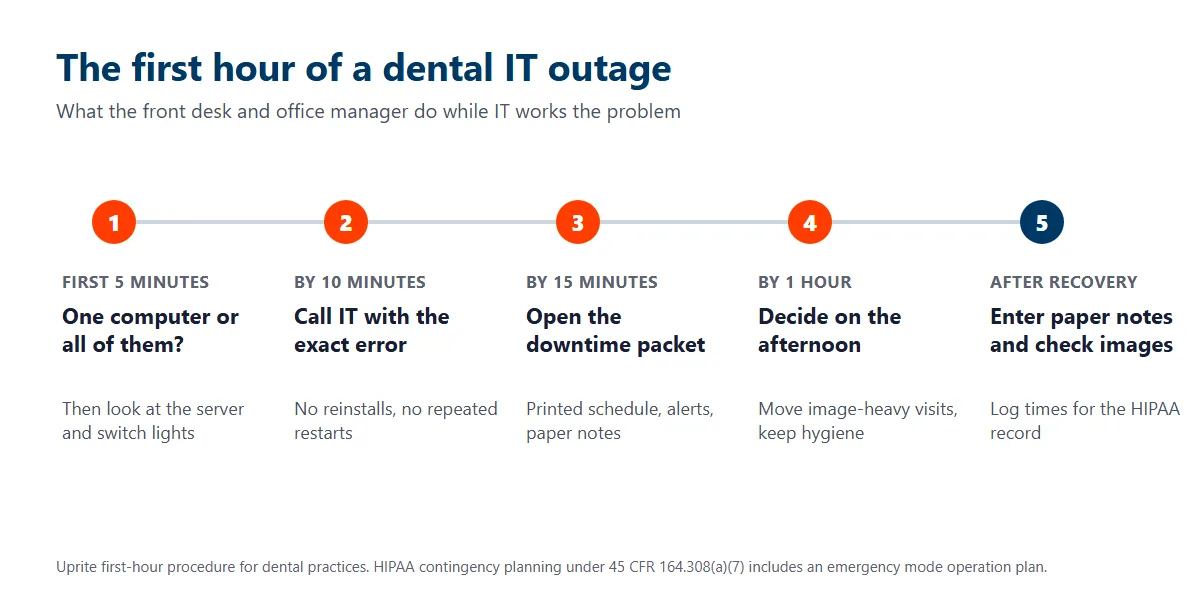
Whether it’s Dentrix, Eaglesoft, or Open Dental, the first hour looks about the same. Speed matters less than not making it worse. Slow down.
- Check whether 1 workstation is affected or all of them. One machine points to that computer or its cable. Every machine points to the server, the switch, or the internet.
- Look at the server and the network switch. Power lights on, link lights blinking? If the server is off, don’t keep pressing the power button, because a hard restart in the middle of a database write can corrupt the database.
- Call your IT provider and say exactly what you see, including any error message. Read it out loud. Open Dental’s own manual tells offices that can’t connect to the MySQL server to contact support before trying the fixes themselves, and that’s good advice for all 3 platforms.
- On cloud software such as Dentrix Ascend, check the vendor’s Henry Schein One status page before anyone reboots anything in the office.
- Open the downtime packet a quarter of an hour in. Paper chart notes, the printed schedule, and medical alerts come out of the drawer, not out of memory.
- Decide on the afternoon by the 1-hour mark. Patients need notice. If IT can’t give you a time, call the afternoon patients who need images or long procedures and keep the hygiene patients.
- Write down the times. When it started, what failed, what you did, and when it came back. HIPAA requires a contingency plan with an emergency mode operation plan, and your notes are the evidence that you followed one.
Never reinstall the practice software during an outage. Wait for IT. A reinstall turns a server problem into a server problem plus a broken workstation. If you want to know why these databases are so fragile, our breakdown of the server requirements for Dentrix, Eaglesoft and Open Dental explains the 3 different database engines and why each one needs its own backup method.
What belongs in a dental downtime packet?
A downtime packet is a folder that lets the front desk and the operatories keep working on paper for a few hours. Build it once. Refresh the schedule every evening.
- Tomorrow’s schedule, printed each night, with medical alerts and allergies on it.
- Paper chart note forms and a sign-in sheet.
- Blank paper claim forms, which the ADA told dentists to consider during the 2024 Change Healthcare outage, along with payer portals for eligibility and alternate clearinghouses for claims.
- Prescription pads, plus official Texas prescription forms if you prescribe Schedule II drugs such as hydrocodone, because a written Schedule II prescription has to be on that form. Texas generally requires controlled substances to be prescribed electronically, but Health and Safety Code Section 481.0755 allows a written prescription when e-prescribing is unavailable because of a temporary technological or electronic failure, as prescribed by board rule.
- Support numbers for your IT provider, your practice software, your imaging vendor, your phone company, and your internet carrier.
- Payer portal logins kept in your password manager, not on a sticky note.
Paper notes don’t stay paper. They become the record. Under 22 Texas Administrative Code Section 108.8, the dentist must keep the dental record for at least 5 years after the last treatment, so every note from the outage gets entered into the chart, and the original goes wherever your office keeps scanned source documents.
Why do Dallas dental offices lose more chair-days than they plan for?
Outages often start elsewhere.
Power is the big one. Uptime Institute’s 2025 outage analysis found that power remains the leading cause of impactful data center and IT service outages, and North Texas weather tests that every spring. In March 2025, Oncor reported restoring more than 315,000 outages from a peak of 335,000, with parts of Dallas County not expected to be substantially restored until Thursday night. Our plan for IT continuity through Dallas storms covers that side of it.
Vendors are the next one. The February 2024 Change Healthcare attack kept many dentists from sending electronic claims and attachments to insurers, according to the ADA. In October 2023, a cyberattack forced Henry Schein to take systems offline, including the eCommerce platform, in a move that primarily disrupted its dental and medical distribution businesses. Its Henry Schein One software business, which makes Dentrix, was not affected, according to the company’s annual report. And in July 2024, one faulty CrowdStrike update knocked out an estimated 8.5 million Windows devices in a matter of hours.
Cloud contracts deserve a careful read too. The Dentrix Ascend status page explains that a partial outage is not considered downtime under the SLA, and a major outage may or may not count depending on how long it lasts in a calendar month. Your chairs can stop while the vendor’s uptime number stays perfect. Read the fine print.
None of this is a reason to avoid cloud software or to stay on an old server. It’s a reason to know which outage you’re exposed to and to pay for the fix that matches it.
What does it cost to stop losing chair-days?
Often less than 1 chair-day for the basic fixes, such as battery backup and cellular failover. The expensive ones are worth pricing against the table above, one failure at a time.
| Fix | Failure it covers | What it changes |
|---|---|---|
| Battery backup on the server, switch, and firewall | Short power blips and clean shutdowns | Turns a corrupted database into a restart |
| Second internet circuit or cellular failover | Carrier outages | Keeps cloud software, claims, and phones online |
| A spare, pre-built operatory workstation | A dead chairside computer | Turns a lost chair-day into a 20-minute swap |
| Monitoring on the server, disks, and backups | Failures that warn first, such as a full disk or a failing drive | Catches the problem at night instead of at the first patient |
| A restore test that opens the practice software | Bad or stale backups | Proves recovery works before you need it |
| A server replacement on a planned date | Aging hardware and expiring Windows Server support | Moves the outage to a night you chose |
Start with the cheap ones. Set the recovery targets before you buy anything. How long can the schedule be down, and how much data can you afford to re-enter? Our guide to RTO and RPO turns those 2 questions into numbers, and our disaster recovery in Dallas service is built around them.
Then compare the monthly cost. Uprite’s Fully Managed IT starts at $138 per user per month on our published pricing, so the 7-person office above would pay $966 a month. The rest of a Dallas practice’s IT bill, plan by plan and office size by office size, is in our breakdown of dental IT costs in Dallas. One full day of downtime costs that office more than 6 months of that plan, even counting lost production alone. I’m not claiming any provider prevents every outage. Nobody can. What a good one changes is how many chair-days each failure takes, and whether you find out about a failing drive from an alert or from a patient.
Where Uprite fits for Dallas dental practices
We’re a managed IT provider with an office at 5757 Alpha Road in Dallas, and a 5-minute average response time on support requests. We support practice management servers, imaging, networks, phones, and backups, and our Dallas team covers Dallas, Collin, Denton, and Tarrant counties. We don’t have a named Dallas dental client yet, so ask us for a restore test and our written terms instead of a reference.
We aren’t the right call for every office. If your practice runs entirely on cloud software, has 2 internet circuits already, and your imaging vendor handles its own support, you may need a dental-only firm or a lighter co-managed plan more than you need us. We’d rather say so. Our ranked list of the best IT providers for Dallas dental practices names the firms worth comparing, including the ones that beat us on dental-only depth.
Tell us which practice software and imaging you run, how many chairs you have, and when your last outage happened. We’ll map which failure would cost you the most chair-days and what it would take to close it.
Book a Free Dental IT AssessmentQuestions Dallas dental offices ask about IT downtime
How much does a day of IT downtime cost a dental office in Dallas?
About $2,139 to $2,370 per chair for a full clinic day at median production, using June 2026 production benchmarks and May 2025 Dallas-Fort Worth wages loaded for benefits. A 4-chair office with an owner dentist and 6 staff loses roughly $8,555 to $9,478.
What should we do when Dentrix will not open on any computer?
Treat it as a server or network problem. Check that the server and network switch have power, call your IT provider with the exact error, and avoid reinstalling Dentrix or restarting the server over and over while you wait.
Can we keep seeing patients while the imaging server is down?
Often, yes, for hygiene visits that need no new radiographs. Exams, emergencies, endodontics, and surgery usually stop, because the dentist cannot view prior images or save new ones until imaging is back.
Does an internet outage stop the whole practice?
Only if your practice software runs in the cloud. With an on-site Dentrix, Eaglesoft, or Open Dental server, the chairs keep working while eligibility checks, claims, e-prescribing, patient texting, and internet phones stop. A cloud system needs a second circuit or cellular failover to keep the schedule open.
Is cloud practice software safer from downtime?
Safer from server failure. More exposed to internet failure. The Dentrix Ascend status page says a partial outage is not considered downtime under its SLA, so read how any cloud vendor defines an outage before you sign.
Can a Texas dentist write a paper prescription when e-prescribing is down?
Yes, within limits. Texas Health and Safety Code Section 481.0755 allows a written controlled substance prescription when electronic prescribing is unavailable because of a temporary technological or electronic failure, as prescribed by board rule. Schedule II drugs still need the official Texas prescription form. Note the outage in the chart so the reason is on record.
How often should a dental office test its backups and failover?
At least once a year and after every server or software upgrade. HIPAA treats testing and revision of contingency plans as an addressable specification under 45 CFR 164.308(a)(7), and the only test that counts ends with the practice software open and the schedule from the day before on screen.