
Read a penetration test report by checking what the tester broke into, ranking each finding by whether attackers already use it and whether it faces the internet, and grouping fixes by root cause so one change closes several findings.
The report lands on your desk with a severity chart near the front and dozens of pages of technical detail behind it, and the first question is always which of this to fix first. This guide is about that ranking. If you want the bigger picture of how a test works and what gets scoped, start with our page on penetration testing in Houston, because this article picks up after the tester hands over the findings. We run these tests ourselves and we do the fixing afterward, so we’ve spent a lot of time on the part most reports skip, which is the order of the work.
Work the report in this order. Start with anything the tester used to take control, then findings that match CISA’s Known Exploited Vulnerabilities catalog, then anything facing the internet, then weak sign-ins and excess admin rights, and leave everything else for a normal maintenance cycle. Group findings by root cause before anyone opens a ticket, and ask for a retest, because a fix only counts once someone has verified it.
What is in a penetration test report?
A penetration test report is the written record of an authorized attack on your systems. It lists what the tester tried, what worked, the evidence for each success, and a recommended fix for every finding, usually with an executive summary on top for the people who won’t read the technical sections.
Most reports follow the same bones, even when the formatting changes from one firm to the next. NIST’s testing guide, SP 800-115, says results should be written for several audiences, so a good report has a page for the owner and a section for the engineer, and the two shouldn’t contradict each other. The table shows what each part is for and what to look for before you accept it.
| Report section | What it tells you | What to look for |
|---|---|---|
| Executive summary | The overall result in plain language | A clear statement of whether the tester got in, and how far, not only a count of findings |
| Scope and rules of engagement | What was tested and what was off limits | Systems you expected to see that are missing from the list |
| Methodology | How the tester worked | Manual testing described in some detail, not just a scanner run |
| Findings | Each weakness with its evidence | Output or screenshots you could repeat, and a recommended fix for each one |
| Attack narrative | How findings chained together | The path from the first foothold to the furthest point reached |
| Appendices | Raw tool output and logs | Reference material only, so nobody should triage from here |
The attack narrative matters more than the findings list, and it’s the section owners skip most often. When a tester chains three modest weaknesses into administrator access, no single finding looks alarming on its own page. NIST makes the same point when it notes that several low-risk vulnerabilities can present a higher risk when combined, and that a scanner can rate each one low and leave you falsely confident.
Why doesn’t a Critical label tell you what to fix first?
Severity labels measure how bad a flaw could be in general, and they know nothing about your network. The scores come from the Common Vulnerability Scoring System, which the National Vulnerability Database publishes for every known flaw, so two companies can see the same 9.8 on a flaw that matters a great deal at one and almost nothing at the other. NIST’s guide tells assessors to set the risk level for each vulnerability themselves instead of simply accepting the level a scanner assigned.
Here’s a correction to the way most owners read these reports. A Critical on an old printer inside your office is usually a smaller problem than a Medium on the VPN that sits on the public internet, and a report sorted only by label will put them in the wrong order. We’d rather you spend your first two weeks on the Medium.
CISA reached a similar conclusion for federal agencies this year. Its June 2026 directive, BOD 26-04, replaced two earlier directives and ranks vulnerabilities on 4 questions. Is the asset exposed to the internet, is the flaw on the Known Exploited Vulnerabilities list, can an attacker automate the exploit, and would a successful attack give partial or total control of the system? When a flaw is on a publicly exposed asset, would give total control, and can be automated, the due date is 3 days. The directive applies to federal agencies and not to private companies, but those 4 questions make a sound template for anyone reading a test report.
What should you fix first in a penetration test report?
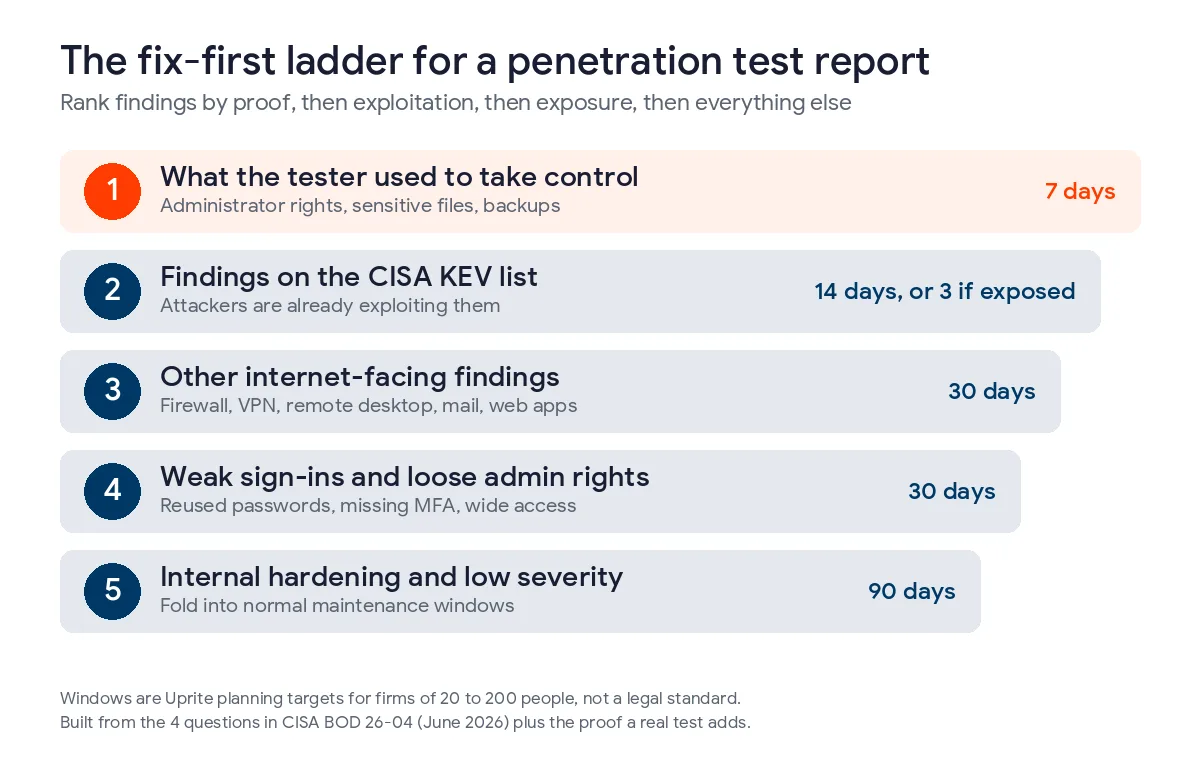
Fix, in order, what the tester used to take control, what attackers are already exploiting, what faces the internet, weak sign-ins and admin rights, and then everything else. That’s the fix-first ladder we use at Uprite, built from the 4 CISA questions plus the one thing a real test adds, which is proof.
| Rung | What goes here | Our planning target |
|---|---|---|
| 1 | Anything the tester used to reach administrator rights, sensitive files, or your backups | 7 days |
| 2 | Findings tied to a CVE on the CISA Known Exploited Vulnerabilities list | 14 days, or 3 days if the system faces the internet |
| 3 | Other findings on internet-facing systems such as firewalls, VPNs, remote desktop, mail, and web applications | 30 days |
| 4 | Weak or reused passwords, missing MFA, and admin rights wider than the job needs | 30 days |
| 5 | Internal hardening and low-severity items | The next maintenance cycle, within 90 days |
Those windows are our own planning targets for firms of 20 to 200 people, not a legal standard, and your tester should adjust them to your environment. Rung 4 surprises people because passwords and admin rights rarely come with a CVE number. A scanner can’t rank them, so they often sit low in a report even though a stolen login is how a lot of internal tests end.
Rung 1 covers whatever the tester used to get in
If the narrative says the tester went from one exposed login page to domain administrator in an afternoon, every link in that chain belongs on rung 1, including the links the report labelled Low. You don’t have to fix every link, because breaking the cheapest one stops the chain, and a retest will tell you whether it did.
Rung 2 is the CISA catalog
The Known Exploited Vulnerabilities catalog is CISA’s list of flaws with confirmed exploitation in the wild. It held 1,768 entries when we pulled it on November 4, 2026, and 361 of them, or 20.4%, carry the tag for known use in ransomware campaigns. Microsoft accounts for 390 entries and 117 of those are tagged, and the network edge vendors punch above their weight, with 13 of SonicWall’s 19 entries and 14 of Fortinet’s 32 carrying the tag. If a finding in your report has a CVE number, searching the catalog takes about a minute and can move that finding up the ladder immediately.
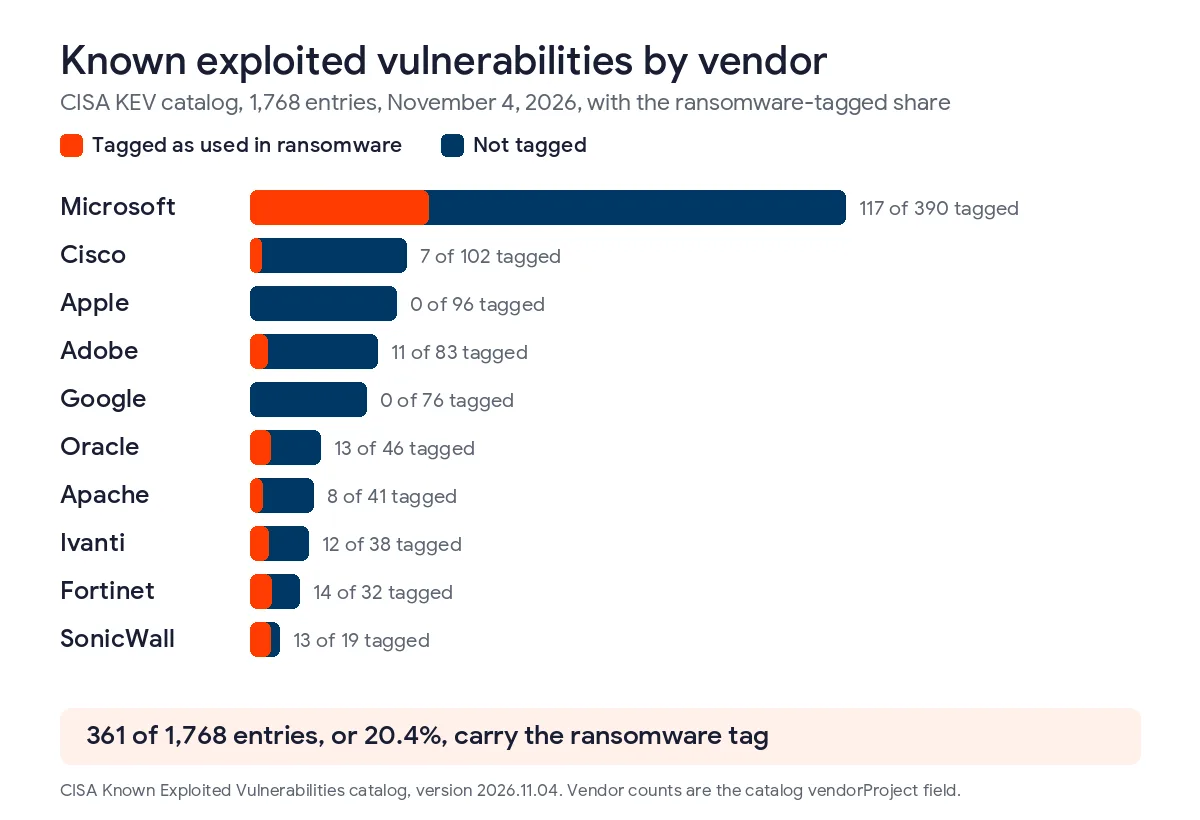
One caution on those tags. CISA applies them after the fact, so 23.7% of the entries added in 2024 carry one and only 9.5% of the entries added so far in 2026 do. A missing tag on a recent entry means nobody has confirmed ransomware use yet, and it doesn’t mean the flaw is safe to leave. CISA’s own urgency shows in the due dates, since 120 of the 151 entries added after the June 10 directive got a 3-day deadline and the other 31 got 14 days.
Rungs 3 and 4 cover exposure and sign-ins
Anything the internet can reach gets more urgent for a plain reason, which is that an attacker needs no prior access to try it. A flaw on your firewall is open to the whole world, while the same flaw on an internal file server has to wait for someone to get inside first. Treat the tester’s notes about reused local administrator passwords or a remote portal with no second factor the same way, because they deserve more weight than a Medium label suggests. CISA’s Cyber Hygiene scanning also checks internet-facing systems between tests, which helps keep rung 3 short.
How do you turn a long findings list into a short work list?
Group the findings by root cause before anyone opens a ticket. NIST’s guide lists the usual root causes, among them insufficient patch management, missing security baselines, weak architecture, and inadequate training, and it says finding the cause matters because one cause often sits behind many findings. The table below is an illustration, and it’s a made-up example rather than a client.
| Root cause | Findings it explains | One fix |
|---|---|---|
| Firewall and VPN firmware 2 versions behind | 4 | Update the appliances and put a monthly firmware review on the calendar |
| One local administrator password shared by every workstation | 6 | Give each machine its own managed local password |
| No second factor on remote access and email | 3 | Turn on MFA for both |
| Servers past vendor support | 7 | Replace the older servers or isolate them until they’re replaced |
| Banner leaks, old TLS settings, and informational items | 3 | Fold into the monthly maintenance window |

Four fixes and one housekeeping item cover all 23 findings in that example, which turns a report nobody wants to open into a work list one technician can plan around. It also gives the owner or controller something concrete to approve, and NIST suggests putting the cost and benefit of each action in front of management for that reason. If you’re weighing who should carry that list, our vCISO services in Houston cover exactly that ownership gap for firms without a security lead.
What should the retest prove?
The retest should show that the original attack path no longer works. NIST says remediation should be verified, by an audit or by retesting, and that a retest can confirm a fix only if it repeats the original test. That’s why we ask testers to keep their exact steps for every rung 1 and rung 2 finding, and why a quote that includes a retest is worth more than one that doesn’t. Our guide to what a penetration test costs in Houston shows how much a retest adds to a typical scope.
If you’re still deciding whether you needed a full test or a scan in the first place, our comparison of penetration testing and vulnerability scanning sorts that out before you spend anything more. Our Houston scan or pen test breakdown adds Harris County numbers. A network assessment at no charge also gives you an inventory and a ranked findings list to start from.
Why does Houston put a clock on all of this?
A lot of Houston firms get a report because somebody outside asked for one. A tax preparer in Sugar Land falls under the FTC Safeguards Rule, which in 16 CFR 314.4 calls for annual penetration testing when there’s no continuous monitoring in place. An insurer’s renewal questionnaire or a customer’s security review often asks for the date of the last test and what came of it. An open rung 1 finding is a poor answer to either one.
An open finding also changes the Texas breach math. A breach that affects 250 or more Texans has to be reported to the Office of the Attorney General no later than 30 days after discovery, according to the Attorney General’s reporting page. We schedule fixes around month-end close, payroll runs, and hurricane watches, so rung 1 and rung 2 work doesn’t land on the worst week of your quarter. Our Houston small business cybersecurity checklist covers the routine items that keep rung 5 short, and our guide to Texas cybersecurity laws for businesses shows which rules apply to you.
Questions Houston owners ask about their test report
How long should we wait before fixing what the report found?
Start on rung 1 findings within 7 days and finish everything on the ladder within about 90 days. Those are our planning targets, and your tester should adjust them for your systems. Anything on the internet that matches the CISA catalog should move faster than the rest.
Do Low and Informational findings need fixing?
Not on their own deadline, but read them before you set them aside. NIST notes that several low-risk findings can add up to a higher risk when they’re combined, so check the attack narrative to see whether any Low item was a link in the chain.
What if the report has no evidence or fix steps?
Ask the tester for both in writing before you pay the final invoice. A finding without repeatable evidence can’t be verified later, and a finding without a recommended fix leaves your team guessing. A report that is mostly raw scanner output is a warning sign, since NIST says assessors should set the risk level themselves.
Should we rank by CVSS score or by the CISA catalog?
Use both, and let the catalog win when they disagree. The CVSS score describes how bad a flaw could be anywhere, while the Known Exploited Vulnerabilities catalog tells you attackers are already using it. A flaw scored 6.5 that is on the catalog outranks a 9.0 that nobody has exploited.
Who should own the fix list at a small company?
One named person with the authority to schedule downtime, which is often the operations lead or an outside IT provider. Split ownership is an easy way for rung 1 items to sit, so put a single name and a date next to every item on the ladder.
Will Uprite look at a report from another firm?
Send it over and we’ll sort the findings onto the ladder in writing, and we’ll tell you honestly which ones matter this week. Uprite also performs penetration tests and handles the fixes afterward, so you can stay with us for all of it or take the list elsewhere.
Do we need a retest after every fix?
You need one for every rung 1 and rung 2 finding, because those are the findings where being wrong is expensive. Lower rungs can usually be verified with a rescan or a configuration check, which costs far less than a full retest.
Send us the report you’ve been handed, whether it came from us or from another firm, and we’ll sort it onto the ladder in writing and tell you what to fix this week. Our average first response is 5 minutes.
Talk to a Security ExpertPrefer email or a phone call? Reach the team through our contact page, and if you’d rather keep security in-house with outside help on monitoring, see managed security services in Houston.