
Before you hire church IT support in Houston, ask how the provider handles volunteer logins, Wi-Fi across every building, coverage when your only staff member is out, and nonprofit license validation. Those 4 gaps are where church IT usually breaks.
A church isn’t a small office with a steeple on it. The people using your technology are mostly volunteers, the busiest hour of the week is Sunday morning, and the person who “knows the computers” is often a part-time administrator who also runs the bulletin. If you’re comparing IT services for nonprofits in Houston, this is the shorter list we’d want a church board or executive pastor to bring to every sales call. It fits faith-based nonprofits too. Think food pantries, recovery ministries, and the groups that meet in church buildings all week.
Church IT goes wrong in predictable places. Shared passwords on the sound booth computer and the check-in kiosk. Guest Wi-Fi that sits on the same network as the office printer. One staff member who holds every login. And Microsoft nonprofit licensing that stalls because the church never asked the IRS for a determination letter. A good provider has a plan for all 4 before you sign anything.
What Makes Church IT Different From Office IT?
Church IT support is managed technology help built around a congregation instead of a payroll. The users are mostly volunteers who rotate in and out, the peak load lands on weekends, and several buildings or outside groups share one network. Support has to fit that pattern. A Monday through Friday office plan won’t. It’s a different job.
Most IT providers price and staff for businesses, with help desks that are busiest on Monday morning and quietest over the weekend, which is exactly backwards for a congregation. That’s fine on a Tuesday. It falls apart at 9 AM on Sunday, when the livestream computer won’t connect, 30 kids are lining up at check-in, the greeter needs the printer, and nobody on site has the admin password because the one person who did is teaching a class across the building. Sound familiar? It’s rarely a hardware problem. It’s an access problem. And a planning problem.
| Area | Typical small office | Typical church | What to ask a provider |
|---|---|---|---|
| Who uses the systems | Paid staff with their own accounts | A few staff plus dozens of rotating volunteers | How do you give volunteers access without sharing one password? |
| Busiest time | Weekday business hours | Sunday morning and midweek evenings | Who answers if something breaks during a service? |
| Buildings | One suite | Sanctuary, education wing, gym, sometimes a second campus | Will Wi-Fi and security settings match in every building? |
| Outside users | Rare | Scout troops, recovery groups, renters, schools | How do you keep outside groups off the office network? |
| Software licensing | Bought at list price | Often eligible for nonprofit grants and discounts | Will you help us get validated, and who does the paperwork? |
Who Should Get an Account, and Who Shouldn’t?
Every person who uses church email, files, or member records should sign in as themselves, and nobody should share a personal login. Volunteers who only run a kiosk or a single app can use a locked-down station account that opens that one app and nothing else, which keeps your costs down and keeps your member records away from people who never needed them. Ask the provider to draw that line before they quote you.
Shared passwords are the easiest church habit to spot. The office@ mailbox. The media team’s YouTube account. The check-in laptop. Everyone knows the password, nobody remembers who set it up, and nobody changes it when a volunteer moves to Dallas or just stops showing up, so the list of people with access only ever grows. That’s how a former member still reads church email 2 years later. Nobody meant for it to happen.
Microsoft has a better tool built in. A shared mailbox in Microsoft 365 can hold up to 50 GB without its own license, and Microsoft says to block direct sign-in to it and keep it blocked. Each person opens it through their own licensed mailbox, so access is tied to each login, you can remove one person without changing anything for the rest, and nobody passes a password around the office. There’s a cap of 25 users. Personal Gmail accounts can’t be added either. That matters when half your volunteers live in Gmail.
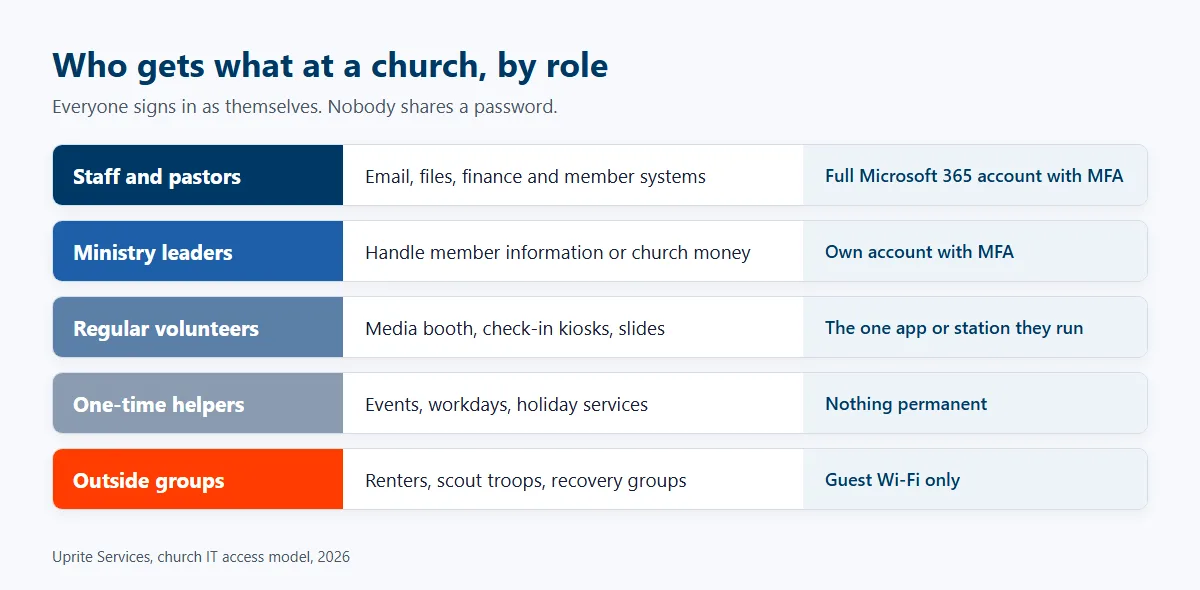
So who needs a license? We usually sort people into 5 groups.
- Paid staff and pastors, who each get a full Microsoft 365 account with multi-factor sign-in turned on.
- Ministry leaders who handle member information or church money. They get their own account too.
- Regular media and check-in volunteers, limited to the one app or station they run.
- One-time helpers. Nothing permanent.
- Outside groups renting the building, who stay on guest Wi-Fi only.
Licensing matters more than people think. Microsoft lists intentional user mis-licensing and unused grant licenses as program abuse, and it expects at least 85% of granted licenses to stay in active use, which means a free license handed to every volunteer who served once in 2024 can quietly put the whole grant at risk. Clean the list. Do it every quarter.
Then there’s the fake pastor email. In a September 2024 alert, the FTC warned that scammers pose as pastors, rabbis, imams, and bishops to get worshippers to buy gift cards. They use real leaders’ names, and sometimes the member’s own name too. You can’t stop a lookalike Gmail account. You can make it fail. Turn on sign-in protection so the real pastor’s account is much harder to take over, tag outside senders so staff spot fakes, and teach members one rule. A real leader at your church won’t ask for gift card numbers. Ever.
Will Your Wi-Fi Hold Up on Sunday Morning?
Church Wi-Fi should run as separate networks for staff, guests, the media booth, children’s check-in, and building systems like cameras and door locks, with the same settings on every campus. One flat network shared by everyone is the design that fails on Sunday.
Think about who’s on that network during a service. Staff laptops. Hundreds of member phones. The livestream encoder. Check-in kiosks printing name tags. Maybe a camera recorder. If those all share one network, a phone full of malware sits one hop from the computer that holds your children’s check-in records, and the guest load can choke the livestream right as the sermon starts. Both problems have the same fix.
| Network | Who’s on it | What it should never reach |
|---|---|---|
| Staff | Church office computers and printers | Nothing is off limits, but it gets the strictest sign-in rules |
| Guest | Members, visitors, renters | Staff files, printers, cameras, check-in stations |
| Media and livestream | Encoder, sound board, slides computer | Guest traffic, which should never share its bandwidth |
| Children’s check-in | Kiosks and label printers | Guest Wi-Fi and the open internet beyond its own app |
| Building systems | Cameras, door controllers, thermostats | Everything else, since these devices are rarely patched |
We did this kind of split for a Texas women’s shelter spread across several buildings. It had consumer-grade gear. An unsecured firewall. Frequent outages. The fix came in phases. The firewall gaps came first, and upgraded switching, separate staff and resident networks, and business fiber from AT&T followed. A church campus with an education wing and a family life center has the same shape of problem.
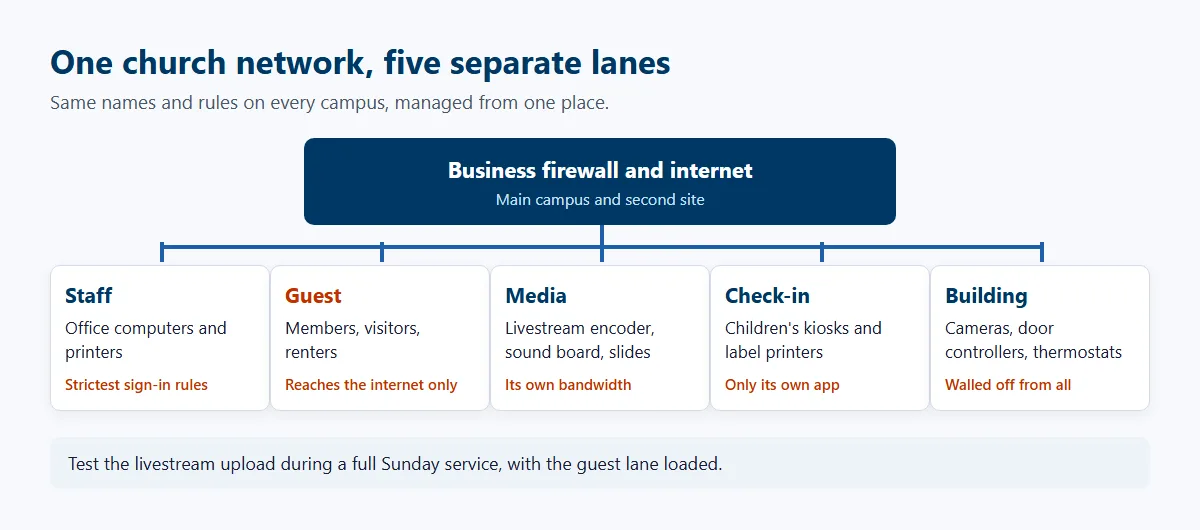
Livestreaming adds its own test. YouTube’s live encoder guide tells streamers to run a speed test and pick a quality their connection can hold. Most people run it on a quiet Tuesday. Wrong day. Run it during a full Sunday service, with the guest network loaded. That’s the number that matters.
Multi-site churches need one more thing. If you’ve got a main campus in Katy and a second site in Cypress, both should carry the same network names, the same firewall rules, and the same sign-in settings, all managed from one place so a change made on Monday reaches both campuses before anyone walks in on Sunday. Our guide to IT support across multiple locations shows how that central setup works.
Who Covers IT When Your One Staff Member Is Out?
Your provider should cover IT on weekends and during staff vacations, and keep every password and network detail documented. The church should never depend on one person’s memory. Ask who answers on a Sunday, how fast, and where your admin passwords live today. Then ask for proof.
Small church staffs carry a single point of failure that most businesses would never accept, usually without anyone choosing it, because keeping track of logins simply drifted to whoever sat closest to the network closet. The administrator knows the Wi-Fi password, the domain login, the alarm code, and which closet holds the router. Then they take 2 weeks off. Or retire. A church can even lose its own website domain when the renewal notice goes to someone who left years earlier. It happens.
Ask for 3 things in writing.
- Weekend coverage that includes Sunday mornings, not just a voicemail box.
- A password vault the church owns.
- A one-page network map showing what’s in each closet and building, so the next person isn’t guessing.
Compare response times too. Our average response is about 5 minutes. Our Fully Managed IT plan includes 24/7 support. If your church already has a capable staffer or a skilled volunteer who wants to stay involved, co-managed IT lets them keep the day-to-day work while a provider takes security, after-hours calls, and the projects they never get to.
Houston adds weather to the list. When Hurricane Beryl hit in July 2024, CenterPoint reported outages to more than 2.26 million customers at the peak. A church that opens its doors as a cooling center or charging station after a storm like that can find its own office without power or internet the same week. A provider should already know which systems come back first, who on staff makes that call, and whether your files and email live anywhere other than a server sitting in a building with no power. Our hurricane recovery planning guide for Houston covers the order.
Backups only count if someone has restored from them. When a nonprofit with about 40 staff lost its on-site server, we recovered more than 3TB of records by standing up a temporary environment so people could keep working while the full restore ran in the background over the following days. That only worked because copies existed. Check yours.

Can a Church Get Nonprofit Pricing on Microsoft 365?
Usually, yes. But the paperwork is where churches tend to get stuck. Microsoft requires status equal to 501(c)(3), and a church that never filed with the IRS can have trouble proving it. Sort that out before you budget around free licenses. Start early.
Here’s the catch. The IRS says churches that meet the 501(c)(3) rules are automatically tax exempt and don’t have to apply for recognition. Many never do. Validation partners still look for proof. TechSoup’s rules for places of worship ask for IRS 501(c)(3) status, and a church covered by its denomination’s group exemption can use the parent body’s group exemption letter. An independent church with neither document can get stuck until one is in hand.
The offer itself changed in 2025. Microsoft ended its free Business Premium grant on July 1, 2025. Nonprofits can still get up to 300 free Microsoft 365 Business Basic licenses, plus discounts of up to 75% on paid plans like Business Premium. Basic covers email, Teams, and OneDrive. No desktop Office apps. Microsoft also allows only one validated grant tenant per organization, so a church that set up a separate tenant for its school or daycare years ago should decide which tenant gets the grant before applying.
One honest note. Free licenses aren’t free IT. The grant pays for software, not for anyone to set up sign-in protection, move old email, or clean out former volunteers. We handle that setup in our Microsoft 365 services for Houston organizations. For the dollars side, see what IT costs a Houston nonprofit and our guide to budgeting for IT at a Houston nonprofit.
What Should You Ask Before You Hire a Church IT Provider?
Ask questions that test the church-specific gaps, like volunteer access, Sunday coverage, Wi-Fi across buildings, and licensing paperwork, rather than the generic uptime promises every provider puts in its first proposal. The answers below separate a provider who has thought about congregations from one who will treat you like a 10-person accounting office. You’ll hear the difference fast. Take notes. We also scored 9 Houston nonprofit IT providers, and church support was part of the test.
| Ask this | A good answer sounds like | Red flag |
|---|---|---|
| How do you price volunteers? | A clear written rule for which volunteer roles count as users, agreed before the quote | Every name on the volunteer roster is a billable seat |
| Who answers on Sunday morning? | A named support line staffed on weekends | Business hours only, with tickets read Monday |
| How will you split our Wi-Fi? | Separate staff, guest, media, and building networks on every campus | One network with a different password for guests |
| Will you help with nonprofit validation? | Yes, including which documents to send and cleanup of any extra tenants | That’s between you and Microsoft |
| Where do our passwords live? | In a vault the church owns and can take with it | In our system, available on request |
| What happens to access when a volunteer leaves? | A removal checklist tied to your ministry rosters | A blank look |
Ask about price structure early. Uprite’s managed IT plans start between $40 and $138 per user per month, depending on the plan. Our IT Essentials plan, starting at $91, fits teams under 12 people with basic, Microsoft-based needs, though its support is limited to business hours. A church with a livestream, a children’s ministry running check-in, and heavy weekend activity usually needs more coverage than a business-hours plan was ever built to give. We’d tell you so on the first call.
And when is outside IT the wrong call? A single-staff congregation with one laptop and a free website probably doesn’t need a managed plan yet. A trusted volunteer with good habits can carry that. Give them a password manager and multi-factor sign-in on the church email. The math changes once you add a second building, a livestream, children’s check-in, or more than a handful of staff.
How Does Uprite Support Houston Churches and Ministries?
Uprite is a Texas managed IT and cybersecurity provider with offices in Houston, San Antonio, and Dallas. For churches and faith-based nonprofits, we handle volunteer access, multi-building networks, weekend coverage, and Microsoft 365 setup. Our pricing is based on the number of users who need IT support, so ask us early how your volunteer roles fit into that count.
We haven’t published a church case study yet. We won’t pretend otherwise. Our published nonprofit work is the closest match. A national conservation nonprofit with chapters across the country came to us after slow support from its previous provider, with every IT request running through one overloaded contact. We took over day-to-day support and added multi-factor sign-in, a managed firewall, security awareness training, and quarterly reviews. Many locations, a tight budget, and one stretched contact? Familiar territory. Read more about our work with mission-driven groups on our nonprofit IT services page.
If you’re weighing providers right now, take the question table above into every call. Ours included. When you’re ready to compare answers, reach our team here and we’ll walk through your buildings, your volunteer roles, and your licensing status on that first call.
Tell us how many buildings, staff, and volunteer teams you support, and we’ll talk through the access and Wi-Fi setup we’d recommend for a church your size.
Plan My Church IT ReviewWhat Church Leaders Ask Us
Do volunteers need their own Microsoft 365 accounts?
Only volunteers who handle church email, files, or member information need their own account, while kiosk and media volunteers can use a locked-down station login that opens one app and nothing else. Shared personal passwords are the thing to avoid. Microsoft also expects granted licenses to stay in active use, so remove accounts when people step away.
Can a church still get Microsoft 365 for free?
Partly. Microsoft offers up to 300 free Business Basic licenses to validated nonprofits, though the free Business Premium grant ended on July 1, 2025. Premium now comes at a nonprofit discount of up to 75%. Your church has to pass validation first.
Why does nonprofit validation take so long for some churches?
Because many churches never asked the IRS for a determination letter, since the law doesn’t require one. Validation partners still want proof of 501(c)(3) status. A church under a denomination can usually use its group exemption letter. An independent church may need to file for recognition first.
What should Wi-Fi look like across 2 church buildings?
Separate networks for staff, guests, the media booth, children’s check-in, and building systems, set up the same way in both buildings and managed from one place. Guests should never reach office computers or cameras. Test the livestream connection during a full Sunday service, not a quiet weekday.
Is weekend IT support worth paying for?
For most churches it is, because Sunday morning is when the livestream, check-in, and sound systems all run at once. If your plan only covers business hours, a failure during service waits until Monday. Ask any provider exactly who answers on a Sunday and how fast.
How do we stop fake emails from our pastor?
You can’t stop scammers from creating lookalike accounts, but you can make the trick fail. Multi-factor sign-in protects the real accounts, outside-sender tags warn staff, and members need to hear plainly that church leaders will never ask them to buy gift cards. The FTC warned about this scam in 2024.