
Overnight security monitoring means a trained analyst reads every alert from your laptops, network and Microsoft 365 sign-ins while your office is closed, decides within minutes if it’s real, and isolates the threat before morning. A tool that only emails an inbox isn’t the same thing.
For about 70% of the week, nobody at your company is watching a screen. This guide walks through what real overnight coverage looks like, what it takes to staff, and what to settle with a provider before an alert ever fires. If you’re comparing providers, our overview of managed detection and response in Houston shows how monitoring fits with the rest of the security stack.
Coverage only counts if a person acts on the alert. Ask any provider who reads alerts overnight, whether they can isolate a device without calling you first, who they phone and in what order, and what you get in writing the next morning. Unless you’re very large, renting that team costs far less than hiring it, because 1 analyst covers only 40 of the week’s 168 hours.
What does 24/7 security monitoring cover for a Houston business?
24/7 security monitoring is the continuous collection and review of signals from your devices, network, email and cloud accounts, with people responsible for acting on what turns up at any hour. It has 2 halves. Software sees the activity, and trained analysts decide what it means and what to do about it.
The NIST Cybersecurity Framework 2.0 files this under its Detect function, where assets are “monitored to find anomalies, indicators of compromise, and other potentially adverse events,” as the framework document puts it. Look at what that sentence asks for. It wants the assets watched, which is different from having a tool installed, and where the watching stops is where your coverage stops.
| Coverage setup | Who sees an alert at 2 a.m. | What happens next | Where it breaks |
|---|---|---|---|
| Alerts emailed to a shared inbox | Nobody until someone opens email | The alert waits for morning | The whole night and every weekend |
| Your IT lead is on call | One person, if the page wakes them | They log in, investigate, and decide alone | Fatigue, vacations, and a single point of failure |
| A security tool that blocks automatically | The software | It stops what it recognizes and logs the rest | Attackers using valid logins look normal to it |
| Managed detection and response (MDR) | A provider’s analyst | They investigate, contain a device, and call your contact | Limited by what the contract lets them touch |
| Staffed 24/7 security operations center with agreed actions | A provider’s analyst working from a runbook | They contain, document, and hand you a morning report | Costs more, and needs your sign-off on actions up front |
The first row is easy to end up in without ever choosing it, since every security product sends email by default and somebody has to notice that nobody reads it. If you want the tool-versus-service distinction spelled out, our guide to EDR vs MDR vs XDR covers it.
What happens during an overnight alert, step by step?
Here’s the sequence a good provider follows for a suspicious sign-in. The timing is an illustration of the pattern and not a record of a client incident, and real alerts vary.
- At 2 a.m. the software flags a sign-in from a country nobody at your company has visited, followed by a new mailbox rule that forwards email to an outside address.
- Within a few minutes an analyst opens the alert, compares the sign-in to that person’s normal pattern, and sees the employee is home in Katy and asleep.
- The analyst signs the session out, resets the credentials, and removes the forwarding rule, because the agreed playbook allows all 3 actions.
- If the account touched anything sensitive, the analyst phones your named contact, and then the backup if nobody answers.
- By 8 a.m. you have a written summary of what happened, what was changed, and what your team should do next, such as confirming the employee’s phone.
Step 3 is the one that vendor comparisons skip. An analyst who has to wait for your approval before touching an account saves you very little time, which is why the pre-approved actions belong in the contract. NIST’s April 2025 incident response guidance, SP 800-61 Revision 3, frames the goal as making incident detection, response and recovery more efficient and effective. Pre-approval is how that gets done at 2 a.m.
Why do attacks cluster when your office is closed?
Because defenders are thinnest then, and attackers know it. A joint FBI and CISA advisory, AA21-243A, reported a rise in highly impactful ransomware attacks on holidays and weekends, when offices are normally closed. It cited a DarkSide attack on an energy company leading into Mother’s Day weekend in 2021, and a REvil attack over the Fourth of July weekend that affected hundreds of organizations.
That advisory dates from 2021, and CISA now lists it as archived content. Its main advice still holds. It tells organizations to continuously and actively monitor for ransomware threats over holidays and weekends, and to name IT security staff who are on call.
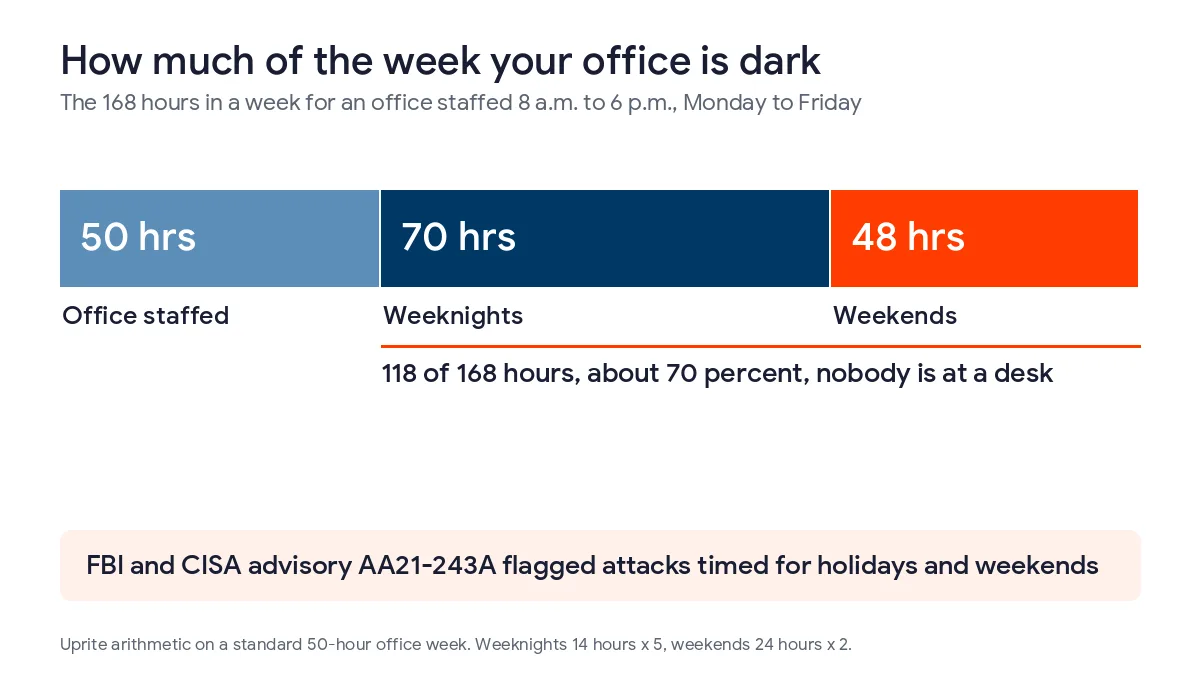
Count the hours. If your office is staffed 8 a.m. to 6 p.m., Monday through Friday, that’s 50 of the 168 hours in a week. The other 118, about 70%, are weeknights and weekends. A monitoring contract exists to cover those hours, and an inbox-only setup leaves them empty.
Houston has its own version of the problem. Hospitals, port operators, trucking dispatch and energy firms run through the night, and hurricane season, June 1 through November 30, brings failovers, remote logins and power events that can make odd activity look routine. An analyst who knows your normal patterns can tell a storm-driven login surge from a break-in. A generic alert feed can’t.
Can a Houston company staff overnight monitoring on its own?
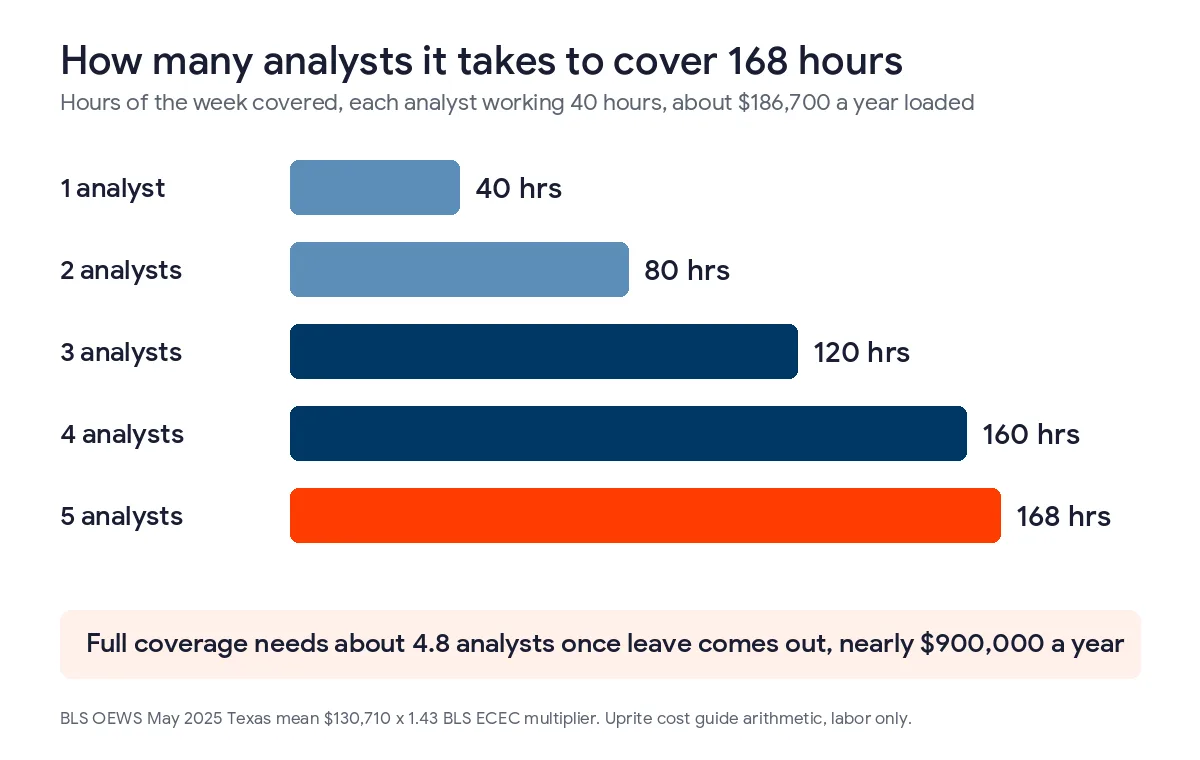
Technically yes, but the arithmetic works against you. One analyst works about 40 of the week’s 168 hours, which is 24% of it. Covering a single seat around the clock takes at least 4.2 people before anyone takes a vacation or calls in sick.
The BLS reports a Texas mean wage of $130,710 a year for information security analysts in May 2025, per its state occupational estimates. Add benefits and payroll taxes and the cost to an employer is about $186,700. Our Texas cybersecurity cost guide carries that through to roughly 4.8 analysts and nearly $900,000 a year, before a single tool license.
One person on call isn’t coverage. It’s a rota with a single name on it. If you already employ a security team that works days, the sensible move is usually to keep that team and rent the night shift, so your people handle projects and the provider handles 2 a.m.
What should you settle with a provider before the first alert?
These 6 items are worth putting in writing, and each one removes a delay that would otherwise happen in the dark.
- Which actions the analyst can take alone, such as isolating a laptop, disabling an account, or blocking an address.
- Which systems are off limits to automatic action, for example a production line controller, a medical device, or the server that runs payroll.
- Who gets the phone call, in what order, with 2 numbers for each person.
- What’s worth waking someone for, so a failed login doesn’t ring the owner while a mail forwarding rule does.
- How fast an analyst must act on a high-severity alert, stated in minutes.
- What you receive the next morning, and who reviews the month with you.

People tend to skip the second and fourth items because they’re uncomfortable to decide. Skipping them doesn’t avoid the decision, though. It makes the decision at 2 a.m., under pressure, by whoever picks up the phone.
A common assumption is that more alerts mean better coverage. We’d argue the opposite. A provider that hands you a long list every night has pushed the triage work back onto your team, and that’s the job you hired them to do.
Speed also matters for legal reasons. When a breach affects 250 or more Texans, notice to the Texas Attorney General is due within 30 days of determining that it occurred, and the state publishes those notices. Finding the problem in minutes gives you a very different report to write than finding it the following Tuesday. If you’d rather start with a baseline, our network assessment is no charge and shows what’s connected and what’s exposed, and our incident response services in Houston cover what happens after containment.
What does overnight coverage cost in Houston?
The rate card behind our cost guide puts 24/7 detection with a staffed security operations center at $40 to $90 per user per month on its own, or $125 to $200 when it’s bundled into fully managed IT. Uprite’s managed security plan starts at $40 per user per month. For a 50-person firm, the $40 tier is $2,000 a month, or $24,000 a year, against the nearly $900,000 in labor above. Current monthly rates are on our pricing page.
What Houston owners ask about overnight security monitoring
What is 24/7 security monitoring?
It’s continuous review of alerts from your devices, network, email and cloud accounts by trained analysts who can act at any hour. Software detects and people decide. Without the people half, you own a tool that records problems for Monday.
Do we need overnight monitoring if our office closes at 6?
Yes, because attackers choose closed hours on purpose. A joint FBI and CISA advisory found a rise in highly impactful ransomware attacks on holidays and weekends. With an 8 to 6 weekday schedule, 118 of 168 weekly hours fall outside your staffed time.
How fast should an overnight analyst respond?
Put a number in the contract, in minutes, for high-severity alerts. Ask for the time from alert to first analyst action, not the time to acknowledge an email. Lower-severity alerts can wait for the morning summary.
Can analysts isolate a device without calling us first?
Only if you’ve authorized it in advance, and you should. Agree which actions are pre-approved, which systems are off limits, and who gets the call. Waiting for approval at 2 a.m. hands the attacker the time you’re trying to save.
Is MDR the same as 24/7 monitoring?
Not exactly. MDR is one way to buy it, pairing endpoint software with analysts who investigate and contain threats. A full security operations center usually watches more, including firewalls, identity and cloud apps. Our EDR vs MDR vs XDR guide covers the differences.
What does 24/7 monitoring cost a small Houston business?
Texas rate cards run $40 to $90 per user per month for a staffed security operations center on its own. At 50 users that’s $24,000 to $54,000 a year. Hiring covers only 40 of 168 weekly hours per analyst.
Does Uprite monitor overnight?
Yes. Our managed security plan includes 24/7 security operations center monitoring and response, starting at $40 per user per month. Ask us to show you the escalation steps and pre-approved actions in writing, as you should with any provider.
Send us your current alert setup and we’ll show you, in writing, who sees an alert at 2 a.m. today, where the gaps are, and what closing them would cost. We usually reply within 5 minutes.
Talk to a Security ExpertPrefer email or a phone call? Reach the team through our contact page.