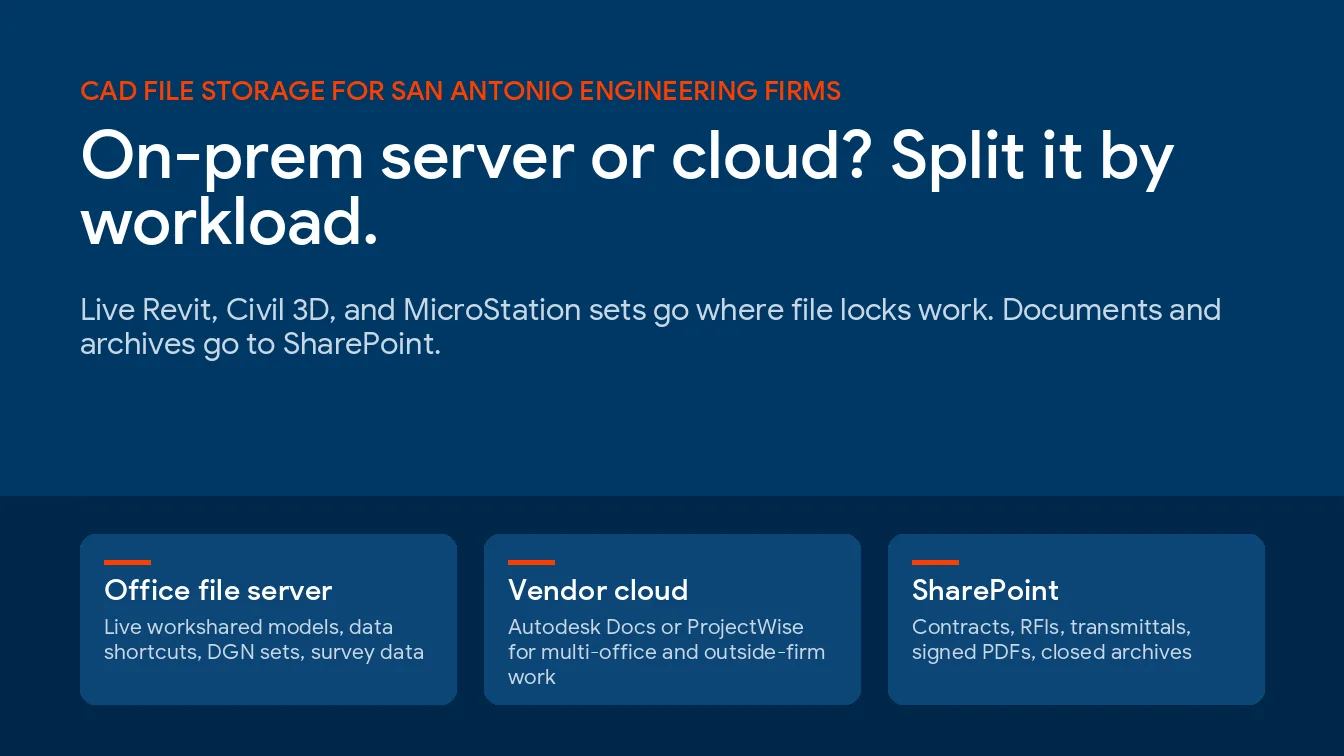
For most San Antonio engineering firms, CAD file storage works best split by workload, with live Revit, Civil 3D, and MicroStation projects on an office file server or the vendor’s own cloud, and contracts, PDFs, and archives in SharePoint. One home is off the list. A synced OneDrive folder isn’t where a live drawing set belongs.
This is often the first real decision in setting up IT services for engineering firms. Somebody wants the server gone. Somebody else has watched a Civil 3D surface lose its references after a sync. Both have a point. Here’s how I’d split the files for a San Antonio firm of 10 to 60 people, with the vendor documentation behind each call, so you can check my work.
Keep live, multi-user CAD work where file locks actually work, on a Windows file server in the office or inside Autodesk Docs or ProjectWise. Put contracts, RFIs, transmittals, signed PDFs, and closed-project archives in SharePoint. Don’t run file-based Revit worksharing over a VPN, because Autodesk says it can corrupt the central model. And size the cloud before you move anything, since SharePoint gives you 1 TB plus 10 GB per license, and anything past that has to be bought.
What Does CAD File Storage Mean for an Engineering Firm?
CAD file storage for an engineering firm is where live design files, their references, and their lock files sit while several people edit them, and where finished sets and archives go once a job closes. It has to keep references intact, stop 2 people from saving over each other, and restore fast.
That’s not a proposal folder. Different job.
A proposal is one file. A Civil 3D project isn’t. It’s host drawings, source drawings, a _Shortcuts folder full of XML, surfaces built from point files, aerial imagery, and xrefs pointing at relative paths that only resolve if the folder tree stays exactly where it was. Revit adds a central model plus a local copy on every user’s machine, trading changes back and forth all day. Move one piece and the rest can quietly stop resolving.
That’s 3 questions, really. Who edits at the same time? From where? And how big is the pile?
Why Are San Antonio Engineering Firms Asking This Now?
Growth. Mostly headcount.
We pulled federal employment counts for private engineering services firms, NAICS 541330, from the BLS Quarterly Census of Employment and Wages for 2019 and 2025. Bexar County added 67 firms and 2,562 jobs over those 6 years, a 33.2% jump that beat Harris, Dallas, and Tarrant counties and the statewide rate of 26.0%.
| County | Firms 2019 | Firms 2025 | Jobs 2019 | Jobs 2025 | Job growth | People per firm 2025 |
|---|---|---|---|---|---|---|
| Bexar | 370 | 437 | 7,724 | 10,286 | +33.2% | 23.5 |
| Comal | 36 | 50 | 338 | 532 | +57.4% | 10.6 |
| Kendall | 10 | 16 | 184 | 279 | +51.6% | 17.4 |
| Tarrant | 367 | 436 | 6,163 | 7,469 | +21.2% | 17.1 |
| Dallas | 565 | 616 | 11,907 | 13,913 | +16.8% | 22.6 |
| Harris | 1,588 | 1,597 | 42,981 | 45,228 | +5.2% | 28.3 |
| Texas | 6,296 | 8,068 | 107,802 | 135,878 | +26.0% | 16.8 |
Source is BLS QCEW, NAICS 541330, private ownership, annual averages, pulled October 2026. Firms means establishments, so a company with 2 offices counts twice.
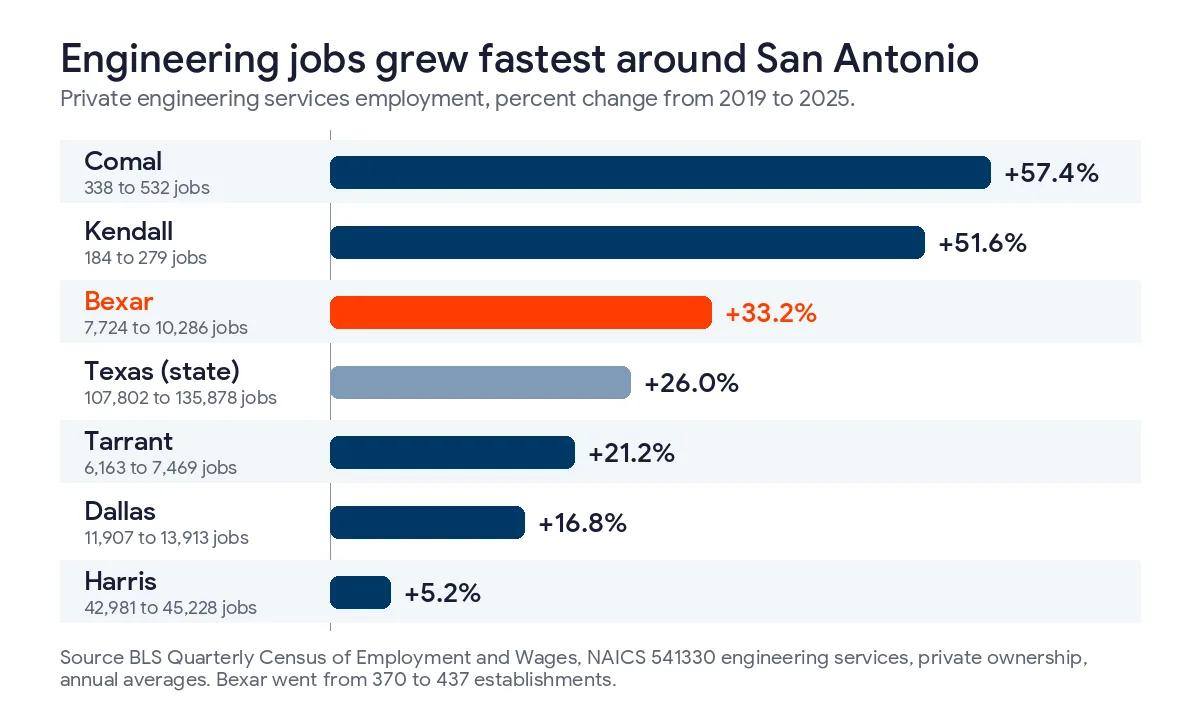
Look at the per-firm column for Bexar. The average engineering establishment there went from about 21 people in 2019 to about 24 in 2025. Sounds small. It isn’t, if your file server was sized for the 2019 headcount and the 2019 project sizes, and nobody has touched the share layout since. Comal and Kendall grew faster still in percentage terms, which raises a second question, about whether a team supported through managed IT services in New Braunfels or managed IT in Boerne can work off the same project share as the Bexar office.
There’s a defense angle too. Department of Defense prime contracts for engineering services, NAICS 541330, carried $332.1 million in net obligations for work performed in Bexar County in fiscal 2025, according to the USAspending.gov pull in our guide to CMMC scoping in San Antonio. Marked drawings change the storage answer. I’ll come back to that.
Where Should Each Type of Engineering File Live?
By workload. Not by firm.
Start here. It’s a default, not a rule, and your application versions and the way your teams actually share work can move a row.
| Workload | Best home | Why | Avoid |
|---|---|---|---|
| Revit file-based workshared central models | Windows file server on the office network | Autodesk warns that file-based worksharing over a VPN can corrupt the central model | Synced OneDrive or SharePoint folders, VPN from home |
| Revit models shared between offices or with outside firms | Revit Cloud Worksharing in Autodesk Docs, or Revit Server | Built for multi-site work, with a recurring per-user cost for the cloud option | Copying central models between offices |
| Civil 3D data shortcut projects | File server, or Autodesk Docs through Desktop Connector | Host drawings, source drawings, and shortcuts have to move together, on paths of 244 characters or fewer | Moving only the _Shortcuts folder |
| MicroStation and OpenRoads DGN projects | File server or ProjectWise | Bentley’s MicroStation help says DGN project data can be stored locally or in ProjectWise | Generic sync folders |
| Survey data, point clouds, drone imagery | File server, backed up offsite | Huge files, few editors, slow to pull back from the cloud | Syncing it to every laptop |
| Contracts, proposals, RFIs, transmittals, signed PDF sets | SharePoint and Teams | Version history, outside sharing, search, and retention | Mixing them into the CAD share |
| Closed project archives | SharePoint or low-cost cloud storage, read-only | Rarely opened, still has to be findable years later | Paying for fast disk nobody opens |
| Electronic PE seals and signatures | Restricted folder with named access only | Texas requires reasonable security for these files | A shared drive everyone can browse |
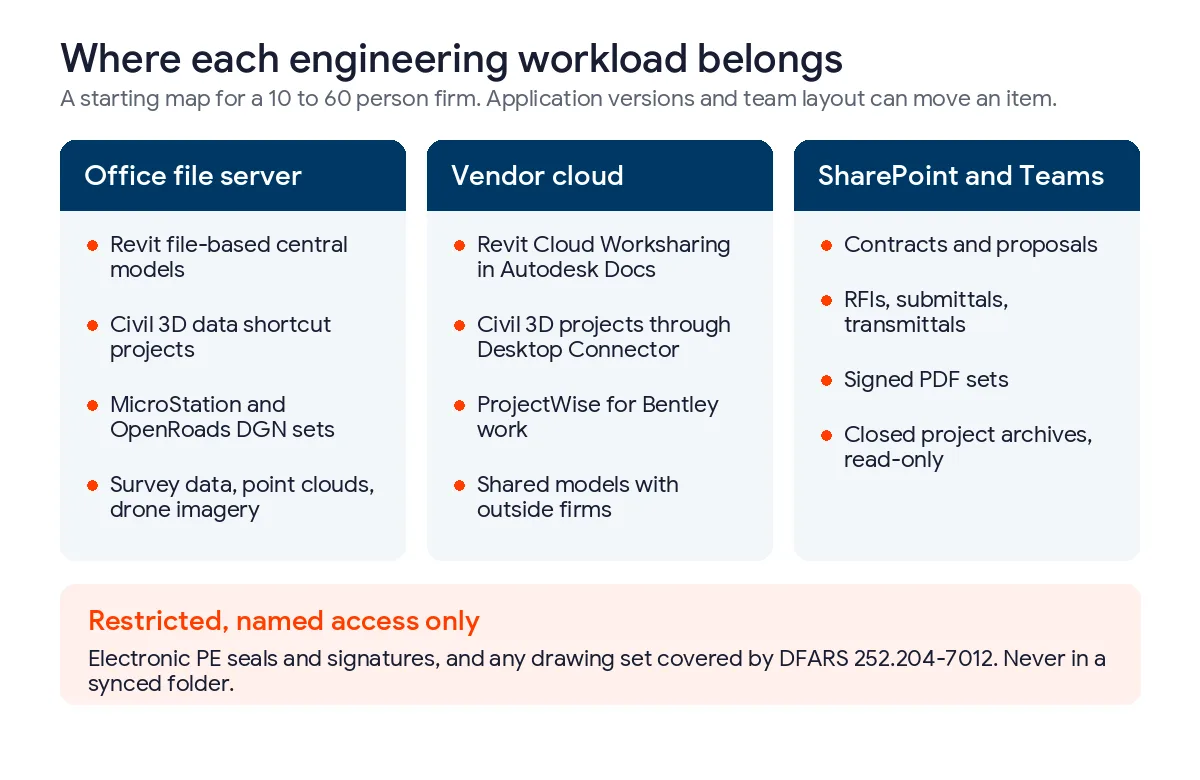
SharePoint isn’t the villain in that table. It owns 2 rows outright and probably holds more of your total file count than the CAD share does. When we moved a construction client’s legacy server shares into SharePoint, we rebuilt the permissions around current projects instead of copying the old folder tree as is, and that cloud-first SharePoint migration case study walks through how that move went. SharePoint’s good at that. Live CAD is the exception.
Why Does a Synced SharePoint Folder Break CAD Projects?
Because the lock doesn’t arrive in time.
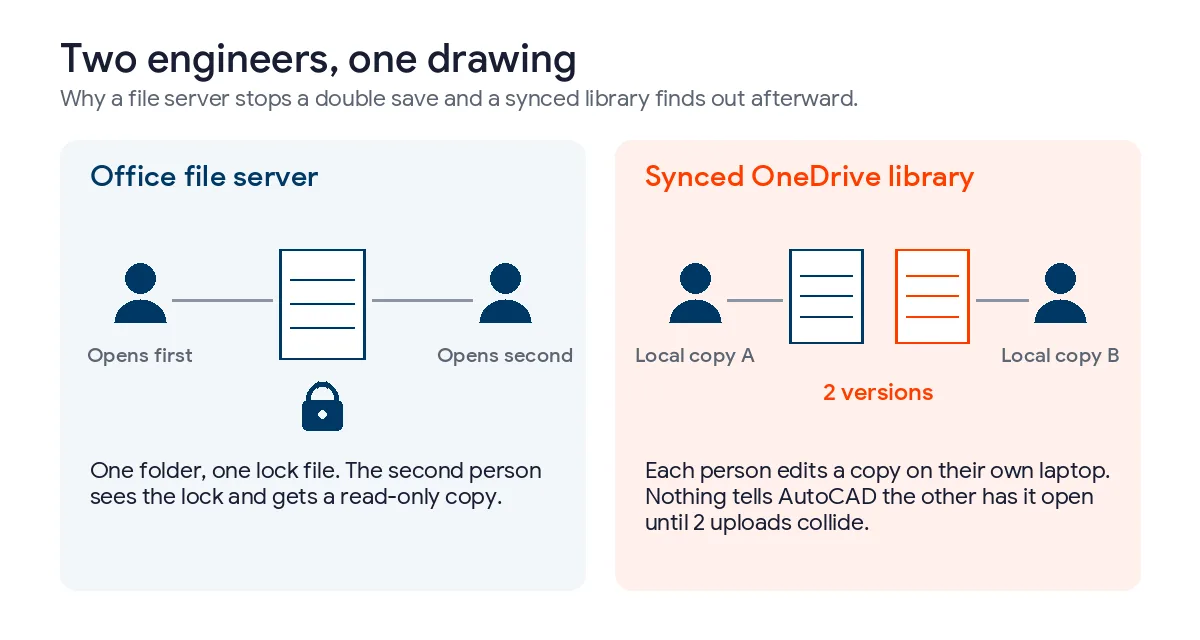
When 2 engineers open the same drawing from a file server, they’re both looking at one folder. AutoCAD writes a small lock file next to the drawing the moment the first person opens it. The second person sees it and gets a read-only copy. Boring. Reliable.
A synced library works differently, because each person opens a local copy on their own laptop and the sync client uploads changes afterward. AutoCAD’s lock file is just another file to the sync client, so it reaches my laptop late or not at all, and AutoCAD has no idea you’ve had that drawing open since lunch. Both of us save. The sync client finds out later, when 2 versions of the same drawing try to upload, and somebody spends Friday afternoon reconciling them by hand.
Autodesk’s support article on the Drawing file is not valid error lists files stored on cloud servers, naming Dropbox Desktop, Google Drive, and OneDrive, among the environmental causes of drawing corruption, right next to dropped VPN connections and out-of-date Desktop Connector installs. It also tells you to switch off on-demand access when that’s where the error comes from.
Then there’s scale. Microsoft recommends syncing no more than 300,000 files in a single library, and says the same performance problems show up at 300,000 items across everything a user syncs, according to its published SharePoint limits. A Civil 3D job with image tiles and survey exports eats a surprising share of that. 10 of those jobs add up fast.
Path length is the last trap, and it bites CAD first. SharePoint allows a 400-character decoded path. Autodesk says an AutoCAD path, name, and extension shouldn’t go past 255 characters, and its Civil 3D migration guidance flags anything over 244 characters as too long for Desktop Connector. A folder tree that lives happily in SharePoint can still be too deep for the drawing inside it. Check before you move.
Is an On-Prem File Server Still the Right Call?
For live work in one office, usually yes.
A Windows file server on the office network gives you real file locks, LAN speed on multi-gigabyte models, and no per-user cloud subscription just to open a drawing. It works with every version of every tool your team runs, including that 2021 Civil 3D install someone keeps alive for one client’s standards. The cost is ownership. You patch it. You back it up. You replace it. And if it sits in a closet with no offsite copy, one bad day takes every active job down at once.
A caveat about cheaper boxes. That same Autodesk corruption article lists external storage such as NAS and SAN devices, and non-Microsoft networks, among its environmental causes. That doesn’t mean a NAS can’t work. Plenty do. It means that when a firm asks me what to buy for live Revit and Civil 3D sets, I’d rather put them on a Windows Server share that behaves the way Autodesk’s documentation assumes, and keep the NAS as a backup target.
A file server that’s going to carry live CAD work needs a short list of things.
- A Windows Server share, with SSD storage for active projects
- Hourly snapshots, so an engineer can roll back their own bad save without a ticket
- An offsite copy that ransomware can’t reach from the office network
- A UPS that shuts the server down cleanly when the power drops
- Monitoring for disk health, free space, and failed backups
- A timed restore test every quarter, on a real project
That last one gets skipped. Our page on disaster recovery in San Antonio covers recovery targets, and data backup services covers the copies themselves.
What About Remote Engineers and a Second Office?
Remote work is the server’s weak spot. Autodesk’s support article on remote access options for Revit ends with a disclaimer worth reading twice. Unsupported workflows, including file-based worksharing through a VPN connection, can cause data corruption when local files synchronize with the central model. So telling people to just VPN in isn’t an answer for Revit. It’s a gamble.
The same article lays out the supported routes, and each one costs something different.
| Remote option | How it works | What it costs you |
|---|---|---|
| Remote Desktop to an office workstation | Project data stays on the office network, only the screen travels | Office machines stay powered on, and usability drops over long distances |
| Revit Server | Central model on a server, with an accelerator in each office | Server hardware, RVT files only, at least 3 Mbps and no more than 100 ms of latency between sites, no Revit LT |
| Revit Cloud Worksharing | Central model lives in Autodesk Docs | A recurring per-user subscription, no Revit LT, and WAN speed still matters |
| Citrix or a hosted desktop | Revit runs on a central server and streams to each user | Server hardware, and a single point of failure if that server goes down |
Pick by team shape. For a firm with 1 office and a handful of people working from home 2 days a week, Remote Desktop into their own office workstation is usually the cheapest thing that works. A firm with a second office in New Braunfels or Boerne, where both teams edit the same models, should look hard at Revit Cloud Worksharing or Revit Server first. And if the project files are Revit, Civil 3D, and MicroStation all at once, remember that Revit Server only carries the RVT side.
Where Azure File Sync fits, and where it doesn’t
Azure File Sync keeps a Windows file server in each office and syncs them all through an Azure file share, which sounds like the perfect fix for 2 offices. It’s good. It isn’t a lock manager. The Azure Files FAQ says that when the same file changes on 2 servers at about the same time, Azure File Sync keeps both and renames the older one with the server’s name added. Nothing gets lost. But it’s exactly what you don’t want on a drawing 2 engineers are editing from 2 towns.
I like it for one office that edits while the others mostly read, for tiering cold project folders off expensive disk, and as a cloud copy for recovery. Pair it with a written rule about which office owns which job. That rule does most of the work.
How Much Cloud Storage Does a San Antonio Engineering Firm Get?
Less than people expect.
Microsoft 365 business and enterprise plans give the whole organization 1 TB of SharePoint storage plus 10 GB for each license purchased, and that pool covers every site, every Teams channel’s files, and the site recycle bins. Personal OneDrive storage is separate. Extra storage is sold in 1 GB increments, and a tenant that keeps running over can be put in read-only mode until usage drops or more capacity is bought.
| Licensed users | Shared SharePoint pool | Typical fit |
|---|---|---|
| 10 | 1,124 GB | Small civil or MEP shop |
| 24 | 1,264 GB | The average Bexar engineering establishment in 2025 |
| 50 | 1,524 GB | Multi-discipline firm, 1 or 2 offices |
| 100 | 2,024 GB | Regional firm with several offices |
Microsoft counts storage in binary gigabytes, so 1 TB is 1,024 GB in that math. Now check your project share. Right-click the folder on the server and look. It takes a minute. If the CAD share alone is bigger than the pool, every gigabyte past it becomes a monthly line item for files that mostly sit there, which is why archives belong on cheaper storage and live work belongs wherever it runs fastest.
The one-time side is in our guide to cloud migration cost in San Antonio, and the running side of SharePoint, Azure, and backup is on our page for cloud services in San Antonio. Firms getting close to 300 seats should read our notes on Microsoft 365 for San Antonio mid-market firms first, because the license family itself changes at that size.
Which Engineering Files Need Tighter Rules Than the Rest?
Defense drawings and PE seals. Both need a home of their own.
Drawings tied to JBSA and other DoD work
If a contract carries DFARS clause 252.204-7012, any outside cloud service that stores, processes, or transmits covered defense information has to meet security requirements equivalent to the FedRAMP Moderate baseline. The clause’s definition of technical information names engineering drawings outright. So before a marked drawing set moves anywhere, someone has to confirm that the specific cloud, tenant, and storage location clears that bar, and that the folder sits inside the boundary your CMMC assessment covers.
Don’t guess on this one. A firm with a few DoD jobs is often better off keeping those projects in a separate, tightly scoped location than pulling the whole company into the requirement.
Electronic PE seals and signatures
Texas allows electronic seals. The board’s sealing rule, 22 TAC 137.33, requires reasonable security measures to protect electronic seal and signature files, and if one is lost, the engineer has to notify the board in writing within 30 days of discovery. A seal image sitting in a synced folder on 24 laptops isn’t reasonable security. Give it a folder with named access, log who opens it, and keep it off the general project share. The rest of what client contracts and federal work ask of a design firm is in our guide to engineering firm cybersecurity in San Antonio.
How Should a Firm Test a Storage Change Before Committing?
Pilot first.
- List every design application and version in use, including the old ones kept for a single client.
- Measure the project share, its file count, and every path longer than 244 characters.
- Pick 1 closed project and 1 live project as the pilot, never the whole share.
- Move images and referenced files first and production drawings last, the order Autodesk documents for Civil 3D projects.
- Have 2 people open and save the same drawing at the same time, and watch what happens.
- Restore a deleted folder and an older version of a model, and time both.
- Decide per workload, using the table above, and write down who owns each location.
Step 5 settles most arguments. It takes 10 minutes. Autodesk also says the first Desktop Connector sync of a Civil 3D project can take several hours, depending on bandwidth and project size, so don’t schedule the pilot for the morning of a submittal.
What Does It Cost to Have Uprite Run This?
Our published plans start at $91 per user per month for IT Essentials, remote support for teams under 12 people, and $138 per user per month for Fully Managed IT, which adds on-site help, after-hours response, and a restore test every quarter. Co-Managed IT is $100 per user per month for firms that keep an internal IT person. The whole bill by firm size, Autodesk licensing and workstations included, is in our guide to what IT costs for an engineering firm in San Antonio. Autodesk, Azure, and extra SharePoint storage stay on their own bills, so each platform’s cost stays visible.
Patching the file server, watching its backups, and planning the storage is the same work behind our managed IT services in San Antonio, run from the office on Radium Street.
What Engineering Firms Ask Before Moving CAD Files
Can Civil 3D data shortcuts run from SharePoint or OneDrive?
Not reliably from a synced library, because each user works on a local copy and the references and locks drift out of step. Autodesk’s supported cloud route for data shortcut projects is Autodesk Docs through Desktop Connector, with every host and source drawing uploaded together, not just the _Shortcuts folder. You may need to relink some surface data source files afterward.
Is a NAS good enough for CAD files?
It can be, for a small office with light concurrent editing. Autodesk lists NAS and SAN devices and non-Microsoft networks among the environmental causes of drawing corruption, so for live multi-user Revit and Civil 3D sets I’d use a Windows Server file share and keep the NAS as a backup target.
Does Revit cloud worksharing need its own subscription?
Yes. Autodesk lists a recurring cost for each user who accesses Revit Cloud Worksharing, and Revit LT isn’t supported there.
How much SharePoint storage does a 25-person engineering firm get?
Roughly 1,274 GB, shared by the whole organization. Microsoft gives each tenant 1 TB, counted as 1,024 GB, plus 10 GB per license, so 25 licenses add 250 GB, and every site and Teams channel draws from that pool while each user’s OneDrive is counted separately.
Can our engineers open Revit models from home over the VPN?
Only through a supported route, and a plain VPN to a file-based central model isn’t one. Autodesk warns that file-based worksharing through a VPN can corrupt the central model, so remote staff should use Remote Desktop into an office workstation, Revit Server, or Revit Cloud Worksharing instead.
Where should a Texas PE keep an electronic seal file?
Somewhere only the engineer who owns it can open it. 22 TAC 137.33 requires reasonable security for electronic seals and signatures, and a lost one has to be reported to the board in writing within 30 days of discovery.
Running Civil 3D and Revit off a server that’s older than half your staff? We’ll measure your project share, map every workload to the right home, and run a 2-person save test on a live job before a single file moves.
Map My CAD StorageWeighing the security side first? A file server full of active projects is exactly what ransomware is built to encrypt, and our cybersecurity services in San Antonio cover the server, the backups, and the accounts that can reach both.