Fully managed IT for an engineering firm in San Antonio typically costs $125 to $175 per user per month in 2026, with Autodesk licenses, Bluebeam, and CAD workstation hardware budgeted on top of that rate. Uprite’s Fully Managed IT plan starts at $138 per user.
Principals ask me for a single number. Fair enough. But an engineering firm’s IT bill is really 3 bills, and the managed IT rate is the smallest of them on any seat that runs Revit or Civil 3D. The software costs more. The engineer’s time costs far more. This guide prices all 3 for San Antonio, using federal wage and business data plus the published rates behind our own IT services for engineering and architectural firms, so you can check any proposal you’re holding.
San Antonio engineering firms pay $125 to $175 per user per month for fully managed IT, and Uprite’s plan starts at $138. An AEC Collection seat adds $306 a month on an annual plan, and with Bluebeam Core on top, IT management is about 29% of a designer’s monthly stack. 65% of the metro’s engineering firms have fewer than 10 people. At a civil engineer’s loaded hourly cost, $138 equals about 2 hours of billable time.
What does IT cost an engineering firm in San Antonio in 2026?
Managed IT means an outside team runs your help desk, workstations, servers, network, security tools, backups, and technology planning for a flat monthly fee per user. For a San Antonio engineering firm in 2026, that fee runs $125 to $175 per user, while software licenses, workstation hardware, and compliance projects are priced as separate lines.
Those ranges come from our Texas MSP Pricing Index, which we built from our own quotes across Houston, San Antonio, and Dallas-Fort Worth, and San Antonio runs lowest of the 3 metros at the standard tier. It’s not a big gap. Dallas-Fort Worth starts around $135 where San Antonio starts at $125, and for any single firm, scope moves the number far more than the zip code does. If you want the citywide picture beyond engineering, we broke down what managed IT costs in San Antonio by company size.
| What you’re buying | 2026 price in San Antonio | Who it fits |
|---|---|---|
| Fully managed IT, market band | $125 to $175 per user per month | Firms with no IT staff that want a single team to own everything |
| Uprite Fully Managed IT | From $138 per user per month | 24/7 support, onsite and cloud infrastructure, quarterly backup testing |
| Uprite IT Essentials | From $91 per user per month | Firms under 12 employees on Microsoft-native tools, remote and business hours only |
| Co-managed IT | $60 to $130 per user per month, Uprite from $100 | Firms that already employ an IT person and need depth behind them |
| Compliance-driven environments | $250 to $300 per user per month | Firms handling controlled unclassified information on defense work |
| Software licenses and hardware | Priced separately | Every firm, every plan |
A correction worth making early. If you’ve seen $138 quoted as a San Antonio average, it isn’t one. In our index, $138 is roughly the Houston average, and in San Antonio it’s simply where our Fully Managed plan starts. Most San Antonio firms land between $125 and $175 depending on what they need covered.
Which plan fits a San Antonio engineering firm of your size?
Start with headcount. San Antonio’s engineering market is mostly small shops. The Census Bureau’s County Business Patterns counted 454 engineering services establishments in the San Antonio-New Braunfels metro in 2023, and half of them, 228 to be exact, had fewer than 5 employees on the payroll that year. Another 69 had 5 to 9. That’s 297 firms, or 65.4%, under 10 people. That’s the market.
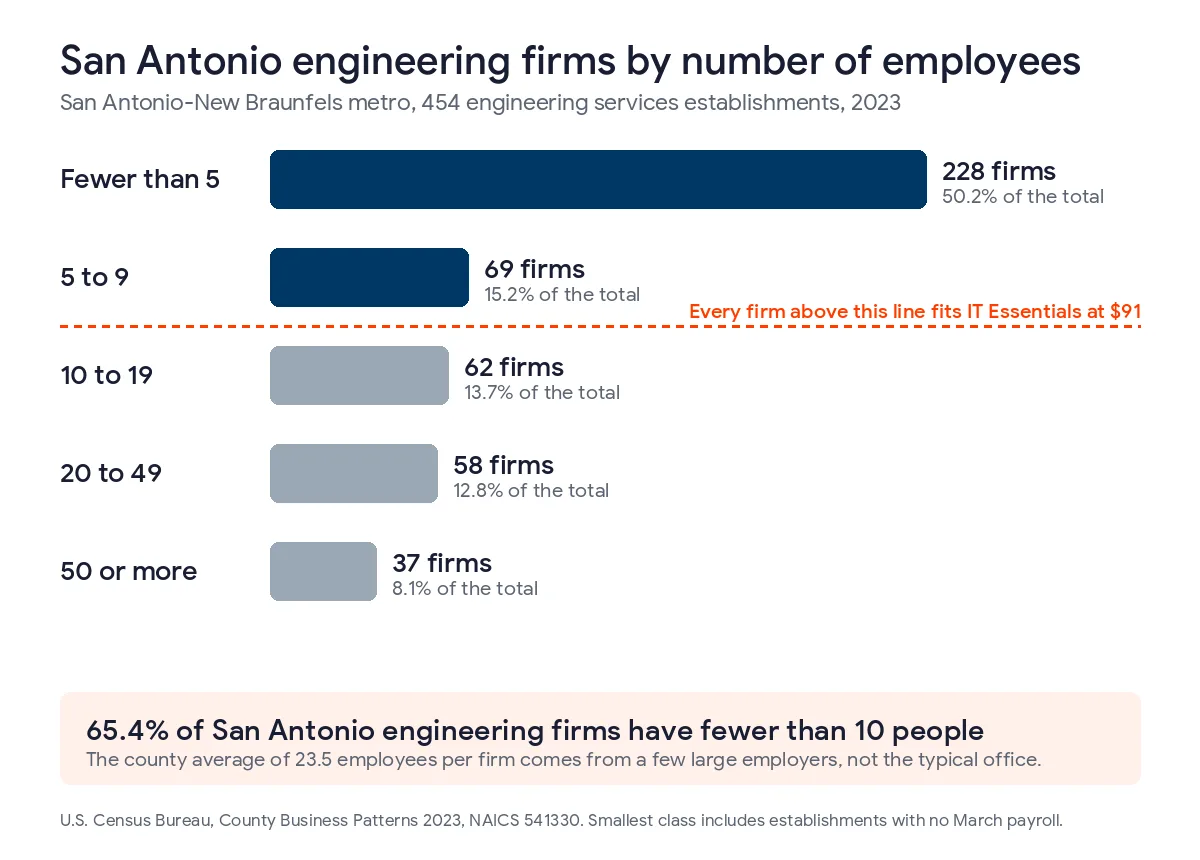
Now look at the averages and you’d guess the opposite. The Bureau of Labor Statistics Quarterly Census of Employment and Wages puts Bexar County engineering services at 437 establishments and 10,286 employees in 2025, which works out to 23.5 people per firm. That average describes almost nobody. A few large employers pull it up, and County Business Patterns counts just 37 metro firms with 50 or more employees, while the typical San Antonio engineering office is a handful of people.
Why does size matter? It decides which plans you can buy.
| Firm size | Share of San Antonio metro engineering firms, 2023 | Plans that fit at Uprite |
|---|---|---|
| Fewer than 5 employees | 50.2% (228 firms) | IT Essentials from $91, or Fully Managed from $138 if you run a local file server |
| 5 to 9 employees | 15.2% (69 firms) | IT Essentials or Fully Managed |
| 10 to 19 employees | 13.7% (62 firms) | Fully Managed from $138, IT Essentials only below 12 people |
| 20 to 49 employees | 12.8% (58 firms) | Fully Managed, or Co-Managed from $100 with an internal IT person |
| 50 or more employees | 8.1% (37 firms) | Co-Managed or Fully Managed, plus a compliance scope if you do defense work |
Here’s the San Antonio wrinkle. Our remote-only IT Pro plan at $110 is built for teams of 12 or more outside the Houston and San Antonio areas, so inside San Antonio, where our Radium Street office sits, a 12-person firm doesn’t get a remote-only middle tier from us. So the real choice for most local firms is $91 remote-first or $138 with onsite work included.
My honest take on the small end? A 3-person firm that keeps its drawings in Autodesk Docs and its email in Microsoft 365 probably doesn’t need our Fully Managed plan. IT Essentials covers 8 support hours per user a month during business hours, Microsoft Defender, and annual backup testing. That’s enough for a lot of tiny offices. Most of them, anyway. It stops being enough the day you install a file server in a closet, start keeping 6 years of project archives on it, and realize nobody has ever tried to restore a single folder from the backup.
What does a month of IT cost at 4, 8, 15, 30, and 60 users?
Multiply the rate by the people who log in. That’s the whole formula for the management fee. Our pricing counts users who need IT support, so a part-time bookkeeper on their own laptop counts and a retired principal who checks email from home twice a year usually doesn’t.
| Users | IT Essentials at $91 | Fully Managed at $138 | San Antonio market band | Co-Managed at $100 |
|---|---|---|---|---|
| 4 | $364 a month | $552 a month | $500 to $700 | Rarely fits, no internal IT |
| 8 | $728 a month | $1,104 a month | $1,000 to $1,400 | Rarely fits, no internal IT |
| 15 | Not offered at 12 or more | $2,070 a month | $1,875 to $2,625 | $1,500 with an IT person on staff |
| 30 | Not offered | $4,140 a month | $3,750 to $5,250 | $3,000 with an IT person on staff |
| 60 | Not offered | $8,280 a month | $7,500 to $10,500 | $6,000 with an IT person on staff |
These are starting prices. Your rate is guaranteed not to rise in the first year, and you can walk away within 120 days if we’re not a fit. Everything else in this guide sits on top of these numbers. That’s where firms get surprised.
Why does software cost more than IT on a CAD seat?
Because Autodesk charges more for the software than we charge to run the machine. Autodesk lists the Architecture, Engineering and Construction Collection at $3,675 a year per user on an annual plan, or $460 a month if you pay monthly. Revit on its own is $3,005 a year. AutoCAD alone is $2,095. Bluebeam’s published Revu pricing runs $260 a year for Basics, $330 for Core, and $440 for Complete, per user, billed annually.
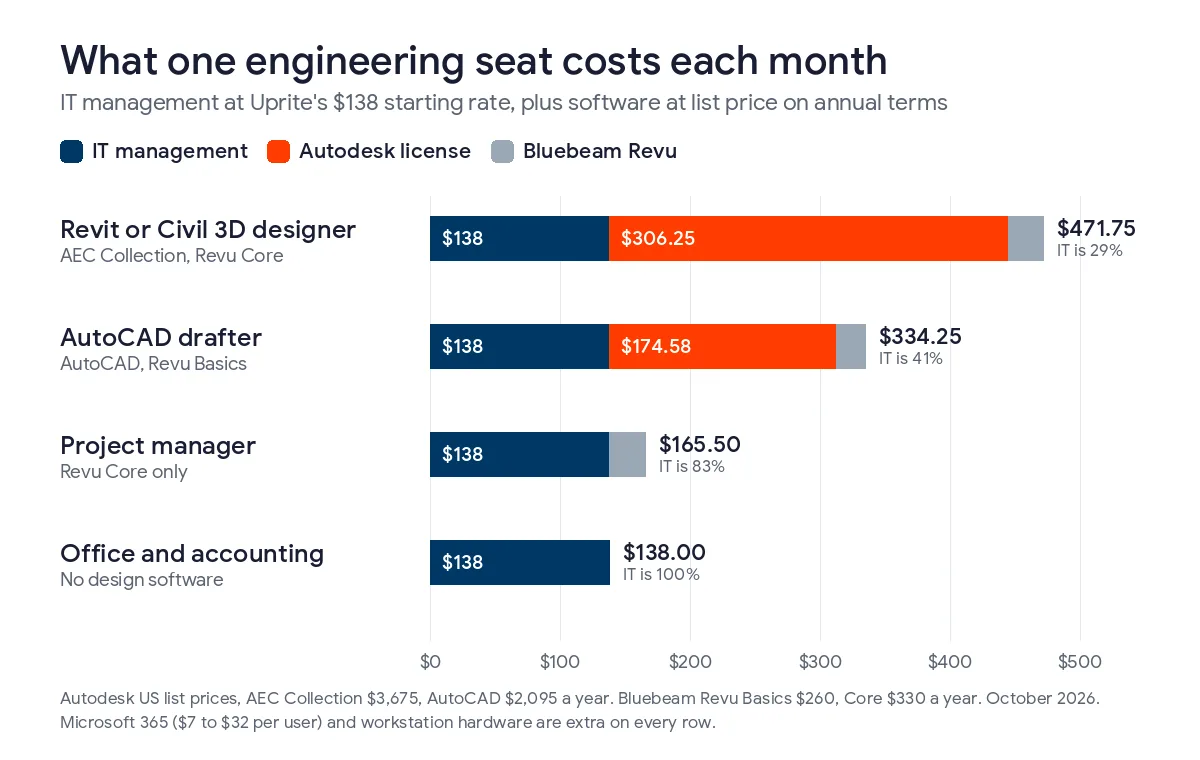
Now stack them on 1 seat. The picture flips.
| Seat type | IT management | Design software | Bluebeam | Monthly total | IT share |
|---|---|---|---|---|---|
| Revit or Civil 3D designer on the AEC Collection | $138 | $306.25 | $27.50 (Core) | $471.75 | 29% |
| Drafter on AutoCAD only | $138 | $174.58 | $21.67 (Basics) | $334.25 | 41% |
| Project manager marking up sets | $138 | None | $27.50 (Core) | $165.50 | 83% |
| Office and accounting | $138 | None | None | $138 | 100% |
Microsoft 365 adds another $7 to $32 per user on every row, depending on the plan. Pay Autodesk monthly instead of annually and a designer’s seat jumps by about $154 a month. That’s more than the whole IT fee, gone to a billing choice. Check your renewal terms.
Then there’s the hardware. A Revit workstation isn’t an office PC with a bigger monitor. It needs a professional graphics card, a lot of memory, and fast local storage for models that run to several gigabytes, and since most firms buy those machines outright, budget them as a capital line on a 3 to 5 year cycle. And watch the old ones. Microsoft’s Extended Security Updates program charges $61 per device for the first year, doubles the price every year after, and makes late joiners pay for the years they missed. A Windows 10 workstation enrolling now for a single legacy plug-in pays $183 just to stay patched.
So what does $138 cover? On a design seat at Uprite, fully managed IT includes CAD and BIM workstation performance, license tracking for Autodesk, Bluebeam, and Adobe seats, backup with quarterly restore testing, and 24/7 support. The licenses themselves and the hardware are billed by the people who sell them. Keep them separate. Any quote that blurs those lines is a quote you can’t compare.
How many billable hours does $138 a month really cost?
About 2 hours of a civil engineer’s time. Here’s the math. The BLS metro wage estimates for May 2025 put San Antonio’s 2,230 civil engineers at a mean of $46.24 an hour. Wages aren’t the whole cost of an employee, though. Benefits ride on top. In professional and technical services nationally, employers paid $75.97 an hour in total compensation in the second quarter of 2026 against $51.88 in wages, a load factor of 1.46. That makes a San Antonio civil engineer’s loaded hour about $67.71. Other roles take 1 to 3 hours.

| San Antonio role, May 2025 | Mean hourly wage | Loaded hourly cost at 1.46 | Hours that equal $138 |
|---|---|---|---|
| Civil engineer | $46.24 | $67.71 | 2.0 |
| Architect | $45.08 | $66.01 | 2.1 |
| Mechanical engineer | $56.27 | $82.40 | 1.7 |
| Electrical engineer | $58.23 | $85.27 | 1.6 |
| Architectural and civil drafter | $30.32 | $44.40 | 3.1 |
| Architectural and engineering manager | $85.94 | $125.85 | 1.1 |
Keep that number handy. If a crawling Revit model, a file server that drops connections, or a lost afternoon of re-plotting costs a single engineer 2 hours a month, the IT fee for that seat has already been paid in waste. Is yours losing more? Few firms track it, which is the problem.
And the wages are climbing. QCEW shows average pay in Bexar County engineering services rose from $108,036 in 2024 to $112,657 in 2025, up 4.3%, and that’s about 70% more than the $66,454 average across all private jobs in Bexar County that same year. Every hour an engineer spends rebooting, waiting, or chasing a license key costs more each year.
When does it make sense to hire your own IT person instead?
Later than most firms think. A San Antonio network and computer systems administrator averaged $97,370 a year in May 2025. Loaded at 1.46, that’s about $142,600. Fully Managed at $138 costs $1,656 per user per year, so you’d need about 86 people before a single administrator’s cost matched the whole outsourced fee. A help desk specialist at the San Antonio mean of $60,520 loads to about $88,600, which equals Fully Managed for roughly 54 users.
And 1 person isn’t a department. They take vacations. They can’t watch alerts at 2 in the morning. Nationally, the BLS industry staffing estimates count 9,070 computer user support specialists across 1,719,390 workers in architectural, engineering, and related services, which works out to 1 specialist for every 190 employees, and most San Antonio engineering offices are nowhere near 190 people.
The firms that do usually land on co-managed IT. Your IT person keeps the relationships and the day-to-day, and the provider adds monitoring, security tools, and after-hours coverage behind them. We price that from $100 per user, and we laid out the split of duties on our page for co-managed IT in San Antonio. If you’re weighing the full trade, our guide to in-house versus outsourced IT in San Antonio runs the department math in more detail.
What pushes an engineering firm above $175 per user?
4 things. Compliance is the biggest.
If your firm takes defense work, the moment a contract hands you controlled unclassified information, you’re expected to meet NIST SP 800-171. That adds documented controls, logging, access reviews, and evidence an assessor will ask to see. It isn’t cheap. Our index puts compliance-driven environments at $250 to $300 per user. Before you price it, figure out how much of the firm the controlled data actually touches, because how CMMC scoping works decides whether 6 people are in scope or all 40. Firms already deep in it can start with our page on CMMC compliance in San Antonio.
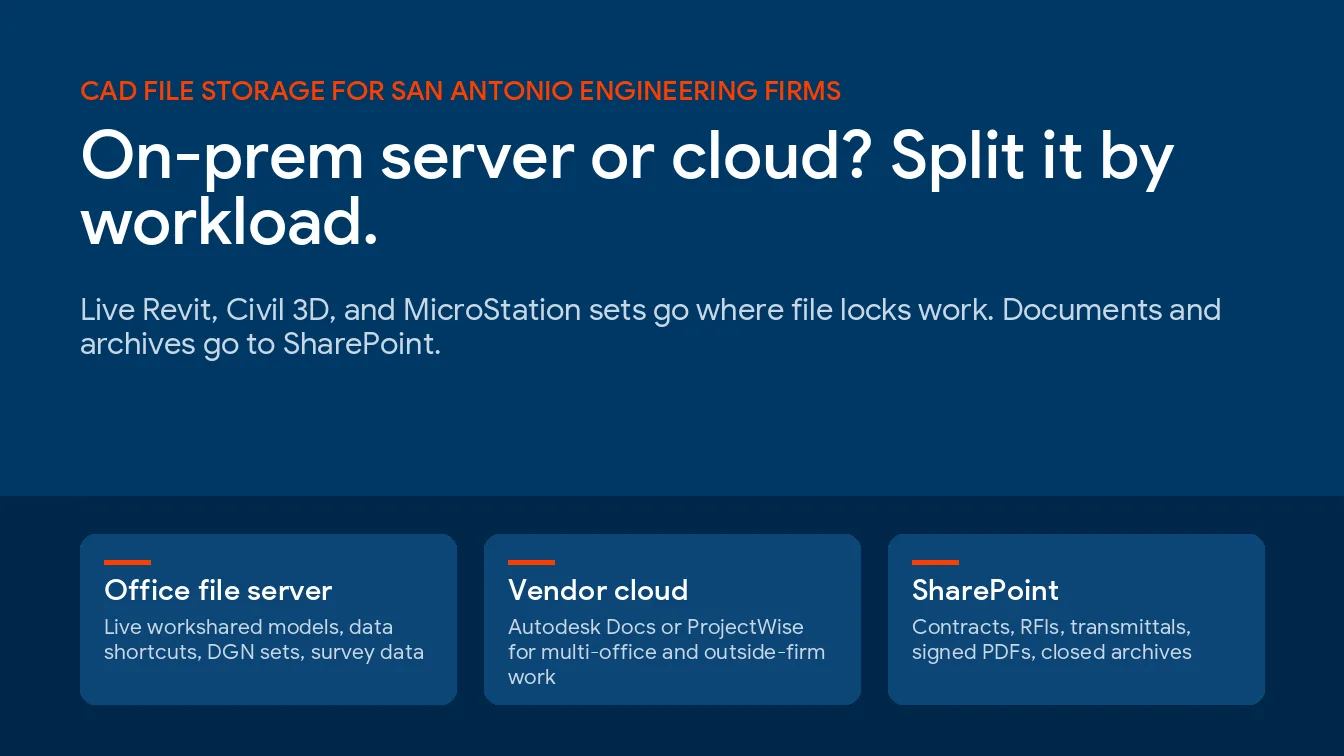
The other 3 are ordinary. Multiple offices or job trailers that need the same model in sync add network and storage work, because somebody has to keep file locking, replication, and permissions straight across every site you run. Where those files should live in the first place is covered in our guide to CAD file storage for San Antonio engineering firms. A large on-premises file server with years of archives needs real restore testing, not a green checkmark. And firms that render or run analysis overnight need someone watching when a job fails at 3 in the morning, or the team walks in to a half-finished render and a deadline that didn’t move. None of these are exotic. They’re just work, and work shows up on the invoice.
How should you read an engineering IT quote in San Antonio?
Run these 6 checks first.
- Confirm the per-user rate and exactly who counts as a user, including part-time staff and principals.
- Ask whether CAD and BIM workstation support is inside the rate or billed by the hour.
- Get Autodesk, Bluebeam, and Microsoft licensing listed as separate lines with annual or monthly terms shown.
- Find out whether onsite visits in San Antonio are included or charged per trip.
- Ask how often backups are restore-tested and who sees the result.
- Check the after-hours rate, the onboarding fee, and how long the price is locked.
If 2 quotes still look far apart after that, the gap is usually scope, not margin. Lining them up against Uprite’s published plan prices is a fast way to see what each one left out. And if you’re still building the shortlist, our ranking of the top MSPs for engineering firms in San Antonio compares providers on more than price.
Engineering firm IT pricing questions we hear in San Antonio
How much does managed IT cost per engineer in San Antonio?
Fully managed IT costs $125 to $175 per user per month in San Antonio in 2026, and Uprite’s Fully Managed IT plan starts at $138. Engineers, drafters, and office staff usually count as the same user. Titles don’t move the rate. What changes is the software each person runs, which is billed separately.
Is CAD workstation support included in the monthly rate?
At Uprite, yes. Fully managed IT for design firms covers CAD and BIM workstation performance, license tracking for Autodesk and Bluebeam, backups, and 24/7 support. The Autodesk licenses and the workstation hardware aren’t included, since those are bought from Autodesk or a reseller and from the hardware maker.
What does an Autodesk AEC Collection seat add on top of IT?
About $306 a month per user on Autodesk’s annual plan, since the list price is $3,675 a year. Paying monthly costs $460 a month instead. Annual billing is cheaper. For a Revit or Civil 3D designer, that license is more than twice the $138 Uprite charges to manage the seat.
Can a small engineering firm pay less than $125 per user?
Yes, if it has fewer than 12 employees and works mostly in Microsoft 365 and the cloud. Uprite’s IT Essentials plan starts at $91 per user with remote, business-hours support capped at 8 hours per user a month. It has limits. Firms with a local file server or frequent onsite needs usually outgrow it fast.
When should an engineering firm hire its own IT person?
Usually past 50 users, and even then an outside partner tends to stay on for nights and security. A San Antonio help desk specialist costs about $88,600 a year fully loaded, the same as Fully Managed IT for roughly 54 users, and a single person can’t cover nights, vacations, or security monitoring alone. That’s where co-managed IT from $100 per user fits.
Does defense work change what an engineering firm pays?
It can double the rate. Firms that handle controlled unclassified information have to meet NIST SP 800-171, and our Texas MSP Pricing Index puts those environments at $250 to $300 per user. Keeping the controlled data inside a small, well-scoped part of the firm is the best way to hold that cost down. Which client contracts put a firm in that bracket is covered in our guide to the security terms San Antonio engineering firms sign.
Do old Windows 10 CAD workstations cost extra in 2026?
Microsoft charges $61 per device for the first year of Extended Security Updates, doubles it each year, and makes late enrollees pay for the years they missed, so a workstation joining now costs $183. Year 3 adds another $244, so treat it as a bridge to a Windows 11 machine, not a plan.
Send us your headcount, how many people run Revit, Civil 3D, or AutoCAD, and whether you keep a file server in the office. We’ll price the IT, list every license line next to it, and show you the monthly total per seat, whether or not you switch.
Get My Firm's IT PriceComparing verticals? Law firms carry a different cost structure, and our breakdown of law firm IT cost in San Antonio shows how billable-hour economics change the math there. For the full service picture across the city, see managed IT services in San Antonio.