Data Backup and Disaster Recovery in San Antonio, TX
A local backup for fast restores, a locked offsite copy in another Texas risk zone, and restore tests with a stopwatch on them, run from our office on Radium Street.
CRN Pioneer 250•MSP 501•Houston Fast 100•Clutch Top Performer•The Manifest Most Reviewed•ForzaDash MSP 555
Backup and disaster recovery in San Antonio means 2 copies of every system that matters, one on a local appliance and one locked offsite, plus a timed restore that proves each copy works. Uprite runs it from our office at 11831 Radium Street as the San Antonio end of our disaster recovery across Texas. It’s part of our managed IT services in San Antonio, and Fully Managed IT includes a restore test every quarter from $138 per user per month.
Why San Antonio Backup Plans Have to Assume the Roads Are Closed
Ask an office manager here what a disaster looks like and you’ll hear about a fire, or a server that won’t boot. Fair enough. But the event that really tests a San Antonio backup plan is often water. And it tends to show up in the dark.
The night of June 11 to 12, 2025, is the clearest recent case. The National Weather Service office that covers San Antonio issued its first Flash Flood Warning for northwest Bexar County at 11:29 p.m. Before dawn, the city had its highest hourly rainfall rate since hourly records began in 1934. The airport gauge alone caught 3.98 inches between 2:51 and 3:51 a.m.
Then it got worse fast. At 4:01 a.m., 40 low-water crossings in Bexar County were closed, according to BexarFlood.org, the crossing-status system the weather service relayed that night. Leon Creek at Loop 410 rose 13 feet in about an hour and crested at 4:45 a.m. The flood killed 13 people, 12 of them in the Beitel Creek basin, and the weather service’s own review of the June 2025 flood lays out the night hour by hour.
There was notice, though. Earlier that evening the Weather Prediction Center raised San Antonio to a level 3 of 4 risk of excessive rainfall, its first since May 2024, and at 9:17 p.m. the local office stretched its Flood Watch over the metro. That’s more than 2 hours before the first warning. Plenty of time to check a backup.
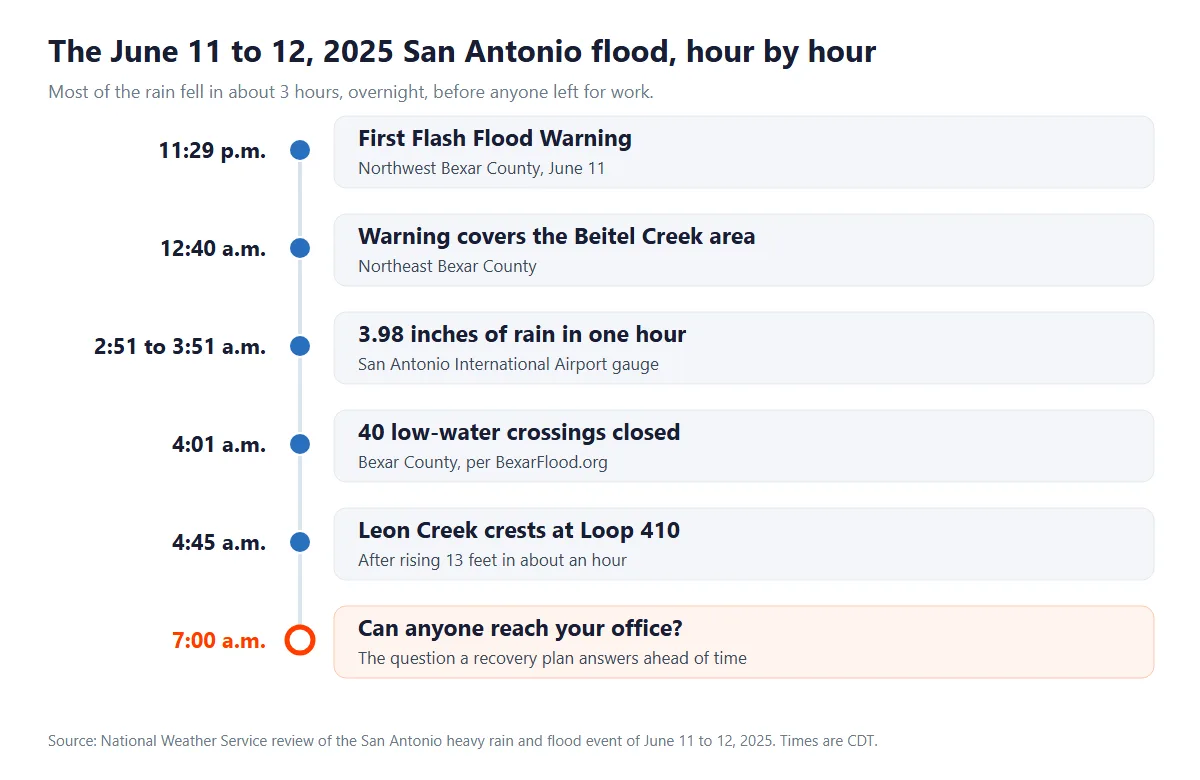
Now look at the next morning from an owner’s chair. Your building might be bone dry. At 7 a.m., though, your staff are reading about closed crossings and flooded frontage roads, and nobody’s getting to the server closet.
A backup you can only restore by standing next to it isn’t worth much that day. Not much at all.
The closet’s location matters. A rack on the ground floor of a building near a creek is a flood risk on its own, and it’s worth asking whether that gear can sit higher or whether the workload belongs in the cloud. Easy question. Worth asking now.
So a recovery plan here has to answer 3 questions before anything floods. Can the systems your people need come back somewhere other than the office? Who makes that call, and by what time? And has anyone actually done it, start to finish, with a clock running?
What to Check the Night a Flood Watch Goes Out
Last night’s backup finished. Every Tier 1 job, not just the summary screen. A partial job looks fine until you need it.
The offsite copy is current. Replication should show a finish time from today. Stuck? Better to find out tonight.
Someone can log in from home. Test remote access from a home connection now, not at 7 a.m. with the crossings closed.
One person owns the failover call. Name them, and the hour they’ll decide by. Committees don’t fail over.
Laptops go home with their owners, because one left on a desk is a machine nobody can reach in the morning.
The after-hours number is saved. Fully Managed IT includes 24/7 support, and our average first response is about 5 minutes. That’s an average, not a promise.
BexarFlood.org, the crossing-status site for Bexar County, is worth bookmarking next to your backup portal. The weather service cited it twice that night.
Water isn’t the only way the building drops out of the picture. Ransomware, a dead drive array, and a SharePoint library somebody emptied by mistake all end the same way, with the restore happening somewhere other than the closet. Our write-up of ransomware lessons from San Antonio incidents covers the attack side.
Data Backup Services in San Antonio, System by System
A backup plan is only as good as its list. Ours starts with whatever you’d miss by lunchtime and works down.
Each protected system gets 2 backup copies. One lives on a local appliance in your office, so an everyday restore takes hours instead of days. The other is replicated to a facility in a different Texas risk zone and retention-locked, so nobody, an attacker holding one of your admin passwords included, can shorten how long it’s kept.
Why 2 copies and not 1? Speed and survival pull in opposite directions. A large file server pulled back over an office internet line can take days, so the local copy handles the everyday restore. But the local copy dies with the building. The offsite one doesn’t.
| What we protect | Where the backup copies live | How it comes back |
|---|---|---|
| Servers and virtual machines | Image backups on the local appliance, replicated to the locked offsite copy | Started as a virtual machine on the appliance or in the cloud while the server gets repaired |
| Desktops and laptops | Image-level backups on the appliance, copied offsite | Restored to the same machine or a replacement |
| Microsoft 365 mail, OneDrive, SharePoint, and Teams | A separate copy your own tenant can’t delete | Single files, mailboxes, or whole sites put back into the tenant |
| Line-of-business databases such as practice management, ERP, and accounting | Point-in-time backups, local and offsite | Rolled back to a chosen point, then opened to prove the application runs |
Microsoft 365 is the row people push back on. Microsoft keeps the service up, but it protects its platform rather than your content, and its own recycle-bin windows are short. Our Microsoft 365 services in San Antonio handle the tenant itself. The backup copy sits outside it.
Want the sizing side, with retention and change rates worked through? Our data backup services page shows how each copy gets built.
Ransomware Recovery Starts With a Copy Nobody Could Touch
Ransomware crews go after the backups first. If the backup console shares a login with the network they just broke into, your copies go down with everything else.
The retention lock and the separate backup logins exist for exactly that. Nobody can delete the offsite copy early or shorten how long it’s kept, so there’s always a clean point to come back to.
Picking that point takes care. The newest copy may already hold the attacker’s tools, so the restore starts by finding the last copy taken before they got in. CISA’s Cybersecurity Performance Goals make the same point from the other direction. Validate a backup’s integrity before you restore from it.
That’s the technical half. Texas also sets notice deadlines once personal information is involved, and our guide to ransomware recovery in Texas walks through those.
Managed Backup in San Antonio Is a Daily Job
Failed Jobs Get Flagged the Same Day
Every backup job is monitored. When one fails, an alert goes out that day instead of waiting for a monthly review.
Backup Logins Live Somewhere Else
Backup storage runs under accounts that don’t exist in your production directory, so a stolen network password isn’t a backup password too.
Retention Matches Your Rules
How long each system’s copies are kept is set against what your regulator, your insurer, and your contracts require. Not a vendor default.
Every Test Ends in a Report
After each restore test you get a plain-language report. What came back, how long it took, what needs fixing.
Backups That Can Outlast a 4-Day Freeze
February 2021 was the other San Antonio stress test. The weather service’s summary of the February 2021 winter storm says San Antonio International Airport stayed below freezing for 4 days and 12 hours, 1 hour short of the record set in 1951.
It lists the damage plainly. Failed power grids. Burst water pipes. Limited road and air travel.
San Antonio is on the ERCOT grid, so when ERCOT ordered rotating outages that week, CPS Energy customers were in them too. A rotating outage doesn’t ask what’s in your server closet.
Think about what that does to an on-site backup. The appliance in your closet runs on a battery measured in minutes, not days. A burst pipe on the floor above can do more damage than the storm did. And the person who’d normally swap a failed drive can’t drive in.
Rolling outages are rougher on a server than one long one. Every cut is a hard stop unless a battery backup shuts the machine down cleanly first, and a hard stop in the middle of a database write is how a server comes back up with a corrupted file.
So the closet’s battery backup should shut servers down on its own after a few minutes. Then somebody should check that it does. Has yours ever been tested?
That’s why the offsite copy carries you through a freeze. For a grid emergency that covers the whole state, our Texas plan names cloud recovery outside Texas as the fallback for the systems you can’t run without, because a second copy elsewhere on ERCOT could be sitting in the same dark.
No disaster-movie budget required. The decision just has to be made ahead of time, in writing, while the power’s still on.
Backup and Disaster Recovery Tiers for San Antonio Systems
Not every system deserves the same speed. Fast recovery costs money, so we sort what you run into 3 tiers and price each one on its own.
A tier comes down to 2 numbers. NIST’s contingency planning guide, SP 800-34, defines the recovery time objective as the longest a system can stay unavailable before the damage spreads to the work that depends on it, and the recovery point objective as the moment your data rolls back to. Plainly put? RTO is how long you can wait. RPO is how much work you’d do twice. Our RTO and RPO worksheet guide shows how to set both.
| Tier | What usually lands here in San Antonio | Back within (RTO) | Work you might redo (RPO) | What it runs on |
|---|---|---|---|---|
| Tier 1, can’t stop | The EHR at a Medical Center practice, a dispatch board, the ERP behind a distribution floor off I-35 | Under 4 hours | An hour or less | A replicated standby that can be switched on, the costliest tier |
| Tier 2, needed by tomorrow | Accounting, email, file shares, the CRM | Within 1 business day | 1 to 4 hours | Image backups taken through the day, bootable on the appliance or in the cloud |
| Tier 3, kept but rarely opened | Archived charts, closed projects, old mailboxes | Several days | 24 hours | A nightly backup, restored when someone asks |
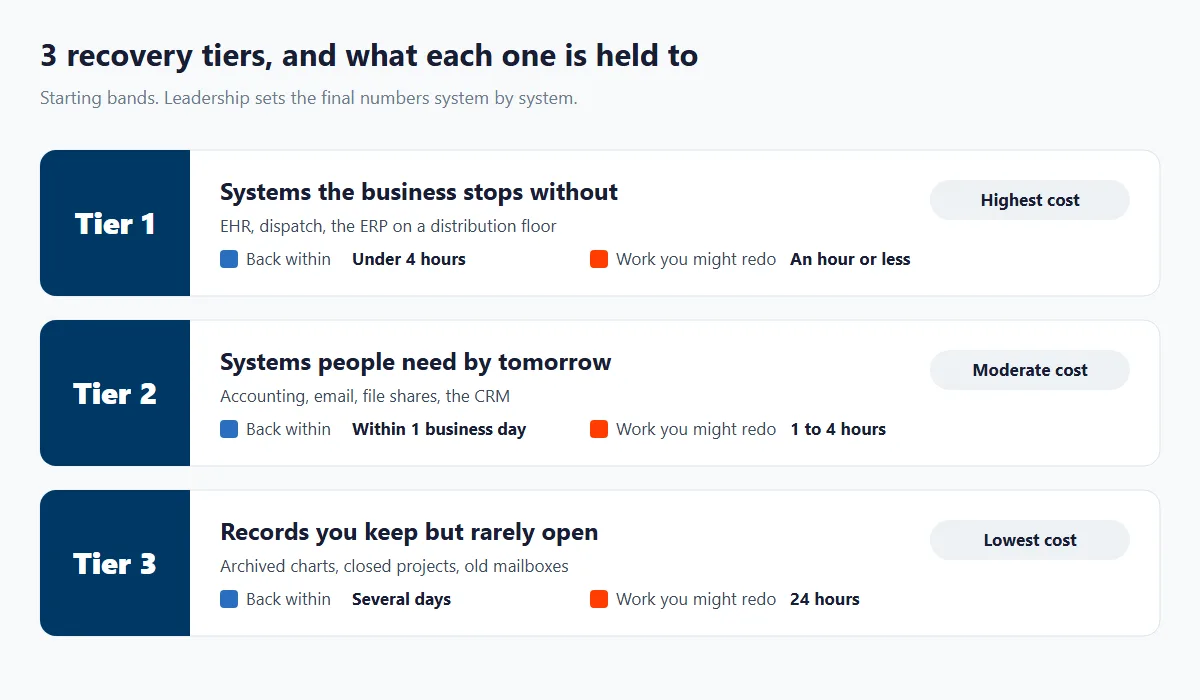
Treat those bands as opening numbers. Your leadership signs off on the final ones system by system, because deciding which systems the business can live without for a day isn’t a call IT should make alone.
Picture a 22-person specialty clinic near the South Texas Medical Center. The EHR and the imaging viewer go in Tier 1, since a morning without them means calling patients to reschedule. Billing, email, and the shared drive land in Tier 2. Charts for patients who left years ago sit in Tier 3, on the cheapest copy there is. Only the first 2 systems need a standby running. That line moves the price.
Sometimes Tier 1 isn’t in your building at all. If the EHR or the ERP is a cloud application, the plan covers getting people to it from somewhere else, plus a copy of your own data outside the vendor’s system wherever the contract allows one. Different problem. Same tier.
Backup Rules for San Antonio Defense Contractors and Clinics
Backup rules get stricter for 2 kinds of San Antonio businesses. Defense contractors. And anyone holding patient records.
Defense Contractors Have to Keep the Evidence Before They Restore
Say your company supports Joint Base San Antonio, or any Defense Department customer, under a contract that includes DFARS clause 252.204-7012. A ransomware hit then comes with obligations that change the order of a restore. You have to report the incident within 72 hours of discovering it. And paragraph (e) says you must preserve images of every known affected system, along with relevant monitoring and packet capture data, for at least 90 days after you submit the report, so DoD can ask for the media or pass.
That collides with every IT team’s first instinct, which is to wipe the infected servers and restore from the last clean copy. Do that first and you’ve destroyed the images you were required to keep.
So a contractor’s plan needs room for both jobs. Image the affected machines. Park those images on storage the restore won’t overwrite. Then rebuild from the clean backup.
Plan storage for those images. Keeping them 90 days for a handful of servers takes real space, and it can’t be the space your restore is about to overwrite.
The clause also flows down. Paragraph (m) requires a contractor to include it in subcontracts that involve covered defense information, so a 40-person machine shop 2 tiers below the prime can be holding it without ever signing anything with DoD directly.
The backups have a rule of their own. NIST SP 800-171 Revision 2, the version the CMMC program rule at 32 CFR 170.14 incorporates, requires you to protect the confidentiality of backup CUI at its storage locations, through encryption or physical controls. Whether a given system is in scope at all is a separate question, and our guide to CMMC scoping for San Antonio defense subcontractors works through it.
Medical Practices Have to Know Where the Offsite Copy Sits
Texas added a location rule in 2025. Senate Bill 1188 created Health and Safety Code section 183.002, which requires a covered entity to keep electronic health records under its control physically maintained in the United States or a US territory, including records stored by a third-party computing facility or a cloud provider. It applies to records stored on or after January 1, 2026.
An offsite backup of your EHR sits in somebody’s computing facility. So ask where the second copy physically sits, and expect an answer with a country in it.
HIPAA covers the planning side. The Security Rule at 45 CFR 164.308(a)(7) requires a data backup plan, a disaster recovery plan, and an emergency mode operation plan, and it lists testing and revision procedures as addressable. Our HIPAA cybersecurity services in San Antonio pick up the rest of the rule.
How We Set Up Backup and Disaster Recovery for a San Antonio Office
Walk the Office and the Tenant
We start with a free assessment of what you run, where each system physically sits, what’s backed up today, and when anyone last restored from it. No proposal goes out before that.
Put the Tiers in Writing
Every system gets a tier, a recovery time, and a data-loss limit. Your leadership approves the list, and the price follows from it, not the other way around.
Seed the Local and Offsite Copies
We install the local appliance, start replication to the locked offsite copy, keep the backup logins out of your directory, and set retention system by system.
Restore a Real System Against the Clock
Before we call anything live, we restore a real system and time it against its target. A miss gets fixed now, not during a flood. You see the time we measured.
Retest, Report, and Adjust
Fully Managed IT repeats the test every quarter and IT Essentials once a year. Each test ends with a report, and the plan changes when your systems do.
Managed Backup Pricing in San Antonio, Plan by Plan
Backup isn’t a separate line item on our plans. It’s built into the per-user price, and the plan you pick decides how often a restore gets tested.
| Plan | Starts at | Built for | Backup and restore testing |
|---|---|---|---|
| Fully Managed IT | $138 per user per month | San Antonio companies handing over the whole IT function, on-site and cloud | Full monitoring and a restore test every quarter |
| IT Essentials | $91 per user per month | Teams under 12 people, remote only | Basic monitoring and a restore test once a year |
| Co-Managed IT | $100 per user per month | Companies with their own IT staff | Scoped with your team, and backup and recovery can be the part we run |
IT Pro, our $110 remote plan, is for teams of 12 or more outside the Houston and San Antonio areas, so it doesn’t apply to offices here.
Do the math for a 30-person office on Fully Managed IT and you get $4,140 a month before licensing, with 4 timed restore tests a year inside that figure. A 9-person office on IT Essentials comes to $819 a month, tested once a year.
Those 4 tests are where the money earns its keep. Each one proves the plan still works after another quarter of new folders, new hires, and new software. Plans drift. Tests catch it.
Standby capacity for Tier 1 systems is the piece we quote separately after the assessment, since it depends on how many systems need a warm spare and how big they are. Your rate is guaranteed not to rise during your first year, and if you’re not satisfied within 120 days, you can leave the contract. Full plan details are on our pricing page.
What You See After Every Backup Restore Test
A green checkmark on a backup console means a job finished. It doesn’t mean anything came back. So we report on the restore, not the job.
Tests also catch the slow problems. A new shared folder that never got added to the job. A database that outgrew its backup window. A license that lapsed. Those turn up on a test day instead of a disaster day.
| The report shows | Why it’s there |
|---|---|
| What was restored | Proof that the copy you’d reach for in an emergency opens and runs |
| How long it took | Measured against the recovery time that system’s tier is held to |
| What needs fixing | Problems a test turns up get fixed while nothing is on fire |
Who do we usually build this for? Companies of 10 to 300 users across Bexar County and up the I-35 corridor to New Braunfels. Medical and dental practices. Defense subcontractors. Law and accounting firms that can’t lose a client file. Distributors that stop shipping when the ERP goes down.
Already have IT staff? Co-managed IT in San Antonio lets your team keep the day-to-day while we run backup and recovery.
What San Antonio Owners Ask Before They Trust a Backup
It’s included. Fully Managed IT starts at $138 per user per month with backup monitoring and a restore test every quarter, and IT Essentials starts at $91 for teams under 12 with a test once a year. Standby for Tier 1 systems is quoted separately after the free assessment.
Every quarter on Fully Managed IT, once a year on IT Essentials. After each test you get a plain-language report showing what was restored, how long it took against that system’s target, and anything that needs fixing.
The offsite copy doesn’t need anyone at the office. It can be restored, or started as a virtual machine in the cloud, from wherever your people are, which matters on a morning like June 12, 2025, when 40 low-water crossings in Bexar County were closed by 4:01 a.m.
Probably not, and your plan shouldn’t depend on it. In February 2021, San Antonio’s airport stayed below freezing for 4 days and 12 hours while rotating outages ran across the ERCOT grid, so the offsite copy carries the restore, with cloud recovery outside Texas as the fallback for Tier 1 systems. Rolling outages are hard on servers, so the closet’s battery backup should shut them down cleanly.
Not before you preserve the evidence. DFARS clause 252.204-7012 requires you to keep images of every known affected system, plus relevant monitoring and packet capture data, for at least 90 days after you file the incident report, which is due within 72 hours of discovery. Image first. Then rebuild from the clean backup.
In the United States. Texas Health and Safety Code section 183.002, added by Senate Bill 1188, requires electronic health records under a covered entity’s control to be physically maintained in the United States or a US territory, including records held by a cloud provider, for storage on or after January 1, 2026. Ask any backup vendor to name the location.
We back it up, because Microsoft protects its platform rather than your content. Exchange Online, SharePoint, OneDrive, and Teams data goes to a separate copy your own tenant can’t delete, so a mistaken purge or an encrypted mailbox can be put back.
Yes, all 3, along with Stone Oak, Leon Valley, Converse, and Universal City. Recovery work is mostly remote, and on-site visits run from our San Antonio office at 11831 Radium Street.
What Our San Antonio Clients Say
Gerardo Sanchez was very helpful & professional. Uprite Services has great customer service and outstanding technicians. We have used them for several years and will continue our business with them.
I’ve been extremely satisfied with Uprite Services and would recommend them without hesitation. They consistently deliver reliable, high-quality work and truly feel like a true partner rather than just another vendor. A special thank you goes to Arvin Ebueng, he is always quick to respond to our needs and incredibly easy to communicate with. No matter how busy things get, Arvin makes sure we’re taken care of promptly and with a smile. His responsiveness and clear communication have made every interaction smooth and stress-free. Thank you, Arvin and the entire Uprite team, Peerless Equipment is a customer for life!
Great service by Juan and Jacob. Always helping us out at Alamo City Trailer Sales. We have been using this company for over 10 years and always happy with the work they do.
Jacob Sandoval was a delight to work with. We are so thankful for the Uprite team in San Antonio. They always deliver quick solutions with fantastic customer service.
Jacob Sandoval has helped me a few times with my various IT issues and each time he's been very friendly and thorough ensuring the issue is fully resolved. Thanks so much for all your help!
Awards & Industry Recognition










Find Out What Your Backups Can Restore
We start with a free assessment, not a pitch. You’ll see what’s backed up, what isn’t, and how long a real restore of your most important system would take.
If your current setup holds up, we’ll tell you, and you’ll have the test results to show for it.
Or call our San Antonio office at (210) 366-4811.
Related pages Managed IT Services San Antonio | Data Backup Services | Disaster Recovery Texas | Cloud Services San Antonio | Cybersecurity Services San Antonio | Healthcare IT Services San Antonio | Business Continuity vs Disaster Recovery



