San Antonio Cloud Services and Hosting for Small Businesses
Microsoft 365, Azure, AWS, and private cloud, run by a local team with a 5-minute average first response and plans from $91 per user.
Cloud services in San Antonio
What Cloud Services in San Antonio Include, and What They Cost
Uprite provides cloud services in San Antonio: Microsoft 365, Azure, AWS, and private cloud hosting, migration, backup, and security for small and mid-sized businesses, from a local office with a 5-minute average first response and plans from $91 per user.
If you’re still comparing models across Texas, start with our cloud service providers overview. Cloud infrastructure management is included in IT Essentials and Fully Managed IT on our published pricing page. IT Essentials starts at $91 per user per month for remote teams under 12 people. Fully Managed IT starts at $138 and adds on-site help, after-hours response, and a restore test every quarter. The Azure or AWS bill stays separate. You see exactly what the platform costs. Hosting sits inside our managed IT services in San Antonio, so one team owns it after go-live.
$91
Plans start, per user per month
5 min
Average first response
Quarterly
Restore tests on Fully Managed IT
| What buyers check | Uprite in San Antonio |
|---|---|
| Office | 11831 Radium St, San Antonio, TX 78216, open 8 a.m. to 5 p.m. on weekdays |
| Platforms | Microsoft 365, Microsoft Azure, AWS, and private or hybrid hosting |
| Published plans | IT Essentials from $91, Co-Managed IT from $100, and Fully Managed IT from $138, per user per month |
| Response | 5-minute average first response, a measured average rather than a contractual SLA |
| Restore testing | Quarterly on Fully Managed IT, annual on IT Essentials |
| Service area | San Antonio, Helotes, Bulverde, New Braunfels, Cibolo, Converse, Schertz, Seguin, Boerne, and Floresville |

Connect & Collaborate Anytime, Anywhere

Migration to the Cloud Without a Hitch

Reliable & Secure Cloud Backup Solutions

Our Cloud Grows With You
Watch the 3:05 breakdown: why cloud migrations stall after go-live, and what ongoing cloud management in San Antonio should cover.
Managed cloud hosting, San Antonio
What Separates San Antonio Cloud Hosting Providers
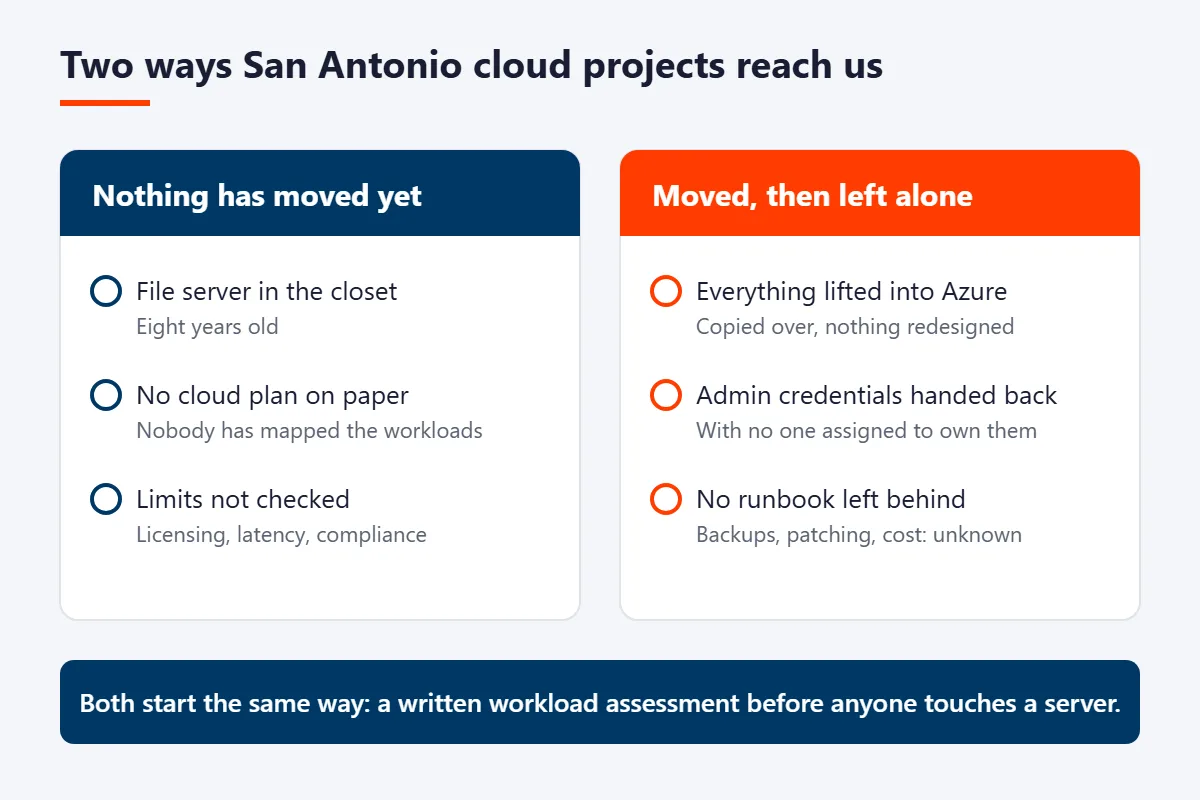
San Antonio businesses usually reach us in one of two states. Either nothing has moved yet and the file server in the closet is 8 years old, or a previous provider lifted everything into Azure, handed back the admin credentials, and left no runbook behind. If you’re still sizing the first state, our guide to cloud migration cost for San Antonio small businesses gives the project bands and the monthly run rate side by side.
Both are fixable. Both start the same way. We map every workload in a technology assessment, then tell you plainly which ones belong in Microsoft Azure, which fit better in AWS, and which should stay on private infrastructure because of licensing, latency, or a compliance boundary you can’t move. You get that recommendation in writing, with the reasoning, before anyone touches a server.
After the migration is where most cloud hosting relationships quietly fall apart. Ours doesn’t. The same team stays on it, handling patching, backup restores we actually test instead of assume, conditional access and MFA in Microsoft 365, endpoint protection, and a monthly cost review so your Azure bill doesn’t double while nobody’s watching. We support businesses across San Antonio and out into Helotes, Bulverde, New Braunfels, Cibolo, Schertz, Seguin, Boerne, and Floresville. Response time is the proof. Our first response averages 5 minutes across 2,227 supported users.
Azure, AWS, or private
Three Places to Host, One Team Running All of Them
Plenty of cloud hosting providers in San Antonio resell one platform and steer every client toward it. We don’t. The right answer changes by workload. Here’s how our cloud team splits the work, and when each one is genuinely the better call. Whichever platform you land on, the split is the same. The Microsoft shared responsibility model puts virtual machines, operating systems, and applications on your side of the line for infrastructure as a service, and AWS documents the same boundary. Someone on your side has to own that half. That’s our job.
Microsoft Azure
Best for Microsoft 365 shops
If your identity already lives in Entra ID and your team is in Teams and SharePoint all day, Azure is usually the cheapest place to put the rest. One directory, one set of conditional access rules, one bill. Live drawing sets are the exception, which is why our guide to where engineering firms should store CAD files keeps Revit and Civil 3D work off synced SharePoint folders.
- Azure Virtual Desktop for hybrid and field staff
- Server workloads lifted off aging on-prem hardware
- Entra ID conditional access and MFA enforcement
Amazon Web Services
Best for custom applications
When a software vendor built its product for AWS, fighting that is expensive. We run the account the same way we run Azure, with hardened networking, tagged resources, and a monthly look at what’s burning money while idle.
- EC2 and RDS workloads for vendor-specified stacks
- Cross-cloud backup so Azure and AWS aren’t a single fate
- Identity federated back to Microsoft 365
Private and Hybrid Cloud
Best for regulated and legacy
Some workloads shouldn’t move yet. An ERP the vendor hasn’t re-platformed, imaging data a HIPAA auditor wants scoped tightly, a machine controller that needs the shop floor next door. We host those on dedicated infrastructure and connect them back.
- Dedicated hosts for HIPAA and CMMC-scoped data
- Hyper-V and VMware workloads kept on known hardware
- Site-to-site links back into Azure or AWS
Where your data runs
Azure’s Texas Region Has a San Antonio On-Ramp
Microsoft runs its South Central US region in Texas, and that’s where we put most San Antonio workloads. Round trips stay short. Primary copies stay in Texas.
People miss the on-ramp. Microsoft’s ExpressRoute location table lists a San Antonio peering site, CyrusOne SA1, with South Central US as its local Azure region, while both Dallas sites in the same table list none. A Local circuit from that site reaches the Texas region over a private connection, and the ExpressRoute FAQ says the Local price already includes data transfer, so heavy nightly backup and imaging traffic doesn’t come back as an egress charge.
Do you need one? Probably not yet. For a 20-person office, a site-to-site VPN to South Central US usually carries the load. A private circuit starts paying for itself when large files move every day, when design or imaging work runs from Azure, or when an auditor wants that traffic off the public internet.
Defense contractors around Joint Base San Antonio get a second entry on the same list. Microsoft’s US Government table shows another San Antonio site, CyrusOne SA2, whose local region is US Gov Texas. That’s Azure Government, which Microsoft keeps isolated from commercial Azure, and it’s the platform contractors on GCC High generally use for servers that handle controlled unclassified information. If AI tools are next, our managed AI services in San Antonio page starts with the tenant question.
Growing past the Microsoft 365 Business plans brings a licensing change of its own, which our page on Microsoft 365 for San Antonio mid-market companies walks through.
| Location | What it is | What it means for a San Antonio office |
|---|---|---|
| South Central US | Microsoft’s Azure region in Texas | Default home for servers, file shares, and Azure Virtual Desktop |
| North Central US | The paired region, in Illinois | Where geo-redundant storage can keep its second copy |
| San Antonio peering site (CyrusOne SA1) | ExpressRoute location with South Central US as its local region | Private circuit option, with data transfer included in the Local price |
| San Antonio government site (CyrusOne SA2) | ExpressRoute location for US Gov Texas | Azure Government for contractors keeping CUI off commercial Azure |
Sources: Microsoft Learn, ExpressRoute locations and providers (updated October 8, 2026), the ExpressRoute FAQ, and Azure region pairs.
How We Do It
Consult With a Cloud Expert
Book a call with our cloud team and get a free estimate before anything changes.
Secure Cloud Migration Plan
We start with a technology assessment, then write your Cloud Migration Plan: what moves, in what order, and what stays where it is.
Get More Done in the Cloud
Cutover happens around your business day, not through it. Our onboarding process moves you onto the cloud without stopping work, and an Uprite technician is on-site the day after go-live to check that everything runs.
Comparing your options
How San Antonio Cloud Hosting Options Compare
Four routes get pitched to San Antonio businesses. They aren’t equivalent. The difference shows up in who’s responsible when something breaks at 2 a.m..
| What matters | Uprite managed cloud | Azure or AWS direct | Shared web host | Server room in your office |
|---|---|---|---|---|
| Who patches the operating systems | Uprite | You | Host, partially | You |
| Backup restores actually tested | Yes, on a schedule | Only if you build it | Rarely | Manual |
| Named engineer who knows your setup | Yes | No | No | In-house only |
| Monthly review for idle spend | Included | Self-service dashboards | Not applicable | Not applicable |
| Microsoft 365 identity and conditional access | Managed | You configure | Out of scope | You configure |
| On-site help in San Antonio | Yes | No | No | In-house only |
| Average first response | 5 minutes | Tiered by support plan | Email queue | Depends on staffing |
| Evidence for a HIPAA or CMMC audit | Supported | Shared responsibility | No | You build it |
Going direct to Azure or AWS is a real option, and for a company with a dedicated cloud engineer on staff it’s often the right one. If nobody on your team owns that job today, the math changes. Capacity is the cheap part. Management is what you’re actually shopping for. One San Antonio wrinkle is worth pricing in early. If you hold a defense contract, DFARS 252.204-7012 requires any external cloud provider that stores, processes, or transmits covered defense information to meet security requirements equivalent to the FedRAMP Moderate baseline. That narrows the shortlist fast. Our cloud service providers page covers how the same model runs across Texas.

Why the Backup Copy Should Leave Bexar County
Every engagement starts with a cloud roadmap that lists which parts of your business gain from moving and which should stay put. Weather belongs in that plan. Since January 2017, FEMA’s declaration records show 9 federal declarations covering Bexar County, and 7 of them were weather or fire: Hurricane Harvey, Hurricane Hanna, Tropical Storms Marco and Laura, the February 2021 winter storms (an emergency and a major disaster declaration), the 2025 Duke Fire, and a flooding emergency in July 2026.
A server closet sits through all of them. Your backup shouldn’t. So the copy we restore from lives out of town. Azure pairs South Central US with North Central US in Illinois, and geo-redundant storage can replicate there on its own. Microsoft’s own region pair guidance is blunt about the limit, though. A pair doesn’t make anything resilient by itself, so you still need a recovery plan and a restore someone has actually run.
The rules agree. The HIPAA Security Rule at 45 CFR 164.308(a)(7) makes a data backup plan required and periodic testing of contingency plans addressable, and NIST SP 800-34 is the guide we follow when we build the recovery plan itself. On Fully Managed IT, that restore gets tested every quarter.
Nobody can promise zero loss. What we promise is a restore we’ve already proven.
Cloud services pricing, San Antonio
How Much Cloud Services Cost in San Antonio
Here’s what we publish. The rates are per user per month, and the table shows which plan carries which part of the cloud work.
| Plan | Starts at | Cloud work included | Restore testing | Support |
|---|---|---|---|---|
| IT Essentials (remote only) | $91 per user per month | Azure and cloud infrastructure management | Annual | Business hours, up to 8 hours per user per month, for teams under 12 |
| Fully Managed IT | $138 per user per month | On-site and cloud infrastructure management | Quarterly | 24/7, with after-hours response |
Co-Managed IT starts at $100 for companies that keep their own IT staff and want support, coverage, and strategy around them. MSSP Security Focus starts at $40 and adds firewall, SIEM, and SOC monitoring for internal teams. It doesn’t manage the cloud.
Two things sit on top of any plan. One is licensing. The other is the Azure or AWS bill, which stays separate and metered so you see the consumption. At the starting rates, a 15-person office on Fully Managed IT pays $2,070 a month before those, and an 8-person remote team on IT Essentials pays $728.
Your service rate is locked for the first year, and the 120-day satisfaction promise lets you leave if it isn’t working. For San Antonio market ranges and what pushes a quote up, read our guide to managed IT cost in San Antonio.
Get a Cloud Services QuoteService Highlights
The work covers 6 areas. Each one sits under the same managed agreement. One contract, one team.

Cloud Migration Plan

Server Migrations

Hosted Servers

Hosted Backups

Email Migrations

24/7 Local Support
Client Testimonials
Gerardo Sanchez was very helpful & professional. Uprite Services has great customer service and outstanding technicians. We have used them for several years and will continue our business with them.
I’ve been extremely satisfied with Uprite Services and would recommend them without hesitation. They consistently deliver reliable, high-quality work and truly feel like a true partner rather than just another vendor. A special thank you goes to Arvin Ebueng, he is always quick to respond to our needs and incredibly easy to communicate with. No matter how busy things get, Arvin makes sure we’re taken care of promptly and with a smile. His responsiveness and clear communication have made every interaction smooth and stress-free. Thank you, Arvin and the entire Uprite team, Peerless Equipment is a customer for life!
Great service by Juan and Jacob. Always helping us out at Alamo City Trailer Sales. We have been using this company for over 10 years and always happy with the work they do.
Jacob Sandoval was a delight to work with. We are so thankful for the Uprite team in San Antonio. They always deliver quick solutions with fantastic customer service.
Jacob Sandoval has helped me a few times with my various IT issues and each time he's been very friendly and thorough ensuring the issue is fully resolved. Thanks so much for all your help!
Cloud hosting questions
What San Antonio Businesses Ask Before Choosing a Cloud Host
Microsoft Azure and Microsoft 365 management, cloud migrations for email, data, and servers, cloud-hosted servers, and secure cloud backup, all for small and mid-sized businesses across San Antonio and the surrounding area. Cloud is one part of Uprite’s broader managed IT support in San Antonio.
Uprite builds a custom cloud migration plan after a full technology assessment, then follows a structured onboarding process designed for zero business interruption. A technician is on-site the day after go-live to confirm operations are running smoothly.
Both. Uprite manages Microsoft 365 and Microsoft Azure as one environment, including email, data, and server workloads hosted in the cloud.
Two ways. Copies leave Bexar County, and restores get tested. Uprite keeps backups in redundant cloud storage built to survive local disruptions such as severe weather, so your data stays recoverable after a disaster or a hardware failure.
San Antonio and the communities around it, including Helotes, Bulverde, New Braunfels, Cibolo, Converse, Schertz, Seguin, Boerne, and Floresville.
It usually is. Cloud technology lets a growing business add users and resources without big upfront hardware costs, and Uprite’s cloud roadmap shows which parts of your operation gain the most from moving.
Look for a provider that owns the environment after go-live, publishes a response time, and can host in Azure, AWS, or private infrastructure without steering you toward whichever one they resell. Ask 3 specific questions. Who patches the operating systems. Who tests the backup restores, and how often. Who reviews the monthly bill for waste. If the answer to any of those is that you do, then you’re buying capacity, not hosting.
Azure fits teams already standardized on Microsoft 365, AWS fits custom line-of-business applications, and private or hybrid hosting fits regulated data and legacy systems that can’t be re-platformed yet. Most of our San Antonio clients end up with a mix. A common build runs identity and email in Microsoft 365, 2 or 3 server workloads in Azure, and one legacy application on dedicated infrastructure until the software vendor ships a cloud version. All three sit under a single agreement so nobody argues about whose problem an outage is.
From $91 per user per month on IT Essentials, a remote plan for teams under 12 people, or from $138 on Fully Managed IT, which adds on-site help, 24/7 support, and quarterly restore tests. Licensing and the Microsoft or Amazon platform bill sit on top, and that bill stays separate and metered because it’s consumption you should see directly. Your service rate is locked for the first year. We also review the platform bill every month and flag idle resources, since unmanaged cloud spend is the most common surprise cost we run into.
Yes. We run a discovery and takeover process for businesses already hosted in Azure, AWS, or with another San Antonio provider, including credential recovery, documentation, and a security review before we accept the environment. Takeovers are a large share of what we do, and the findings are consistent. Backups configured but never restore-tested, global admin accounts without MFA, and resources still billing for a project that ended 2 years ago. You get that list in writing before anything changes.
In Texas. South Central US is Microsoft’s Azure region in the state, paired with North Central US in Illinois for geo-redundant copies. Microsoft’s ExpressRoute table also lists a San Antonio peering site, CyrusOne SA1, with South Central US as its local region, so a private connection can start in town.
If the provider stores patient data, yes. Under 45 CFR 160.103, anyone who creates, receives, maintains, or transmits protected health information for a covered entity is a business associate, and hosting the files counts as maintaining them. Get the business associate agreement signed before the first file moves. Backups count too.
Awards & Industry Recognition










We Understand Your Technology Challenges
Our experts have your technology needs covered so you can stay secure, be more efficient, grow your business, and succeed in the marketplace. Schedule time with us today to explore how Uprite can help you reach your objectives.



