A 7-person Dallas dental office pays roughly $640 to $1,750 a month for managed IT, and where it lands depends on 3 things. Remote or onsite support. Whether the HIPAA program sits inside the fee. And how the provider counts users. At least 3 in 4 DFW dental offices have fewer than 10 employees, which keeps them out of plans built for 12 or more. This page prices the work described in our guide to IT support for dental practices in Dallas.
Managed IT for a Dallas dental practice runs about $91 to $250 per user per month in 2026, with support alone at $91 to $200 and $180 to $250 once the HIPAA program is inside the fee. Scope explains nearly all of that gap.
I’m the Lead vCIO at Uprite, so the budget conversation with a practice owner is mine. Owners want one number. There isn’t one. There are 3 or 4, depending on what each quote leaves out, and they don’t compare until somebody lines them up in the same unit. That’s this page, a breakdown of dental practice IT cost in Dallas by plan, office size, and published DFW price.
So here they are, lined up for Dallas. Every price below is published, either on our own managed IT pricing page or by a DFW dental IT firm on its own site, and every practice count comes from federal data for Dallas, Tarrant, Collin, and Denton counties. The statewide method for turning quotes into a cost per chair lives in our Texas dental IT cost per operatory guide. This page won’t repeat it.
How Much Does Managed IT Cost a Dallas Dental Practice?
Managed IT cost for a dental practice is the monthly fee an outside provider charges to run the office’s computers, network, backups, and security, usually quoted per user. In Dallas that fee ranges from a remote-only help desk to a fully managed plan that also carries the HIPAA risk analysis, policies, and training.
| Price layer | Per user per month | 7-person office per month | Where the number comes from |
|---|---|---|---|
| Remote-only support for teams under 12 (Uprite IT Essentials) | From $91 | $637 | Uprite pricing page |
| Fully managed support with onsite work (Uprite Fully Managed IT) | From $138 | $966 | Uprite pricing page |
| General managed IT, DFW market band | $135 to $200 | $945 to $1,400 | Uprite HIPAA cost breakdown for Texas |
| HIPAA program carried inside the fee, DFW band | $180 to $250 | $1,260 to $1,750 | Uprite HIPAA cost breakdown for Texas |
| Microsoft 365 Business Premium license | $22 | $154 | Microsoft list price, billed on top of plan rates |
Why 7 people? That’s the average Dallas County dental office. The Quarterly Census of Employment and Wages counted 1,544 private dental offices in the county in 2025 with 10,970 employees, or 7.10 per office. Tarrant ran 7.31. Collin ran 6.76.
The bottom 2 rows are where quotes stop agreeing. Our $138 rate is a starting price for a standard environment, meaning the help desk, patching, monitoring, and backups for an office whose HIPAA paperwork is either already in order or being handled by someone else. The $180 to $250 band, from our HIPAA compliant IT cost breakdown for Texas, is where practices land once the risk analysis, the risk management plan, and the evidence file ride inside the monthly fee instead of getting quoted as a separate project. An owner holding one quote of each can easily decide one provider is gouging when neither is. The 2 quotes cover different work.
DFW also runs a little higher than the other big Texas metros. Not by much. That breakdown puts general managed IT at $135 to $200 per user here, against $125 to $175 in Houston and $125 to $200 in San Antonio. The compliance work itself barely moves between cities. The help desk behind it does.
Why 3 in 4 DFW Dental Offices Can’t Buy the Middle Tier
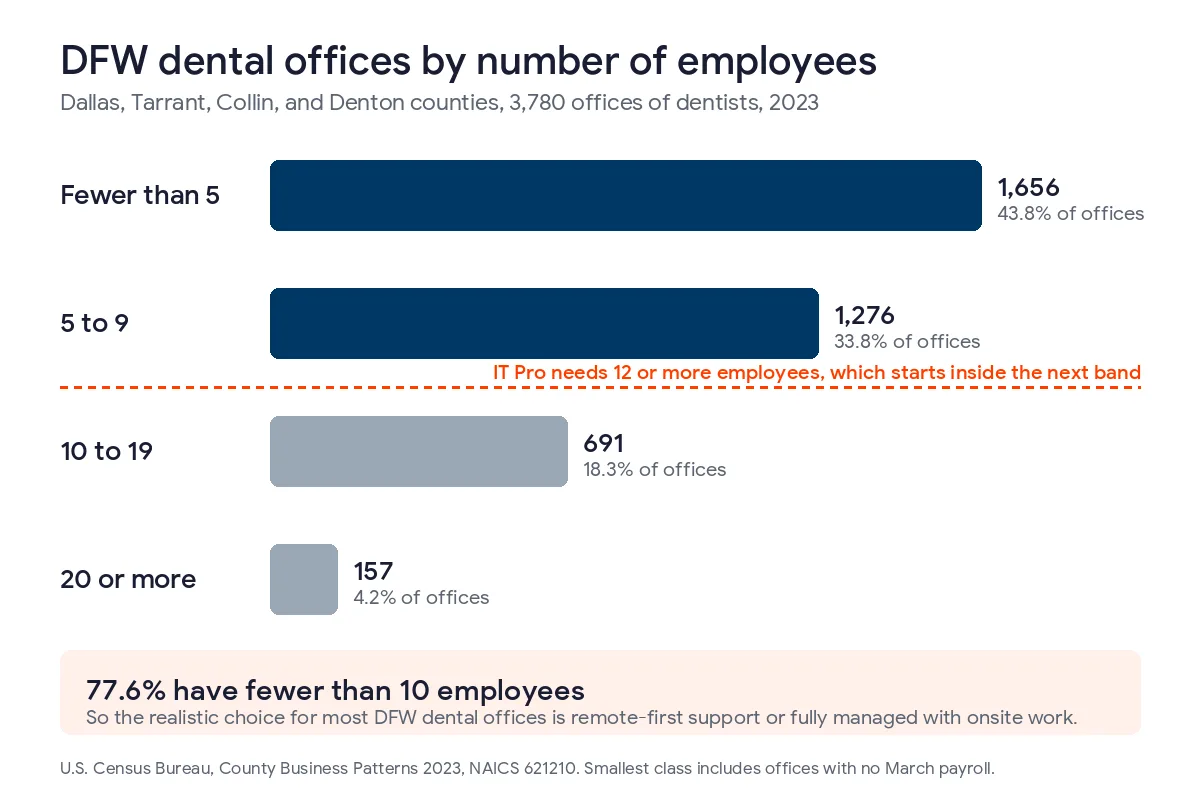
Our IT Pro plan starts at $110 per user, and it’s built for teams of 12 or more outside Houston and San Antonio. Dallas qualifies on geography. Dental offices mostly don’t qualify on size, because a 12-person minimum sits above what most of them employ.
| County | Dental offices, 2023 | Fewer than 5 employees | 5 to 9 | 10 to 19 | 20 or more | Share under 10 |
|---|---|---|---|---|---|---|
| Dallas | 1,476 | 670 | 467 | 262 | 77 | 77.0% |
| Tarrant | 1,029 | 392 | 389 | 207 | 41 | 75.9% |
| Collin | 802 | 369 | 271 | 139 | 23 | 79.8% |
| Denton | 473 | 225 | 149 | 83 | 16 | 79.1% |
| 4 counties | 3,780 | 1,656 | 1,276 | 691 | 157 | 77.6% |
Counts come from the U.S. Census Bureau’s County Business Patterns 2023 file for NAICS 621210, offices of dentists. The smallest class includes offices that had no paid employees in the March payroll week.
Of 3,780 dental offices in the 4 core DFW counties, 2,932 had fewer than 10 employees. That’s 77.6%. Another 691 sat in the 10 to 19 band, and some of those clear the 12-person line. The census doesn’t split that band. So 77.6% is a floor. It isn’t an estimate.
So the real choice for a typical Dallas practice is $91 or $138. Not $110.
Those 2 plans aren’t close substitutes. IT Essentials is remote first. It includes 8 hours of business-hours support per user per month and tests backups once a year. Fully Managed adds 24/7 support, onsite infrastructure work, and quarterly backup testing. A 6-person accounting office might live happily on the first. Dentistry is different. A dental office has intraoral sensors, an imaging workstation, a panoramic unit or a cone beam scanner, and a schedule that starts at the same time whether or not the sensor driver survived last night’s Windows update. When a sensor stops talking to Dentrix with a patient already in the chair, somebody may need to stand in that operatory. That’s what the extra $47 per user buys.
Still, I’d question any provider who pushes a 4-person practice onto the top plan without asking how often anything breaks. Some small offices really do fine remote. Our pricing page lets the remote plans add onsite visits as needed, too. Ask about it.
What a Dallas Dental Practice Pays by Office Size
Run each size band through the plans it can actually buy. Here’s the monthly bill.
| Office size | Example users | IT Essentials, $91 | IT Pro, $110 | Fully Managed, $138 | HIPAA-scoped DFW band |
|---|---|---|---|---|---|
| Fewer than 5 employees | 4 | $364 | Not eligible | $552 | $720 to $1,000 |
| 5 to 9 employees | 7 | $637 | Not eligible | $966 | $1,260 to $1,750 |
| 10 to 19 employees | 14 | Not eligible | $1,540 | $1,932 | $2,520 to $3,500 |
| 20 to 49 employees | 30 | Not eligible | $3,300 | $4,140 | $5,400 to $7,500 |
Starting prices only. We assumed 1 user per employee. Microsoft licensing isn’t included.
One snag hides in that user column. We price per employee who needs IT support, but a dental office shares machines. Two part-time hygienists who split an operatory are 2 people and 1 workstation. Ask every provider how they count a shared operatory login before you compare totals. That one definition decides how many seats the quote bills.
Per User or Per Operatory? The Dallas Conversion
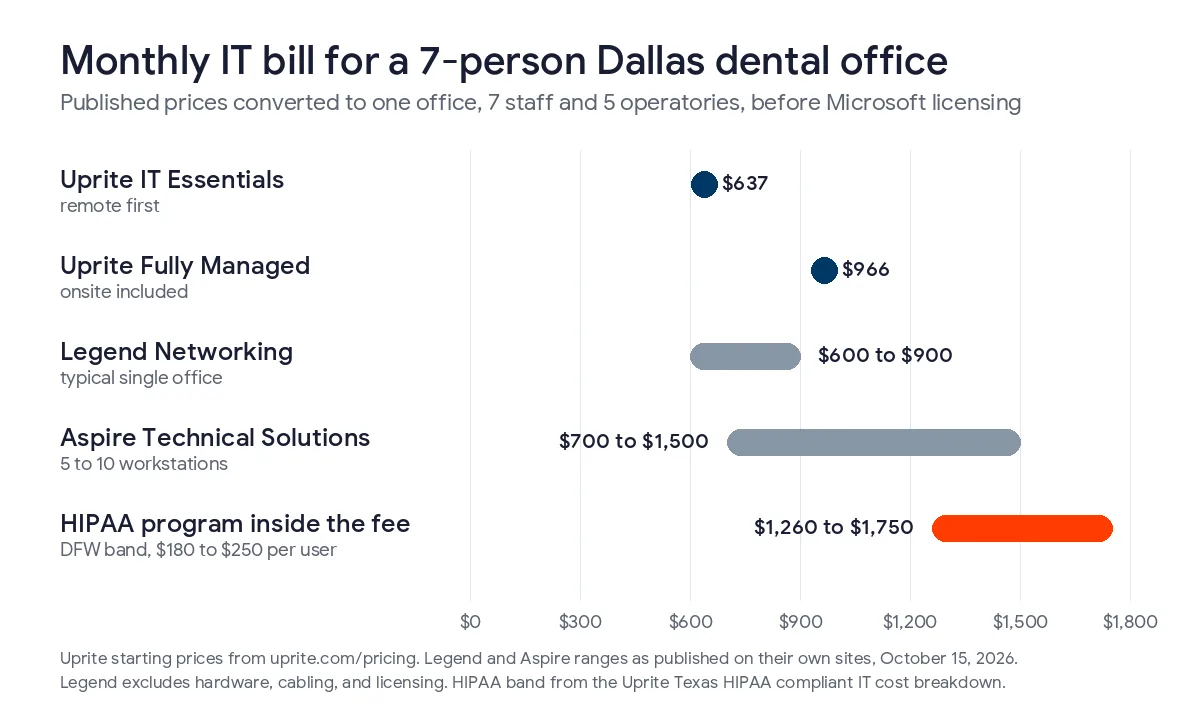
Legend Networking and Aspire Technical Solutions publish flat monthly ranges per practice. General providers quote per user. To hold them side by side, I took a 7-person Dallas County office running 5 operatories and converted each published DFW price into both units.
| Published DFW price | Monthly, 7 staff and 5 operatories | Per person | Per operatory |
|---|---|---|---|
| Uprite IT Essentials, remote first | $637 | $91 | $127 |
| Uprite Fully Managed IT | $966 | $138 | $193 |
| Legend Networking, typical single office | $600 to $900 | $86 to $129 | $120 to $180 |
| Aspire Technical Solutions, 5 to 10 workstations | $700 to $1,500 | $100 to $214 | $140 to $300 |
| HIPAA program inside the fee, DFW band | $1,260 to $1,750 | $180 to $250 | $252 to $350 |
Competitor figures as published on their own sites on October 15, 2026. Legend’s range excludes hardware, cabling, and licensing. Aspire’s range covers practices with 1 to 2 providers.
Converted, the flat fees overlap ours more than the sticker prices suggest, which is the whole point of doing the arithmetic before you sit through 3 sales calls that each describe the same work in a different unit. Legend Networking, a dental-only firm in Dallas, publishes a typical single-office cost of $600 to $900 a month all in, which is $86 to $129 per person at 7 staff. Aspire Technical Solutions in Mansfield says practices with 5 to 10 workstations typically invest $700 to $1,500 a month, and a separate Aspire page puts dedicated software support at $200 to $400. The low ends sit near our remote plan. Aspire’s top end sits above our onsite starting price but inside the HIPAA-scoped band. Ask what its $1,500 covers before calling it expensive.
Not everyone publishes a plan. Infonaligy in Allen publishes no monthly dental price, though its master services agreement lists $140 an hour for tiered support and $250 for CIO-level work. Any hourly line looks cheap in a quiet month, and it gets expensive fast in the month the server dies, the backup turns out to be 3 weeks stale, and somebody has to rebuild the imaging bridge on a Saturday. Budget for the bad month.
Flat fees and per-user rates also move differently as a practice grows. Add a hygienist. A per-user quote goes up by 1 seat. Add a hygienist under a flat fee and nothing changes until the provider decides you’ve crossed a tier, which you’ll usually learn at renewal, right around the time you’ve also added a chair and a second imaging workstation. Neither is a trick. Know which one you’re holding. For the full conversion across 3 to 12 chairs, compliance layer included, use the per-operatory cost method for Texas practices. If you’re choosing between firms rather than budgeting, our ranking of the best IT providers for Dallas dental practices scores 8 of them on more than price.
What Isn’t in the Monthly Rate?
A monthly rate covers running what you already own. That’s all. It doesn’t buy the things this year’s software deadlines force on a Dallas practice.
| Cost line | What it costs | Why it lands in 2026 |
|---|---|---|
| Microsoft 365 Business Premium | $22 per user per month | Billed on top of our plan rates, and it carries the email, Office apps, and device security a dental office runs on |
| Replacement Windows 11 desktop | $1,233 to $1,285 starting price on Dell’s Pro Micro line, before discounts | Patterson’s Eaglesoft hardware requirements list Windows 11 Professional as the only workstation system |
| New Dentrix workstation | The same hardware line | Henry Schein One stopped supporting new Dentrix installs on Windows 10 workstations after June 30, 2026 |
| Windows 10 Extended Security Updates | $183 per device if you enroll now | Year 1 at $61 and year 2 at $122 are cumulative, so a late enrollment pays both |
| First-year HIPAA program work | Priced by chair count in our Texas cost guide | Risk analysis, written policies, staff training, and business associate agreements |
Sources are Microsoft’s Business Premium page, Dell’s Pro desktop line as listed on October 16, 2026, Patterson’s Eaglesoft hardware requirements, the Dentrix system requirements, and Microsoft’s Extended Security Updates program.
Hardware is the biggest line on that table we can price from published numbers. Say a 5-operatory practice still has 5 chairside PCs that can’t run Windows 11. At Dell’s starting prices that’s $6,165 to $6,425 before discounts, setup, or imaging software, against $11,592 for a full year of Fully Managed at 7 users. One-time money. Still real money. The rest of the one-time list for a new office is in our guide to opening a new dental office in Dallas.
Get the hardware list in writing before you sign, with every chairside PC, the imaging acquisition machine, the front desk, and the server marked as staying, upgrading, or getting replaced. A provider who’s done a real onboarding assessment can name the machines that fail the Eaglesoft or Dentrix requirements on day 1. If they can’t, they haven’t looked. And if one of them dies in the middle of a full schedule, our guide to dental office IT downtime in Dallas prices the lost chair time. Our dental software server requirements guide covers the server side for Dentrix, Eaglesoft, and Open Dental.
Is an In-House Person Cheaper in Dallas?
Plenty of small practices pay nobody for IT, at least not on paper, because the person who knows where the router lives and which login opens the imaging software also happens to run the front desk. The office manager does it. That isn’t free. DFW wage data shows how fast it adds up.

The federal Occupational Employment and Wage Statistics survey put the mean wage for office and administrative supervisors in the Dallas-Fort Worth metro at $36.62 an hour in May 2025. Employers pay about $1.43 in total compensation for each $1 of wages, according to the employer cost release, so a loaded hour runs about $52.32.
| Office manager’s IT time | Hours a year | Loaded cost a year | Per month |
|---|---|---|---|
| 1 hour a week | 52 | $2,721 | $227 |
| 2 hours a week | 104 | $5,441 | $453 |
| 4 hours a week | 208 | $10,882 | $907 |
Scenarios, not a survey. Nobody publishes how many hours Dallas office managers spend restarting routers, chasing a Henry Schein support ticket, or resetting a hygienist’s password. But 4 hours a week costs $907 a month, within $59 of a Fully Managed plan for 7 people, and it comes with no monitoring, no tested backup, and nobody to sign a business associate agreement. It also comes out of the person who runs your schedule.
A full-time hire sits at the other end. Way at the other end. A DFW computer user support specialist averaged $63,030 in the same survey, or about $90,051 a year loaded. That’s 7.8 times the annual bill for a 7-person office on Fully Managed. It only pencils out for a group big enough to keep that person busy, and a group that size can pair its hire with co-managed IT in Dallas for coverage and security.
What Skipping the HIPAA Paperwork Cost a 10-Person Practice
On October 8, 2026, the HHS Office for Civil Rights announced a $140,000 settlement with Shen Smiles, a solo dental practice in Pennsylvania. No ransomware. No hacker. A patient couldn’t get their records, the practice told investigators a former workforce member had taken them, and when OCR asked for the practice’s written privacy policies, the answer it got back in writing was “None.”
OCR’s 2024 notice describes a general dentistry practice with 10 employees. It priced each of 2 violations, missing policies and missing safeguards, at $1,379 a day, capped at $100,000 per violation per year, for a maximum of $1,400,000 across calendar years 2018 to 2024. Then it cut that by 90%. The practice was small. The resolution agreement settled at the discounted figure.
Even discounted, it cost more than 12 years of Fully Managed IT for a 7-person office. A written policy set and staff training aren’t the expensive part of a dental IT budget by comparison. They’re just the part a support-only quote leaves out. Ask for them by name. Our walkthrough of the dental HIPAA security risk analysis covers what that document has to contain, and our page on dental practice IT security in Texas covers the state rules stacked on top.
DFW sees the security side too. It isn’t abstract here. 4 of the 12 breach notices Texas dental practices filed with the Texas Attorney General between April 2025 and early October 2026 came from DFW, 2 from Azle and 1 each from Grand Prairie and Sachse.
Questions to Ask a Dallas Provider Before You Sign
Take these to every proposal. Each one maps to a gap on this page. Write the answers down.
- Which of your plans can a practice our size actually buy, and is there a monthly minimum?
- How do you count a shared operatory login, as 1 user or as everyone who signs in?
- Is onsite work inside the rate, and where does the technician drive from?
- Is Microsoft 365 licensing included, or billed on top?
- Which of our workstations fail the Dentrix or Eaglesoft requirements today, and what will replacing them cost?
- Are the risk analysis, the policy set, and staff training inside the monthly fee, or quoted as a project?
- Who signs the business associate agreement, and when?
Fair’s fair. Here are ours. Our Dallas office is at 5757 Alpha Road in North Dallas. Fully Managed includes onsite infrastructure work, Microsoft licensing is billed on top, we sign a business associate agreement before we touch patient data, and the rates on our published price list are the starting prices we quote from. If your current provider gives you good answers to all 7, keep them.
Send us your staff count, your operatory count, and your current IT invoice. You’ll get the plan your practice actually qualifies for, a monthly number with Microsoft licensing shown on its own line, and a list of any workstation that fails the current Dentrix or Eaglesoft requirements.
Get My Practice's PriceWhat Dallas Dental Owners Ask About IT Pricing
What does a Dallas dental practice pay for IT support each month?
$91 to $250 per user per month, depending on scope. For a 7-person office that’s roughly $640 to $1,750 a month, with remote-first support at the bottom and a plan carrying the full HIPAA program at the top. Microsoft licensing adds about $22 per user.
Is dental IT more expensive in Dallas than in Houston?
Slightly, by about $10 per user at the low end. Our Texas HIPAA cost breakdown puts general managed IT at $135 to $200 per user in DFW against $125 to $175 in Houston, and the compliance work layered on top costs about the same in both metros.
Can a 4-person dental office get onsite support?
Yes, on our Fully Managed plan, which publishes no minimum headcount. At $138 per user, a 4-person office starts at $552 a month before licensing.
Do Dallas dental IT companies publish their prices?
Legend Networking and Aspire Technical Solutions do, as monthly ranges per practice, and Infonaligy publishes hourly rates in its service agreement. Legend lists $399.99 to $1,200 a month and Aspire lists $700 to $1,500. Plenty of others ask for a call first. That isn’t sinister. It does make side-by-side budgeting harder for an owner who just wants a ballpark before talking to anyone.
Should a dental practice pay per user or per workstation?
It depends on whether your office has more people or more machines. Count both. Rotating hygienists push a per-user count up, and imaging PCs and front desk machines push a per-workstation count up. Our Texas per-operatory guide converts both.
Is the HIPAA risk analysis included in a $138 plan?
Usually not at that price. The $138 rate is a starting price for a standard environment, and DFW practices that carry the risk analysis, policies, and training inside the monthly fee land at $180 to $250 per user.
What should a Dallas practice budget for new computers this year?
Plan on about $1,250 for each chairside PC that can’t run Windows 11, based on Dell’s current starting prices for its Pro Micro desktops. Eaglesoft lists Windows 11 Professional as its only workstation system, and Dentrix stopped supporting new Windows 10 installs after June 30, 2026. It isn’t optional for long.