Remote IT support fixes software, accounts, and settings without a visit, while onsite support covers anything that needs hands, like a dead switch, new cabling, or a flooded server closet, so Houston businesses want a provider that does both. The hard part is knowing which is which.
If you’re comparing IT support in Houston, you’ve heard both pitches. One provider says everything can be fixed remotely and a truck roll is a sign of a weak platform. Another says nothing beats a person in the room. Both are partly right. Both are also selling something.
We run Houston support from 2 offices and do both kinds of work every week, so we’d rather give you the sorting rules than a pitch. Below, you’ll see which problems need a technician in the building, why this metro bends the answer, what a storm changes, and what to get in writing before you sign.
Remote support is faster for software, accounts, and settings. It works the same from a spare bedroom. Onsite support is for hardware, cabling, physical security, and the first hours after a storm. In Houston, a visit can be an 11 to 53 minute drive before traffic, depending on the neighborhood. Pick a plan that names which visits are included. Then get the dispatch terms in your agreement.
What can remote IT support fix, and what can’t it?
Remote IT support is help delivered over the network. A technician connects to a laptop, server, or cloud account through a monitoring agent. No travel. It covers software, accounts, security settings, and anything that still powers on. It can’t replace a part. It can’t pull a cable or carry a spare to your desk.
That covers a lot of a normal week. Password resets. Outlook profiles. VPN errors. Print queues. All remote work, and a remote session starts faster than a truck. Hybrid staff get the same coverage at home because the monitoring agent travels with the laptop. The full case is in our write-up on why Houston businesses are switching to virtual IT support.
Remote has a floor, though. A dead switch? No network to connect through. A laptop that won’t power on? No agent to talk to. And a technician in another zip code can’t see that the rack is sitting in a closet with a leaking window unit. So the real question isn’t whether remote works. It’s which of your problems stop it.
Which Houston IT problems actually need a technician onsite?
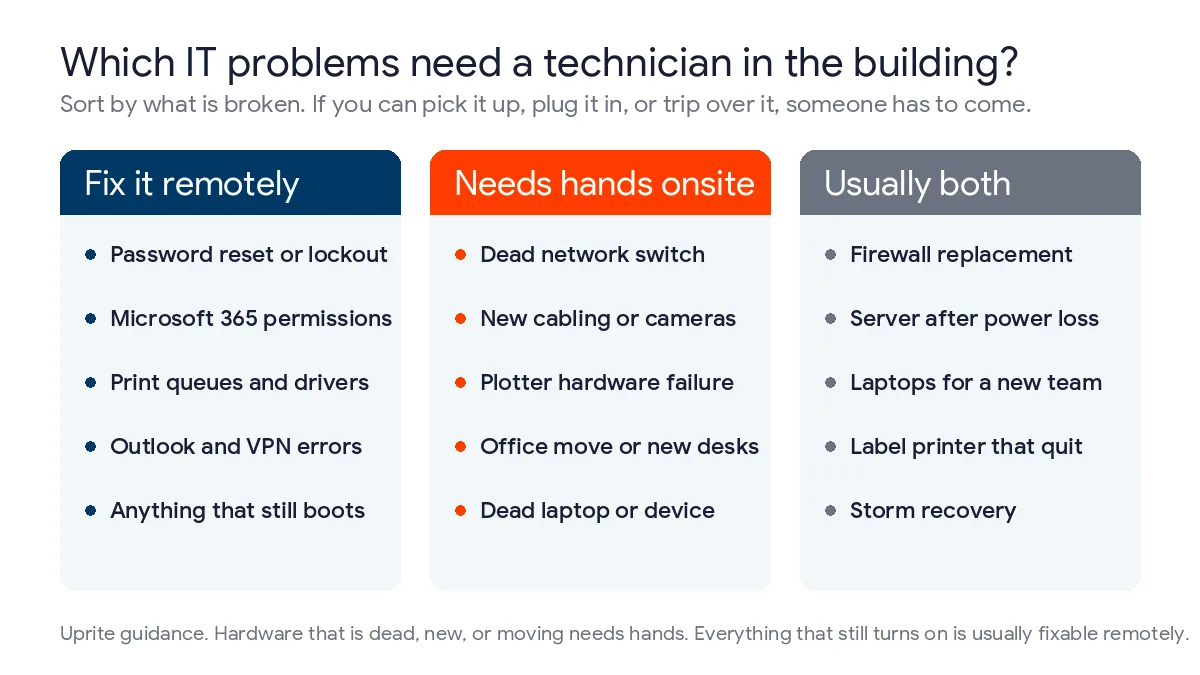
Sort tickets by what’s broken, not by how urgent it feels. Software or a cloud account? Remote. Something you can pick up, plug in, or trip over? Somebody has to come. Plenty of jobs split in two, with the setup done remotely and the swap done by hand.
| Problem | Usually handled | What decides it |
|---|---|---|
| Locked Microsoft 365 account or password reset | Remotely | Nothing physical is involved, so a visit only adds travel time. |
| Outlook, Teams, or SharePoint permission problem | Remotely | The fix lives in the tenant, not in the building. |
| Label printer on a shipping dock stops printing | Remotely first, onsite if the hardware is dead | Drivers and queues are software. A failed print head or damaged cable is not. |
| Large-format plotter at an engineering firm jams or won’t feed | Onsite | Paper paths and rollers need hands, even when the queue is fine. |
| Dead network switch in a Westchase or Galleria office | Onsite | Staging and configuration can be done ahead of time, but someone has to rack the replacement. |
| Firewall replacement | Both | The rules are built remotely, then the device is swapped on site during a quiet window. |
| Laptops for a new team | Remotely, or onsite at the desks | Ship them pre-configured for 1 or 2 people. Deploy at the desks when a whole group starts together. |
| New cabling, Wi-Fi access points, or cameras | Onsite | Pulling cable and mounting hardware is physical work, and a walkthrough comes first. |
| Server that won’t come back after a power outage | Both | Remote tools usually can’t reach a machine that is off, so someone has to be in the room to bring it up. |
Dead. New. Moving. Those are the 3 triggers for a visit. Everything that still turns on can usually be fixed from somewhere else. That’s the whole sorting rule. Ask a provider which of these it sends someone for, and the answer tells you more than any brochure.
Why does Houston change the answer?
Houston is huge. The Houston metro covers about 8,839 square miles of land according to the Census Bureau’s 2024 Gazetteer files, so a site visit here is a drive and not a walk, and where the technician starts matters more than almost anything on the rate sheet.
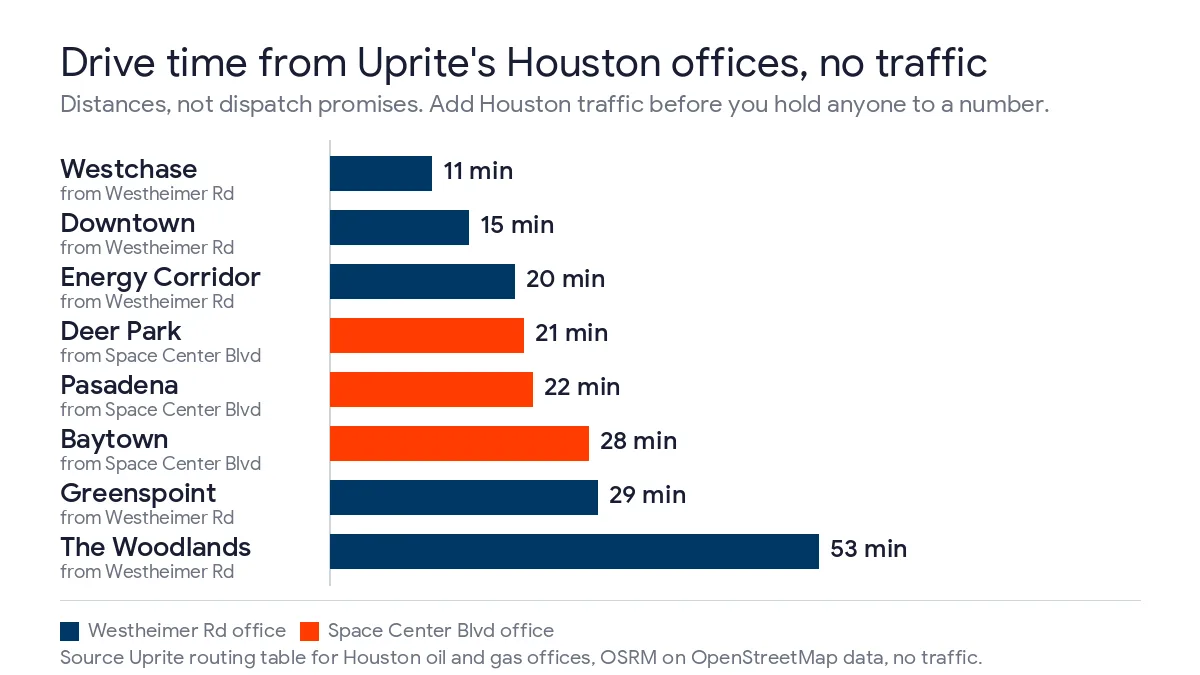
Uprite runs Houston support from 2 offices, 1 on Westheimer near the Galleria and 1 on Space Center Boulevard in Clear Lake, and the managed IT services in Houston page lists both of them and says remote support works from either. We measured the drive from each office to 10 Houston business districts for our own routing table for Houston oil and gas offices. The numbers below are a few of those rows. They come from OSRM routing with no traffic.
Take them as distances. Not promises. Rush hour on I-10 won’t cooperate, and a technician already on another job can’t be in 2 places.
Westchase sits 11 minutes from the Westheimer office. The Energy Corridor is 20. The Woodlands is 53. From Clear Lake, Pasadena is 22 and Baytown is 28. That’s a spread of nearly 5 to 1 inside 1 metro. A provider that says “we’re local” hasn’t told you anything yet. Ask which office the technician leaves from, and whether that changes for your address. Then check it.
The kind of site matters as much as the distance. Different sites, different answers. A plant floor off the Ship Channel, a dock with a handheld scanner network, and a job-site trailer all hold gear that can’t be fixed from a desk, and they’re usually the places where somebody is also trying to ship something. If that’s your business, read how we handle manufacturing IT services in Houston and maritime IT support in Houston. A downtown office on the 20th floor is a different animal, and mostly a remote one.
What does hurricane season do to the onsite versus remote decision?
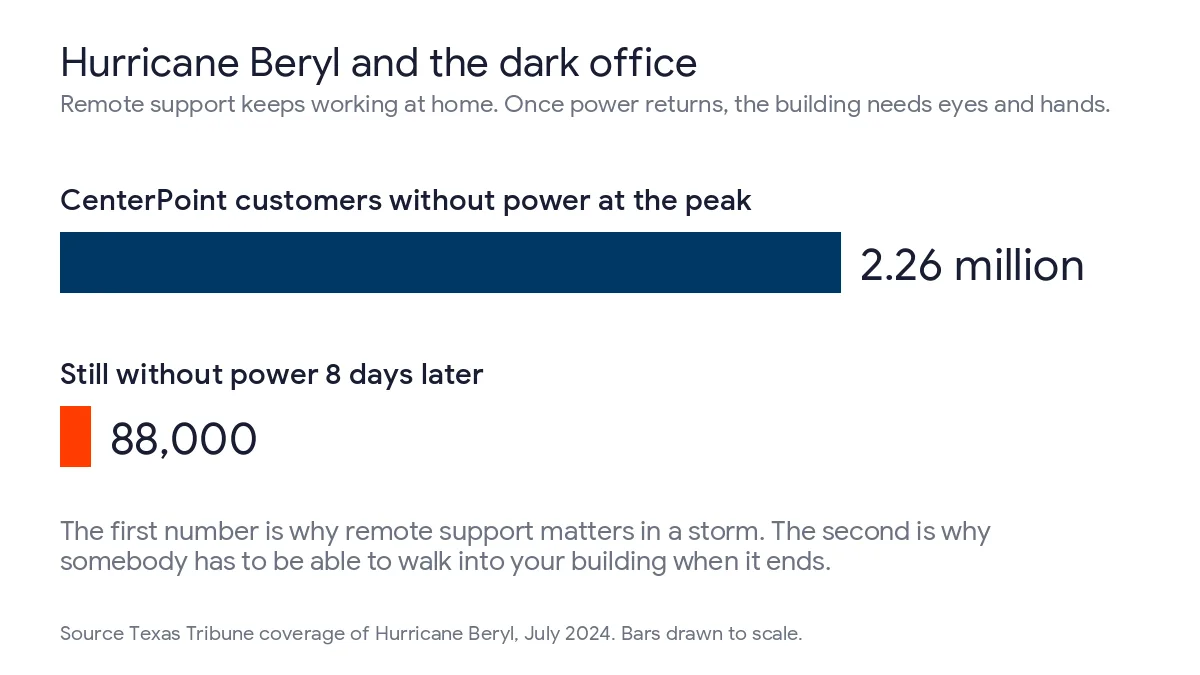
It tests both halves. Hurricane Beryl knocked out power to 2.26 million CenterPoint customers in July 2024, and 88,000 of them were still without it 8 days after the storm, according to the Texas Tribune’s running coverage of the recovery. The Atlantic season runs from June 1 to November 30 on the National Hurricane Center’s climatology page. It’s not hypothetical.
In a storm the split is simple. The office goes dark. Remote support carries the load. Staff who have power work from home, and their laptops keep getting help. Then the lights come back, and the work flips. Servers, switches, and phones that rode out the outage have to be looked at by somebody standing in the room, and some of them won’t have survived the surge, which only shows up when someone powers them on and watches.
Ready.gov’s guidance on an IT disaster recovery plan starts with an inventory of your hardware and software, favors standardized equipment that’s easy to reimage, and says to test the plan. All 3 make a first visit shorter. Skip them and it gets long. If your provider doesn’t know what’s in your closet, the first hour of that visit is spent finding out. Our overview of disaster recovery planning in Houston covers the remote half.
How should a Houston business split remote and onsite support?
There are 3 workable models. The right one depends on what you own. Here’s how they line up against Uprite’s published plans, which start at the rates shown on our pricing page.
| Model | Fits | Watch for |
|---|---|---|
| Remote only, such as IT Essentials at $91 per user per month | Teams under 12 people with laptops and Microsoft 365, and no server closet | Limited business hours support, basic alerting with no response, and nobody who can come to you |
| Remote first, with onsite added as needed | Offices that rarely have hardware problems but want a way to get one fixed | The per-visit or hourly rate for onsite work, and whether a trip charge applies |
| Onsite included, such as Fully Managed IT at $138 per user per month | Teams that hand off the whole IT function and own switches, firewalls, servers, or cabling | What infrastructure management covers, and which of your sites count as covered |
A few details change the picture for Houston. Our pricing page says the Fully Managed IT plan includes on-site infrastructure management, and that other plans are remote-first and can be upgraded to include onsite services as needed, which is the line a lot of Houston buyers skim past. IT Pro, our $110 remote-only plan, is sold to teams of 12 or more outside the Houston and San Antonio areas. So a Houston company of that size compares Fully Managed IT or Co-Managed IT, and a remote-only quote from an out-of-market vendor is a different product, not a cheaper version of ours.
Run the arithmetic on your own headcount. It takes a minute. A 10-person office on IT Essentials starts around $910 a month. A 25-person office on Fully Managed IT starts around $3,450. Different products. Different jobs. So don’t call it a discount, and ask which plans apply to your address, because some remote-only plans aren’t sold in Houston.
If you already have an internal IT person, co-managed IT in Houston puts a bench behind them. Ask this up front. When a switch dies, who goes to the closet, your person or ours?
What should you get in writing about onsite visits?
The answer has to be in your agreement, because a salesperson’s promise on a call isn’t. Get it in writing. Our scored list of Houston small-business IT providers shows which firms put onsite support in writing at all. We’re not going to quote you an arrival time here. Those terms belong in a contract that fits your sites, and any provider who quotes one without asking where you are is guessing, because a technician leaving Clear Lake for The Woodlands has a different job than one leaving Westheimer for Westchase. These are the questions we’d put to any Houston provider, ourselves included.
- Is onsite work included in the monthly fee, billed by the visit, or billed by the hour, and what’s the rate?
- Is there a trip charge or a minimum, and does it change in The Woodlands, Clear Lake, or Katy?
- Which office does a technician leave from for your address?
- What counts as an emergency visit, who decides, and what happens at 9 PM on a Saturday?
- Is the person who shows up an employee who already knows your setup, or a subcontractor who’s seeing it for the first time?
- After a storm, who walks your site first, and what do they carry?
- Does the response time in the contract measure a technician’s first reply, or arrival at your door?
That last one trips up more buyers than you’d think. A fast first reply is a different clock from a fast arrival, and a provider can be completely honest about one while saying nothing at all about the other, which is how a 5 minute answer ends up sitting next to a 3 hour wait. We broke the clocks down in our guide to IT support response time in Houston.
Our Houston offices are staffed 7 AM to 6 PM on weekdays, with on-call engineers covering the hours after that, and our average first response is about 5 minutes. It’s an average. Not a guarantee on every ticket. For nights and weekends, 24/7 IT support in Houston explains how after-hours help works.
When don’t you need onsite support at all?
Often. We’re a managed IT provider, so we do have a stake in this, and we’d still tell a 9-person firm with everything in Microsoft 365, laptops for everyone, and no server to skip the onsite plan. You’d be paying for a closet visit that never comes.
The trouble starts when a company grows into physical gear and keeps the cloud-only plan. It’s common. A second office, a phone system, a handful of cameras, a plotter, a shop floor. Any one changes the answer. Our earlier guide to the value of onsite IT support still makes the case for local hands, and the sorting table above tells you when you’ve crossed the line from cloud-only to needing someone who can walk in the door. San Antonio offices have their own version, with suburb dispatch and the defense and clinic rules that change a visit, in our guide to onsite vs remote IT support in San Antonio.
Security doesn’t change. CISA’s cyber guidance for small businesses names multifactor authentication, patching, and backups as goals worth tracking. Remote access raises the stakes on all 3, so ask how any provider protects its own access to your machines.
Not sure which of your problems would need a visit? Send us your list of sites and what’s in each one, and we’ll tell you which we’d handle remotely and which need a person in the building, along with what we’d want to know before anyone drives anywhere. You can reach the team through our contact page.
Tell us where your offices are and what’s in the closet, and a Houston specialist will sort your tickets into remote and onsite.
Speak to a Houston IT ExpertCommon Questions About Onsite and Remote IT Support in Houston
Is remote IT support as good as having someone onsite?
For software, accounts, and settings, yes, and it’s often faster because nobody has to drive. For anything physical, no. A remote technician can’t swap a switch, pull a cable, or power up a server that’s off. Judge it by the problem. Not the label.
Do I need onsite IT support if my team works from home?
Not for day-to-day help, because a remote session reaches a laptop at the kitchen table the same way it reaches one at the office. The office still needs somebody. The switch, the firewall, the phones, and the printer don’t care where your people sit.
How much does onsite IT support cost in Houston?
Uprite’s Fully Managed IT starts at $138 per user per month and includes onsite and cloud infrastructure management. Other plans are remote-first and can add onsite services as needed. Whatever provider you pick, get the visit rate, trip charge, and any minimum in writing before you sign.
How fast can a technician get to my Houston office?
It depends. Mostly on where the technician starts, and on traffic. Our own routing, with no traffic, shows 11 minutes from our Westheimer office to Westchase and 53 minutes to The Woodlands. Those are drive times, not a dispatch promise, so ask any provider for arrival terms in writing.
What happens to IT support when a hurricane knocks out power?
Remote support keeps working for any staff who still have power and internet, since it needs only the laptop and a connection. The office is different. Servers, switches, and phones need someone in the building once the lights return, so ask how a provider handles that first visit. The Texas Tribune’s Beryl coverage shows how long some outages last, with 88,000 customers still dark 8 days after the storm.
Can a remote-only provider cover a Houston business?
Yes, if the business is small, cloud-first, and has no gear that needs hands. Uprite’s remote-only IT Essentials plan is built for teams under 12 people. Once you own a server closet, a firewall, or cabling, you want someone who can come to you.
Does a hybrid IT support model mean paying twice?
Hybrid support shouldn’t mean paying twice. It’s a single agreement where remote is the default and onsite is the exception, and the contract says which visits are included and which are billed. If you’re getting 2 invoices from 2 vendors, you’re buying 2 products. Not hybrid support.