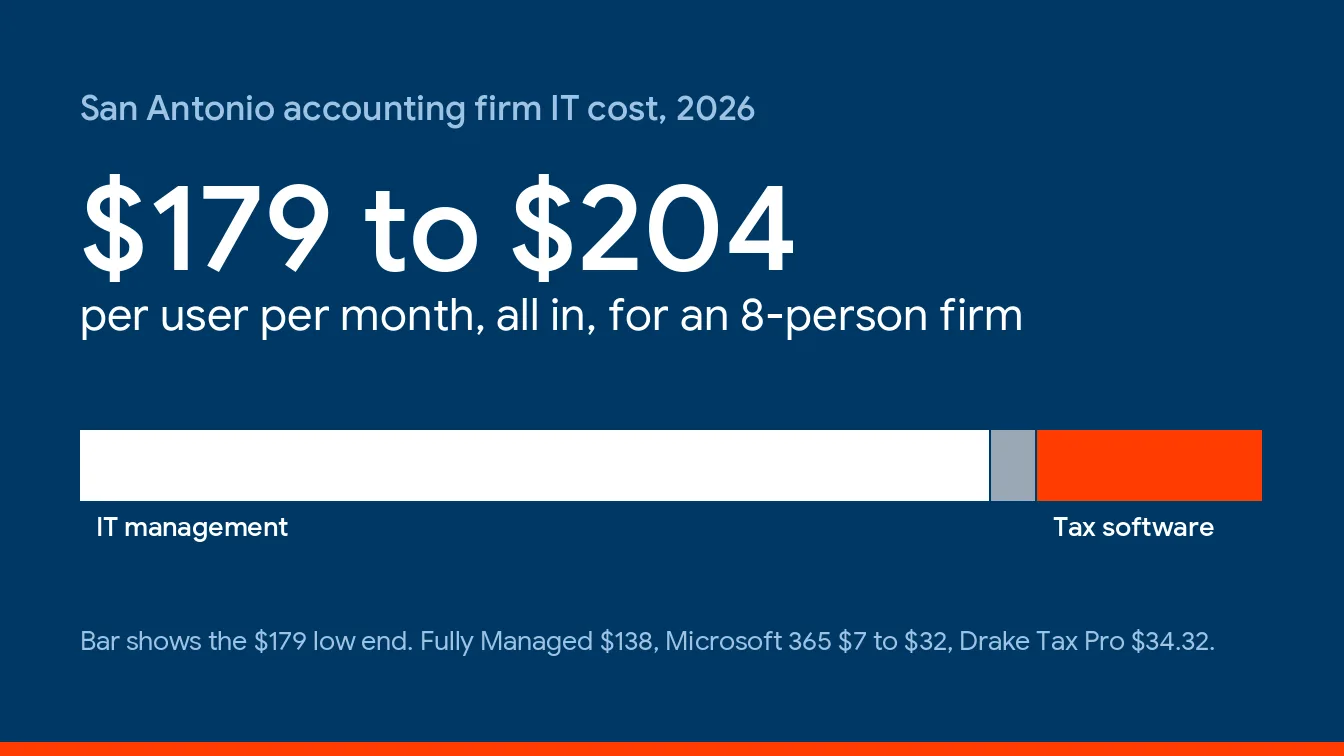
San Antonio accounting firms pay $125 to $175 per user per month for fully managed IT in 2026, and Uprite’s plan starts at $138. Tax software, Microsoft 365, and hardware are billed on top.
Partners want one number. But the number on a quote covers only 68% to 77% of what an 8-person firm really spends, because tax software and Microsoft licensing print on separate lines. That’s the gap. This guide prices each line with federal wage and business data and the published rates behind our IT services for accounting firms in San Antonio, so you can pressure-test any proposal you’re holding.
An 8-person San Antonio CPA firm on Uprite’s $138 plan, with Drake Pro and Microsoft 365, should budget about $179 to $204 per user per month all in, against a market rate of $125 to $175 for the managed IT line alone. 83% of the metro’s CPA offices have fewer than 10 people. The FTC Safeguards Rule exempts firms holding data on fewer than 5,000 consumers from its testing clause, which removes one of the biggest add-ons.
What does IT cost an accounting firm in San Antonio in 2026?
Managed IT is a flat monthly fee per user that hands an outside team your help desk, workstations, servers, network, security tooling, backups, and planning. In San Antonio in 2026, an accounting firm pays $125 to $175 per user for that bundle, with tax software, licenses, and hardware billed on separate lines.
Those bands come from our Texas MSP Pricing Index, built from our own quotes in Houston, San Antonio, and Dallas-Fort Worth, and the typical small-business range starts at $125 here against $150 in Dallas-Fort Worth. Sticker prices, both of them, and scope can move a quote as much as the zip code does. For every industry at once, our guide to managed IT cost in San Antonio splits the numbers by company size.
| Option | San Antonio price, 2026 | Best for |
|---|---|---|
| Market band for fully managed IT | $125 to $175 per user per month | Firms with no IT employee that want one team accountable |
| Uprite Fully Managed IT | From $138 per user per month | Round-the-clock support, onsite and cloud work, an advanced security stack, restore tests every quarter |
| Uprite IT Essentials | From $91 per user per month | Teams under 12 on Microsoft-native tools that can live with limited business-hours support |
| Co-managed IT | $60 to $130 per user per month, Uprite from $100 | An existing IT employee who needs backup and specialist depth |
| Security-heavy or compliance-driven | $250 to $300 per user per month | Setups where monitoring, testing, and documentation sit inside the rate |
| Tax software, Microsoft 365, hardware | Separate lines | Every firm on every plan |
A caution if you’re comparing against a Dallas price sheet, including our accounting firm IT costs in Dallas. The rates differ, and the firm mix differs more.
Who are San Antonio’s accounting firms, and why does that change the price?
Small ones, mostly. Very small. The Census Bureau’s County Business Patterns counted 293 CPA offices in the San Antonio-New Braunfels metro in 2023, and 183 of them had fewer than 5 employees. Another 60 had 5 to 9. That’s 243 offices, or 82.9%, under 10 people. Widen the lens to accounting, tax preparation, bookkeeping, and payroll services and the metro counts 884 establishments, 624 of them with fewer than 5.
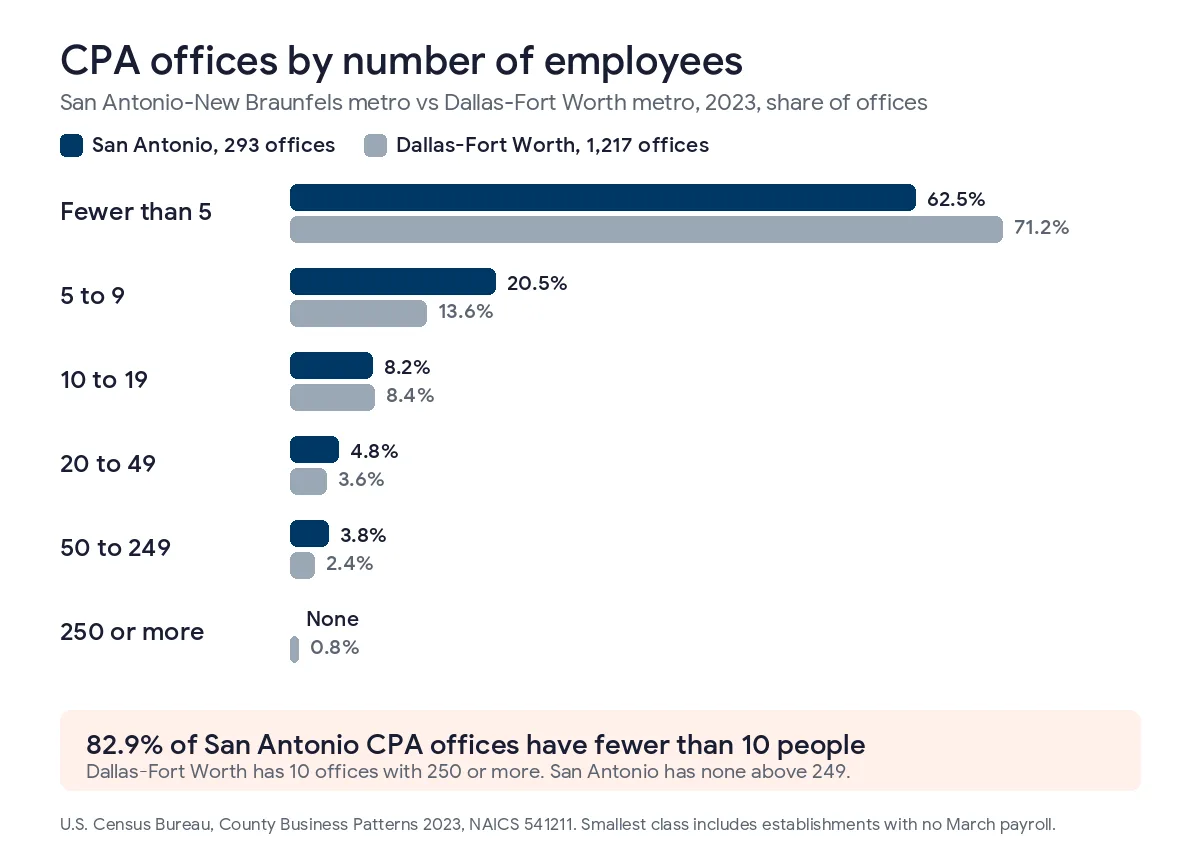
Now put Dallas-Fort Worth next to it. The shares under 10 look alike, 82.9% here and 84.8% there, and the real difference between the two metros is the 10 offices with 250 or more employees in the size table below.
| CPA office size, 2023 | San Antonio metro | Dallas-Fort Worth metro |
|---|---|---|
| Fewer than 5 employees | 183 offices (62.5%) | 867 offices (71.2%) |
| 5 to 9 employees | 60 offices (20.5%) | 165 offices (13.6%) |
| 10 to 19 employees | 24 offices (8.2%) | 102 offices (8.4%) |
| 20 to 49 employees | 14 offices (4.8%) | 44 offices (3.6%) |
| 50 to 249 employees | 11 offices (3.8%) | 29 offices (2.4%) |
| 250 employees or more | None | 10 offices (0.8%) |
Dallas-Fort Worth has 10 CPA offices with 250 or more employees, and 3 of them top 1,000, while San Antonio’s largest size class is 100 to 249 and it holds just 3 offices. That’s why the average CPA office here employs 9.3 people against 15.8 up north, 2,732 jobs across 293 offices versus 19,251 across 1,217. A price guide written for the Dallas market describes firms San Antonio mostly doesn’t have.
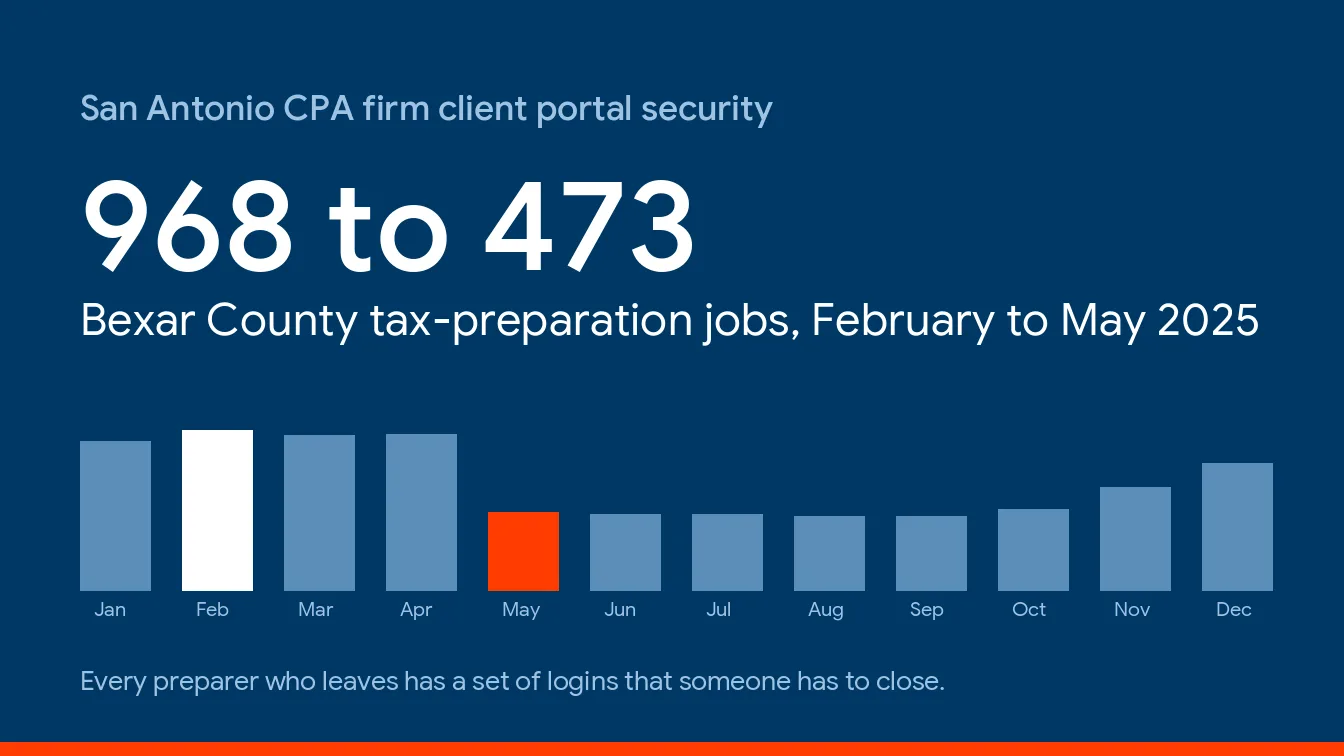
Pay tells a similar story. Quarterly Census of Employment and Wages data from the Bureau of Labor Statistics shows Bexar County CPA offices at 232 establishments, 3,074 jobs, and $101,235 in average pay for 2025, while Dallas County shows 512 offices, 13,677 jobs, and $142,352. And Bexar lost jobs in a year when pay rose. CPA-office employment slid from 3,307 in 2024 to 3,074, down 7.0%, while average pay climbed 6.1%, so the payroll got smaller and each remaining seat got more expensive to idle. Fewer people at a higher average pay. Every hour one of them loses to a locked laptop gets pricier.
Why does size matter for price? It decides which plan you can buy. The $110 remote-only IT Pro plan exists for teams of 12 or more beyond the Houston and San Antonio areas, which leaves a small San Antonio firm choosing between $91 remote-first and $138 with onsite work and round-the-clock coverage.
How much is the monthly bill for 4, 8, 15, or 30 users?
Count the people who log in, multiply by the rate, and you have the management fee. Seasonal preparers count while they’re active, so ask any provider how it bills someone who works January through April. Ask early.
| Seats | Essentials, $91 | Fully Managed, $138 | Co-managed, $100 | San Antonio market band | Dallas-Fort Worth market band |
|---|---|---|---|---|---|
| 4 | $364 | $552 | Needs an IT employee | $500 to $700 | $600 to $700 |
| 8 | $728 | $1,104 | Needs an IT employee | $1,000 to $1,400 | $1,200 to $1,400 |
| 15 | Closed to teams of 12 or more | $2,070 | $1,500 with an IT employee | $1,875 to $2,625 | $2,250 to $2,625 |
| 30 | Closed to teams of 12 or more | $4,140 | $3,000 with an IT employee | $3,750 to $5,250 | $4,500 to $5,250 |
Those are starting prices. Your rate is locked for the first year, and the plan carries a 120-day satisfaction promise. Everything below sits on top of these numbers. All of it.
What does the monthly fee leave out?
3 things. Tax software, Microsoft licensing, and whatever the quote doesn’t say it includes.
Take an 8-person firm on Fully Managed IT, and use Drake Software as the tax package for the math, since Drake publishes its prices and that makes it a clean example. Its 2026 price list shows the Pro package, with unlimited individual and business returns, at $3,295 for a multi-user license. Microsoft 365 adds $7 to $32 per user per month depending on the plan. Both are real costs. They add up.
| Line for an 8-person firm | Per month | Per year |
|---|---|---|
| Fully Managed IT, 8 users at $138 | $1,104 | $13,248 |
| Microsoft 365, $7 to $32 per user | $56 to $256 | $672 to $3,072 |
| Drake Tax Pro, unlimited, multi-user | $274.58 | $3,295 |
| Total | $1,434.58 to $1,634.58 | $17,215 to $19,615 |
| Per user per month | $179 to $204 | Not applicable |
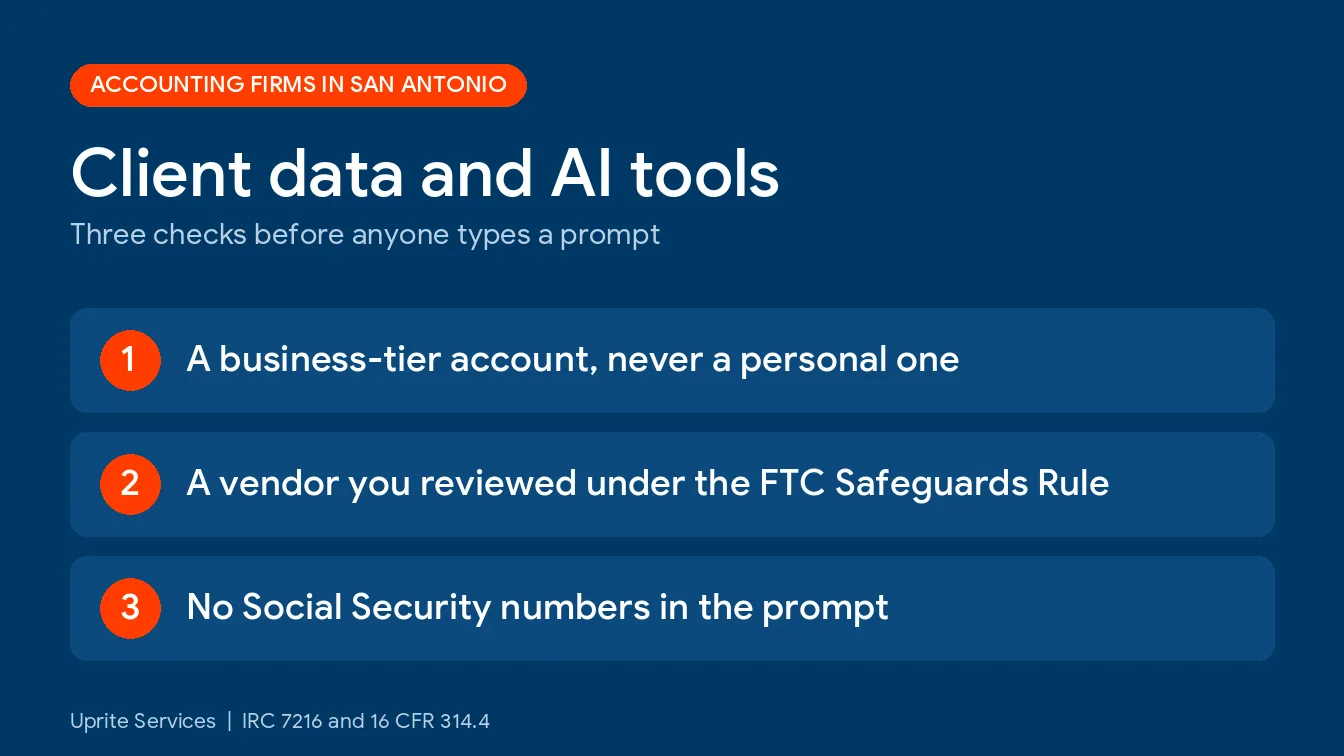
That’s 30% to 48% above the $138 headline, and the management fee is only 68% to 77% of the total, since Uprite’s Fully Managed plan already includes the advanced security stack and monitoring with after-hours response, so nothing else gets added for those. Budget the whole stack. Add AI tools to that stack, because staff will try them on client files, and our guide to AI tools for San Antonio accounting firms sets out where client data is allowed to go.
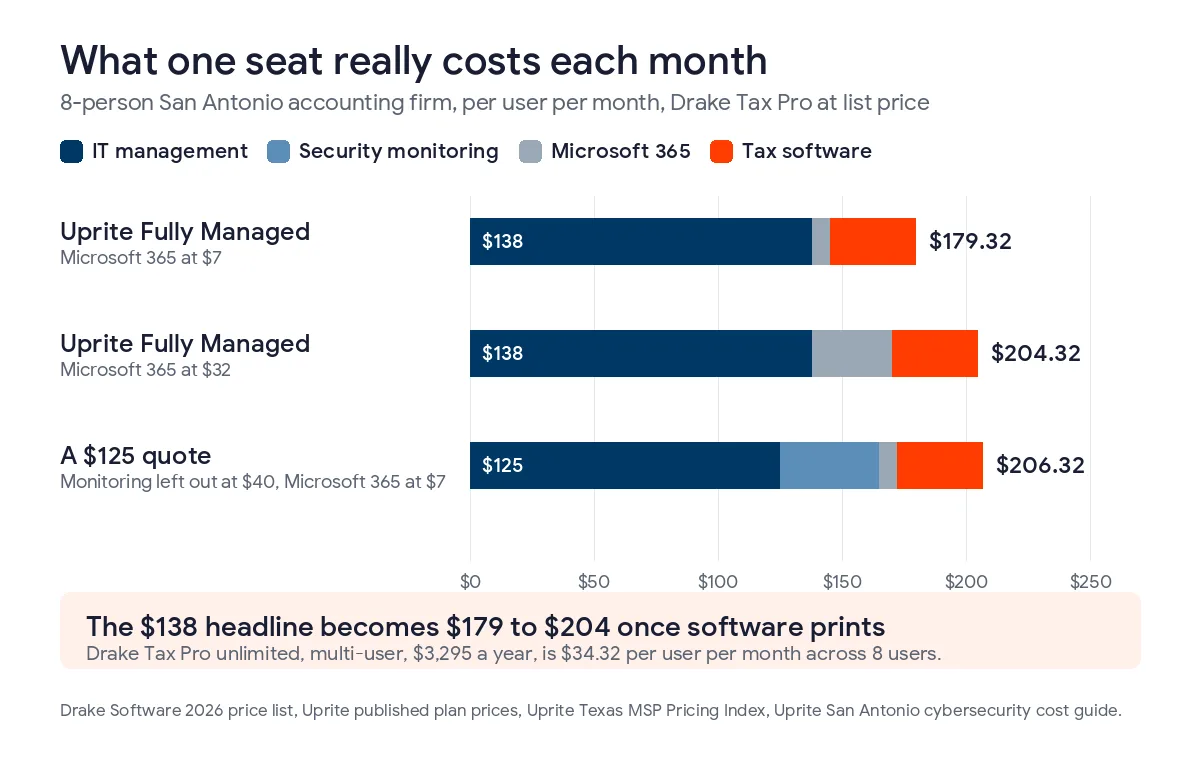
Not every quote works that way, and if a provider quotes $125 and leaves security monitoring out, the math changes fast, because monitored security on its own runs $40 to $90 per user per month in San Antonio, per our San Antonio cybersecurity cost guide. $125 plus $40 is already $165. The cheaper headline can be the pricier contract. Read the scope.
When does a per-firm tax software license beat pay-per-return?
Past about 52 individual returns for Drake’s 1040 package, and past about 69 for Pro. Pay-per-return costs $379.99 and includes 10 individual returns. Each additional individual return is $49.99. Each business return is $74.99.
| Drake package, tax year 2026 | List price, multi-user | What it covers | Cheaper than pay-per-return past |
|---|---|---|---|
| Pay-per-return | $379.99 | 10 individual returns, then $49.99 each, business returns $74.99 each | Baseline |
| Drake Tax 1040 | $2,445 | Unlimited individual returns, business returns $74.99 each | About 52 individual returns |
| Drake Tax Pro | $3,295 | Unlimited individual and business returns | About 69 individual returns |
A shop that files 400 individual returns would pay about $19,900 per return against $2,445 flat for the unlimited 1040 package, and that’s before a single business return gets counted on either side. That’s the whole argument. Do that math early. Run your own count. Lacerte and ProSeries come from Intuit, and UltraTax CS comes from Thomson Reuters, so get current written quotes from them before you compare.
Why put this in an IT guide? Fair question. Managed IT quotes don’t include it, so it never shows up when two proposals get compared. It should.
Does the $91 plan survive tax season?
For a firm that works 9 to 5 all year, yes. CPA firms don’t. IT Essentials includes limited business-hours support, 8 hours per user per month, and the Microsoft Defender stack only, while Fully Managed includes 24/7 support and monitoring with after-hours response. For 8 users the difference is $376 a month, or $4,512 a year. That’s real money.
Now price the alternative. If after-hours help were billed at an illustrative $250 an hour, a figure from the example in our San Antonio cost guide and not an Uprite rate, $4,512 buys 18 hours. That’s thin. Spread over a 13-week season, that’s about 1.4 hours a week. Think about the last week of March. One locked workstation on a Tuesday evening burns an hour of that budget.
The $91 plan is a good fit for a 3-person bookkeeping practice that works business hours, keeps client files in the cloud, and doesn’t host a tax package on a shared drive. It stops fitting the day partners start working nights in March, or a server shows up in the closet and nobody has ever restored a single file from its backup to see whether the backup actually works. That’s a gamble.
What does the FTC Safeguards Rule add to the bill?
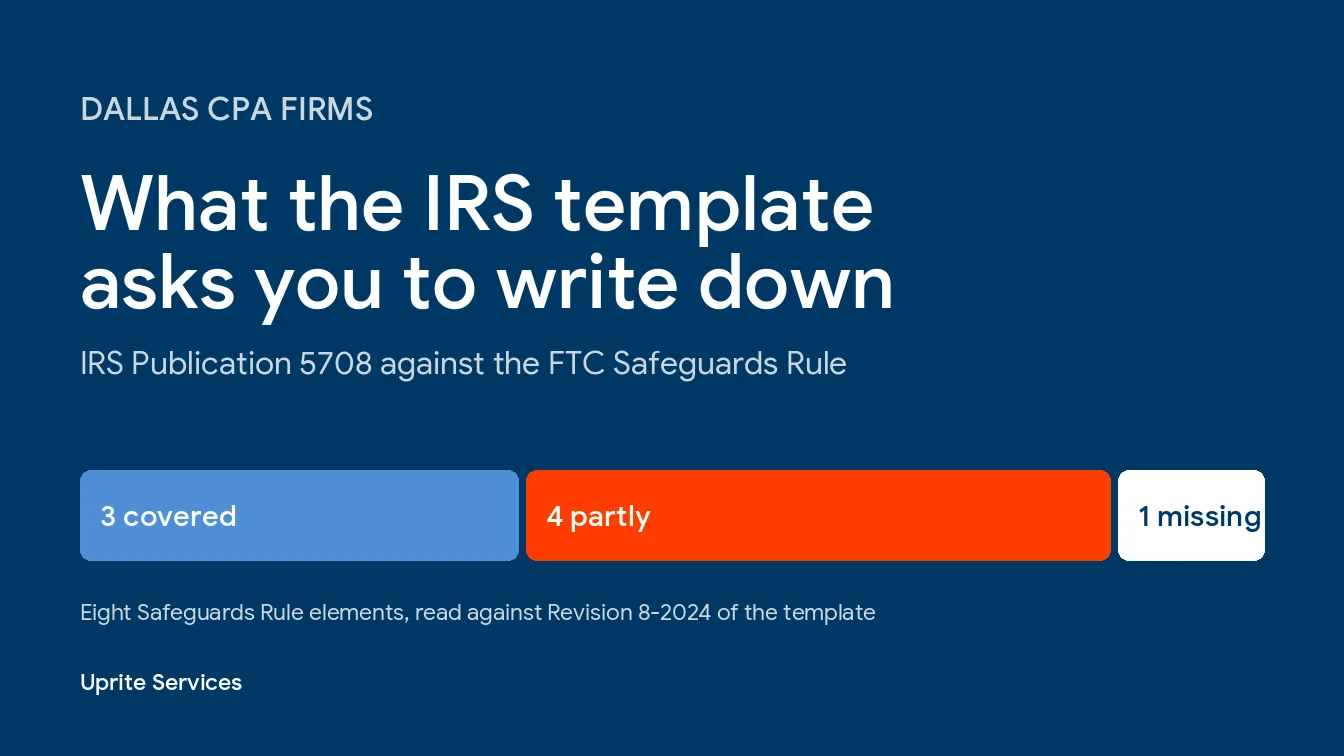
Less than vendors imply, and more than a quote shows. Tax preparers, and CPA firms that prepare returns, count as financial institutions under the FTC’s Safeguards Rule, 16 CFR Part 314, and the FTC’s compliance guide lists 9 required elements, including multi-factor authentication, encryption, and a designated Qualified Individual who answers for the program. Most of those are policy and configuration work. Client portals and tax software logins sit inside that work, and our guide to client portal security for San Antonio CPA firms covers who owns each control. One clause costs real money. Just one.
Section 314.4(d)(2) asks for continuous monitoring. Without it, you owe annual penetration testing plus vulnerability scans at least every 6 months, and in San Antonio a formal external assessment starts around $5,000 and climbs past $15,000 with penetration testing attached. Where monitoring is priced separately, it runs $40 to $90 per user per month, so 8 users pay $3,840 to $8,640 a year. Ask any provider, Uprite included, whether its monitoring is meant to meet 314.4(d)(2). The test is a lump sum that comes back every year.
Some small firms may owe neither. Section 314.6 says 314.4(b)(1), (d)(2), (h), and (i) don’t apply to institutions that keep customer information on fewer than 5,000 consumers. By our reading, that takes out the written risk assessment, the testing clause, the written incident response plan, and the annual board report, though it doesn’t touch multi-factor authentication, encryption, or the written program itself. That’s our reading of the rule, not legal advice. Confirm it with counsel. And count everything you hold before you assume you’re under the line, and ask counsel whether past clients count.
The other side of the ledger is real too. Weigh it. The IRS counted nearly 300 data breaches reported by tax professionals in the first half of 2025, affecting as many as 250,000 clients. For who enforces what, see our guide to IRS cybersecurity requirements for CPAs, and for the wider program cost, our GLBA compliance IT cost in Texas.
How does San Antonio’s wage base change the math?
Less than you’d expect. The BLS metro wage estimates for May 2025 put San Antonio below Dallas-Fort Worth in every role that matters here. Benefits ride on top of wages, though. Employer cost data for professional and technical services put total compensation at $75.97 an hour against $51.88 in wages for the second quarter of 2026, a 1.46 load factor that I apply to each San Antonio wage below.
| Role, May 2025 mean hourly wage | San Antonio | Dallas-Fort Worth | San Antonio vs DFW | San Antonio loaded at 1.46 | Hours that equal $138 |
|---|---|---|---|---|---|
| Accountants and auditors | $42.16 | $44.48 | 5.2% lower | $61.73 | 2.2 |
| Bookkeeping, accounting, and auditing clerks | $24.41 | $26.36 | 7.4% lower | $35.74 | 3.9 |
| Computer user support specialists | $29.09 | $30.30 | 4.0% lower | $42.60 | 3.2 |
| Network and computer systems administrators | $46.81 | $51.93 | 9.9% lower | $68.54 | 2.0 |
| Financial managers | $78.69 | $90.05 | 12.6% lower | $115.23 | 1.2 |
So the metro discount is real, small, and uneven. Modest, really. A San Antonio staff accountant earns 5.2% less than a Dallas one, and a support specialist 4.0% less. Our low tier is 7.4% under Dallas-Fort Worth’s, $125 against $135. Financial managers, the people approving this budget, see the biggest gap at 12.6%.
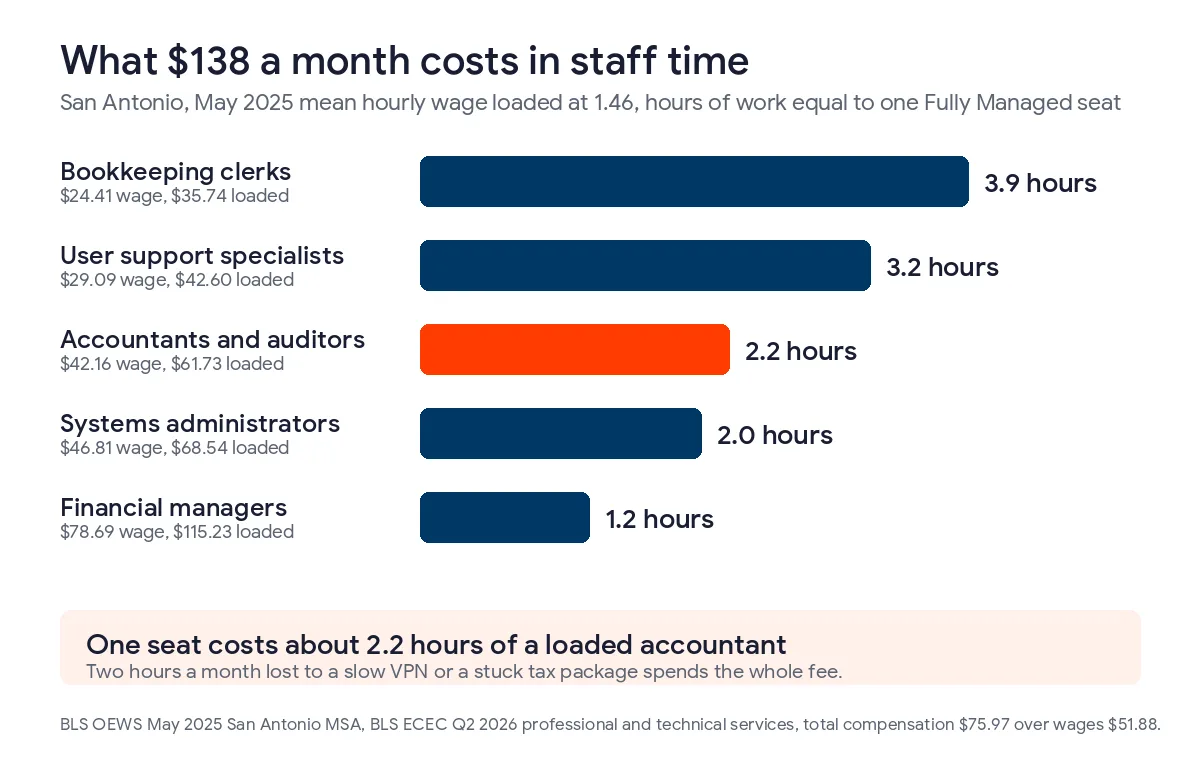
Keep the last column in mind. $138 a month equals about 2.2 hours of a loaded San Antonio accountant’s time. That’s the yardstick. If a slow VPN, a printer queue, or a tax package that won’t open costs one accountant 3 hours a month, the fee for that seat has already been spent on waiting.
When does it make sense to hire your own IT person?
Later than most partners think. A San Antonio systems administrator averaged $97,370 in May 2025, or about $142,600 once benefits ride on top at 1.46. Fully Managed runs $1,656 per user per year at $138, so one administrator doesn’t pencil out until you employ roughly 86 people. Below that headcount, the hire costs more. Simple as that. A user support specialist averaging $60,520 loads to about $88,600, the same as Fully Managed for about 54 users. Do the division.
A single hire still isn’t a department. Vacations happen. Nobody watches alerts at night. Nationally, the BLS industry staffing estimates count 9,430 computer user support specialists across 1,091,370 workers in accounting, tax preparation, bookkeeping, and payroll services, which is 1 specialist per 116 employees and a denser ratio than the 1 per 190 in architectural and engineering firms. An 8-person firm is about 0.07 of that specialist. That’s not a hire.
Some firms that hire pair that person with co-managed IT, where your employee owns the daily work and the provider covers monitoring, security tooling, and nights. Pricing starts at $100 per user, and our co-managed IT in San Antonio page lays out who does what. For the full hire-or-outsource comparison, including the coverage gap when your one hire is out sick, see in-house versus outsourced IT in San Antonio.
How should you read an accounting firm IT quote in San Antonio?
Check 6 things before you sign. No jargon.
- Who counts as a user? Settle it for seasonal preparers and for partners who log in from home.
- Is security monitoring with a live response inside the rate, and who picks up when a preparer gets locked out on a late March night?
- Are tax software, QuickBooks, and Microsoft licensing separate lines, and are they billed annually or monthly?
- Does the quote include the Safeguards paperwork you’d have to produce, or is that left to you?
- How often are backups restore-tested, and does the test touch your tax package’s data folder?
- What does after-hours work cost, is there an onboarding fee, and how long is the price locked?
When two quotes land far apart, scope explains it more often than margin does. Set both beside Uprite’s published plan prices and the missing lines show up fast. Try it with any proposal.
Accounting firm IT pricing questions in San Antonio
How much does managed IT cost per CPA in San Antonio?
A San Antonio firm pays $125 to $175 per user each month for fully managed IT in 2026. Uprite’s Fully Managed plan starts at $138. Partners, staff accountants, and admins count the same. Titles don’t change it. Tax software and Microsoft licensing come on top of that rate.
Does the monthly rate include tax software like Drake or Lacerte?
No, the monthly rate leaves tax software like Drake and Lacerte out. Drake lists its Pro unlimited package at $3,295 for a multi-user license in tax year 2026, and Microsoft 365 adds $7 to $32 per user. Uprite keeps QuickBooks, Sage, Lacerte, and ProSeries patched, backed up, and reachable. The license fees stay with the software vendors.
Is a $91 plan enough for a small CPA practice?
Only if the practice works business hours. IT Essentials covers 8 support hours per user per month during business hours, plus the Microsoft Defender stack, for firms under 12 people. Not in March. It stops fitting when partners work nights in tax season or a server sits in the office.
What does the FTC Safeguards Rule cost a small accounting firm?
Mostly staff time and configuration, plus either continuous monitoring or annual testing. Monitored security runs $40 to $90 per user per month in San Antonio, and a formal external assessment starts around $5,000. A firm with 8 users pays $3,840 to $8,640 a year if it buys monitored security. The written program, multi-factor authentication, and encryption apply regardless of firm size.
Can a 5-person firm skip penetration testing?
Possibly, if the firm keeps customer information on fewer than 5,000 consumers. Under 16 CFR 314.6, institutions that keep customer information on fewer than 5,000 consumers don’t have to meet the testing clause in 314.4(d)(2). That’s our reading, not legal advice, and it doesn’t excuse multi-factor authentication or encryption. Count carefully.
Is it cheaper to hire an IT person than to outsource in San Antonio?
Not under about 54 users. Not close. One support specialist costs a San Antonio firm about $88,600 a year once benefits are counted, the same as Fully Managed at $138 for roughly 54 people. And a single hire can’t cover nights, vacations, or security alerts. Firms near that size can add co-managed IT from $100 per user.
Do seasonal preparers count as users?
Yes, seasonal preparers count as users while their accounts are active. Some contracts bill seasonal accounts by the month they’re active, and others on a flat annual head count. Get that in writing, along with whether onboarding fees repeat every January. Ask early.
Tell us your headcount, your tax package, and whether a server lives in your office. We’ll price the IT, put the software and licensing on the same page, and show you what each seat costs all in, switch or not.
Get My Firm's IT PriceOther professions price differently. Law firms bill by the hour, which raises the stakes, as we worked through in law firm IT cost in San Antonio. Engineering firms carry CAD licenses on top, which IT cost for engineering firms in San Antonio prices out.