
When an ELD goes down on a Houston truck, the driver has 24 hours to tell the carrier in writing and switches to paper logs, and the carrier has 8 days to repair or replace the device.
I run operations at Uprite, and this plan comes out of our work on IT services for trucking companies in Houston. Most of the ELD and fleet system downtime a carrier deals with isn’t a broken box in the cab. It’s a dead signal on Highway 225, a vendor platform having a bad afternoon, or a dispatch office with no power after a storm. Each of those has different rules, and treating them all the same is how drivers end up parked at a weigh station.
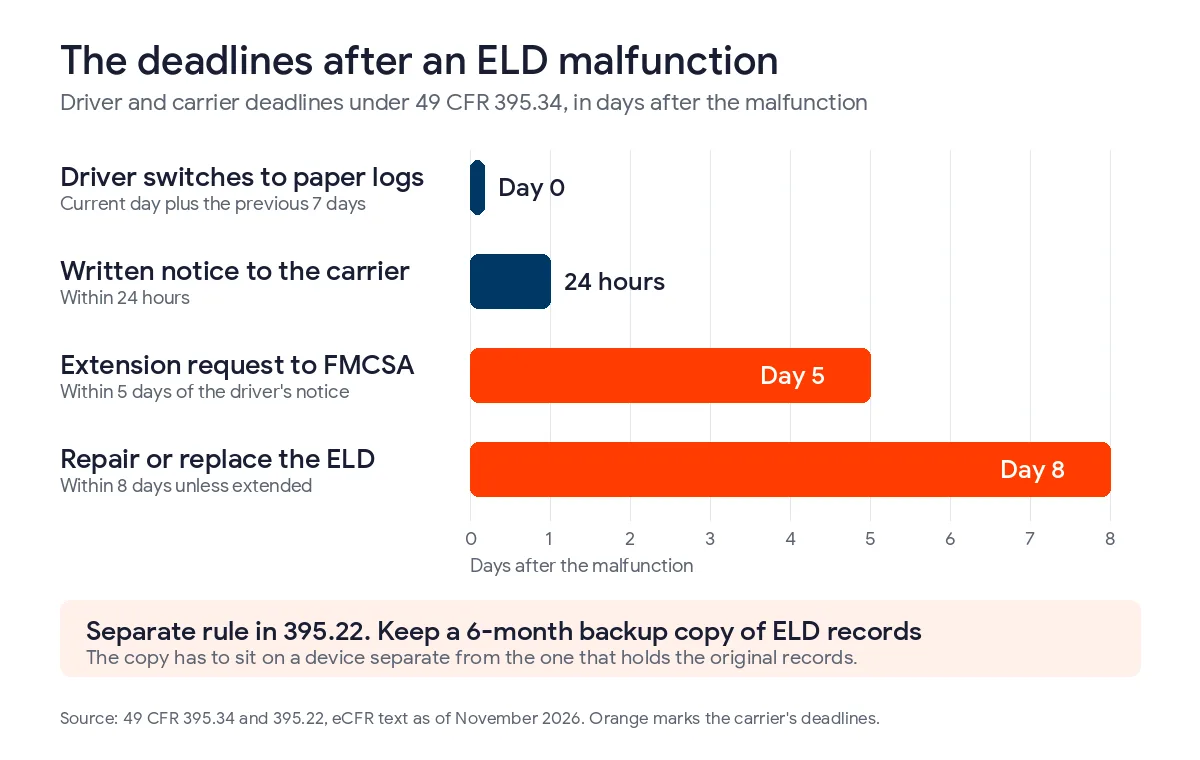
The federal rule is short. The driver notes the malfunction, gives the carrier written notice within 24 hours, rebuilds the last 7 days on paper if the records can’t be pulled, and keeps logging by hand. The carrier fixes the unit within 8 days or asks FMCSA for more time within 5. What the rule doesn’t do is tell you which outages count, who calls whom, or how to keep 6 months of records safe. That part is on you.
What counts as ELD downtime under FMCSA rules?
FMCSA splits ELD problems into 2 groups. A malfunction means the device can’t record or produce hours of service correctly, and it starts the repair clock in 49 CFR 395.34. A data diagnostic event is a smaller inconsistency that the driver works through with the carrier and the ELD provider.
FMCSA’s technical specification, in Appendix A to subpart B of Part 395, lists the malfunction types. They cover power, engine synchronization, timing, positioning, data recording and data transfer, plus a catch-all for other technology problems. A cell dead zone isn’t on that list by itself. It can still become one of them, and 2 of the rules show how.
The first is positioning. If the unit can’t get a valid location fix within 5 miles of the truck’s movement for more than 60 minutes in total over 24 hours, it has to set a positioning malfunction. The second is data transfer. At least once every 7 days, the ELD checks its roadside transfer method. If a check fails, it logs a diagnostic event and starts checking every 24 hours, and after 3 more failed checks in a row it sets a malfunction. A truck that spends a week shuttling between the Bayport terminal and a yard with spotty coverage can drift into that second one without anyone noticing.
The 5 kinds of fleet system outage and which ones start the clock
When a driver calls in and says the logs are down, the first job is figuring out which of these you’re looking at. Your answer decides whether the 8-day clock is running and who should pick up the phone.
| What went down | What the driver sees | Does the 8-day clock start? | Who handles it first |
|---|---|---|---|
| One ELD malfunctions | A malfunction indicator on the unit | Yes, from discovery or the driver’s notice, whichever comes first | Your safety or compliance lead |
| A data diagnostic event | A diagnostic indicator, logs still recording | Not unless it turns into a malfunction | The ELD provider, following the carrier’s instructions |
| Coverage gap or failed transfer check | Logs that won’t sync, or an unconfirmed transfer mode | Only once a positioning or transfer malfunction is set | The driver keeps logging, and the office watches the sync |
| The provider’s cloud platform is down | Logs fine in the cab, invisible to the office | Not if the in-cab units still record and display logs | The provider, with the outage confirmed in writing |
| Your own office systems are down | Nothing in the cab, but dispatch can’t see anything | No ELD clock, but record retention still applies | Your IT provider and your incident plan |
There’s a sixth case worth knowing about. FMCSA sometimes removes a device model from its list of registered ELDs, and when that happens the agency publishes a deadline for carriers to switch. If you run a low-cost device, check that list every quarter. A removal notice lands on the carrier’s desk, not the driver’s.
For the wider picture of how a TMS, EDI and warehouse systems fail alongside the ELD, our guide on how Texas logistics companies use managed IT walks through each one.
What a driver needs in the cab when the screen goes dark
Under 49 CFR 395.22, every truck has to carry an ELD information packet. As of November 2026, the regulation lists 3 items. There’s an instruction sheet on how to transfer records to an inspector, an instruction sheet on malfunction reporting, and enough blank graph-grid log sheets to cover at least 8 days.
Log sheets are the part that goes missing. Somebody uses a few during a malfunction in March, nobody restocks them, and by August the packet has 2 pages left. We’d put a packet check on the same list as the fire extinguisher and the reflective triangles, because a roadside inspector treats a missing log the same way whether the cause was a bad ELD or an empty folder.
Here’s the order we’d train drivers to follow when the unit fails.
- Write down the time, the location and what the screen shows, and take a photo of it if you can.
- Send the carrier written notice within 24 hours. We’d have drivers send it by text or email so there’s a timestamp on it.
- Try to pull the last 7 days from the ELD or the provider’s app. If you can show them, you don’t have to rewrite them.
- If you can’t retrieve them, fill in paper logs for the current 24 hours and the 7 days before it.
- Keep logging on paper until the unit is fixed, and hand those sheets to any inspector who asks.
At the roadside, the stakes are written into 49 CFR 395.13. A driver who can’t show a record of duty status for the day of the inspection and the 7 days before it can be ordered out of service. There’s a narrow exception. A driver who is missing only today and yesterday, with the previous 6 days complete, gets a chance to bring the log current on the spot. After an out-of-service order for a missing log, the carrier can’t send that driver back out until the required off-duty hours have passed, which for a property-carrying driver usually means 10 hours.
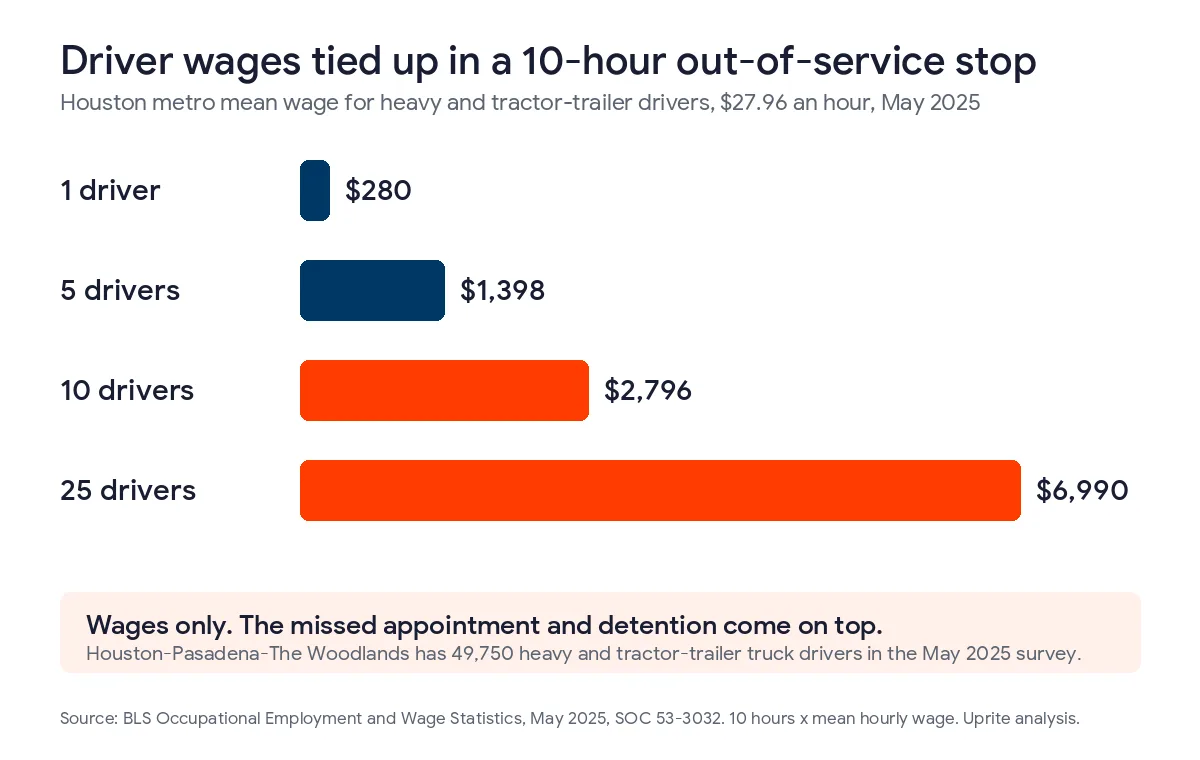
Those 10 hours cost real money in Houston. BLS puts the mean wage for heavy and tractor-trailer truck drivers in the Houston metro at $27.96 an hour as of May 2025, across 49,750 drivers. One 10-hour stop is about $280 in wages before you count the missed appointment, the detention charge or the customer who stops tendering loads.
What the carrier has to get done in 8 days
The carrier’s clock starts on whichever comes first, the day the carrier discovers the problem or the day the driver reports it. From there the carrier has 8 days to correct the malfunction. In practice that means repairing the unit, swapping it, or getting the provider to push a fix that clears the indicator.
If 8 days won’t be enough, the carrier can ask for an extension. The request goes to the FMCSA Division Administrator for the state where the carrier has its principal place of business, which for a Houston carrier is the Texas Division. It has to arrive within 5 days of the driver’s notice, it has to be signed by the carrier, and it has to include 4 things.
- The name, address and phone number of the person filing the request
- The make, model and serial number of each affected ELD
- The date and location of each malfunction, as the driver reported it
- A short statement of what the carrier has done to fix the units and why it needs more time
A complete request keeps the carrier in compliance until FMCSA decides. That’s the detail that matters after a hurricane, when 20 trucks lose units in the same week and replacement hardware is stuck in a warehouse somewhere. We’d keep a filled-in template with every unit’s serial number on file before June, so the only thing left to write on a bad day is the dates.
The backup copy most carriers forget about
This is the rule I see missed most often, and it’s an IT rule more than a compliance one. Section 395.22 also says a carrier must keep a backup copy of its ELD records for 6 months, on a device separate from the one that holds the original data. A separate rule in 49 CFR 395.8 sets the same 6-month retention for records of duty status and supporting documents.
Plenty of carriers assume the ELD provider’s cloud is the backup. I don’t think that holds up well. If the provider’s platform is the original store, a copy that lives in the same platform isn’t on a separate device in any sense an auditor would accept. It also doesn’t help you if the provider has a long outage or the account gets locked during a billing dispute.
What we’d set up instead is a scheduled export, weekly at minimum, from the ELD platform to storage the carrier controls. That copy should sit somewhere ransomware on the office network can’t reach. CISA’s #StopRansomware Guide tells organizations to keep offline, encrypted backups of critical data and to test them regularly, and hours-of-service records fit that description for a trucking company. Our data backup services page covers how we handle that kind of retention.
Your office systems matter just as much. If ransomware takes down dispatch, the trucks keep rolling and the ELDs keep recording, but nobody in the building can see where anyone is. Our guide to the first hour of a ransomware attack in Houston covers who to call and what to unplug.
A Houston storm-season plan for ELD and fleet systems
Hurricane season runs from June 1 to November 30. When Hurricane Beryl came ashore on July 8, 2024, much of the Houston area lost power for days, and freight still had to move. A newer ELD doesn’t help much in that week. What helps is having decided ahead of time how dispatch works without the office.
NIST’s contingency planning guide, SP 800-34 Revision 1, starts with a business impact analysis. For a carrier, that means picking a number for each system. How many hours can dispatch be dark? How long can you go without seeing ELD data in the office? How many days can payroll wait? Those numbers decide what you pay for.
| When | What to do | Who owns it |
|---|---|---|
| Before June 1 | Restock graph-grid sheets in every truck, update the extension template with current serial numbers, and test the weekly ELD export | Safety lead and IT provider |
| Before June 1 | Print a driver phone list and a load list template that dispatch can work from on paper | Dispatch manager |
| When a storm is 72 hours out | Charge spare tablets, move the latest log export off site, and confirm a second internet path for the office | IT provider |
| During the outage | Run dispatch from cell phones and the printed list, and log every ELD malfunction report with its date and time | Dispatch and safety lead |
| Within 5 days of the first driver notice | File the extension request for any units that won’t be fixed in 8 days | Safety lead |
| After power returns | Reconcile paper logs into the ELD platform and confirm the backup copy is complete | Safety lead and IT provider |
Our post on hurricane disaster recovery in Houston goes deeper on generators, internet failover and offsite servers. If your yard sits in Pasadena, Baytown or La Porte, assume the power will be out longer than the forecast says and plan for that.

Where to go from here
If you only do 1 thing this month, open the ELD packet in 3 of your trucks and count the blank log sheets. If you do 2 things, ask your ELD provider in writing how you’d get 6 months of records out of their system if their platform went down tomorrow. Their answer tells you how much of this plan you already have.
If you’d rather hand the IT side to someone else, our managed IT services in Houston cover the office network, backups and devices that keep dispatch running. Our first response on live tickets averages about 5 minutes, and clients have a 120-day guarantee if it isn’t working out.
Questions Houston carriers ask about ELD outages
Can a driver keep driving when the ELD malfunctions?
Yes. The driver switches to paper logs, gives the carrier written notice within 24 hours, and rebuilds the past 7 days on paper unless those records can be pulled from the ELD. Driving continues as long as the paper logs stay current.
Does losing cell service in a dead zone count as an ELD malfunction?
Not by itself. A dead zone becomes a malfunction only if it trips one of the listed rules, such as more than 60 minutes in 24 hours without a valid location, or repeated failed checks of the roadside data transfer method. Until then the driver keeps using the ELD.
How long can a Houston carrier run a truck on paper logs?
Up to 8 days after the carrier discovers the problem or the driver reports it, whichever comes first. Past that point you need an extension from FMCSA. Without one, the truck is out of compliance even if the driver’s paper logs are perfect.
Who do we send an ELD extension request to?
Send it to the FMCSA Division Administrator for the state of your principal place of business, which is the Texas Division for a Houston carrier. It’s due within 5 days of the driver’s notice and needs the serial number of every affected unit.
Is our ELD provider’s cloud good enough as the backup copy?
Probably not on its own. Section 395.22 asks for a 6-month backup on a device separate from the original records, so we’d keep a scheduled export in storage the carrier controls. That copy also protects you during a provider outage or an account dispute.
What happens at a roadside inspection if the driver has no logs at all?
The driver can be ordered out of service. Under 395.13, a driver without a current record for the inspection day and the prior 7 days fails the out-of-service criteria, and the carrier can’t dispatch that driver again until the required off-duty hours are done.
Tell us how many trucks you run and what your dispatch office depends on. We’ll walk through your ELD packet, your backup copy and your storm plan with you, and point out the gaps before the next outage finds them.
Talk to Our Houston Team