
A cyber insurance renewal checklist for a DFW business comes down to 4 proofs, MFA on email, remote and admin logins, EDR on every device, a backup you’ve actually restored, and answers that match what’s running. A lot of the work isn’t buying anything. It’s writing down, honestly, where each control stops. Dull, but it’s the job.
This cyber insurance requirements checklist is for the owner or office manager in Dallas, Fort Worth, Plano, Frisco or Irving who just got a renewal notice with a questionnaire longer than last year’s. I run technology at Uprite, and our Dallas cybersecurity services team builds the controls those forms ask about. We don’t sell policies, and we won’t sign your application.
If you’re on a first application instead, start with our walkthrough of the cyber insurance application, because this post is the renewal version, and it’s built around deadlines and the evidence a carrier asks you to produce. If you’d rather have the controls verified for you, see our cyber insurance readiness services in Dallas-Fort Worth.
For a renewal, carriers want proof, not promises. Show MFA on email, remote access and every admin account, EDR on every laptop and server, and a backup you can name the restore date for. Write each answer as a scope, like 100% of email users and 0% of the backup console, and attach a dated fix for anything short. Start 90 days out. An overstated yes is what Travelers alleged against ICS, and that policy was rescinded by agreed judgment.
What Does a Cyber Insurance Renewal Checklist Cover?
A cyber insurance renewal checklist is the list of security controls, proof documents and deadlines you need ready before your carrier or broker quotes next year’s policy. It covers MFA, endpoint protection, backups, email security, training and incident planning, plus the dated evidence that each one was running when you answered.
- Last year’s application, read line by line, because the renewal form starts from what you told them then.
- An MFA coverage report exported from Microsoft Entra ID or whatever identity provider you use.
- An EDR device list that matches your real headcount, servers included.
- The date of your last restore test. Not the last backup job. The last restore.
- Training completion records and your most recent phishing test result.
- A written incident response plan with current names and phone numbers.
- A short list of every answer you’d have to qualify, each with a fix date.
What Will the Renewal Form Want Proof Of?
Every carrier words it differently, and your broker holds the actual questions. The pattern underneath barely moves. Lockton points out that underwriters look past MFA, at patch management, backups and who holds administrative privileges. The rows below are how those tend to show up on a small-business form, and the last column is just our read of the usual slips, not survey data.
| Control | What the form usually asks | What to attach | Where offices tend to slip |
|---|---|---|---|
| MFA | Is it enforced on email, remote access and admin accounts | Coverage report by user and app | Email is covered, but the VPN and the backup console aren’t |
| EDR | Is it on every endpoint and server, and who responds to alerts | Device list matched to headcount | Servers and a few older laptops never got the agent |
| Backups | Are copies offline or immutable, and when was the last restore | Dated restore log | Backups share a login with production, and nobody has restored one |
| Email security | Filtering, plus SPF, DKIM and DMARC | Current DMARC policy | DMARC set to monitor only and left there |
| Training | How often, and are phishing tests run | Completion export | One session at hire and nothing since |
| Incident plan | Written, tested, with contacts | The plan with a review date | A plan from 2021 that names someone who left |
| Admin access | Separate admin accounts, limited to the people who need them | Admin account list | The owner’s daily account has admin rights |
Where Does MFA Trip Up a Renewal?
Scope. The form doesn’t ask whether you own MFA. It asks where it’s enforced.
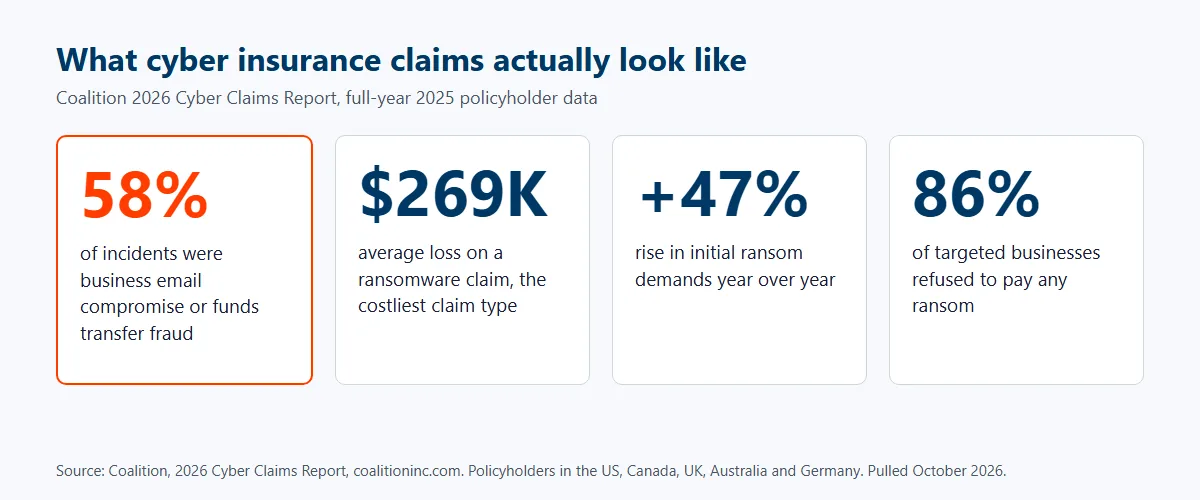
CISA’s MFA guidance says passwords alone are no longer enough. It tells businesses to start with administrative accounts and anyone handling sensitive data, then switch it on for email, file storage and remote access. Sensible order for a renewal too, since those are the first places a form probes. Email is the front door. Why do carriers care so much? Claims. Coalition’s 2026 Cyber Claims Report counts business email compromise and funds transfer fraud as 58% of the incidents it saw in 2025, while ransomware was the costliest claim type at an average loss of $269,000.
Now the honest correction. MFA isn’t a force field. Marsh McLennan’s 2023 research found that MFA across critical data, remote access and admin access made a successful attack 1.4 times less likely, which is useful, but it’s one control among many, and that’s why carriers ask about the rest of the list too.
CISA ranks security keys highest and text or email codes lowest, and it describes number matching as an interim step for push prompts. As of this writing I couldn’t find a carrier form that requires security keys outright. Put them on admin accounts if you can. Otherwise turn on number matching in Microsoft Authenticator and follow our Microsoft Authenticator setup guide for the rollout.
What Counts as EDR Coverage, and Who’s Watching It?
Two questions hide inside that one line. Is the agent on everything, and does a person respond when it fires? An agent that alerts into an inbox nobody reads is a purchase, not a control.
The difference between EDR alone and a monitored service is covered in our piece on EDR, MDR and XDR. Count your devices first. Say the EDR console shows 52 and payroll shows 61 people with laptops. You now have a 9-device answer to explain. That’s the gap. We’ve finished EDR, MFA and email filtering in under 2 weeks when a client’s deadline required it, though a full managed security rollout usually takes 30 to 60 days, which is the number to plan around.
What Does a Backup Answer Have to Survive?
A real restore. TechTarget’s February 2026 piece on how insurance requirements reshape backup design says insurers expect immutable storage, offline or air-gapped copies kept away from production, and routine documented restore tests. It describes the proof as “Evidence that backups restore, not just that backup jobs complete.”
The same article warns that backup terms lack consistent definitions across carriers, so immutable, tested and geographic separation can each mean something different on your form. Ask your broker how the carrier defines all three, in writing, before you answer. It costs one email.
Our own setup keeps backup storage under identities outside the production directory, with a retention lock that neither we nor an attacker holding your admin password can shorten, and it’s described on our immutable backup services page. If you’re vetting any provider, our list of questions to ask an MSP about backup covers the rest.
Run one restore this month. Pick a file share, restore it to a different location, and write down the date and how long it took. That page is your answer.
Why Does an Overstated Yes Cost More Than an Honest No?
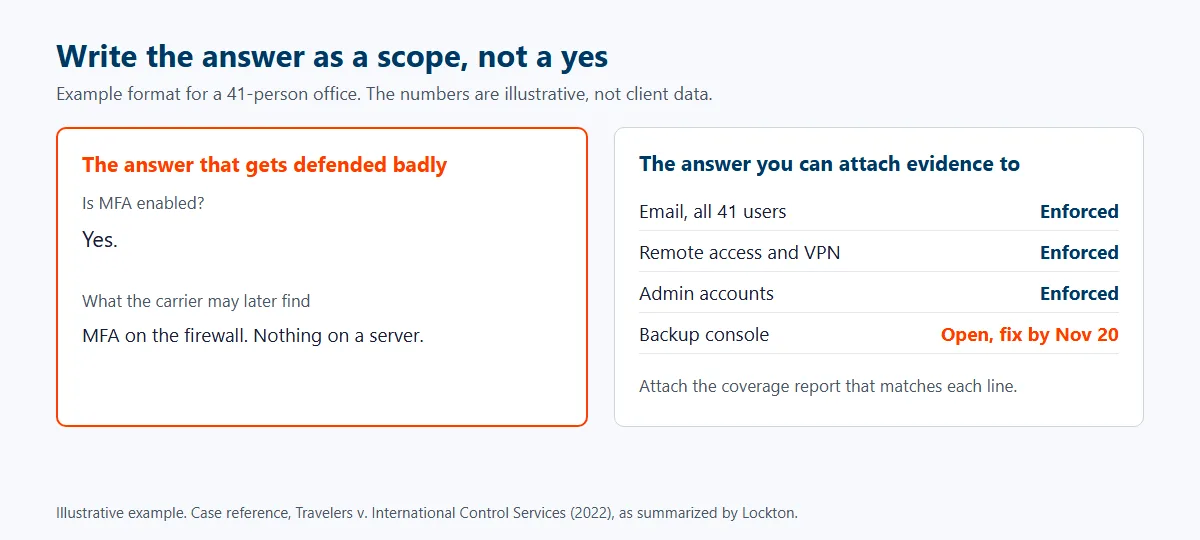
Because the carrier can undo the policy. In July 2022, Travelers filed a complaint to rescind a cyber policy it had issued to International Control Services after a ransomware attack that May. Per Lockton’s write-up, Travelers alleged the application overstated MFA, and its investigation found MFA on a firewall and nothing protecting a server. On August 26, 2022, judgment rescinding the policy was entered after ICS agreed to it.
Commentators differ on how far that case reaches. Lockton’s advice isn’t controversial. Describe the current state of your controls accurately, because an insurer may use a wrong answer as a coverage defense. Plain enough. If you want to see how denials and rescissions play out in other cases, our guide to cyber insurance claim denials for DFW businesses goes through them. To find a partner who can build that evidence, see our ranking of IT firms that handle cyber insurance readiness across Dallas-Fort Worth.
So I write answers as scopes, not yeses. Picture a 41-person office. The answer reads like MFA enforced on email and remote access for all 41 users, backup console not yet covered, fix dated November 20. Longer to write. Far easier to defend.
When Should a DFW Business Start the Renewal?
90 days before expiration, earlier if you already suspect gaps. The math is simple. A full managed security rollout usually takes us 30 to 60 days, and you need the form and the evidence folder done well before the broker’s deadline. Gaps take weeks.
| Days before renewal | What to do | Why then |
|---|---|---|
| 90 to 75 | Ask the broker for this year’s questionnaire, reread last year’s answers, export MFA, EDR and backup reports | You can’t fix a gap you haven’t found |
| 75 to 45 | Close gaps cheapest first, which is usually MFA scope, email filtering, EDR stragglers and one restore test | Bigger fixes need the 30 to 60 days |
| 45 to 21 | Fill in the form with scoped answers, attach evidence, list dated fixes for anything open | Answers should come from reports, not memory |
| 21 to 7 | Broker review, officer sign-off, any follow-up questions from the carrier | Follow-ups eat days |
| Week of renewal | File the evidence folder where the next renewal can find it | Next year starts here |
Renewal 3 weeks out and gaps just showed up? Don’t panic-buy. Fix the fastest ones, turn on MFA wherever it’s missing, and put a date on the rest. A dated plan beats a quiet no.
One budgeting note. Don’t plan on premium cuts to pay for the work, because that isn’t guaranteed, and the better question for your broker is which controls your carrier credits when it sets your price. Our guide to what Dallas businesses pay per user has the numbers, including Microsoft 365 Business Premium at $22 per user per month, which bundles Defender for Business and policy-based access controls.
Who Can Do This Alone, and Who Shouldn’t?
If you run a small office, everyone’s on Microsoft 365 Business Premium, MFA is enforced through conditional access, and somebody restored a file from backup this quarter, you probably don’t need us for this. Fill out the form. Attach the reports. Move on.
It gets harder with servers in a closet, a second office in Fort Worth or Plano, a line-of-business app that only runs on-site, or a carrier asking for 24/7 monitoring. Different problem. That’s when the evidence folder becomes someone’s job. If that’s you, talk to our Dallas team before the form goes back, not after.
Send us last year’s application and this year’s questionnaire, and we’ll show you which answers you can defend today and which need a dated fix first.
Book a Security Controls ReviewBefore You Send the Renewal Back
So what does MFA actually mean on an insurance form?
MFA is multi-factor authentication, a login that needs something beyond the password, like an app prompt or a security key. Insurers usually ask where it’s enforced, and email, remote access and admin accounts are the common three. Your broker’s form has the exact wording.
Is a NAS or USB drive in the office an offline backup?
Usually not. A drive that stays plugged in can be reached by the same malware or stolen admin login that hit the server. Ask your broker how the carrier defines offline and immutable before you answer.
What if we can’t meet a control by the renewal date?
Say so, and attach a dated plan with an owner. A not-yet with a fix date is easier to defend than a yes you can’t back up, which is the warning in the Travelers v. ICS case. Whether the carrier quotes anyway is its call, and the earlier your broker knows, the more options they’ll have.
How early is too early to start?
There’s no too early. We tell clients to start 90 days before expiration, because our full managed security rollouts usually take 30 to 60 days and a 45-day runway is a squeeze.
Does MFA on email alone satisfy the form?
Not by itself. Forms commonly ask about remote access and admin accounts separately, so email-only MFA leaves those answers open. CISA names email, file storage and remote access as the places to turn it on, and it says to begin with admin accounts.
Do we need phishing-resistant MFA, like security keys?
Not as far as I could find. CISA tells businesses to aim for phishing-resistant MFA, but I didn’t find a carrier form that requires it. Start with security keys on admin accounts, and use number matching for everyone else while you plan the move.








