Cloud services in The Woodlands and Conroe usually mean moving email, files, and sign-ins to Microsoft 365, moving the apps that can travel to Azure, and keeping a small, well-protected setup on site for anything that can’t. How much lands in each bucket depends on which end of the county you work in.
I’m the Lead vCIO at Uprite, so most of my week goes to planning technology changes with owners before anything gets touched. Cloud projects come up constantly. Lately they come with a date attached. Our page on managed IT services in The Woodlands covers the day-to-day support side. This guide is narrower. It’s the checklist I’d hand to a 15-person or 40-person company anywhere in Montgomery County that wants off its old server without a bad week after cutover and without losing a single file along the way.
It rests on 3 things you can check yourself. Microsoft’s own documentation for the migration tools. The Census Bureau’s 2023 count of business establishments in the Woodlands and Conroe ZIP codes, which I pulled and sorted by industry. And Entergy Texas restoration updates from Hurricane Beryl, because power is the part of a cloud plan people forget. Where a number isn’t published anywhere, I’ll say so instead of guessing.
The short version. Most Woodlands offices can put nearly everything in Microsoft 365 and retire the server. Most Conroe shops and yards can’t, so they go hybrid, with machine software and cameras kept local and everything else moved. Either way, take inventory first, fix permissions before you copy anything, test a restore, and add a second internet line. And if you still run Windows Server 2016, its support ends January 12, 2027.
What Do Cloud Services Mean for a Small Business Here?
Cloud services are software, storage, and servers you rent from a provider like Microsoft and reach over the internet instead of owning them in a closet. For most small businesses in The Woodlands and Conroe, that means Microsoft 365 for email, files, and Teams, plus Azure for the few servers or apps that still need one.
That’s the whole idea. The hard part is the order you do it in, and what you decide to leave behind.
We look after 2,227 users and 444 servers, according to the figures we publish on our cloud services in Houston page. Plenty of those servers look like the ones this checklist is about. Small boxes. Racked years ago.
Why The Woodlands and Conroe Need Different Migration Plans
The Woodlands and Conroe sit a short drive apart on I-45, and their businesses don’t look much alike. Not even close. I wanted numbers rather than impressions, so I pulled the Census Bureau’s 2023 County Business Patterns data at the ZIP code level for both. I counted 77380, 77381, and 77382 as The Woodlands and 77301 through 77304 plus 77306 as Conroe, and I deliberately left out the 3 ZIP codes that mix Woodlands addresses with Conroe or Spring ones, 77384, 77385, and 77389, so that they wouldn’t blur the comparison between them. Here’s what came back.
| Measure | The Woodlands (77380 to 77382) | Conroe (77301 to 77304, 77306) |
|---|---|---|
| Employer establishments | 4,136 | 2,785 |
| Employees (mid-March 2023) | 75,448 | 39,152 |
| Share with fewer than 20 employees | 83.4% | 84.0% |
| Professional, health care, and finance offices | 45.9% | 28.1% |
| Construction, manufacturing, wholesale, and transport | 11.8% | 24.6% |
| Manufacturing establishments | 48 | 165 |
Almost half the businesses in the Woodlands core ZIPs are offices. Law firms, CPAs, clinics, insurance agencies, engineering consultants. Their work already lives in documents and email, so it moves cleanly. Conroe is different. In Conroe, about 1 in 4 businesses builds, makes, stores, or hauls something for a living, which is roughly double the Woodlands share and a very different starting point for anyone planning to retire a server. That’s where you find the shop-floor PC that feeds a CNC machine, the camera recorder in the yard office, and the label printer nobody wants to touch.
Size is a wash, though. 83.4% of Woodlands establishments and 84.0% of Conroe establishments have fewer than 20 employees. Small shops on both sides. They just keep different things in the closet.
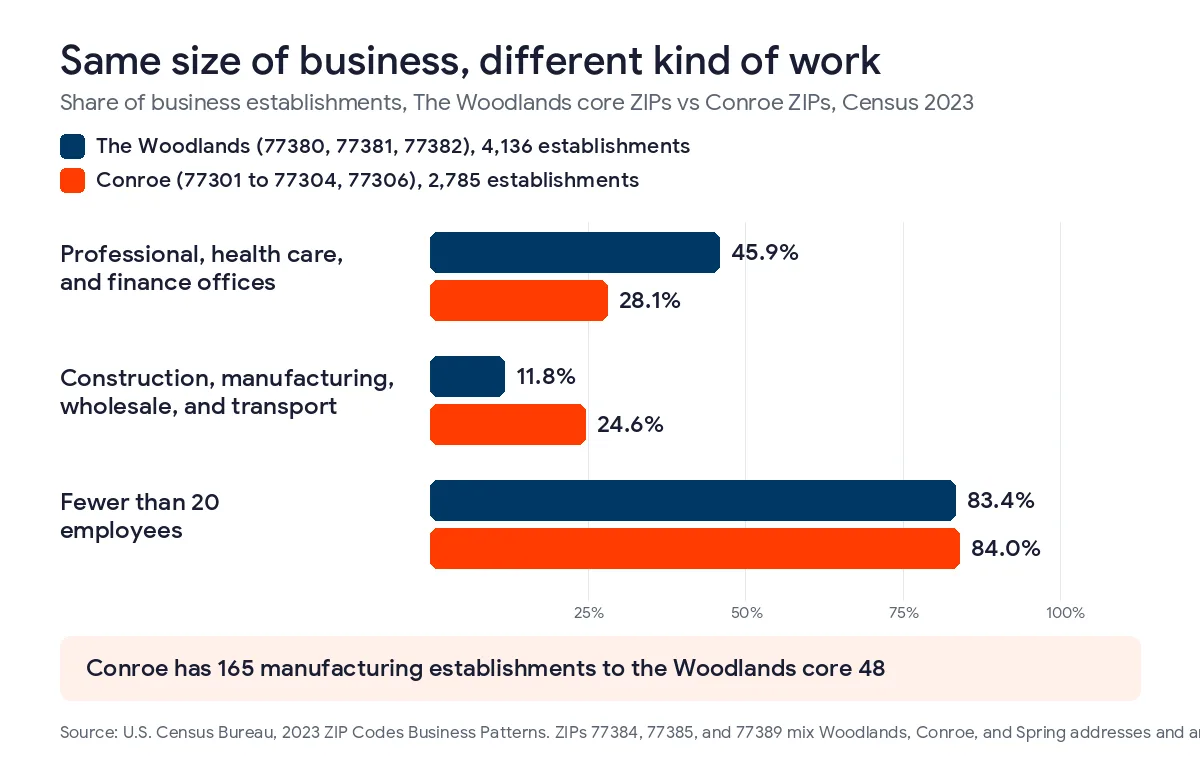
So the honest answer to “should we move to the cloud” changes depending on which end of the county you’re in. Most Woodlands offices can retire the server. Most Conroe shops shouldn’t try. Not all at once, anyway. Our managed IT services in Conroe page goes deeper on the shop-floor side of that.
The Server Deadline Coming on January 12, 2027
Here’s the date pushing a lot of these projects. Microsoft ends extended support for Windows Server 2016 on January 12, 2027, according to its product lifecycle page. Then the security updates stop. The server keeps running. It just stops getting fixed.
In a lot of small offices that one machine does 4 jobs. It holds the shared drive. It handles logins. It even hosts printers. And it runs the accounting or job-costing software that everyone is slightly afraid of. You have 3 realistic options. I’d rank them differently for each town.
- Retire it, moving files to SharePoint and OneDrive, sign-ins to Microsoft Entra ID, and the accounting app to its cloud version if the vendor offers one. This fits most Woodlands offices.
- Replace it with a smaller server running Windows Server 2025 that keeps only what has to stay local, and move everything else out. This fits most Conroe shops.
- Move the server itself into Azure. It works, but lifting an old server into the cloud unchanged is usually the priciest way to keep it, so I only suggest it when an app can’t be replaced and can’t stay on site.
Notice what’s missing. Doing nothing. A server past end of support is a known hole that attackers go looking for, and it’ll still be sitting on your network next to every laptop, printer, and shared folder you own.
The Cloud Migration Checklist for Woodlands and Conroe Businesses
Here’s our order. It rarely changes. The early steps are the ones people skip, and they decide whether cutover weekend is boring. Boring is the goal.
- Write down every system the server touches, including scanners that send email, printers, the time clock, and any machine out on the shop floor that saves its work to a shared folder.
- Decide what moves, what stays, and what goes hybrid, one system at a time, using the table in the next section.
- Clean up the shared drive before you copy it by deleting duplicates, archiving closed jobs, and shortening folder paths that run 8 or 10 levels deep.
- Rebuild permissions around how people work today instead of copying years of old access rules.
- Turn on multifactor authentication for every Microsoft 365 account before any data lands, and plan how each PC moves its sign-in from the old server to Microsoft Entra ID.
- Move 1 department first and have real staff work from it for a week.
- Check your internet line, especially upload speed, and order a second line from a different carrier if you don’t have one.
- Schedule the cutover for a Friday evening, with someone on call Saturday and first thing Monday.
- Prove you can restore a file, a mailbox, and a whole folder after the move, not just before it.
- Power the old server off, leave it unplugged for 30 days, then wipe it and recycle it.
Step 1 matters more in Conroe. A shop-floor PC that saves programs to a folder on the server, or a recorder writing camera footage to a share, will break the day that server goes away, and nobody will connect the 2 events until a machine sits idle on a Tuesday morning.
Step 4 is the real work. Microsoft’s file share migration guide puts assessment and cleanup ahead of the move for good reason. When we started moving a construction client’s shares into SharePoint, we didn’t copy the old folder tree at all. Copying it copies the mess. We rebuilt it around active projects instead, which you can read about in our construction cloud migration case study.
Step 6 is cheap insurance. Don’t skip it. Microsoft’s Migration Manager runs from a small agent on a computer that can see your shared drive, and it copies that drive into SharePoint, OneDrive, or Teams. A pilot week costs a little time. Finding a broken workflow with 30 people already in it costs a lot more.
If you want the Microsoft 365 side in more depth, including mailboxes, licensing tiers, and the settings that catch people out, our Microsoft 365 migration checklist covers it in detail. I won’t repeat it here.
What Moves, What Stays, and What Goes Hybrid
It’s a starting point. Not a rule. Every row has exceptions. And your software vendor gets a vote.
| System | Typical Woodlands office | Typical Conroe shop or yard | Where it usually lands |
|---|---|---|---|
| Email and calendars | Moves | Moves | Microsoft 365 |
| Shared drive and documents | Moves | Mostly moves | SharePoint and OneDrive |
| Logins and passwords | Moves | Moves | Microsoft Entra ID |
| Accounting software on the server | Cloud version if one exists | Cloud version or hosted | Vendor cloud or Azure |
| ERP or job costing with shop terminals | Rare | Often stays local or hybrid | Small local server with cloud backup |
| CNC, PLC, and machine programs | Rare | Stays on site | Local network, kept apart from office PCs |
| Security camera recorder | Stays on site | Stays on site | Local recorder |
| Large CAD or drawing files | Hybrid | Hybrid | Local cache synced to Azure |
The last row is the one people don’t expect. Azure File Sync with cloud tiering keeps the files people open often on a small local server, pushes the rest to Azure, and pulls a file back down when someone opens it. For a Conroe fabricator with big drawings and a slow upload, that’s often the right middle ground. For a Woodlands CPA firm it’s usually overkill. Different towns, different answers.
My honest take? Machine controllers, PLCs, and the PCs that feed them shouldn’t share a flat network with the office, cloud or no cloud. A migration is a good moment to separate them. It’s rarely a good moment to move them.

Plan for the Next Storm Before You Cut Over
Moving to the cloud protects your data from a flooded server room. It doesn’t power your office.
Hurricane Beryl came ashore on July 8, 2024. 4 days later, Entergy Texas reported it had restored about 182,800 of the 252,460 customers who lost power, and it was still telling the rest to expect service by July 15, according to its July 12 restoration update. Its list of cooling stations that day included the Conroe Central Library and the South County Branch library in The Woodlands. Some waited a week.
Your files would’ve been fine in Microsoft 365 that week. Your team still needed somewhere with power and internet to open them. Power was the problem.

So the checklist has a resilience part too.
- Find out which utility serves your building, because The Woodlands is split between Entergy Texas and CenterPoint according to The Woodlands Township, and that decides which outage map and restoration estimates you’ll be watching during a storm.
- Put a second internet connection from a different carrier on the firewall, even a cellular one, and test that it really takes over.
- Keep battery backup on the firewall and the main switch so short blips don’t drop everyone.
- Decide ahead of time where people will work if the office is dark, and confirm they can sign in from there.
Backups need their own plan. Our guide to backup and disaster recovery in The Woodlands goes through it, including how long a cloud restore really takes over a normal business connection.
What Cloud Services Cost in The Woodlands and Conroe
There are 2 monthly bills. Licensing is one. People are the other.
Microsoft raised its list prices on July 1, 2026. Business Basic is now $7 per user a month, Business Standard is $14, and Business Premium stays at $22, according to Microsoft’s pricing announcement. I’d pick Premium. It’s the one I recommend for most businesses here with 20 or more people, because it adds the device management and security tools that an old server and a pile of separate products used to handle.
Now the people. Our Fully Managed plan starts at $138 per user a month and includes onsite and cloud infrastructure management, so the hybrid server in a Conroe shop is covered along with the Microsoft 365 side. Teams under 12 people with simple needs can start on IT Essentials from $91, which is remote only and capped at 8 hours of business-hours help per user a month. If you already have an IT person on staff, Co-Managed starts at $100. The full rate card is on our managed IT pricing page, and licensing is billed on top.
What I can’t give you here is a flat migration price. It depends on how much data you have, how messy it is, and how many systems from the table above have to stay behind on site once everything else has moved to the cloud. We quote it after the inventory in step 1. That’s deliberate. Anyone quoting before they’ve seen your server is guessing.
For the Microsoft side on its own, our Microsoft 365 services in Houston team covers Montgomery County too. And when something breaks after cutover, our published average response time is 5.06 minutes. Want to talk first? Contact our team and ask for a vCIO.
Questions Woodlands and Conroe Owners Ask Before Moving
How long does a cloud migration take for a small business in The Woodlands?
Our Microsoft 365 migration checklist puts most offices under 25 users at 1 to 2 weeks end to end, and offices of 25 to 75 users at 3 to 5 weeks. Retiring or replacing a server adds time on top, and skipping the inventory and pilot is what causes a rough first week.
Do manufacturers in Conroe have to keep a server on site?
Usually yes, but a much smaller one. Machine programs, shop-floor terminals, and camera recorders tend to stay local, while email, documents, and sign-ins move to Microsoft 365. The result is a hybrid setup, with the local server kept on its own network and backed up to the cloud every night.
What happens to cloud files when the power goes out in Montgomery County?
Your files stay safe in Microsoft data centers, but your team needs power and internet somewhere to reach them. After Hurricane Beryl, Entergy Texas expected it to take about a week to restore every customer it could, so plan a second internet line, battery backup, and a place for people to work.
Is Microsoft 365 enough, or do we also need Azure?
For most Woodlands offices, Microsoft 365 is enough, because email, files, Teams, and sign-ins cover nearly everything they run. Azure comes in when an application needs a server and cannot stay on site, or when a shop wants Azure File Sync to keep large drawings close to the people who open them.
What should we do with a Windows Server 2016 machine before January 2027?
Decide before the end of 2026 whether to retire it, replace it, or move its workload to Azure, because Microsoft stops security updates for Windows Server 2016 on January 12, 2027. Start with an inventory of everything it does, since most of these servers handle several jobs at once.
How much do cloud services cost in The Woodlands and Conroe?
Plan on 2 monthly costs. Microsoft licensing runs $7, $14, or $22 per user a month, and managed support starts at $138 per user a month on our Fully Managed plan. The one-time migration is quoted after an inventory, because data volume and leftover on-site systems drive most of the price.
Does Uprite support businesses on site in The Woodlands and Conroe?
Yes. Our Fully Managed plan includes onsite and cloud infrastructure management across The Woodlands, Spring, Conroe, and greater Houston, and our published average response time is 5.06 minutes. Remote-only plans exist for very small teams, but a hybrid shop with equipment on site is usually better served by Fully Managed.
Not sure which of your systems can move? We’ll go through your server, your shared drive, and anything on the shop floor, then tell you in writing what moves, what stays, and what it’ll cost. You keep the list.
Plan My Cloud Migration