Backup and disaster recovery in Spring, TX, The Woodlands and Conroe should keep a locked copy outside the Houston region, restore each key system inside a tested time limit, and keep copies longer than an attacker can hide. For a 25-person office here, one lost workday runs about $9,290 in payroll alone.
Most owners up the I-45 corridor don’t think about backups until the morning a file server won’t boot, or the morning after a storm, when the building has power again but the closet with the server took on water. We work with companies along that stretch through our managed IT services in The Woodlands. The first question isn’t technical. It’s “how bad is this going to be?” This post answers it. It uses local wage data, the Texas Attorney General’s public breach list, and what 2 of the biggest storms of the last decade did to power and water in Montgomery County. Then it covers what a recovery plan has to include so the answer is “not very.”
Data loss costs a north Houston business in 3 places. There’s payroll for people who can’t work. There are the hours spent redoing work since the last good copy. And there are notice and legal costs if personal data was involved. The fix isn’t more storage. It’s a copy that can’t be deleted, kept outside the region, held longer than a breach can hide, and restored on a schedule so you know the recovery time before you need it.
What Does Backup and Disaster Recovery Actually Cover?
Backup and disaster recovery, usually shortened to BDR, is the service that copies your servers, PCs and Microsoft 365 data on a schedule, keeps at least one copy offsite and locked against deletion, and brings each system back within a written time target that has been tested before anything goes wrong. Backup is the copy. Recovery is the plan.
The difference matters. Plenty of offices in Spring and Conroe have a backup, in the sense that a box in the closet runs a job every night and sends an email nobody reads. Far fewer have recovery. Recovery means someone has written down which systems come back first, how long each one takes, and who makes the call to fail over to the cloud when the building is dark. Can you say how many hours it would take to get your accounting system running on a different machine? If not, there’s a backup. There’s no plan yet.
What Does Data Loss Cost a Business in Spring, The Woodlands or Conroe?
Start with payroll. People get paid to wait. The BLS May 2025 wage survey puts the average hourly wage across all jobs in the Houston-Pasadena-The Woodlands metro at $32.51. Wages are only part of what an employee costs, though, because benefits, payroll taxes and insurance push the total higher, and the BLS employer cost survey for the second quarter of 2026 shows total compensation nationally running about 1.43 times wages. That’s $46.45 per loaded hour.
For a 25-person office that’s $1,161 for every hour nobody can work. A full day costs $9,290. That’s only half of it. The rest is redone work. Everything entered since the last good copy is gone, and someone has to rebuild it from emails, paper and memory. So the honest way to price an outage is to add the hours of lost work to the hours of downtime. Here’s how that plays out for the same office under 3 common setups.
| Setup | Work lost since last copy | Time to restore | Staff-hours gone (25 people) | Payroll cost |
|---|---|---|---|---|
| Nightly backup to a closet box, server rebuilt from the cloud | About 8 hours (failure late in the day) | About 2 workdays | 600 | $27,870 |
| Hourly image backups to a local appliance with a cloud copy | Up to 1 hour | About 4 hours | 125 | $5,806 |
| Snapshots every 15 minutes plus a tested cloud failover | Up to 15 minutes | About 1 hour | 31.25 | $1,452 |
The math uses $46.45 an hour. These figures count payroll only. Lost sales aren’t in there, and neither are overtime, missed filing deadlines or the client who quietly moves their work elsewhere. Treat them as a floor. Tax season runs higher. So does a booked clinic. Firms that bill by the hour feel it twice, since the hours are lost and can’t be billed either.
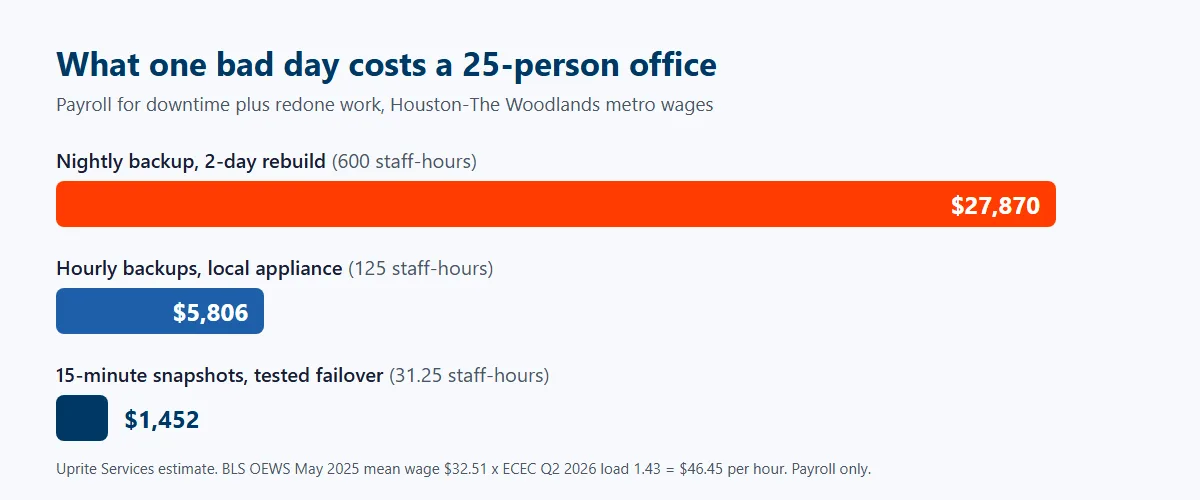
The gap between the first and third rows is about $26,400 for a single incident. Now compare the fix. Our Fully Managed IT plan starts at $138 per user per month and includes monitored backup with a restore test every quarter. Cloud failover capacity, if you need it, is priced separately. For 25 people that’s about $3,450 a month for the whole IT department, backup included. One avoided outage like the first row covers about 8 months of the plan.
Why Are So Many Local Backups Set Up by Accident?
Many firms here are new. Or newly bigger. BLS county employment data shows Montgomery County had 12,816 private workplaces in 2020 and 15,360 in 2025, a gain of almost 20%. Private employment in the county grew from about 156,900 to 200,100 over the same 5 years. Harris County, by comparison, added under 2% more workplaces in that time. Professional firms grew fastest. That’s the professional, scientific and technical sector, meaning the accountants, engineers, consultants and law offices that live on their files, and in Montgomery County it went from 1,911 locations to 2,462 over the same stretch.
Growth is good for business. It’s hard on IT. Picture a 6-person firm in 2020 whose backup is whatever the first IT person set up. Nobody revisits it as the firm moves from a suite in Spring to a building off Research Forest Drive, adds a second location in Conroe and grows to 30 people. Audits exist to catch that. The job still runs. But it’s backing up the old server, or the cloud copy stopped syncing months ago, or the Microsoft 365 tenant was never included because everyone assumed Microsoft keeps everything forever. It doesn’t. More on that below.
What Local Risks Should a North Houston Backup Plan Assume?
Assume the power goes out for days, not hours. When Hurricane Beryl came through on July 8, 2024, Entergy Texas reported a peak of about 252,460 customer outages, with more than 40 transmission lines and more than 50 substations affected, and 4 days later it was still only 72% restored. Entergy Texas serves Conroe and The Woodlands, while CenterPoint serves much of Spring and the Harris County side of the corridor. That doesn’t double the safety. It means 2 restoration schedules for offices a few miles apart.
Assume water too. Not just rain, either. During Harvey, the San Jacinto River Authority released 79,141 cubic feet per second from the Lake Conroe dam on August 28, 2017, more than twice the previous record of 33,000 set in 1994, and that water ran down the West Fork toward Kingwood and Humble. For businesses downstream along the West Fork, the flood risk that week depended on what happened upstream as much as on the rain over their own roofs.
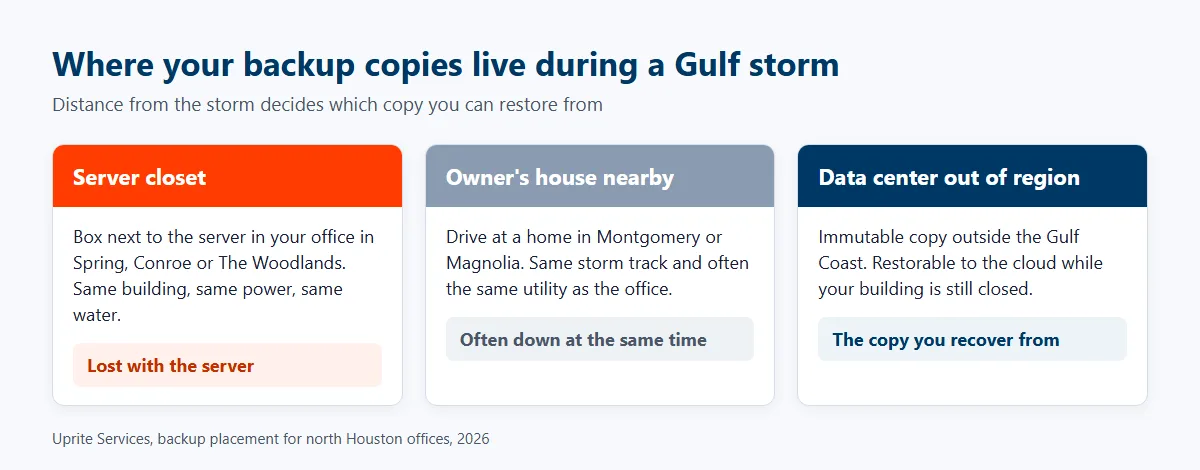
What does that mean? Mostly geography. A backup box in the server closet and a second copy at the owner’s house in Montgomery or Magnolia sit under the same weather system, and often on the same utility. That isn’t offsite in any way that counts during a Gulf storm. At least one copy should live in a data center outside the region, ideally outside the Gulf Coast entirely. And it should be one you can restore from while your own building is still closed.
How Long Should Backups Be Kept When Breaches Go Unnoticed for Months?
Longer than most keep them. We pulled the Texas Attorney General’s public breach list on October 27, 2026, and counted 13 notices posted between April 2025 and October 2026 for organizations based in Spring, Conroe and The Woodlands. Spring had 6 of them. Conroe had 4, and The Woodlands 3. They included 4 healthcare providers, 2 CPA firms, a tax advisory practice, a law firm, an energy company, a nonprofit and 3 other local businesses. Most were small. The median notice covered 897 Texans, and 7 of the 13 were under 1,000.
The number that should change your retention is how long these incidents ran before anyone noticed. Across the 12 notices that list both dates, the median gap between the start of the breach and its discovery was 189 days. That’s over 6 months. It lines up with the IBM 2026 Cost of a Data Breach report, which puts the global average at 247 days to find and contain a breach, and the cost at $4.99 million. Small local firms won’t see a bill like that. The timeline still applies.
Why does that matter? Say an attacker gets in during March and ransomware fires in September. Every restore point you keep for 30 or 60 days was taken while they were already inside. Restore from those, and you may bring the attacker back along with your data. Ransomware showed up in 48% of breaches in the Verizon 2026 Data Breach Investigations Report, and 69% of ransomware victims didn’t pay. Clean copies make that possible. So keep enough history to reach back before the break-in. Keep at least one copy that can’t be changed or deleted, even by someone holding an administrator password.
Microsoft 365 needs its own line. It’s where a lot of Woodlands-area firms keep their email and files now, and its built-in safety nets are short and fixed.
| What was deleted | How long Microsoft keeps it | Can you extend it? |
|---|---|---|
| Email permanently deleted in Exchange Online | 14 days by default | Up to 30 days, per Microsoft’s Exchange documentation |
| Files deleted in SharePoint or OneDrive | 93 days across both recycle bins | Not in the recycle bins, per Microsoft’s SharePoint documentation. Longer needs a retention policy. |
| Files encrypted or overwritten in place | Only as far back as version history reaches | Limited, and an attacker with admin rights can change it |
Compare those windows with 189 days. The gap is obvious. A separate Microsoft 365 backup, held outside the tenant, closes it. It’s cheap. And easy to forget.
What Do Texas Breach Rules Add to the Bill?
If the lost or stolen data includes personal information, the cost doesn’t stop at payroll. Under Texas Business and Commerce Code section 521.053, you have to notify affected people within 60 days of finding the breach. If 250 or more Texans are affected, the Attorney General has to hear from you within 30 days. Late notice has a price. Section 521.151 lets the Attorney General seek up to $100 per affected person for each day notice to those people is late, capped at $250,000 for one breach, and that sits on top of the letters, call center and credit monitoring that usually follow.
Backups help here too. A clean, recent, well-logged backup lets you work out what was taken and when. Notice letters need that. Without one, firms often can’t tell whose records were touched. So they notify everyone. And pay for everyone. Medical practices in the Research Forest and Conroe medical corridors carry a separate duty, because the HIPAA Security Rule at 45 CFR 164.308(a)(7) requires a written data backup plan and a disaster recovery plan, not just the backup itself.
How Do You Tell a Backup That Will Restore From One That Won’t?
You test it. On a calendar, with a stopwatch, and you write down how long it took. CISA’s Cybersecurity Performance Goals 2.0 set the floor at testing backups and recovery at least once a year. We think that’s too slow. Fully Managed IT restores real data every quarter instead. A quarterly test catches the backup that broke in February before hurricane season, not after it. Auditing your own setup? Check these 7 things.
- Every server, every PC that stores files locally, and the Microsoft 365 tenant are on the protected list, and the list matches what you actually run today.
- At least one copy is immutable, so it can’t be changed or deleted for a set period, even with an administrator login.
- At least one copy sits in a data center outside the Houston region.
- Retention reaches back further than a breach is likely to sit unnoticed, which means months rather than weeks.
- Each important system has a written recovery time and an acceptable amount of lost work, approved by someone who runs the business.
- A real restore was timed within the last 3 months, and the result is written down.
- Someone reads the failure alerts every day and opens a ticket when a job misses.
Don’t skip the first item. It sounds obvious, and it isn’t. A protected list written 3 years ago is how an old server keeps getting backed up while the new one never does. For more on setting time targets, our disaster recovery in Houston page lays out the tiers we use. Our data backup services page explains how restore speed changes with the size of what you’re restoring.
Which Businesses Here Need Full Disaster Recovery, and Which Just Need Backup?
Not everyone needs 15-minute snapshots and a warm standby in the cloud. On every system, it’s waste. We’d rather say so. A good plan matches the protection to what each system is worth per hour.
| Type of business | What usually works | Why |
|---|---|---|
| Small professional office in Spring that runs almost entirely in Microsoft 365, no server | A separate Microsoft 365 backup with long retention, plus a tested restore | There’s little on site to recover. The risk is deleted or encrypted cloud data. |
| CPA, law or engineering firm in The Woodlands with a file server or practice software | Hourly image backups to a local appliance, an immutable copy outside the region, quarterly restore tests | Billable hours make every lost hour expensive, and client files carry notice obligations. |
| Medical or dental practice near Research Forest or in Conroe | Frequent snapshots of the practice system, cloud failover, a written HIPAA backup and recovery plan | Patients are booked, records are regulated, and HIPAA requires the written plan. |
| Manufacturer, distributor or field-service company along I-45 in Conroe | Fast local restore for the ERP and dispatch systems, cloud copy for everything else, a power plan for the shop floor | A stopped line or idle trucks cost more per hour than an idle office. |
The cloud piece doesn’t have to mean moving everything. Weighing on site versus cloud? Our guide to cloud services in The Woodlands and Conroe covers that choice, including where cloud backup fits. Still deciding on outside help? See what managed IT costs in The Woodlands and our comparison of the best IT support companies in The Woodlands. We have local pages for Spring and Conroe too.
So What Should You Do This Month?
Find out 3 numbers. How old is the newest copy you can actually restore? How long did the last real restore take? How far back does your oldest clean copy go? If nobody in the building can answer all 3 without guessing, that’s your gap. The payroll math above puts a single lost day for 25 people at around $9,290. Texas notice rules and a long breach dwell time can make the real figure much larger.
Uprite is a managed IT and cybersecurity provider that’s served Texas businesses since 1999. We support companies across The Woodlands, Spring and Conroe from our Houston team. We set up backups that are monitored, locked and stored outside the region, and we prove them with a timed restore every quarter, so the recovery time in your plan is a measured number rather than a guess. Want to know where your setup stands before storm season or an audit forces the question? Talk with our team, and we’ll start by checking what’s actually protected.
Tell us what you run and where it lives, and we’ll check what’s backed up, how far back it goes and how long a restore would really take.
Check My Backup SetupWhat Owners in The Woodlands, Spring and Conroe Ask About Backup
How much does backup and disaster recovery cost for a small business near The Woodlands?
At Uprite, backup with quarterly restore testing is included in Fully Managed IT, which starts at $138 per user per month. For a 25-person office that starts around $3,450 a month for the whole IT department, backup included. Licensing is extra. So is any cloud failover capacity, priced on what you run.
Doesn’t Microsoft 365 already back up our email and files?
Not the way most assume. Microsoft keeps permanently deleted email for 14 days by default, or up to 30 unless you add a retention policy or hold, and deleted SharePoint and OneDrive files for 93 days. That covers accidents. It won’t reach back far enough for a breach that went unnoticed for months. A separate backup outside the tenant is still worth having.
Is a backup drive at the owner’s house in Montgomery good enough as an offsite copy?
Not on its own. It beats nothing. But it’s worse than it looks. A house in Montgomery or Magnolia sits under the same storms, and often the same utility, as an office in Conroe or The Woodlands, so one Gulf hurricane can take out both copies at once. Keep at least one copy in a data center outside the region.
How often should we test a restore?
Quarterly. That’s what we recommend and what Uprite’s Fully Managed IT does. CISA’s baseline is once a year, which leaves too long for a broken job to go unnoticed. Put one test in May. You’ll go into hurricane season with a measured recovery time.
What happens if ransomware hits and our backups are infected too?
You restore from an immutable copy taken before the attacker got in, which is why retention length and immutability matter more than backup frequency. In recent Attorney General breach notices from Spring, Conroe and The Woodlands that give both dates, the median time from breach to discovery was 189 days. Keep only 30 days and every copy may be compromised.
Do we have to report data loss to the Texas Attorney General?
Only when sensitive personal information was breached and 250 or more Texans are affected. Then notice is due within 30 days of discovery. Affected individuals must hear from you within 60 days either way. A lost file from a hardware failure, with no unauthorized access, generally isn’t a breach under the law.