
Cybersecurity cost in Dallas comes down to 6 lines on a quote. Endpoint protection, email security, and sign-in controls run on Microsoft licenses that total $12 to $15 per user a month at list price. Monitoring, training, and security leadership are mostly people, and Dallas-Fort Worth pays its IT and security managers $185,720 a year on average. Our cybersecurity services in Dallas start at $40 per user. Price every line before you sign.
Monitored cybersecurity for a Dallas small or mid-sized business starts around $40 to $55 per user per month, which is Uprite’s $40 managed security tier plus up to $15 in Microsoft security licenses your plan may not include. Without IT staff or an IT provider, the same stack comes inside a managed IT plan instead.
I’m the Lead vCIO at Uprite, so I read security quotes after someone else has written them. They tend to arrive as 1 per-user number. That number hides 6 decisions. Each has a price.
Some of those decisions are software, and Microsoft prints the prices. The rest are people. That’s where Dallas-Fort Worth gets expensive, because the metro employs 30,690 computer and information systems managers and pays them more than Houston or San Antonio does.
So pull the quote apart. Put a price next to every line, decide which ones your insurer, your clients, and your own risk actually require, and fund those first. The rest can wait a budget cycle.
What is a cybersecurity budget, line by line?
A cybersecurity budget is the monthly cost of the tools that protect your devices, inboxes, and sign-ins, plus the people who watch those tools, train your staff, and answer your insurer’s questions. In Dallas the tools are the small share. People are most of the bill.
That split is why 2 quotes for the same office can look nothing alike. One provider priced the tools. The other priced a team that answers at 3 a.m. Both called it security.
What does each line of the security stack cost in 2026?
At Microsoft’s October 2026 list prices, endpoint, email, and sign-in protection cost $12 to $15 per user per month bought separately, or come inside Microsoft 365 Business Premium at $22.00. Monitoring, training, and leadership are labor.
| Line item | What it covers | Tool price per user per month, annual | Who has to run it |
|---|---|---|---|
| Endpoint detection and response (EDR) | Spots ransomware and hands-on-keyboard attacks on laptops and servers, then isolates the device | Defender for Business, $3.00 alone or inside Business Premium | Someone who answers the alert, at any hour |
| 24/7 monitoring and response (MDR or SOC) | Analysts reading alerts and logs around the clock and starting containment | None. It’s a service. | A staffed security operations center |
| Email security | Phishing, malicious links and attachments, and QR-code lures | Defender for Office 365 Plan 1, $2.00, included in Business Premium | Quarantine review and rule tuning |
| MFA and conditional access | A second sign-in factor plus rules that block risky logins | Basic MFA comes with every Microsoft 365 business plan, and Entra ID P1 adds policy-based access for $7.00 | Exception control and separate admin accounts |
| Awareness training and phishing tests | Teaching staff, then testing them with simulated attacks | Defender for Office 365 Plan 2, $5.00, adds attack simulation training | A person to run campaigns and keep completion records |
| Security leadership (vCISO) | Policies, the insurer application, the incident plan, and the quarterly review | No license | A fractional or full-time security lead |
Read the license column twice. The numbers are small on purpose. Microsoft lists Defender for Business at $3.00 per user and Business Premium at $22.00 on the same page, while its Defender for Office 365 plans run $2.00 and $5.00 and Entra ID P1 is $7.00, all billed per user on annual plans.
But Business Premium isn’t a security-only license. It bundles Defender for Business, Defender for Office 365 Plan 1, Intune, and policy-based access controls with the Office apps your team already uses. Count the difference between it and your current plan as security spend. Not the whole seat.
Now look at the right-hand column. Every license in that table produces alerts, and an alert nobody reads at 2 a.m. protects nothing. Alerts need readers. Closing that gap is the job of managed security services in Dallas, and it’s the line buyers are most tempted to cut. Don’t. If the acronyms blur together, our plain-English guide to EDR, MDR, and XDR sorts them out.

Why does the people line cost so much in Dallas-Fort Worth?
Dallas-Fort Worth pays computer and information systems managers, the BLS category that includes IT security managers, an average of $185,720 a year, and benefits push the employer’s real cost past $265,000.
Those figures come from the BLS May 2025 metro wage estimates. The metro employs 30,690 of these managers at a location quotient of 1.76, so the job is 76% more concentrated here than in the U.S. workforce as a whole. Plenty of employers want them. A 40-person company is rarely the highest bidder.
Wages are only part of it. The BLS employer cost survey for June 2026 puts private-industry compensation at $46.89 an hour for every $32.82 paid in wages, a 1.43 multiplier once payroll taxes, insurance, and paid leave are counted, and benefits alone came to $14.07 of every hour. Apply it to the $89.29 hourly mean, and 1 hour of a DFW security manager costs an employer about $128. That adds up fast.
Analysts aren’t cheap either. The middle half of the metro’s 7,080 information security analysts earn $103,440 to $162,270, so an analyst at the 25th percentile still costs about $147,800 a year fully loaded. The math for staffing a round-the-clock desk is on our Dallas security page. It isn’t pretty.
One comparison worth keeping. The Dallas-Fort Worth manager average runs 1.9% above Houston’s $182,200 and 11.5% above San Antonio’s $166,630, which makes this the most expensive of the 3 metro areas we serve for the people line.
When does a fractional vCISO beat a full-time hire?
A fractional vCISO beats a hire when you need a few days of security leadership a month, not a full-time seat. At DFW employer costs, each of those hours is worth about $128, and a full-time hire costs all 173 a month.
| Leadership hours a month | Value at about $128 an hour | What I’d expect that time to cover |
|---|---|---|
| 4 | About $510 | A quarterly security review and the insurer renewal |
| 8 | About $1,020 | Add vendor security questionnaires and policy updates |
| 16 | About $2,040 | Add a risk register, board reporting, and a yearly tabletop exercise |
| 40 | About $5,100 | Close to a part-time security manager |
| 173, full time | About $22,100 | All of the above, plus recruiting and turnover risk |
Treat that table as a yardstick, not a price list. Hold quotes against it. If a vCISO proposal runs $4,000 a month for what reads like 8 hours of work, ask what the other hours buy.
I’ll admit my bias here, since fractional leadership is my day job. Weigh it accordingly. Most 30-person companies don’t need a full-time CISO. They need 1 person who owns the insurer application, the incident plan, and the quarterly review, and who’d notice if any of the 6 lines quietly lapsed. Regulated firms past a few hundred employees, or anyone answering security questionnaires every week, should hire.
Uprite doesn’t bill that work as a separate retainer. Quarterly security reviews and strategy planning are part of the $40 managed security tier on our published price list, and vCIO services in Dallas come with every fully managed contract rather than arriving on a separate invoice.
What does your cyber insurer want you to prove?
Cyber insurers now ask for specific controls before they’ll quote, led by MFA on remote and admin access, EDR, and tested backups. An application answer that doesn’t match your systems can cost you the policy.
Insurance broker Marsh says insurers have taken a much more cautious stance, requiring specific cybersecurity controls with insurability at stake. Its guide to the 12 key cyber controls reads like a security quote with the prices taken off.
- MFA for remote access and for privileged or administrator accounts.
- Email filtering and web security, which is the $2.00 line in Microsoft terms.
- Secured, encrypted, and tested backups. Those usually sit in your managed IT plan, not the security budget.
- Privileged access management, plus RDP and other hardening work.
- Endpoint detection and response.
- Patch and vulnerability management, where scanning is in our $40 tier and patching usually stays with whoever runs IT.
- Incident response plans, along with logging and monitoring, the 2 controls that turn a tool into a service.
- Awareness training with phishing tests.
- Replacing or protecting end-of-life systems.
- Digital supply chain risk, meaning the vendors who can reach your network.
Take the application seriously. What happens when an answer is wrong? In July 2022 Travelers asked a federal court in Illinois to rescind a $1 million cyber policy it had sold to International Control Services, after concluding that the MFA described on the application wasn’t protecting the company’s servers when ransomware hit, as Taft’s summary of the case explains. The court docket shows Travelers’ motion for rescission granted that August. No policy, no payout.
So collect the evidence before renewal season, not during it. The MFA coverage report. The EDR deployment list. The date of your last restore test. Training completion records. Our guide to a 72-hour breach response plan covers the incident plan the application will ask about.
How does the DFW industry mix change the bill?
Your industry decides which lines grow. Finance and health care carry the costliest breaches in IBM’s 2026 study, and the 4 core DFW counties hold 37.0% of the state’s private finance and insurance jobs against 27.5% of all private jobs.
| Industry | Private jobs in Dallas, Tarrant, Collin, and Denton counties, 2025 | Share of that industry’s Texas jobs | IBM 2026 average breach cost | Line that usually grows |
|---|---|---|---|---|
| Finance and insurance | 244,668 | 37.0% | $6.3 million | MFA on every system that touches client data, plus outside testing |
| Legal services | 30,940 | 29.2% | Not reported separately | Email security and payment-change checks |
| Health care and social assistance | 409,780 | 23.9% | $6.64 million | Training records, access logs, and backup proof |
| Energy, meaning extraction, drilling support, power, and pipelines | About 16,400 | About 6% | $5.2 million | Monitoring scoped for plant and field networks |
| All private industries | 3,321,673 | 27.5% | $4.99 million worldwide | The baseline stack |
Sit with the finance row. Our count of the BLS Quarterly Census of Employment and Wages for 2025 puts more than a third of Texas finance and insurance jobs in these 4 counties, and the Census Bureau’s 2023 County Business Patterns counts 1,077 finance and insurance offices across the metro with 20 to 499 employees. That’s a big mid-market. IBM’s 2026 data breach release puts the average financial breach at $6.3 million, and the cybersecurity requirements for Dallas financial firms explain which controls examiners and clients expect.
Law firms are small and email-heavy. Few people. Big transfers. The 4 counties average 7.4 people per legal office, and CBP finds just 314 metro law offices with 20 to 499 staff. A 7-person firm wiring settlement funds doesn’t need its own analyst. It needs mail filtering, call-back checks on payment changes, and MFA with no exceptions. Firm-specific numbers live in what Dallas law firms pay for managed IT.
Health care has the most mid-sized employers of the 4 industries in the table, 3,565 offices with 20 to 499 staff in CBP, and IBM’s 2026 report puts its average breach at $6.64 million, the highest of any industry, per Baker Donelson’s review of the report. Practices end up paying for training records and access logs, not just tools. Paperwork costs money too. Our page on healthcare IT services in Dallas covers the rest.
Energy isn’t Houston’s energy. QCEW counts about 16,400 private jobs in oil and gas extraction, drilling support, power generation, and pipelines across the 4 counties, roughly 6% of the state’s total, yet Dallas County extraction employers pay an average of $274,139. Fewer field sites. Bigger payrolls. IBM’s release puts the average energy breach at $5.2 million and says 62% of AI-driven attacks targeted critical infrastructure.
Is managed security cheaper in Fort Worth than in Dallas?
Managed security shouldn’t cost less in Fort Worth, because BLS measures security wages for the whole Dallas-Fort Worth metro as 1 area, and Tarrant County’s IT services firms pay slightly more than Dallas County’s.
Look for a Fort Worth discount in the BLS tables and you won’t find one to apply. The May 2025 wage estimates treat Dallas-Fort Worth-Arlington as a single area, with no separate Fort Worth figure. QCEW does split the counties, and in 2025 Tarrant’s computer systems design services firms paid their workers $129,913 on average against $126,731 in Dallas County, 2.5% more. Hardly a discount. Our managed security services in Fort Worth start at the same $40 per user as Dallas.
What does move a Fort Worth quote is the shape of the business. Tarrant County manufacturers average 47.8 workers per site, and transportation and warehousing employers average 53.5, against 18.2 for the county’s private employers overall. Big sites. Real shifts. Before you compare 2 proposals, ask each provider the same 4 questions.
- Are shared shop-floor PCs and kiosks priced per user or per device?
- Does the night shift get the same monitoring and response as the day shift?
- Are plant control networks in the quote, or scoped as a separate project?
- How far away is the nearest engineer if a machine needs hands on it? Our DFW office on Alpha Road in Dallas is about 35 miles from downtown Fort Worth.

What will a 30-person and a 120-person Dallas company pay?
At list prices, a 30-person Dallas company with its own IT support would pay about $1,650 a month for monitored security, and a 120-person company about $6,600, using Microsoft’s security add-ons and Uprite’s $40 starting rate.
| Line | 30 users, per month | 120 users, per month |
|---|---|---|
| Defender for Business at $3.00 | $90 | $360 |
| Defender for Office 365 Plan 2 at $5.00 | $150 | $600 |
| Entra ID P1 at $7.00 | $210 | $840 |
| Uprite managed security from $40 | $1,200 | $4,800 |
| Monthly total | $1,650 | $6,600 |
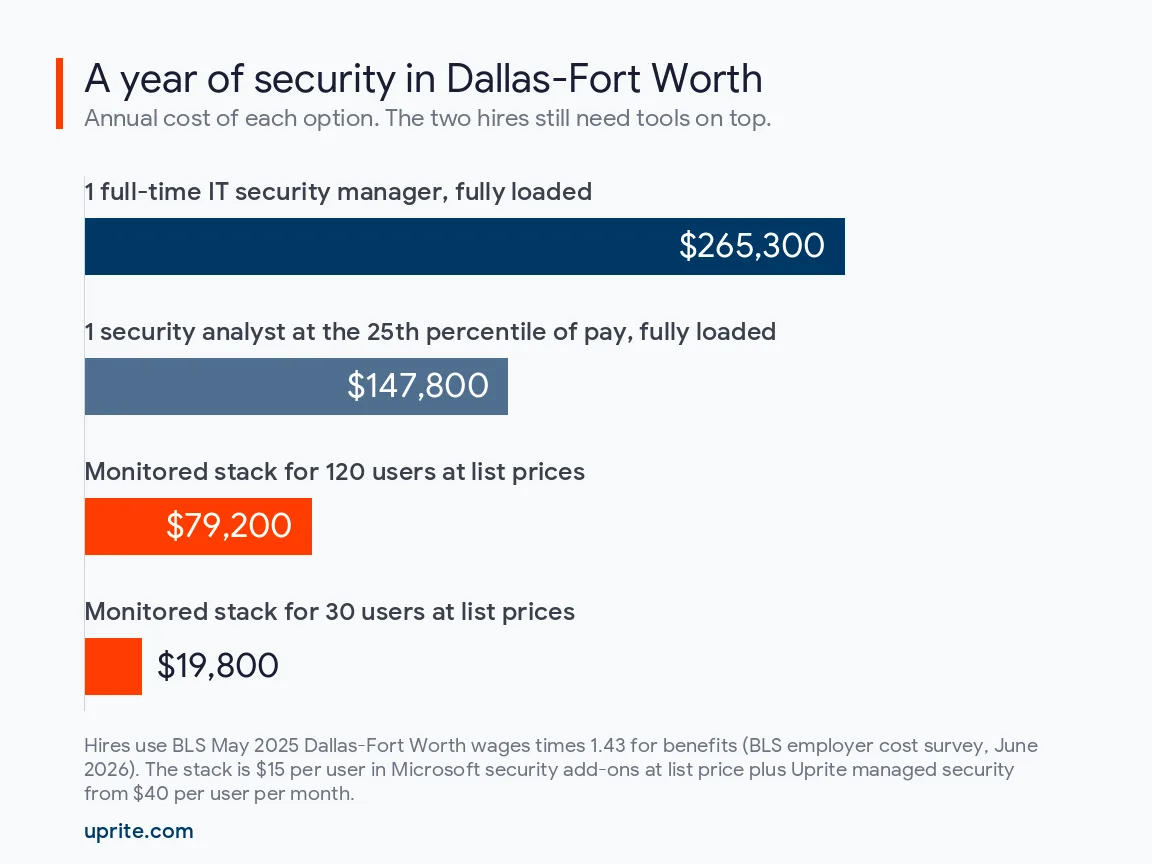
| Annual total | $19,800 | $79,200 |
Caveats apply here. Already on Business Premium? Then Defender for Business, Plan 1 email protection, and policy-based access are paid inside the seat, and the license lines shrink to the $5.00 Plan 2 license if you want the simulations. These are starting rates, too. Your assessment sets the real number.
Now set the hire beside it. One full-time DFW security manager at the BLS average, fully loaded, costs about $265,300 a year. That’s 3.4 times the 120-person stack, and that person still sleeps at night. Nights need a team.
Which line should a tight budget fund first?
Fund the cheap controls with measured payoffs first, meaning system hardening, 7-day patching, and MFA everywhere, then pay for monitored EDR, because Marsh McLennan’s claims research ties each of the first 3 to fewer incidents.
The research backs that first tier. Marsh McLennan’s 2023 study of its own claims found that organizations using automated hardening techniques were nearly 6 times less likely to have a cyber incident, that patching high-severity flaws within 7 days cut the odds of an incident in half, and that MFA across all remote access, admin accounts, and sensitive data made a successful attack 1.4 times less likely. Only 24% of the organizations studied patched that fast. Fast patching is rare. All 3 are mostly configuration work your IT team or provider can start this quarter, while the monitored EDR line is where the real money goes.
Then match the plan to the team you actually have.
Have an IT person, but nobody watching at night?
Buy the monitoring. Our $40 tier sits on top of your current IT team or provider, and it adds the overnight coverage, threat intelligence, scanning, and incident response that a single admin can’t staff.
No IT staff at all?
Security comes inside a managed IT plan. In Dallas-Fort Worth that includes IT Pro, a remote plan at $110 per user that Uprite offers to teams of 12 or more outside Houston and San Antonio, with advanced endpoint and email security built in, or fully managed IT from $138 with on-site support. See what managed IT costs in Dallas for the full plan math.
Already employ a security team?
You may not need us. That’s the honest answer. If you have analysts of your own, the gap worth checking is nights and weekends, and a team that already covers those has made a perfectly reasonable call.
What does Uprite charge for security in Dallas-Fort Worth?
Uprite’s managed security tier starts at $40 per user per month in Dallas and Fort Worth, built to sit on top of an IT team or provider you already have, and the fully managed plan, security included, starts at $138.
The $40 tier covers advanced firewall management, SIEM and SOC monitoring, threat intelligence, vulnerability scanning, incident response, and quarterly security reviews. We run our own security operations center, and our average first response across clients is about 5 minutes. Licensing is billed separately.
Terms don’t change by metro. No hidden fees. A rate that won’t rise in year one. A 120-day satisfaction promise. Ransomware is the threat most of these lines exist to stop, and our guide to ransomware protection in Dallas walks through what City Hall learned the hard way. If you run offices in more than one metro, compare this page with cybersecurity cost in Houston and cybersecurity cost in San Antonio, where different drivers set the price, from federal port and pipeline rules in Houston to a much smaller analyst pool in San Antonio.
Straight Answers on DFW Security Spend
How much does cybersecurity cost for a small business in Dallas?
$40 to $55 per user per month is a realistic floor for monitored security, before any compliance project. That assumes you already have IT support and buy Microsoft’s security add-ons at list price. A 30-person office lands near $1,650 a month.
Is Microsoft 365 Business Premium enough security on its own?
Not by itself. Business Premium includes Defender for Business, Defender for Office 365 Plan 1, and policy-based access controls, which cover 3 of the 6 lines. Nobody is watching the alerts it raises, though, and Plan 1 doesn’t include attack simulation training.
What does a fractional vCISO cost compared with hiring one in DFW?
Each hour of security leadership is worth about $128 at Dallas-Fort Worth employer costs, so 8 hours a month is roughly $1,020 of a full-time manager’s loaded pay, against about $22,100 a month for the whole person. Use those numbers as a yardstick when a vCISO quote arrives, then ask exactly which hours and deliverables it covers. Titles matter less than hours.
Will spending more on security lower our cyber insurance premium?
Maybe, but don’t budget on it. Carriers decide whether to quote you based on specific controls, so the dependable payoff is staying insurable and holding answers that survive a claim. Ask your broker which controls your carrier rewards before you buy anything new.
Do Fort Worth plants pay more for security than Dallas offices?
Per user, no. Per site, sometimes. Shared floor terminals, night shifts, and plant control networks add devices and hours that a per-user count misses, so ask how each one is priced before you line up 2 quotes.
Can we add managed security without replacing our IT provider?
Yes, that’s exactly what the $40 tier is for. It sits on top of your current IT team or provider, adds 24/7 monitoring and incident response, and leaves day-to-day support where it is. Nothing gets ripped out.
How do we check a quote for licenses we already own?
Ask for the license list line by line and hold it against your Microsoft 365 admin center. If a quote charges for Defender for Business while you already pay for Business Premium, you’re buying the same tool twice. Cross it off.
Want your own 6 lines priced? Book the free security assessment and we’ll review the tools you already own, show where each line stands, and give you a per-user number before you buy anything new.
Book a Free Security Assessment