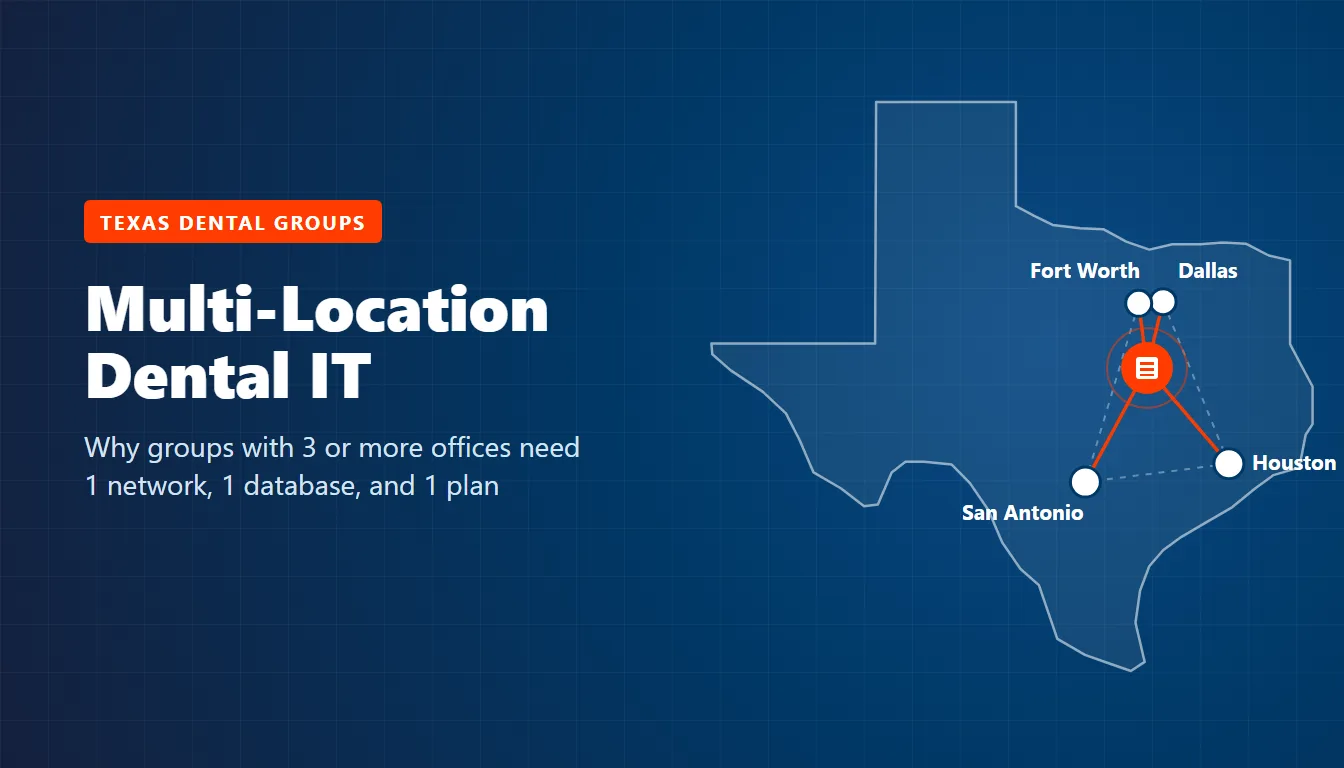
Multi-location dental IT in Texas means running every office on 1 network, 1 patient database, 1 set of logins, and 1 HIPAA program. A group that keeps each office on its own server, its own router, and its own local vendor is paying for 3 small IT departments. It gets the visibility of none.
The break usually shows up at the third office. A 2-office group can limp along as a practice with a branch. A 3-office group can’t. Patients book wherever there’s an opening. Hygienists float. The owner dentist stops being the person who hears about every server alert, and each front desk builds its own workarounds. If you’ve been following our guide to IT support for dental practices in Houston, think of this as the next chapter, written for groups with 3 or more offices.
Short version. A Texas dental group with 3 or more offices needs 1 design, not 3 copies of the first office. Decide where the patient database and imaging archive live before you open or buy the next location. Put every office on the same network template, sign-in system, phone system, and backup plan. Put in writing whether your offices are 1 HIPAA covered entity or several. Texas’s SB 2610 safe harbor asks more once a business entity reaches 20 employees.
What is multi-location dental IT?
Multi-location dental IT is how a dental group with several offices runs its technology as one system. It covers where the practice management database and the imaging archive live, how the offices connect, how staff sign in, how phones route between front desks, and how the group proves HIPAA security across every address instead of office by office.
It’s a design decision. Not a bigger version of the IT you already have.
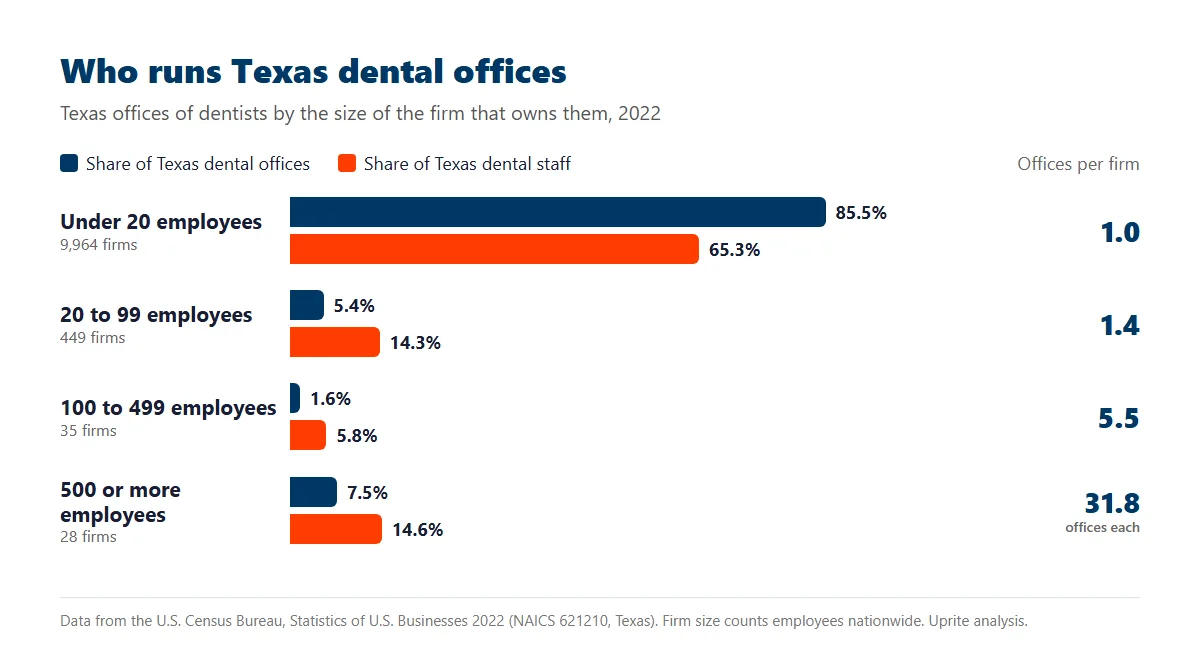
Texas has more of these groups than you’d guess from the dentists you know. We pulled the U.S. Census Bureau’s 2022 Statistics of U.S. Businesses for offices of dentists in Texas because it counts firms and offices separately. That split matters. In 2022, 512 dental firms operating in Texas had 20 or more employees nationwide, and together they ran 1,721 of the state’s 11,845 dental offices while employing 30,928 people, or 34.7% of everyone working in a Texas dental office. More than a third of the workforce.
| Firm size (employees nationwide) | Texas firms | Texas offices | Offices per firm | Share of Texas dental staff |
|---|---|---|---|---|
| Under 20 | 9,964 | 10,124 | 1.0 | 65.3% |
| 20 to 99 | 449 | 639 | 1.4 | 14.3% |
| 100 to 499 | 35 | 191 | 5.5 | 5.8% |
| 500 or more | 28 | 891 | 31.8 | 14.6% |
Look at the bottom row. The 28 largest firms ran 891 Texas offices by themselves, which is 7.5% of every dental office in the state. Nationally that share is 5.8%. The middle is thinner, too. Firms with 20 to 99 employees ran 5.4% of Texas offices against 7.6% across the U.S.
So Texas dentistry is barbelled. Lots of single offices. Some very large groups. Fewer groups in between. Those in-between groups, the owners of 3 to 15 offices, are who this post is for.
Dentists see the same shape. In the ADA Health Policy Institute’s 2024 practice modalities data, 35.5% of Texas dentists worked in practices with 2 or more locations, against 27.3% nationally, and 24.8% were affiliated with a dental support organization, against 16.1%. Yet only 8.3% worked in practices with 2 to 9 locations, below the 9.9% national figure. Barbell again.
County data tells the same story from another angle. In the BLS Quarterly Census of Employment and Wages, dental offices in the 3 biggest counties got fewer and larger between 2020 and 2025.
| County | Dental offices 2020 | Dental offices 2025 | Staff per office 2020 | Staff per office 2025 |
|---|---|---|---|---|
| Dallas | 1,651 | 1,544 | 5.8 | 7.1 |
| Tarrant | 978 | 943 | 6.5 | 7.3 |
| Harris | 2,226 | 2,214 | 5.3 | 6.2 |
| Bexar | 808 | 848 | 6.9 | 7.6 |
| Texas | 11,578 | 12,722 | 6.3 | 7.0 |
Dallas County lost 107 dental offices while its dental workforce grew 14.2%. Tarrant and Harris both lost offices while adding staff. We can’t see who bought whom in this data, but fewer, bigger offices is what consolidation looks like from the outside. Bexar went the other way. It added 40 offices even as the average office got bigger, so dental IT support in San Antonio still involves a lot of brand-new offices.
Why does the third office change the IT model?
At 3 offices, 4 things start moving at once. None of them is a purchase.
- Headcount crosses a legal line. At the Texas average of 7.0 staff per dental office, 3 offices is about 21 people.
- Patients move between offices. They book where there’s an opening, so their chart, ledger, and X-rays have to follow them.
- Staff float. An associate works Tuesdays in one office and Thursdays in another, and her login, her email, and her access should go with her.
- Nobody sees the whole picture. The owner dentist can’t be the help desk for 3 buildings, so each office quietly solves its own problems.
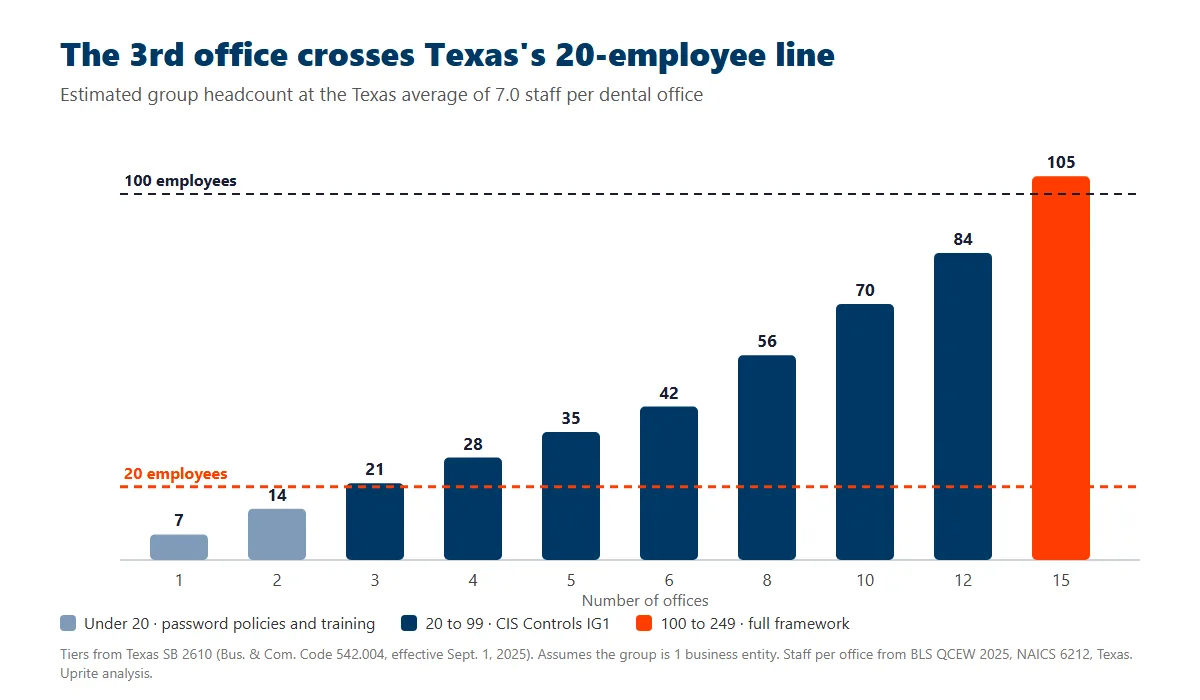
Headcount has a statute attached. SB 2610, in effect since September 1, 2025, shields a business with fewer than 250 employees from exemplary damages after a breach if it ran a qualifying cybersecurity program. Under 20 employees, that program needs “simplified requirements, including password policies and appropriate employee cybersecurity training.” From 20 to 99, it needs “moderate requirements, including the requirements of the Center for Internet Security Controls Implementation Group 1,” which is a set of 56 safeguards. It’s a real jump. We walk through how those tiers apply to a dental practice in our post on dental practice IT security in Texas.
Keep 2 cautions in mind. SB 2610 is a safe harbor, not a mandate, so nobody fines you for missing it. And the statute counts employees of “a business entity” without saying how affiliated entities add up. If each of your offices sits in its own PLLC, have your attorney tell you which tier you’re really in. Don’t guess.
The last bullet is the one that costs money. When each office solves its own problems, a year later you’ve got 3 firewall brands, 3 backup schedules, 3 ways of resetting a password, and no single place to see whether any of it is working. Nobody did anything wrong. It’s simply what happens when there’s no design.
Where should the patient database live?
This is the decision that sets everything else, and in our experience it’s the one groups make last, usually by accident. Make it on purpose. There are 3 workable models.
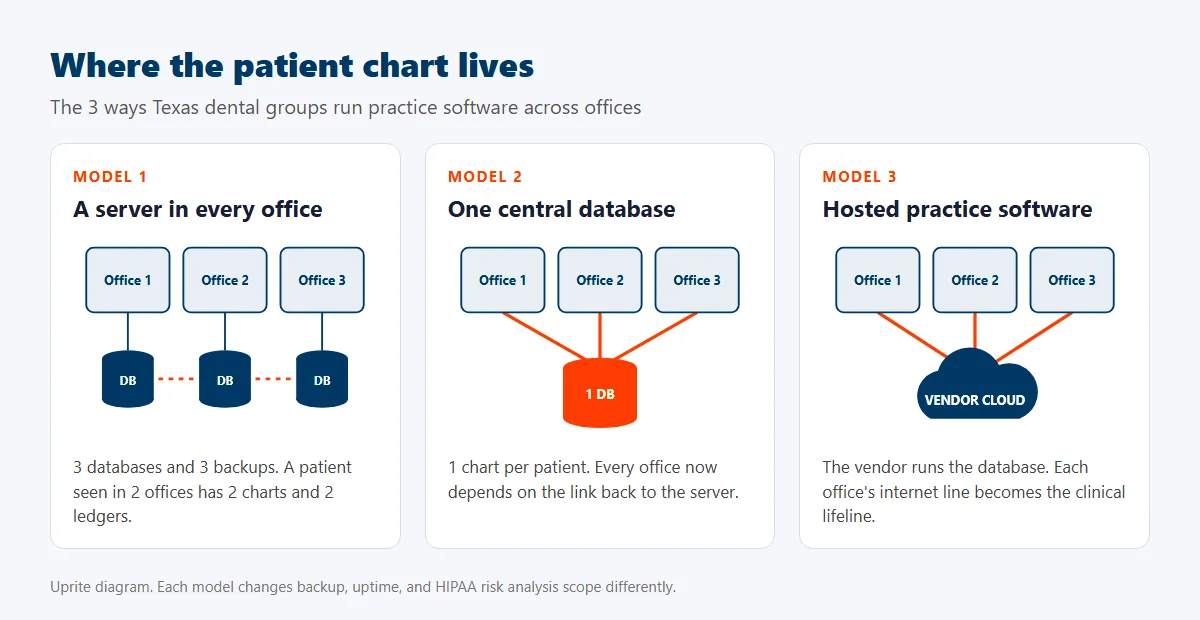
A server in every office is where most groups start, because that’s how each practice was built. It’s also where the patient record splits. Several common platforms are built for one office on one local network. As we covered in our breakdown of dental software server requirements, Patterson doesn’t support Eaglesoft over a WAN, and Henry Schein One doesn’t support running Dentrix through Terminal Services or Citrix. Put 2 offices on those systems and a patient seen in both has 2 charts and 2 ledgers.
One central database fixes the split. Henry Schein One’s Dentrix Enterprise brings every site into “a single database” on Microsoft SQL Server, and its system requirements say remote offices are best served by a Remote Desktop Session server “at the same location as the Microsoft SQL Server.” That’s a new database engine, too, since single-office Dentrix doesn’t run on SQL Server. Open Dental’s multiple locations guide lists 11 ways to set up multiple offices, typically suggests 1 database shared over a VPN for fewer than 5 locations, and says its support “cannot assist with network setup.” That’s the trade. Every office now depends on the link back to that server, and if the circuit at your newest office drops at 8 a.m., that office can’t see a single chart.
Hosted practice software moves the database to the vendor. Each vendor publishes its own internet floor. Curve Dental recommends 10 Mbps down and 5 up for an average practice of 1 to 10 users, Dentrix Ascend lists 50 down and 10 up for 10 logins at one location, and Open Dental Cloud wants 20 down, 10 up, and latency under 30 milliseconds. There’s no server to patch. But each office’s internet line becomes the clinical lifeline, so a second circuit or a cellular backup stops being optional.
| Model | What it fixes | What it costs you in IT | Fits best when |
|---|---|---|---|
| Server in every office | Nothing new, but each office keeps working if another goes down | 3 servers, 3 backups, 3 patch schedules, split charts | Offices rarely share patients or staff |
| One central database | 1 chart and 1 ledger per patient, group reporting | A business-grade circuit at every office, a failover plan, a hosted or hardened central server | Patients and providers move between offices every week |
| Hosted practice software | No practice server to run, vendor handles the database | 2 internet paths per office, browser and identity hardening, a data export you’ve tested | The group is adding offices fast and wants the same setup at each |
Here’s my honest take. I’d rather see a group stay on separate office databases for another year than move to 1 central server over a single consumer-grade internet line, because a central database on a bad link is worse than 3 good local ones. Fix the network first. Then consolidate.
Imaging is the heavier half of the decision
Practice software moves small records. Imaging moves files. A 2D X-ray runs about 9 MB, and a cone beam CT (CBCT) volume can run up to 1 GB, per the vendor figures we collected for our server requirements post. Do the math. A 1 GB scan takes about 80 seconds to move at a true 100 Mbps, and close to 7 minutes on a 20 Mbps upload. Check the upload number on each office’s plan, not the download number on the bill. Upload is the bottleneck.
So the CBCT’s location matters. If the scanner sits in office 1 and the oral surgeon reads in office 3, either the image archive lives somewhere both can reach quickly, or someone ends up carrying a USB drive. We’ve seen both.
Who answers the phone when 3 offices share 1 schedule?
Start at the front desk. It’s where a multi-office group feels its IT every hour, and it’s the part a lot of IT plans skip.
With 1 office, there’s 1 desk. At 3, you have choices. Each office can keep its own line and its own hold music, or calls can route to whoever is free across the group, with overflow from a slammed office ringing a quieter one after 4 or 5 rings. Larger groups go further and build a small central business office that handles scheduling, recall, and insurance verification for every location.
Every one of those options is a phone system and identity question first. A central scheduler needs 1 view of all 3 schedules, which loops back to the database model above. Call routing between offices needs 1 hosted phone platform rather than 3 separate carriers. And a recall team calling patients from every office needs the same patient list, the same call scripts, and logins that work from any desk. We run that kind of setup through our managed phone system service. It also gives you 1 place to change call routing instead of 3.
Is your group 1 HIPAA covered entity or several?
This question decides how much HIPAA paperwork you carry. Few groups decide on purpose. Who signs the policies? Whose risk analysis covers the shared server?
If every office sits under 1 legal entity, that entity is 1 covered entity, with 1 set of policies and 1 risk analysis that has to reach every office. If each office is its own PLLC or LLC, each one is a separate covered entity by default. That’s 3 sets of policies, 3 risk analyses, and paperwork between your own practices. It adds up.
There’s a way out. Under 45 CFR 164.105(b), legally separate covered entities under common ownership or common control may designate themselves a single affiliated covered entity. Common ownership means an ownership or equity interest of 5% or more. The designation has to be in writing, and you keep that document for 6 years after it was last in effect.
Designation consolidates the work. It doesn’t shrink it. The group still has to cover all the ePHI it holds, and the risk analysis rule in 45 CFR 164.308 doesn’t care which building a server sits in. HHS’s own guidance on risk analysis says electronic media “includes a single workstation as well as complex networks connected between multiple locations.” Our post on the dental HIPAA security risk analysis covers what that document has to include.
Regulators want more, not less. HHS has proposed a Security Rule update that would require a written inventory of every technology asset, including where it sits, plus a network map of how patient data moves, reviewed at least every 12 months and after any “sale, transfer, merger, or consolidation.” It’s still a proposal. The federal regulatory agenda now lists July 2027 as its target, and a group that buys practices should build that inventory anyway.
Texas adds its own clock. Under Texas Business and Commerce Code 521.053, you notify affected people within 60 days of determining a breach happened, and the Texas attorney general within 30 days if 250 or more Texans are involved. Those clocks start when you determine there was a breach, so a group that can’t see logs from all 3 offices is slow to know anything at all. Central logging fixes that.
Does your management company count as a dental support organization?
It might. And IT is one reason.
Texas treats owning an office that employs dentists as practicing dentistry under Occupations Code 251.003, so a non-dentist can’t own the clinical practice. Groups that want shared billing, HR, and IT often put those services in a separate management company that contracts with the dentist-owned practices.
Texas has a registration law aimed at exactly that company. Business and Commerce Code chapter 73 defines a dental support organization as an entity that provides 2 or more “business support services” to a dentist under an agreement, and the list includes “information systems” and “regulatory compliance” right next to billing, payroll, and staffing. A dental support organization has to register with the Texas secretary of state every year by January 31, or within 90 days of signing its first agreement. Missing it carries a civil penalty of up to $1,000, and each day counts as a separate violation.
So if your management company runs the group’s IT and its HIPAA compliance, it’s already providing 2 of the listed services. Check the registration. The law dates to 2015, so it isn’t new, just easy to miss.
Structure decides the IT, too. If the management company holds the Microsoft 365 tenant, the firewall contracts, and the practice software license, the records inside them still belong to the treating dentist under the dental board rule covered below. Write down who owns each system, who can grant access, and what happens to a dentist’s access when they leave. Your attorney should confirm the structure. IT can’t be designed until someone has.
What changes when you buy another practice?
In our experience, acquisition is how a lot of groups reach office 3, 4, or 7. IT starts before closing.
The seller’s records come with rules attached. Under 22 TAC 108.8, dental records are “the sole property of the dentist who performs the dental service” unless ownership is transferred. When a dentist leaves a location or sells, the rule gives 3 options. They keep the records, sign a written transfer of records, or sign a written maintenance agreement, and either agreement has to be reported to the Texas State Board of Dental Examiners within 15 days. A maintenance agreement must keep the original dentist’s “access to and control of the records.”
That last line is an IT requirement hiding in a dental board rule. If a selling dentist or a departing associate keeps that access, someone has to give them a permissioned, logged way into the records without handing them the group’s network. And because the same rule keeps records at least 5 years from the last treatment, the seller’s old database and image archive have to stay readable long after you’ve converted the patients. Plan the archive. Never just unplug it.
| When | What IT should do | Why it matters |
|---|---|---|
| Before closing | Inventory the seller’s servers, imaging, software licenses, vendors, and business associate agreements, and order the business circuit | You’re inheriting their contracts and their gaps |
| Day 1 | New passwords, the group’s MFA, the group’s endpoint protection on every PC, and a full backup of the seller’s database | The seller’s former staff and vendors still know the old passwords |
| First 30 days | Get the business circuit live, swap the firewall to your standard, move email into your Microsoft 365 tenant | Network and identity have to match the group before data moves |
| By day 90 | Convert patients into your practice software, archive the old database and images, retire or wipe old hardware | Records retention outlives the old server |
Order matters here. Convert the database before the network is ready and you’ll have patients in a system the new office can’t reach reliably.
A dental surgery group that grew from 2 offices to 4
We worked with a dental surgery group, implants and jaw disease, with roughly 40 users. When we met them, their first 2 offices were linked by a connection too slow to move X-rays, staff couldn’t reach records from the other office, imaging workstations couldn’t keep up with high-resolution images, and their previous provider was slow to respond. HIPAA and cyber insurance requirements were tightening at the same time.
We started with an on-site Business Technology Assessment, then standardized the firewalls, authentication, domain, and password rules, moved the group onto Office 365, upgraded equipment during planned downtime, and worked directly with their clinical software vendor on performance. An X-ray machine failed. We handled the emergency. The group grew to 4 locations on that foundation, and the multi-location dental case study has the details.
My takeaway is simple. The fifth office should be deployed from a template, not designed from scratch, and the effort between office 2 and office 5 is where a group either saves money or burns it. That’s the same approach behind Uprite MED℠, our managed IT for healthcare practices, applied to dental groups. If you’re comparing providers, our ranking of the best IT providers for dental practices in Houston scores local options on dental-specific criteria. Our team of 42 averages a 5.06-minute response on support tickets, and every ticket is triaged inside 10 minutes, whichever office it comes from.
Questions Texas dental groups ask before opening office 4
Does a 3-office dental group need its own IT person?
Usually not a full-time one, because a group of about 21 people rarely has enough IT work to keep 1 skilled person busy every day. It does have more than a front desk can absorb. A managed provider with a named lead for your group covers more skills, and you can add an internal coordinator later.
Should each dental office have its own server?
Only if the offices rarely share patients or providers. Few groups stay there. Separate servers split charts and ledgers, so once patients move between offices every week, a central database or hosted software wins.
Can separate PLLCs share one HIPAA program?
Yes, separate PLLCs under common ownership or control can designate themselves a single affiliated covered entity under 45 CFR 164.105(b). The designation has to be in writing, and you keep it for 6 years after it was last in effect. It combines the work into 1 set of policies and 1 risk analysis. It doesn’t reduce what you have to prove.
Does SB 2610 require a dental group to adopt the CIS Controls?
No, SB 2610 is a safe harbor, not a mandate. At 20 to 99 employees, a qualifying program includes CIS Controls Implementation Group 1 and blocks exemplary damages after a breach. Skipping it removes the protection. Nothing more.
Do our offices need a VPN or SD-WAN between them?
You need one only when something every office uses lives in one building, like a central practice server or a shared imaging archive. With hosted practice software, each office mostly needs 2 reliable internet paths and a good firewall rather than a private link. A site-to-site VPN between matching firewalls is usually enough for a 3 to 10 office group. SD-WAN earns its cost once every office runs 2 circuits and you want traffic to fail over on its own.
How long do we have to keep an acquired office’s old records?
At least 5 years from each patient’s last treatment under 22 TAC 108.8, and for a patient last treated before age 18, until they turn 21 if that’s longer. So the acquired office’s old database and X-rays have to stay readable for years. Patients can ask for copies, including radiographs, and the rule gives you 30 days to furnish them.
What does IT cost for a multi-office dental group?
Plan on roughly $280 to $400 per operatory a month for fully managed IT with the HIPAA layer, and a group with 12 or more chairs should sit near the low end. Chairs drive the price. Our breakdown of dental IT cost per operatory shows the 3 to 12 operatory math. Budget one-time costs for circuits and firewalls at each new office, too.
What should we do before opening or buying office 4?
Get an assessment of what you already run. Before another office goes live, you want a written inventory of every server, PC, imaging system, and vendor across the group, a decision on where the database lives, and a standard build the new office can copy. Order the new office’s internet circuit early, because business fiber can take weeks to install, and decide whether its phone numbers port into your group system or stay with the seller’s carrier. Skip this step and you end up with 4 different offices instead of 1 group.
Uprite provides IT services for dental groups across Houston, San Antonio, Dallas, and Fort Worth, and every engagement starts with an on-site Business Technology Assessment. We’ll map every office, show you where your patient data really lives, and hand you a standard build for the next location.
Get an Assessment