
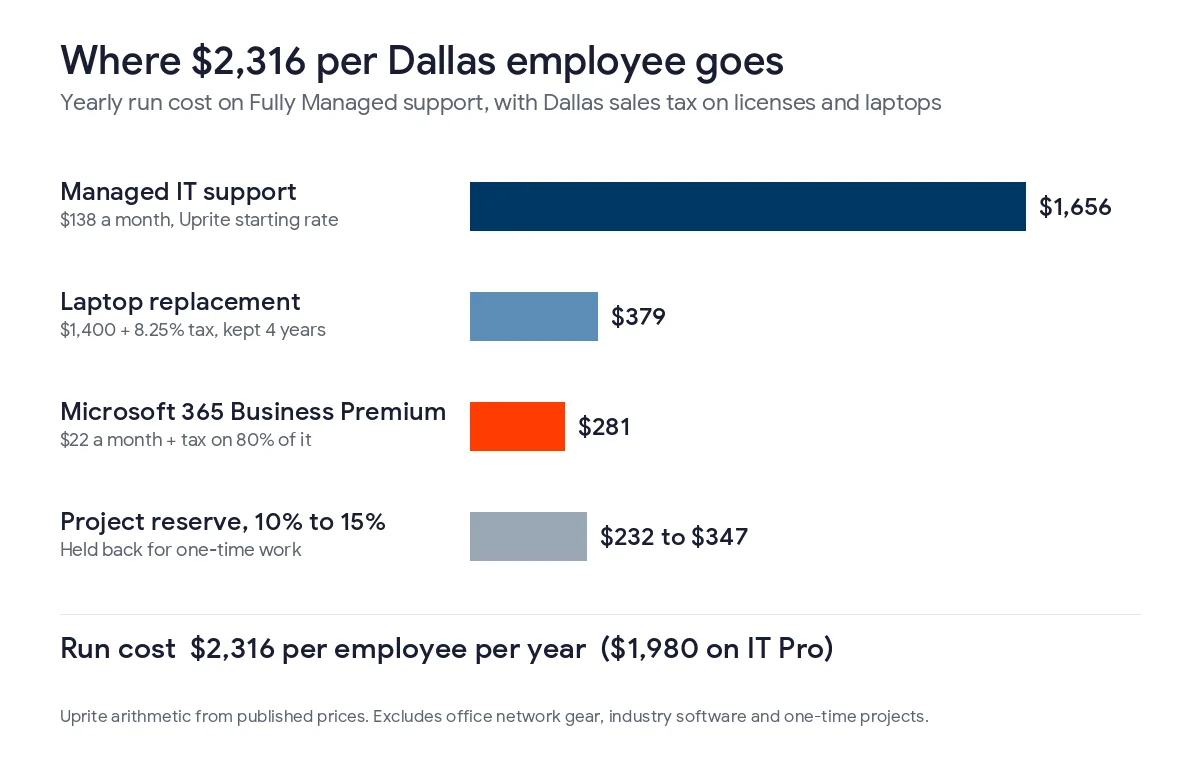
A Dallas business with no IT staff should budget about $2,316 per employee per year for managed support, Microsoft 365 and laptops with sales tax, or about $1,980 on a remote-only plan, plus 10% to 15% for projects.
I build these numbers with Dallas clients every fall, and those 2 figures are where I start. Both use prices you can look up. Support is our published rate, licenses are Microsoft’s list price, and the laptop is a $1,400 machine kept for 4 years. Texas sales tax is added to the licenses and the hardware. Budgeting is one part of the planning work we do as IT consulting in Dallas, along with roadmaps and vCIO meetings. If you are deciding who should own that work, our guide to choosing a vCIO or an IT consultant in Dallas lays out the split.
At 50 employees the run cost comes to about $115,800 a year on our Fully Managed plan and $99,000 on the remote-only IT Pro plan. Dallas budgets need 4 lines that generic templates leave out. One is the 8.25% local sales tax, and another is DFW wages, which are the highest in Texas for most IT jobs. The other 2 are hail and ice outages and offices spread across the Metroplex. Revenue percentages are a check, not a method.
What should a Dallas IT budget cover?
An IT budget is the money a company plans to spend on technology over the next 12 months. It covers support, software subscriptions, computers, network equipment, security, backup and planned projects. In a company with no IT employees, the support contract is usually the largest line. Licenses and hardware come next.
I split every budget into 2 parts. The first part grows with headcount. The second part is tied to buildings and events, like a new office in Frisco or a firewall that’s out of warranty. The second part is where most overruns come from, because nobody priced it in advance.
- Managed support, or the salaries of your own IT staff
- Microsoft 365 and the software your industry runs on
- Laptops and desktops on a replacement schedule
- Firewalls, switches, Wi-Fi and internet circuits for every office
- Security tools, staff training and written policies
- Backup and an outage plan for storms
- Sales tax on the taxable lines
- A reserve for projects
What does IT cost per employee in Dallas?
The table shows 3 lines that go up with every new hire, priced 2 ways. The first column uses our Fully Managed plan at $138 per user per month, which includes on-site work. The second uses our IT Pro plan at $110, which is remote only. Microsoft 365 and laptops are the same in both columns, with Dallas sales tax included. The laptop price is my planning assumption, so change it to match what you actually buy.
| Line item | Basis | Fully Managed, per employee per year | IT Pro, per employee per year |
|---|---|---|---|
| Managed IT support | $138 or $110 per user per month, Uprite starting rates | $1,656 | $1,320 |
| Microsoft 365 Business Premium | $22 per user per month plus Texas tax on 80% of it | $281 | $281 |
| Laptop replacement | $1,400 plus 8.25% tax, kept 4 years (assumption) | $379 | $379 |
| Run cost | Before office gear and projects | $2,316 | $1,980 |
| Project reserve | 10% to 15% of run cost | $232 to $347 | $198 to $297 |
Both rates come from our pricing page. Fully Managed includes 24/7 support, on-site and cloud infrastructure management, the advanced security stack, quarterly backup tests and vCIO planning sessions. IT Pro has 24/7 support and advanced endpoint and email security, and it tests backups twice a year. Microsoft licenses are billed separately on both plans. Microsoft raised Business Basic and Business Standard on July 1, 2026 and left Business Premium at $22.00, according to its 2026 packaging and pricing update.
A lot of owners ask me for a percent of revenue instead. Our post on budgeting for IT in a growth year gives a 3% to 7% range, and I use it as a check at the end. It doesn’t work as a starting point. A 30-person staffing firm in Las Colinas and a 30-person distributor in Garland can have very different revenue. They still need 30 seats, 30 licenses and about 30 laptops.
Should a Dallas budget assume Fully Managed or IT Pro?
This choice matters in Dallas and not in Houston or San Antonio. We offer IT Pro to teams of 12 or more outside those 2 metros, so a Dallas company can pick it. The difference is $28 per user per month, or $336 per employee per year. Here’s what that adds up to.
| Employees | Fully Managed run cost per year | IT Pro run cost per year | Yearly difference |
|---|---|---|---|
| 25 | $57,900 | $49,500 | $8,400 |
| 50 | $115,800 | $99,000 | $16,800 |
| 100 | $231,600 | $198,000 | $33,600 |
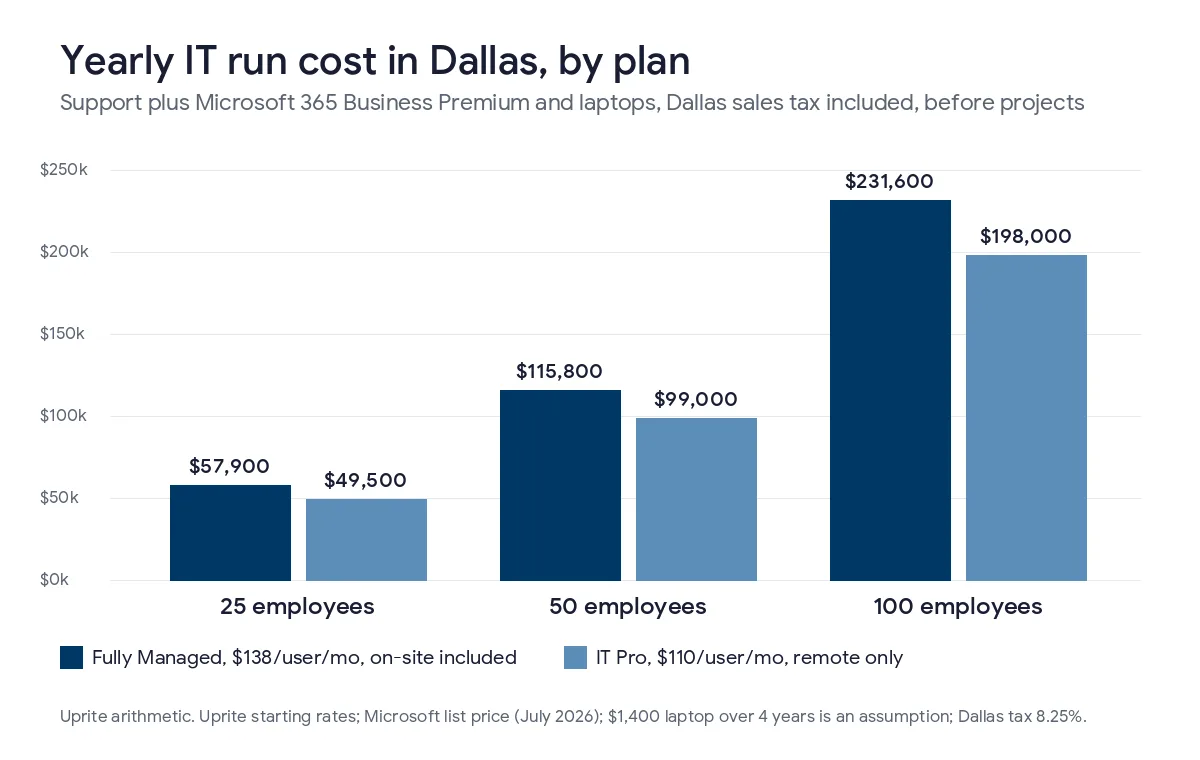
IT Pro fits a company with one office, a cloud phone system and files in SharePoint or OneDrive. When nothing in the building needs hands-on work very often, remote support covers most days. Fully Managed is the better budget line if you run a server or a lot of network gear, or if you have more than one office. It’s also the safer pick when staff need someone at their desk when a printer, scanner or conference room breaks. For a 50-person company the gap is $16,800 a year. Compare that with what on-site visits and rushed repairs would cost you if they were billed one at a time. Put the plan you actually need in the budget, not just the cheaper one.
Our page on managed IT pricing in Dallas explains what each plan includes and what’s usually missing from a quote under $110.
Why does sales tax belong in a Dallas IT budget?
Most budget templates leave tax out. In Dallas the rate is 8.25%. According to a City of Dallas budget memo, 6.25% goes to the state, 1% to the city and 1% to Dallas Area Rapid Transit. That’s already the most local sales tax Texas law allows, so the rate shouldn’t rise.
Hardware is taxed on the full price, so a $1,400 laptop costs $1,515.50. Cloud subscriptions work differently. The Texas Comptroller treats storing and processing a customer’s data as a taxable data processing service. Section 151.351 of the Tax Code exempts 20% of the charge. Tax is due on the other 80%, which works out to about 6.6% in Dallas. Microsoft 365 Business Premium goes from $22.00 to about $23.45 per user per month. For a 50-person office, that adds about $871 a year.
Ask your IT provider whether its invoice includes sales tax. Some managed services count as data processing in Texas and some don’t, depending on the mix of work. If yours is taxed, add about 6.6% to the support line too. Also note that a DFW suburb that votes to leave DART doesn’t get a tax cut right away. The same memo explains that a city leaving DART keeps collecting the 1% until it pays off its share of DART’s debt.
What else changes the numbers in Dallas?
Three other things make a Dallas budget different from one written for a smaller market.
An in-house IT hire costs more in DFW
In May 2025, computer user support specialists in the Dallas-Fort Worth metro had a mean wage of $63,030, according to the BLS occupational wage series. Wages aren’t the whole cost. In June 2026, private employers paid $46.89 per hour in total compensation for every $32.82 per hour in wages, per the BLS Employer Costs for Employee Compensation release. At that rate, one help desk tech costs about $90,050 a year before tools and training.
A systems administrator in DFW averaged $108,020, or about $154,330 with benefits included. An information security analyst averaged $133,790, or about $191,150. I bring these numbers up most when a company with 40 or 60 people is thinking about hiring its first IT person. One hire covers one person’s hours. Our co-managed IT plan for Dallas is $100 per user and adds a team behind an in-house tech for after-hours calls and vacations.
Hail, ice and long power outages
On May 28, 2024, straight-line winds hit the northern and eastern parts of DFW. Oncor reported more than 650,000 customers lost power. Oncor expected most of them back about 3 days later, with the hardest-hit areas waiting a fourth day. In February 2021, Winter Storm Uri kept North Texas below freezing for days, as the National Weather Service event summary records.
The budget items for this are simple. You need a second internet connection from a different carrier or a cellular backup, and battery backup for the firewall and switches. Cloud phones and files let people work from home when the office is dark. Hail is also a reason to keep laptop warranties and insurance current. Our IT continuity plan for North Texas storms covers the outage plan in detail.
Offices spread across the Metroplex
Many of our Dallas clients have more than one site. There might be a headquarters off the Tollway, a warehouse in Garland and a sales office in Fort Worth. Every site needs its own firewall, switches, Wi-Fi and internet circuit, and each one has its own replacement date. I budget these items per site, not per person. A 3-site company with 45 people spends a lot more on network gear than a 45-person company in one building.
Texas SB 2610 and the security line
Texas SB 2610 took effect on September 1, 2025. It protects businesses with fewer than 250 employees from exemplary damages after a data breach if they kept a cybersecurity program that fits their size. Companies with fewer than 20 employees need basic controls like password rules and staff training. From 20 to 99 employees, the standard is CIS Controls Implementation Group 1. From 100 to 249, it’s a recognized framework like the NIST Cybersecurity Framework. Our SB 2610 compliance guide lists the details. The law doesn’t add a budget line, but it gives you a legal reason to fund security every year.
Which costs catch Dallas budgets off guard?
These come up in almost every budget review I do in the fall.
- Windows 10 PCs that weren’t replaced. Support ended on October 14, 2025. Extended Security Updates cost $61 per device in year one and the price doubles each year. Enrollment is cumulative, so a PC added in year two costs $183.
- Microsoft 365 renewals at the new price. Business Standard went from $12.50 to $14.00 per user and Business Basic from $6.00 to $7.00. Many companies won’t see the increase until their renewal date.
- Setup for new hires. Each new person needs a laptop, a license and a couple of hours of setup before day 1, and that cost is rarely in the hiring plan.
- Office moves and expansions. Cabling, Wi-Fi and a new circuit take weeks to arrange, and the lease is often signed before anyone prices them.
- Cyber insurance questions. Carriers commonly ask about multifactor sign-in, endpoint protection and tested backups. A gap found right before renewal costs more to fix in a hurry.
How do you build next year’s IT budget?
- List every employee, laptop, shared PC, server and office, with the date each device was bought.
- Price support and licenses per person, using your current contracts.
- Choose the support plan that matches how many offices and on-site needs you have.
- Add Dallas sales tax to hardware and cloud subscriptions, and to support if your invoice is taxed.
- Schedule device replacements so about a quarter of them happen each year.
- List each site’s network gear with its replacement date, plus any projects you already know about.
- Add a storm line and a 10% to 15% reserve, then review the budget every quarter.

If you don’t want to start from scratch, our free IT budget template fills in Texas pricing from your user count. Most project lines come from an IT roadmap for a Dallas small business, which puts the next 12 to 24 months of work in order. Our guide to IT consulting rates in Dallas covers hourly and retainer pricing if you only need advice a few times a year. The full cost breakdown by plan is in our post on managed IT services cost in Dallas.
What Dallas owners ask about IT budgets
Is managed IT taxed in Texas?
Cloud subscriptions are taxed in Texas, and some managed IT bills are too. The state taxes data processing on 80% of the charge, so in Dallas a subscription such as Microsoft 365 effectively carries about 6.6% tax. Whether a managed IT invoice is taxed depends on what the service includes, so check your provider’s invoices and budget for the tax if it’s there.
How much does an in-house IT person cost in Dallas?
A help desk tech in DFW had a mean wage of $63,030 in May 2025, according to the BLS. With benefits and payroll costs, that comes to about $90,050 a year. A systems administrator costs about $154,330 on the same basis.
Can a company with 2 offices use a remote-only plan?
Yes, if both sites are mostly cloud-based and rarely need hands-on work. Once you have servers, on-site phone hardware or a lot of network gear in each building, the on-site work in Fully Managed usually costs less than paying for visits one at a time.
Does the support rate include Microsoft 365?
No, our plans bill Microsoft licenses separately from the support rate. A 20-person office on Business Premium adds $440 a month in list price, plus about $29 a month in Dallas sales tax.
What percentage of revenue should go to IT?
A range of 3% to 7% is common, but it isn’t reliable on its own because revenue per employee varies a lot between industries. Build the budget per employee and per site first. Then compare the total with revenue to see if anything looks wrong.
When should a Dallas company plan its IT budget?
Plan in October or November, before the new year’s contracts renew. That also leaves the winter to install backup internet and battery equipment before the spring hail season in North Texas.
Want a budget built on your own headcount, offices and devices? Send us your user count and we’ll go through next year’s IT costs with you line by line, including the sales tax and storm items. We usually reply within 5 minutes.
Talk to an IT ExpertPrefer email or a phone call? Reach the team through our contact page.