
Client data protection at a Dallas wealth firm means mapping every place client records live, putting phishing-resistant MFA and encryption on each one, cutting access the day someone leaves, and holding vendors to a 72-hour breach notice.
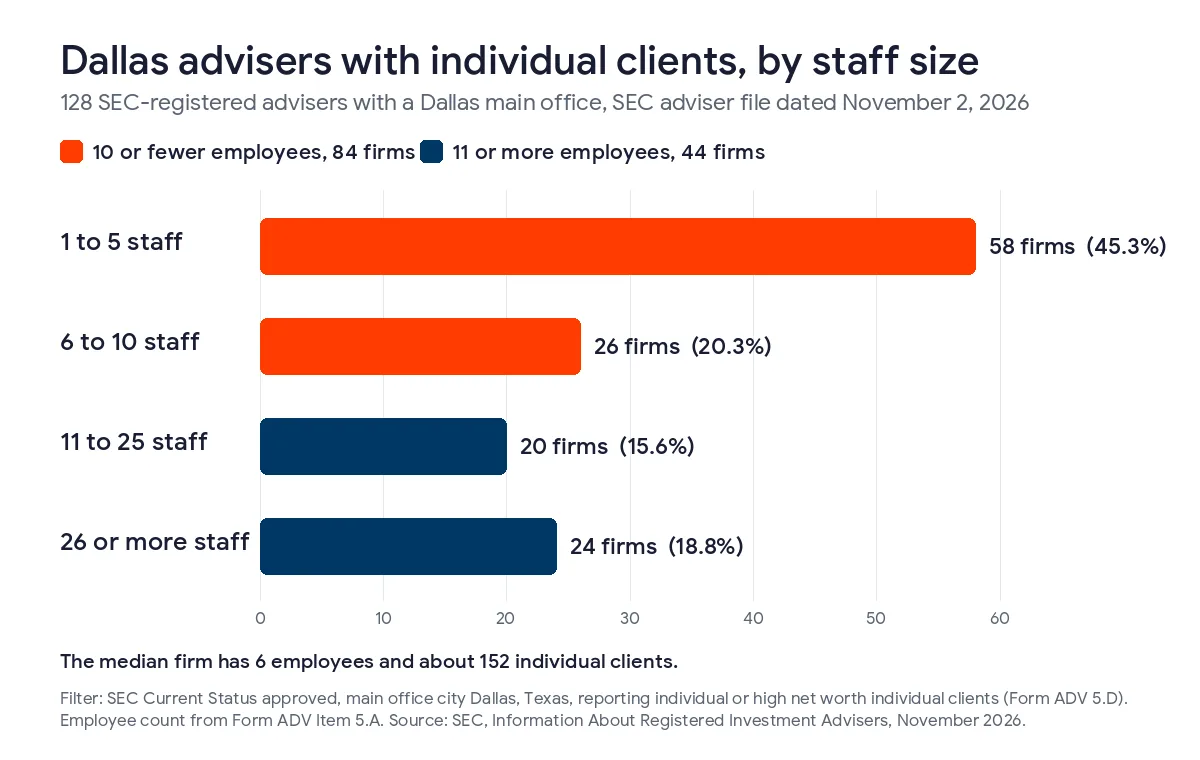
Most Dallas advisory firms are small. In the SEC’s November 2026 adviser file, the median Dallas firm with individual clients had 6 employees and about 152 individual clients, so 1 stolen mailbox can expose most of a firm’s book. I run operations at Uprite, and our IT services for wealth management firms in Dallas start with a walk through where that data actually sits. This guide covers that map, the 2 enforcement cases that show how advisers lose client data, the controls that close each gap, and how to rehearse a client notice before you need one.
Client records at a wealth firm sit in more places than the custodian. They’re in the CRM, the planning software, Microsoft 365 mailboxes, scanned paperwork, personal phones and old laptops, and 49 of the 128 Dallas advisers we counted keep books and records at a second location. SEC-registered firms answer to the 2024 Regulation S-P amendments, which require client notice within 30 days and vendor notice within 72 hours. State-registered firms answer to the FTC Safeguards Rule, which spells out MFA and encryption.
What does client data protection mean for a Dallas wealth firm?
Client data protection is the set of access rules, encryption, monitoring and disposal steps a firm uses to keep clients’ nonpublic personal information away from people who shouldn’t see it. For an adviser, that means account numbers, Social Security numbers, tax returns, estate documents and the custodian logins that can move money.
We pulled the SEC’s registered adviser file dated November 2, 2026 and counted firms with a main office in the city of Dallas. 299 SEC-registered advisers list a Dallas main office. 128 of them report individual clients, and together they report 111,610 individual clients, 35,448 of them high net worth. The median firm in that group has 6 employees, and 58 firms have 5 or fewer. Across the Dallas-Fort Worth-Arlington metro, the Bureau of Labor Statistics counted 6,230 personal financial advisors in May 2025.
| Dallas SEC-registered advisers, November 2026 file | Count |
|---|---|
| Advisers with a main office in Dallas | 299 |
| Advisers reporting individual clients | 128 |
| Of those, 10 or fewer employees | 84 |
| Of those, under $1.5 billion in regulatory assets | 97 |
| Of those, books and records kept at another location | 49 |
| Individual clients reported by those 128 firms | 111,610 |
A typical Dallas firm protects a large book with a staff of 6 and no full-time IT person, and the rules don’t scale down for that. The 97 firms under $1.5 billion had until June 3, 2026 to comply with the amended Regulation S-P, and the 31 larger firms had until December 3, 2025, according to the SEC’s small entity compliance guide. Both dates have passed, and the SEC’s 2026 exam priorities name the amendments as an exam area.
Advisers below about $100 million in assets usually register with the Texas State Securities Board instead of the SEC, and the FTC lists those advisers among the firms its Safeguards Rule covers. Our guide to SEC cybersecurity rules for RIA firms in Dallas sorts out which rule set applies to your firm. This page stays on the practical side.
Where does client data actually live at a wealth firm?
When we take on a new advisory firm, the first job is a data map. Most owners name the custodian and the CRM first. The full list is usually longer, and it tends to look like this.
- Custodian platforms such as Schwab, Fidelity and Pershing, where each rep and assistant has a login that sits outside your Microsoft 365 directory
- The CRM, often Redtail, Wealthbox or Salesforce, which holds family names, birthdays, account numbers and notes from every meeting
- Planning software such as eMoney, MoneyGuidePro or RightCapital, which stores linked balances and uploaded tax returns
- Microsoft 365 mailboxes and OneDrive folders, where clients send statements and driver’s licenses as attachments
- E-signature and document vault tools that keep signed account forms
- Scanned paperwork on a shared drive, and the paper originals in a file room or storage unit
- Personal phones with client texts, photos of documents and saved passwords
- Laptops, copiers and servers that were retired but never wiped
Form ADV asks every adviser whether it keeps books and records anywhere other than its main office. 49 of the 128 Dallas firms answered yes. That second location might be a cloud archiving service, a back-office provider or a storage unit in Garland, and each one belongs on the map with an owner and a list of who can log in. A cybersecurity risk assessment is the formal version of this exercise.
We also look at who can export data. A CRM export button or a scheduled custodian report can move a whole client list in about a minute, and those rights are rarely reviewed after the person who set them up leaves.
What went wrong at advisory firms the SEC already fined?
In August 2021 the SEC sanctioned 8 firms in 3 actions over email account takeovers. The orders found that cloud email accounts of more than 60 Cetera personnel were taken over and exposed information on at least 4,388 customers and clients. Cambridge found its first takeover in January 2018 but didn’t adopt firm-wide protections for its representatives’ email until 2021, and KMS exposed about 4,900 customers and clients. Penalties ran from $200,000 to $300,000, and each order cited Rule 30(a) of Regulation S-P.
None of those were attacks on a custodian. They were mailboxes. An adviser’s inbox holds statements, transfer requests and the client’s own messages, which is why email is the first system we lock down at a new client.
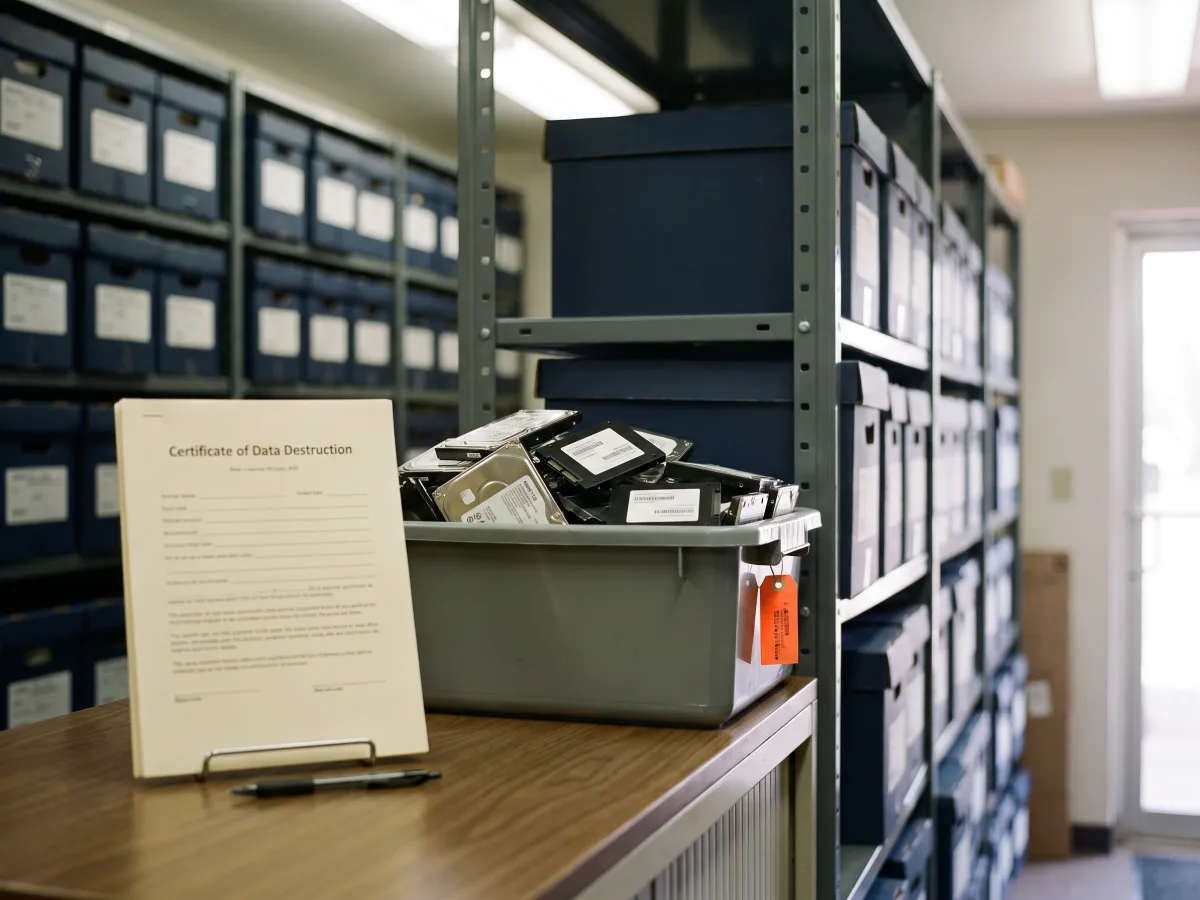
In September 2022, Morgan Stanley Smith Barney agreed to a $35 million penalty over the personal information of about 15 million customers. The SEC found the firm hired a moving and storage company with no data destruction experience to decommission hard drives and servers, and some of those devices were resold online with customer data still on them. 42 servers went missing during a hardware refresh, and encryption the devices already had was never turned on.
A 6-person Dallas firm won’t have 42 servers. It will have a box of old laptops in a closet. Both cases come down to ordinary systems, an inbox and a retired drive, and those are the 2 we find neglected most often at small firms.
Which controls close each gap?
The table below is the checklist we work from. The last column is the evidence an examiner, an insurer or your own compliance officer can ask to see.
| Where client data sits | Common gap | Control | Proof to keep |
|---|---|---|---|
| Custodian logins | Shared passwords, former staff still active | Named logins, MFA and a quarterly user review | Signed review each quarter |
| Microsoft 365 email | Push approvals only, forwarding rules nobody checks | Phishing-resistant MFA, alerts on new forwarding rules, legacy sign-in blocked | Sign-in and rule alert reports |
| CRM and planning software | Everyone can export, no MFA on the vendor app | Role-based access, export rights for 1 or 2 people, single sign-on | Role list and export log |
| Laptops and phones | No disk encryption, client photos on personal phones | BitLocker or FileVault, managed phones with remote wipe | Encryption status report |
| Scanned files and paper | Open shared drive, a file room nobody locks | Folder permissions by team, locked storage, a scan and shred schedule | Permission export and shred receipts |
| Retired hardware | Drives in a closet or with a recycler | Wipe or destroy to NIST SP 800-88 Rev. 2 | Certificate for each serial number |
| Vendors | No breach notice terms in the contract | A written duty to notify within 72 hours | Signed vendor addenda |
For a state-registered firm, the FTC rule writes 2 of those controls into its text. 16 CFR 314.4(c)(3) requires encryption of customer information in transit over external networks and at rest, and (c)(5) requires multi-factor authentication for anyone accessing an information system. SEC-registered firms get broader language under Regulation S-P, but we apply the same list to them, since an incident at either kind of firm would be judged against it.
On MFA, CISA’s phishing-resistant MFA fact sheet treats FIDO security keys and passkeys as the strongest option, with push approvals that use number matching as an interim step. A text-message code is better than a password alone, but CISA doesn’t count it as phishing-resistant, and an adviser’s mailbox deserves better.
What should happen the day an advisor leaves?
Departures are where wealth firms lose track of data. An advisor who moves to another firm may be allowed to contact clients, but they shouldn’t leave with your CRM export, your mailbox or a working custodian login. Our same-day list runs in this order.
- Disable the Microsoft 365 account, revoke its active sessions and convert the mailbox to a shared mailbox so the mail is kept.
- Remove each custodian login by hand, because disabling the directory account doesn’t touch the custodian’s own user list.
- Remove CRM, planning, e-signature and document vault accounts, and move record ownership to another advisor.
- Wipe firm data from managed phones and tablets, and collect any security keys.
- Change shared passwords the person knew, including the copier, the Wi-Fi and any vendor portal.
- Pull 30 days of CRM export history and mailbox forwarding logs, and keep the report in the employee file.
We run the list from a ticket so every step has a timestamp. The custodian step is the one we check first in a new client’s audit, since offboarding that starts and ends in the directory misses it.

What should a vendor contract say about client data?
The amended 17 CFR 248.30 requires a firm to oversee its service providers. Those providers have to notify the firm as soon as possible, and no later than 72 hours after they learn of a breach that gave someone unauthorized access to a customer information system they maintain. The firm then has to start its own incident response program. When we review a wealth firm’s vendor contracts, we look for these terms.
- Notice within 72 hours to a named person at your firm, by phone and by email
- Where your data is stored and which subcontractors can reach it
- MFA and encryption on the vendor’s side, stated in writing
- Return or destruction of your data when the contract ends, with a certificate
- Whether the vendor will send client notices on your behalf if you ask
The rule lets a firm sign a written agreement for a provider to notify affected clients for it. Most small firms never ask. We think they should at least know whether the CRM vendor or the archiving service would do it, because sending 150 letters in a week is hard for a staff of 6.
How do you test the 30-day client notice before you need it?
Under the same rule, a firm has to notify affected individuals as soon as practicable and no later than 30 days after it becomes aware that sensitive customer information was, or was reasonably likely to have been, accessed without authorization. Texas adds its own deadlines under SB 768, including notice to the Attorney General within 30 days when 250 or more Texans are affected. Our post on the breach notice deadlines Dallas financial firms face shows how those clocks line up.
| Drill day | What the team does | Owner |
|---|---|---|
| Day 0 | Confirm the incident, keep the logs, call the insurer’s claims line | Operations lead and IT |
| Days 1 to 3 | Export the list of clients whose records sat in the affected system | IT and the CRM admin |
| Days 3 to 10 | Decide who gets notice and draft the letter with counsel | Chief compliance officer |
| Days 10 to 20 | Set up a call script and a phone line for client questions | Operations lead |
| Days 20 to 30 | Send notices, file with the Texas Attorney General if 250 or more Texans are affected, keep copies | Chief compliance officer |
We run this as a 90-minute tabletop once a year with the owner, the compliance officer and whoever runs operations. The step that slows teams down is usually Day 1, because nobody has practiced pulling a client list from one system by account, and the whole 30-day clock depends on it. A written breach response plan turns the drill notes into something the team can follow under pressure.
What does it cost a small Dallas firm to do this?
Most of the list is configuration and habit, not new software. Our Fully Managed plan is $138 per user per month and includes the security stack, 24/7 monitoring and backup with quarterly testing, so a 6-person firm would pay about $828 a month for the managed side. Security keys cost extra, and the custodian and CRM licenses stay with those vendors. Our breakdown of what IT costs a Dallas wealth management firm goes line by line, and our GLBA compliance cost guide covers the written program.
A firm this size doesn’t need a security operations center of its own. It needs the 7 rows in that table kept current every week, and someone outside the firm checking that they still are. That’s the job our managed security services in Dallas are built to do, with a 5-minute average first response when something looks wrong. Email and wire fraud aimed at Dallas wealth advisors is the threat most of these controls are built around.
What Dallas wealth advisors ask us about client data
Does Regulation S-P apply to a small Dallas RIA?
It applies to every SEC-registered adviser, and firms under $1.5 billion in assets had to comply with the 2024 amendments by June 3, 2026. Advisers registered only with the Texas State Securities Board fall under the FTC Safeguards Rule instead.
Is MFA on the custodian portal enough?
No, because the mailbox is where the takeovers in the SEC’s 2021 cases started. Put phishing-resistant MFA on Microsoft 365, the CRM and the planning software too, and review custodian user lists each quarter so former staff can’t still sign in.
How fast does a vendor have to tell us about a breach?
Within 72 hours under the amended Rule 248.30, which requires service providers to notify the firm after they learn of unauthorized access to a customer information system they maintain. Write that term into each contract, with a named contact at your firm.
Can we keep client documents in Microsoft 365?
Yes, if the tenant has MFA, encryption, retention and alerts set up. Statements and IDs belong in a restricted SharePoint library or a document vault, not in personal OneDrive folders or in email attachments kept for years.
What should we do with old laptops and drives?
Wipe them to NIST SP 800-88 Rev. 2 or have them destroyed, and keep a certificate listing each serial number. The 2022 Morgan Stanley order shows what happens when a mover handles disposal and nobody checks the work.
How often should a wealth firm review who has access?
Every quarter for custodian, CRM and Microsoft 365 accounts, and on the same day for anyone who leaves. Keep the signed review, since it’s the simplest proof you can show an examiner or an insurer.
Send us the list of systems your firm uses and your headcount, and we’ll map where your client data sits and send back the gaps we find, in writing.
Get a Client Data Review