
Phishing attacks hitting Fort Worth businesses mostly go after Microsoft 365 logins and payment changes. The controls that stop them are DMARC set to reject, phishing-resistant MFA, a blocked device code flow and a phone callback before any bank detail changes.
I’m the CTO at Uprite, and most of the security incidents I get pulled into in Tarrant County start with an email or a phone call, not a piece of malware. A freight broker’s controller gets a polite note that a carrier changed banks. A project manager on a west side subdivision clicks a shared drawing link and types a password into a page that looks exactly like Microsoft’s. If you want the full picture of how we handle cybersecurity services in Fort Worth, that page covers it. This post stays narrow. I wanted to know how exposed Fort Worth companies actually are, so in November 2026 we checked the email security records of 51 local business domains and read through every Tarrant County breach notice filed with the Texas Attorney General. The numbers below come from that work.
About half of the Fort Worth business domains we checked can still be impersonated by email, because 24 of the 47 that receive mail have no DMARC enforcement. Texans filed 97,912 internet crime complaints with the FBI in 2025, second only to California, and business email compromise cost US victims $3.05 billion that year. The fixes are mostly settings you already pay for. Set DMARC to reject, move to phishing-resistant sign-in, block the device code flow and make a phone callback mandatory before anyone changes payment details.
What does a phishing attack on a Fort Worth business look like now?
A phishing attack is a message that pretends to come from someone you trust so that you hand over a password, approve a sign-in or send money. In 2026 most of the attacks we see against Fort Worth companies are aimed at a Microsoft 365 account or at a pending payment, and very few rely on a malicious attachment anymore.
The shapes repeat because the local economy repeats. Fort Worth runs on freight, construction, aerospace suppliers, healthcare and professional firms, and each of those has a predictable money flow that an attacker can study.
- Freight and logistics firms around Alliance get carrier invoices with new remittance details, usually sent from a lookalike domain one letter off from the real carrier.
- Contractors see a progress payment redirected after someone replies inside a real email thread, which only works because a mailbox was already compromised weeks earlier.
- Defense suppliers get credential lures dressed up as a prime’s supplier portal, because the drawings in a small machine shop’s mailbox are worth more than its bank balance.
- Title companies, law firms and CPAs face closing-day and tax-season wire fraud, timed to the days when a large transfer is expected anyway.
- Anyone on Microsoft 365 can get a device code lure, a message asking the user to type a short code into a real Microsoft page. That one gets past ordinary MFA, and I’ll come back to it.
None of these need bad grammar or a strange attachment. The FBI’s 2025 Internet Crime Report notes that businesses reported more than $30 million in losses to business email compromise involving AI in 2025, and AI is mostly good at writing the polite, ordinary emails that these schemes depend on. If you want a broader walk through the classic types, our general guide to phishing attack types and warning signs covers them. Here I’m sticking to what we measured.
How easy is it to fake an email from a Fort Worth company?
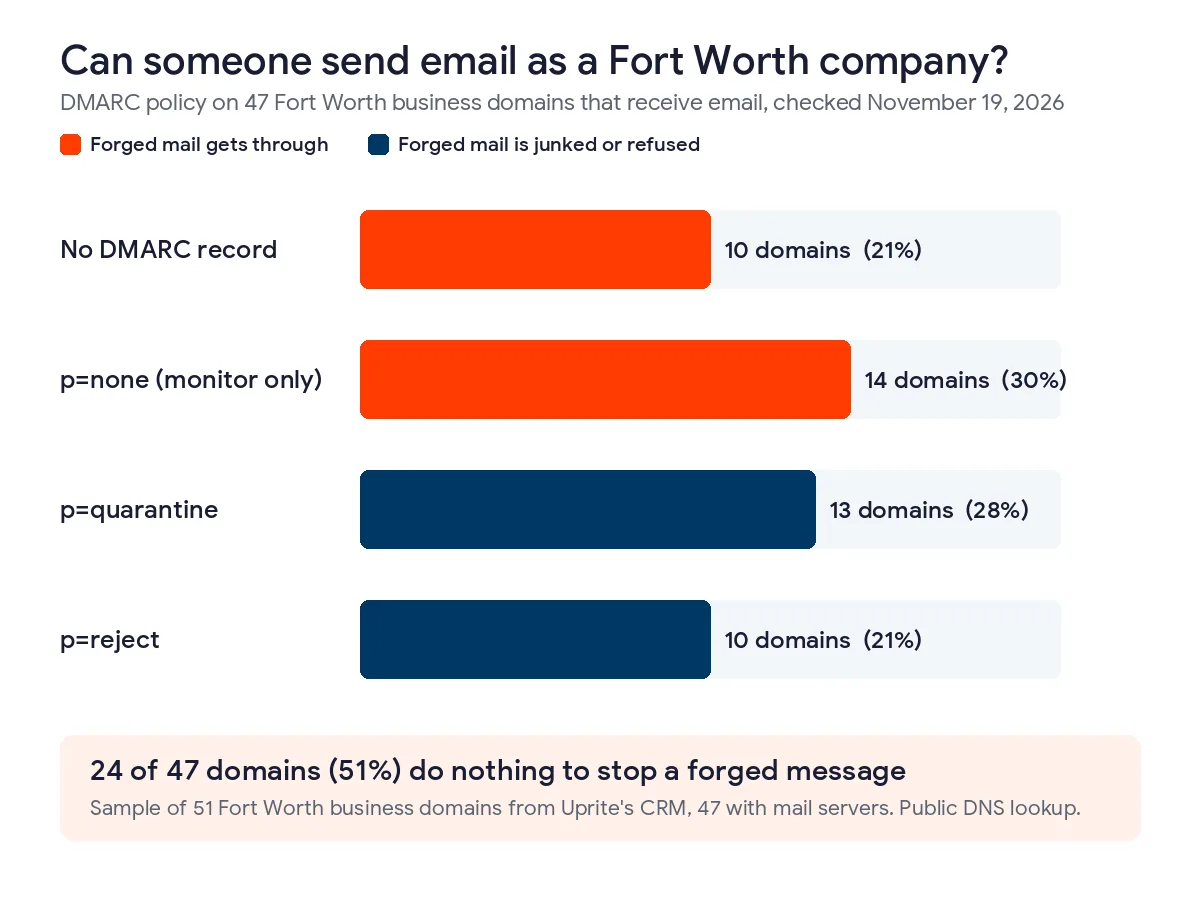
For about half of the local companies we checked, it’s easy. DMARC is the DNS record that tells receiving mail servers what to do with a message that claims to come from your domain but fails authentication, and without an enforcing policy a criminal can send mail that shows your exact address in the From line.
On November 19, 2026 we looked up the public DNS records for 51 business domains in our CRM that list a Fort Worth address. These are companies we’ve talked to or prospected, from 10-person contractors to a few large employers, so treat it as a local sample rather than a census. 47 of the 51 domains receive email. We’re not naming any of them, because the point is the pattern and not the companies.
| DMARC policy found | Domains | Share of 47 | What happens to a forged email |
|---|---|---|---|
| No DMARC record | 10 | 21% | Each receiving server decides on its own, and many deliver it |
| p=none (monitor only) | 14 | 30% | Delivered, while the owner gets a report about it if reports are set up |
| p=quarantine | 13 | 28% | Sent to junk or held |
| p=reject | 10 | 21% | Refused before it reaches the inbox |
So 24 of 47 domains, 51%, do nothing to stop a forged message, and only 10 are at the reject setting that the joint CISA, NSA, FBI and MS-ISAC phishing guidance recommends for outbound mail. 27 of the 47 run their email on Microsoft 365, and 9 of those 27 still aren’t enforcing DMARC even though the setup costs nothing beyond time. SPF looked better, since every domain had a record, but 19 of them end in a soft fail that receivers are free to ignore.
Why does this matter if your own staff never fall for anything? Because the attack isn’t aimed at your staff. A domain without enforcement lets someone email your customers as you, with your real address, asking them to pay a new account. Your customer loses the money and you lose the customer. I’ve watched that conversation happen, and the customer rarely blames the criminal.
Most of the companies sitting at p=none meant to finish the job. Someone published a monitoring record during a Microsoft 365 migration, the reports started arriving in an inbox nobody reads, and the project ended there. Moving from none to reject usually takes 4 to 8 weeks of reading those reports and fixing the services that send mail on your behalf, such as your accounting software, your CRM and your copier’s scan-to-email. Microsoft documents the process in its DMARC setup guide for Microsoft 365.
What do Tarrant County breach notices show?
They show that local breaches are frequent, that they usually expose Social Security numbers, and that they tend to sit unnoticed for weeks. Texas law requires a business to report a breach affecting 250 or more Texans to the Attorney General, and the AG publishes those notices.
We pulled the Texas Attorney General’s data breach list on November 9, 2026. It held 692 notices posted between April 1, 2025 and November 6, 2026. 18 came from organizations based in Fort Worth or a nearby Tarrant County city such as Bedford, Hurst, Grapevine or Mansfield, and 7 of those were in Fort Worth itself. Together they covered 107,754 Texans.
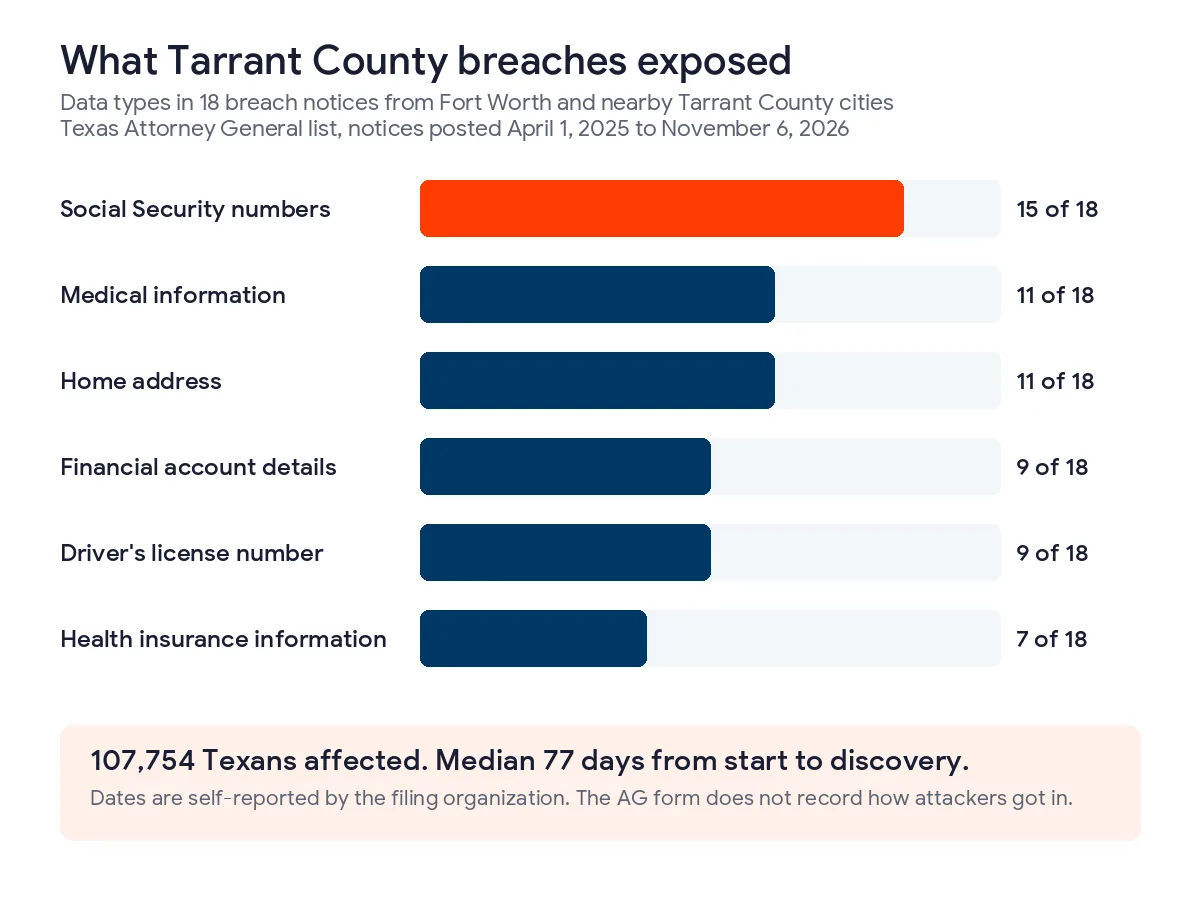
The AG’s form doesn’t ask how an attacker got in, so I can’t tell you how many of the 18 began with a phishing email. What I can tell you is what was taken. Social Security numbers were involved in 15 of the 18 notices, medical information in 11 and financial account details in 9. The filers were mostly retailers and merchants (7) and medical providers (5), followed by a mix of insurance, government and other businesses. The median time between the reported start of a breach and its discovery was 77 days. Those dates are self-reported, but 77 days is long enough for a mailbox compromise to read every invoice thread you have.
That gap is the part that should worry a Fort Worth owner most. An attacker who logs into a mailbox in March doesn’t need to strike in March. They can wait for the quarterly payment to a supplier and reply to the real thread with new bank details. Under Texas Business and Commerce Code chapter 521, once you determine a breach happened you have 60 days to notify affected people and 30 days to notify the AG when 250 or more Texans are involved, so slow discovery also eats into a short legal clock.
Which phishing attacks get past MFA?
Two kinds do, and both are common against Microsoft 365. Adversary-in-the-middle kits relay your real sign-in, MFA prompt included, and steal the session token. Device code phishing gets the user to type a code into a genuine Microsoft page, which hands the attacker a signed-in session without ever touching your password.
I hear the same objection in almost every first meeting. We already have MFA, so we’re covered. Text codes, authenticator app codes and simple push approvals all stop password spraying, and they’re worth having. They don’t stop a fake login page that passes your code straight through to Microsoft in real time. NIST’s digital identity guideline, SP 800-63B-4, says plainly that authenticators that involve manually entering a code shall not be considered phishing-resistant.
Device code phishing is the one I’d look at first in Fort Worth, because so many local firms live in Microsoft 365. The attacker starts a sign-in for a device like a conference room TV, gets a short code from Microsoft, and emails it to your employee with a story about a shared document. Your employee goes to the real microsoft.com/devicelogin page, enters the code and approves MFA. Everything they saw was real. Microsoft’s own documentation on blocking authentication flows with Conditional Access recommends getting as close as possible to a complete block on device code flow, and most small offices don’t use it for anything legitimate.
The fix for both is phishing-resistant sign-in. Passkeys and FIDO2 security keys are tied to the real website, so a relay page gets nothing it can reuse. Microsoft Entra supports them, including passkeys stored in Microsoft Authenticator, which means most staff can switch without buying hardware. The CISA guidance I linked above says to prioritize phishing-resistant MFA for administrator accounts first, and I agree with that order.

How do you stop phishing in a Fort Worth business, in order?
Start with the controls that remove whole attack types, then work toward the ones that depend on people noticing things. This is the order we use with new clients, and most companies can finish the first 4 within a month.
- Publish DMARC at p=none with reporting turned on, fix every legitimate sender that fails, then move to quarantine and finally to reject.
- Put administrators, finance staff and executives on passkeys or FIDO2 keys first, then the rest of the company.
- Block device code flow and legacy authentication with Conditional Access, starting in report-only mode for a week.
- Write a payment-change rule. Any new or changed bank detail gets a phone call to a number already on file, never a number in the email, and a second person approves it.
- Require the help desk to verify identity with a callback before any password reset or MFA change.
- Turn on impersonation protection and link scanning in Microsoft Defender for Office 365, and add a banner on mail from outside the company.
- Run short phishing exercises every quarter and make reporting a suspicious email a one-click habit that nobody gets punished for.
Step 5 surprises people. The group CISA calls Scattered Spider got into large companies by phoning their help desks, posing as employees and asking for password and MFA resets, as described in CISA advisory AA23-320A. A Fort Worth company of 40 people can be hit the same way, by phone. We wrote about building that callback into your support contract in our post on what a help desk SLA should promise.
| Control | Attack it stops | What you need | Typical setup time |
|---|---|---|---|
| DMARC at reject | Criminals sending mail as your exact domain | DNS access and a list of every service that sends your mail | 4 to 8 weeks of monitoring |
| Passkeys or FIDO2 keys | Fake login pages and real-time relay kits | Microsoft Entra ID, plus keys for anyone without a phone | 1 to 3 weeks |
| Block device code flow | Code-entry lures that pass MFA | Conditional Access in Entra ID P1, included with Microsoft 365 Business Premium | 1 week in report-only, then on |
| Payment callback rule | Fake invoices and changed remittance details | A written policy and a vendor phone list kept outside email | 1 day to write, a quarter to make it habit |
| Help desk callback | Phone-based reset scams | A rule in your support agreement | Same week |
Notice what’s missing from the top of that list. Training is on it, but it’s 7th. I’m not against training, and every program should include it. But a control that works on a tired Friday afternoon beats one that depends on a person noticing a single wrong letter in a domain name. Our breakdown of what each Microsoft 365 plan blocks shows which of these settings you may already be paying for.
What should happen if a payment already went to the wrong account?
Call your bank’s fraud line right away and ask for a wire recall, then file a complaint at ic3.gov with the full transaction details the same day. Speed is the only thing that reliably gets money back, and the FBI says so in nearly those words.
The FBI’s Recovery Asset Team runs a process it calls the Financial Fraud Kill Chain, which asks receiving banks to freeze stolen funds. In 2025 it worked 3,900 incidents involving $1.16 billion in attempted theft and froze $679 million, a 58% success rate, according to the same 2025 IC3 report. Those freezes depend on the money still sitting in the first account it landed in. After a day or two it has usually moved on.
Once the bank is moving, assume the email account that sent or received the fake instructions is compromised. Reset that user’s password, revoke their active sessions, check the mailbox for forwarding rules the attacker added, and look at who else received mail from that account. Then call your cyber insurer before you hire anyone, because many policies require you to use their panel. If customer data was exposed, the Texas notice clock described above applies. Our team’s work on cyber insurance readiness in DFW covers what carriers expect to see before and after a claim.
Where Uprite fits, and when you can do this yourself
Uprite is a managed IT and cybersecurity provider for small and mid-sized businesses in Texas. Our DFW team works out of 5757 Alpha Rd in Dallas, about 35 miles from downtown Fort Worth, and most of the work in this post is done remotely through Microsoft 365 and DNS. We roll out MFA with Conditional Access and hardware keys where phones won’t do, watch mailboxes for the forwarding rules attackers leave behind and route every reported phishing email to a named analyst as part of our managed security services in Fort Worth.
You may not need us for this. If you have an IT person who manages your Microsoft 365 tenant and your DNS, the steps above are well documented and a capable admin can finish the first 4 in a few weeks. The cases where we earn our fee are companies with 10 different services sending mail as their domain, a finance team that wires money every week, or a prime contractor asking for evidence of controls. If you’re still sizing the job, start with our cybersecurity checklist for Fort Worth small businesses and our numbers on cybersecurity cost in Fort Worth. Our help desk answers in about 5 minutes on average, and every client has a 120-day guarantee, so you can leave if the work isn’t what we promised.
What Fort Worth owners ask about phishing
We’re a 20-person company. Do attackers really bother with us?
They do, because small companies often send and receive large payments with fewer checks. 15 of the 18 Tarrant County breach notices we reviewed exposed Social Security numbers, and the median notice covered 2,237 Texans, which is the size of an ordinary customer or patient list.
Doesn’t Microsoft 365 already block phishing?
It blocks a lot, but not everything, and several of the strongest protections are switched off or never configured. Device code flow is allowed by default, DMARC for your own domain is your job, and impersonation protection needs a Defender for Office 365 plan and someone to tune it.
How long does it take to get DMARC to reject?
4 to 8 weeks for most companies we work with. The record itself takes minutes to publish. The time goes into reading the reports, finding every service that sends mail as you and fixing its SPF and DKIM before you start rejecting anything.
What if we already paid a fake invoice?
Call your bank’s fraud department now and ask for a recall, then file at ic3.gov. The FBI’s kill chain process froze 58% of the money it chased in 2025, and that only works when victims report fast enough that the money hasn’t moved again.
Do we have to report a phishing incident to the Texas Attorney General?
Only if it becomes a breach of sensitive personal information affecting 250 or more Texans, in which case the AG notice is due within 30 days of your determination. Affected individuals must be notified within 60 days. A compromised mailbox that held customer Social Security numbers or account details often meets that bar, so ask your attorney early rather than waiting until the investigation is finished.
How can I check my own company’s DMARC setting?
Look up the TXT record at _dmarc followed by your domain name with any free DNS lookup tool. If nothing comes back, or the record says p=none, a stranger can still send email that appears to come from your address.
Send us your company’s domain name and tell us how your team approves payment changes today. We’ll check your DMARC, SPF and Microsoft 365 sign-in settings and tell you which of the 7 steps above you’ve already covered.
Check My Phishing DefensesPrefer to talk it through first? Our contact page has the phone number and email for the DFW team.