After-hours IT support in Fort Worth usually covers outages, security alerts, lockouts that stop a team from working and maintenance booked in advance, while routine requests wait for morning and project work is billed on its own.
The exact line depends on the contract, and that line is what this guide is about. I run operations at Uprite, so I see the night and weekend queue for our North Texas clients, and the same questions come up every time a company compares providers. After-hours work is one part of the help desk services in Fort Worth that we run for Tarrant County companies, and it’s the part buyers find hardest to compare, because two quotes can both say “24/7” and mean very different things.
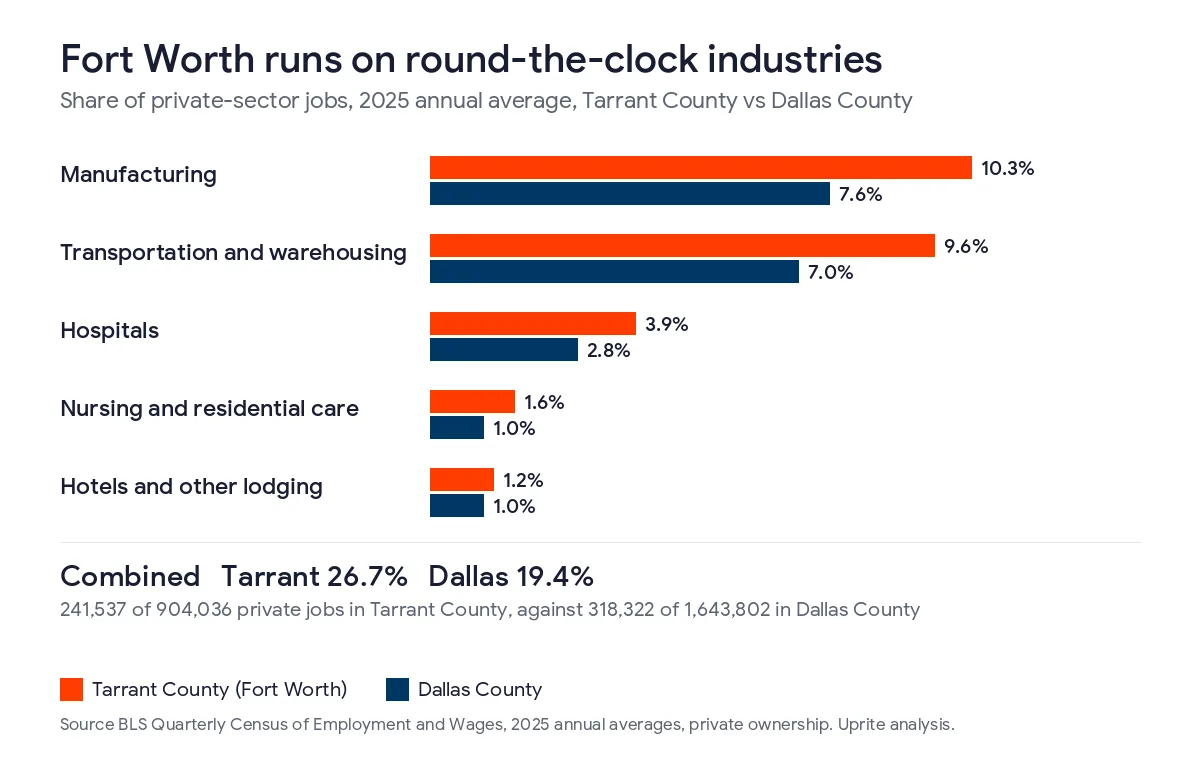
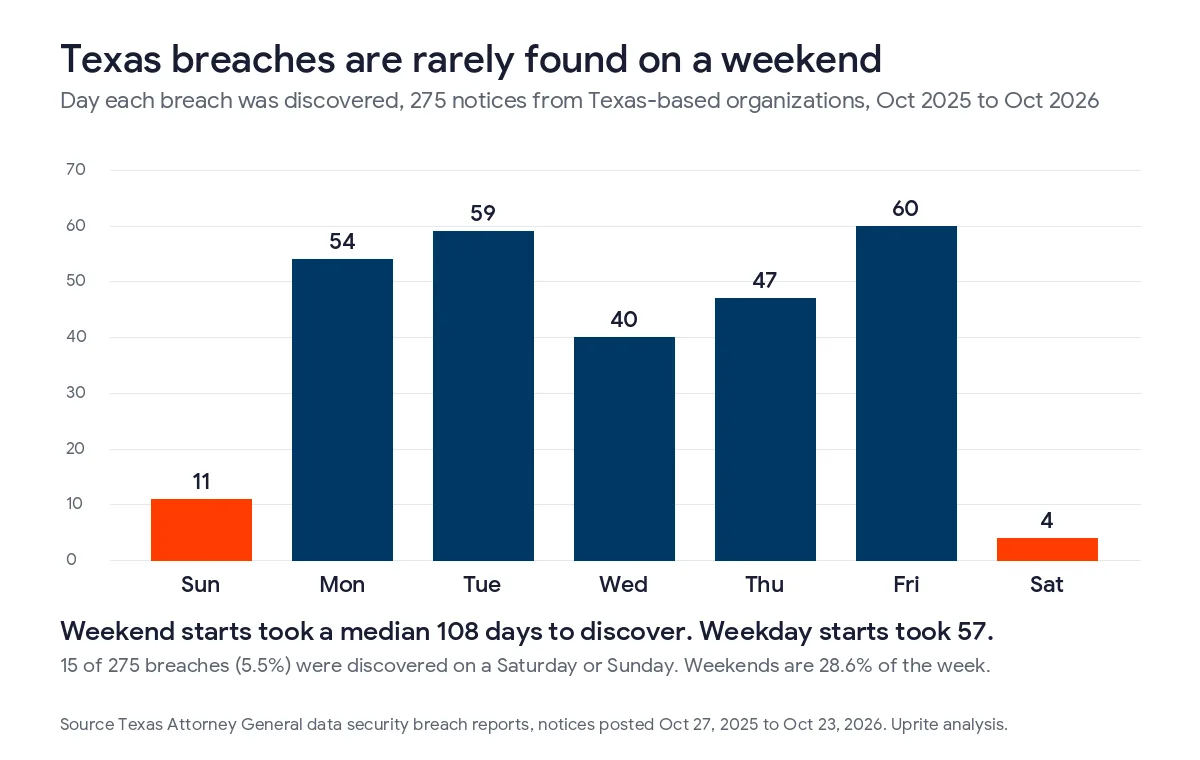
A business-hours contract covers 45 of the 168 hours in a week. The other 123 hours are where coverage terms differ the most. Fort Worth leans harder on round-the-clock industries than Dallas does, with 26.7% of Tarrant County private jobs in manufacturing, transportation and warehousing, hospitals, nursing care and lodging in 2025, against 19.4% in Dallas County. Texas breach notices also show that problems starting on a weekend tend to be found much later.
What does “after hours” mean in an IT support contract?
After-hours IT support is help from your provider outside the hours its contract calls the business day, which is usually 8 a.m. to 5 p.m. Central, Monday through Friday. That window is 45 hours a week. Every hour outside it, including weekends and the holidays listed in the agreement, counts as after hours.
So “after hours” is not a small slice of the week. It’s 123 hours, or 73% of the clock. A contract can treat those hours in 4 broad ways. It can ignore them and bill you by the hour when you call. It can cover only emergencies. It can log your call and have someone return it in the morning. Or it can staff a help desk that works the problem right away. Holidays add their own wrinkle, and we’ve written separately about what an after-hours coverage SLA should actually say about them.
Who in Fort Worth needs IT help after 5 p.m.?
Fort Worth has more employers that run past the office day than Dallas does. The Bureau of Labor Statistics counts jobs at nearly every employer in its Quarterly Census of Employment and Wages. In the 2025 annual averages, Tarrant County had 904,036 private-sector jobs. Manufacturing accounted for 93,180 of them and transportation and warehousing for 87,218. Hospitals added 35,620, nursing and residential care 14,392 and hotels and other lodging 11,127.
Together those industries held 241,537 jobs, or 26.7% of private employment in Tarrant County. In Dallas County the same group held 318,322 of 1,643,802 private jobs, which is 19.4%. Aerospace makes the gap plain. Tarrant County had 22,742 jobs in aerospace product and parts manufacturing at 56 establishments, more than 3 times the 6,677 in Dallas County.
Not everyone in those industries works nights, and plenty of office firms have people online late. National survey data gives a sense of scale. The BLS job flexibilities and work schedules release for 2024 and 2025 found that 85% of wage and salary workers had a regular daytime schedule. About 5% worked evenings and 3% worked nights, and the rest had rotating, split or irregular schedules. In a county built on plants, freight and hospitals, that minority is the part of the payroll that keeps calling after 5.
Office-only companies need after-hours help too. Servers, firewalls and cloud accounts keep running when the lights are off. So do attackers. A ransomware infection that starts at 11 p.m. on a Friday does its damage before Monday whether or not anyone is in the building.
What gets handled after hours, and what waits until morning?
The useful question is not whether a provider offers after-hours support. It’s what happens to each kind of request when it arrives at night. This table shows how the common contract types tend to treat the requests we see most often. Your agreement may differ, which is why the next section explains how to check.
| Request at 9 p.m. on a weekday | Business hours plus paid callout | Emergency-only after hours | Staffed 24/7 help desk |
|---|---|---|---|
| Server, internet or network outage | Worked if you approve the hourly rate | Worked | Worked |
| Whole shift locked out of Microsoft 365 | Worked if you approve the hourly rate | Usually worked | Worked |
| Security alert or suspected ransomware | Often not seen until morning | Worked if the tools are watched | Worked |
| One person’s password reset | Waits for morning | Usually waits | Worked |
| Printer, software install or new hire setup | Waits for morning | Waits for morning | Logged and scheduled |
| Firmware or patching in a planned window | Billed as project time | Often billed | Scheduled with you |
| Technician on site at night | Billed, if available | Billed or by agreement | Depends on the plan |
Three things decide where a request lands. The first is the severity definition in your contract, meaning who decides that your problem is an emergency. The second is whether anyone is watching your monitoring tools overnight or the alerts just sit in an inbox. The third is the billing rule for after-hours labor. Providers that bill it separately usually charge a higher rate than their daytime one, often with a minimum increment of an hour or more.
We grade every night call on business impact, not on what suits our schedule. A network outage, a mail flow failure or a lockout that blocks a whole team gets worked at once. A single password reset at 11 p.m. on our 24/7 plans is handled too, under the same plan rate, but it isn’t treated as a crisis.
What do the 4 common after-hours models actually include?
Business hours with paid callout
This is the cheapest contract on paper. Daytime support is covered, and anything after 5 p.m. is billed by the hour when you call. It works for a small office that closes at 5, runs nothing critical overnight and accepts that a Saturday problem costs extra. It fails when nobody is watching the alerts, because no one calls about a problem nobody has noticed.
Emergency-only after hours
Here the provider covers the highest severity issues around the clock and holds everything else for the morning. The weak point is the definition. If the contract lets the provider decide what counts as an emergency, your second shift may hear that its problem can wait.
Answering service or ticket logging
A person or a phone system takes your call at night, opens a ticket and someone calls you back the next business day. You get a record and nothing else. Buyers often mistake this for 24/7 support because a human answered the phone.
Staffed 24/7 help desk with monitoring
Technicians work requests at any hour, and someone acts on monitoring alerts as they arrive. This costs more per user, but nights and weekends are already priced in, so there is no meter running during an outage. It is the model we recommend for any company with a second shift, a warehouse, patient care or a defense contract.
What does Uprite cover after hours on each plan?
Our coverage is listed plan by plan on our pricing page, and this is how it applies to a Fort Worth client. Every plan except IT Essentials includes 24/7 support availability.
| Uprite plan | Starting price per user per month | After-hours support | Overnight monitoring | On-site work |
|---|---|---|---|---|
| Fully Managed IT | $138 | 24/7 support availability | Alerts with after-hours response | Included |
| Remote Only IT Pro, 12 or more staff | $110 | 24/7 support availability | 24/7 alerting with immediate response | Remote, on-site can be added |
| Co-Managed IT Partnership | $100 | 24/7 support availability | Shared with your in-house team | Remote, on-site can be added |
| Remote Only IT Essentials, under 12 staff | $91 | Business hours only, 8 hours per user per month | Alerts only, no response | Remote only |
I’d rather say plainly what IT Essentials doesn’t do. It has no after-hours response. If your company works nights or weekends, it’s the wrong plan, even though it’s the cheapest one. Microsoft licenses are billed separately on every plan.
On-site work in Fort Worth is dispatched from our Dallas office at 5757 Alpha Rd, about 35 miles from downtown Fort Worth, and most night calls are resolved remotely before anyone would need to drive. For companies that need someone on site overnight, our page on 24 hour IT support in Fort Worth describes that service, and our 24/7 IT support cost guide for Fort Worth manufacturers prices 1, 2 and 3 shifts. If you already have IT staff, co-managed IT in Fort Worth keeps nights and vacations covered behind them.
Why do weekend incidents cost Texas companies more?
They tend to be found later. Under Texas Business and Commerce Code Section 521.053, a company must notify affected people within 60 days of determining a breach occurred, and must report to the Attorney General within 30 days if 250 or more Texans are affected. Those reports appear on the Attorney General’s public data security breach reports list, which we downloaded and analyzed.
The list held 275 notices from Texas-based organizations posted between October 27, 2025 and October 23, 2026. Only 15 of those breaches, or 5.5%, were discovered on a Saturday or Sunday, and just 4 on a Saturday. Weekends are 2 of the 7 days in a week, or 28.6%. Most problems that begin on a weekend are first noticed when people come back to work.
Start dates tell the same story. Of the 230 Texas notices that gave a start date, 41 began on a weekend. Those breaches took a median of 108 days to discover. Breaches that began on a weekday took a median of 57 days. Start dates are reported by the companies themselves and the weekend group is small, so treat the gap as a pattern and not as a forecast.
Tarrant County shows up in the same data. Organizations based in Tarrant County filed 17 of the notices, covering 107,337 Texans, with a median of 77 days from start to discovery. Only 1 of the 17 was found on a weekend. One Fort Worth retailer’s breach began on December 25, 2025 and wasn’t discovered until January 16, 2026.
Federal agencies have warned about this timing for years. The FBI and CISA advisory AA21-243A, Ransomware Awareness for Holidays and Weekends, describes attacks over Memorial Day weekend, before Mother’s Day weekend and during the Fourth of July weekend in 2021. It recommends naming IT security staff to be available and on call during those times. NIST guidance in SP 800-61 Revision 3, published in April 2025, treats incident response as part of everyday risk management, and that only works if someone is responding outside the business day.
Defense suppliers carry a tighter clock. DFARS 252.204-7012 requires a cyber incident involving covered defense information to be reported to the Department of Defense within 72 hours of discovery. Many Fort Worth subcontractors near the aerospace plants work under that clause, and a Friday night discovery uses up much of that window before Monday.
How do you check what your current contract covers after hours?
You can answer this in about an hour with your agreement and one test call. Work through these steps in order.
- Find the defined business hours and the time zone, then list the holidays the contract names.
- Read the severity definitions and note who decides the severity of a call.
- Confirm who answers at night, whether that’s a technician, an answering service or a voicemail box.
- Check whether monitoring alerts are acted on overnight or only sent by email.
- Find the after-hours labor rate, the minimum billing increment and when the clock starts.
- Ask whether a technician can come on site at night and what that costs.
- Place a low-stakes test call at 9 p.m. on a weekday and time the response.
Thanksgiving is a good moment to run this check. It falls on November 26 in 2026, and the federal holiday calendar doesn’t include the Friday after. If your provider closes both days, your company could go from Wednesday evening to Monday morning with nobody assigned to your systems. Ask your provider now, before the holiday, who will be on call that weekend.

If the answers are vague, the coverage probably is too. Our guides on IT support cost in Fort Worth and cybersecurity services in Fort Worth show how after-hours terms affect price and security. Other guides in this series cover help desk cost in Fort Worth, what a help desk SLA should promise a Fort Worth business and the in-house vs outsourced help desk decision for Fort Worth companies. Our ranking of the best help desk services in Fort Worth scores 8 local providers, and coverage is one of the scores.
What Fort Worth companies ask about after-hours IT support
Is after-hours IT support the same as 24/7 support?
Not always. Some providers use after-hours support to mean emergency calls only, or a callback the next morning, while 24/7 support should mean a technician works your request at any hour. Check the contract wording, not the sales page.
How much does after-hours IT support cost in Fort Worth?
At Uprite it’s included in the per-user price of every plan except IT Essentials, with plans starting at $100, $110 and $138 per user per month. Providers that bill it separately usually charge a higher hourly rate than their daytime one.
Will a technician come on site at night?
On our Fully Managed plan, yes, when the fault needs hands on equipment. We dispatch from our Dallas office about 35 miles away, though most night problems are fixed remotely first. Other plans can add on-site work.
Does a single password reset count as an emergency?
Usually not. A lockout that stops a whole team is urgent, but one person’s reset is a standard request. On a staffed 24/7 help desk it still gets done that night.
Do we need after-hours coverage if nobody works at night?
Probably, yes. Your servers, cloud accounts and firewall run all night, and Texas breach notices show that problems starting on a weekend are discovered much later than those starting on a weekday. Monitoring with someone assigned to respond closes that gap.
Who should we call first during a weekend security incident?
Call your IT or security provider first, so they can contain the problem and preserve evidence. Then bring in your cyber insurer and legal counsel, because Texas notice deadlines start once you determine a breach occurred.
Not sure what your current contract covers after 5 p.m.? Send us the agreement and we’ll mark up what happens to each kind of request at night, on weekends and on holidays. We usually reply within 5 minutes.
Talk to an IT ExpertPrefer email or a phone call? Reach the team through our contact page.