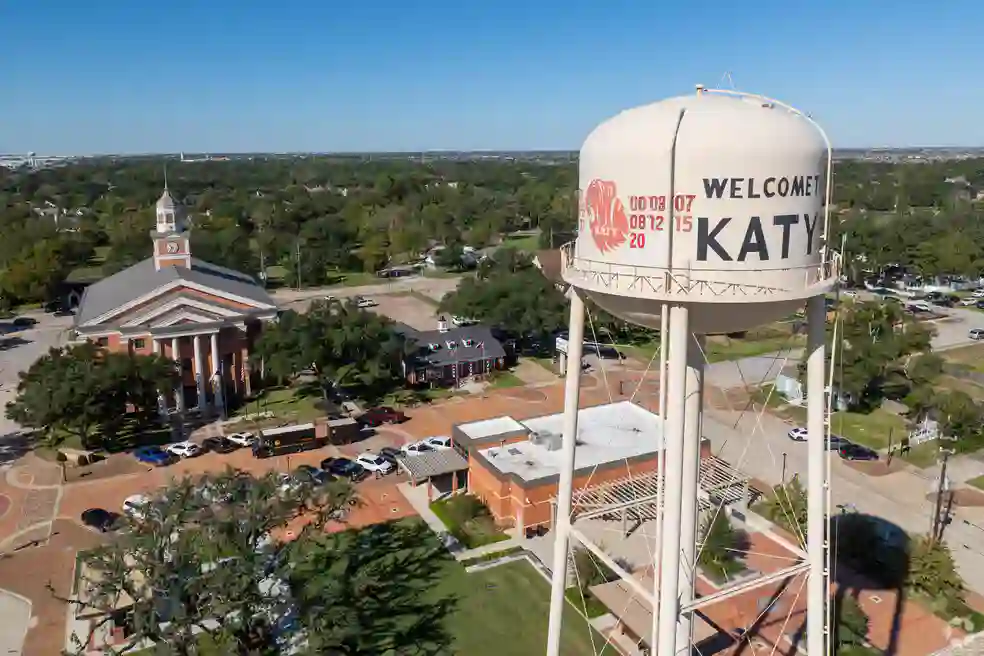
Help Desk Services in Fort Worth, TX: Support for Offices, Plants and Warehouses
Help desk services in Fort Worth from Uprite give your staff one place to report IT problems by phone, email, portal, or chat, with 24/7 coverage on most plans and a 5-minute average first response. The desk is part of our managed IT services in Fort Worth, and plans start at $91 per user.
Password resets, Microsoft 365 problems, and label printers for Tarrant County companies, handled by technicians who can fix them.
Get a Fort Worth Help Desk QuoteNo obligation. Tell us your headcount and the hours your teams work, and we’ll show you which plan covers them.In Texas Since 1999 | MSP 501 Winner 7 Years Running | SOC 2 Type 1 (2023) | 120-Day Satisfaction Guarantee
Price Your Help Desk
Recognized Across Texas for Managed IT and Help Desk Support













The Fort Worth Problem
Fort Worth Help Desk Calls Don’t Stop at 5 p.m.
A help desk has to match the hours a company actually works, and in Tarrant County those hours run long.
Federal QCEW employment data from the Bureau of Labor Statistics counted 904,036 private-sector jobs in Tarrant County in 2025. Manufacturing accounted for 93,180 of them, and transportation and warehousing accounted for another 87,218. Together those two industries hold 20.0% of the county’s private workforce, compared with 14.6% in Dallas County.
Plants, distribution centers, and dispatch offices often keep working after the front office has gone home.
By the same survey’s location quotient, Tarrant County has 2.02 times the national concentration of transportation and warehousing jobs, and 22,742 people in the county build aircraft and parts. When a handheld scanner stops talking to the warehouse system during a second shift, or a plant supervisor gets locked out of Microsoft 365 at 9 p.m., somebody has to pick up the phone.
Hiring for that is expensive. The Bureau of Labor Statistics May 2025 wage survey counts 22,600 computer user support specialists in the Dallas-Fort Worth-Arlington metro, with a mean wage of $63,030. BLS compensation cost data puts total pay at 1.43 times wages in private industry, so one technician costs about $90,100 a year once benefits are added.
A technician on a weekday 8-to-5 schedule is available for about 1,840 hours a year once holidays, vacation, and sick days come out, or 21% of the year’s 8,760 hours. The same math, run out to round-the-clock coverage, is on our page about IT help desk services in Texas.
For a company with 20 to 249 employees, that 79% gap is usually what starts the conversation about outsourcing. Where most of the risk sits at night and on weekends, the details are on our page for 24/7 IT support in Fort Worth.
What’s Included
What Our Help Desk Services in Fort Worth Cover
Four ways in, one queue. A call to (469) 699-8766, an email, a portal request, or a chat message all land in the same place and get a ticket number your staff can look up later.
Whoever picks up is a technician, not a dispatcher with a script. In a Tarrant County office the calls are mostly about sign-ins, Outlook and Teams, mapped drives, printers, and whatever ERP client or dispatch board the business runs on, and the technician fixes what can be fixed right then and writes down what changed.
Picture a distribution center off I-35W near Alliance at 4:40 in the morning. The thermal printer at dock door 6 dropped off the network after an overnight Windows update, and the first trailer pulls out at 5:15. Our technician rolls the printer driver back remotely, watches a test label come out, and blocks that update on the other two shipping stations before anyone finds out the hard way.

What happens when the problem is bigger than one printer?
In that case the ticket goes to a network or systems engineer at Uprite, notes and all, and nobody at your site retells the story. When a device needs hands on it, the Fully Managed IT plan covers on-site work and an engineer drives out.
Before going further, here is our bias. Uprite sells managed IT, and the help desk is part of what we sell, so we are not neutral about outsourcing it. A company with steady daytime work and a capable IT person on staff may not need us for this, and we will tell you if the numbers point that way.
The help desk is also a security control. The CISA advisory on Scattered Spider, updated July 29, 2025, describes attackers who pose as employees and ask help desk staff to reset passwords and move multi-factor authentication to a device the attacker controls. Our technicians follow a caller check that your company approves in writing before any reset.
Six Kinds of Requests Our Fort Worth Help Desk Handles Every Week
Sign-Ins and Lockouts
Password resets, account unlocks, and MFA changes, each one checked against your caller rules before anything changes.
Microsoft 365 and Email
Outlook, Teams, OneDrive, SharePoint, and mailbox permissions, including the shared mailboxes that dispatch and sales teams depend on.
Printers and Scanners
Office printers, label printers, and handheld scanners on the shipping floor, which produce more tickets than most owners expect.
New Hires and Departures
Accounts and devices are ready before a new hire’s first day, and access is removed on the day an employee leaves.
Business Software
First-line help with ERP, accounting, and dispatch software, plus a call to the vendor when the fault is on their side.
Escalation to Engineers
Network, server, and security problems go to an Uprite engineer along with the full ticket history.
Each month you receive a report of tickets by category, location, and user. We use that report to find the problems that keep coming back, such as one printer model or one batch of aging laptops, and we fix the cause instead of closing the same ticket every week.
Help Desk Security
How Does a Fort Worth Help Desk Stop a Fake Password Reset Call?
A password reset is the most common request a help desk receives, and it is also the request attackers go after, because a reset hands over an account.
The CISA advisory describes the method in detail. Attackers call employees while posing as IT staff, and they call the help desk while posing as employees. They often make several calls to learn how resets work before they ask for one. A desk that resets a password because the caller sounds convincing is the weak point that advisory warns about.
Texas SB 2610, in effect since September 1, 2025, covers businesses with fewer than 250 employees. A business in that group that keeps a security program built on a recognized framework, and then has a data breach, cannot be hit with exemplary damages in court. Access controls are part of any such program, and in practice the help desk exercises them more often than anyone else in the company.
The NIST Cybersecurity Framework 2.0 (February 26, 2024) files this under Protect, in the Identity Management, Authentication, and Access Control category. A caller check on paper, plus a ticket entry for each reset, is the evidence an insurer or auditor will ask to see.
Monitoring and incident response sit outside the help desk, and our cybersecurity services in Fort Worth handle them. For the desk itself, a written caller check often includes four rules like these.
Call Back on File
Before a password changes, the technician dials the employee back on the number HR already has.
Approval for MFA Moves
A new phone for MFA needs sign-off from a named manager, since whoever holds the second factor holds the account.
A Note on Every Reset
The ticket shows who called, how they were confirmed, and what was changed, in case anyone asks in six months.
Repeat Lockouts Flagged
Three lockouts on one account in an hour get reported to you as a possible attack, not quietly reset a fourth time.
How It Works
What Happens After a Fort Worth Employee Calls the Help Desk?
One ticket from a warehouse night shift shows the path every request follows, from the first call to the monthly report.
Setup comes first. We record your users, devices, software, vendor contacts, and caller rules, so the person answering at 2 a.m. works from the same notes as the person answering at noon, and the handheld scanners in the warehouse are on the same list as the laptops upstairs.
Urgency gets agreed in advance too. A dead label printer an hour before the trucks leave is a drop-everything call, a sluggish laptop in an office closed until Monday is not, and both rules are in writing before the desk goes live.

Six Steps for Every Ticket
Log
At 6:50 a.m. a picker can’t sign in to the scanner app, and the call becomes a ticket marked account access.
Verify
Since it involves a login, the technician calls the picker back at the number on file before touching the account.
Fix
This one closes remotely in a single call, once a stale saved password is cleared from the handheld.
Escalate
If ten handhelds fail at once, the warehouse Wi-Fi is the likelier cause, and a network engineer takes over.
Close
The picker scans a test pallet tag, it reads, and the ticket logs the start time, finish time, and fix.
Review
If that scanner model throws sign-in errors three weeks running, it shows up in the monthly report with a recommendation.
Has Uprite supported a Texas manufacturer this way?
Yes, although not in Fort Worth. The manufacturer in our manufacturing modernization case study had failing servers, hardware past end of life, and insurance requirements it couldn’t meet, and we moved its email to Office 365 and swapped the hardware in stages without stopping the line. Day-to-day support for Fort Worth sites beyond the help desk is covered on our IT support in Fort Worth page.
The setup work is what makes a 2 a.m. call go the same way as a call at noon.
Ticket Types
Which Requests Does a Help Desk in Fort Worth Take On?
Most help desk contracts we review in Fort Worth list the support channels and the hours, but few of them say which kinds of requests are included.
That silence turns into arguments. A company expects the desk to fix an ERP login, and the provider calls it a project. A printer complaint turns out to be a dead network switch, and the repair shows up later as hourly time.
The table lists the ticket types our desk handles, with an example of each from a Tarrant County business.
Common Ticket Types and Examples
| Ticket type | What the desk does | Fort Worth example |
|---|---|---|
| Account access | Password resets, unlocks, and MFA changes, each checked against your caller rules | A supervisor locked out of Microsoft 365 at the start of a night shift |
| Microsoft 365 | Outlook, Teams, OneDrive, SharePoint, licenses, and shared mailboxes | A dispatch mailbox that stopped syncing to a new phone |
| Devices and printers | PCs, label printers, scanners, docking stations, and meeting room equipment | A thermal label printer that dropped off the network |
| Business software | First-line help with ERP, accounting, and dispatch apps, plus vendor calls | An ERP client that fails to open after a Windows update |
| Network and Wi-Fi | First diagnosis of connection faults, then escalation to a network engineer | Wi-Fi dead spots in a warehouse after new racking went up |
| People changes | New accounts and devices before day one, and access removed on the last day | Five seasonal hires starting on the same Monday |
When a request falls outside this list, we tell you before we start whether it is covered or will be quoted as a project.
Help desk and service desk get used as if they meant the same thing. They don’t, since a service desk adds change management, an asset register, and problem tracking on top of fixing tickets, and our article on help desk vs service desk covers where the line sits.
Quotes also hide which level of person answers. Texas mean wages from BLS run $61,690 for computer user support specialists, $74,760 for computer network support specialists, and $104,900 for network and computer systems administrators, so a single per-user price has to stretch across all three, and it’s fair to ask a provider who is actually on the phone.
Microsoft 365 projects deserve a separate note. Licensing changes, security settings, and mailbox migrations are bigger than a help desk ticket, and our Microsoft 365 services in Fort Worth handle that work.
Response time is the number providers quote most often. Uprite’s first response averages 5 minutes on live tickets, and that is a measured average rather than a contract term. Before you sign with anyone, it helps to read about help desk response time SLA terms and which numbers belong in a contract.
Most of this work is routine, and it goes wrong mainly when nobody owns it. That is common in companies of 20 to 249 people, and the Census Bureau’s County Business Patterns counted 7,838 Tarrant County establishments in that size range in 2023.
The Data
The Numbers Behind Help Desk Services in Fort Worth
The table lists each figure on this page with its source. Some figures are our own arithmetic, such as the $90,100 yearly cost of one technician, which is the BLS mean wage of $63,030 multiplied by the 1.43 compensation ratio.
20.0%
Share of Tarrant County private jobs in manufacturing or transportation and warehousing in 2025.
22,600
Computer user support specialists working in the Dallas-Fort Worth-Arlington metro.
$90K
Yearly cost of one DFW help desk technician at the BLS mean wage, with benefits.
21%
Share of the year that one 8-to-5 technician is actually available to answer.
5 min
Uprite’s measured average time to first response on live support tickets.
| Metric | Data Point | Source |
|---|---|---|
| Private-sector jobs in Tarrant County | 904,036 (2025) | BLS Quarterly Census of Employment and Wages |
| Manufacturing jobs in Tarrant County | 93,180, of which 22,742 are in aircraft and parts | BLS QCEW, 2025 |
| Transportation and warehousing jobs in Tarrant County | 87,218, location quotient 2.02 | BLS QCEW, 2025 |
| Share of Tarrant private jobs in those two industries | 20.0% | Uprite arithmetic on BLS QCEW |
| Same share in Dallas County | 14.6% (239,662 of 1,643,802) | Uprite arithmetic on BLS QCEW |
| Tarrant County business sites with 20 to 249 employees | 7,838 of 47,656 (2023) | Census Bureau CBP, 2023 county data |
| Computer user support specialists, Dallas-Fort Worth-Arlington metro | 22,600, mean wage $63,030, median $60,710 | BLS OEWS, May 2025 |
| Same occupation across Texas | 72,030, mean wage $61,690 | BLS OEWS, May 2025 |
| Ratio of total compensation to wages, private industry | 1.43 ($46.89 in total compensation per hour vs. $32.82 in wages, Q2 2026) | BLS Employer Costs for Employee Compensation release |
| One DFW support technician with benefits | About $90,100 a year | Uprite arithmetic, $63,030 times 1.43 |
| Hours one weekday 8-to-5 technician is available | About 1,840 of 8,760 (21%) | Uprite arithmetic after holidays, vacation, and sick days |
| Full-time staff needed to keep one person answering every hour | 4.76 | Uprite arithmetic, 8,760 divided by 1,840 |
| Help desk social engineering advisory | AA23-320A, updated July 29, 2025 | CISA |
| Texas SB 2610 safe harbor | In effect September 1, 2025, for businesses under 250 employees | Texas Legislature, bill text |
| Uprite plans that include the help desk | $91, $110, and $138 per user per month, $100 co-managed | Uprite pricing page, as of November 2026 |
| Average first response time at Uprite | 5 minutes | Uprite support data |
Pricing
What Do Help Desk Services Cost in Fort Worth?
Uprite doesn’t sell the help desk as a separate line item. It comes inside every managed plan, priced per user per month and listed on our pricing page.
Fort Worth companies with 12 or more employees qualify for Remote Only: IT Pro at $110 per user per month, which includes 24/7 support availability. Fully Managed IT at $138 adds on-site and cloud infrastructure management, so an engineer can come to your plant or office. Teams under 12 people with basic needs can use Remote Only: IT Essentials at $91, which covers business hours with up to 8 support hours per user per month.
| Plan | Starting price | Built for | Help desk coverage |
|---|---|---|---|
| Remote Only: IT Essentials | Starts at $91 per user, per month | Teams under 12 people with basic needs and Microsoft-native tools | Business hours, with up to 8 support hours per user per month |
| Remote Only: IT Pro | Starts at $110 per user, per month | Teams of 12 or more outside the Houston and San Antonio areas, which includes Fort Worth | 24/7 support availability, delivered remotely |
| Co-Managed IT Partnership | Starts at $100 per user, per month | Companies with IT staff already on the payroll | 24/7 support availability, coordinated with your IT staff, duties agreed in writing |
| Fully Managed IT | Starts at $138 per user, per month | Companies that want a fully outsourced IT department | 24/7 support availability plus on-site and cloud infrastructure management |
Companies that already have IT staff can use the Co-Managed IT Partnership, starting at $100 per user per month, where your people keep their projects and our desk picks up overflow, nights, and weekends. The split of duties is laid out on our page for co-managed IT in Fort Worth.
For a 40-person company, IT Pro comes to $52,800 a year at the starting rate before licensing, about $37,300 less than one in-house technician at the DFW mean, who would cover 21% of the year. Your own help desk cost in Fort Worth moves with headcount, the hours you want covered, and how often someone has to drive to your sites.
Weighing an in-house vs outsourced help desk usually turns on two numbers, ticket volume and hours of operation. Plenty of companies with steady daytime volume and a good IT person keep days in-house and buy nights and weekends from us.
No plan has hidden fees. Rates are locked for 12 months, and under the 120-day satisfaction guarantee you can walk away without penalty in roughly the first four months.
Every price in that table is a starting rate per user per month, and Microsoft licensing comes on top.
Send your headcount, your shift schedule, and a month of IT tickets if you have them.
You’ll get back a plan recommendation and a monthly price, and you don’t have to sign anything.
Get My Fort Worth Help Desk QuoteGetting Started
How Does a Help Desk Switch Work in Fort Worth?
Switches in Fort Worth start with a short call about dates. Manufacturers tend to rule out their month-end shipping week, contractors rule out bid deadlines, and we schedule the cutover around whatever is left.
Step 1. Collect What Exists
User list, device list, software list, and whatever ticket history your current provider will hand over. That history usually points straight at the two or three things that break most.
Step 2. Write the Caller Rules
Your managers sign off on the reset rules, including who can approve an MFA move, before a single live call is taken.
Step 3. Install and Test
Support agents go onto your devices, the phone line, portal, and email intake are set up, and your team tests each one.
Step 4. Start With a Pilot Group
One department or one site goes first, so any gaps show up while only a handful of people are affected.
Step 5. Go Live and Report Monthly
The rest of the company moves over, and the monthly report starts, with ticket volume, response times, and repeat problems. Fully Managed IT clients also get on-site visits from this point.
A 30-person office on Microsoft 365 alone moves faster than a manufacturer with two plants, an ERP server in a closet, and its own phone system, and the first call usually tells us which one we’re dealing with.
Good Fit
Fort Worth Companies That Get the Most From an Outsourced Help Desk
| Right fit |
|---|
| Tarrant County and west DFW companies with roughly 20 to 250 employees and no full-time help desk |
| Plants, distribution centers, and dispatch offices with staff working before 8 a.m. or after 5 p.m. |
| Companies with one IT person who can’t take a vacation without the phones going unanswered |
| Businesses with sites in Fort Worth, Arlington, Alliance, or Burleson that want one ticket queue |
| Owners who want a written record of every password reset and access change |
| Companies whose current provider answers slowly or keeps reopening the same tickets |
Two or more matching rows is a good reason for a short call. Bring a headcount and your teams’ working hours.
Common Pushback
What Stops Fort Worth Companies From Outsourcing the Help Desk?
We hear four objections on most first calls. Here is how we answer each one.
“We already have an IT person.”
Usually we’d keep that person right where they are. Under co-managed IT, your IT lead keeps the jobs that need someone who knows the building, and our desk handles resets, overflow, and the 9 p.m. calls.
“An outside desk won’t know our software.”
It won’t on the first day, which is why setup includes documenting your applications and their vendor contacts. After the first month the desk has a record of every fix, and repeat problems get solved faster each time they come up.
“Our people like walking over to someone.”
That works until the person down the hall is out sick or on vacation. A ticket number gives your staff a record they can check and proof that someone owns the problem, which a hallway conversation never does.
“Per-user pricing costs more than we pay now.”
Sometimes it does, especially when the current cost is one part-time person. Compare it with what full coverage would cost to staff, at about $90,100 a year per technician at the DFW mean, and then decide which hours you actually need covered.
Definition
What Are Help Desk Services?
3 Reasons Fort Worth Companies Choose Uprite for Help Desk Support
Technicians Answer the Phone
The person who picks up can fix the problem, and harder issues go to Uprite engineers inside the same company.
Published Prices
Plans that include the help desk start at $91, $110, and $138 per user per month on our pricing page, with the rate locked for the first year.
On-Site Help Across Tarrant County
Our engineers work from our office at 5757 Alpha Rd, Suite 530, in Dallas, about 30 miles east of downtown Fort Worth, and they visit sites from Arlington to Weatherford.
Client Feedback
What Texas Clients Say About Our Support
Hector and Kareem are super helpful! They are always willing to take on my computer problems even if its small. I had my mouse disappear off my screen, it was an user issue but Hector didn't make me feel small or "dumb" for this error. We love uprite!
Gerardo Sanchez was very helpful & professional. Uprite Services has great customer service and outstanding technicians. We have used them for several years and will continue our business with them.
Barnes Network Solutions came recommended highly by a trusted contractor and let me tell you, they did not disappoint. Five stars.
Jacob Sandoval was a delight to work with. We are so thankful for the Uprite team in San Antonio. They always deliver quick solutions with fantastic customer service.
I had been having trouble with an IT matter that I didn't think would be fixed but Arvin Ebueng from Upright took his time with me and worked with me until we were able to resolve the issue. The issue was an internal issue with the way the program was written, but Arvin came up with a great work around so that I am now able to do what I need to do at my job. Long story short, he got me access to both things that I need access to simultaneously and daily. Thanks 😊 Arvin, you are much appreciated 👏 💐 🥳.
I’ve been extremely satisfied with Uprite Services and would recommend them without hesitation. They consistently deliver reliable, high-quality work and truly feel like a true partner rather than just another vendor. A special thank you goes to Arvin Ebueng, he is always quick to respond to our needs and incredibly easy to communicate with. No matter how busy things get, Arvin makes sure we’re taken care of promptly and with a smile. His responsiveness and clear communication have made every interaction smooth and stress-free. Thank you, Arvin and the entire Uprite team, Peerless Equipment is a customer for life!
FAQ
What Fort Worth Companies Ask About Help Desk Services
Help desk services in Fort Worth from Uprite include phone, email, portal, and chat support for sign-ins, Microsoft 365, printers, business software, and new or departing staff. Harder problems go to our engineers, and every request is logged and reported to you monthly.
Plans with the help desk start at $91 per user per month for teams under 12 and $110 for teams of 12 or more, which adds 24/7 support. Fully Managed IT at $138 brings on-site work, and co-managed IT starts at $100, all listed on our pricing page.
On three of the four plans, yes. Remote Only: IT Essentials covers business hours only, up to 8 support hours per user per month, so a plant or warehouse running a night shift belongs on IT Pro, Co-Managed, or Fully Managed IT.
First response averages 5 minutes, a measured figure from live tickets rather than a contract promise. How long a fix takes depends on the problem, though most sign-in and software issues close remotely during that first contact.
With a written caller check your managers approve before go-live, such as calling the employee back on the number HR holds. Every reset ticket notes how the caller was confirmed, which matters because CISA describes attackers posing as employees to get help desks to reset passwords and move MFA.
Yes, that is what the Co-Managed IT Partnership is for, starting at $100 per user per month. Your IT person keeps the work that needs local knowledge, we take overflow, nights, and weekends, and both sides sign off on the division of duties before the contract starts.
Yes. On-site work is included in Fully Managed IT and can be added to the other plans, with engineers driving from our Dallas office to sites across Tarrant County, from downtown Fort Worth to Arlington and the Alliance corridor.
It takes five steps, collecting records, writing caller rules, installing and testing, a pilot group, then go-live. A cloud-only office gets through them faster than a company with several sites and on-premises servers, and the dates are set around your busy weeks.
A help desk fixes individual problems, like a locked account or a printer that won’t print. A service desk handles those too and adds change management, an asset register, and problem tracking, which is why it usually costs more.
Call (469) 699-8766 or request a Fort Worth help desk quote, and have your headcount and work hours ready. We will recommend a plan and explain what is covered and what isn’t, and our average first response time is 5 minutes.
Next Step
Find Out What Your Help Desk Should Cost
We look at your headcount, your work hours, and your recent tickets, then show you which plan covers them and what it costs each month.
The recommendation comes back in writing, including which hours are covered and what counts as a project.
Your staff will keep calling with problems whether or not anyone is ready to answer.
Get a written help desk quote before the next lockout happens.
Prefer to talk it through first? Call our Dallas office at (469) 699-8766.