
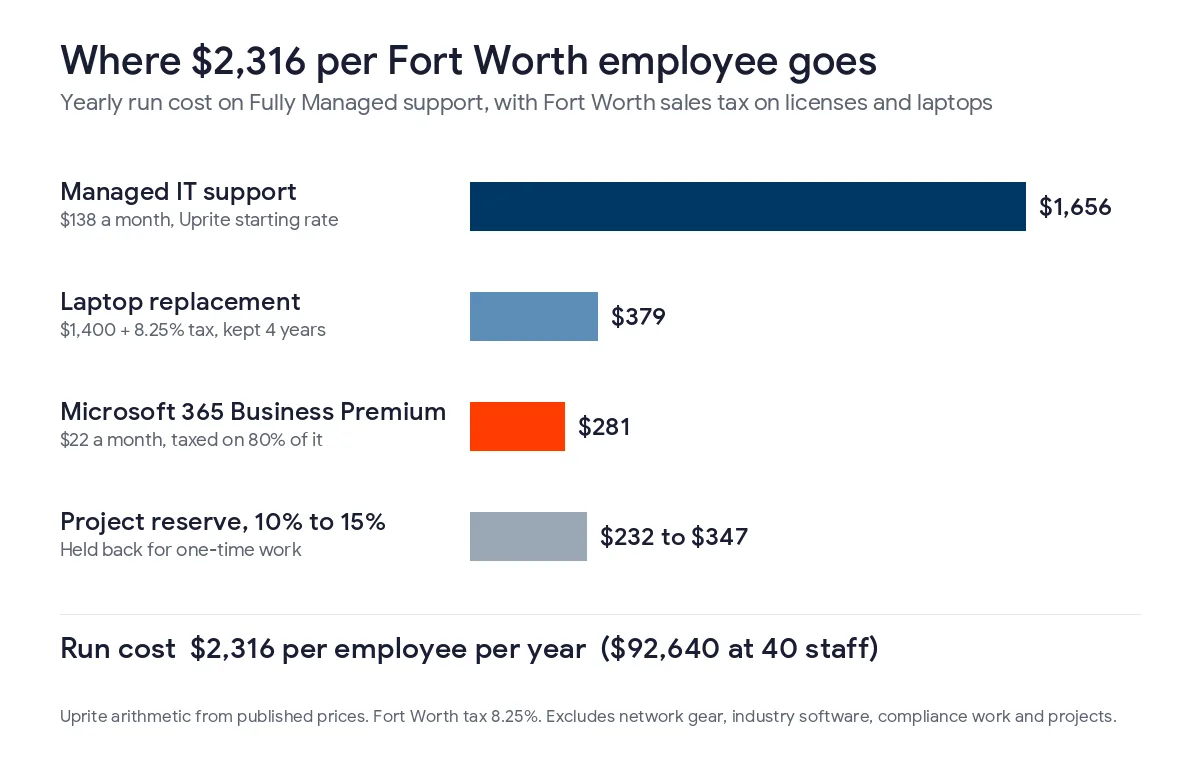
A Fort Worth business without IT staff should budget about $2,316 per employee per year for managed support, Microsoft 365 and a laptop, with sales tax included, and hold another 10% to 15% for projects.
That’s the figure I start from when a Fort Worth owner asks what next year’s technology should cost. It rests on prices anyone can check. Support is our published rate, licenses are Microsoft’s list price, and the laptop is a $1,400 machine kept for 4 years. Budgeting sits inside the wider planning work we do as IT consulting in Fort Worth, next to roadmaps and vCIO reviews.
For a 40-person company that comes to about $92,640 a year before projects. Four things make a Fort Worth budget different from a generic template. Tarrant County pays IT workers more than Dallas County does, even though it pays less overall. The 8.25% sales tax is split its own way. Many local firms sell into the defense supply chain, which brings compliance costs. And some useful security help is free from federal agencies.
What goes into a Fort Worth IT budget?
An IT budget is a 12-month plan for what a company will spend on technology. It includes support, software subscriptions, computers, network equipment, security tools, backup and planned projects. For a business with no IT employees, the support contract tends to be the biggest single line, followed by licenses and hardware.
I sort the lines into 2 groups before I price anything. Some costs rise with every hire, like a seat of support, a license and a laptop. Others are tied to obligations, like a clause in a federal contract, a state breach law or a second building. The first group is easy to forecast. The second group is where Fort Worth budgets tend to come up short, because nobody wrote those items down until the bill showed up.
- Managed support or in-house IT salaries
- Microsoft 365 plus the industry software you run
- Laptops and desktops on a set replacement cycle
- Network gear and internet circuits for each location
- Security tools, training and written policies
- Compliance work your customers and contracts require
- Backup, plus a plan for outages and breaches
- Sales tax on the taxable lines
- A reserve for projects
How much does IT cost per employee in Fort Worth?
Three costs rise with headcount. The table prices them on our Fully Managed plan at $138 per user per month, which includes on-site work, with visits in Fort Worth dispatched from our Dallas office. Microsoft 365 and the laptop carry Fort Worth’s 8.25% sales tax. The laptop price is my planning assumption, so swap in what you actually buy.
| Line item | How it’s figured | Per employee per year |
|---|---|---|
| Managed IT support | $138 per user per month, Uprite starting rate | $1,656 |
| Microsoft 365 Business Premium | $22 per user per month, taxed on 80% of the price | $281 |
| Laptop replacement | $1,400 plus 8.25% tax, spread over 4 years (assumption) | $379 |
| Run cost | Before network gear and projects | $2,316 |
| Project reserve | 10% to 15% of run cost | $232 to $347 |
At 20 employees the run cost is about $46,320 a year. At 40 it’s $92,640, and at 75 it’s $173,700. Teams of 12 or more can also choose our remote-only IT Pro plan at $110, which brings the per-employee figure down to $1,980. That plan suits a single office that runs in the cloud. A shop floor or a warehouse with its own network gear usually needs the on-site work that comes with Fully Managed. Both rates are on our pricing page, and Microsoft licenses are billed separately on every plan. Microsoft kept Business Premium at $22.00 when it raised other Microsoft 365 plans on July 1, 2026, according to its 2026 packaging and pricing update.
Some owners would rather start from a share of revenue. I treat 3% to 7% of revenue as a sanity check at the end, as our post on budgeting for IT in a growth year describes, and never as the method. A 35-person machine shop near Meacham Airport and a 35-person insurance agency downtown can have very different revenue. They’ll still need 35 seats of support, 35 licenses and about 35 computers.
Should a Fort Worth company hire IT staff or outsource?
This is the question I hear most from Fort Worth companies with 30 to 80 employees. Local wage data makes the answer clearer than most owners expect.
Tarrant County pays more for IT work than Dallas County
The Bureau of Labor Statistics counts pay at nearly every employer through its Quarterly Census of Employment and Wages. In 2025, private computer systems design firms in Tarrant County paid an average of $144,394 per employee. Dallas County firms in the same industry paid $138,207, so Tarrant ran about 4.5% higher. The Tarrant figure also jumped 10% in one year, up from $131,271 in 2024.
Across all industries the picture flips. The average Tarrant County job paid $74,950 in 2025, about 19% less than the $92,543 average in Dallas County. So Fort Worth is the cheaper labor market in general, just not for the people who run networks and servers. That industry average covers everyone those firms employ, from help desk staff to engineers, so read it as a direction and not as a salary quote.
What one in-house hire really costs
BLS publishes occupational wages for the whole Dallas-Fort Worth metro, not for Fort Worth by itself. In May 2025 the mean wage there was $108,020 for network and computer systems administrators and $80,300 for network support specialists. Help desk technicians averaged $63,030. Benefits and payroll taxes come on top of that. The BLS Employer Costs for Employee Compensation release shows private employers paying $46.89 per hour in total compensation for every $32.82 in wages as of June 2026. Applied to those wages, a systems administrator costs about $154,330 a year, a network support specialist about $114,730 and a help desk tech about $90,050. Given the county numbers above, a Fort Worth candidate may well ask for more than the metro average.
| Option for a 40-person company | Cost per year | What it covers |
|---|---|---|
| Fully Managed support for 40 people | $66,240 | A 24/7 team, on-site work and vCIO planning |
| Co-managed plan for 40 people plus 1 in-house tech | about $138,050 | Your own tech on site, with a team behind them for nights, vacations and projects |
| One help desk technician | about $90,050 | 1 person’s working hours and no cover when they’re out |
| One systems administrator | about $154,330 | Deeper skills, still 1 person’s working hours |
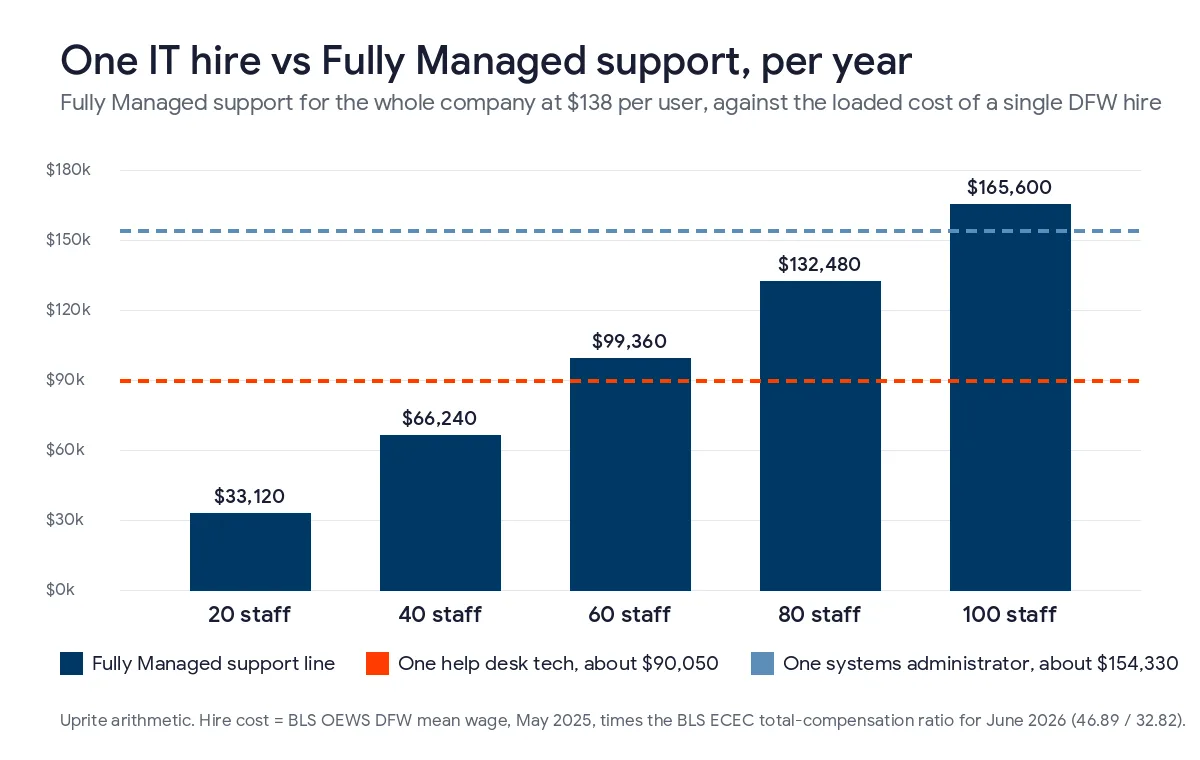
Our Fully Managed support line for an entire company doesn’t reach the cost of one help desk tech until about 54 employees. It doesn’t reach the cost of one systems administrator until about 93. A single hire also can’t cover nights, sick days and vacations alone. Hiring makes sense once you want someone in the building every day, and at that point our co-managed IT plan in Fort Worth at $100 per user keeps a team behind that person. Our breakdown of IT support cost in Fort Worth goes further into hourly and per-device billing.
How does Fort Worth sales tax change the budget?
The rate inside Fort Worth city limits is 8.25%, the same total as Dallas, but the local 2% is divided differently. The Texas Comptroller’s breakdown of local sales taxes lists 1% for the city, 0.5% for the Fort Worth transit authority, now called Trinity Metro, and 0.5% for the Crime Control and Prevention District. Some Tarrant County suburbs reach the same 8.25% with a different mix, and a few addresses outside city limits pay less. Check the rate for each office before you build the tax line.
Hardware carries the full rate, so a $1,400 laptop becomes $1,515.50. Cloud subscriptions are different. The Comptroller treats them as a data processing service, and Tax Code Section 151.351 exempts 20% of the charge. Tax falls on the other 80%, which works out to about 6.6%. Microsoft 365 Business Premium goes from $22.00 to about $23.45 per user per month, or roughly $697 a year for a 40-person office. Ask your IT provider whether its invoice is taxed, since some managed services count as data processing and some don’t. Our Dallas IT budget guide covers the transit share of that city’s rate if you have offices in both.
Which compliance costs belong in a Fort Worth budget?
Fort Worth leans on aerospace, defense and logistics more than most Texas cities do. That brings a few lines a generic template won’t mention.
Defense supply chain contracts
A shop that makes parts for a defense prime often has a contract clause requiring the security controls in NIST SP 800-171. The Department of War paused Phase 2 of its CMMC certification program in July 2026, but the Phase 1 self-assessment and the controls behind it still apply. I tell suppliers to budget for the controls, not the deadline. In practice that means multifactor sign-in everywhere, logs that are kept and reviewed, encrypted file storage and a written system security plan. These costs don’t scale with headcount the way support does. Our guides to CMMC for Fort Worth aerospace suppliers and CMMC compliance cost in DFW price them in more detail.
Texas breach notice rules
Under Business and Commerce Code Section 521.053, a business has to notify the Texas Attorney General of a breach that affects at least 250 Texans, no later than 30 days after it determines the breach occurred. Reports go through the Attorney General’s data breach reporting form, and the office posts a public list of them. In my experience this rarely shows up in a small company’s budget. An incident response retainer and a cyber insurance policy are the lines that pay for lawyers, forensics and customer notices if it ever happens.
SB 2610 and the security line
Texas SB 2610 took effect on September 1, 2025. A business with fewer than 250 employees can avoid exemplary damages after a breach if it kept a cybersecurity program that fits its size. Under 20 employees, basic controls like password rules and training are enough. Companies with 20 to 99 employees are measured against CIS Controls Implementation Group 1, and those with 100 to 249 against a recognized framework such as the NIST Cybersecurity Framework. Our SB 2610 compliance guide goes through each tier. The law adds no new bill, but it gives you a legal reason to fund security every year rather than after something breaks.
What can a Fort Worth company get for free?
Not every security line needs a vendor. A pair of federal programs can trim the budget, especially for manufacturers.
CISA’s Cyber Hygiene vulnerability scanning checks a company’s internet-facing systems at no cost and sends a report every week. CISA opens it to private organizations in critical infrastructure, and its list of 16 critical infrastructure sectors includes critical manufacturing and the defense industrial base. That covers a good share of Fort Worth’s manufacturers and their suppliers. Sign-up is an email, and scans usually start within 3 business days.
NIST also publishes a free Small Business Quick-Start Guide for its Cybersecurity Framework 2.0, with one page for each of the framework’s 6 functions. It won’t replace a security tool. For a company that’s just getting organized, though, it’s a reasonable first gap check before you pay anyone for an assessment.
Which costs catch Fort Worth budgets off guard?
These come up in nearly every fall planning session I run.
- Microsoft 365 renewals at the July 2026 prices. Business Standard went from $12.50 to $14.00 per user and Business Basic from $6.00 to $7.00, and many companies won’t see it until their renewal date.
- A second building. A warehouse near AllianceTexas or a yard in south Fort Worth needs its own firewall, switches, Wi-Fi and circuit, each with its own replacement date.
- Hiring plans with no IT line. Every new person needs a laptop, a license and a few hours of setup before day 1.
- Insurance questionnaires. Carriers commonly ask about multifactor sign-in, endpoint protection and tested backups, and closing a gap in a hurry costs more.
- The old server nobody wants to touch. Retiring it is a project, and it belongs in the reserve.
How do you build next year’s IT budget in Fort Worth?
- Count employees, devices, servers and locations, and note when each device was bought.
- Price support and licenses per person from your current contracts.
- Decide whether you’ll hire, outsource or mix the 2, using the costs above.
- Add Fort Worth sales tax to hardware and subscriptions, and to support if your invoice is taxed.
- Replace about a quarter of your computers each year so no single year takes the whole hit.
- List the compliance work your contracts require, plus breach response and insurance.
- Add a 10% to 15% reserve and review the numbers every quarter.

Our free IT budget template fills in Texas pricing from your user count if you’d rather not start from a blank sheet. Most project lines come out of an IT roadmap for a Fort Worth small business, which puts the next 12 to 24 months of work in order. If you only need advice a few times a year, our guide to IT consulting rates in Fort Worth covers hourly and retainer pricing. For ongoing help, our vCIO services in Fort Worth can run this review with you, and the full cost by plan is in our post on managed IT cost in Fort Worth.
What Fort Worth owners ask about IT budgets
Is IT staff more expensive in Fort Worth than in Dallas?
For IT services firms it is, based on 2025 BLS county data. Private computer systems design firms in Tarrant County paid an average of $144,394 per employee, about 4.5% more than Dallas County’s $138,207, even though Tarrant pays less across all jobs.
Does Fort Worth have the same sales tax as Dallas?
The total is the same 8.25%, but the pieces differ. Fort Worth’s local 2% goes to the city, Trinity Metro and the Crime Control and Prevention District, while Dallas sends 1% to DART. Cloud subscriptions in either city carry about 6.6% after the data processing exemption.
Can CISA scan our network for free?
Yes, if your company is in a critical infrastructure sector such as critical manufacturing or the defense industrial base. CISA’s Cyber Hygiene service scans internet-facing systems at no cost and reports weekly. You request it by email, and scans usually begin within 3 business days.
Do defense subcontractors need a separate IT budget line?
They should. Contracts that require NIST SP 800-171 controls bring costs for multifactor sign-in, logging, encryption and documentation, and those costs don’t grow with headcount the way support does. The July 2026 pause in CMMC Phase 2 didn’t remove the controls.
What happens if we have a data breach in Texas?
If it affects 250 or more Texans, you must report it to the Attorney General within 30 days of determining it happened, and the report lands on a public list. An incident response retainer and cyber insurance mean that response is already paid for.
How big should the project reserve be?
Hold 10% to 15% of your run cost. At 40 employees on Fully Managed that’s about $9,264 to $13,896 a year, set aside for one-time work like a firewall replacement or an office move.
Want next year’s budget built on your own headcount, sites and contracts? Send us your user count and we’ll go through the numbers with you line by line, including the tax and compliance items. We usually reply within 5 minutes.
Talk to an IT ExpertPrefer email or a phone call? Reach the team through our contact page.