
An IT roadmap for a Fort Worth small business is a schedule, usually 12 to 24 months long, of every system you run, the date each must change, and the cost of acting on time versus waiting.
That last column is the one most plans leave out. I’m Uprite’s Lead vCIO, and when I sit down with a Fort Worth owner, the question is rarely whether something needs replacing. It’s whether doing it this quarter costs less than doing it next year, and the answer changes from row to row. Some costs climb on a fixed schedule, and Microsoft doubles one of its prices every year. Others jump at a renewal or a tax date. This guide shows how to build the roadmap yourself, using the 2027 dates that matter here. If you’d rather have help, that’s the work we do under IT consulting in Fort Worth.
List everything the business owns or pays for. Beside each one, note the date that forces a decision, what acting before that date would cost and what waiting would cost. For a Fort Worth office in 2027, the big rows are old Windows 10 PCs, Windows Server 2016, the Microsoft 365 renewal and the April 15 rendition to the Tarrant Appraisal District. Assign every change to a quarter and a single owner, then look the whole sheet over every 3 months.
What goes on an IT roadmap?
An IT roadmap is a spreadsheet, not a strategy deck. Each row is one thing the business pays for, like a server, a batch of laptops, a software subscription or the internet circuit. The columns show the deadline, the realistic options, the cost and the quarter the work lands in.
I add one more column that most templates don’t have. It’s the cost of waiting, written as a dollar figure or a plain-English risk. That column turns a list into a schedule. Without it, every row looks equally urgent, and owners do what anyone does with 30 equally urgent items. They wait for something to break.
| Column | What goes in it | Example row |
|---|---|---|
| Item | The thing you own or pay for | 12 office PCs still on Windows 10 |
| Forcing date | The date a vendor, contract or law sets | Extended Security Updates renew each October |
| Options | 2 or 3 realistic choices | Pay for updates, upgrade to Windows 11 or replace the PC |
| Cost to act now | One-time and monthly cost | New PCs plus setup time |
| Cost of waiting | What gets more expensive or riskier | $122 per PC this year and $244 the next |
| Quarter and owner | When it happens and who decides | April to June 2027, office manager |
Why does a growing Fort Worth business need one?
Fort Worth is adding people faster than almost any big city in the country. The Census Bureau’s city population estimates put it at 1,028,117 residents on July 1, 2025, up from a 2020 base of 918,892. That’s 11.9% in 5 years and 19,512 new residents in the last year alone, enough to move Fort Worth past Jacksonville into 10th place nationally. In a small office, growth like that shows up as new hires, a second site in Alliance or Burleson and a phone system that suddenly feels too small.
Most of those offices are small. The Census Bureau’s County Business Patterns counted 47,656 employer locations in Tarrant County in 2023, and 39,411 of them had fewer than 20 employees. That works out to 82.7%. Hardly any of those carry a full-time IT manager. The dates fall to the owner, a bookkeeper or an outside provider, and anything that lives in one person’s head walks out the door with them.
Nobody plans to miss a server deadline. It just happens.
Which roadmap rows cost more the longer you wait?
In 2027, 5 rows on a typical Fort Worth roadmap get more expensive with delay. They’re Windows 10 PCs, Windows Server 2016, the Microsoft 365 renewal, equipment timing around the appraisal district and breach detection.
| Row | Forcing date | Cost of waiting |
|---|---|---|
| Windows 10 PCs | Every October | $122 per PC for Year 2 of security updates, then $244 for Year 3 |
| Windows Server 2016 | January 12, 2027 | No more security fixes and harder answers on the insurance application |
| Microsoft 365 | First renewal after July 1, 2026 | $1.00 more per user each month on Business Basic and $1.50 more on Business Standard |
| Equipment and TAD | January 1 and April 15 | A 10% penalty for a late rendition, and a big purchase can land in the wrong tax year |
| Monitoring and log review | No fixed date | Fort Worth area breaches took a median of 59 days to discover |
Windows 10 PCs
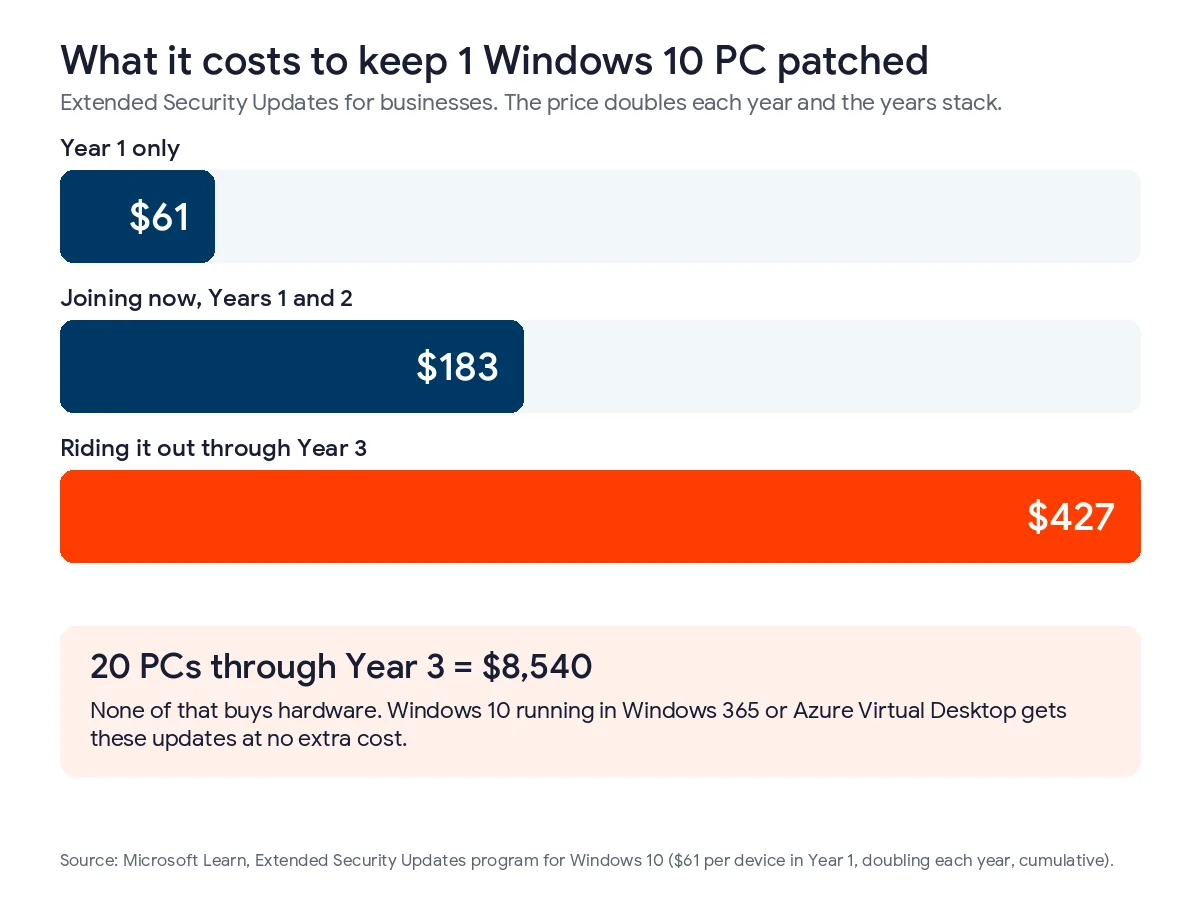
Windows 10 lost support on October 14, 2025. Businesses can keep getting security fixes through Microsoft’s Extended Security Updates program, which costs $61 per device for the first year. The price doubles each year, for a maximum of 3 years. ESU is also cumulative, so a business that skipped Year 1 has to buy it to get Year 2.
Per PC, joining now costs $183. Riding it out through Year 3 costs $427 in total. For a 20-PC office, that’s $8,540 spent keeping old machines patched, and none of it buys hardware. The exception is Windows 10 running as a virtual desktop in Windows 365 or Azure Virtual Desktop, where Microsoft includes ESU at no extra cost.
My view is that Year 2 is a fair bridge for a handful of PCs you’ll replace by spring. Year 3 is harder to defend. You’d be paying $244 for one more year of patches on a machine that already failed the Windows 11 hardware check.
Windows Server 2016
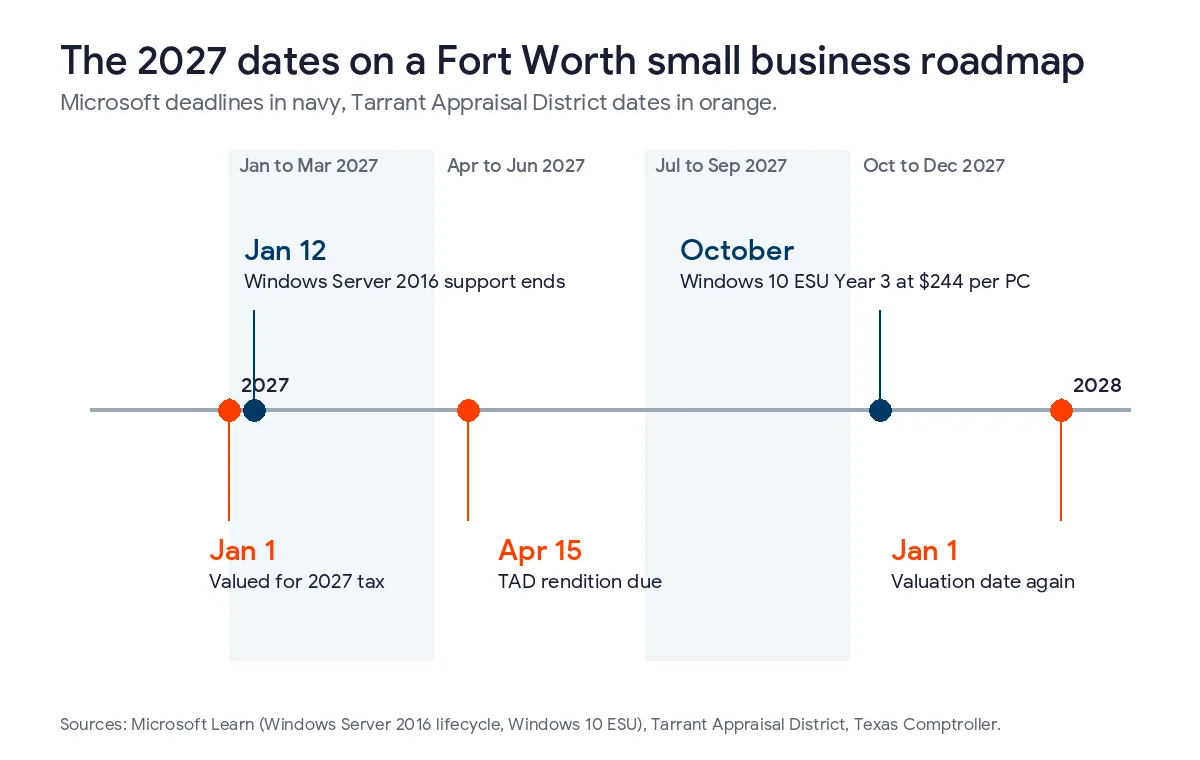
Windows Server 2016 reaches the end of extended support on January 12, 2027, according to Microsoft’s product lifecycle page. As I write this in the third week of November, that’s 55 days away. The server won’t shut off on January 13. It just stops getting security fixes, and cyber insurance applications ask whether you run unsupported systems.
A small office server usually does 3 or 4 jobs at once. It holds the shared files, handles sign-ins as the domain controller, runs the printers and hosts an older accounting or practice app. List those jobs before you price anything. The shared files can move to SharePoint over a weekend. The app is the slow part, because its vendor decides which newer server versions it supports.
Your Microsoft 365 renewal
Microsoft raised commercial prices on July 1, 2026. Its licensing announcement moved Business Basic from $6.00 to $7.00 per user per month and Business Standard from $12.50 to $14.00. Business Premium stayed at $22.00. Existing customers keep the old price until their next renewal, so plenty of Fort Worth offices haven’t felt it yet.
For a 25-person office on Business Standard, the increase comes to $450 a year. That’s not a crisis. What belongs on the roadmap is the renewal month, plus a license cleanup 60 days before it, because we usually find seats still assigned to people who left. There’s a quieter change too. The gap between Standard and Premium shrank from $9.50 to $8.00 per user. Premium adds Intune device management and Defender for Business, so if those were already on your wish list, the upgrade costs less than it did a year ago. Our Microsoft 365 services in Fort Worth page covers how we handle licensing.
Equipment and the Tarrant Appraisal District
Computers, servers, switches and phone systems count as business personal property in Texas. The Comptroller’s guide to valuing property notes that appraisal districts value it as of January 1. In Tarrant County, TAD’s rendition page sets April 15 as the filing deadline. It also says an extension has to be requested in writing by that date, and that a late or missing rendition adds a 10% penalty to the tax bill.
House Bill 9 changed the math for 2026. It exempts the first $125,000 of a business’s income-producing personal property, and appraisal districts apply it automatically. Lots of small Fort Worth offices fall under that line. The roadmap still needs 2 rows here. One is the April 15 filing, in whatever form your CPA says it should take. The other is a running total of what you’ve spent on equipment, because a server room or a camera system can push a business past $125,000 sooner than people expect. When a large purchase sits close to the line, check with your CPA on which side of January 1 it should fall.
Monitoring and log review
This row has no vendor date, and that’s exactly why it slides. The Texas Attorney General publishes data breach reports from any organization that exposes 250 or more Texans. We pulled the list on November 13, 2026 and kept the filers based on the Fort Worth side of the metro, from Fort Worth, Grapevine and Bedford out to Cleburne and Granbury. There were 22 between April 1, 2025 and November 10, 2026, and all 22 listed when the breach started and when it was found. The median gap was 59 days. 11 took longer than 30 days to find, and 7 took longer than 90.
Most of those filers are medical practices, schools, retailers and local government, not 15-person offices. The lesson carries over anyway. The longer someone sits inside a network, the more there is to clean up. Put managed monitoring, or at least a monthly log review, on the roadmap with a name beside it.
How do you build the roadmap?
Build it in 5 steps. Inventory what you own and pay for, find each row’s forcing date, price acting now against waiting, place each change in a quarter and name 1 owner who reviews it every 3 months.
- Write down every device on the network and every system holding company data, plus every subscription on the company card.
- Find the forcing date for each row. Vendor lifecycle pages, contracts and renewal emails cover most of them.
- Price 2 numbers per row, the cost to act now and the cost of waiting a year.
- Put each change in a quarter, starting with the rows where waiting costs the most.
- Give every row 1 owner and put a 30-minute review on the calendar each quarter.
Step 1 takes the longest. Microsoft 365’s admin center shows every user and license, your IT provider should be able to export a device list, and a year of card statements turns up the subscriptions nobody remembers buying. CISA’s Cyber Essentials guide for small business owners treats that same inventory as the starting point for security, so the work counts twice.
Step 3 is where the roadmap earns its keep. Sometimes waiting is the right call. A copier lease with 14 months left doesn’t need a decision this year. The goal isn’t to do everything early. It’s to know which delays are free and which ones aren’t. Once you know what’s coming, our guide to putting together a Texas IT budget covers how to split it into one-time and monthly spending.
What does a 2027 roadmap look like for a 20-person office?
Here’s an example for a made-up 20-person office near Sundance Square. It has 1 server on Windows Server 2016, 8 Windows 10 PCs that can’t run Windows 11, and Microsoft 365 Business Standard renewing in March. Your dates will differ. The order usually doesn’t.
| Quarter | Work | Why it lands here |
|---|---|---|
| January to March | Move the shared files and sign-ins off Server 2016. Clean up Microsoft 365 licenses before the March renewal. Total the equipment list. | Server 2016 support ends January 12, and equipment is valued as of January 1 |
| April to June | File with TAD. Replace the 8 Windows 10 PCs. | The rendition is due April 15, and replacing before October avoids buying Year 3 of updates |
| July to September | Review backups and multifactor sign-in ahead of the insurance renewal. Get quotes for fall projects. | Insurance applications ask about both |
| October to December | Build next year’s roadmap. Time any big equipment purchase with your CPA. | January 1 valuation comes around again |
A defense subcontractor would add a row for CMMC, and our post on CMMC for Fort Worth aerospace suppliers explains what Level 2 asks of a small shop. A medical practice would add HIPAA work. The skeleton stays the same.
Who keeps the roadmap current?
Decisions belong to the owner or general manager. Someone technical keeps the dates and prices honest. In a company without an IT manager, that’s usually a virtual CIO from a managed IT provider, and our explainer on what a vCIO actually does puts the roadmap near the top of that job. Some owners hire a consultant for a one-time roadmap instead, and our guide to IT consulting rates in Fort Worth shows what that usually costs. If you want to compare the firms that sell that work, we scored 8 IT consulting firms in Fort Worth, us included.
Bias disclosed. Uprite sells this work, and roadmap reviews come with every fully managed IT plan we offer. How that works locally is on our vCIO services in Fort Worth page, and our breakdown of managed IT costs in Fort Worth shows where it sits in the monthly price. Still, a 6-person office with everything in Microsoft 365 can run this spreadsheet without us. The owner has to show up to the quarterly review either way. We’ll notice a server losing support. We won’t know you’re opening an office in Alliance in June unless you tell us.

Starting from nothing? Our free network assessment produces the inventory and flags the security gaps it finds. Our pricing page lists what each plan costs.
Questions Fort Worth owners ask us about roadmaps
How detailed does a roadmap need to be for a 10-person office?
One page is plenty. A 10-person office might have 20 to 30 rows, and only the next 4 quarters need real detail. Past that, each item can be one line with its date, like Windows Server 2019 support ending in January 2029.
Should we pay for Windows 10 Extended Security Updates or replace the PCs?
$183 per PC covers Years 1 and 2 if you’re joining now, which is a reasonable bridge for machines you’ll replace soon. Year 3 adds $244 per PC on top of that. For most offices, replacing the PCs before Year 3 is the cheaper path, and any PC that can run Windows 11 should simply be upgraded.
When does the Microsoft 365 price increase actually hit us?
At your first renewal after July 1, 2026. Microsoft kept existing customers on their old price until then. Check the renewal date in the admin center and remove unused licenses before it arrives, so you aren’t renewing seats nobody uses.
Do we still deal with TAD if our equipment is worth less than $125,000?
Probably, though less than before. HB 9 exempts the first $125,000 automatically starting in 2026, so a lot of small offices owe nothing on their equipment. TAD still sets an April 15 rendition deadline, so ask your CPA what your business should file.
How often should we look at the roadmap?
Every quarter, for about 30 minutes. A full rebuild once a year works best in the fall, before budgets are set and before the January 1 valuation date. Revisit it any time something big changes, too. A new office, an acquisition or a large client with security requirements can reorder half the rows in one afternoon.
We’re opening a second location. When should IT get involved?
3 to 4 months before move-in, if you can manage it. Internet circuits, cabling and network gear for a new site in Alliance or Burleson all have lead times, and the internet provider is usually the slowest. Put the opening date on the roadmap the day the lease is signed.
Not sure which of your rows are expensive to wait on? Send us a short note about your office. We’ll start with an inventory and the Fort Worth dates that apply to you, and replies usually come within about 5 minutes.
Plan My 2027 RoadmapPrefer the phone or email? Both are on our contact page.