An IT roadmap for a Dallas small business is a dated list of every system you run, when each one has to be replaced or renewed, what that will cost and who decides, planned 12 to 24 months ahead.
Most of the dates on it aren’t yours to pick. Microsoft sets some of them. The Dallas Central Appraisal District sets one. Your insurer, your landlord and your internet provider set others. The roadmap is the one place where those dates sit side by side, so you see a collision a year early and not a week early. I build these with clients as Uprite’s Lead vCIO, and this post is the version you can start on your own. If you’d like a hand with it, that work sits under our IT consulting in Dallas.
Start with an inventory of everything you own or pay for. Next to each item, write the date it loses vendor support or its contract renews. Add the 2 Texas tax dates that touch equipment, January 1 and April 15. Add your own plans, like new hires or a second office. Then price each change, put it in a quarter, give it 1 owner and look at the whole thing every 3 months.
What does an IT roadmap look like on paper?
Most good ones are a spreadsheet. Each row is one thing the business owns or pays for. The columns hold the date that forces a decision, the options, the cost, the quarter it lands in and the person who owns it. Expect more rows than you think. Printers, the phone system, the camera system and every software subscription all get a row.
It isn’t a strategy deck, and it isn’t a vendor quote. A quote tells you what one company would like to sell you. The roadmap tells you what has to happen whether or not anyone is selling it, and in what order.
Why would a 15-person company bother?
Because nobody else is watching the dates. The Census Bureau’s County Business Patterns counted 189,739 employer locations in the Dallas-Fort Worth-Arlington metro in 2023. Of those, 158,493 had fewer than 20 employees. That’s 83.5% of the metro’s business locations.
Very few of them can justify a full-time IT manager. The Bureau of Labor Statistics puts the mean annual wage for computer and information systems managers in the DFW metro at $185,720 for May 2025, before benefits. So the dates end up with the owner, the office manager or an outside provider. If they’re written down, the plan still works after that person leaves.
Which 4 calendars feed the roadmap?
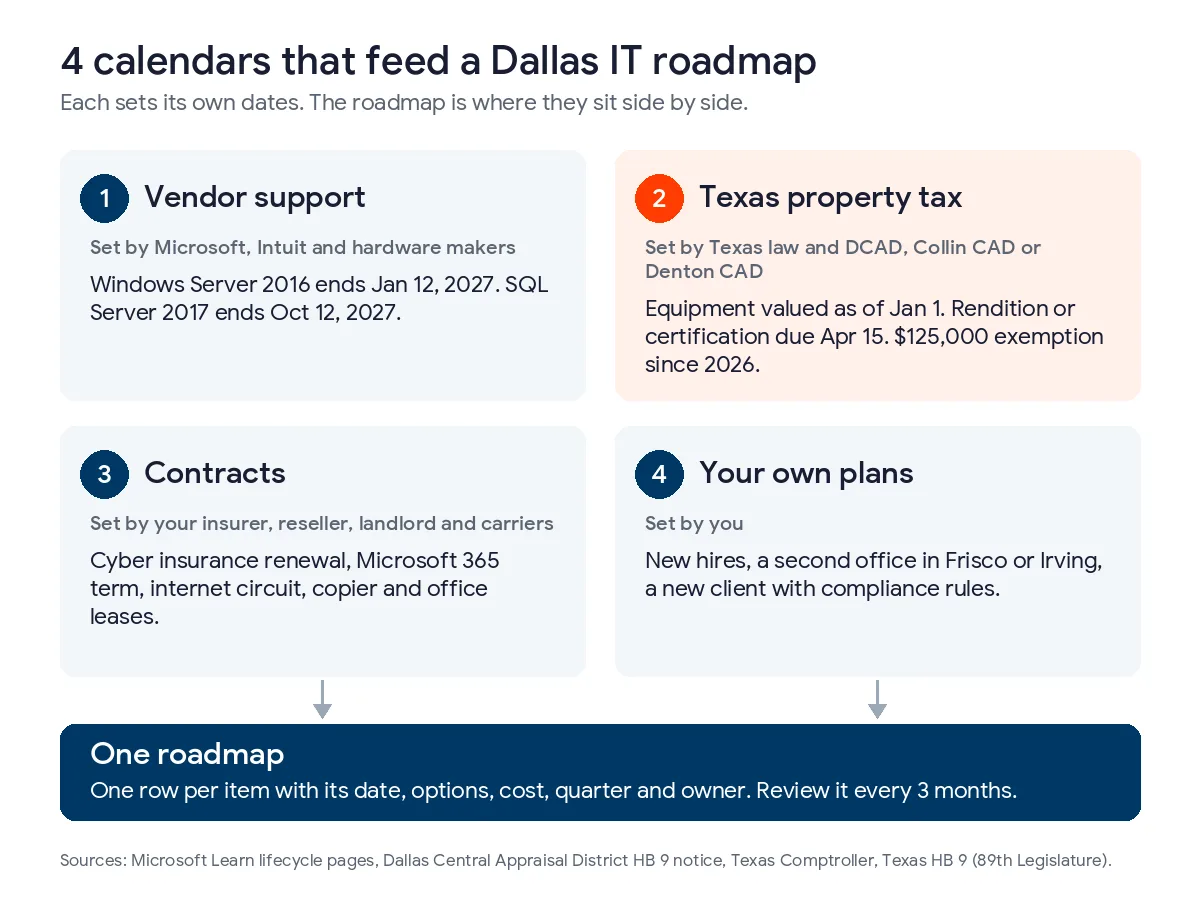
I find it easiest to think of the roadmap as the place where 4 separate calendars meet. Each one has a different owner, and each one lives somewhere different.
| Calendar | Who sets the dates | Examples | Where you find them |
|---|---|---|---|
| Vendor support | Microsoft, Intuit, hardware makers | Windows Server 2016 ends January 12, 2027. SQL Server 2017 ends October 12, 2027. | Vendor lifecycle pages |
| Texas property tax | Texas law and your county appraisal district | Equipment is valued as of January 1. Renditions and certifications are due April 15. | DCAD, Collin CAD or Denton CAD, and the Texas Comptroller |
| Contracts | Your insurer, reseller, landlord and carriers | Cyber insurance renewal, Microsoft 365 annual term, internet circuit, copier lease, office lease | Contracts, invoices and renewal emails |
| Your own plans | You | New hires, a second office in Frisco or Irving, a new client with compliance rules | Your business plan and your head |
Vendor support dates
Microsoft’s list of products reaching end of support in 2027 spells out what the date means. After it there are no new security updates, no non-security updates and no free or paid assisted support. These are the lines I check against a small Dallas office’s inventory first.
| Product | Support ends | Where small offices usually have it | What to plan |
|---|---|---|---|
| Office 2016 and 2019, Exchange Server 2016 and 2019 | Ended October 14, 2025 | Perpetual Office licenses on older PCs, an on-site mail server | Move to Microsoft 365 if it hasn’t happened yet |
| QuickBooks Desktop 2023 | Discontinued after May 31, 2026 | Bookkeeping on a local PC or server | Upgrade or move the books now |
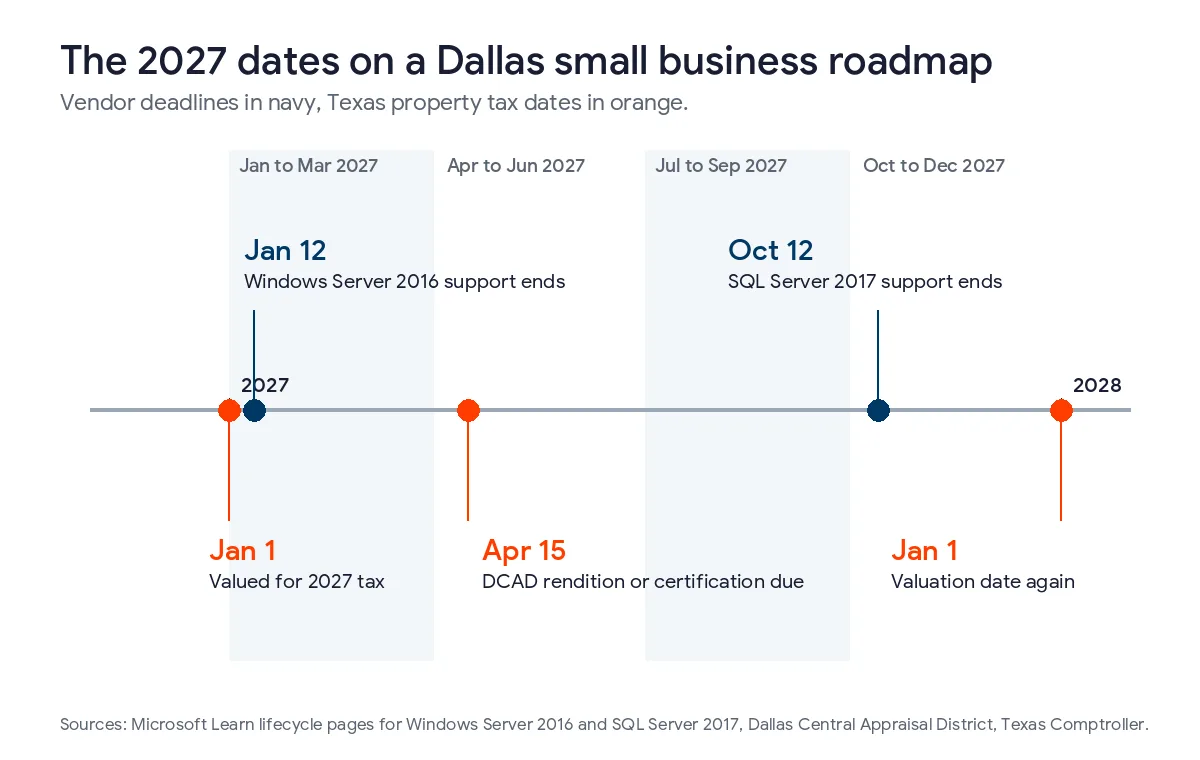
| Windows Server 2016 | January 12, 2027 | File server, domain controller, or the box running an older practice or accounting app | Move the workloads this quarter, or budget for paid Extended Security Updates as a bridge |
| SQL Server 2017 | October 12, 2027 | The database underneath a line-of-business app | Ask the app vendor which SQL Server version their current release supports |
| Windows Server 2019 | January 9, 2029 | Servers bought from about 2019 on | Budget the replacement in 2028 |
The first 2 rows are already past. I list them because they still turn up. Microsoft’s 2025 end-of-support list shows Office 2016, Office 2019 and both Exchange versions ending on October 14, 2025. Intuit’s QuickBooks Desktop discontinuation policy says version 2023 stopped getting support after May 31, 2026. Discontinued versions don’t get critical security updates, and they lose Desktop Payroll, Desktop Payments and online bank feeds. If the bookkeeper still opens that version every morning, it goes at the top of the list.
SQL Server 2017 is the row people miss. Hardly anyone buys it on purpose. It gets installed underneath something else, like a dental imaging package, a practice management system or an inventory app. Microsoft’s SQL Server 2017 lifecycle page lists extended support ending in October 2027. The fix usually runs through the app’s vendor and their upgrade schedule, so it needs more lead time than the date suggests.
Windows Server 2016 is the closest deadline on the list. Its lifecycle page shows extended support ending January 12, 2027. I’m writing this in mid-November, so that’s roughly 8 weeks out. The server will still boot on January 13. It just won’t get fixes anymore, and cyber insurers ask about unpatched servers on their renewal forms.
Texas property tax dates
This is the calendar most IT plans leave out, and it’s the one that’s specific to Texas. Business equipment like computers, servers, switches and phone systems is business personal property. The Texas Comptroller’s page on valuing property says Tax Code Section 23.01 has appraisal districts value taxable property at market value as of January 1. In Dallas County, DCAD’s rendition notice sets April 15 as the last day to file. Missing it brings a penalty equal to 10% of the tax on that property.
The rules changed in 2026. House Bill 9 raised the exemption for income-producing personal property to $125,000 of appraised value, starting January 1, 2026. DCAD’s notice on the HB 9 exemption says the district applies it automatically. A business at or under $125,000 may elect not to render. To make that election, it files a rendition statement or property report by April 15 with a certification that the value doesn’t exceed $125,000. The election then stays in place until ownership changes, the chief appraiser asks for a rendition or the value goes over $125,000. Related businesses at the same address are added together.
For most small offices that becomes 2 rows on the roadmap. One is a one-time task, which is filing that certification if nobody has. The other is a running total. Keep the cost of everything on the inventory summed in one cell, since a rendition asks for cost and purchase dates anyway. Laptops, a firewall and a few switches won’t get near $125,000 for a lot of offices. A server room, a camera system or new conference room gear can close the gap. When a big purchase might push you over, ask your CPA whether it should land before or after January 1. If your office is in Plano or Frisco, your appraisal district is Collin’s and not Dallas’s, but the state dates are the same.
Contract renewal dates
Contracts have dates as well. They’re easy to lose track of, since each one sits in a different inbox. Of all of them, the cyber insurance renewal is the one that creates IT work. The application asks whether you use multifactor sign-in, how you back up and how fast you patch. A gap you find in February can hold up a renewal in April. I put each renewal on the roadmap 90 days ahead of its date.
Insurers and large clients measure you against something, and it helps to read it first. CISA wrote Cyber Essentials for owners of small businesses. NIST’s quick-start guide for small businesses covers the current Cybersecurity Framework in plain terms. Texas SB 2610 adds one more check if you have 20 or more employees and hold customer data. Our Texas SB 2610 compliance guide explains its size tiers.
The Texas Attorney General’s data breach reports show why this matters. A business has to file there when a breach touches 250 or more Texans. We downloaded the list on November 13, 2026 and counted the DFW filers. There were 92 between April 1, 2025 and November 10, 2026. 80 of them listed both the date the breach started and the date it was found. In 38 of those 80, more than 90 days passed in between. That’s why monitoring and log review get their own row.
Your own plans
Only you can fill this calendar in. Hiring 8 people in the spring means 8 laptops, 8 Microsoft 365 licenses and maybe a faster internet circuit. A second office in Frisco or Irving means a firewall, a network, phones and possibly a second appraisal district. A new client in health care or defense can bring HIPAA or CMMC requirements with it. I ask these questions at every quarterly review, because the answers move the roadmap more than any vendor date does. Whether that review sits with a vCIO or a one-time consultant is its own decision, and I cover it in vCIO vs IT consultant in Dallas.
How do you put the roadmap together?
- Take the inventory, counting anything that connects to the network or holds company data.
- Fill in the 4 calendars for each row, starting with vendor end-of-support dates.
- Price each change and mark it as a one-time purchase or a monthly cost.
- Assign each change to a quarter, then check it against January 1, April 15 and your renewal dates.
- Name 1 owner per row and book a 30-minute review every quarter.
Step 1 is the slow one. The Microsoft 365 admin center lists users and licenses. Your IT provider’s asset report lists devices. Invoices and card statements catch the subscriptions nobody remembers signing up for. CISA lists an up-to-date asset inventory among its Cross-Sector Cybersecurity Performance Goals, so the same list does double duty for security.
Step 4 is where the calendars collide. Here’s how a typical Dallas roadmap spreads across 2027.
| Quarter | What usually lands here | Dates to check |
|---|---|---|
| January to March | Windows Server 2016 moves, budget approval, the inventory total for the appraisal district | January 1 valuation date, January 12 Server 2016 deadline |
| April to June | The rendition or certification, laptop refresh, Microsoft 365 license cleanup | April 15 filing date |
| July to September | Testing the line-of-business app on a newer SQL Server, quotes for fall projects | Leave room before October 12 |
| October to December | SQL Server 2017 cutover, insurance renewal prep, next year’s roadmap, big purchases timed with your CPA | October 12 SQL Server 2017 deadline, January 1 again |
Our article on building an IT budget for a Texas business goes through the spending categories. On the roadmap, keep one-time purchases in one column and monthly costs in another. Waiting doesn’t make Microsoft 365, backup or support any cheaper. One-time purchases are the ones where tax timing matters.
Who keeps the roadmap current?
The owner or general manager makes the calls. A technical person keeps the dates and prices right. Without an IT manager on staff, that person is usually a virtual CIO at your managed IT provider. Our explainer on what a vCIO does lists the roadmap first among that role’s jobs. If you want outside help with the first version, we compared 8 IT consulting firms in Dallas, us included.
Uprite includes roadmap work in its fully managed IT plans. Our vCIO services in Dallas page explains how that works here. The owner should still read the roadmap each quarter. We’ll catch a server that’s lost support. We won’t know about a Frisco office opening in March unless you mention it.

No inventory yet? Our free network assessment builds one and lists the security gaps it turns up. Plan rates are on our pricing page.
What Dallas owners ask about IT roadmaps
How far ahead should a small business IT roadmap look?
Plan the next 12 to 24 months row by row. Anything further out can be a single line per item with its known date, like Windows Server 2019 in January 2029. Roll the plan forward each quarter so it always shows at least a year.
Do IT purchases affect our Dallas property taxes?
They can, because computers and network gear are business personal property in Texas. Since January 1, 2026, the first $125,000 of that value is exempt under HB 9, so many small offices owe nothing on it. DCAD still expects either a rendition or a one-time certification by April 15.
What should we do first if we still run Windows Server 2016?
List every job that server does today, before you price anything. A file share moves quickly. A domain controller takes more planning. An old accounting or practice app may need its vendor involved, and that piece usually sets the timeline. Support ends January 12, 2027.
Do we need a roadmap if everything is in the cloud?
Yes, but it’s shorter. Cloud services still have renewal dates, license counts and security settings, and the laptops people use to reach them still age out. What drops off is the server row, which is often the most expensive one.
Can our current IT provider build the roadmap?
Usually, if they’re willing to put dates and prices in writing and review them with you. Ask for their asset report and a list of end-of-support dates for your devices. If they can’t produce either one, that’s worth knowing before your next renewal.
What if one of our deadlines is only weeks away?
Get in touch before the date, not after it. Uprite’s average first response time is 5 minutes. The network assessment gives us an inventory, and your vCIO books urgent work like a Server 2016 move once we see what the server runs.
Want a second set of eyes on your dates? Tell us a little about your office and we’ll begin with an inventory and a list of the Dallas deadlines that apply to it. Most messages get a reply within 5 minutes.
Book a Roadmap CallYou can also call or email the team from our contact page.