IT Support for Dental Practices in Dallas
Dental IT support in Dallas keeps Dentrix, Eaglesoft, or Open Dental, your imaging, and your patient records running and HIPAA-ready. Uprite does it from North Dallas with a signed BAA, a five-minute average response, and fully managed plans at $138 per user.
SOC 2 Type 1 audited in 2023. The dental side of our managed IT for healthcare in Texas, built for Dallas-Fort Worth general, pediatric, orthodontic, and oral surgery practices.
Get Your Free Dental IT AssessmentIn Texas Since 1999 | SOC 2 Type 1 (2023) | Signed BAA Before Access | 120-Day Satisfaction Guarantee
Get Your Free Dental IT Assessment
Recognized Across Texas for Secure, HIPAA-Ready IT















The Dallas Shift
Dallas Has Fewer Dental Offices Than in 2020, and Each One Is Bigger
The count went down.
Dallas County had 1,651 private dental offices in 2020, according to the Bureau of Labor Statistics Quarterly Census of Employment and Wages. By 2025 it had 1,544. That’s 107 fewer offices. Over the same five years, the number of people working in Dallas County dental offices rose from 9,610 to 10,970, a gain of 14 percent.
Put those two lines together and the typical Dallas County practice grew from about 5.8 people to 7.1. More chairs per office. More hygiene columns on the schedule, more sensors, more workstations, more logins, and in a lot of buildings the same back-room tower that was bought when the practice was two operatories smaller. The growth also moved north. Collin County added 86 dental offices and Denton County added 46, while Tarrant lost 35.
Nobody told the server.
It still thinks it’s 2018.
And the bill for standing still just went up. Year two of Microsoft’s Extended Security Updates for Windows 10 began on October 14, 2026, at $122 per device, double the $61 year-one price, and a machine can’t join year two without paying for year one too. Open Dental suspended Windows 10 support in October 2025. Patterson’s August 2026 Eaglesoft requirements list Windows 11 Pro as the only supported workstation system. A bigger office running older operatory machines now pays more every year for the privilege of not upgrading.
So when a provider pitches a growing Dallas practice the same setup it sold a five-person office years ago, it’s quoting for a business that no longer exists. Medical groups and clinics have different software, staffing, and compliance needs, and we cover those on our healthcare IT services in Dallas page. This page is about dentistry.
Inside the Practice
How a Growing Dallas Dental Office Outgrows Its IT
Picture a practice anywhere from Oak Cliff to Frisco.
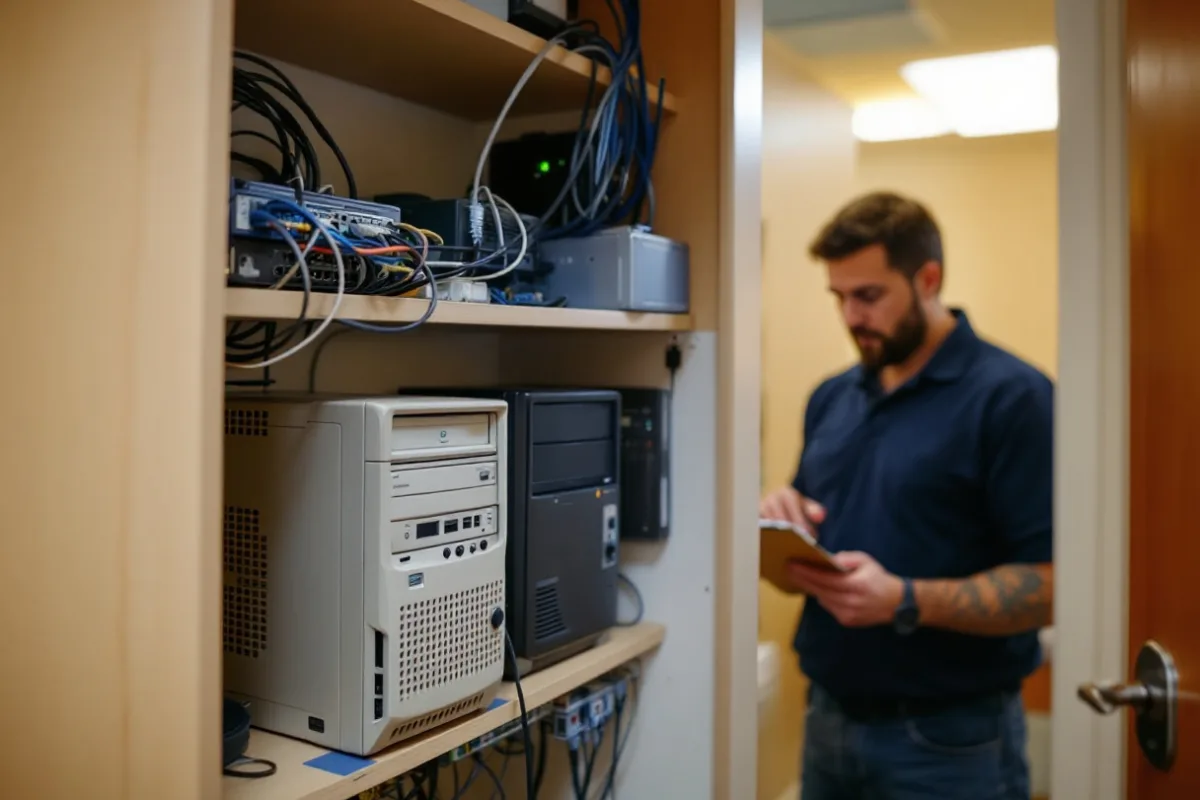
The Dentrix or Eaglesoft database runs on a desktop tower that got promoted to server duty the year the practice opened. It shares a closet with the router and the phone system. Its Windows license is older than the third hygienist. The imaging software reaches its images through a mapped drive letter, and the acquisition PC for the panoramic unit has never been joined to anything, because the sensor vendor set it up and nobody wanted to touch it afterward.
Then the office grew. Two operatories went in during a remodel and the low-voltage crew ran one cable to each. A second front desk seat showed up with its own printer and its own scanner, plus a shared login written on a sticky note under the keyboard.
Nobody made a bad decision here. Each purchase solved the problem in front of it. What nobody did was add up the whole thing, and Texas now rewards the practices that do. Senate Bill 2610, in effect since September 1, 2025, gives a business with fewer than 250 employees an affirmative defense against exemplary damages in a breach lawsuit if it maintained a cybersecurity program that conforms to a recognized framework. For a dental practice the bill goes further. The program also has to conform to HIPAA, and to PCI DSS if the front desk takes cards.
That isn’t a menu. It’s a stack, and the practice owns all of it. We walk through the statute line by line in our guide to dental practice IT security in Texas.
So dental IT support in Dallas has to treat the office as one system. The chair, the sensor, the front desk, the closet, and every vendor account that can reach into any of them.
Here’s what Uprite brings to that. We completed a SOC 2 Type 1 examination in 2023, earned Compliancy Group’s HIPAA Seal of Compliance the same year, and we sign a business associate agreement before onboarding begins. Under HIPAA, an IT company that can reach your patient data is a business associate whether or not anybody has put that in writing yet, and 45 CFR 164.308(b) requires that writing.
What That Looks Like in a Dallas Office
A Server Sized for the Office You Have Now
Practice management and imaging databases moved off the promoted desktop onto hardware sized for today’s chair count, on a Windows Server release your software vendor actually lists, with the Dentrix, Eaglesoft, and Open Dental server requirements checked first.
Operatory Machines on Windows 11
Chairside and front desk workstations moved to Windows 11 Pro on hardware with TPM 2.0, so the ESU invoices stop and every machine stays inside vendor support.
Logins With a Name on Them
Shared front desk passwords replaced with named accounts and multi-factor authentication. When someone edits a ledger entry, the audit trail shows a person. Not “FrontDesk2.”
A Vendor List With Every BAA on It
Practice management, imaging, patient texting, the clearinghouse, the phone company, and IT, each listed with what it can reach and whether a signed business associate agreement exists.
Backups Somebody Has Restored
Immutable copies held outside the practice network, plus a scheduled restore drill. We time it against the 72-hour restoration target HHS proposed in its January 2025 HIPAA Security Rule update. The rule isn’t final. Seventy-two hours is still a fair test of whether a backup actually works.
Remote Access That Isn’t an Open Door
Remote desktop and vendor support tools pulled off the open internet and put behind multi-factor authentication and a managed gateway. In May 2026, six Texas practices reported incidents with identical dates, and the one published notice points to irregular activity on remote desktop session hosts.
One habit is common. A practice opens a second location and copies the first office’s setup onto it, shared logins and all. Copying a problem to Frisco doesn’t solve it in Dallas. It just doubles the number of closets nobody is watching.
The Risk
Four DFW Dental Practices Filed Breach Notices in 18 Months
Texas keeps a public list. We read it.
Between April 2025 and early October 2026, 12 Texas dental practices posted breach notices on the Texas Attorney General’s data breach report. Four of them were in Dallas-Fort Worth: one in Grand Prairie, one in Sachse, and two in Azle. Together those four notified 26,635 Texans. DFW’s share of the notices, one in three, is close to its share of the state’s dental offices. So this isn’t a Dallas problem. It’s a dental office problem, and Dallas has a lot of dental offices.
The details say more than the count does. One of the Azle practices is among six Texas practices that reported incidents with identical dates, each starting on May 25, 2026. The notice one of those practices published says its IT support company found irregularities on its remote desktop session hosts, and the response was to lock down remote desktop web access and reset every password in the office. The other Azle practice reported a separate incident that started on April 10, 2026, and wasn’t discovered until August 10. That’s 122 days.
Four months. Nobody noticed.
No ransomware was found in the largest dental breach on the list. DentaQuest, one of the dental plans in Texas children’s Medicaid, reported 3,973,000 affected Texans. Its counsel’s filing with the Rhode Island Attorney General says one employee was tricked into handing over a password and a multi-factor code. Multi-factor authentication worked exactly as designed. A person handed the code to the attacker. Our cybersecurity services in Dallas are built around that kind of failure, not just the malware kind.
Vendor Sessions With an Off Switch
Every vendor support tool gets its own named login. Each session is logged. Access closes when the ticket does.
Detection That Works Nights
Managed detection on every operatory, front desk, and server machine, watched around the clock, so a session that starts at 2 a.m. gets noticed before the first patient walks in at eight.
Training That Meets the Texas Clock
Privacy training for every new hire within 90 days, as Texas Health and Safety Code Section 181.101 requires, with signed completion records kept six years. Plus one standing rule for the front desk and billing team. Nobody reads a code to a caller.
A Notice Plan Written Before the Notice
An incident plan built against Texas Business and Commerce Code Section 521.053, which gives a practice 60 days to notify patients and 30 days to notify the Attorney General once 250 or more Texans are involved. Our ransomware protection in Dallas covers the recovery side.
Chairside and Front Desk
Your Dental Software Now Sets Your Hardware Calendar
Three vendors moved in the same direction.
Henry Schein One’s Dentrix system requirements ended support for new Dentrix installations on Windows 10 workstations after June 30, 2026. Open Dental lists October 14, 2025 as the date it suspended Windows 10 support. Patterson’s Eaglesoft hardware requirements, revised August 11, 2026, name Windows 11 Pro as the only supported workstation system and say a virtual machine isn’t supported for any Patterson software. If your office runs one of the three, your refresh schedule is already written. You just haven’t been sent a copy.
None of this is exotic work. It’s sequencing. Which machine moves first, which sensor driver has to be retested, which imaging bridge breaks when the drive letter changes, and which night the server can go down without costing a single appointment.
What We Support in Dallas Practices
Practice Management Platforms
Dentrix, Eaglesoft, Open Dental, Curve Dental, and Denticon, including the database engine underneath each one, the version upgrades, and the scheduled jobs that quietly stop working after a Windows update.
Imaging, Sensors, and Cone Beam
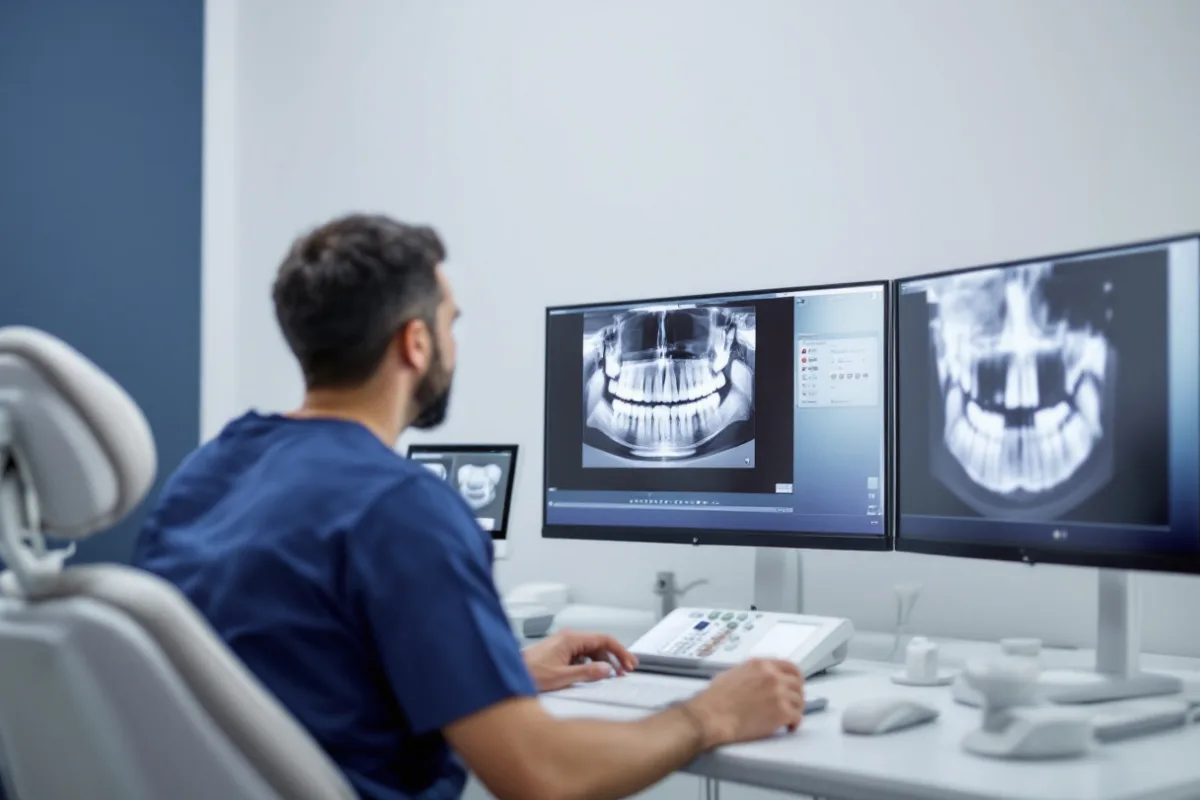
DEXIS, Schick, Carestream, Planmeca, and Vatech acquisition stations, the bridge that files each image to the right chart, and storage planned for cone beam volumes that run from about 50 MB to more than a gigabyte apiece.
Microsoft 365 for Patient Data
Exchange Online, Teams, and SharePoint set up to hold patient information, with outbound email encryption, retention rules, and conditional access that blocks a sign-in from a country nobody on staff has visited.
Network, Wi-Fi, and Cabling
A business-class firewall, guest Wi-Fi kept off the network the server lives on, and cabling that actually reaches the operatory you added in the remodel.
Phones, Texting, and Claims
VoIP phones, patient reminder and texting platforms, and the clearinghouse connections that carry eligibility checks and claims. When those stop, the schedule stops.
North Texas Weather Continuity
Hail, ice storms, and tornado season take out power and roofs, not just internet circuits. Failover, remote access, and offsite backup are planned through our disaster recovery in Dallas practice before the spring storms, not during them.
Then there’s the question of where the next office goes.
The dental offices added in North Texas over the last five years went north. Collin and Denton counties gained 132 offices between them from 2020 to 2025, and employment inside those offices grew by roughly a quarter. For a growing Dallas practice, a second location in Frisco, McKinney, Prosper, or Little Elm is the obvious next move. It also means a secure site-to-site link, a second imaging setup, and one patient database that two front desks write to at the same time without stepping on each other. We cover the architecture in our guide to multi-location dental IT in Texas.
Plan the second office. Don’t copy the first one.
By the Numbers
The Numbers Behind Dental IT Support in Dallas
We pulled most of these from federal data for this page. The rest come from Texas records, Microsoft, and our own math. Check any of them.
1,544
Private dental offices in Dallas County in 2025, down from 1,651 in 2020, per BLS county employment data.
7.1 people
Average staff in a Dallas County dental office in 2025, up from 5.8 in 2020. Fewer offices, bigger teams.
+132
Dental offices added in Collin and Denton counties from 2020 to 2025, while Dallas and Tarrant counties lost 142.
4 of 12
Texas dental practices on the Attorney General’s breach list from April 2025 to October 2026 that were in Dallas-Fort Worth.
$138
Per user per month for fully managed IT with on-site support in Dallas, published on our pricing page.
| Metric | Data Point | Source |
|---|---|---|
| Private dental offices, Dallas County | 1,544 in 2025 (1,651 in 2020) | BLS QCEW, NAICS 6212, annual averages |
| People employed by Dallas County dental offices | 10,970 in 2025 (9,610 in 2020) | BLS QCEW, NAICS 6212, annual averages |
| Private dental offices, Collin and Denton counties | 1,219 in 2025 (1,087 in 2020) | BLS QCEW, NAICS 6212, annual averages |
| Dental offices across Dallas, Tarrant, Collin, and Denton | 3,706, about 7 people each | BLS QCEW, 2025 annual averages |
| Dentists, hygienists, and dental assistants, DFW metro | 2,890 / 7,050 / 9,010 | BLS Occupational Employment and Wage Statistics, May 2025 |
| Loaded staff cost of one idle hour, 7-person practice | About $263 | Uprite calculation from BLS OEWS May 2025 and BLS employer cost data |
| DFW dental practices on the Texas AG breach list | 4 of 12 statewide, 26,635 Texans notified | Texas Attorney General, April 2025 to October 2, 2026 |
| Windows 10 Extended Security Updates, year two | Began October 14, 2026, at double the $61 year-one price | Microsoft |
| Breach notice deadlines | 60 days to patients, 30 days to the AG at 250+ Texans | Tex. Bus. & Com. Code Sec. 521.053 |
| Uprite published prices in Dallas | $138 fully managed, $100 co-managed, $110 and $91 remote-only | Uprite pricing page |
Tell us how many chairs you run and which version of Windows sits under them.
We’ll map the practice before you commit to anything.
Get Your Free Dental IT AssessmentGetting Started
How We Onboard a Dallas Dental Practice
Every step runs around a full schedule. Patients keep coming. The work happens between them, or after the last one leaves.
Step 1. Count Every Machine and Every Vendor
Operatories, front desk, imaging stations, the server, phones, printers, and every outside company with remote access, plus the Windows version on each machine. You keep the inventory whether you hire us or not.
Step 2. Business Technology Assessment
The inventory becomes a ranked plan. Anything that threatens the schedule or the chart goes to the top. An imaging store nobody has ever restored is week one. A monitor upgrade can wait.
Step 3. Lock the Doors Before Moving Anything
Multi-factor authentication, named accounts, remote access behind a gateway, a signed business associate agreement, and an immutable backup all go in before any migration starts. None of it requires a chair to close.
Step 4. Move the Operatories to Windows 11
Workstations rebuilt or replaced against your practice software’s published requirements, sensor drivers and imaging bridges retested, one room at a time, after hours.
Step 5. Run It and Keep the Evidence
Around-the-clock monitoring, a help desk that answers the front desk in about five minutes on average, scheduled restore tests, and records that drop straight into your annual dental HIPAA security risk analysis.
A single Dallas office on Open Dental and Microsoft 365 is a short project. A practice with a second location in Collin County, two imaging platforms, and a server bought in 2017 takes longer. We’ll tell you how much longer before you sign anything.
Honest Fit Check
Who Uprite MED℠ Is Built For
| Right fit |
|---|
| Dallas-Fort Worth dental practices, group practices, and specialty offices with 5 to 150 users |
| Offices on Dentrix, Eaglesoft, or Open Dental that still have Windows 10 machines in an operatory or at the front desk |
| Practices that outgrew the setup they opened with, whether that was a third hygienist, a cone beam unit, a remodel, or a second office in Collin or Denton County |
| Anyone asked for a business associate agreement, a risk analysis, or a cyber insurance questionnaire who couldn’t produce one quickly |
These are the practices we designed it around. If yours is close but not an exact match, ask anyway. The first call costs nothing.
Before You Switch
What Dallas Practices Ask Before They Switch
Four concerns come up in nearly every first call. Here are honest answers to each.
“We want a dental IT specialist, not a general MSP.”
Reasonable. Test it instead of trusting the label. Ask every provider on your list, us included, which practice management database they last restored, how they would move an Eaglesoft server to Windows Server 2022 without breaking the imaging bridge, and what they would do with a Windows 10 acquisition PC tied to an old sensor driver. Then read how we upgraded IT infrastructure and security for a multi-location dental surgery group with more than 40 users.
“We’re booked solid. There’s no week to shut down for IT.”
You won’t need one. Identity, monitoring, backup, and device enrollment go in during business hours without touching a chair, and server and workstation moves happen after the last patient, one room at a time. That matters, because an idle hour costs a seven-person Dallas practice about $263 in loaded staff pay before a single procedure is lost. We got that from May 2025 DFW mean wages for the six people around the dentist (two hygienists, three assistants, and one front desk coordinator), multiplied by the roughly 1.43 total compensation factor in BLS employer cost data.
“The remote-only plan is cheaper. Why not take it?”
Sometimes you should. In Dallas, our IT Essentials plan is $91 per user per month for teams under 12, and IT Pro is $110 for teams of 12 or more, both remote-only. A practice with sensors, a panoramic unit, and an on-site server usually needs someone in the building a few times a year, so for imaging-heavy offices we normally recommend fully managed IT at $138. The assessment tells you which one fits, and we’ll put the reason in writing.
“We already have someone who handles our computers.”
Keep them. Uprite MED Impact℠ is co-managed IT at $100 per user per month, built for exactly this. Your person keeps the relationships and the history, and gets monitoring, backup, security tooling, and a bench of engineers behind them for the morning the server won’t boot and the first patient is already in the chair.
Definition
Dental IT Support in Dallas, Defined
Why Dallas Practices Choose Uprite
Uprite MED℠ in Three Versions
MED Complete is fully managed. MED Impact is co-managed beside the person you already have. MED Secure adds compliance and vCISO coverage for the day an insurer, a lender, or a DSO partner asks for more documentation than the office can produce.
Prices You Can See Before the Call
Dallas prices are on our pricing page. That’s $138 per user per month fully managed, $100 co-managed, $40 for security augmentation, and remote-only plans at $110 and $91. Rates are locked for year one. For the per-operatory math, see our breakdown of dental IT cost in Texas.
A North Dallas Office and a Five-Minute Average Response
Our office is at 5757 Alpha Road, Suite 530, in North Dallas. Remote support handles most tickets, and our average first response runs about five minutes. When a sensor stops talking to its workstation, an engineer drives over.
What Clients Say
What Texas Clients Say About Working With Uprite
Hector and Kareem are super helpful! They are always willing to take on my computer problems even if its small. I had my mouse disappear off my screen, it was an user issue but Hector didn't make me feel small or "dumb" for this error. We love uprite!
Gerardo Sanchez was very helpful & professional. Uprite Services has great customer service and outstanding technicians. We have used them for several years and will continue our business with them.
I had been having trouble with an IT matter that I didn't think would be fixed but Arvin Ebueng from Upright took his time with me and worked with me until we were able to resolve the issue. The issue was an internal issue with the way the program was written, but Arvin came up with a great work around so that I am now able to do what I need to do at my job. Long story short, he got me access to both things that I need access to simultaneously and daily. Thanks 😊 Arvin, you are much appreciated 👏 💐 🥳.
I’ve been extremely satisfied with Uprite Services and would recommend them without hesitation. They consistently deliver reliable, high-quality work and truly feel like a true partner rather than just another vendor. A special thank you goes to Arvin Ebueng, he is always quick to respond to our needs and incredibly easy to communicate with. No matter how busy things get, Arvin makes sure we’re taken care of promptly and with a smile. His responsiveness and clear communication have made every interaction smooth and stress-free. Thank you, Arvin and the entire Uprite team, Peerless Equipment is a customer for life!
I'm am not a "tech" person, however the team at Uprite gets me through the technological side of computers and software so that I can function on a daily basis... but the most enduring quality is that they care. Special shoot out to Mary, Sergio, Eufemio, Hector, and Jeff just to name a few... I appreciate each of you and the help you give me.
Great service by Juan and Jacob. Always helping us out at Alamo City Trailer Sales. We have been using this company for over 10 years and always happy with the work they do.
FAQ
What Dallas Dental Practices Ask First
It covers the practice management server and database, chairside and front desk workstations, imaging and cone beam storage, Microsoft 365, network and remote access security, and tested backup. Uprite adds a signed business associate agreement, around-the-clock monitoring, and a help desk with a five-minute average response, all run from our office in North Dallas.
Yes. Most of the work is remote, and our North Dallas office sends an engineer to Collin and Denton County practices when on-site work is needed. A second location needs a secure site-to-site link, a shared practice database both offices can write to safely, and its own imaging setup. If you call before the lease is signed, we can plan the network with the build-out.
Start with a signed business associate agreement, because any IT company that can reach patient data is a business associate under HIPAA. Then ask for evidence. Uprite completed a SOC 2 Type 1 examination in 2023, earned Compliancy Group’s HIPAA Seal of Compliance that year, and keeps the inventory and control records your annual risk analysis depends on.
Uprite publishes its prices. Fully managed IT with on-site support is $138 per user per month. Co-managed IT is $100, security augmentation is $40, and remote-only plans cost $110 for teams of 12 or more and $91 for smaller teams. A seven-person practice on fully managed IT pays $966 a month, plus licensing and hardware.
Our average first response is about five minutes. When the front desk can’t open the schedule or reach the server, an engineer starts on it remotely right away. When the fix needs hands on hardware, one comes from our North Dallas office.
We do, and Curve Dental and Denticon too. All three major platforms are moving off Windows 10. Dentrix stopped supporting new installs on Windows 10 workstations after June 30, 2026, Open Dental suspended Windows 10 support in October 2025, and Eaglesoft’s current requirements list only Windows 11 Pro for workstations. We plan the move room by room, after hours.
Start Here
See What Your Practice Is Really Running On
Ask three people in a Dallas practice where the backups go and you’ll often hear three different answers. That’s normal. It’s also the reason the assessment exists.
We inventory every workstation, the server, the imaging store, the vendor accounts, and the backup. Then we show you, in writing, which machines are out of vendor support, what’s exposed, and what couldn’t be restored today. The assessment is free. Hiring us is a separate decision.
The practice grew. The IT should grow with it.
Your practice outgrew its first IT setup. Plan the next one on purpose.
Prefer the phone? Our Dallas office answers at (469) 699-8766.



