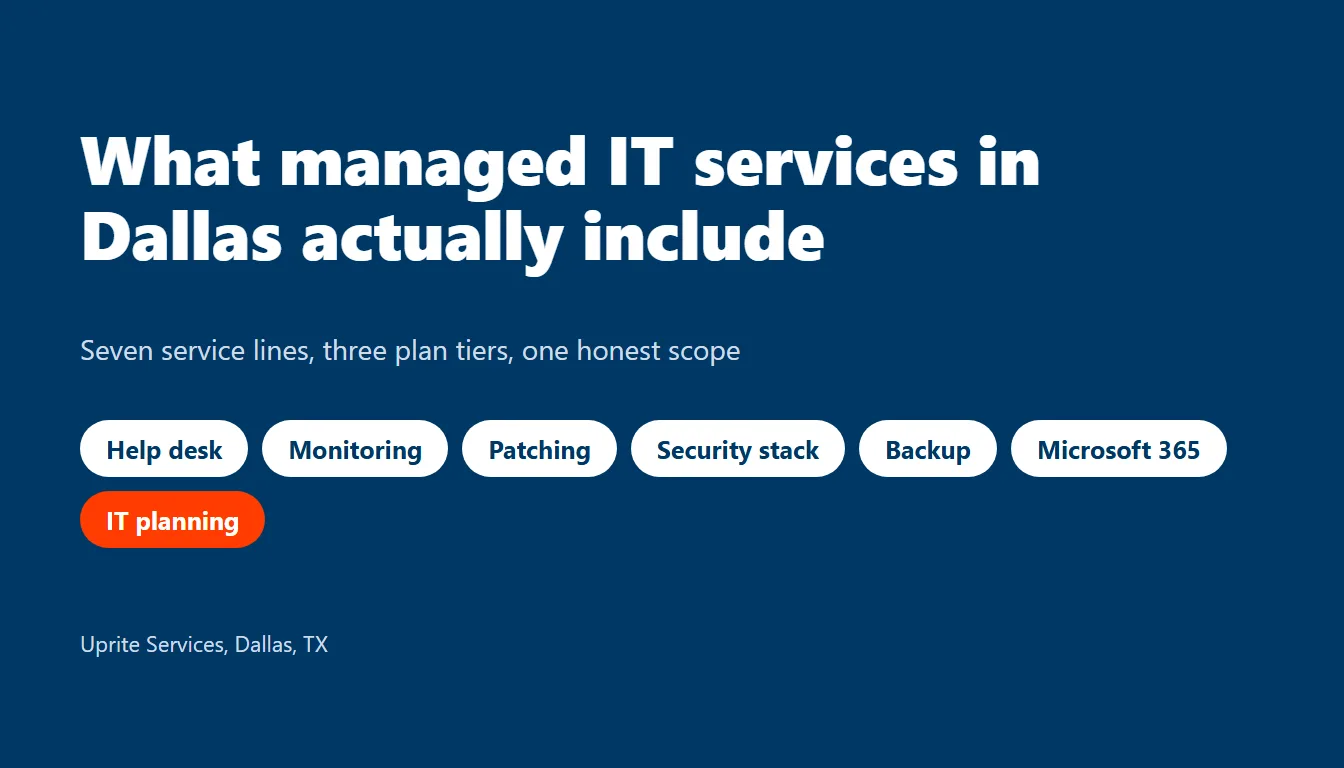
Managed IT services in Dallas include a help desk, 24/7 monitoring, patching, endpoint security, backups, Microsoft 365 administration and IT planning for a flat monthly fee per user. What you get inside each of those lines depends on the plan tier. Fine print beats plan names.
Most buyers compare managed IT services in Dallas on price alone. That’s a mistake. A $110 quote and a $138 quote can describe different jobs, because one provider answers the phone at 11 p.m. while the other logs an alert for Monday morning and hopes nothing burns in between. Scope is the product. So we’ll go through it line by line and plan by plan, then price it against what Dallas-Fort Worth pays people to do the same work.
What are managed IT services in Dallas, in plain terms?
Managed IT services are a standing arrangement where an outside provider runs a company’s day-to-day technology, from the help desk to the firewall, for a monthly fee that’s usually priced per user. In Dallas that normally means 7 service lines. Each has a floor, which is the minimum you should see in writing, and a ceiling, which is where the plan tier decides how much you actually get. Tier sets the ceiling.
Here are the 7 lines. Beside each one sits the question that exposes a thin version.
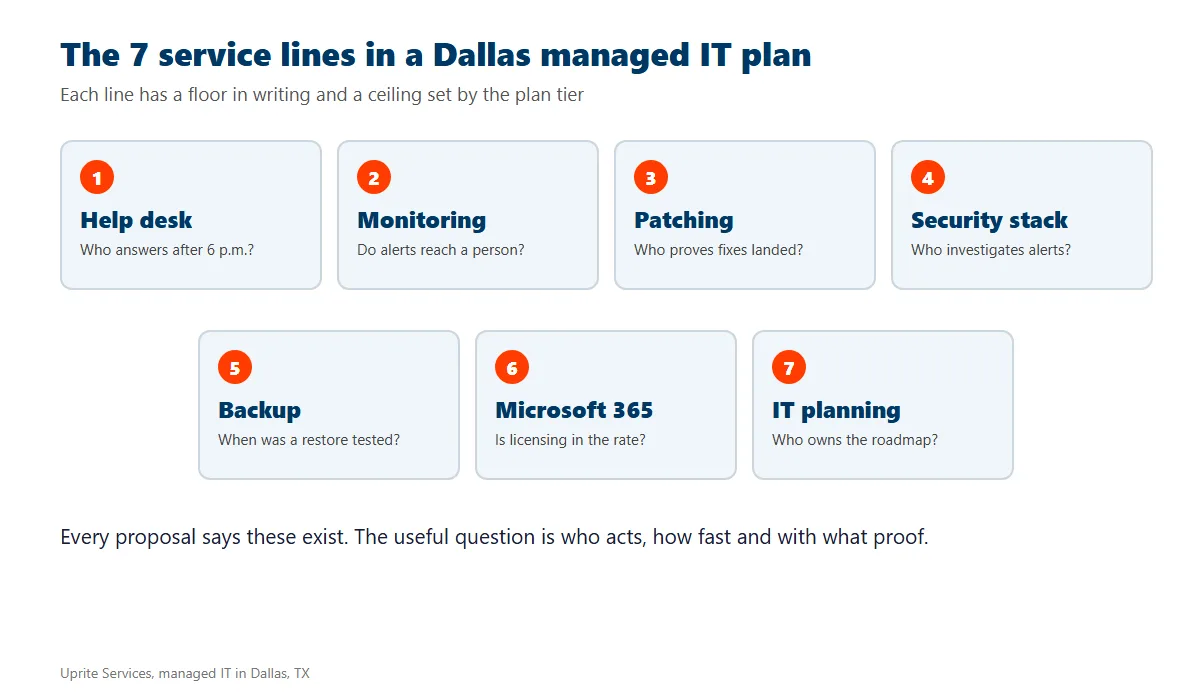
| Service line | What it should cover | The question that exposes a thin version |
|---|---|---|
| Help desk | Real engineers handle calls, chats and tickets for password resets, software faults, new hires and printers | Who answers after 6 p.m., and how fast does a person start? |
| Monitoring and alerting | Servers, firewalls and laptops report their health around the clock | Do alerts reach a person, or only a dashboard? |
| Patching | Windows, Microsoft 365 apps, firewall firmware and common business software get updates on a schedule | How soon are critical fixes applied, and who proves it? |
| Security stack | Endpoint detection, email filtering, multifactor sign-in and phishing training | Who investigates when an alert fires? |
| Backup and recovery | Copies of server and cloud data, plus restore tests | When was the last restore actually tested? |
| Microsoft 365 and cloud | User setup, tenant security, Teams, SharePoint and Azure administration | Is licensing inside the rate or billed on top? |
| IT planning | A roadmap, a budget, a hardware life-cycle list and a regular review | Who owns the plan, and how often do you see it? |
Look at what the questions share. None of them asks whether a service exists, since every proposal claims it does, and all of them ask instead who acts, how fast and with what proof, which is exactly where scope hides. A line item without an owner and a clock is a sentence in a brochure. Ask for names and clocks.
What does each Uprite plan in Dallas actually cover?
We publish our plan sheet so you can check the claims above against real terms, with rates that start at $91 per user per month, run to $138 and sit on the Uprite pricing page too. Microsoft licensing is billed separately. That’s true of every plan.
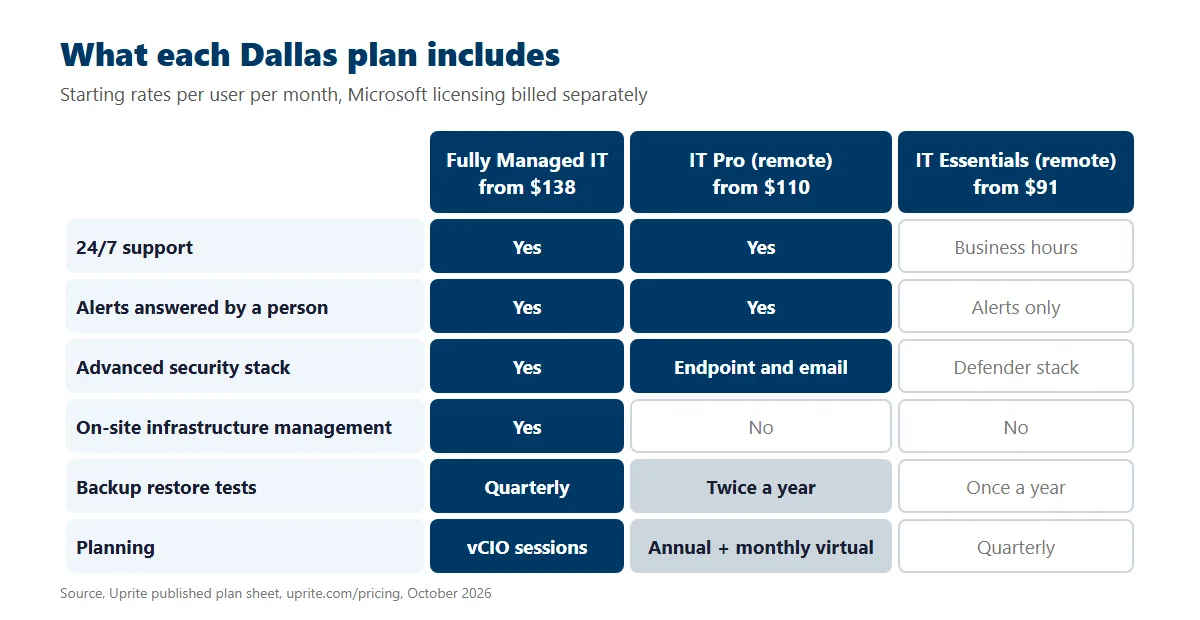
| Plan | Starts at, per user per month | Support hours | Monitoring | Security | Backup testing | Planning |
|---|---|---|---|---|---|---|
| Fully Managed IT | $138 | 24/7 | Full visibility, with after-hours response | Advanced protection tools included | Quarterly | vCIO and planning sessions |
| IT Pro (remote only) | $110 | 24/7 | 24/7 alerting with immediate response | Advanced endpoint and email security | Twice a year | Annual plan plus monthly virtual check-ins |
| IT Essentials (remote only) | $91 | Business hours, up to 8 hours per user a month | Basic alerting only, no response | Microsoft Defender stack | Once a year | Quarterly planning |
Three differences matter more than the price gap. First, only Fully Managed IT includes on-site infrastructure management, while IT Pro and IT Essentials are remote only, with IT Pro built for teams of 12 or more and IT Essentials fitted to offices under 12. Second, IT Essentials raises alerts without anyone responding to them. That’s a fair product for a 6-person office on Microsoft 365. It isn’t a monitored environment. Third, backup testing runs quarterly, twice a year or once a year depending on the tier, so one word covers three levels of proof. Same word, different proof.
Two more plans sit outside that grid. Co-managed IT starts at $100 per user and pairs with an internal IT person, which we cover on our co-managed IT in Dallas page. MSSP Security Focus starts at $40 and adds a security operations layer for companies that already employ IT staff.
At 25 users, the starting rates work out to $3,450 a month on Fully Managed IT and $2,750 on IT Pro, and the $700 gap buys on-site support, a vCIO and quarterly restore tests that IT Pro doesn’t include. The math is simple. For what pushes a quote above those starting rates, read our guide to managed IT services cost in Dallas.
What would the same scope cost on a Dallas payroll?
The fair comparison isn’t Uprite against nothing. It’s Uprite against the people you’d otherwise hire. The Bureau of Labor Statistics publishes May 2025 wage estimates for the Dallas-Fort Worth-Arlington metro, and its Employer Costs for Employee Compensation release shows private employers paying $46.89 an hour in total compensation for every $32.82 in wages in the second quarter of 2026. Call it 1.43 times salary.
We matched four of the seven service lines to the job a metro employer would post for it. Help desk means user support. Monitoring and patching mean network support. Security means an analyst. Planning means a manager.
| Job a hire would fill | Employed in the metro | Average salary | Loaded yearly cost | Fully Managed seats that equal one hire |
|---|---|---|---|---|
| Computer user support specialist | 22,600 | $63,030 | $90,050 | 54 |
| Computer network support specialist | 3,340 | $80,300 | $114,726 | 69 |
| Information security analyst | 7,080 | $133,790 | $191,150 | 115 |
| Computer and information systems manager | 30,690 | $185,720 | $265,342 | 160 |
Add the four loaded costs and you get $661,268 a year, while a 25-person company on Fully Managed IT pays about $41,400 a year, which is 6.3% of that bench. Read the number carefully before you quote it. A 25-person company wouldn’t hire all four people. It would hire none, or one generalist, and live with the gaps nobody covers on a Saturday night. A managed plan sells slices of a bench, not four full-time employees. That’s the honest version.
Those slices still count for something. One hire works about 2,080 of the year’s 8,760 hours, and nights, holidays and sick days fall to whoever is left. In a metro with 7,080 security analysts, the one you need is also one that large employers are trying to hire. Good luck with that.
What do Dallas breach notices say about monitoring and response?
Scope matters most on the worst day, so we looked at how long Dallas-area organizations took to notice a breach. On October 9, 2026, we pulled the Texas Attorney General’s data security breach reports. The list covers notices posted from April 1, 2025 through October 6, 2026, and it held 650 of them. Of those, 274 came from Texas-based organizations and 86 came from cities in the Dallas-Fort Worth area. Here’s what we found.
Those 86 notices covered 1.79 million Texans, and Social Security numbers appeared in 65 of them, which is 75.6% of the DFW notices in the sample, while healthcare providers filed 29 of the 86. Big numbers. Real people.
Then we measured the gap between the day an incident started and the day the organization found it. Dates are self-reported, and 77 of the 86 notices gave both, so that’s our sample. The median was 77 days.
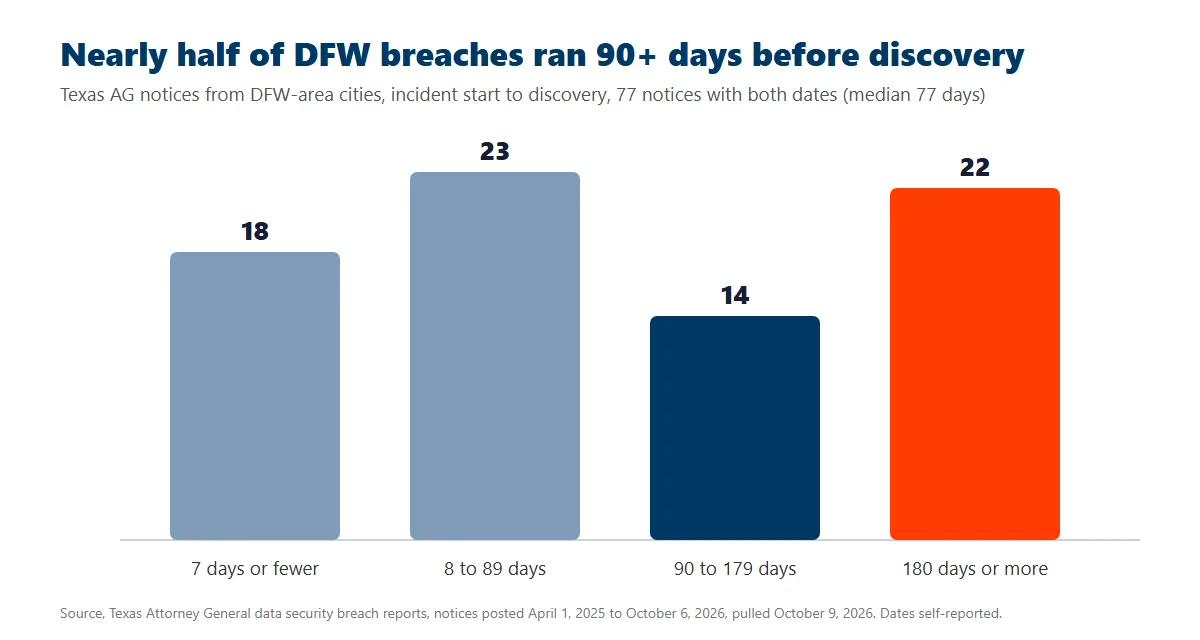
| Start of incident to discovery | DFW notices | Share of the 77 |
|---|---|---|
| 7 days or fewer | 18 | 23% |
| 8 to 89 days | 23 | 30% |
| 90 to 179 days | 14 | 18% |
| 180 days or more | 22 | 29% |
Nearly half took 90 days or longer, and about a quarter took 206 days or more, which is a long window for an attacker holding a stolen password while nobody inside the company knows it’s open. Think about that.
We can’t say how many of those organizations paid a provider, because the notices don’t name one and we won’t guess. What the numbers do show is the price of silence. The scope lines that shorten the gap are monitoring that reaches a person, endpoint detection with someone assigned to respond, and log review that somebody actually performs, and those are the same lines that separate IT Essentials from IT Pro and Fully Managed IT. Ask which of the three is in your rate. Then ask who reads it.
What isn’t included in a managed IT plan?
Every agreement has a “not included” side, and it deserves as much attention as the brochure, so here are the usual gaps we see in Dallas proposals before anyone signs.
- Microsoft licensing. Seats for Microsoft 365 are billed on top of the per-user rate on our plans, so ask every provider whether licensing sits inside or outside its number.
- Hardware. Laptops, firewalls, switches and access points are purchases or leases. They aren’t scope.
- Projects. Office moves, tenant migrations, cabling runs and a new phone system are normally quoted separately from the monthly rate.
- On-site hours on remote plans. IT Pro and IT Essentials are remote only, so a technician at your desk means a different plan or a separate quote.
- Line-of-business software bugs. The vendor of your ERP, CAD or practice-management package still owns its own application faults.
- Signed compliance assessments. A provider can run the controls that HIPAA, CMMC or the FTC Safeguards Rule expect, but your policies and the final sign-off stay with you unless the agreement says otherwise.
How do you read a Dallas managed IT proposal in 10 minutes?
Start with five checks, which take less time than the sales call and tell you more about a provider than the sales call will.
- Circle the support hours. “24/7 availability” and “24/7 response” are different promises.
- Find the sentence that says who responds to a monitoring alert at 2 a.m. If there isn’t one, you’re buying a dashboard.
- Look for multifactor sign-in on every administrator account, the provider’s own included. The joint CISA, NSA and FBI advisory on managed service providers tells customers to require it and to make sure the contract spells out the security controls the provider runs.
- Ask for the restore-test date, because CISA’s Stop Ransomware Guide recommends offline, encrypted backups and regular restore tests, so a backup nobody has restored is a hope and not a control.
- Check the exit clause for a handback date. Your passwords, documentation and backups belong to you.
If a proposal passes all five, compare it on price, and if it doesn’t, price is the least interesting thing about it because the gaps will cost you more than any discount saves. Buyers still deciding whether they need outside help at all can start with the signs your Dallas business needs managed IT, and anyone weighing providers side by side can use our comparison of managed IT providers in Dallas.
What do Dallas buyers ask about managed IT scope?
What is included in managed IT services in Dallas?
A help desk, 24/7 monitoring, patching, endpoint security, backup with restore tests, Microsoft 365 administration and IT planning. Depth changes by tier. On our plans, Fully Managed IT adds on-site management and a vCIO, while the two remote-only plans trade those for a lower rate.
Is help desk support part of managed IT?
Yes, on every Uprite plan. Hours differ, though. Fully Managed IT and IT Pro cover 24/7, while IT Essentials includes business-hours support up to 8 hours per user a month. Across all of them, our average first response is 5 minutes.
Does managed IT include cybersecurity?
Some of it always does. Every managed tier carries a security stack, from the Microsoft Defender stack on IT Essentials to advanced endpoint and email tools on IT Pro and Fully Managed IT. SOC monitoring and incident response sit in the MSSP Security Focus offering, which starts at $40 per user.
Are Microsoft 365 licenses included in the monthly price?
No. Licensing is billed separately on our plans, so the per-user rate covers the management of Microsoft 365 and not the seats themselves. Ask any provider the same question, because a quote with licensing folded in can look more expensive than it is.
What does managed IT not cover?
Hardware purchases, large projects such as migrations or office moves, bugs inside your industry software, and signed compliance assessments are normally outside the monthly rate. Get the exclusions in writing before you sign, and ask what a project rate looks like. Ask early.
How much do managed IT services cost per user in Dallas?
Our published plans run from $91 to $138 per user per month, and Microsoft licensing comes on top. What lifts a quote above the starting rate is covered in our Dallas pricing breakdown.
Can I keep my in-house IT person and still use managed services?
Yes. Co-managed IT starts at $100 per user per month. Your person keeps the daily relationships. We cover nights, security, projects and vacations.
Does managed IT include on-site visits in Dallas?
Only on Fully Managed IT, which includes on-site infrastructure management from our Alpha Road office. IT Pro and IT Essentials are remote only. Remote plans stay remote. If you need a technician at your desk regularly, price Fully Managed IT first.
Uprite runs managed IT for Dallas companies from our North Dallas office, and every plan starts with a free Business Technology Assessment. Bring the proposal you’re holding. We’ll mark what it covers, what it skips and what it would cost to close the gaps.
Get Your Free Assessment