Dallas has already run the experiment most owners hope to skip. In 2023 the Royal ransomware crew spent 26 days inside the City of Dallas network before it encrypted a single file, and Dallas County later mailed breach notices to 201,404 people after a separate attack by a different ransomware group. Good cybersecurity services for Dallas businesses are built to catch that quiet stretch. This guide turns both attacks into a protection plan a 20 to 200 person company can actually run.
Ransomware protection for a Dallas business means finding an intruder during the weeks before encryption, not just blocking the final payload. In practice that takes locked-down accounts, phishing-resistant MFA, 24/7 monitoring, offline backups you have actually restored, and a written response plan that already knows the Texas notification deadlines before anyone needs them.
Most ransomware conversations start at the ransom note. That’s the wrong end of the story. By the time the note prints, the attacker has usually been reading email, copying files and mapping the backups for weeks. Sometimes months.
I’m not saying that for effect. It’s in the public record. And the record is local.
The City of Dallas published what happened to it. Dallas County notified more than 200,000 people. Two North Texas appraisal districts went dark in the same stretch. Every one of those organizations had an IT department, and several had dedicated security staff on the payroll when the attackers walked in, which is exactly why their stories are more useful to a private company than another vendor survey. Budgets didn’t save them.
So what does a 40-person firm in Las Colinas or Richardson take from that? More than you’d think. The failures weren’t exotic. They were ordinary gaps. Plenty of private companies have the same ones today.
What does ransomware protection actually cover?
Ransomware protection is the set of controls that keeps an attacker out, spots them quickly if they get in, limits what they can reach, and lets you restore operations without paying. It spans identity, endpoints, email, the network edge, backups and response. No single product does all of that, whatever the sales deck says. Buy a system.
Notice what that definition leaves out. Antivirus. A firewall by itself. A cyber insurance policy. Each one matters. None of them notices a stranger logging in with a valid account at 11 p.m. on a Tuesday. That’s the scenario that hurt Dallas.
If you’re in the middle of an active incident right now, skip ahead to our ransomware recovery guide for Texas businesses, which walks through the first 72 hours. This piece is for the month before.
What happened inside the City of Dallas network in 2023?
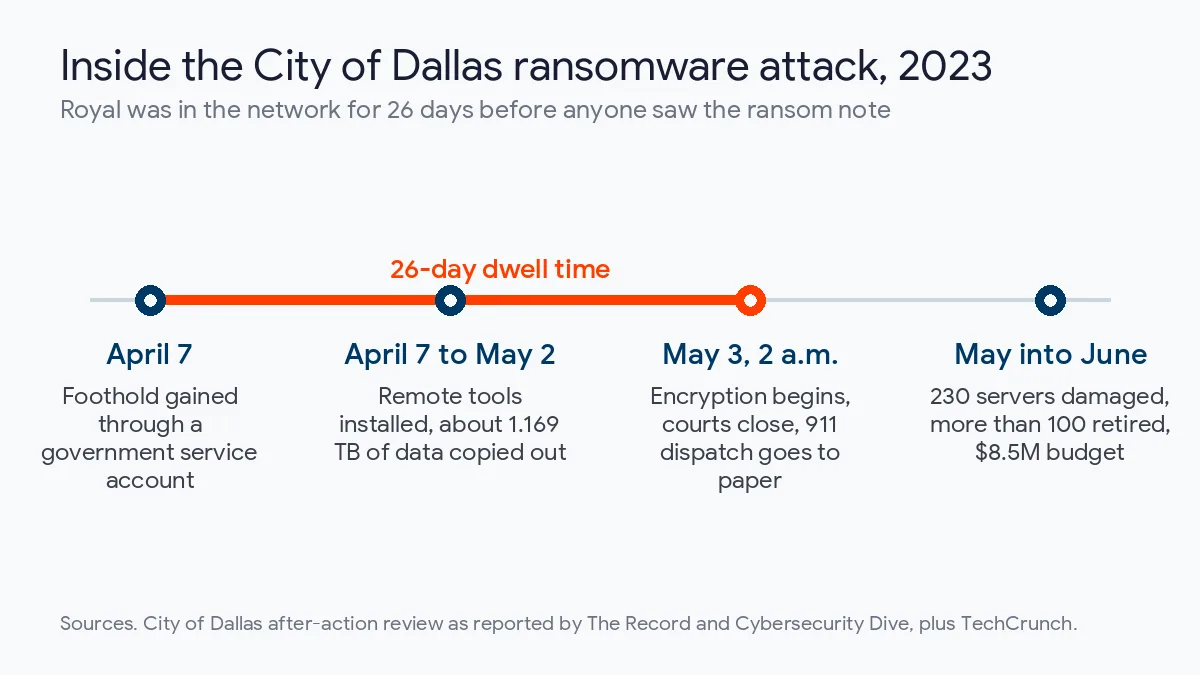
Patience happened. According to reporting on the city’s after-action review by The Record, Royal got its first foothold on April 7, 2023 through a government service account, then used remote management tools to move deeper into city infrastructure. Nobody noticed. For 26 days the group looked around and copied data out. Quietly.
How much data? Roughly 1.169 terabytes, per the review as summarized by Cybersecurity Dive. Then, at 2 a.m. on May 3, the encryption started. Everything stopped at once.
What followed is the part people remember. TechCrunch reported that municipal courts closed and 911 call takers wrote dispatch instructions by hand because the computer-aided dispatch system was down, while the police department website went offline and the city posted a notice about a service outage. Ransom notes printed on city printers. The city later counted 230 damaged servers and retired more than 100 of them permanently. A rebuild. Not a restore.
| Attack stage | When | What happened in Dallas | The control that interrupts it |
|---|---|---|---|
| Initial access | April 7, 2023 | Royal uses a government service account to gain a foothold | Service account inventory, unique passwords, alerts on unusual logins |
| Quiet period | April 7 to May 2 | Remote management tools installed, about 1.169 TB copied out | Endpoint detection and response watched 24/7, alerts on large outbound transfers |
| Encryption | May 3, 2 a.m. | Ransomware deployed, courts close, 911 dispatch moves to paper | Network segmentation and a practiced isolation playbook |
| Recovery | May into June | 230 servers damaged, more than 100 retired, nearly 40,000 IT hours | Offline backups with a tested restore order |
| Cost | Approved in 2023 | $8.5 million budget for recovery vendors and breach notification | All of the above, bought earlier |
Here’s my honest read. Dallas wasn’t a city that ignored security. Cybersecurity Dive reports its security spending grew from $3.4 million in 2019 to $7.8 million in 2023, and its cybersecurity staff rose from 18 full-time employees in 2020 to 35, which is a larger dedicated team than most Dallas companies will ever employ. It still missed 26 days of activity. A private company with nobody assigned to security at all has less margin than that. Not more.
The recovery numbers deserve a second look too. The Record puts the city’s IT effort at nearly 40,000 hours, with more than 90% of systems back within 18 days. That’s 18 days of a major city running partly on workarounds. Now scale it down. For a 50-person company, 18 days without the file server and the accounting system is not an inconvenience you absorb quietly, because it shows up as late invoices, missed bid deadlines and clients who start returning a competitor’s calls. That hurts.
Why should a private company care about Dallas County and the appraisal districts?
Because the pattern repeats. Dallas County detected an intrusion in October 2023, and the Play ransomware group claimed it, as The Record reported at the time. The real damage surfaced months later. In July 2024 the county sent breach notices to 201,404 people covering Social Security numbers, driver’s license numbers, medical information, health insurance details, dates of birth and taxpayer identification numbers, according to BleepingComputer.
That’s the other half of modern ransomware. Encryption is optional now. Theft is the pressure point. Backups don’t fix theft. A business with perfect backups can restore every file and still owe breach notices, legal fees and some very uncomfortable client calls.
The county’s fixes are telling. After the attack it deployed endpoint detection and response across all servers, forced password resets and blocked suspicious IP addresses, and none of those steps required a new security department or a large capital budget to put in place. A small company can do all 3 of those before anything goes wrong. Worth copying.
The appraisal districts round out the picture. The Dallas Central Appraisal District was hit on Election Day 2022 by the same Royal group, after an employee clicked a fake email that appeared to come from a vendor, according to Dallas Morning News reporting republished by Governing. All 300 desktop computers, email, the website and the cloud backups were compromised. The district paid $170,000 against a demand of nearly $1 million and went 72 days without full operational capacity. In March 2024 the Medusa group hit the Tarrant Appraisal District and demanded $700,000, KERA News reported. That’s 4 public bodies across North Texas in roughly 16 months. Not one was a hospital. Not one was a utility. Ordinary offices.
Which Dallas businesses are most exposed to ransomware?
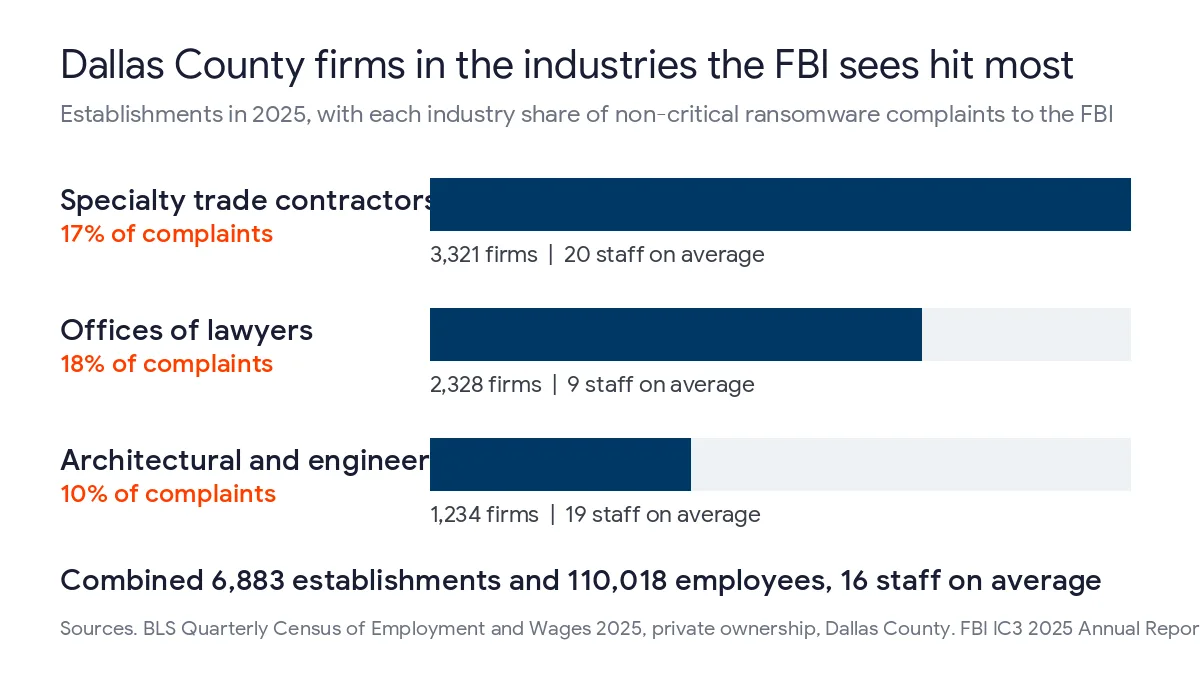
Public agencies make the news because they have to disclose. Private companies mostly don’t. So they stay invisible. The better signal is complaint data. The FBI Internet Crime Complaint Center 2025 report logged more than 1,400 ransomware complaints from organizations outside the 16 critical infrastructure sectors, which is the closest public view we have of ordinary private businesses like law offices and trade contractors getting hit. Legal services made up 18% of them. Contracting services, meaning electricians and general contractors, were 17%. Engineering and architectural firms were 10%.
Now put Dallas County next to that list. The Bureau of Labor Statistics Quarterly Census of Employment and Wages shows how many private employers here sit in exactly those 3 industries.
| Industry the FBI named | Share of non-critical ransomware complaints | Dallas County establishments, 2025 | Employees | Average staff per location |
|---|---|---|---|---|
| Legal services (offices of lawyers) | 18% | 2,328 | 21,473 | 9 |
| Contracting (specialty trade contractors) | 17% | 3,321 | 65,657 | 20 |
| Engineering and architectural services | 10% | 1,234 | 22,888 | 19 |
| Combined | 45% | 6,883 | 110,018 | 16 |
That’s 6,883 Dallas County businesses employing 110,018 people, at an average of 16 staff apiece. Small teams. Real money. Firms that size rarely employ a security engineer. They almost always hold client files, bank access and deadlines an attacker can squeeze.
One correction to a story you’ll hear a lot. This isn’t about those sectors booming. Offices of lawyers in Dallas County actually fell from 2,403 establishments in 2020 to 2,328 in 2025, a 3.1% drop, while employment inside them grew. The risk is density and size, not growth. Different problem. We ran the same FBI industry data against Bexar County and found a similar mix, which tells you this is a Texas small-business problem rather than a Dallas quirk.
If your firm sits in one of those groups, our pages on IT services for Dallas law firms and construction IT services in Dallas go deeper on the software and compliance side.
How do attackers actually get into a Dallas company?
Mostly through people and logins. Inboxes first. The Sophos State of Ransomware 2026 survey of 2,158 IT and security leaders found malicious email behind 26% of attacks and phishing behind another 24%, which means half of the attacks in that survey began with a message somebody opened in an ordinary inbox. Compromised credentials accounted for 23%. Sophos also found that 79% of ransomware attacks started with an identity-based approach.
The finding that should worry you is quieter. Among victims whose attack began with compromised credentials, 97% already had multi-factor authentication turned on. MFA wasn’t missing. It was the wrong kind, or it carried exceptions, or a user simply approved a prompt they shouldn’t have. Easy mistake.
The network edge is the other door. Verizon’s 2026 Data Breach Investigations Report puts ransomware in 48% of breaches and names vulnerability exploitation as the most common initial access vector, and it found only 26% of critical vulnerabilities were fully remediated in 2025, down from 38% the year before. Patch lag is the gap. A joint CISA and FBI advisory on Akira, the most reported variant in the FBI 2025 data, says the group primarily targets small and medium-sized businesses and gets in through VPNs without MFA and unpatched SonicWall and Cisco appliances.
Size widens the gap. In the Sophos data, only 34% of organizations with 100 to 250 employees stopped an attack before encryption or extortion, compared with 46% of organizations with 3,001 to 5,000 employees, and a typical Dallas firm with 30 people sits well below even that smaller group. Smaller companies lose more of these fights. Not from carelessness. Nobody is watching at 2 a.m.
Which 6 controls would have shortened a 26-day dwell time?
If you only fund part of a security program this year, fund these, in this order. Each one maps to a stage of what happened to Dallas.
- Inventory every service account and shared login, remove the ones nobody owns, and alert on unusual use of the rest.
- Put phishing-resistant MFA on email, VPN and every remote access tool, with no exceptions for executives.
- Patch the firewall, VPN and other internet-facing devices first, within days of a known exploited vulnerability.
- Run endpoint detection and response on every server and laptop, watched by people 24 hours a day.
- Keep an offline or immutable backup copy and restore from it on a schedule, not only when something breaks.
- Write the response plan now, including who calls the lawyer, the insurer and the Texas Attorney General.
Start with the accounts nobody watches
The city’s entry point was a service account. Those accounts run backups, printers, line-of-business apps and scheduled jobs, and they often combine broad rights with passwords that never change and no human who gets an alert when they log in somewhere strange. Plenty of companies can’t produce a list of theirs. Can yours? Find out this week.
Make MFA hard to trick
Given that 97% figure, the question isn’t whether you have MFA. It’s which kind. CISA’s #StopRansomware Guide recommends MFA for all services where possible, especially webmail, VPNs and accounts that reach critical systems. The Akira advisory goes further and calls for phishing-resistant MFA. In Microsoft 365 that means number matching at the very least, plus passkeys or FIDO2 security keys for admins and anyone who approves payments, since those are the accounts an attacker most wants to control once they’re inside. Start with finance.
Treat the edge as the front door
A firewall that hasn’t seen a firmware update in a year isn’t a security control. It’s an entry point with a logo on it. Our network security services track edge devices against the CISA Known Exploited Vulnerabilities catalog for exactly this reason, because that catalog lists the flaws attackers are already using rather than every theoretical weakness a scanner can find. Measure the patch window for a VPN appliance in days. Never quarters.
Watch the quiet period
This is the control that matters most for Dallas, because it’s the one aimed at those 26 days. Endpoint detection and response flags the behavior Royal relied on, such as new remote management tools appearing on servers and large volumes of data leaving the network over days or weeks. But an alert nobody reads is decoration. Someone has to be on shift. Every night. That’s the case for managed security services in Dallas backed by a staffed 24/7 watch rather than a shared inbox.
Test the restore, not the backup job
Sophos found that 66% of organizations whose data was encrypted used backups to recover. The rest paid, rebuilt from scratch or lived with the loss. The Dallas Central Appraisal District is the local example, since its cloud backups were compromised along with everything else and it paid. Attackers hunt for backups on purpose, which is why CISA tells organizations to keep them offline and encrypted and to test restoring them regularly, so a single stolen admin password can’t wipe out both the servers and the copies meant to rebuild them. A green checkmark on a backup report proves a job ran. It doesn’t prove your accounting database comes back. Only a restore does. Our disaster recovery service for Dallas businesses is built around immutable copies and scheduled restore tests for that reason.
Decide the hard calls before you’re under pressure
Who can authorize pulling the network offline at 3 a.m.? Who calls the cyber insurer, and does the policy require its own breach counsel? Would you ever pay? Decide now. Write the answers down while everyone is calm. Texas law adds a deadline you can’t negotiate.
What does Texas law expect after a ransomware attack?
Two statutes matter most. The first is the breach notification rule in Chapter 521 of the Texas Business and Commerce Code. If an attack exposes sensitive personal information about Texans, you have 60 days after determining the breach occurred to notify the people affected, and that clock runs whether or not the attacker ever encrypted a single file. Reach 250 or more Texans and the Attorney General must hear from you within 30 days as well.
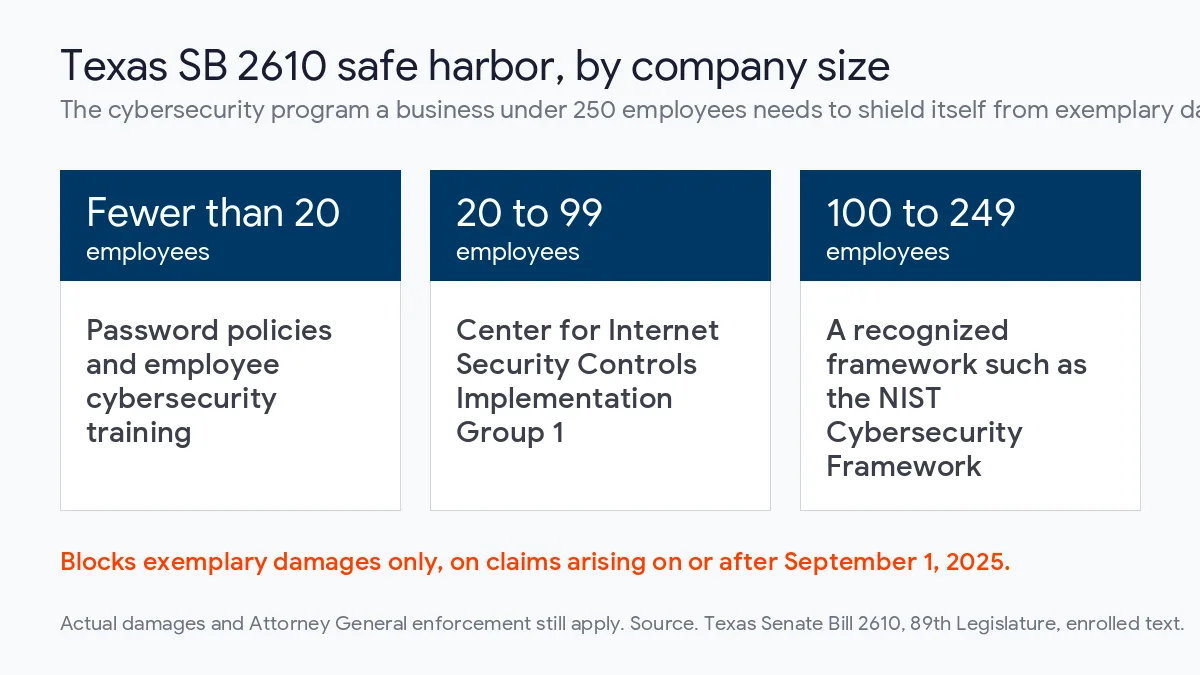
The second is newer and far less known. Senate Bill 2610, which applies to claims arising on or after September 1, 2025, bars exemplary damages in a data breach lawsuit against a Texas business with fewer than 250 employees, provided it maintained a qualifying cybersecurity program when the breach happened. The program it expects scales with headcount. Smaller firms get simpler rules.
- Businesses with fewer than 20 employees need password policies and employee cybersecurity training.
- Businesses with 20 to 99 employees need to meet CIS Controls Implementation Group 1.
- Businesses with 100 to 249 employees need a recognized framework, such as the NIST Cybersecurity Framework.
Don’t oversell it to yourself. SB 2610 shields against punitive damages only. It doesn’t stop a lawsuit, cap actual damages or block Attorney General enforcement. What it does do is reward the same documented program this guide describes, which makes the paperwork worth doing properly the first time instead of rebuilding it after a breach under deadline pressure.
What does Uprite look for first in a Dallas ransomware assessment?
When our team runs a security assessment for a Dallas company, we don’t start with a tool list. We start with 4 questions. The answers usually say more than a scan does.
- Which accounts can log in to a server without a person behind them?
- Who gets the alert if an endpoint tool fires at 2 a.m. on a Sunday?
- When did someone last restore a real system from backup, and how long did it take?
- Is any user, often the owner, exempt from MFA?
The fix is rarely a new product. Usually it’s removing an exception, naming an owner or scheduling the restore test that should have happened last year. Cheap work. Far cheaper than $8.5 million.
Uprite has supported Texas businesses since 1999, runs a Dallas office on Alpha Road, and holds SOC 2 Type 1 certification. Clients on our managed IT services in Dallas get a 5-minute average first response and a 120-day satisfaction guarantee. Already have an internal IT team you like? Keep them. We can add security coverage around the people you have.
Questions Dallas owners ask about ransomware protection
How much does ransomware protection cost for a small Dallas business?
Uprite’s managed security starts at $40 per user per month, covering the monitoring and endpoint layer most small companies are missing. Backup, email security and training add to that depending on what you already own. For scale, the City of Dallas approved $8.5 million for its recovery.
Is multi-factor authentication enough to stop ransomware?
No. Sophos found that 97% of victims breached through compromised credentials already had MFA turned on, because push prompts can be phished or approved by a tired user. Use phishing-resistant methods such as passkeys or FIDO2 keys for admins and finance staff, and remove every exemption.
Should a Dallas business ever pay a ransom?
Treat payment as a last resort decided with legal counsel, never as the plan. Coveware by Veeam put the median payment at $150,000 in the second quarter of 2026, and paying doesn’t erase stolen data or your notification duties. Tested backups are what make refusing possible.
Do we have to report a ransomware attack in Texas?
If sensitive personal information was exposed, yes. Texas requires notice to affected individuals within 60 days and to the Attorney General within 30 days once 250 or more Texans are affected. Reporting to the FBI through IC3 is voluntary for most businesses, but worth doing early.
Does Texas SB 2610 protect my business if we get breached?
Partly. For a business under 250 employees with a qualifying cybersecurity program, SB 2610 blocks exemplary damages on breach claims arising on or after September 1, 2025. It doesn’t prevent the lawsuit itself, limit actual damages or stop Attorney General enforcement.
How quickly can Uprite respond to a ransomware incident in Dallas?
Fast. Our managed IT clients get a 5-minute average first response, with engineers on call 24/7 and a Dallas office on Alpha Road. If you aren’t a client yet and something looks wrong, call anyway, because the first hour decides how far an attack spreads.
Find out how long an intruder could sit in your network
A free Uprite security assessment answers those 4 questions for your company and ranks the fixes by what they would have stopped. Start with a short conversation with a Dallas-based expert.
Speak to an IT Expert