IT Help Desk Services · Texas
IT Help Desk Services for Texas Businesses
Uprite’s IT help desk services cover Texas businesses by phone, email, and portal, with a 5-minute average first response, a 10-minute triage target, and plans from $91 per user per month. The desk is the front line of our IT support in Texas, and that 5-minute figure is a measured average, not a contractual SLA.
The real question isn’t whether somebody answers. It’s how many hours of the year are actually covered, and who picks up the other 6,680.
Talk to a Help Desk EngineerSee Our Response Time DataServing Texas Business Since 1999 | 7-Time MSP 501 Winner | Houston · Dallas · Fort Worth · San Antonio
Get Your Coverage Math
Recognized Across Texas for Managed IT, Security and End-User Support















The Arithmetic
An 8-to-5 Help Desk Covers 21% of the Year
There are 8,760 hours in a year. That’s the honest denominator. A Monday-to-Friday desk running 8 to 5 is scheduled for 2,080 of them, which is 23.7% of the calendar, and it’s the optimistic number, because it quietly assumes the person never takes a day off.
Then it gets worse. Subtract what a person is actually away for. Ten paid holidays. Fifteen days of PTO. Five sick days. That’s 240 hours gone, leaving roughly 1,840 hours of genuine availability, or 21% of the year. Everything else is covered by hope. Here’s the same arithmetic run across 4 coverage models, priced against real Texas wage data rather than a vendor estimate. The numbers are public.
| Coverage model | Hours covered | Share of year | FTE required | Fully loaded Texas cost |
|---|---|---|---|---|
| One technician, 8 to 5, Mon to Fri | 2,080 | 23.7% | 1.13 | $99,700 |
| Two technicians, 8 to 5, no single point of failure | 2,080 | 23.7% | 2.00 | $176,400 |
| Extended hours, 7am to 7pm, Mon to Fri | 3,120 | 35.6% | 1.70 | $149,500 |
| 24/7/365, one person awake at all times | 8,760 | 100% | 4.76 | $419,800 |
The wage figures aren’t ours. The Bureau of Labor Statistics puts the Texas mean annual wage for computer user support specialists, occupation code 15-1232, at $61,690 as of May 2025. Its Employer Costs for Employee Compensation series for the first quarter of 2026 shows wages making up $32.60 of $46.60 in total hourly compensation across private industry, which means payroll taxes and benefits add roughly 43% on top of salary. One fully loaded Texas help desk seat therefore runs about $88,200 a year. That buys you a person. It doesn’t buy a phone system, a ticketing platform, a remote access tool, a knowledge base, a supervisor, or the second person you need on shift the moment the first one is already on a call. Those come after.
The 24/7 line is the one that surprises people. Read it again. Covering every hour of the year with a single person awake requires 4.76 full-time employees before you hire anyone to handle overflow, holidays, or a resignation, which is roughly $420,000 in Texas salary and benefits to keep a single phone answered.
Texas has the workforce. Plenty of it. BLS counts 72,030 computer user support specialists in the state, just over 10% of the 717,190 employed nationally, with 22,600 in Dallas-Fort Worth, 12,840 in Houston, and 4,710 in San Antonio. Those 3 metros hold 56% of the state total. What Texas doesn’t have is a way for a 40-person company to buy 4.76 of them, which is the whole argument for outsourcing the desk rather than staffing it.
Watch the 3:02 breakdown: the coverage arithmetic behind help desk pricing, and why most quotes are impossible to compare.
Definitions
Help Desk, Service Desk, and NOC Aren’t the Same Job
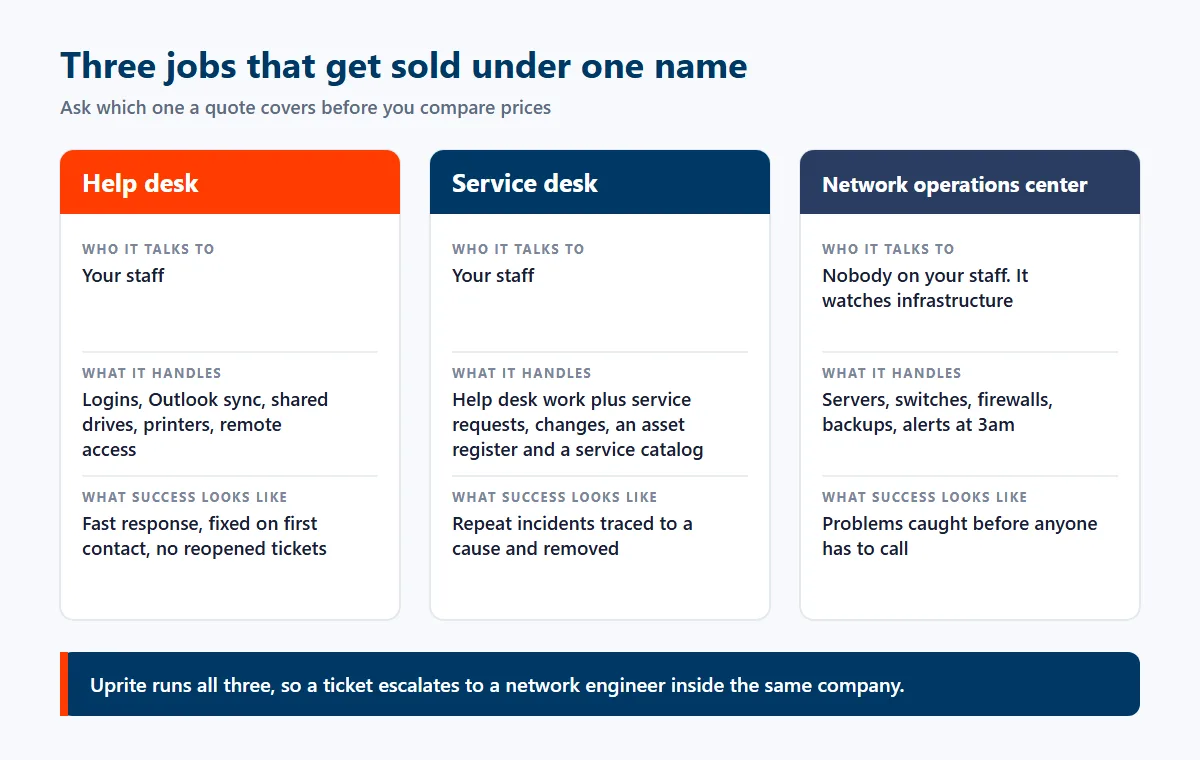
These 3 terms get used as synonyms in sales conversations, and the substitution is rarely accidental. They aren’t interchangeable. Each one describes a different job, staffed by different people, measured on different things.
If you’re comparing quotes, this is the first place the comparison breaks down. Ask which one. Two providers can both say help desk and be selling you work that differs by a factor of 3 in cost. We wrote a longer explainer on help desk versus service desk if you want the detail.
Help desk
A help desk is reactive and person-facing. Somebody can’t log in, Outlook won’t sync, the shared drive has vanished, the label printer is printing hieroglyphics. Speed is the metric. Success is measured by how fast a named human gets back to work, so the numbers that matter are response time, first-contact resolution, and reopen rate. A help desk is a component of managed IT services, not a substitute for them.
Service desk
A service desk includes all of that and adds the process layer around it. Service requests, change management, an asset register, a service catalog, problem management that hunts the cause behind repeat incidents. It’s help desk plus governance, and it costs more because it’s more work.
Network operations center
A NOC doesn’t talk to your staff at all. It watches infrastructure. Servers, switches, firewalls, backups, alerts firing at 3am about a disk that’s filling up. A NOC prevents tickets. A help desk answers them. Buying one and calling it the other is the most common gap we find when we take over an account, usually in a business that has been paying for monitoring for years and has never once been told a disk was filling up. Uprite runs all 3 functions, which is the point of our managed IT services in Texas. One company, one path. The person who answers your call has the escalation route to a network engineer sitting at the next desk rather than behind a vendor contract.
What’s Included
What a Managed Help Desk Actually Covers
Everything below is standard rather than a line item. Read the fine print. If a quote you’re comparing charges separately for any of it, that’s worth asking about before you sign.
Phone, email, portal, and chat
Four intake channels, one queue, one ticket number. No routing maze, no dispatcher reading from a script before a technician sees the problem. The people answering our phone are technicians.
Passwords, MFA, and accounts
Resets, lockouts, MFA re-enrollment, conditional access exceptions. The highest-volume ticket category in almost every environment, and the one with the most security exposure attached to it.
Microsoft 365 and identity
Exchange Online, Teams, SharePoint, OneDrive, licensing, mail flow, shared mailboxes, and the permissions questions that follow every staffing change. Backed by our Microsoft 365 practice.
Endpoints and applications
Windows and macOS, imaging and rebuilds, driver and update failures, VPN and remote access, plus the line-of-business applications your team actually spends the day inside.
Printers, peripherals, and hardware
The unglamorous half. Print queues, scanners, docking stations, conference room displays, and headsets. It’s a large share of real ticket volume and almost nobody puts it on a marketing page.
Escalation to engineering
When a ticket is a network problem, a server problem, or a security incident, it moves to an engineer at the relevant tier. No handoff to a different company, no starting the story again.
Onboarding and offboarding
New starters provisioned before day one. Leavers disabled the same day, with mailbox delegation, license reclaim, and device recovery tracked to completion instead of forgotten.
Ticket data and root cause
Volume by category, by site, and by user, so recurring problems get eliminated rather than reclosed. A help desk that only closes tickets is a help desk with no reason to shrink.
Plans and Response Times
What Uprite’s Help Desk Costs, Plan by Plan
These are the rates on our published pricing page, billed per user per month. Three things decide which plan fits. Headcount, where your offices sit, and whether anyone on your payroll already does IT.
| Plan | Starts at | Help desk coverage | Built for |
|---|---|---|---|
| IT Essentials (remote only) | $91 per user per month | Business hours, up to 8 support hours per user per month | Teams under 12 employees on Microsoft-native tools |
| Co-Managed IT Partnership | $100 per user per month | 24/7 support availability, coordinated with your internal IT staff | Companies with their own IT team that needs backup and coverage |
| IT Pro (remote only) | $110 per user per month | 24/7 support availability, with 24/7 alerting and immediate response | Teams of 12 or more employees outside the Houston and San Antonio areas |
| Fully Managed IT | $138 per user per month | 24/7 support availability, onsite and cloud, with after-hours response | Businesses that want the whole IT department run for them |
MSSP Security Focus, at $40 per user per month, isn’t in this table. It’s a security plan for internal IT teams, and nothing on its feature list is help desk work.
Run that against the coverage table above. A 40-person company on Fully Managed IT pays about $66,240 a year at the starting rate, before licensing and anything else built into the plan. One fully loaded help desk technician in Texas costs $88,200 and covers 21% of the year.
Which response numbers are commitments
Response and triage get quoted the most, and they aren’t the same kind of number.
| What we publish | The number | What kind of number it is |
|---|---|---|
| First response | 5 minutes, on average | A measured average on live tickets, not a contractual SLA |
| Triage | Within 10 minutes, at any hour | Our operational target for every ticket, nights and weekends included |
| Satisfaction promise | 120 days | If you’re not satisfied within 120 days, you may get out of your contract |
| Rate lock | Your first year | Your service rate is guaranteed not to increase during the first year |
Buying for Houston or San Antonio specifically? Houston teams comparing providers can start with our comparison of help desk services in Houston, and San Antonio clinics, banks, and insurers have their own page on help desk services in San Antonio.
The Money
How Help Desk Pricing Works, and What Each Model Hides
There are 4 pricing models in common use. Know which is which. Each of them is honest in the right situation and misleading in the wrong one.
- Per user. The most common. You pay a flat monthly rate per person supported, which makes budgeting simple and gives the provider a financial interest in fewer tickets. Watch what counts as a user, because contractors, shared floor terminals, and seasonal staff are where the definition gets stretched.
- Per device. Bills by endpoint instead. It suits environments where a single person uses 4 machines, and it punishes you in environments where 4 people share one. Check which way your ratio runs before you accept it.
- Per ticket. Looks like the fairest option and behaves like the worst one. It creates a direct financial reason to leave the underlying problem in place, because the underlying problem is billable every month. We do not sell it.
- Block hours. Prepaid time drawn down as you use it. They work for co-managed arrangements where your own staff handle the routine work and call for overflow. They fail as a primary support model. The hour you most need is always the hour after the block ran out.
The tier ladder is a wage ladder
BLS treats first-line support, network support, and systems administration as 3 separate occupations with 3 separate pay scales. In Texas the mean annual wages run $61,690 for computer user support specialists, $74,760 for computer network support specialists, and $104,900 for network and computer systems administrators. If you want the plain-English version of what sits in each band, we cover IT support tiers separately.
That’s a 21% step from tier one to tier two, and a 70% step from tier one to tier three. So ask. A flat per-user price that covers everything is doing one of two things. It’s priced for tier one work and the tier three work will arrive later as a project quote. Or it’s priced for tier three, and you’re paying systems administrator rates for password resets. A provider who can’t tell you which tiers the number includes hasn’t costed their own service.
Send us a month of ticket volume and your headcount. We’ll model what the desk actually costs to run, including the cases where keeping it in-house is the right answer.
Coverage
Four Coverage Models, and Who Carries the Pager
The software and the process barely change between these. Somebody has to answer. What changes is who’s awake, and what happens on the Friday night your file server stops responding.
| Model | Who answers at 2am | Best fit |
|---|---|---|
| Fully in-house | Nobody, or whoever answers their mobile | Businesses with genuine 8-to-5 operations and no after-hours risk they can’t absorb |
| In-house days, Uprite nights and weekends | Uprite | Companies with an internal technician worth keeping, plus a night shift, a plant, or a clinic that runs past 5pm |
| Fully outsourced 24/7 | Uprite | Businesses that would rather buy coverage than build a rota, which is most companies under about 250 staff |
| Co-managed overflow | Shared, by agreement | Internal teams that are competent but too small to survive a holiday week, a resignation, or a bad Monday |
The middle two are where most Texas businesses land, and they’re the two that almost never get quoted properly. Our co-managed IT model exists for exactly that case, where you have good people and not enough of them, so your team keeps the work it knows best while ours absorbs the hours nobody in the building wants to cover.
What We Do
Onboarding, Runbooks, Escalation, Reporting, and Verification
Anybody can put a phone number on a website. The 5 things below decide whether calling it is useful.
Onboarding and discovery
We start by documenting what actually exists, which is usually not what the last documentation says. Users, devices, applications, licenses, network kit, the 3 systems nobody mentioned, and the one server in a cupboard that turns out to run payroll. Start with the truth. Until that inventory is real, every ticket costs more than it should.
Documentation and runbooks
Every recurring task gets a written procedure tied to your environment rather than a generic one. Write it down. That’s what lets any engineer on shift resolve your issue at the same speed as the one who took your last call, and it’s why undocumented environments end up with support quality that depends entirely on which person happens to be working that day.
The escalation path
Every ticket has a named tier and a defined trigger for moving up. First contact aims to resolve. When it can’t, the ticket moves to a network or systems engineer inside the same company, with the history attached, rather than into a queue that starts by asking you to describe the problem again. No repeat explanations.
Reporting and root cause
You get ticket volume by category, by location, and by user, with response and resolution times alongside. The purpose isn’t to prove we were busy. It’s to find the 4 problems generating 40% of your tickets and remove them, which is the only version of this service that gets cheaper over time.
Caller verification and help desk security
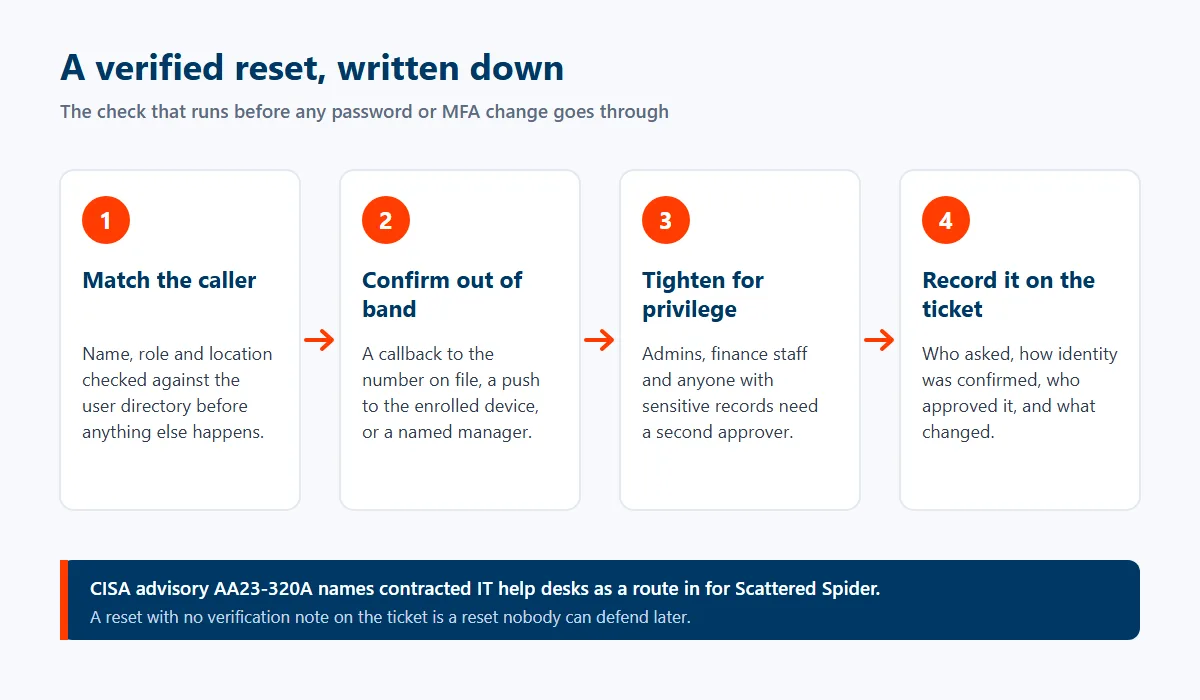
The help desk is now a documented attack surface, and treating it otherwise is negligent. This isn’t theoretical. The CISA advisory on Scattered Spider, updated in July 2025, states plainly that the group targets large companies and their contracted IT help desks, calling in to have passwords reset and MFA tokens transferred to devices the attacker controls, and it specifically names the abuse of trusted relationships with contracted help desks as a route in. So ask any provider bidding for your account a single question. How do you verify a caller before you reset their credentials? If the answer takes longer than a sentence, or arrives as an assurance rather than a procedure, that’s your answer. Identity verification is a control, and controls belong in the contract rather than in the culture.
If you already have a help desk and inherited it from a provider who has gone quiet, we take over existing environments. That starts with an audit of the ticket history, the documentation, the escalation path, and the verification procedure, then an honest report on what we find, including the parts that were fine.
The First 30 Days
How a Help Desk Transition Actually Runs
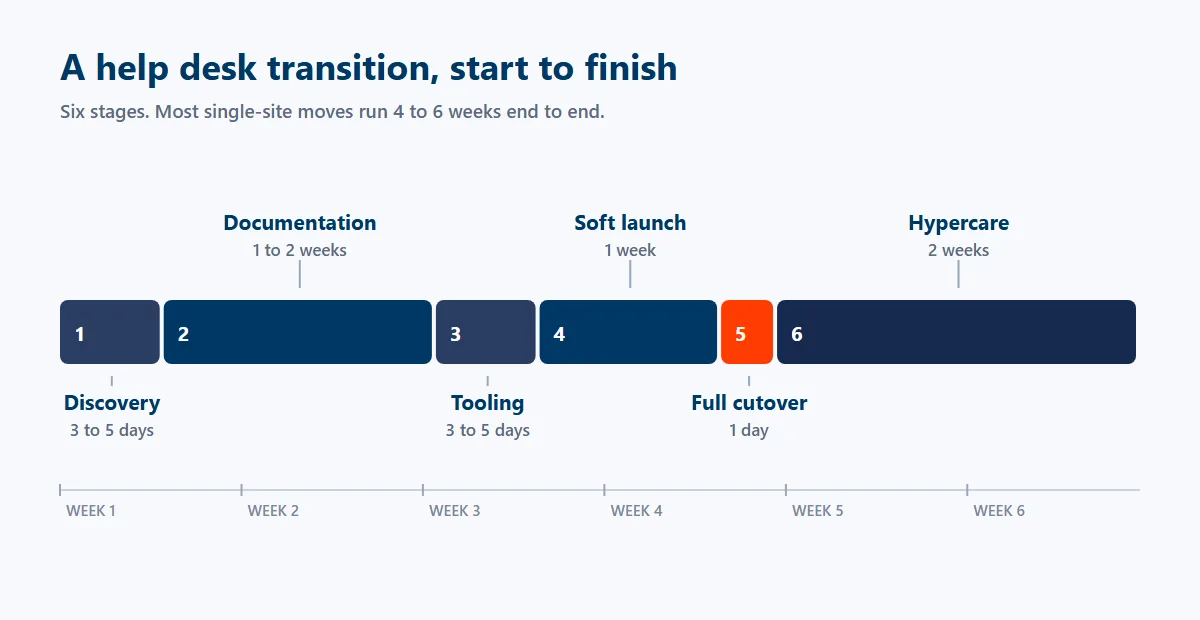
The fear is a Monday where nobody knows who to call. Here’s the sequence that makes that a non-event.
| Stage | What happens | Typical duration |
|---|---|---|
| 1. Discovery | Environment audit, user and device inventory, application list, current ticket history and volume analysis | 3 to 5 days |
| 2. Documentation | Runbooks written, escalation tiers defined, caller verification procedure agreed in writing | 1 to 2 weeks |
| 3. Tooling | Ticketing, remote access and monitoring agents deployed, intake channels stood up and tested | 3 to 5 days |
| 4. Soft launch | Desk live for a pilot group. Real tickets, real timings, gaps found while the stakes are low | 1 week |
| 5. Full cutover | All users switched, contact details published internally, old process retired on a confirmed date | 1 day |
| 6. Hypercare | Dedicated engineer attention, daily review of every ticket, then into normal reporting cadence | 2 weeks |
Most single-site transitions run 4 to 6 weeks end to end. The long pole is almost never technical. It’s getting an accurate list of who works there and what they use, and that’s the one question nobody outside your building can answer for you.
Honest Fit Check
Who This Help Desk Is Built For
Worth a conversation
Companies between roughly 20 and 500 staff where IT is a cost of doing business rather than the product. Businesses running past 5pm, including clinics, plants, logistics operations, and anyone with a night shift. Multi-site Texas operations tired of a different arrangement in every building. Internal IT teams of 1 or 2 people who can’t take a holiday. Regulated firms that need password resets to leave an audit trail. Anyone whose current provider can’t say what their busiest ticket category is.
How you’ll know it’s working
It shows in the paperwork. By month 3, the monthly report should name your busiest ticket category and what’s being done about it. Every password reset should carry a note on how the caller was verified. And if a single printer has generated tickets 12 weeks running, it belongs on a replacement list, not back in the queue.
Discovery starts with your ticket history and your opening hours, because together they decide how much cover you actually need. If the help desk turns out to be part of a larger IT gap, our wider IT support practice in Texas picks up the rest.
What Clients Say
Hector and Kareem are super helpful! They are always willing to take on my computer problems even if its small. I had my mouse disappear off my screen, it was an user issue but Hector didn't make me feel small or "dumb" for this error. We love uprite!
Gerardo Sanchez was very helpful & professional. Uprite Services has great customer service and outstanding technicians. We have used them for several years and will continue our business with them.
I had been having trouble with an IT matter that I didn't think would be fixed but Arvin Ebueng from Upright took his time with me and worked with me until we were able to resolve the issue. The issue was an internal issue with the way the program was written, but Arvin came up with a great work around so that I am now able to do what I need to do at my job. Long story short, he got me access to both things that I need access to simultaneously and daily. Thanks 😊 Arvin, you are much appreciated 👏 💐 🥳.
I’ve been extremely satisfied with Uprite Services and would recommend them without hesitation. They consistently deliver reliable, high-quality work and truly feel like a true partner rather than just another vendor. A special thank you goes to Arvin Ebueng, he is always quick to respond to our needs and incredibly easy to communicate with. No matter how busy things get, Arvin makes sure we’re taken care of promptly and with a smile. His responsiveness and clear communication have made every interaction smooth and stress-free. Thank you, Arvin and the entire Uprite team, Peerless Equipment is a customer for life!
I'm am not a "tech" person, however the team at Uprite gets me through the technological side of computers and software so that I can function on a daily basis... but the most enduring quality is that they care. Special shoot out to Mary, Sergio, Eufemio, Hector, and Jeff just to name a few... I appreciate each of you and the help you give me.
Great service by Juan and Jacob. Always helping us out at Alamo City Trailer Sales. We have been using this company for over 10 years and always happy with the work they do.
Common Questions
IT Help Desk Services FAQ
What are IT help desk services?
IT help desk services give your staff one place to report a technical problem and get it fixed, staffed by technicians who resolve most issues on first contact. In practice that covers logins, email, Microsoft 365, endpoints, applications, printers, and remote access, delivered by phone, email, portal, or chat against an agreed response time. A managed help desk also logs every ticket, so recurring problems can be found and removed rather than reopened each month.
How much do IT help desk services cost in Texas?
At Uprite, plans start at $91 per user per month for small remote teams and $138 for fully managed 24/7 support, and outsourced help desk services in Texas are usually billed that way. Running the same desk in-house costs about $88,200 a year per fully loaded seat, and 24/7 coverage needs 4.76 of them. That in-house figure comes from BLS data. The Texas mean annual wage for computer user support specialists is $61,690, and the Employer Costs for Employee Compensation series shows benefits and payroll taxes adding roughly 43% on top of salary. Neither figure includes ticketing software, remote access tooling, a phone system, or supervision. Ask for both numbers. Send us your headcount and a month of ticket volume and we’ll model both sides. If you’re buying in Houston specifically, we break the local numbers down in what a Houston help desk actually costs.
What is the difference between a help desk and a service desk?
A help desk fixes incidents for individual users. A service desk does that and adds the process layer around it, including service requests, change management, an asset register, and problem management. The distinction matters when you’re comparing quotes, because a service desk is more work and costs more. If 2 providers quote very different numbers for what sounds like the same thing, one of them is usually pricing a help desk and the other a service desk, and the gap is process work rather than padding.
Is it cheaper to outsource the help desk or hire someone in-house?
For most businesses under about 250 staff, outsourcing is cheaper, because a single hire covers only 21% of the year once holidays, PTO, and sick days are subtracted from a 40-hour week. A single 8-to-5 technician is scheduled for 2,080 of the 8,760 hours in a year and is genuinely available for around 1,840 of them. It depends on volume. Hiring is the better answer when your ticket volume can keep 2 or more people busy inside business hours and you have no after-hours exposure worth covering.
What hours does the Uprite help desk cover?
Every Uprite plan except IT Essentials includes 24/7 support availability, and IT Essentials covers business hours, up to 8 support hours per user per month. A co-managed option lets your internal team handle business hours while we take nights, weekends, and overflow. Which one fits depends on when your business actually runs. Clinics, plants, logistics operations, and anyone with a night shift usually need coverage past 5pm. Offices with no after-hours risk often don’t, and we’ll say so rather than sell the larger plan.
How fast does Uprite respond to a help desk ticket?
Uprite’s first response averages 5 minutes on live tickets, and that’s a measured average, not a contractual SLA. Our triage target is 10 minutes for every ticket at any hour, and critical issues go to a senior engineer immediately. Response time on its own is a weak comparison metric, because it has converged across the industry. Resolution time is where providers still differ by a wide margin, which is why our reporting shows both.
What are help desk tiers, and which tier will handle my ticket?
Tier one handles user-facing issues such as logins, email, and applications. Tier two handles network and connectivity faults. Tier three handles servers, identity infrastructure, and security incidents. The tiers are separate occupations with separate pay scales. In Texas the BLS mean annual wages run $61,690, $74,760, and $104,900 respectively, which is why a flat per-user price should always come with a clear statement of which tiers it includes.
How do you stop attackers from social engineering your help desk?
Caller identity verification is the control. Every password reset and MFA change should follow a written verification procedure that’s agreed in the contract rather than left to whoever picks up the phone. This is a documented threat, not a hypothetical one. The CISA advisory on Scattered Spider, updated in July 2025, describes attackers calling IT help desks to have passwords reset and MFA tokens moved to devices they control, and specifically names contracted help desks as a route in. Get it in writing. Ask any provider you’re evaluating to describe their verification procedure before you sign.
Related
Help Desk and IT Support Across Our Texas Metros
- IT support in Texas, the wider practice this desk sits inside
- IT support in Houston, and help desk services in Houston compared provider by provider
- IT support in Dallas
- IT support in San Antonio, and help desk services in San Antonio for clinics, banks, and insurers
- IT support in Fort Worth
- 24/7 IT support in Houston, if your risk sits after hours
- Managed IT services in Texas, if the help desk is part of a larger problem
Start With Your Own Numbers
Get the Coverage Arithmetic for Your Business
Send us your headcount, your hours of operation, and a month of ticket volume. We’ll show you what your coverage costs today and what it would cost run properly, including the cases where doing nothing is the right call. No sales theater. Call 866-570-3065 or use the form on this page.
Talk to a Help Desk EngineerSee Managed IT in Texas


