A help desk response time SLA for a Fort Worth business should promise coverage when your people work, a clock that starts at your report, written priorities, verified password resets and a named escalation path.
I run operations at Uprite, and owners often send me their current help desk contract before a renewal. They want to know if the response numbers are good. If you’re comparing providers rather than contracts, our page on help desk services in Fort Worth covers the service itself. In most of the agreements I read, the numbers are fine and the hours are the problem. The covered hours start at 8, and a large part of Fort Worth is already at work by then. The Census Bureau’s commute table for the city shows 83,834 of its 449,500 commuters leaving home before 6 a.m. That group includes warehouse staff at Alliance, nurses on the early shift in the Medical District and construction crews heading out to new subdivisions on the west side. This post goes through the promises I’d get in writing, starting with the ones I see missing most often. We also compared the response numbers 8 local firms publish in our ranking of the best help desk services in Fort Worth.
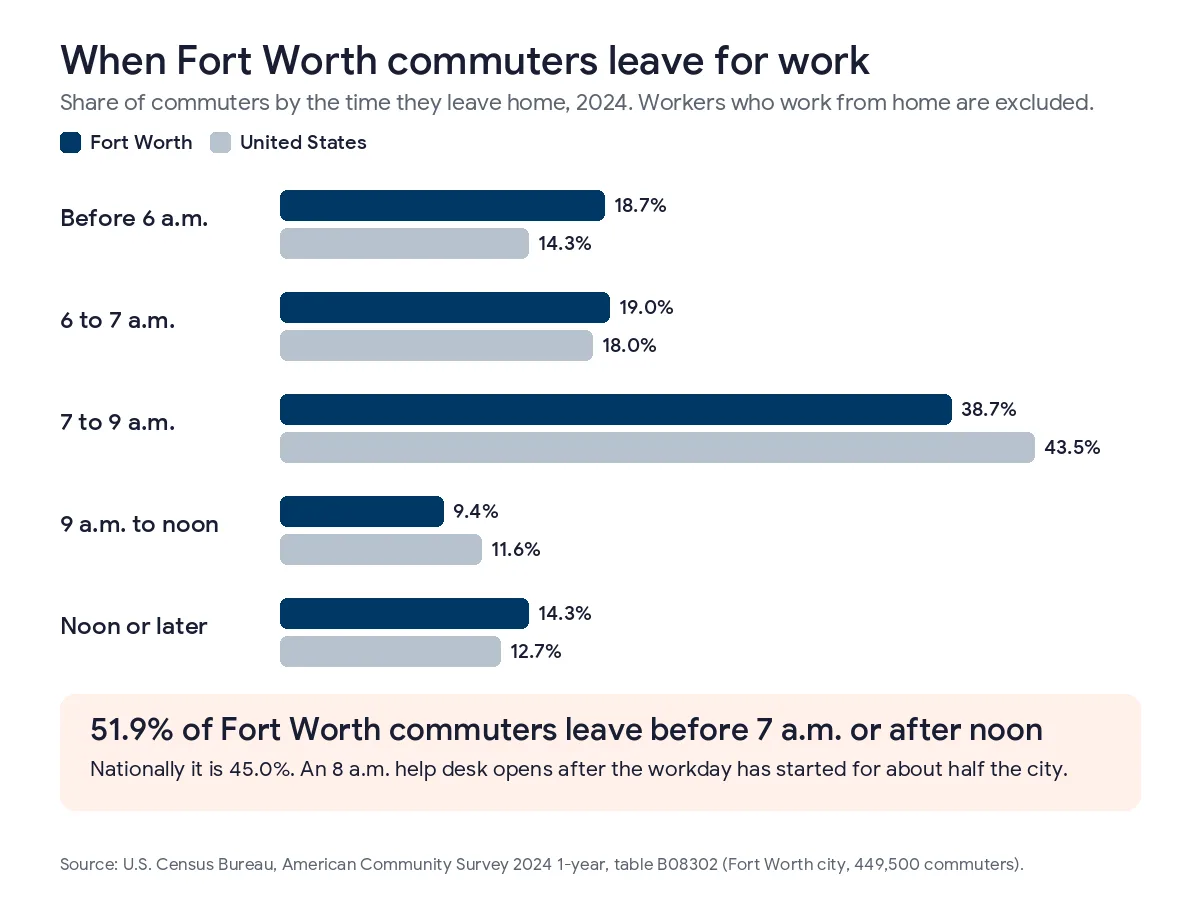
Fort Worth starts work early. 18.7% of the city’s commuters leave home before 6 a.m., compared with 14.3% nationally, so an SLA that assumes an 8 o’clock help desk leaves out real working hours. Put the covered hours, the moment the clock starts, your own P1 definitions, a callback rule for resets and a security escalation path in writing. A single locked-out morning for a 12-person crew costs about $914 in wages, which is more than 3 months of a 10% credit on a $2,750 bill.
What does a help desk response time SLA actually measure?
A help desk response time SLA is the part of a managed IT contract that says how fast the provider has to act when you ask for help, usually broken out by priority. A useful one separates first response, triage and resolution, and it says which of those 3 carries a penalty if it’s missed.
Providers often blur the 3 together. Many ticketing systems send an acknowledgment email within a minute of a submission, and many contracts count that email as the response, even though no technician has read the request yet. Triage starts when a technician sets the priority and takes ownership of the ticket. Resolution should mean the point where you confirm the problem is fixed, which can be later than the point where the provider closes the ticket.
| Clock | What starts it | What stops it | What to ask for |
|---|---|---|---|
| First response | Your call, email or portal request | A person replies about your actual issue | The clock starts on receipt, on every channel |
| Triage | The first human reply | Priority set and a named technician assigned | A stated maximum at every hour you’re covered |
| Resolution | Triage | You confirm the fix works | A target per priority plus an update interval while it’s open |
Our own figures show how this works in practice. Uprite’s first response averages about 5 minutes on live tickets. We publish that as a measured average and we don’t put it in contracts, because a monthly average can hide a slow day. The commitment we work to is triage within 10 minutes during any hour we cover. When a provider quotes a single number, ask which of the 3 clocks it measures and whether it appears in the signed agreement. Our 2026 MSP SLA benchmarks explain why 2 well-known reports come out 112 times apart on the same metric.
When does Fort Worth actually go to work?
Earlier than most help desk contracts assume. In the Census Bureau’s 2024 American Community Survey, 18.7% of Fort Worth commuters left home before 6 a.m., against 14.3% nationally, and 37.6% were out the door before 7.
The figures come from ACS table B08302, time of departure to go to work, which counts workers who didn’t work from home. For Fort Worth that’s 449,500 people. Another 14.3% of them leave at noon or later, which in this city usually means a second shift at a plant, a hospital in the Medical District or a distribution center up at AllianceTexas.
| Left home for work | Fort Worth | Tarrant County | United States |
|---|---|---|---|
| Before 6 a.m. | 18.7% | 16.6% | 14.3% |
| Before 7 a.m. (includes the row above) | 37.6% | 35.3% | 32.3% |
| Between 7 and 9 a.m. | 38.7% | 39.8% | 43.5% |
| Between 9 a.m. and noon | 9.4% | 10.8% | 11.6% |
| Noon or later | 14.3% | 14.2% | 12.7% |
When I add the before-7 group to the noon-or-later group, the total for Fort Worth is 51.9%. The national figure is 45.0%. That means about half of the city’s commuters start work outside the 7-to-9 window that office-hours help desks are staffed for. Tarrant County as a whole is only slightly lower than the city.
To put a dollar figure on it, I used the BLS series for average hourly earnings in the Fort Worth-Arlington-Grapevine area, which was $38.08 for private-sector workers in September 2026, a preliminary number. Suppose 12 people on an early crew can’t log in to their handheld scanners at 6 a.m., and the provider’s phones don’t open until 8. That’s 24 paid hours, or about $914 in wages, before anyone looks at the ticket. If it happens once a week, the cost passes $47,000 a year.
For that reason, coverage hours are the first thing I check in any SLA, ahead of the response number and ahead of the price.
Which promises belong in a Fort Worth help desk SLA?
For a Fort Worth company with 10 to 200 people, I’d ask for 8 promises. They are listed in the order I’d negotiate them, which is also close to the order in which I find them missing from contracts.
- Covered hours should start before your earliest shift, and the contract should say who answers outside those hours.
- The response clock should start when your call connects or your email arrives, rather than when a dispatcher enters it in the ticketing system.
- P1 should be defined with your own systems, for example the dock scanners, the payroll app or the front desk phones.
- Triage and resolution should be separate numbers, with a status update every 30 minutes while staff are unable to work.
- No password or MFA reset should happen without a callback to a number already on file.
- Security escalation should list names, phone numbers and times, which the incident section below covers.
- On-site terms should state where the technician is dispatched from, since Weatherford is a longer drive than Arlington.
- The monthly report should show medians, the 5 slowest tickets and every time the clock was paused, with the reason.
The table below shows how the strong and weak versions of each promise usually read in a contract.
| Promise | Strong wording | Weak wording to push back on |
|---|---|---|
| Coverage | A technician answers from 6 a.m., 7 days a week | Business hours, as defined by the provider |
| Clock start | Starts when the request is received on any channel | Starts when a ticket is created |
| Priority | P1 lists your named systems, such as the dock scanners or the billing app | Priority assigned at the provider’s discretion |
| Resolution | A target per priority, with P1 updates every 30 minutes | Commercially reasonable efforts |
| Password resets | Verified by calling back a number already on file | Not mentioned at all |
| Clock pauses | Only while waiting on you, and every pause is logged | Paused whenever awaiting customer or third party |
| On-site | Dispatch point and arrival target written down | On-site support as needed |
A competent provider can sign the strong versions without much cost. If one of them causes a long pause on a sales call, take note of it. Our guide to what Texas response time contracts actually say covers the contract mechanics behind each line, including notice periods and termination rights.
Why should a password reset take longer than 5 minutes?
Because a fast reset is exactly what an attacker is hoping for. A help desk that resets a password or MFA method on the strength of one phone call gives access to whoever sounds most convincing on that call.
CISA’s advisory on Scattered Spider, last revised in July 2025, says the group places calls to “convince IT help desk personnel to reset passwords and/or transfer MFA tokens.” CISA first published it in November 2023. The callers do their homework first. By the time they phone the help desk, they know the employee’s name, job title and manager.
Here is the step I’d ask a provider to write into the SLA. The technician hangs up and calls the employee back on the number already in the file. If that number doesn’t answer, the employee’s manager confirms the request through Teams or email. The minutes this takes are excluded from the response clock. After the check, the technician issues a Microsoft 365 Temporary Access Pass, which is a time-limited code the employee uses to set up a new sign-in method. Nobody reads a password out over the phone. The whole check adds a few minutes to the ticket.
How should a security incident change the SLA clock?
Security incidents need their own track in the contract, and the reason is legal. Once a business determines that a breach happened, Texas deadlines begin, and some industries add federal ones. A ticket sitting in the P2 queue doesn’t stop either clock.
The Texas rule is in Business and Commerce Code Section 521.053. The business has 60 days from the date it determines a breach occurred to notify the affected people. When at least 250 Texans are involved, the attorney general gets notice within 30 days. Defense suppliers have a much shorter clock. A west Fort Worth machine shop making parts for the aerospace plants may carry DFARS 252.204-7012 in its contracts, and that clause defines rapid reporting as within 72 hours of discovering a cyber incident. An incident found at 6 p.m. on the Wednesday before Thanksgiving would be due by 6 p.m. that Saturday. Our post on CMMC for Fort Worth aerospace suppliers covers the rest of that clause.
The help desk is often the first place an incident shows up. The ticket looks routine. A user says the sign-in page looks different, or a folder of spreadsheets won’t open. NIST revised its incident response guide, SP 800-61 Revision 3, in April 2025, and the new version treats incident response as part of normal cybersecurity risk management. For an SLA, I turn that into 4 lines of contract text. One names who can declare a security incident. One sets how fast your contact gets a phone call after that. One requires logs to be saved before any machine is wiped. The last one names who calls your cyber insurance carrier.
Do service credits make up for a missed SLA?
Rarely. A credit refunds part of your monthly fee, while an outage costs wages and sales, and those are much larger numbers.
Take a 25-person Fort Worth office with a 4-hour P1 outage. At the BLS average of $38.08 an hour, that’s 100 lost hours and $3,808 in wages, before any missed shipments or overtime. On a plan at $110 per user, the monthly bill is $2,750. A 10% credit returns $275, which covers about 7% of the wage cost alone.
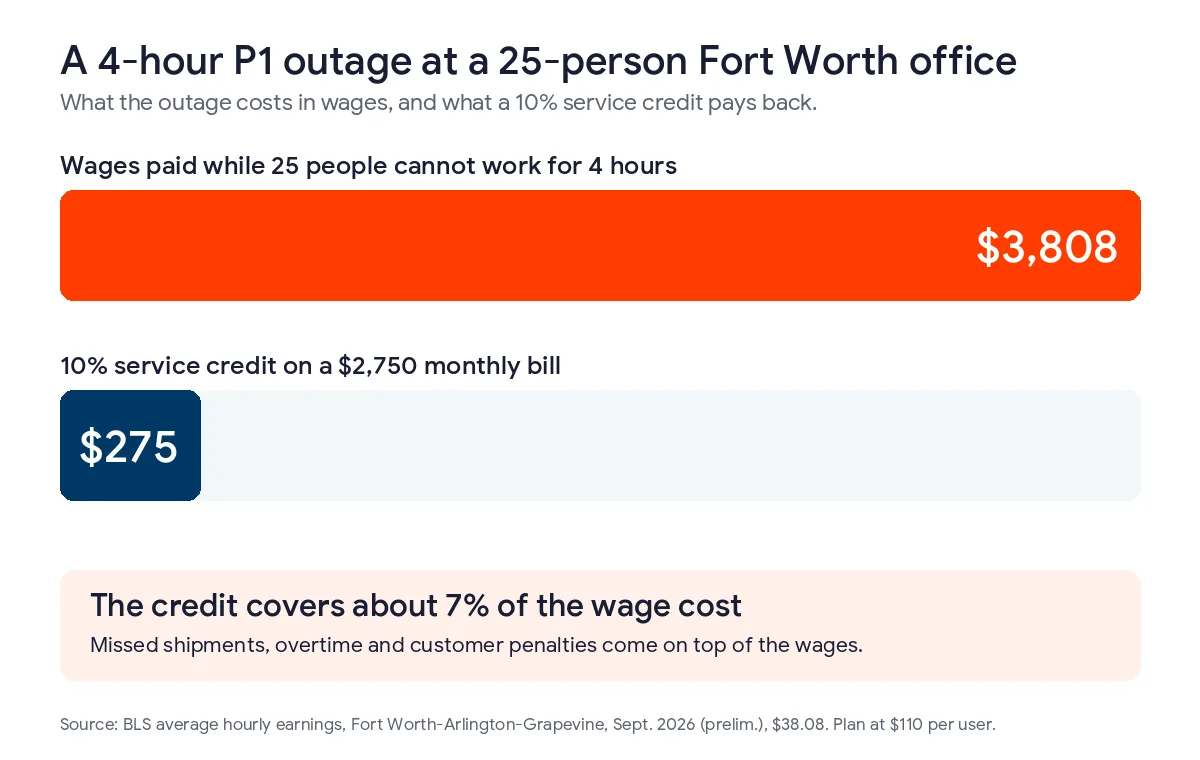
Credits do show whether a provider will put money behind its numbers, so I don’t ignore them. I’d still give up a big credit table in exchange for 2 other terms. The first is an escalation contact who can make decisions and who answers a direct line during a P1. The second is a way out of the contract. At Uprite that’s a 120-day guarantee. If you’re not satisfied within 120 days, you may get out of your contract.
Check the pause clause too. Most ticketing tools let a technician stop the SLA timer by marking a ticket as waiting on customer. Sometimes the technician really is waiting on you. If nobody reviews those pauses, a fix that took 4 hours can show up in the report as 40 minutes. I’d ask for every pause to appear in the monthly report for that reason.
Where does Uprite fit in Fort Worth, and when is a business-hours SLA enough?
This is the section where my bias matters, since we sell help desk coverage in Fort Worth.
We run our DFW team out of 5757 Alpha Rd in Dallas. On-site technicians drive from there to clients in Tarrant and Parker counties. A site in Weatherford is a longer drive than a site in Arlington, and we’d rather a client hear that before signing. Triage happens within 10 minutes during any hour we cover. Every plan except IT Essentials includes 24/7 support, and the overnight details are on our 24-hour IT support in Fort Worth page. Some companies already have one good internal technician with too much work. For them we offer co-managed IT in Fort Worth, where the internal person keeps the daytime work and we take the early mornings, nights and overflow.

Not every business needs 24/7 coverage. Take a 9-person title office on Camp Bowie. The first person arrives after 8, nobody works on Saturday and an outage can wait until the next morning. That office can skip a 24/7 SLA. Our breakdown of after-hours IT support in Fort Worth covers what changes when a business stays open past 5. IT Essentials costs $91 per user. It covers business hours and includes up to 8 support hours per user each month, and it’s the plan I’d point that office to. For businesses that do run nights or holidays, our guide to after-hours coverage clauses has the contract wording, and our breakdown of IT support costs in Fort Worth shows what extra coverage adds to the monthly bill. We also priced a Fort Worth help desk two ways, in our help desk cost guide for Fort Worth and our in-house vs outsourced help desk comparison.
What Fort Worth owners ask about help desk SLAs
What’s a reasonable response time for a P1 ticket?
We usually suggest 30 minutes or less for a P1, measured to a technician who’s working on it, plus a status update every 30 minutes. In Fort Worth it matters more that the promise holds at 6 a.m. than that it gets shorter at 2 p.m.
Does a business-hours SLA cover Saturdays?
Usually not. Most contracts define business hours as Monday through Friday on the provider’s calendar, minus holidays, so a Saturday shift has to be named in the contract.
Should the clock stop while the provider waits on us?
Sometimes. A pause makes sense when the technician needs something only you can give, such as a manager’s approval for a $40 license or an admin password the owner keeps. It doesn’t make sense when the technician is on hold with a software vendor, since chasing vendors is part of the service. Ask to see the pause log each month. If a quarter of the tickets show pauses, bring it up before the renewal.
Is a very fast password reset a good sign?
It can be a warning sign. Scattered Spider got into companies by calling their help desks and asking for resets. If a provider resets a password without calling the employee back, anyone who knows the right name and job title can get in.
Can we negotiate the SLA with a managed IT provider?
You can. Covered hours, P1 definitions and a callback rule take a few sentences to add, so a good provider can agree to them quickly. If a provider pushes back on them, ask why, because the answer often shows how many senior technicians it has.
Does Uprite put the 5-minute average in the contract?
No. The 5-minute figure is an average we measure on live tickets, and we publish it that way. What we commit to is triage within 10 minutes during covered hours. Clients also have a 120-day guarantee and can leave if they’re not satisfied.
Send us your current SLA with your earliest shift time and your headcount. We’ll mark the clauses that don’t fit how your Fort Worth business runs. Replies usually come back within about 5 minutes.
Review My Help Desk SLAPrefer the phone or email? Both are on our contact page.