
SOC as a service is worth it for most Dallas small businesses under about 400 users, because one in-house security analyst costs about $191,000 a year and still covers less than a quarter of the hours in a week.
Owners in Plano, Irving, and Frisco usually reach this question after an insurer or a client asks who watches their network at night. The honest answer at most firms of 20 to 200 people is nobody. If you want to see the service itself before the math, our page on managed detection and response in Dallas explains how our own security operations center works. This post is about whether the money makes sense for your company.
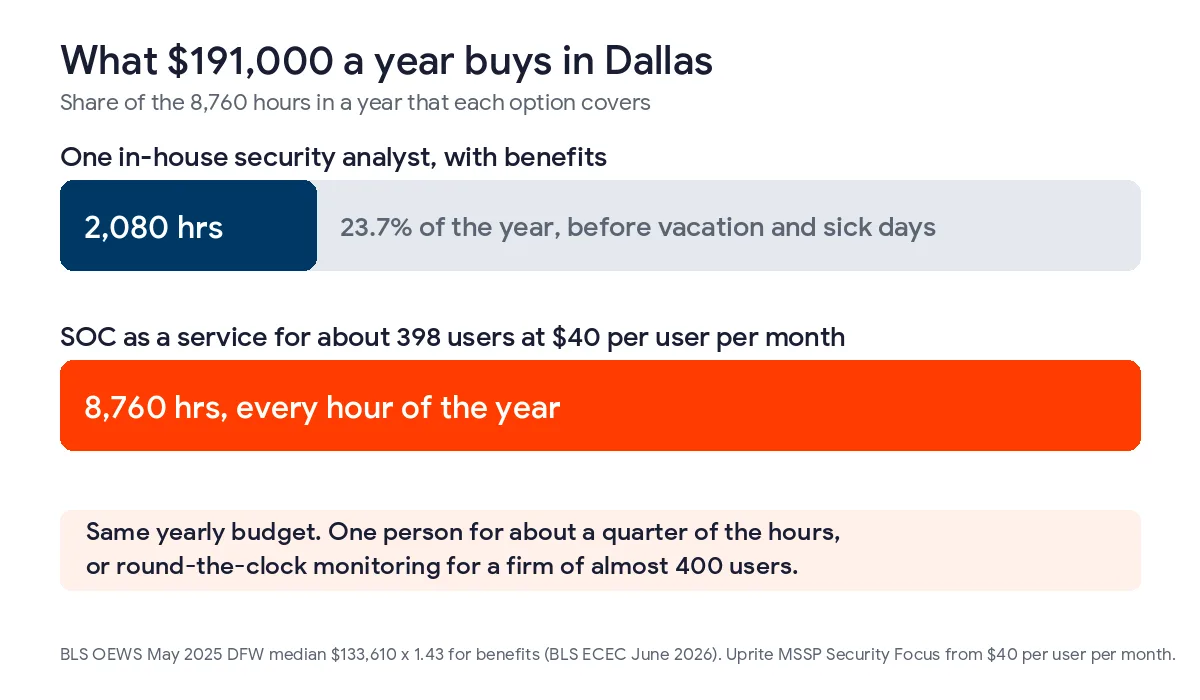
A Dallas firm that buys SOC as a service is paying for someone to read alerts at hours when its own staff is asleep. The comparison that matters is one local hire, and a DFW information security analyst costs about $191,000 a year once benefits are added. That same budget covers SOC monitoring for roughly 398 users at $40 per user per month. Firms that have not set up multifactor sign-in or tested backups should do that first.
What does SOC as a service include?
SOC as a service is a subscription to an outside security operations center, where analysts watch your devices, user sign-ins, email, firewall, and cloud apps around the clock and act on what looks wrong. You pay per user or per device each month instead of hiring and scheduling a team of your own.
The useful part is the people, since most small businesses already own tools that generate alerts. Microsoft 365, the firewall, and the antivirus on each laptop all send warnings, and those warnings land in an inbox that nobody reads after 6 p.m. A SOC reads them, decides which ones are real, and starts containment on the ones that are. If you are comparing it with MDR, the difference is mostly scope. Our MDR vs EDR guide for Dallas businesses covers what the extra cost buys, and EDR vs MDR vs XDR adds the third option.
How long do Dallas-area breaches go unnoticed?
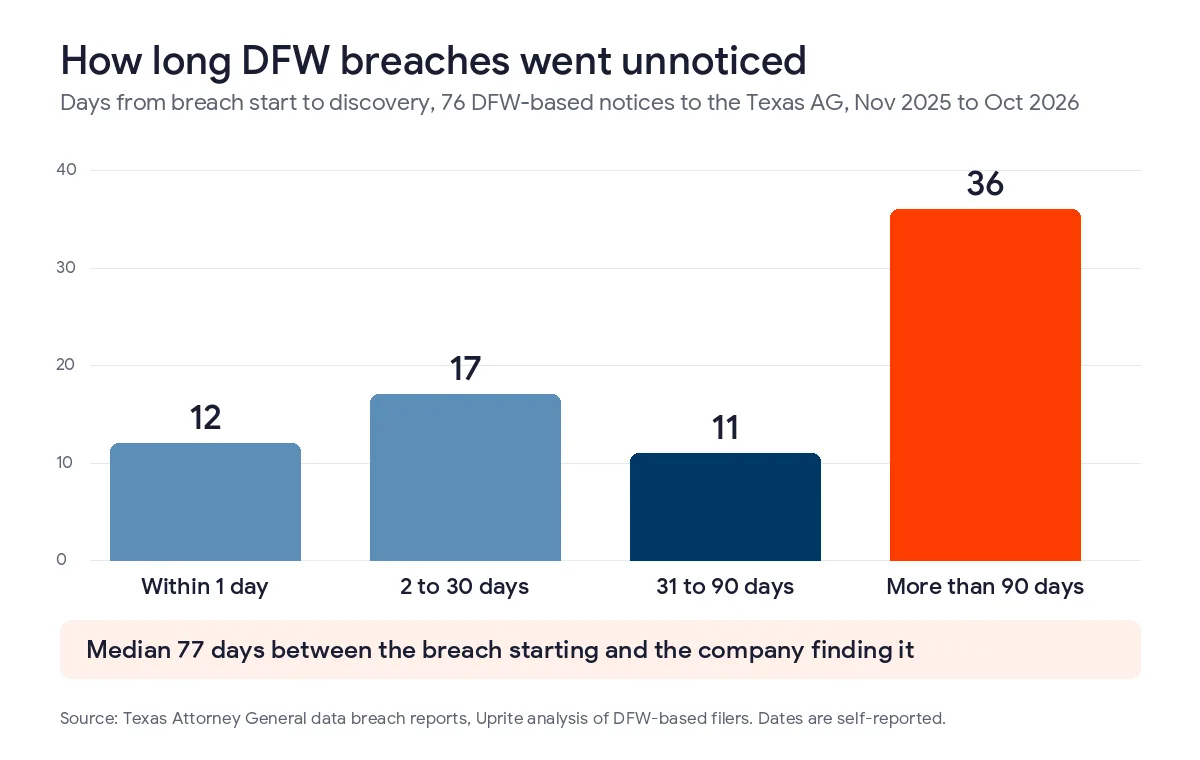
We went through the breach notices published by the Texas Attorney General between November 1, 2025 and October 31, 2026 and kept the ones filed by organizations based in Dallas-Fort Worth. There were 86 of them. 76 listed both the date the breach started and the date it was discovered, and the median gap between those two dates was 77 days.
Only 12 of the 76 found the problem within a day. 47 took longer than 30 days, and 36 took longer than 90 days. The dates are self-reported by each filer, so treat the exact median with some caution, but the pattern is hard to argue with. Most of these organizations learned about the breach weeks or months after it began, and roughly a third of them were healthcare providers.
Texas law adds a deadline on top of that. Since September 1, 2023, a breach that involves at least 250 Texans has to be reported to the Attorney General no later than 30 days after the business determines it happened, under Senate Bill 768. A SOC does not shorten that clock. What it does is make it far more likely that you find the breach in days instead of months, with a written record of what the analysts saw and when.
Is one security hire cheaper than SOC as a service in Dallas?
Usually not, and the gap is wider than most owners expect. The Bureau of Labor Statistics counts 7,080 information security analysts in the Dallas-Fort Worth metro, with a May 2025 median wage of $133,610 in its metro wage estimates. The 10th percentile is $82,140 and the 90th is $178,000, so even a junior hire is not cheap here.
Wages are only part of what an employer pays. In June 2026, private employers spent $14.07 of every $46.89 in hourly compensation on benefits, according to the BLS employer costs release. That makes total compensation about 1.43 times wages, which puts one analyst at the DFW median near $191,000 a year before training, tools, or a recruiter.
Then there is coverage. A full-time employee is paid for 2,080 hours, and a year has 8,760, so one analyst covers at most 23.7% of the week even before vacation and sick days come out. At $40 per user per month, the same $191,000 pays for round-the-clock SOC monitoring for about 398 users.
| Users at your firm | SOC as a service per year at $40 per user | One DFW analyst per year, with benefits | Hours of the week covered by the analyst |
|---|---|---|---|
| 15 | $7,200 | About $191,000 | Under 24% |
| 40 | $19,200 | About $191,000 | Under 24% |
| 100 | $48,000 | About $191,000 | Under 24% |
| 250 | $120,000 | About $191,000 | Under 24% |
| 400 | $192,000 | About $191,000 | Under 24% |
Our cybersecurity services in Dallas page runs the same wages through a full round-the-clock team and lands near $805,000 a year, which is why so few small firms try it. I should be fair to the hire, though. A good analyst on staff also fixes things, trains people, and knows your systems, and a $40 plan does not do all of that. Many of our Dallas clients end up with both, an internal IT person for the daytime work and a SOC for the hours that person is off.
Which Dallas businesses get the most from it?
The firms that gain the most have data worth stealing, staff who go home at night, and some kind of IT person who can act on what the SOC finds. Here is how we would sort the companies we talk to in Dallas, Richardson, Addison, and Fort Worth.
| Your situation | What we would usually recommend | Why |
|---|---|---|
| 10 to 30 users, no IT staff, no multifactor sign-in yet | Fix sign-ins and backups first, then a fully managed plan | A SOC needs basic controls in place before its alerts mean much |
| 20 to 150 users with one IT generalist | SOC as a service alongside that person | The generalist keeps the daytime work and the SOC covers nights, weekends, and holidays |
| Medical, dental, CPA, or financial office of any size | SOC as a service plus a written incident response plan | Patient and client records raise both the breach cost and the reporting burden |
| 400 or more users with a security person on staff | Price both routes, or use a SOC only for after-hours coverage | At this size one hire and a subscription start to cost about the same |
Uprite’s MSSP Security Focus plan starts at $40 per user per month and is built for the second and third rows, firms that already have internal IT. It includes firewall management, SIEM and SOC monitoring, threat intelligence, vulnerability scanning, incident response, and quarterly security reviews. Companies with no IT staff at all usually start on Fully Managed IT at $138 per user per month, where the security stack is part of the whole service. Both prices are on our pricing page, and licensing comes on top.
When should a Dallas firm skip it or wait?
We sell this service, so I want to be clear about where it is a poor buy. If your company has 8 people, no regulated data, and no multifactor sign-in on email, a SOC would mostly be watching a door you never locked. Turning on multifactor sign-in, setting up tested backups, and removing old admin accounts will do more for you in the first month.
It is also a poor fit if nobody at your firm will answer the phone when the SOC calls, or if you will not let the provider isolate a laptop or disable an account without a meeting first. In both cases the alerts arrive, but nothing happens until morning, and you have paid for monitoring without getting the response. A larger company with a staffed security desk at night may not need a second one either.

What should a SOC contract spell out?
NIST rewrote its incident response guidance in April 2025, and SP 800-61 Revision 3 now ties detection and response to the same framework most insurers ask about. You do not need to read all of it. You do need the agreement to answer these 5 questions in writing.
- Which systems send data to the SOC, listed by name, such as Microsoft 365, the firewall, servers, and each laptop.
- What the analysts are allowed to do on their own at 3 a.m., including isolating a device or locking an account.
- How many minutes pass between a critical alert and a person looking at it.
- How long logs are kept and whether you get them back if you leave.
- What the monthly report shows, so you can see what was caught and what was closed.
The second question matters most in practice. A provider that can only email you is selling alerts, and it should be priced like an alert service. For reference, Uprite’s average first response is 5 minutes across all priority levels, measured on our own tickets.
How do you decide this week?
Start by counting users and writing down who would actually respond to an alert at 2 a.m. on a Sunday. Then list the contracts, insurers, and regulators that ask about monitoring. With those 3 facts you can price both routes using the table above, and our cybersecurity risk assessment for Dallas businesses walks through the inventory step by step.
For per-endpoint numbers, see what MDR costs in Dallas, and for the full security budget beyond monitoring, see what cybersecurity costs in Dallas. If ransomware is the worry that started this, our guide to ransomware protection in Dallas covers what the City of Dallas went through in 2023. Firms that want a senior security lead without a full-time hire can look at our vCISO services in Dallas, and our free network assessment will show what your systems could feed a SOC today.
Questions Dallas owners ask before buying a SOC
Is SOC as a service worth it for a small business in Dallas?
For most firms under about 400 users, yes, because one DFW security analyst costs about $191,000 a year with benefits and covers less than a quarter of the week. The service covers every hour for a monthly per-user price.
What does SOC as a service cost per month?
Uprite’s SOC monitoring starts at $40 per user per month, so a 40-person office pays about $1,600 a month before licensing. Other providers charge per device or by tier, which is why you should compare the same list of systems and the same response rights.
Is a SOC the same thing as MDR?
They overlap, but MDR usually centers on laptops, servers, and user accounts, while a SOC also reads firewall, email, and cloud logs. Many providers sell the two together, so ask which data sources are included rather than relying on the label.
Can our one IT person handle security alerts instead?
During business hours, often yes. The trouble is the other 128 hours of the week, plus vacations and sick days, when alerts sit unread. A SOC is usually cheaper than adding staff to cover those hours, and it lets your IT person keep doing the daytime work.
Does Texas law require small businesses to have 24/7 monitoring?
No Texas law requires a SOC by name. The state does require you to report a breach involving 250 or more Texans to the Attorney General within 30 days of determining it happened, and insurers and clients often ask about monitoring when they review your controls.
How quickly can a Dallas business get a SOC running?
Most small offices can be connected within a few weeks. The time goes into installing agents on each device, connecting Microsoft 365 and the firewall, and agreeing on what the analysts may do without calling you first. That last step is the one worth taking slowly.
Send us your user count and tell us who handles an alert after hours today. We will tell you in writing whether SOC as a service fits your firm, what it would cost, and what would stay on your side of the line.
Talk to a Security ExpertIf you would rather start with a conversation, you can reach our Dallas team through the contact page.