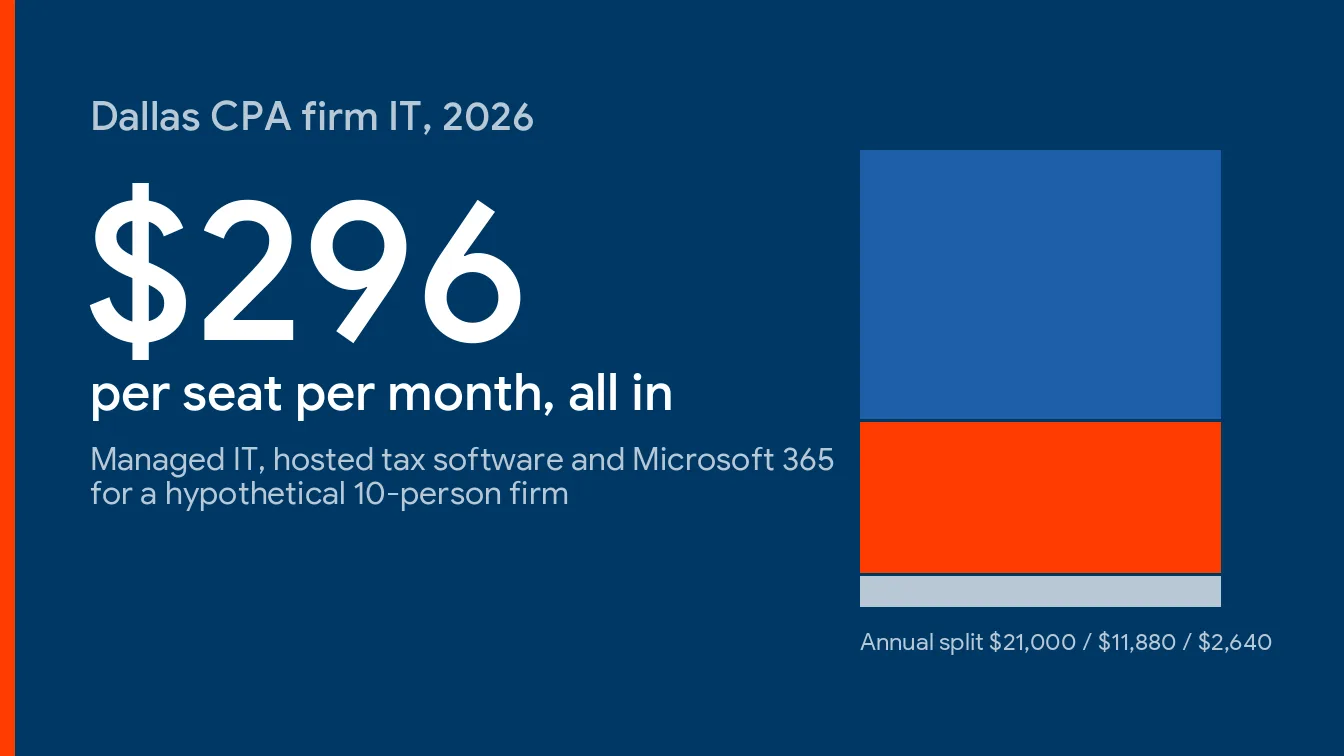
Short version. A Dallas CPA firm should budget roughly $150 to $225 per user per month for managed IT in 2026. Hosted tax software is a second invoice at $89 to $114 per user. Seasonal preparers are a third. Firms tend to price the first one and get surprised in February. Plan on about $296 per seat per month all in for a 10-person office.
Dallas CPA firms should budget about $150 to $225 per user per month for managed IT in 2026, plus $89 to $114 per user per month if the tax software is hosted. That range is our estimate, built from our published Dallas pricing and the extra work a tax practice creates.
This guide sits under our overview of IT services for accounting firms in Dallas and answers one question. What does the bill actually look like? Not the number on a sales page. The number a managing partner signs.
Tax practices don’t price like other offices, and it isn’t only because the data is sensitive. The software is usually hosted. The headcount swells every January. The IRS expects a written security plan. Each of those lands on an invoice somewhere, and the only open question is whether you see them before you sign.
What Dallas CPA Firms Pay Per User for Managed IT in 2026
Managed IT for a CPA firm is a flat monthly fee per user that covers help desk, patching, endpoint security, backup, Microsoft 365 administration, and coordination with the firm’s tax and practice software vendors. In Dallas the base rate follows local technician wages, and the accounting premium follows compliance work and tax-season coverage.
Our Dallas managed IT pricing guide puts the general DFW market at $135 to $200 per user per month. Businesses mostly land between $150 and $175, and compliance-heavy environments reach $250 to $300. A CPA firm sits in the upper half of that. Not because accountants are hard to support. Because of what the rate has to carry.
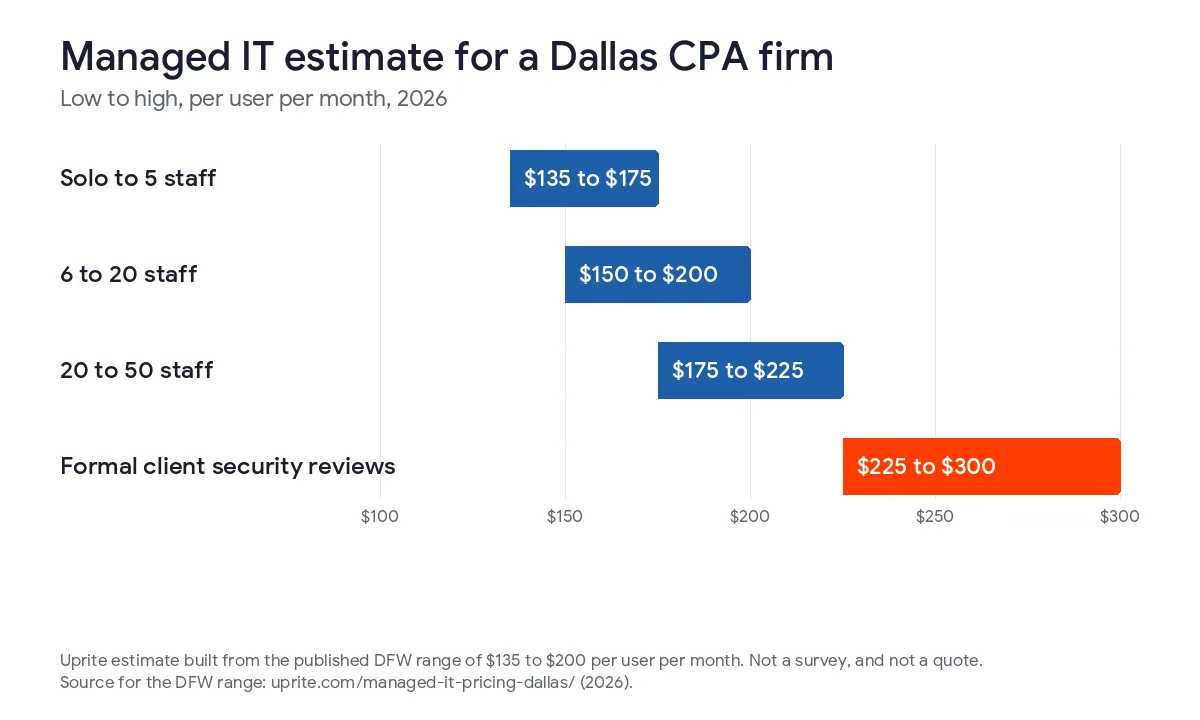
| Firm profile | Our 2026 estimate per user per month | What usually moves the number |
|---|---|---|
| Solo to 5 staff, cloud-based tax stack | $135 to $175 | Help desk, Microsoft 365, endpoint protection, backup, MFA on every login |
| 6 to 20 staff, one office | $150 to $200 | All of the above, plus tax software vendor coordination, security plan upkeep and seasonal seat handling |
| 20 to 50 staff, partner-led, two offices | $175 to $225 | All of the above, plus extended hours in season, a vCIO and evidence for client and insurer questionnaires |
| Any size with formal client security reviews | $225 to $300 | All of the above, plus control mapping, questionnaire responses and audit support |
These bands are estimates drawn from our published DFW range, not a survey. Your quote will shift with device count, the software you run, and how much onsite time you want. Treat them as a starting point.
Why the CPA Number Lands Above the General Dallas Number
Three things push it up.
The calendar comes first. A law firm’s deadlines are scattered across the year, but a tax practice stacks nearly all of them between January and April 15, so the support contract has to flex when the work does, and a provider that staffs evenly across 12 months will feel thin in March.
Then there’s the IRS. IRS Publication 4557 says tax return preparers count as financial institutions under the FTC Safeguards Rule and must keep a written security plan, and it requires multi-factor authentication for anyone who touches client information, which the IRS says applies to all companies regardless of size, with training and regular refreshers on top of that. Somebody has to run all of it. That labor sits inside your rate whether the proposal itemizes it or not.
Software is the third. Drake, UltraTax CS, CCH Axcess, Lacerte and QuickBooks each have their own hosting terms, update cycles and vendor support lines. Each has quirks. A general-purpose provider can patch a laptop in its sleep, but coordinating a tax program update during the last week of March, while 8 preparers wait on a hosted desktop and a partner asks why the screen froze, is a different skill entirely.
For the other side of this comparison, see our Dallas law firm IT cost guide. Same metro, different stack, different invoice. For the San Antonio version, see our accounting firm IT costs in San Antonio.
The Typical Dallas CPA Office Is Smaller Than You’d Guess
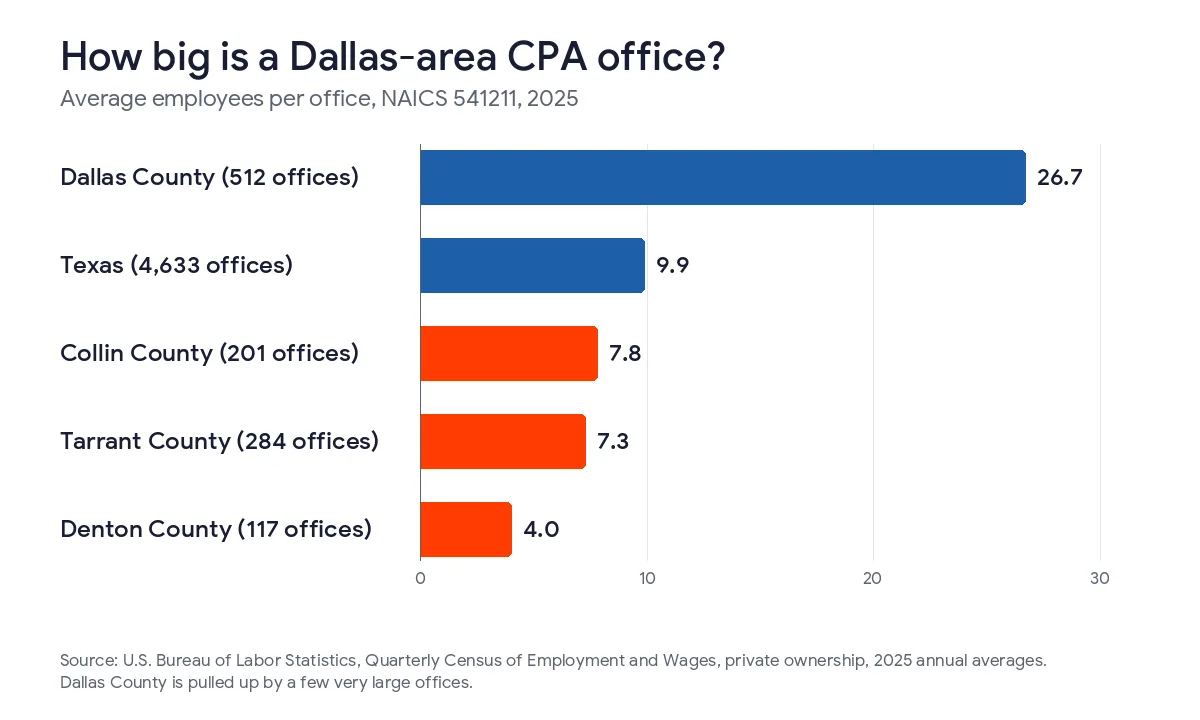
We pulled the Bureau of Labor Statistics Quarterly Census of Employment and Wages for the four core Metroplex counties, private ownership, 2025 annual averages, NAICS 541211 offices of certified public accountants.
| County | CPA offices | Employees | Average staff per office | Average annual pay |
|---|---|---|---|---|
| Dallas | 512 | 13,677 | 26.7 | $142,356 |
| Tarrant | 284 | 2,074 | 7.3 | $103,582 |
| Collin | 201 | 1,561 | 7.8 | $99,397 |
| Denton | 117 | 466 | 4.0 | $91,853 |
| Four-county total | 1,114 | 17,778 | 16.0 | $132,737 weighted |
Dallas County’s 26.7 is pulled up by a handful of very large offices. Look at the other three. They average 4 to 8 people. Statewide, the same data shows 4,633 Texas CPA offices averaging 9.9 staff, and the tax preparation shops (NAICS 541213) are smaller still, with Dallas County holding 390 of them at 5.3 people each and Tarrant County holding 261 at 2.3. Small shops, mostly.
So the typical Dallas-area practice is a partner, a few preparers and an office manager. Yet the Safeguards duty attaches to client data, not to headcount. A 6-person firm carries the same written-plan and MFA obligations as a 60-person one. Size doesn’t change the duty.
That gap is what you’re paying to close. The BLS Occupational Employment and Wage Statistics for May 2025 put the mean information security analyst in Dallas-Fort Worth at $133,790 a year. A 6-person firm can’t hire that person, but it can rent a slice of one inside a managed contract, and that slice is most of what the premium buys when you compare it against a plain help desk.
The Second Invoice Is the Tax Software
Your managed IT rate doesn’t include the software that makes you a tax practice. Those are separate per-user invoices, and the hosting line is the one that surprises people. It adds up fast.
| Line item | 2026 cost | What to watch |
|---|---|---|
| Microsoft 365 Business Premium | $22 per user per month, annual commitment | Held flat in the July 2026 price changes. Most of the security controls insurers ask about live in this plan |
| Drake Tax hosted through Rightworks | $114 per user for 1 to 9 users, $99 for 10 to 19, $89 for 20 or more, per month | Includes 40 GB per user. The Drake license is bought separately every year |
| UltraTax CS, CCH Axcess or Lacerte hosting | Quote only | Priced on storage, server size and peak concurrent users, so ask for the February figure, not the August one |
| Seasonal preparer seats | Same per-user rates for the months used | Ask whether you’re billed for 4 months or 12 |
| Cyber liability insurance | Quote from your broker | Applications ask about MFA, endpoint protection and tested backups, and your answers have to match your systems |
The Microsoft figure comes from Microsoft’s Business Premium page, and the Drake rates come from Drake’s hosting page. Rates change. Check both before you budget.
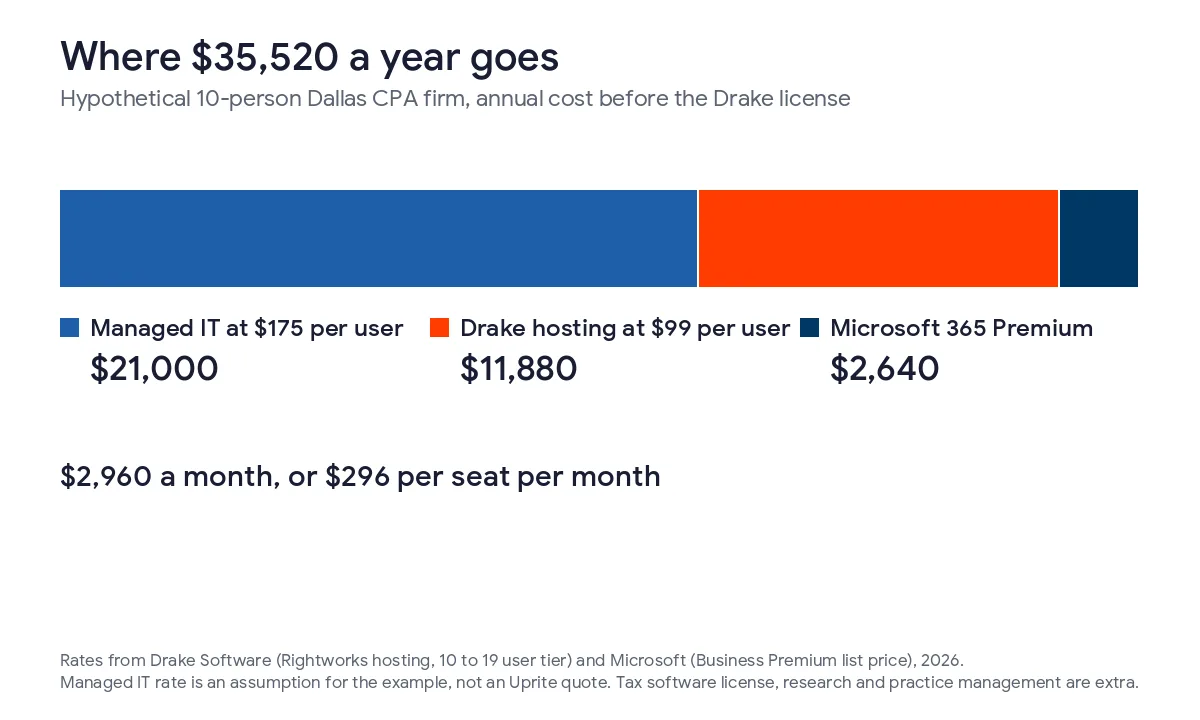
Now a worked example. Take a hypothetical 10-person Dallas firm, 8 of them accountants, paying $175 per user for managed IT and hosting Drake at the 10-to-19 tier.
| Line | Monthly | Annual |
|---|---|---|
| Managed IT, 10 users at $175 | $1,750 | $21,000 |
| Microsoft 365 Business Premium, 10 users at $22 | $220 | $2,640 |
| Drake hosting, 10 users at $99 | $990 | $11,880 |
| Total before the Drake license | $2,960 | $35,520 |
That’s $296 per seat per month. The Drake license, tax research subscriptions and practice management software come on top, and they vary too much by firm for me to guess at. Budget accordingly.
One sanity check helps. The Inside Public Accounting data series shows accounting firm technology spending rising from 3.89% of revenue in 2015 to 5.25% in 2024. On a $2M practice, 5.25% is $105,000. A firm sitting far below its own version of that line usually has a replacement cycle it hasn’t funded yet. Worth a look.
Seasonal Seats, the Line Item Law Firms Never Have
Say you add 3 preparers from January through April. Every one of them needs a login, a laptop or a hosted desktop, MFA, and a tax software seat. Day one, not week two.
If seats are billed only for the months used, that’s 3 seats times 4 months times $296, or $3,552, but if the contract bills a full year for each one, it’s 3 times 12 times $296, or $10,656. The gap is $7,104. Nobody mentions it until the first bill.
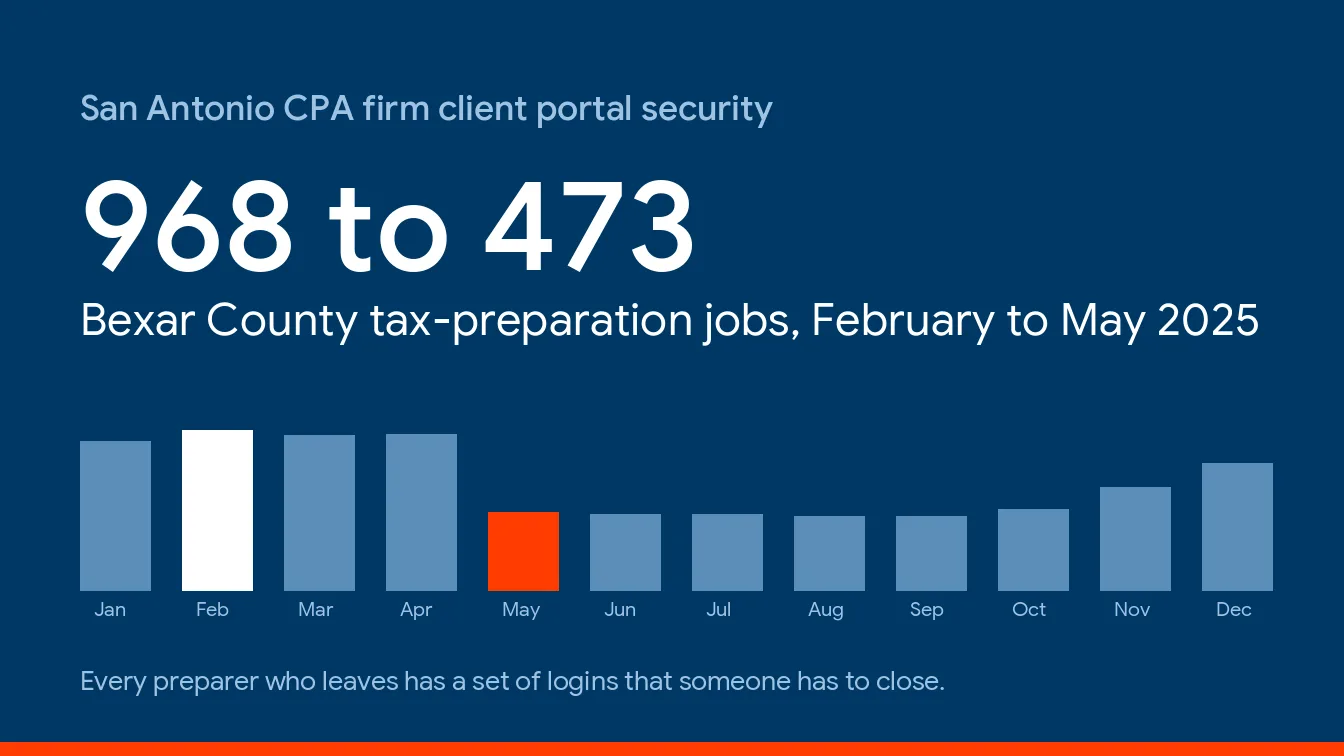
I’d pay for the 4 months. I’d also want the offboarding date in the agreement. The expensive mistake isn’t the seat, it’s the preparer account still active in June, with access to every client folder it ever opened, which is the kind of loose end that turns a small mistake into an incident report. Pub 4557’s own advice is to limit access to people who have a business reason to see client files, and a preparer who left on April 20 doesn’t.
Ask every provider, us included, to show seasonal seats as a separate line. Our own plans hold the rate flat for the first year and give you 120 days to leave if you’re unhappy, and you can see the full tiers on our pricing page. Whatever the seasonal terms are, get them written down before you sign.
What the IRS Security Plan Adds to the Bill
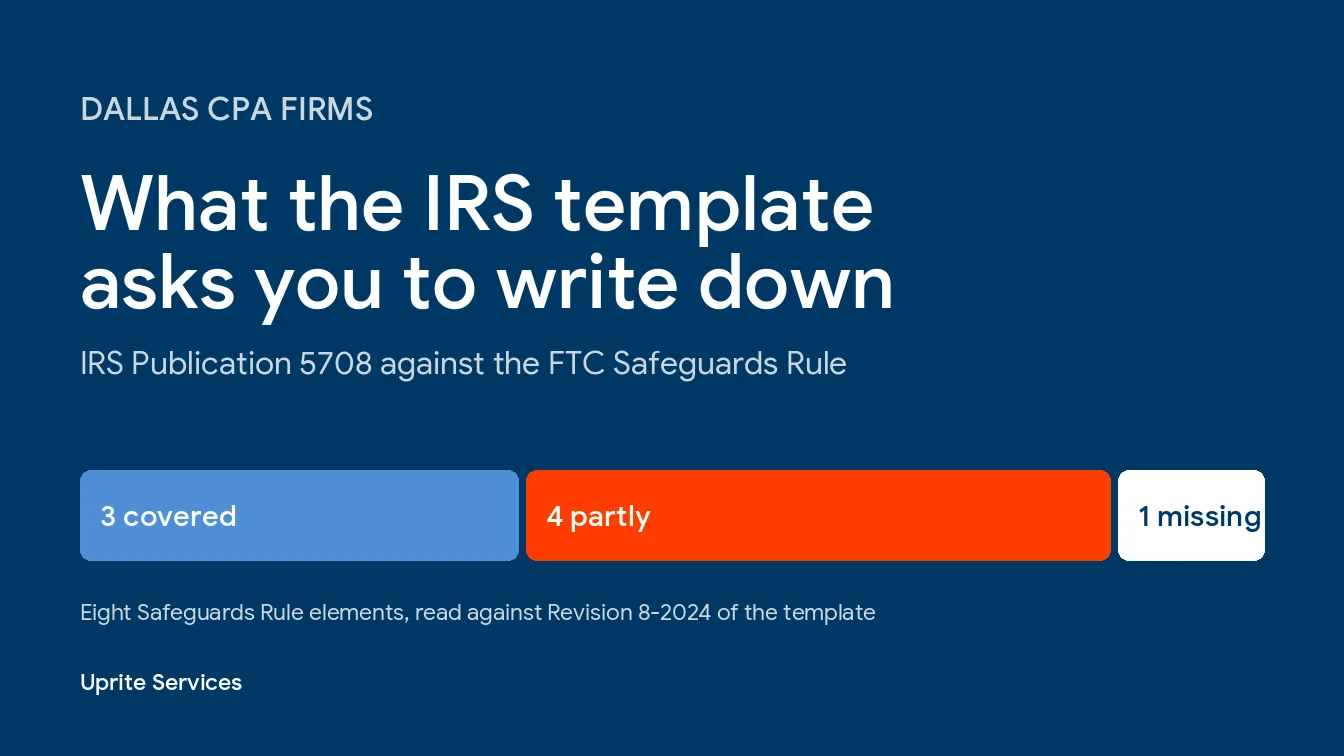
Publication 4557 lists what the plan has to cover. A qualified individual to run the program. MFA for anyone accessing client information. A risk assessment. Regular monitoring and testing. Oversight of any service provider that touches client data. Training with scheduled refreshers.
Small firms get partial relief. Under 16 CFR 314.6, a firm holding information on fewer than 5,000 consumers is exempt from 4 specific requirements. Those are the written risk assessment, the penetration testing and vulnerability scans, the written incident response plan, and the annual report to the board.
The written plan itself and MFA still apply. So does everything else on the list. IRS Publication 5708 has a sample plan, and our guide to a WISP for Dallas CPA firms walks through it.
MFA enforcement, endpoint protection, backup testing, training and monitoring sit inside the managed rate, while outside assessor and auditor fees, software licensing, hardware and projects are billed separately, and that’s true of how we price it too, so if a proposal doesn’t say which side of the line something falls on, ask.
What an Hour of Downtime Costs in Tax Season
The BLS puts the mean annual wage for an accountant or auditor in the Dallas-Fort Worth metro at $92,520, across 37,450 jobs. Apply the 1.43 employer cost load from the BLS Employer Costs for Employee Compensation release and divide by 2,080 hours. One accountant costs the firm about $63.61 an hour to employ.
In that 10-person office, 8 people are accountants. When the hosted tax desktop is down, that’s $509 an hour in payroll doing nothing. An 8-hour outage costs $4,071.
Compare that to the $21,000 annual managed IT line. One lost day is nearly a fifth of the year’s bill, and the math ignores missed filing windows, client calls and the overtime you pay to catch up, and it ignores the week in late March when a lost day can’t be recovered at any price. Nobody budgets for that.
How to Compare Three Quotes Without Getting Burned
Quotes for the same 10-person firm can differ by $50 a user. Cheap rarely stays cheap. Run these checks before you pick.
- Is the written security plan a deliverable, or is it a template you fill in yourself?
- Does the rate cover tax software vendor coordination, or only Microsoft 365?
- What happens to response times between February 1 and April 15?
- Ask what a seasonal seat costs, and for how many months.
- How are Drake, UltraTax or CCH hosting quoted, and at which user count?
- Who owns the backup, and when was a restore last tested?
Read the exit terms too. Our best IT support for CPA firms in Dallas comparison scores providers on exactly these points, and our tax season IT readiness guide covers the January checklist.
When You Probably Don’t Need a Managed Plan
We’re a managed IT provider, so you’d expect us to say every firm needs one. It’s not true. A 3-person practice that’s fully cloud-based, hosts its tax software with a vendor who patches everything, and turns on MFA everywhere may do fine with a lighter plan or a part-time consultant. Our lightest managed IT tier starts at $91 per user for that reason.
If you already have a full-time IT director who owns the security plan, you may only want a co-managed arrangement. We’d rather tell you that now than after you’ve signed.
For the state-level view of what the FTC rule costs a Texas firm, our GLBA compliance cost guide has the numbers, and our IT services for CPA and accounting firms page shows what we support. You can also contact us directly.
Want a number for your own firm? Send us your user count, the tax software you run, and how many seasonal preparers you add each year. We’ll price it line by line, hosting and seasonal seats included, and show every assumption so you can check it against any other quote.
Price My CPA Firm's ITQuestions Dallas Partners Ask About the Bill
How much should a 10-person CPA firm in Dallas budget for IT each year?
About $31,000 to $43,000 a year once managed IT, Microsoft 365 and hosted tax software are counted. That assumes $150 to $225 per user for managed IT. The Drake license, research subscriptions and hardware are extra.
Is hosting our tax software worth the cost?
Sometimes. Drake’s published hosting rates work out to $1,068 to $1,368 per seat per year, so the real question is what the alternative costs you. If preparers work remotely or you add seasonal staff, hosting often earns its keep. If everyone sits in one office, it may not.
Do seasonal preparers need their own managed IT seat?
Yes, if they touch client data. The IRS says MFA applies to anyone accessing client information, and a temp on a personal laptop with no controls breaks that. Budget a seat per person. Then ask how it’s billed.
Does the FTC Safeguards Rule apply to a firm our size?
Yes. The IRS treats tax preparers as financial institutions under the rule regardless of size. A firm with fewer than 5,000 client records skips 4 requirements, including the written risk assessment, but the written plan and MFA stay. Confirm your record count before relying on the exemption.
Why do two quotes for the same firm differ by $50 a user?
Scope differs, not just price. One includes tax software coordination, after-hours coverage in season and a written security plan, and the other doesn’t. Compare line by line. A lower rate with a long list of billable extras ends up costing more by April.
Can we pay per device instead of per user?
Some providers price per device, but a preparer usually has a laptop, a desktop and a phone, so per-device pricing gets hard to predict. Per user is simpler to budget. If a provider quotes by device, ask what the total is at your real device count.
What does Uprite charge a Dallas CPA firm?
Our published managed IT plans run $91 to $138 per user per month before licensing, with a first-year rate guarantee and a 120-day exit. Where your firm falls depends on size, tax software and the hours of coverage you need, so we quote it in writing.