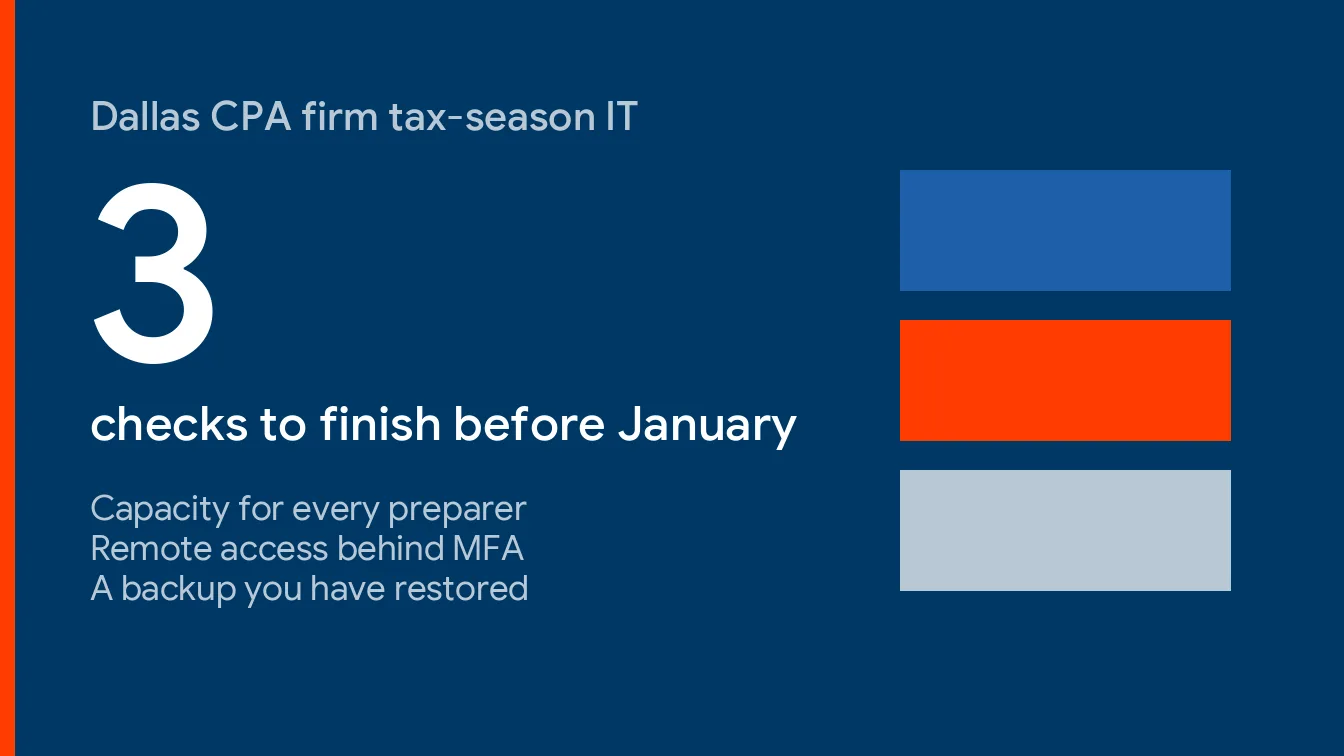
Short version. Most tax-season IT failures in a Dallas CPA firm are predictable and cheap to catch in December. Test three things before the IRS opens the season. Can every preparer, seasonal ones included, log in at once? Can they do it safely from outside the office? Can you restore a client’s return folder in under an hour? If any answer is “not sure,” you have your January project.
A tax season IT checklist for CPA firms comes down to three proven checks by early January, capacity for every preparer, remote access behind MFA, and a backup you’ve actually restored. Everything else is detail.
This guide sits under our overview of IT services for accounting firms in Dallas. It’s the practical one, with dates, tests and what a pass looks like, written for a managing partner who has about 10 minutes to spare and a January that’s already full of other deadlines.
Nobody schedules an outage for March 14. Outages pick the week you can least afford them. So the job isn’t preventing every failure, because you can’t, it’s making sure the failures you can see coming have already happened, in December, on a day when nothing is due and nobody’s waiting on the result.
The 2027 Calendar Your IT Has to Survive
Tax-season IT readiness is the work of proving, before filing season opens, that your staff can log in, reach client data safely and recover it quickly if something breaks. It’s a rehearsal, not a purchase. The calendar tells you when the rehearsal has to be finished.
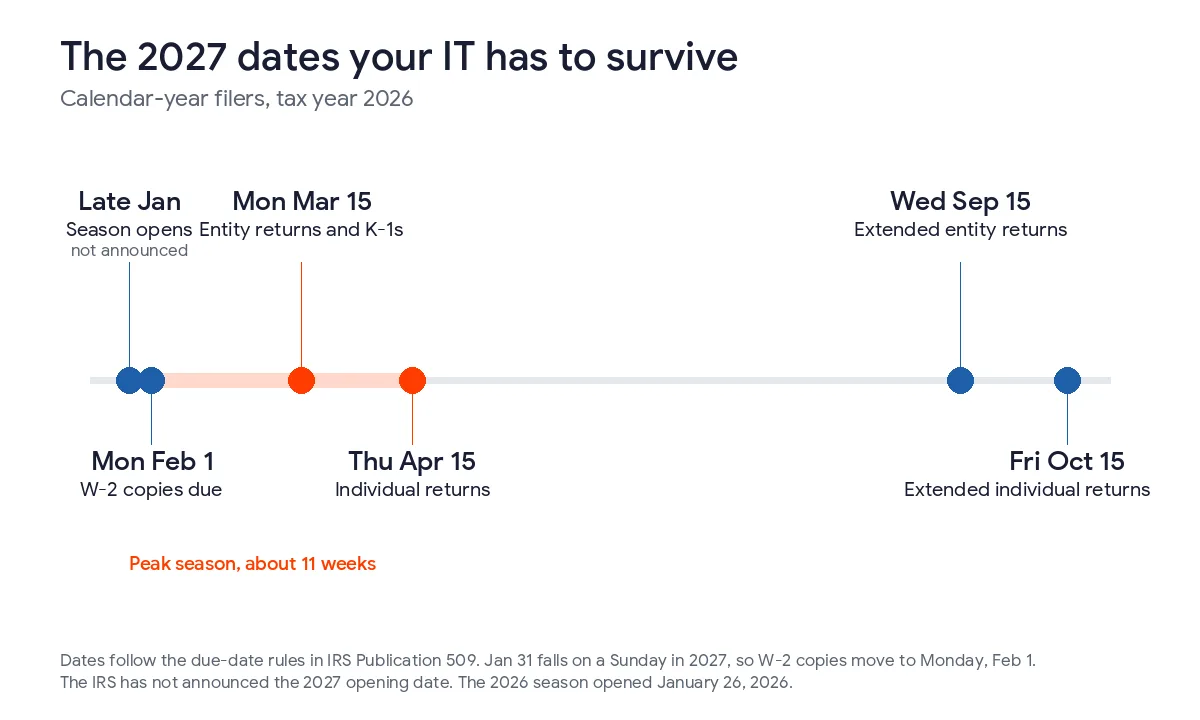
The IRS opened the 2026 season on Monday, January 26, 2026 and expected about 164 million individual returns. It hasn’t announced a 2027 date yet, so I’d plan on the last week of January and treat any earlier announcement as a bonus. Here’s how the rest of 2027 lines up, using the due-date rules in IRS Publication 509.
| Date in 2027 | What’s due | What it does to your IT |
|---|---|---|
| Late January (not announced) | IRS begins accepting 2026 returns | Every preparer logs in at once for the first time in months. Expired passwords and stale MFA devices surface here. |
| Monday, February 1 | W-2 copies to employees (January 31 falls on a Sunday) | Payroll clients send files in a burst. Mailboxes and file shares take the hit. |
| Monday, March 15 | Partnership and S corporation returns, plus K-1 copies | Entity work stacks into the weekend before. The last working day is Friday, March 12. |
| Thursday, April 15 | Individual returns and extension requests | Peak concurrent use. Any slow hosted desktop gets noticed by everyone. |
| Wednesday, September 15 | Extended partnership and S corporation returns | Seasonal staff are gone. Their accounts shouldn’t be. |
| Friday, October 15 | Extended individual returns | A second, smaller crunch with a thinner team. |
I worked the weekdays out from the Publication 509 rules, so check them against the IRS calendar once it’s published for 2027. The pattern matters more than the exact day. March 15 lands on a Monday, which turns the preceding weekend into the real deadline for every entity client you have. Mark it now.
One more date you can’t put on a calendar. When winter storms hit Texas in February 2021, the IRS moved deadlines in all 254 counties to June 15, but only after the storm had passed. Relief followed the outage. It didn’t prevent it. Plan as if the deadline never moves. It won’t.
Capacity Checks Before the January Rush
Capacity is the dullest part of readiness and the one that fails most visibly. A slow screen at 4 p.m. on a Tuesday in March costs you real money, and the cause is almost always something you could have measured in December, on a quiet day, with nobody waiting. Everyone notices.
Start with a headcount that includes everyone. If you have 8 accountants and add 3 seasonal preparers, you’re planning for 11 simultaneous users, not 8. Each of the 3 needs a login, a laptop or hosted desktop, an MFA device, a Microsoft 365 license and a tax software seat on the first morning of their first day, not the second week. Day one.
- Build the seasonal accounts in early December, disabled, with licenses assigned and MFA enrollment scheduled for their first day.
- Ask your tax software host in writing how many concurrent sessions your plan allows and what happens at the limit.
- On a quiet Monday in early January, have every user open the tax program and a large return at the same time for 30 minutes.
- Pull the plug on your primary internet circuit and confirm the backup connection takes over without anyone re-entering a password.
- Check printers, scanners and the e-signature tool, because they fail quietly and get noticed loudly.
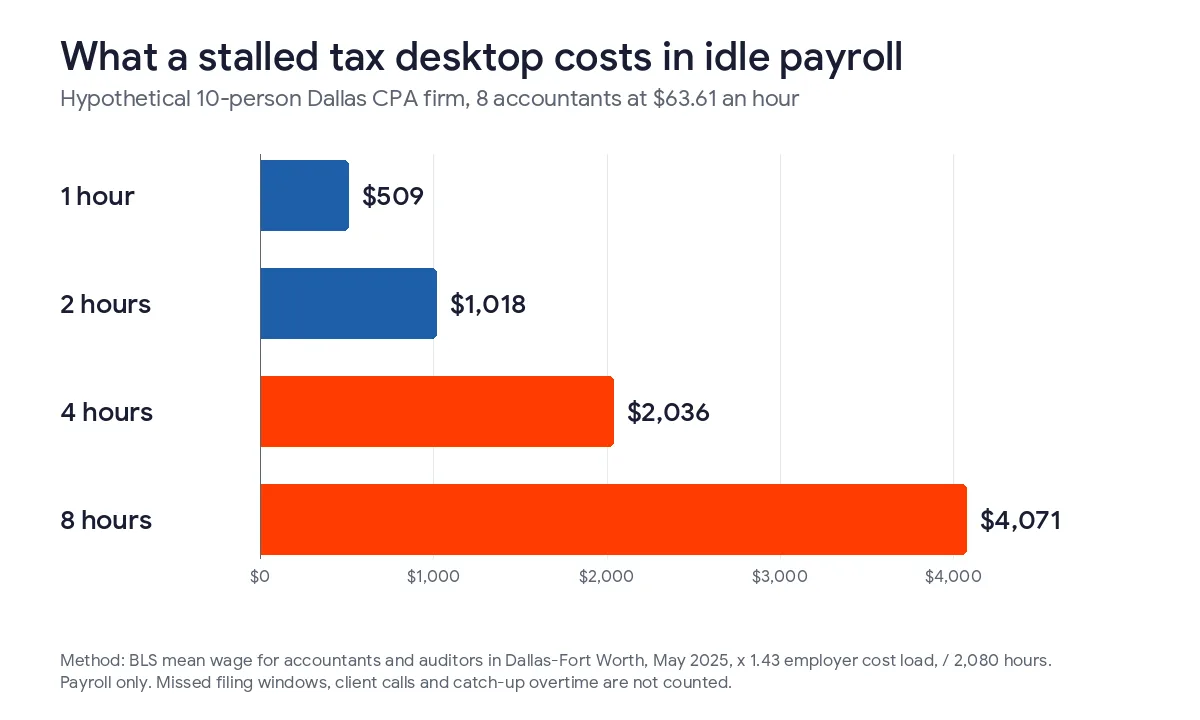
The cost side is easy to estimate. Using Bureau of Labor Statistics wage data, our accounting firm IT costs in Dallas guide put one accountant at about $63.61 an hour to employ. For a 10-person office with 8 accountants, a stalled hosted desktop burns roughly $509 an hour in payroll that produces nothing, and a 2-hour stall during the week of March 15 costs about $1,018 before you count a single missed client call. Now compare that with the price of a 30-minute test. It isn’t close.
Dallas adds one wrinkle. Spring storms and summer heat don’t wait for tax season, and our own Dallas severe weather IT continuity guide covers keeping a firm running through storms and outages. If your firm can’t work from home on a bad-weather day, you don’t have remote access yet. You have a hope.
Remote Access Checks for Preparers Outside the Office
Remote work in a tax practice isn’t a perk anymore, because seasonal preparers, partners at a client site and anyone working a Saturday all connect from somewhere you don’t control. The question is whether that somewhere has the same protection as your office.
The IRS lists six baseline protections on its Security Six checklist for tax professionals, and they are antivirus, a firewall, two-factor authentication, backups, drive encryption and a VPN, none of which is exotic. Three of the six, MFA, drive encryption and a VPN, speak directly to remote work and lost devices.
Here’s where I’ll disagree with the standard advice. A VPN isn’t a cure-all, because if your client files live only inside a hosted tax desktop, forcing a VPN on top of it adds friction without adding much protection, and preparers will find ways around friction. Friction loses. Pick one secured path and secure it well. A hosted desktop behind MFA is a fine answer. A VPN to an office server with MFA is a fine answer. A remote desktop port open to the internet is not.
That last one comes straight from CISA, which tells organizations in its #StopRansomware Guide not to expose services such as remote desktop protocol on the web. Ask your IT provider to confirm, in writing, that no preparer machine or office server is reachable that way.
| Remote access check | How to test it | What a pass looks like |
|---|---|---|
| MFA on every login | Sign in to email, the tax software, the hosted desktop and the file share from a new device | Every one asks for a second factor. No exceptions for partners. |
| No exposed remote desktop | Ask your provider for an external scan of your public IP addresses | Zero open remote desktop ports |
| Encrypted laptops | Check drive encryption status on every machine, seasonal ones too | 100% encrypted, verified by a report rather than a promise |
| Phishing resistance | Send a harmless test email posing as a new client with an attachment | Staff report it instead of opening it |
| Offboarding | List every account that should be disabled after April 17 | A named owner and a date for each one |
The phishing row isn’t filler. In August 2026 the IRS and its Security Summit partners warned tax pros about phishing, spear phishing, clone phishing and a “new client” scam that carries infected links or attachments, in release IR-2026-85. A tax firm is supposed to open attachments from strangers. That’s the business, which is exactly why a drill in January beats a lecture in March.
Then there’s the law. The FTC treats tax preparers as financial institutions under its Safeguards Rule, which calls for multi-factor authentication for anyone accessing customer information and encryption of that information in transit and at rest. A seasonal preparer on a personal laptop with no controls fails both. Our guide to GLBA compliance costs in Texas shows what closing that gap runs. The written plan behind those controls is covered in our WISP guide for Dallas CPA firms.
Backup Checks That Prove You Can Restore
Almost every firm has a backup. Far fewer have a restore. Different things. Test yours. The gap between them is where a bad week turns into a bad quarter.
CISA’s guide says to maintain offline, encrypted backups of critical data and to test their availability and integrity regularly. The reason is blunt. Many ransomware variants hunt for backups and delete or encrypt them first. A copy that sits on the same network as the thing that just got encrypted isn’t really a copy at all, it’s a second victim waiting for the same attacker to come back around. Don’t build that.
Then there’s Microsoft 365, which people assume is backed up, but Section 6.b of the Microsoft Services Agreement, effective September 30, 2026, says Microsoft recommends that you regularly back up your content and data. If client PDFs live in OneDrive and years of engagement email live in Exchange, they need their own backup, tested the same way you’d test any other copy of data you can’t afford to lose. Our piece on data backup services covers how that works in practice.
| Backup test | When to run it | What a pass looks like |
|---|---|---|
| Restore one client’s full return folder to a clean machine | First week of January | Complete in under 1 hour, opens without errors |
| Restore the tax software database from the vendor’s backup | Before the season opens and again the week of March 8 | Program launches and last night’s work is present |
| Recover a deleted mailbox item and a deleted shared folder | Early February | Back in the original location, permissions intact |
| Confirm one copy is offline or immutable | Once, then after any backup change | Written confirmation of where it lives and who can delete it |
Time the first test with a stopwatch. Really. That number is your real recovery time, and it’s the one to compare with what an outage costs. At $509 an hour for the 10-person example above, an 8-hour recovery costs about $4,071 in idle payroll. Do the math. If the stopwatch says 8 hours and you can’t afford 8 hours in March, you’ve learned that for free, and in December, which is the entire point of testing early. Write it down.
For the questions to put to a provider about how backups are run, see questions to ask an MSP about backup.
A Readiness Schedule You Can Hand to Your IT Provider
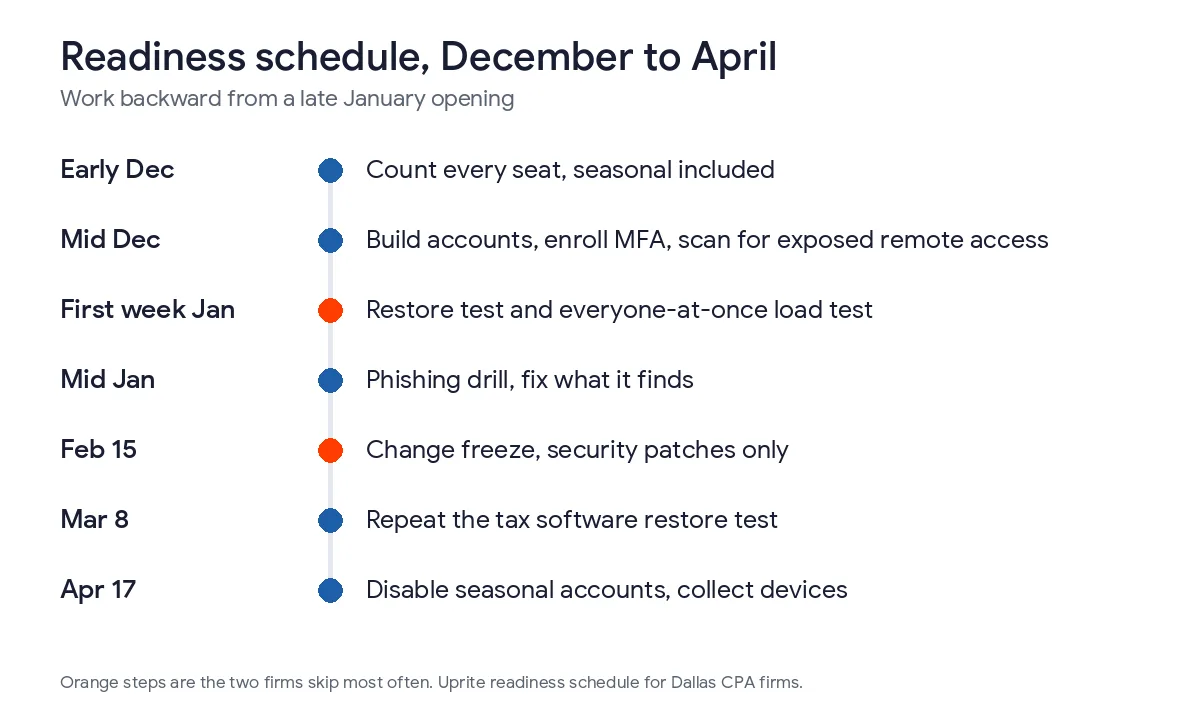
Dates beat intentions. Here’s the order I’d run it in, working backward from a late January opening.
- Early December. Count every seat you’ll need, seasonal included, and request licenses and hosted desktop capacity in writing.
- Mid December. Build seasonal accounts disabled, enroll MFA, and run the external scan for exposed remote access.
- First week of January. Run the full restore test and the 30-minute everyone-at-once load test.
- Mid January. Send the phishing drill and fix whatever it finds.
- February 15. Freeze everything but security patches. No hardware swaps, no new software, no migrations until after April 15.
- March 8. Repeat the tax software restore test, because the data is bigger now than it was in January.
- April 17. Disable seasonal accounts and collect devices. Don’t wait for June.
The freeze is the item firms skip and regret. An update that goes sideways in the last week of March can’t be rolled back on your schedule. If something truly needs changing, schedule it for a weekend after the deadline and write down who approved the exception, so next season’s plan starts from facts instead of memory.
Status Pages Worth Bookmarking Before January
When a screen freezes, the first question is whose fault it is, and if you can answer it in 30 seconds you save the 45 minutes of everyone rebooting for no reason. Bookmark four places and give the list to your office manager.
First, your tax software vendor’s status page and support line. Second, the Microsoft 365 service health page in your admin center. Third, your internet provider’s outage page. Fourth, the IRS e-file notices for tax professionals, which is where planned system maintenance gets announced. Ask your provider to watch all four. You shouldn’t be the one refreshing them.
When You Can Handle This Yourself
We sell managed IT, so you’d expect us to say you can’t. That wouldn’t be honest. Plenty of small firms can. A 3-person firm that’s fully cloud-based, uses a hosted tax product that patches itself and has MFA on everything can run most of this checklist alone in a weekend. The restore test is the one I’d never skip. Ever. It’s the only item where “I think it’s fine” has no value. Be honest with yourself.
If you’ve got more preparers than you can supervise, remote staff, or seasonal hires every year, it’s worth having someone else own the schedule. Our Dallas managed IT pricing guide shows what that costs, and 24/7 IT support in Dallas explains what coverage around the clock means when a Saturday in March goes wrong. Our average response time is 5 minutes, and our plans include a 120-day exit if it isn’t working for you.
Want your firm walked through this checklist before January? Send us your user count, the tax software you run and how many seasonal preparers you add. We’ll map the dates, run the restore test with you and tell you plainly what’s missing.
Book a Tax-Season Readiness ReviewQuestions Dallas Partners Ask Before Filing Season
When should a Dallas CPA firm start tax-season IT prep?
Start in early December. The IRS opened the 2026 season on January 26 and hasn’t announced a 2027 date, so plan for late January. That leaves about 7 weeks to build seats, test restores and close remote access gaps before the first return is filed. Don’t wait.
What’s the single most important test before the season?
A full restore of one client’s return folder to a clean machine, timed with a stopwatch. A backup you haven’t restored is only a belief. The stopwatch number tells you what an outage will really cost. Do it first.
Do seasonal preparers need their own accounts and MFA?
Yes. The FTC’s Safeguards Rule calls for multi-factor authentication for anyone accessing customer information, and a shared login can’t show who opened what. Give each seasonal preparer a named account, a seat and an MFA device, and disable all of it when they leave. No sharing.
Do we need a VPN for remote preparers?
Not always. The IRS lists a VPN among its Security Six, but a hosted tax desktop behind MFA can do the same job. What you can’t do is leave a remote desktop port open to the internet. Pick one secured path and test it. Then leave it alone.
Doesn’t Microsoft 365 already back up our email and files?
Not in the way most people mean. Microsoft’s Services Agreement recommends that you regularly back up your content and data. Treat Exchange mail, OneDrive and SharePoint as needing their own backup, and test a restore from it. Same drill.
What should we do if the tax software or IRS e-file goes down in March?
Check the vendor’s status page and the IRS notices for tax professionals first, then tell staff what you found. Keep working on return preparation where you can, and avoid resubmitting repeatedly. Write down the times and the error messages, because you’ll want them later. Stay calm.
What happens if a preparer’s laptop is lost during the season?
An encrypted laptop turns a likely breach into a managed incident. Contact your IRS Stakeholder Liaison and your state tax agency, as the IRS advises. Under the FTC rule, unencrypted data on 500 or more people needs a report within 30 days, so confirm encryption first. That’s cheap insurance.