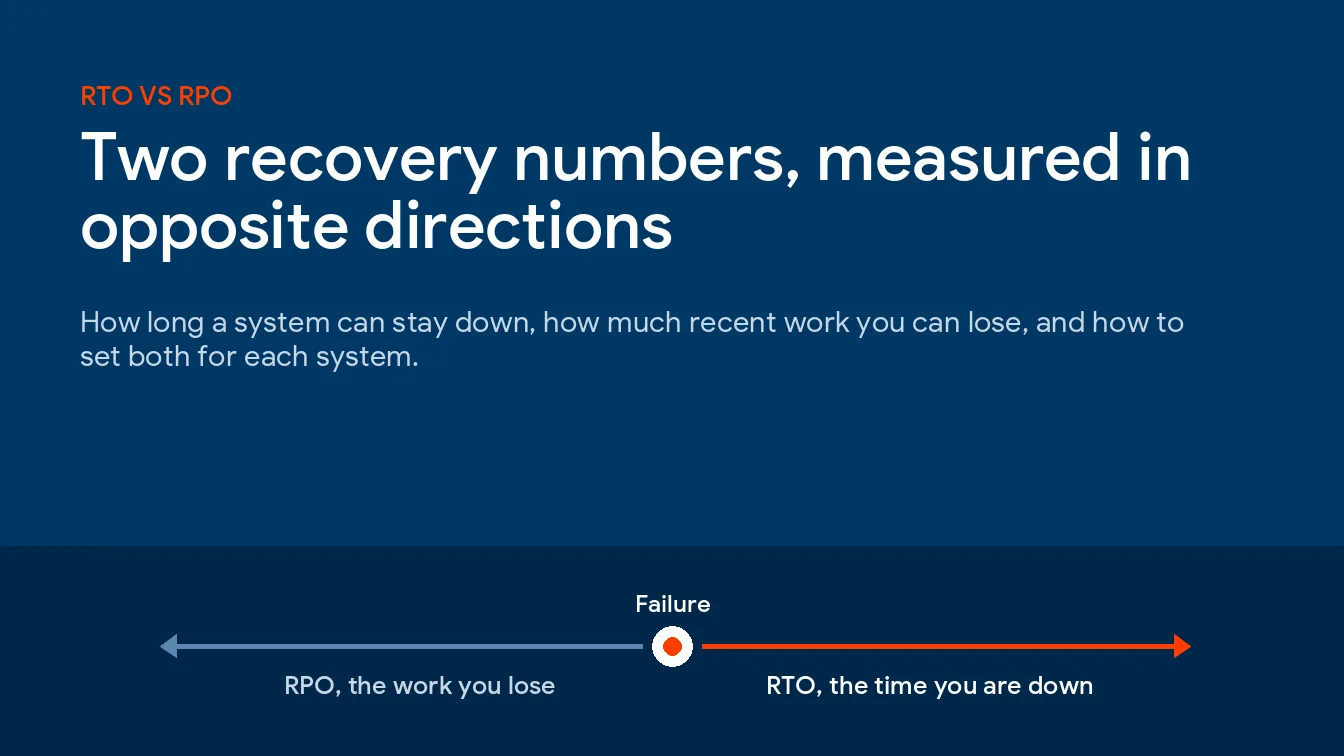
RTO is a clock that runs forward from the outage. RPO is a ruler laid backward from it. Set both per system by asking how long each process can wait and how much recent work it could re-create. Then check which copy you’d really restore from in each kind of failure. That copy sets your true RPO.
RTO is how long a system can stay down before the damage becomes unacceptable, and RPO is how much recent work you can afford to lose, measured back from the moment it failed. That’s RTO vs RPO in a sentence. One is a deadline. The other is a data-loss limit.
I run operations at Uprite, and these 2 numbers sit under every piece of our disaster recovery in Texas. They get said in one breath. So people treat them as one setting. They aren’t. A plan can hit one and miss the other by days.
This page skips what a recovery plan is, because our guide to what disaster recovery covers already does that job and the plan-level questions live in our managed IT services FAQ. What follows is narrower and more useful on a bad Tuesday, covering the 2 numbers, how to set them system by system, and how backup frequency and replication decide whether you’ll actually hit them.
What’s the difference between RTO and RPO?
The recovery time objective is how long a system can sit in recovery before the business takes real harm, while the recovery point objective is the point in time your data has to come back to after an outage. Both definitions come from NIST SP 800-34, through its glossary entries for RTO and RPO.
So what is RTO and RPO once you set the jargon down? Direction. Put recovery time objective vs recovery point objective side by side. RTO points forward from the failure. RPO points back.
Say the accounting server dies at 10 a.m. With a 2-hour RTO and a 1-hour RPO, it’s working again by noon. It comes back missing every invoice entered after 9. Two separate promises.
NIST also defines maximum tolerable downtime, the time a business process can be disrupted before the harm turns significant. Think of MTD as the ceiling. Your RTO is the budget that has to fit under that ceiling, with enough room left over for someone to check the restored data and for staff to catch up on what they missed. MTD comes from the continuity side, and our guide to business continuity vs disaster recovery shows where the two plans split.
| Measure | RTO | RPO |
|---|---|---|
| The question it answers | How long can we be down? | How much work can we lose? |
| Which way it’s measured | Forward from the outage | Backward from the outage |
| What tightens it | Standby hardware, cloud boot, a rehearsed restore order | More frequent backups, replication, shorter backup windows |
| What you pay for | Compute that sits ready and idle | Storage, bandwidth, and more restore points to keep |
| How you test it | A timed restore, from failure to a working login | A spot-check of the newest restorable point |
| Who owns the number | The person who runs the process | The same person, with IT saying what’s achievable |
Why can a 5-minute RPO turn into 3 days?
You don’t have one RPO. You’ve got one per copy.
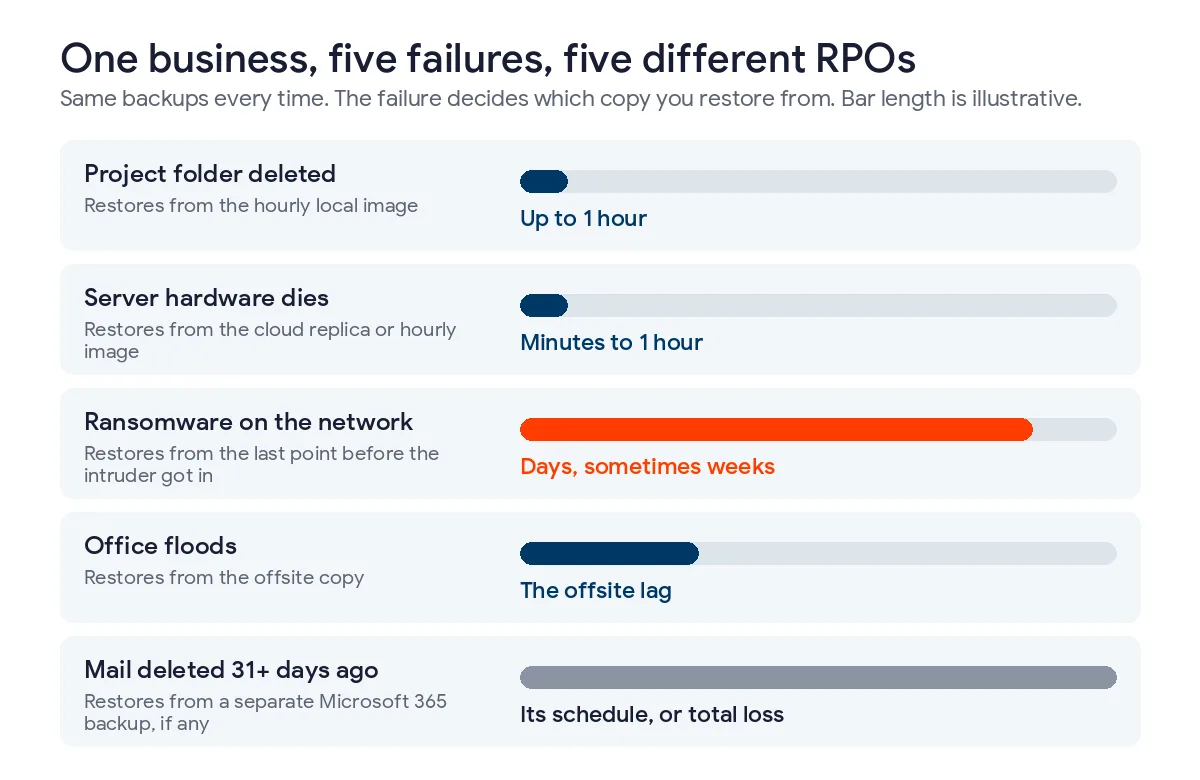
Take a common setup. A server replicates to the cloud every few minutes, a local appliance takes an image every hour, and a nightly job writes to storage that nobody can delete, not even an admin. That’s 3 copies. And 3 RPOs. The failure decides which one you get to use, and the number in the brochure only ever describes the best case.
| What went wrong | Copy you restore from | RPO you actually get | Why |
|---|---|---|---|
| Someone deleted a project folder | The hourly local image | Up to 1 hour | The newest copies are clean and close by |
| The server’s hardware died | The cloud replica or the hourly image | Minutes to 1 hour | Nothing is wrong with the data itself |
| Ransomware encrypted the network | The last restore point from before the intruder got in | Days, sometimes weeks | Replication copies the damage, and recent points may hold the attacker’s tools |
| The building flooded | The offsite copy | Whatever the offsite lag was | The local appliance went under with the office |
| Mail deleted 5 weeks ago, noticed today | A separate Microsoft 365 backup, if one exists | That backup’s schedule, or total loss | Exchange Online’s own deleted-item window has already closed |
Row 3 is the expensive one. AWS says it flatly in its disaster recovery whitepaper. Continuous replication may not protect against corruption or a malicious attack as well as point-in-time backups do, and after a data disaster the recovery point always sits somewhere before the problem was discovered.
Retention matters as much as frequency. Azure Site Recovery, for example, creates crash-consistent recovery points every 5 minutes and doesn’t let you change that, but its default policy keeps recovery points for 1 day, according to Microsoft’s Site Recovery architecture notes. Great on Monday. Gone by Wednesday.
Microsoft 365 hides the same trap. Exchange Online keeps soft-deleted mail for 14 days by default, and an admin can stretch that to 30 days at most, per the Recoverable Items documentation. Unless a hold or retention policy is in place, after that it’s gone. No RPO at all.
My rule is simple. Quote the RPO of the copy that survives the failure you fear most, not the fastest copy you own. How long that copy needs to be kept, measured against how long intruders go unnoticed, is its own question, and we work through it in questions to ask an MSP about backup.
What actually fills an RTO?
Restore speed is one slice. A small one, often. Here’s where the hours go after a server fails.
- Noticing. A monitoring alert fires, or a user calls. A failure at 2 a.m. on a Saturday can sit unseen until somebody logs in on Monday and wonders why nothing opens.
- Deciding. Somebody with authority has to say restore, fail over, or wait for the vendor. If nobody’s named, this step eats the morning.
- Getting a target. A spare host, the backup appliance, or a cloud instance. Ordering a replacement server can take longer than every other step combined.
- Moving the data. Size divided by the throughput you really get.
- Booting and checking. AWS says a recovered Windows server in its Elastic Disaster Recovery service normally boots within 20 minutes and a Linux server within 5, per its service documentation. Then come logins, license checks, and a test transaction.
- Catching up. Staff re-enter what was lost.
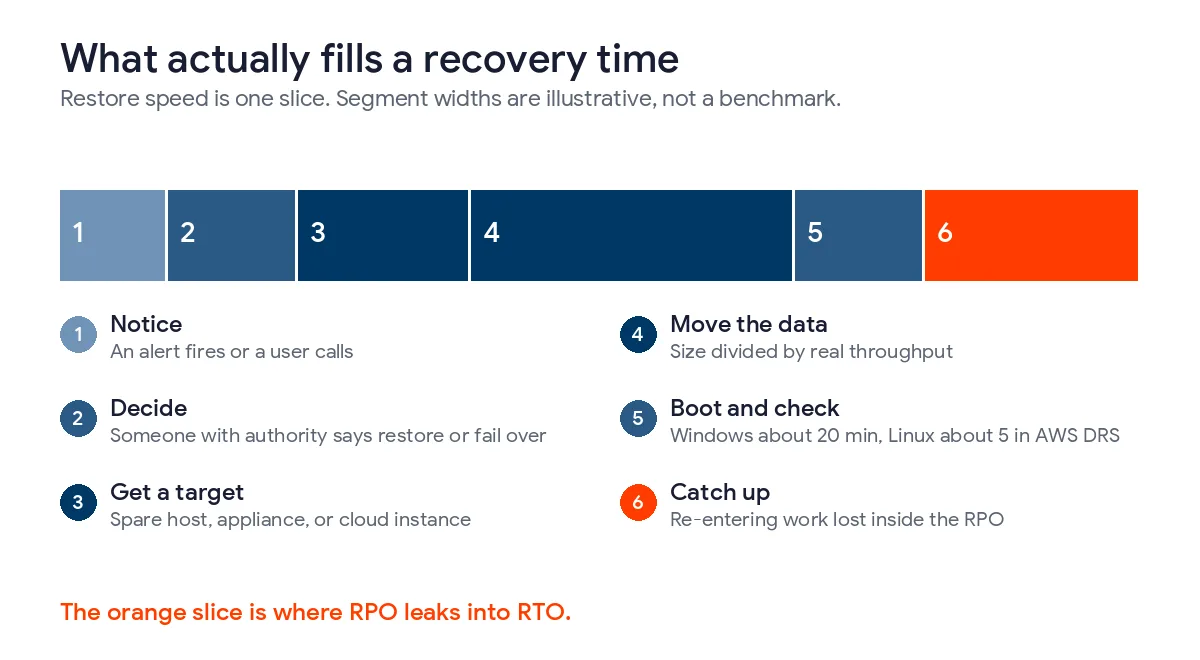
Step 4 is plain arithmetic, not a benchmark. Restoring 2 TB over a path that really sustains 100 MB per second takes 20,000 seconds, about 5.6 hours, and that’s before step 5 even begins. Halve the throughput. Now it’s 11 hours.
Step 6 is the one people leave off. It’s where RPO leaks into RTO. An order system restored in 2 hours with 6 hours of missing orders isn’t recovered when the login screen appears, it’s recovered when those orders are back in, so a loose RPO quietly stretches the business’s real recovery time even when the server came back fast.
And sometimes the smart move isn’t a faster restore at all. In our nonprofit data recovery case study, staff worked in a temporary environment while more than 3 TB of data came back alongside it. Systems were stable within days. The people didn’t wait for them.
How do you set RTO and RPO for each system?
Start from the work. Not the server list. A server inventory tells you what exists, but it won’t tell you what the business can live without for an afternoon, a day, or a week, and that’s the only question these numbers answer.
- List the business processes first, then the systems each one needs. Ready.gov’s business impact analysis guidance suggests a questionnaire to managers. Use it.
- Ask the RTO question in plain terms. How long could this team keep going on a workaround before customers, cash, or a regulator notice? Ready.gov’s impact list helps you price it, from lost sales and overtime to regulatory fines and contractual penalties.
- Ask the RPO question the same way. If the last few hours vanished, could we rebuild them, and from where?
- Run the re-creatability test. Data that also lives somewhere else, like a bank feed, a card processor, a supplier portal, or mail sitting in a customer’s inbox, can tolerate a longer RPO. Data born on your system can’t.
- Put each system in a tier. Write the 2 numbers down.
- Add a gap column showing what your current setup actually delivers. Then fund the gap or accept it in writing. Either is fine. Silence isn’t.
Healthcare practices already have a legal name for this. HIPAA’s contingency plan standard includes an applications and data criticality analysis at 45 CFR 164.308(a)(7)(ii)(E). Same worksheet. More paperwork.
RTO and RPO examples from an illustrative 40-person distributor
The company below is made up, but the numbers follow the opening bands Uprite publishes, and they show how one business ends up with very different targets for systems that sit side by side on the same network.
| System | What leadership said | RTO | RPO | Can lost data be re-created? |
|---|---|---|---|---|
| ERP and order entry | Trucks stop leaving after about half a day | Under 4 hours | 1 hour | Partly, from customer emails, slowly |
| Accounting | Payroll on Friday is the hard date | 1 business day | 4 hours | Mostly, since bank and card feeds re-import |
| Microsoft 365 email | Phones and texts can cover a day | 1 business day | 4 hours | Sent mail survives in recipients’ inboxes |
| File shares and drawings | Only active jobs matter this week | 1 business day | 4 hours | Rarely, since drawings are born here |
| Closed-year archive | Nobody needs it this month | Several days | 24 hours | Not needed quickly |
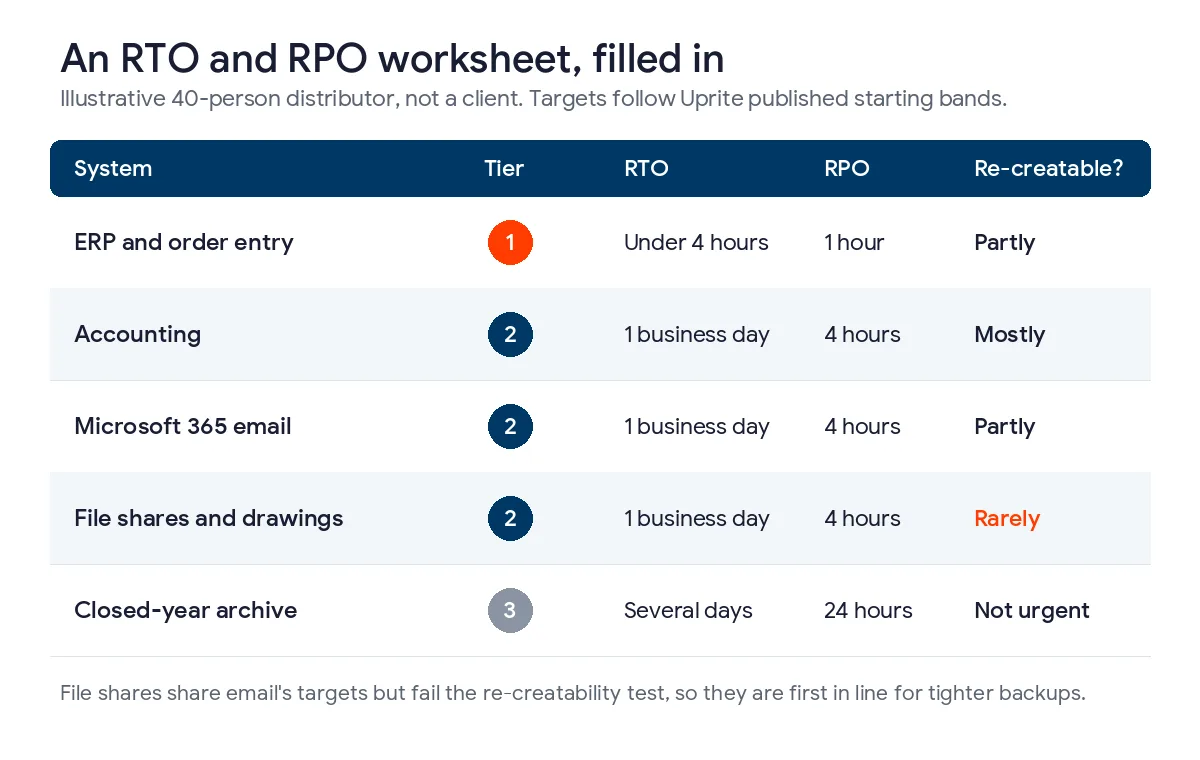
Look at the file shares. Same targets as email. But they fail the re-creatability test, so they’re the first candidate for tighter backups once the budget allows, and that’s exactly the kind of call a worksheet surfaces while a server list never will.
Which backup methods hit which RTO and RPO?
Three levers, really. Backup frequency sets the best RPO a copy can reach. Replication and standby set how short an RTO can get. Retention decides how far back you can still go when the newest copies turn out to be bad.
| Method | RPO it can reach | What decides the RTO | The catch |
|---|---|---|---|
| Nightly backup | Up to 24 hours | Restore size and having a target ready | A whole working day is always at risk |
| Image backups through the day | The gap between images | Whether the image can boot on the appliance or in the cloud | More images mean more points to store and check |
| Azure Site Recovery | 5-minute crash-consistent points, fixed by Microsoft | Failing over to a second Azure region | Default retention is 1 day |
| AWS Elastic Disaster Recovery | Seconds, per AWS | Boot time, typically 5 to 20 minutes per AWS | Bandwidth has to keep up with how fast the server writes |
| Microsoft 365 native retention | Not a backup | Manual recovery by an admin | 14 days of deleted mail by default, 30 at most |
AWS groups recovery strategies into 4 steps, backup and restore, pilot light, warm standby, and multi-site active/active, running from the lowest cost and complexity at one end to the most expensive and complex at the other. The pattern holds on any platform. Speed costs money. Every hour you cut from an RTO is paid for with something kept running and waiting.
Uprite’s published starting bands map onto that ladder. Tier 1 systems come back in under 4 hours with an hour or less of data loss, which takes replication or a warm standby. Tier 2 comes back within 1 business day with 1 to 4 hours of loss, using images that can boot on the appliance or in the cloud. Tier 3 waits several days. A nightly backup covers it. Our pages for disaster recovery in Houston, Dallas, and San Antonio show those bands with local examples.
Where does the 3-2-1 rule fit?
3-2-1 answers a different question. It decides whether any copy survives at all, with 3 copies on 2 kinds of storage and 1 kept offsite. RTO and RPO decide how fresh that surviving copy is and how fast it comes back. Our post on the 3-2-1 backup strategy covers the rule itself, and our data backup and recovery guide covers the newer variant that adds an immutable copy and zero unverified restores.
What RTO and RPO should a small business set?
Longer ones than you first want. That’s my honest view. Owners tend to say “1 hour” for everything, then see the price of a standby environment and quietly drop the whole plan, which leaves them with no written targets at all and a backup nobody has timed.
Better to write down 1 business day for email and files, mean it, and spend real money only on the 1 or 2 systems that stop revenue within hours. Price an hour of that outage first. Our cost of IT downtime guide walks through the math. The answer usually shows where speed is worth buying.
A 12-person office with no server is a special case. Different math. Its RTO is mostly about getting people signed in on working laptops, and its RPO is whatever its Microsoft 365 backup captures, because the native retention window won’t cover a problem that somebody finds a month late.
One more trap. A provider’s 1-hour response time isn’t an RTO. Response means someone starts working, and recovery means you’re working again, so read any contract with both numbers in mind. Our MSP SLA benchmarks break down what response, resolution, and uptime promises actually measure.
Your cyber insurer will probably ask too. Renewal forms often want to know how often you back up, whether a copy is offline, and when you last tested a restore. Our guide to the cyber insurance application covers what underwriters look for.
How do you prove the numbers before you need them?
Test RTO with a stopwatch. Restore a real system into an isolated environment and time it from the simulated failure to a working login, not from the moment someone clicked restore. CISA’s Cybersecurity Performance Goals 2.0 set the floor in Goal 3.O, which calls for testing backups and recovery no less than once per year and for validating a backup’s integrity before anyone restores from it.
Once a year is thin. Too thin for anything that stops revenue. On Uprite’s published plans, Fully Managed IT from $138 per user per month includes a restore test every quarter, IT Pro from $110 includes one twice a year, and IT Essentials from $91 includes one a year.
RPO needs a different test, and almost nobody runs it. Pick a random weekday afternoon. Ask what the newest restorable point for the ERP is right now, and which copy it sits on. If the answer is older than the target, you’ve found the gap without a disaster. It costs nothing.
Then write the result next to the target. A test that never fails isn’t telling you much. The failures are why you run it.
Where does Uprite fit?
We build and run backup and recovery for Texas companies, so we’re not neutral on this. Not every business needs us for it, though. If your company runs entirely in Microsoft 365, owns no server, and could work from phones for 2 days, a solid Microsoft 365 backup and a signed worksheet are probably enough.
Once a server, a line-of-business database, or a compliance obligation shows up, the worksheet gets harder and the gap column gets expensive. That’s the work behind our data backup services, where every system gets written targets, an immutable offsite copy, and restore tests timed against those targets.
Want your RTO and RPO checked against what your backups can actually deliver? We’ll inventory your systems, find when each one was last restored, and hand you the gap list.
Get a Free Recovery Readiness AssessmentWhat business owners ask about RTO and RPO
Is RTO or RPO more important?
Neither, because they protect different things. RTO protects revenue while a system is down. RPO protects the work done just before it failed. A payments system usually needs a tight RPO, while a phone system mostly needs a short RTO.
What is a good RTO and RPO for a small business?
Start with under 4 hours and an hour or less of data loss for the systems that stop revenue, 1 business day and 1 to 4 hours for the next tier, and several days for archives. Those are the opening bands Uprite publishes. Leadership then adjusts them system by system, after pricing an hour of downtime for each one.
Can RPO be zero?
Close to it against hardware failure, but not against every failure. Continuous replication can keep a copy seconds behind production. AWS notes, though, that after corruption or deletion the recovery point always lands before the problem was discovered. Ransomware still costs you data.
Does Microsoft 365 count as a backup?
No. Microsoft keeps the service running, but deleted Exchange Online mail stays recoverable for 14 days by default and 30 days at most. Anything found after that window needs a separate backup to come back.
How often should we test RTO and RPO?
At least once a year, which is the floor in CISA Cybersecurity Performance Goals 2.0, and every quarter for systems that stop revenue. Time a full restore to test RTO. For RPO, check the newest restorable point at a random hour. Compare it with the target.
Who should set the numbers, IT or leadership?
Leadership sets them, and IT says what each one costs and whether the current setup can meet it. The person who runs a process knows how long it can wait. The IT team knows what the backups can deliver. A signed worksheet is where those 2 views meet, and the gap column shows what is still unfunded.
How is RTO different from maximum tolerable downtime?
MTD is the ceiling for a business process, and RTO is the target for the system behind it. NIST defines MTD as how long a process can be disrupted without significant harm. RTO has to be shorter. People still need time to check data and catch up once the system returns.