
EDR is software that catches attacks on your laptops and servers. MDR is a service that puts outside analysts on that software around the clock, so someone investigates the alerts, hunts for quiet intruders, and acts before the damage spreads.
San Antonio owners usually ask us about this after they’ve already bought an EDR product, often Microsoft Defender for Business, and a security quote shows up asking for more money every month. The honest answer is that the two fail in different places. This post lists what each one stops, what each one misses, and what breach filings from the San Antonio metro say about how long problems sit unnoticed. For the service side, our page on managed detection and response in San Antonio covers how we run it.
EDR blocks a lot on its own, including ransomware that tries to run on a protected laptop. It misses attackers who log in with stolen passwords, use normal admin tools, switch the agent off, or sit on devices it can’t see, and it misses every alert nobody reads at 2 a.m. MDR closes the people gap. It still won’t patch your firewall, watch a vendor’s systems, or cover devices the contract leaves out.
What is the difference between MDR and EDR?
EDR (endpoint detection and response) is an agent installed on each computer and server. It records what runs there, blocks or flags behavior that looks like an attack, and can pull an infected machine off the network. MDR (managed detection and response) is the staff and process wrapped around that agent, usually a provider’s security operations center working nights, weekends, and holidays.
So one is a product and the other is a job. MDR usually runs on an EDR agent anyway, sometimes the one you already own. Our EDR vs MDR vs XDR breakdown gets into XDR and SIEM. Here we’re sticking to the practical part, which is where each one leaves you exposed.
What does EDR stop on its own?
More than people give it credit for. A current agent, set up properly, handles a lot of the fast and noisy attacks without anyone touching it.
- Ransomware and other malware that tries to run on a machine with the agent installed
- Odd chains of activity, like a Word document launching PowerShell that then reaches out to the internet
- Tools that try to pull saved passwords out of memory
- Cutting a laptop off the network automatically, if that setting is on and the detection is confident
Microsoft sells Defender for Business on its own for $3.00 per user per month, and it includes EDR with automated investigation and response. It also comes bundled in Microsoft 365 Business Premium. If you’re on Business Premium, check that every device was actually onboarded. A license on the invoice and an agent on the laptop aren’t the same thing.
What does EDR miss?
EDR misses anything that doesn’t look like an attack on a device it’s installed on, and anything that happens while nobody’s reading its alerts. Five gaps come up again and again.
Alerts that land after hours
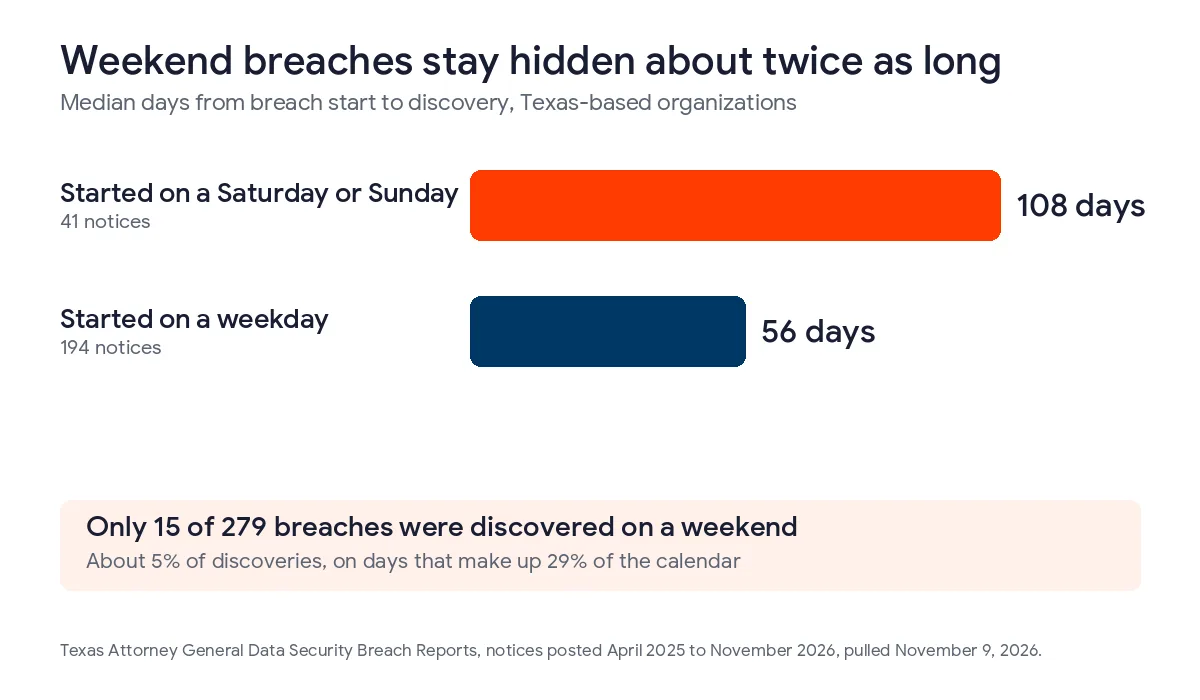
The agent can raise the alarm at 2 a.m. on a Saturday. Whether anything happens next depends on who sees it. Across the 279 breach notices that Texas-based organizations filed with the Texas Attorney General between April 2025 and early November 2026, only 15 breaches were discovered on a Saturday or Sunday. That’s about 5% of discoveries, on days that make up 29% of the calendar. Breaches that started on a weekend took a median of 108 days to find. Weekday starts took 56.
Attackers who use your own tools
Plenty of intrusions never drop malware at all. The attacker signs in and uses PowerShell, remote desktop, and the same remote management software your IT person uses. CISA and its partners call this living off the land, and their 2024 joint guidance says many organizations don’t have the detection practices to catch it, so it keeps working with little effort from the attacker. An agent sees those tools run. It often can’t tell your admin from an intruder.
Attackers who turn the agent off
Ransomware crews plan for EDR now. CISA’s advisory on the Medusa ransomware group says its operators tried to use vulnerable or signed drivers to kill or delete EDR tools, and parked their data theft tools in folders already excluded from Windows Defender scans. A blinded agent sends no alert. The only clue is a device that stops checking in, and someone has to be watching for that.
Devices with no agent
You can’t install EDR on most firewalls, VPN gateways, printers, or phone systems. Attackers go after those edge devices often enough that CISA and partner agencies published a full set of guidance on protecting them in February 2025. If the way in is an unpatched VPN appliance, the first thing your EDR sees may be the attacker showing up on a server days later.
Sign-ins with stolen passwords
When someone logs into Microsoft 365 from a browser in another country with a real password and a stolen session, nothing runs on your laptop. Endpoint software has nothing to look at. That activity shows up in Microsoft 365 sign-in and mailbox logs, so it only gets caught if someone is reading those logs.
What do San Antonio breach filings show?
Texas requires a business to notify the attorney general when a breach affects 250 or more Texans, no later than 30 days after discovery, according to the AG’s data breach reporting page. The office publishes those notices. We pulled every one filed by an organization based in the San Antonio metro and posted from April 2025 through early November 2026. There were 26. Nine came from medical and dental providers, 7 were filed under the AG’s retail and merchant category, and the rest came from schools, insurers, financial firms, a county government, and a few others. The median notice covered 3,197 Texans.
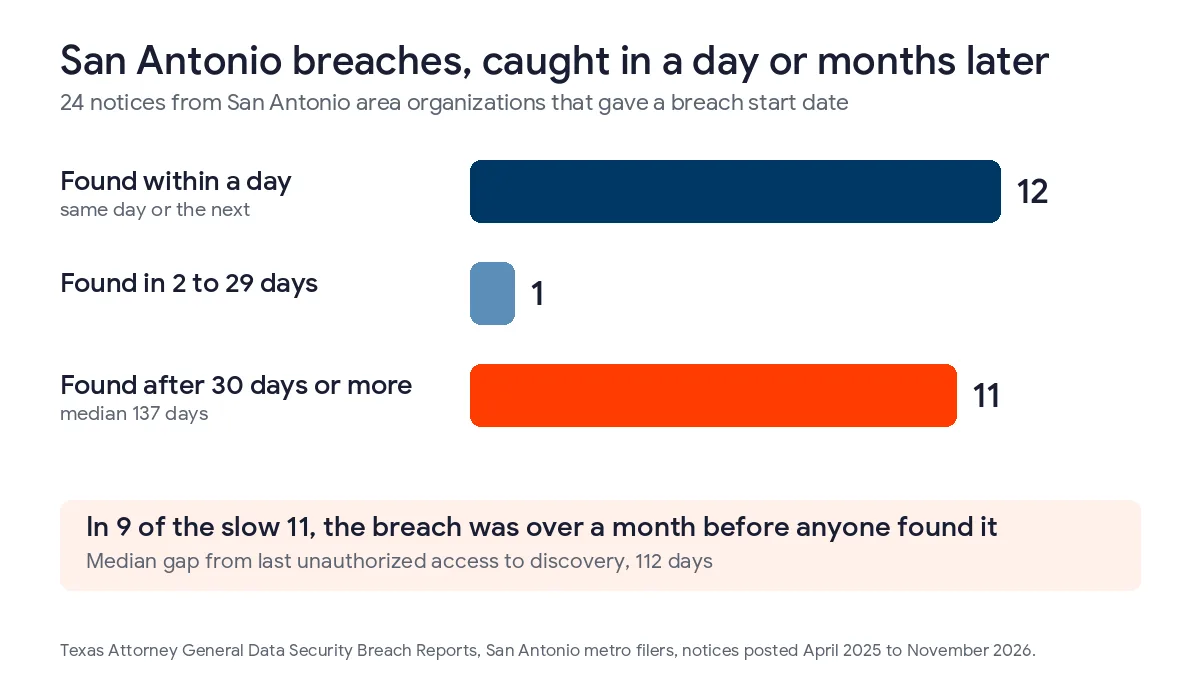
Of those, 24 gave a start date for the breach. They split almost cleanly in two.
- 12 were discovered within a day of starting
- 11 took 30 days or longer, with a median of 137 days
- In 9 of those slow 11, the breach had been over for more than a month by the time anyone found it
That slow group is what the MDR question is really about. Those intruders didn’t trip a loud alarm. They got in, did their work, and left, and the median gap between the last unauthorized access and its discovery was 112 days. The filings don’t say what security tools each organization ran, so we can’t tell you any of them lacked EDR. What they do show is that in this metro a breach tends to get caught almost right away or found months later, after the data is gone.
One more detail stood out. Four separate healthcare practices in Converse, Floresville, and San Antonio reported breaches that began on the same day, May 25, 2026, which was Memorial Day. All 4 found it the next day. Unrelated practices with the same start date suggest a shared software platform or service provider, though the filings don’t say. Either way, no agent on your own computers can watch inside someone else’s system.
What does MDR add, and what does it still miss?
MDR adds people with permission to act. It doesn’t add coverage the contract leaves out. This table lines up the gaps above against both options.
| Gap | EDR on its own | MDR |
|---|---|---|
| Alert fires at 2 a.m. on a Sunday | Waits in a console until someone logs in | An analyst triages it and isolates the device if the contract allows |
| Intruder using PowerShell and remote tools | Logged, rarely flagged as malicious | Can be caught by threat hunting, which some providers include and some sell separately |
| Agent switched off or blinded | No alert at all | A device that goes quiet can be noticed and chased down |
| Firewall or VPN appliance exploited | Not visible | Covered only if firewall logs are in scope |
| Microsoft 365 sign-in with a stolen session | Not visible | Covered only if identity and email logs are in scope |
| Breach inside a vendor’s system | Not visible | Not visible |
| Unpatched systems and missing backups | Not fixed | Not fixed, unless patching and backup are separate line items |
Read the last 3 rows twice. Some MDR is sold as endpoint-only, which means it inherits the agent’s blind spots and simply watches them around the clock. That’s still a real improvement for overnight alerts. It does nothing for the VPN appliance in your network closet.
NIST’s current incident response guidance, SP 800-61 Revision 3 from April 2025, treats detection, response, and recovery as one cycle tied to the rest of your risk program. MDR handles a slice of the detect and respond part. Patching, backups, access control, and recovery planning are still yours, or your IT provider’s.
Can you staff round-the-clock monitoring yourself in San Antonio?
For most firms under a few hundred people, no. The Bureau of Labor Statistics counts 1,350 information security analysts in the San Antonio-New Braunfels metro, with a mean annual wage of $125,830, in its May 2025 wage estimates. Covering all 168 hours in a week takes about 5 analysts once you count vacations and sick days. That’s $629,150 a year in wages before benefits, tools, or turnover, and you’d be hiring from the same pool of 1,350 people that every other employer in the metro is fishing in.
That math is why the managed version exists. Our MSSP Security Focus plan starts at $40 per user per month and includes firewall, SIEM, and SOC monitoring with incident response, per our pricing page. Our IT Essentials plan runs the Microsoft Defender stack with alerts only and no response. Anyone who needs nights covered should skip IT Essentials, and we’ll tell you that on the first call. For what MDR itself runs here, see our MDR cost guide for San Antonio. For the rest of the security budget, see our cybersecurity cost guide for San Antonio.
When is EDR alone enough?
EDR alone is enough when a specific person will act on an alert within minutes at any hour, and when your real exposure sits on the laptops rather than in the cloud or at the firewall. That’s a narrow fit. If a cyber insurance application is what’s pushing the question, our guide to cyber insurance monitoring requirements in San Antonio lists the proof underwriters ask to see. Here’s how we’d sort it.
| Your situation | Our call |
|---|---|
| Fewer than 10 people on Business Premium, with an owner who checks Defender alerts on their phone every night | EDR is enough for now, as long as that habit actually holds |
| A medical or dental practice holding patient records | MDR, with Microsoft 365 sign-ins in scope |
| One IT generalist who goes home at 5 | MDR |
| A VPN or remote access appliance facing the internet | MDR with firewall logs in scope, plus a named owner for patching |
| An in-house security team with a night rotation that works | Keep EDR and buy outside coverage only for the hours you can’t staff |
Before you sign anything, ask the provider to name which of the 5 gaps above its contract covers, in writing. Ask whether its analysts can isolate a device without calling you first. Ask what happens when an agent stops reporting. Vague answers usually mean vague coverage. Our page on network security services covers the firewall and VPN side, and our 24/7 IT support in San Antonio page explains who answers after hours.
Questions San Antonio businesses ask about EDR and MDR
Do I need MDR if I already have EDR?
You need it if nobody on your team will act on an alert at night, on weekends, or during a holiday. EDR keeps detecting either way. MDR decides whether that detection turns into a response at 2 a.m. or a ticket on Monday morning.
Is EDR or MDR better for a small business in San Antonio?
For most small firms it’s MDR, because few have anyone watching alerts after hours. The exception is a very small office where the owner reliably checks alerts every evening. Even then, the Microsoft 365 sign-in gap stays open unless someone watches those logs.
Can attackers really turn off EDR?
Yes. CISA’s advisory on the Medusa ransomware group describes operators trying to kill or delete EDR tools with vulnerable or signed drivers. That’s why a device that suddenly stops reporting deserves the same urgency as an alert.
Does MDR watch Microsoft 365 and email?
Only if the contract puts those logs in scope. Some services watch endpoints alone. Ask for the data sources in writing, including Microsoft 365 sign-ins, mailbox rules, and firewall logs.
How long do breaches go unnoticed in San Antonio?
Of 24 San Antonio-area breach notices that listed a start date, 12 were found within a day and 11 took 30 days or more. The slow group’s median was 137 days. Statewide, breaches that started on a weekend took about twice as long to find as weekday ones, 108 days against 56.
What does Uprite’s security monitoring plan include?
MSSP Security Focus starts at $40 per user per month and covers firewall, SIEM, and SOC monitoring, threat intelligence, vulnerability scanning, and incident response. We quote after reviewing your environment and list which devices and log sources are in scope, so you can check it against the gaps in this post.
Send us your device count and what you already run, whether that’s Defender, another EDR agent, or nothing yet. We’ll map which of the 5 gaps you have today and what closing them would cost for your headcount. We usually reply within 5 minutes.
Talk to a Security ExpertRather call or email? Reach the team through our contact page.